
| Tested on | Pentest lab — Kali GNU/Linux Rolling 2026.2 |
|---|---|
| Package | sherlock 0.16.0-3, maigret 0.6.5 (via pipx) |
| Applies to | Any reader auditing their own footprint; Kali for optional username tools |
| Privilege | Normal user for browser checks and username scans; sudo only for installing Kali packages such as sherlock or pipx. Maigret itself is installed user-local with pipx |
| Lab environment | Optional Kali workstation — pentest lab setup |
| Scope | How doxxing works through correlation, what common clues reveal, and how to audit and reduce your own exposure. Does not teach targeting third parties, phone-lookup abuse, or leaked credential databases. |
Doxxing usually starts with one known identifier — a username, real name, email, phone number, photo, or social profile — and expands by correlating information exposed across unrelated sources. One clue is rarely enough. Confidence comes from several details that appear to point to the same person.
This guide explains how that process works, what an IP or username can and cannot prove, and how to audit your own footprint. It is not a targeting playbook. Laws differ by jurisdiction; this is not legal advice.
What does it mean to dox someone?
Doxxing (also spelled doxing) generally means collecting and publishing identifying information about someone without their consent, often in a context meant to harass, intimidate, or enable real-world harm.
The information may already be public in fragments. Aggregation and disclosure still matter. The same public information can appear in legitimate OSINT work; intent, authorization, context, and disclosure are what separate that work from harmful doxxing.
How do people dox someone?
There is rarely one tool that dumps a complete identity. The usual pattern is:
- Start with a small clue (handle, name, email, phone, photo, or profile)
- Search independent public sources for matching details
- Decide whether overlapping clues likely belong to the same person
- Expand the footprint (other accounts, records, broker listings, archives)
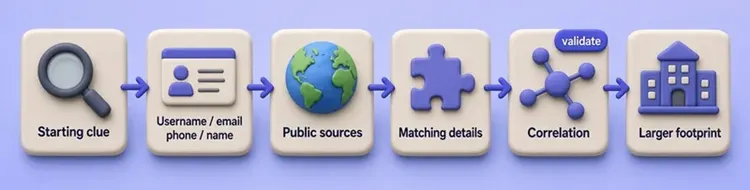
Username reuse alone is not proof. The same string on GitHub and Instagram does not prove one owner. Stronger correlation usually needs several matching attributes, such as a reused profile picture, a linked personal site, matching bio text, or a consistent self-disclosed city or employer.
Treat every automated “hit” as a lead to validate, not as identity.
What information can be exposed in a dox?
Not every field exists for every person. Coverage depends on country, how much you publish, and which brokers or archives still hold copies.
| Information | Common sources |
|---|---|
| Real name | Social profiles, résumés, or domain-registration/business records where contact information is still public |
| Usernames | Forums, GitHub, Discord, Reddit, gaming sites |
| Email / phone | Personal sites, résumés, ads, broker listings |
| Home address | Brokers, public records, photo backgrounds |
| Employer / school | LinkedIn, bios, comments |
| Relatives | Obits, people-search graphs, tagged posts |
| Photos / location | Profiles, geotags, image search, EXIF leftovers |
| Old accounts | Username reuse, search indexes, archives |
Address, private phone numbers, live location, financial information, and family locations generally carry much higher safety risk than a generic username or broad region.
Common ways personal information becomes exposed
| Source | What can become exposed |
|---|---|
| Reused usernames | Links between otherwise separate profiles |
| Social posts and bios | Employer, school, city, birthday, relationships |
| Photos and documents | Location clues, names, metadata |
| Public records | Address history or business information where legally public |
| Data brokers / people-search sites | Contact, address, and relative associations (coverage varies by country) |
| Old websites and forums | Forgotten usernames, emails, biographical details |
| Domain / business records | Organization or contact information where still public |
| Prior data breaches | Previously exposed email or account data |
| Account compromise or deception | Information that was never intentionally public |
This article does not access leaked databases or demonstrate account compromise or deception. Those rows appear because current privacy guidance lists them as common exposure paths. Account takeover risk also overlaps with social engineering.
Previously exposed contact information can become another correlation clue when the same email, phone number, username, or profile details appear elsewhere. For self-auditing, use legitimate breach-notification services for addresses you own. Do not download or search leaked credential databases.
What can a username, email, phone number, or IP reveal?
| Starting clue | What it may reveal | What it does not prove |
|---|---|---|
| Username | Other reused profiles | Same username ≠ same person |
| Public contact pages, accounts, breach notifications for that address | Exact home address is not guaranteed | |
| Phone number | Public or broker listings where available | Ownership data can be stale or wrong |
| IP address | ISP and approximate geographic area | Usually not a street address or legal name |
| Photo | Reused profiles and location or context clues | Similar image alone is not identity proof |
Discord, Reddit, TikTok, Instagram, and GitHub do not hand strangers your private signup form. A handle becomes linkable when it is reused elsewhere, shares an avatar, or sits next to self-disclosed name, city, or employer details.
Can someone find your exact address from an IP?
A public IP normally shows provider, country, and often an approximate city or region in geolocation databases. It does not normally reveal your street address. ISP subscriber records are not generally available from a casual lookup. “I have your IP, therefore I know your house” is usually exaggerated.
The Kali self-audit lab later checks your own public-IP metadata. The important point is that public geolocation commonly gives network/provider and approximate location context, not a residential street address. City-style fields are database estimates and can be wrong or refer to ISP infrastructure rather than the device’s street location. An IP city plus a public “lives in X” bio can still raise confidence through correlation without being a precise address from the IP alone.
How to audit your own digital footprint
Start with browser checks on identities you own. Automate usernames only after you understand what you are looking for.
- Search your full name and nicknames while logged out or in a private window
- Search usernames you actually use
- Reverse-image search an avatar or profile photo you own (reused images can connect accounts even when usernames differ; treat visual similarity as a clue, not proof)
- Open your social profiles as an unauthenticated visitor
- Check people-search or data-broker listings where those services exist in your country
- Review legitimate breach notifications for your emails
- Optionally automate username discovery with Sherlock or Maigret on Kali
Write confirmed findings into a short evidence map (confirmed, false positive, or unverified). Skip rows that do not apply. When you want a repeatable Kali walkthrough with real commands and outputs, use the lab below after the browser checks.
Kali self-audit lab (end-to-end)
This first pass uses a synthetic username chosen only to demonstrate false positives. It is not treated as a real identity. After understanding the output, repeat the audit only with usernames you actually own. Do not point these tools at classmates, coworkers, or strangers.
You will:
- Create a work directory and set
$SELF_USERto the synthetic string - Install Sherlock and confirm the version
- Scan the username string and read the hit count
- Check whether one reported hit is real
- Install Maigret and compare results on the same string
- Check your own public-IP metadata
- Build an evidence-status map (confirmed / false positive / unverified)
Step 1: Create the work directory and synthetic username
Create a folder for this lab and move into it:
mkdir -p ~/dox-selfaudit && cd ~/dox-selfauditmkdir and cd print nothing when they succeed. Export the synthetic username used in this article:
export SELF_USER=glc_selfaudit_demoexport prints nothing. Print the value so you know the shell stored it:
echo "$SELF_USER"glc_selfaudit_demoStep 2: Install and verify Sherlock
Prefer current packages over cloning an old requirements.txt workflow. Install Sherlock with apt, then confirm the CLI:
sudo apt install sherlockApt reports whether Sherlock was installed or was already present, then returns to the prompt. Check the version:
sherlock --versionSherlock v0.16.0That version string is what you run in the next step.
Step 3: Scan the synthetic username
Ask Sherlock which supported sites appear to expose a profile path matching the username string. Add --output "${SELF_USER}.txt" to this command if you want to save results in one pass:
sherlock --print-found --no-color --timeout 10 "$SELF_USER"Trimmed sample from the lab run:
[*] Checking username glc_selfaudit_demo on:

[+] Hashnode: https://hashnode.com/@glc_selfaudit_demo
[+] Reddit: https://www.reddit.com/user/glc_selfaudit_demo
...
[*] Search completed with 44 results
Search completed with 44 results means Sherlock marked 44 sites as apparent profile-path matches, not 44 confirmed identities.
Step 4: Check whether one reported hit is real
Spot-check a lead with curl and print only the HTML title:
curl -sS -L --max-time 15 -A 'Mozilla/5.0' "https://hashnode.com/@${SELF_USER}" | grep -oI '<title>[^<]*' | head -1<title>User not found | Hashnode“User not found” means this reported hit is false. Username scanners check apparent existence. They do not prove legal identity. Expect collisions, recycled handles, soft-404s, and anti-bot pages.
Step 5: Compare the same string with Maigret
Install pipx if needed:
sudo apt install pipxApt reports whether pipx was installed or was already present, then returns to the prompt. Install Maigret into an isolated user environment:
pipx install maigretpipx prints the install path when it finishes. Put the user binaries on your shell path:
pipx ensurepath/home/kali/.local/bin is already in PATH.If maigret is still not found, open a new shell, then verify:
maigret --versionmaigret 0.6.5
Socid-extractor: 0.1.1
Aiohttp: 3.14.3
Requests: 2.34.2Run the same synthetic $SELF_USER:
maigret --timeout 10 --retries 0 -n 50 "$SELF_USER"Short report from the lab run:
[*] Short text report:
Search by username glc_selfaudit_demo returned 4 accounts.
Extended info extracted from 0 accounts.
In this synthetic-username test, Maigret returned fewer claimed matches (4 vs Sherlock’s 44) and extracted no extended metadata. Fewer results do not make those results confirmed identities; validate each claimed account manually. Do not treat this single demo as a universal accuracy ranking.
| Feature | Sherlock | Maigret |
|---|---|---|
| Best for | Fast username breadth scan | Second pass / reports |
| Results on this demo handle | 44 hits | 4 claimed accounts |
| Install on Kali | apt install sherlock |
pipx install maigret |
Accuracy comes from validation, not raw site count.
Step 6: Check your own public-IP metadata
Fetch a public JSON summary for your own egress IP:
curl -sS --max-time 10 https://ipinfo.io/jsonTrimmed sample (IP redacted for publishing; use your live result):
{
  "ip": "203.0.113.50",
  "city": "Bengaluru",
  "region": "Karnataka",
  "country": "IN",
  "org": "AS64500 Example ISP"
}
Read org, country, and city first. The city is a geolocation estimate, not a home address.
Step 7: Build an evidence-status map
Fill a map that separates confirmed exposure from false positives and unverified results:
| Identifier | Status | Evidence | Action |
|---|---|---|---|
| Synthetic username / Hashnode | False positive | User not found title |
Ignore |
Other scanner hits for glc_selfaudit_demo |
Unverified | Tool output only | Do not attribute to a person |
| Own public IP | Confirmed network metadata | Live IPInfo result | Understand ISP/region exposure only |
Repeat the username scan steps only with a username you actually own, then classify each result the same way (confirmed, false positive, or unverified). The terminal lab covers username and IP clues only. Complete the self-audit by returning to the browser checklist for your own name, photos, social visibility, broker listings, and breach notifications.
Remove personal information from search and data brokers
People-search and data-broker availability varies heavily by country. In the U.S., consumer people-search products such as TruthFinder or Instant Checkmate are common examples of paid/subscription listings you may want to opt out of when the record is yours. Pipl-style products today are often closer to identity-resolution or fraud-prevention intelligence than a casual consumer lookup.
Practical order:
- Correct or remove information at the source site when you can
- Request Search removal where eligible (Google’s Find and remove personal info / Results about you can help for certain contact details and IDs)
- File broker opt-outs through each vendor’s official privacy page; save confirmation; recheck weeks later (listings can reappear)
Availability of Google’s monitoring feature varies by market and account, but Google’s separate removal forms may still be available. If information was specifically posted to harm or threaten you, Google also has a removal path for qualifying doxxing content, separate from normal contact-info monitoring.
Removing a Google result is not the same as deleting the page that published the information.
How to reduce your doxxing exposure
- Avoid username reuse across unrelated personas
- Keep personal email and phone off public pages when you can
- Separate public and professional contact details when that fits your work
- Remove old unused accounts
- Tighten social visibility and location sharing
- Review photos and document metadata before publishing
- Use unique passwords and MFA (protects account takeover; does not erase public data)
What to do if you are doxxed
- Preserve evidence (URL, screenshot, timestamp, account)
- Report the content to the platform
- Assess physical, financial, and identity risk
- Secure accounts (password reset, MFA, revoke sessions)
- Remove information at the source where possible, then request qualifying Search-result removal or doxxing removal from Google and other search engines
- Alert employer or family if they are named
- If financial account details or identity documents were exposed, contact the relevant bank or provider and follow your jurisdiction’s identity-theft guidance
- Contact local authorities or support services when threats, stalking, or swatting are involved
Use guidance for your country. Do not copy another jurisdiction’s emergency numbers blindly.
Is doxxing illegal?
There is no single worldwide answer. Legality can depend on jurisdiction, what information was involved, how it was obtained, whether threats or harassment occurred, whether protected categories of data were involved, and how the information was published or used.
Even where publishing already-public information is not independently prohibited, related conduct such as hacking, stalking, threats, extortion, impersonation, or swatting may violate separate laws.
This is not legal advice. U.S. readers can start with the FTC’s privacy guidance and local resources when harassment is involved.
Common doxxing myths
| Myth | Reality |
|---|---|
| An IP gives my home address | Usually false for casual lookups; expect ISP and approximate region |
| Username match = same person | False; collisions and recycled handles are common |
| Deleting social removes me everywhere | False; brokers and archives retain copies |
| A VPN makes me impossible to dox | False; it changes IP view, not public profiles or broker listings |
| MFA prevents doxxing | MFA protects access; it does not scrub public data |
Summary
Doxxing usually succeeds by correlating multiple small public clues, not by one magical tool. Start by understanding what each clue can reveal, then audit your own names, profiles, photos, brokers, and breach notices. Username scanners such as Sherlock and Maigret are optional automation: a found URL is only a lead until you confirm it is yours.
Reduce reuse of identifiers, remove what you can at the source, and use Search and broker opt-outs where they apply. If you are targeted, preserve evidence, report, secure accounts, protect financial identity when needed, and escalate when physical risk is real.
References
- eSafety Commissioner — Doxing — definition, prevention, and response guidance
- Sherlock Project — upstream username search tool
- Maigret — upstream username search and reporting tool
- Google — Find and remove personal info — Results about you monitoring and removal
- Google — Remove my private info / report doxxing — private-info and doxxing removal policies
- Google — Remove information from Google — Search removal overview
- FTC — How to protect your privacy — U.S. consumer privacy guidance
- ipinfo.io — example public IP geolocation API used in the lab check
Frequently Asked Questions
Can someone dox me with only a username?
Usually not from the handle alone. Risk rises when you reuse that username elsewhere, share the same avatar, or publish identifying details in bios and posts that can be correlated.
Can someone dox me with my phone number or email?
Those clues can lead to public pages, broker listings, or breach notifications for addresses you own. Risk is highest when that phone or email is reused across public profiles, old accounts, business listings, or broker records. They do not automatically prove a current home address, and broker data can be stale or wrong. Search yourself first; do not assume every listing is accurate.
How do I know if I have been doxxed?
Warning signs include personal details suddenly posted or messaged publicly, harassment that uses private home/work/family information, strangers referencing facts you never shared with them, or unusual account-recovery attempts after those details appear online.
What should I do if someone threatens to dox me?
Preserve the threat messages, report them on the platform, secure your accounts, assess physical risk, and contact local authorities or support services when the threat is serious. Do not rely on a single blog post for legal strategy.
Is doxxing illegal?
It depends on jurisdiction and facts: what was published, how it was obtained, and whether threats, harassment, or protected data were involved. There is no single worldwide rule. Seek local legal guidance when needed.
