
| Tested on | Kali GNU/Linux Rolling 2026.2 (kali-rolling) |
|---|---|
| Package | curl 8.21.0-2dig (BIND 9.20.23) |
| Applies to | Any browser for hosted tokens; Kali or similar Linux for CLI triggers |
| Privilege | Normal user |
| Scope | Hosted Thinkst Canarytokens: create and test a Web bug end to end, then choose document, AWS, Kubernetes, cloned-site, and MCP honeytokens, investigate alerts, and decide when self-hosting is worth it. Does not cover commercial Thinkst Canary appliances or full SIEM playbook design. |
| Related guides | Browser-in-the-browser phishing GoPhish phishing framework Analyze phishing email with ThePhish Pentest lab setup |
Canarytokens are decoys that alert you when someone accesses or uses them. This tutorial starts with a Web bug token: you'll create one on the hosted Canarytokens service, trigger it from Kali, and inspect the resulting alert.
After that, you'll see how document, AWS, Kubernetes, cloned-website, and MCP tokens apply the same idea to different types of assets. Place tokens only on systems and accounts you own or are authorized to monitor.
What Are Canarytokens?
A Canarytoken is a piece of fake or decoy information that acts like a tripwire. It might be a URL, document, hostname, cloud credential, kubeconfig, or other item. You place it somewhere that nobody should normally access. If something does access or use it, Canarytokens sends an alert.
A honeytoken is fake but believable information created as bait. For example, you might place a fake AWS access key in a decoy credentials file. Because no real application should use that key, any attempt to use it is worth investigating.
The hosted workflow is short:
- Create a token. Choose where the alert should be sent and add a memo describing where you placed the token.
- Plant the decoy where normal users and applications should have no reason to access it
- When the token is accessed, Canarytokens records that event (a hit) and sends you an alert
Canarytokens is Thinkst's free service for creating these decoy tokens and receiving alerts when they are triggered. Thinkst Canary appliances are a separate commercial product that provides richer network decoys. You do not need a full honeypot VM to start.
Canarytokens Quick Start
The quickest way to understand Canarytokens is to create a Web bug token:
- Open canarytokens.org
- Choose Web bug
- Enter your alert email and a descriptive reminder (memo)
- Create the token and copy its unique URL
- Request the URL from your lab system. Use
curlto trigger it so the test request is easy to identify in the alert history. - Check the alert email or the token history page
The next section walks through these steps using a Web bug token and Kali.
Create and Test Your First Canarytoken
A Web bug is a good first example because it triggers as soon as its unique URL is requested. Once you understand that workflow, the other token types mainly differ in what you deploy and what action causes the alert.
Open canarytokens.org and pick a token type from the grid. Web bug, DNS, AWS keys, Kubeconfig, MCP configuration, and many others appear on the same page.
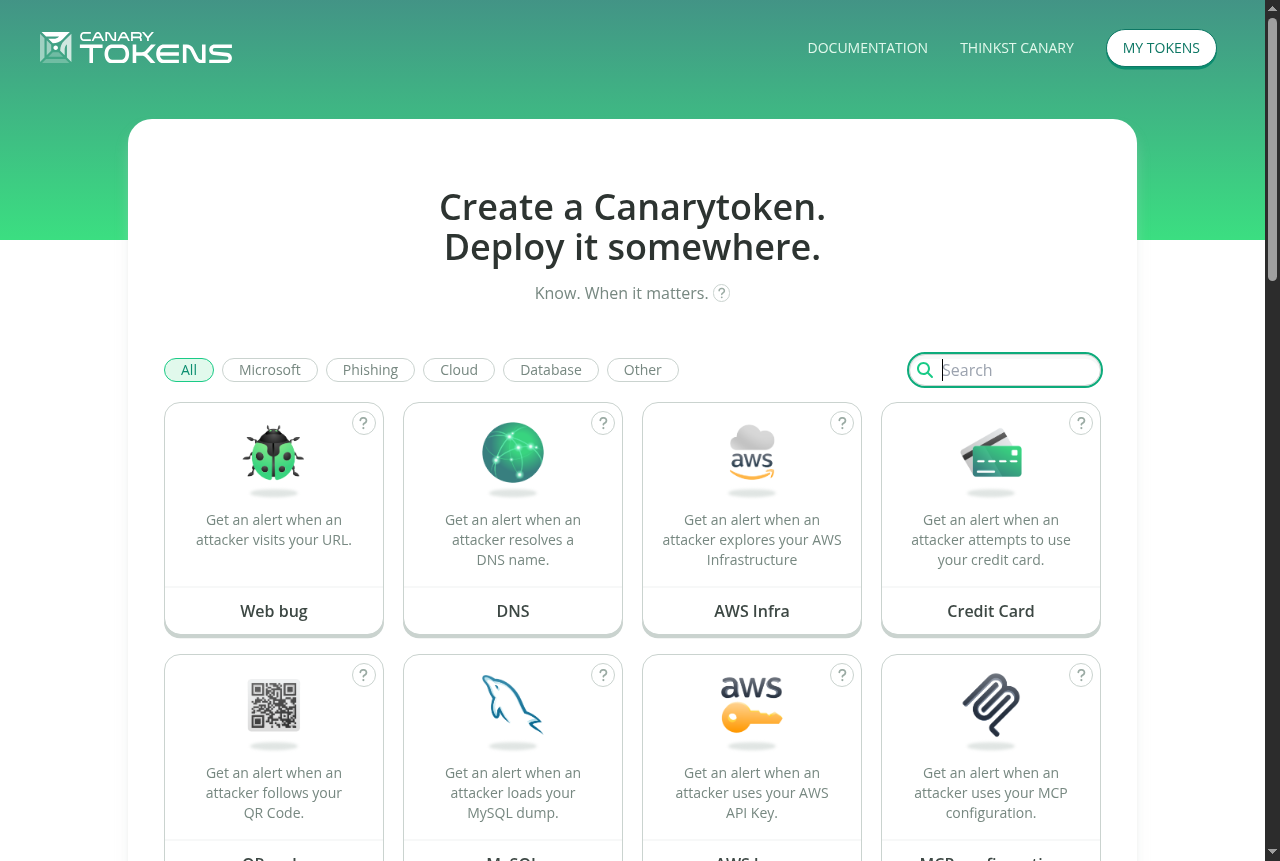
Choose Web bug for this walkthrough because it requires very little setup and can be tested immediately with curl.
Create a Web bug token
On the create form, fill in:
- Email — where alerts should arrive (use a mailbox you control)
- Memo / reminder — write where you will plant the token, not just
test
The memo does not affect how the token works. It appears with the alert so you can remember where that specific token was planted. Use a memo that will still tell you where the token was placed months later. For example, Unread CEO lure in lab mailbox alice@lab.example is more useful than demo.
The screenshot uses lab-alerts@example.com only as a placeholder; enter a real mailbox you control if you want to receive the email alert.
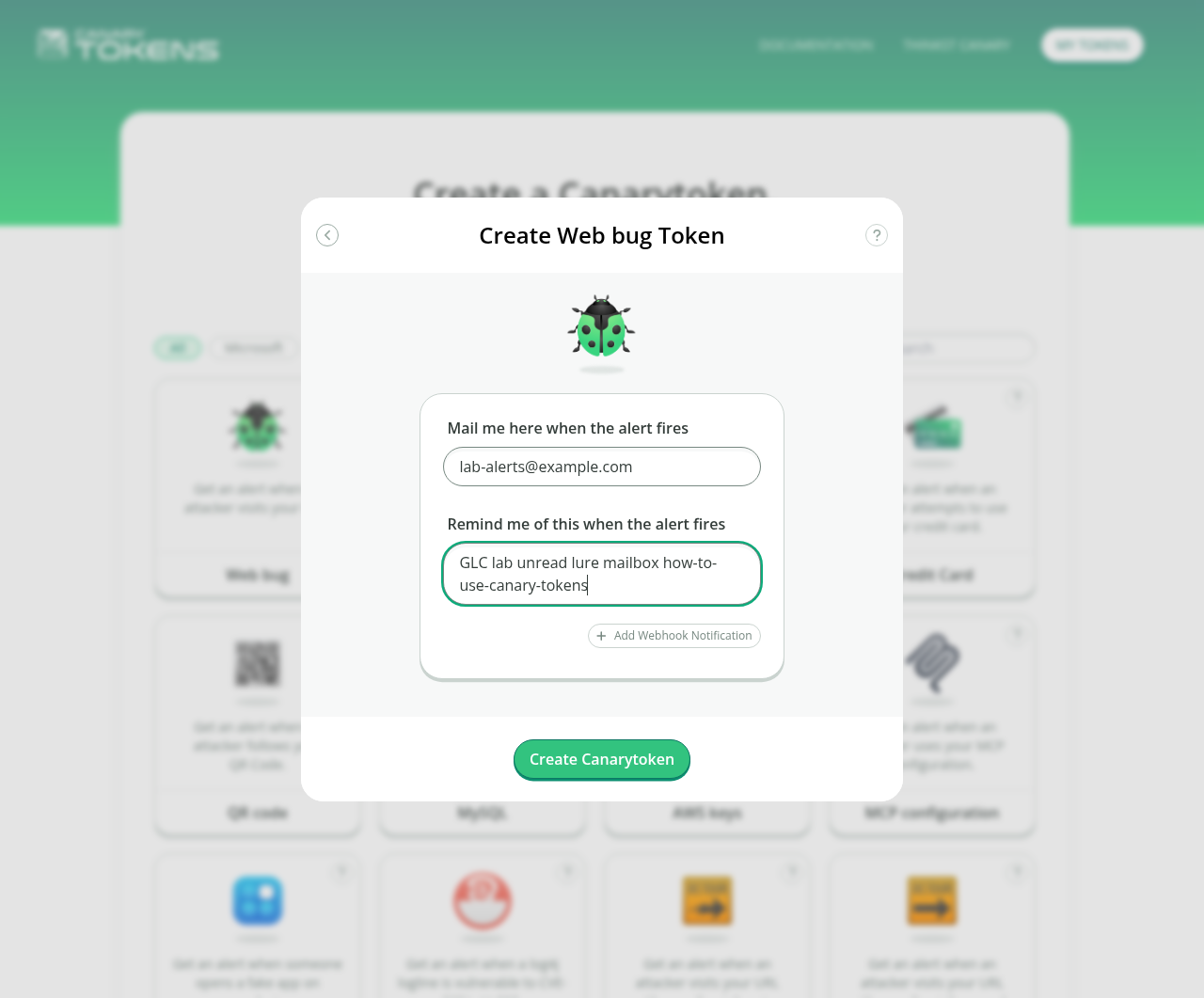
Click Create Canarytoken. Copy the URL from the success page. Canarytokens may generate callback URLs on different service-controlled domains, so always copy the exact URL shown on the create page rather than constructing one manually.
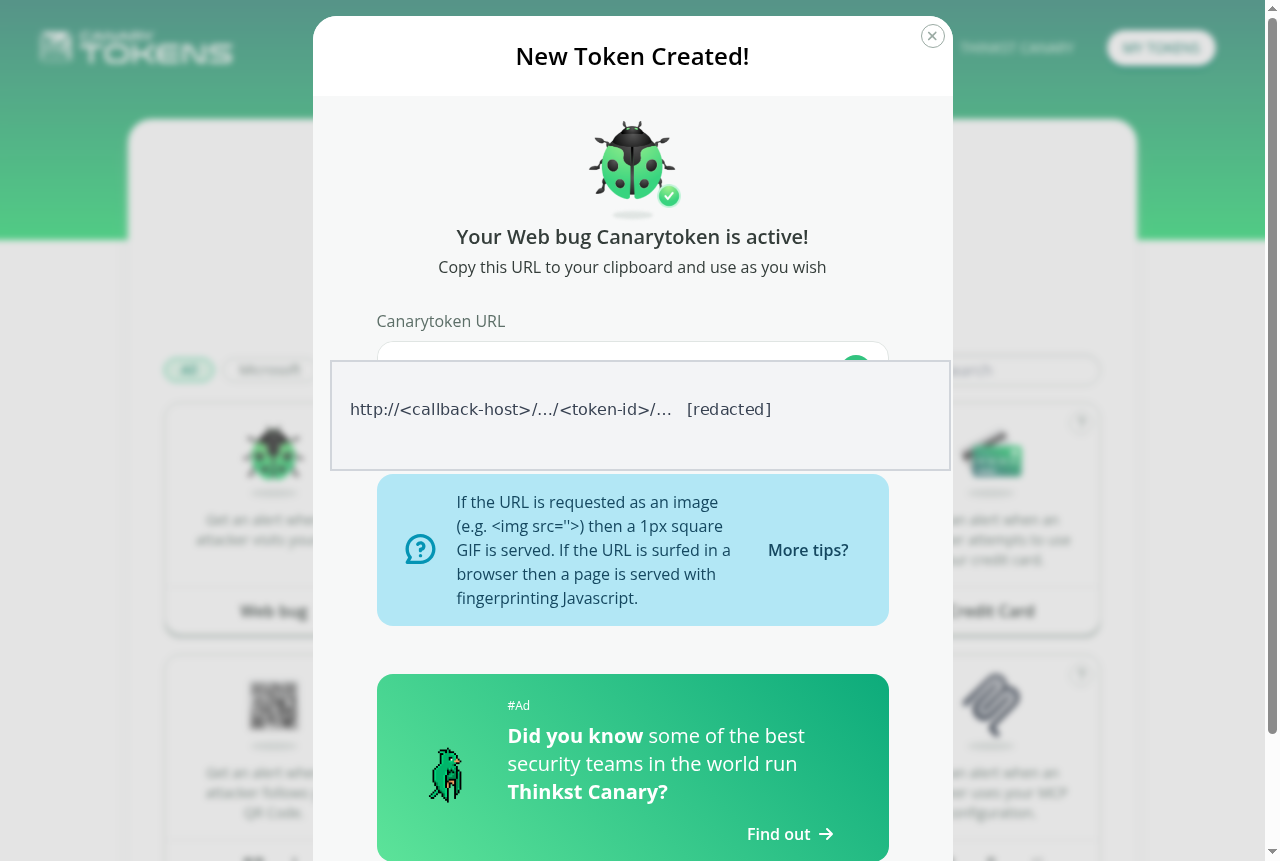
Requesting the generated URL triggers the token. Some Web bug tokens can use a path that resembles an ordinary file or resource. Use the exact URL generated for your token and do not change its token-specific portion.
Keep the manage and history links from the create page. Keep the management URL private because anyone who has it may be able to view the token's history or change its settings. Do not publish it alongside the Canarytoken itself.
Trigger the Web bug from Kali
Test the token before placing it in its intended location. From Kali, paste the complete URL copied from the New Token Created dialog into a shell variable. Do not rebuild it from the token ID or examples in this article:
TOKEN_URL='<paste-the-complete-Web-bug-URL-here>'Give the test request a custom User-Agent so you can recognize your own request later in the alert history. A User-Agent is a text string that identifies the client making an HTTP request.
Send the test request with the curl command:
curl -A 'GoLinuxCloud-Lab/canarytokens-e2e' "$TOKEN_URL" -o /dev/null-A sets the custom User-Agent. -o /dev/null discards the response body so binary image data does not print in the terminal.
A successful request may return a tiny image such as a 1-pixel GIF. The response content is not what matters; requesting the unique URL is what triggers the Canarytoken and records information such as the source IP and User-Agent. Browser requests may produce different response content.
Check the mailbox you registered, or open Alerts History from the manage page. The alert history can include:
- Memo you wrote at create time
- Source IP and approximate location
- User-Agent (
GoLinuxCloud-Lab/canarytokens-e2efor this test) - Input channel (
HTTP) - Timestamp
Your deliberate curl test should be easy to identify by its HTTP channel and the custom GoLinuxCloud-Lab/canarytokens-e2e User-Agent (token id and source IP redacted in the capture):
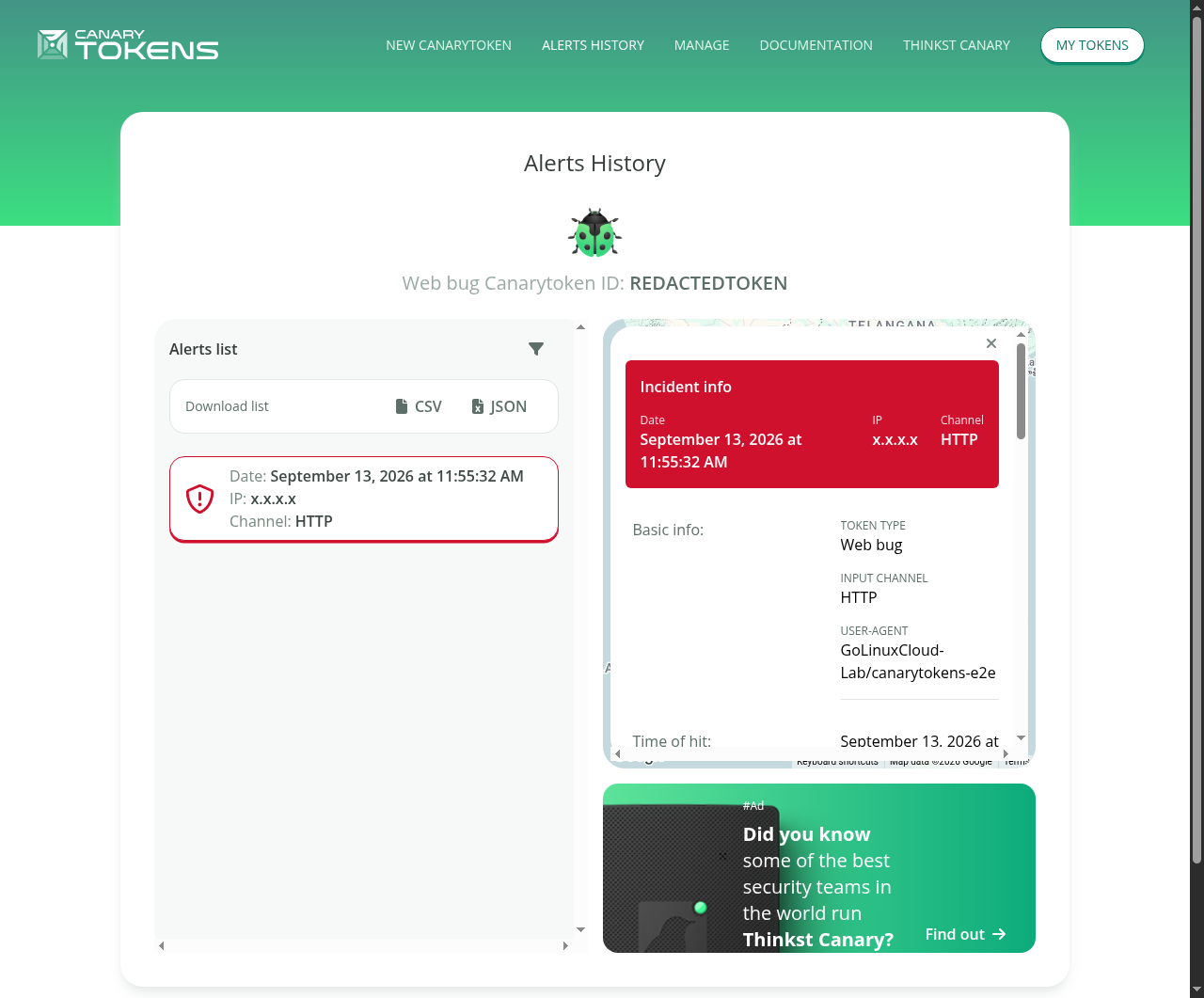
Treat the IP address and location as clues, not as proof of who triggered the token. VPNs, NAT, proxies, corporate gateways, and DNS resolvers can all change what Canarytokens records.
If the email alert has not arrived yet, check the token's history page directly. A recorded hit there confirms that the token fired even if email delivery is delayed.
Preview bots, corporate proxies, and mail clients that fetch remote images can also fire Web bug tokens. Treat the first unexpected hit as something to investigate, not automatically as a confirmed breach.
Test a DNS Canarytoken
A DNS token triggers when its unique hostname is resolved. DNS tokens are useful when you want the lookup itself to trigger an alert. The system does not need to load a web page; resolving the generated hostname is enough.
Create a DNS token on canarytokens.org, then copy the hostname the service generates. Do not invent a hostname from the token id alone; use exactly what the create page shows.
Resolve it with dig:
dig +short <dns-hostname-from-create-page> A52.18.63.80dig performs the DNS lookup and should return an address for the generated hostname. Then check Alerts History to confirm that Canarytokens recorded the DNS-channel hit. The recorded IP may belong to the DNS resolver that performed the lookup on your behalf rather than your Kali system itself. Compare the alert time with the time you ran dig to confirm that it came from your test.
Which Canarytoken Should You Use?
Start with a Web bug to understand the concept. Then choose a token that matches the asset you want to monitor:
| What you want to detect | Suggested token |
|---|---|
| Access to a decoy mailbox link | Web bug |
| Unexpected DNS resolution | DNS |
| Opening a decoy document | Word / PDF / Excel |
| Use of fake AWS credentials | AWS keys |
| Use of a decoy Kubernetes config | Kubeconfig |
| Login-page phishing clones | JS or CSS cloned-website |
| Discovery or misuse of AI-tooling config | MCP configuration |
Include the token's location in the memo. Six months later, AWS key bait in developer backup folder is much more useful than aws1.
Use separate tokens for separate placements so an alert tells you exactly which location was accessed. This matters once you have many tokens, because an alert should immediately tell you which decoy was accessed.
The hosted service also offers Credit Card, QR code, MySQL, Fake App, AWS Infra, and other types. You do not need every type on day one. Choose a token that looks natural in the place where you deploy it.
Canarytokens vs Honeypots
Canarytokens and honeypots are both decoys, but they work at different scales.
| Canarytokens (honeytokens) | Classic honeypots | |
|---|---|---|
| What you deploy | A bait file, URL, key, or snippet | A whole fake system or service |
| Resources | Very little infrastructure when using hosted Canarytokens | CPU, disk, patching, isolation |
| Signal | “Something accessed this specific decoy” | “Something interacted with this host/service” |
| Best for | Credential theft, file snooping, phishing clones | Observing what an attacker does after interacting with the fake system |
| False positives | Accidental clicks, scanners, preview bots | Scanners and noisy internet noise on open ports |
Use Canarytokens when you want an alert from a specific decoy without running a complete fake system. Use a honeypot when you want to watch attacker behavior on a fake system.
Detect File Access With Document Tokens
Document tokens place a callback inside a Word, PDF, or Excel file. When the file is opened, a compatible viewer may contact Canarytokens and generate an alert. The alert depends on the viewer being allowed to make that network request, so Protected View, offline systems, or other security controls can prevent it.
On canarytokens.org create Microsoft Word, Acrobat Reader PDF, or Excel, then download the generated file.
Place the decoy file somewhere it should not normally be opened, for example:
- A document share containing files that normal users should not need to open
- A decoy backup/document directory on an authorized jump host
Opening the file yourself during testing will fire the token if the viewer is allowed to reach the network. For a deliberate test, use a memo that clearly identifies it, such as lab self-test Word 2026-09-13, so you do not confuse your own tests with later alerts.
Word or PDF tokens are good starting points because their trigger is easy to understand: opening the decoy document may generate the alert. Other token types, such as Windows Folder and Custom EXE, are available when those formats better match the location you want to monitor.
Detect Stolen AWS Credentials
Choose AWS keys on canarytokens.org. Thinkst returns an access key id and secret access key pair.
They look like an AWS access key ID and secret access key, but they are decoys rather than credentials for your AWS account. Because no legitimate workload should use them, any attempt to use the keys is worth investigating.
In an authorized environment, place the fake keys in a location that resembles where credentials might be stored:
- Fake
~/.aws/credentialson a developer laptop image - A private lab repository containing a decoy credentials file
- CI secret store decoy that is never used by real pipelines
When the fake credentials are used, the event is detected through AWS's logging path and Canarytokens sends an alert. This is slower than a Web bug; Thinkst documents roughly 2–30 minutes rather than an instant hit.
The generated token contains values similar to:
aws_access_key_id: AKIA................
aws_secret_access_key: <redacted>
Never publish those values. Create a new token if a lab key leaks into a ticket or chat log.
Detect Kubernetes Credential Use
Create a Kubeconfig token. Thinkst gives you a kubeconfig that resembles a real cluster configuration but points to Canarytokens infrastructure rather than your Kubernetes cluster. Place the decoy kubeconfig in an authorized location where a real kubeconfig might plausibly be stored:
~/.kube/configon a jump box image- A CI/CD secret named
prod-kubeconfig - A “break-glass” folder in object storage
When the decoy kubeconfig is used, the connection does not provide access to a real cluster, but the attempt triggers an alert.
Do not use this kubeconfig for real workloads; it exists only as a detection tripwire.
certificate-authority-data with insecure-skip-tls-verify: true for that decoy cluster only. Never copy insecure-skip-tls-verify: true into a real production kubeconfig just to reduce its size.
Detect Cloned Websites and Phishing
Suppose someone copies the HTML, CSS, or JavaScript from a login page you control and hosts that copy on another domain. A cloned-site Canarytoken can make that page call back to Canarytokens when the copied page runs on a hostname other than the one you configured.
JS cloned website token: you supply your real domain (for example login.example.com). Thinkst returns JavaScript that checks the hostname where the page is running. If it is not your expected hostname, the script requests the unique Canarytoken callback URL and triggers an alert. Embed that script on the real site you control.
The generated code looks conceptually like this (use the full snippet Canarytokens gives you, not this shortened illustration):
if (window.location.hostname != "login.example-corp.test") {
    // Request the generated Canarytoken URL
}
Always use the complete snippet generated for your token rather than hard-coding a Canarytokens domain. The real generated code includes additional checks and should be used unchanged.
CSS cloned website token: A CSS cloned-website token uses a remote resource URL inside the site's CSS. If the copied page loads that resource, the request triggers the Canarytoken. This can be useful when you can add CSS but not JavaScript.
This token does not prevent the page from being cloned or take the phishing site down. It gives you a signal that your page code is running on a hostname other than the one you expected.
Detect MCP and AI Tooling Config Use
MCP (Model Context Protocol) lets AI tools connect to external tools and data sources. An MCP configuration Canarytoken looks like a normal MCP server configuration used by AI development tools. Depending on how the token is configured, the alert can trigger when an MCP client connects to the decoy server or tries to use one of its advertised tools.
Thinkst documents copying or downloading that JSON as mcp.json in configuration locations used by AI development tools such as .claude/ or .cursor/, or as .mcp.json (leading dot) at a VS Code workspace root.
This is useful when you want a tripwire for discovery or misuse of fake AI-tooling configuration. Create it from the same token grid as Web bug. To test it, place the generated configuration where your authorized MCP client reads its settings, then allow that client to connect to it.
Investigate Canarytoken Alerts
When an alert arrives, start with the memo. It tells you which decoy was accessed and where you placed it. That gives you the starting point for the investigation.
Then read:
- Source IP and approximate location (useful, not proof of identity)
- User-Agent or other client details supplied by the triggering request
- Whether the hit matches a known scanner, mail preview, or your own test
Common non-malicious triggers:
- You testing the URL or opening the document
- Chat/mail clients fetching previews
- Security scanners crawling public pages where you accidentally published a URL
- DNS resolvers appearing as the “source” for DNS tokens
If a legitimate scanner or preview service repeatedly triggers a token, use the token's management settings to ignore that source or adjust how alerts are routed. You can also move the token to a location with less expected background activity.
If you cannot explain the alert as your own test, a preview bot, or a known scanner, investigate the location identified by the memo. Check relevant logs and determine whether any real secrets or data stored nearby could also have been accessed. Rotate real credentials when that investigation shows they could be at risk.
A Canarytoken tells you that the decoy was accessed or used; it does not explain the full incident by itself.
If you deploy multiple tokens:
- Use a unique memo for every token placement; never reuse
test - Use a separate mailbox for lab alerts if you test tokens frequently
- Do not commit live token URLs to public git history
- Replace tokens you no longer need so old placements do not confuse new alerts
- Keep a simple record of each token, its memo, and where you placed it
With the hosted service, alert information such as the source IP, User-Agent, memo, and alert email passes through Thinkst's infrastructure. Review Thinkst's current privacy terms before using hosted tokens near regulated or sensitive data.
Hosted vs Self-Hosted Canarytokens
For most users, the hosted service at canarytokens.org is the simplest way to start. You create tokens in the browser and receive alerts without running your own DNS or mail infrastructure.
Self-host (thinkst/canarytokens-docker) when you need your own callback domains or when organizational policy requires the token data to stay on infrastructure you control.
Self-hosting requires:
- Public IP and a domain you control. The Canarytokens callback domain must be configured/delegated to the self-hosted service as described in Thinkst's deployment documentation.
- Outbound alerting (Mailgun, SendGrid, or SMTP)
- Docker on an internet-facing host
Install Docker using the current instructions for your Linux distribution (for Debian family hosts, see install Docker on Debian), then follow Thinkst's current Docker/Compose documentation for Canarytokens.
Troubleshooting
| Symptom | Likely cause | Fix |
|---|---|---|
| No email after a deliberate hit | Spam folder, typo in alert address, or delay | Check history/manage link; confirm the address on the token |
| AWS key alert does not appear immediately | AWS logging delay | Wait up to ~30 minutes; re-check history |
| DNS alert shows a different IP than your Kali system | DNS resolver performed the lookup on your behalf | Expected for DNS tokens; compare the alert time with when you ran dig |
| Repeated unexpected Web bug alerts | Token URL leaked to crawlers | Replace the exposed token with a new one; stop publishing live URLs |
| Document token never fires | Viewer blocked network access (Protected View, offline open) | Retry with a networked viewer; confirm history; adjust placement |
| Self-host DNS or port 53 conflicts | Another service already owns port 53 | Check which service already owns port 53 before changing the host's DNS configuration |
Summary
Canarytokens are small decoys that alert you when they are accessed or used. A Web bug demonstrates the basic workflow clearly: create a token, place or request it, trigger it, and inspect the resulting alert.
The same idea extends to documents, fake AWS credentials, kubeconfigs, cloned websites, and MCP configurations. Choose the token type that matches what you want to monitor, give every token a descriptive memo, and investigate unexpected alerts rather than treating them as automatic proof of compromise.
The hosted service is sufficient for most small deployments and labs. Self-host only when you need your own callback domains or tighter control over where alert data is processed.
References
- Canarytokens — free hosted token generator
- Canarytokens documentation — official usage guide
- Getting started
- HTTP Canarytoken
- AWS API Keys Canarytoken
- Kubeconfig token
- Cloned website Canarytoken
- MCP configuration Canarytoken
- thinkst/canarytokens-docker — self-hosted Docker compose
- thinkst/canarytokens — upstream source
Frequently Asked Questions
Are Canarytokens free?
Yes. The hosted service at canarytokens.org is free for creating tokens and receiving alerts. Thinkst also sells commercial Canary appliances separately; those are not required for the honeytokens in this article.
Do I have to self-host them?
No. Hosted tokens are enough for learning and for many production tripwires. Self-host when you need private callback domains, stricter data control, or policy that forbids the public service.
What happens when a token fires?
Canarytokens records a hit and notifies the email or webhook you configured. The history view typically includes time, source IP, approximate location, User-Agent or client channel, and your memo. AWS key alerts may take several minutes because detection depends on AWS logging.
Can Canarytokens detect phishing?
They can detect cloned copies of your own site when you embed a cloned-website JavaScript or CSS token on pages you control. They detect that type of cloning; they do not remove the phishing site or prevent phishing emails.
Can Canarytokens detect stolen AWS/Kubernetes credentials?
Yes, when you plant AWS key or kubeconfig Canarytokens and an attacker uses those bait credentials. You are alerted when the bait is used; real account keys still need normal secret management and rotation.
Are Canarytokens the same as honeypots?
No. Canarytokens are honeytokens: small decoys such as fake files, URLs, or credentials. Honeypots are usually full fake systems or services. Both deceive attackers; Canarytokens are lighter and aim for a clear “this decoy was accessed” signal.
