
| Tested on | Kali GNU/Linux Rolling 2026.2 (kali-rolling) |
|---|---|
| Package | theharvester 4.11.1-0kali1recon-ng 5.1.2-2spiderfoot 4.0-0kali5 |
| Lab environment | Pentest lab |
| Cert prep | CompTIA PenTest+ PT0-003 — Domain 2 (Reconnaissance and Enumeration) |
| Privilege | Normal user for OSINT commands; sudo for apt install |
| Scope | OSINT tools and services for penetration testing, organized by what you investigate: theHarvester, Shodan, Censys, Wayback, Recon-ng, Maltego, HIBP, SpiderFoot, passive DNS, VirusTotal, and OSINT Framework for domains and infrastructure, plus Sherlock/Maigret for usernames and ExifTool for image metadata, with tested Kali commands where applicable and a passive reconnaissance workflow showing when to use each tool. Covers job boards, social profiles, and code repos for people and org clues. Does not cover active port scanning, DNS brute force, or a full Recon-ng tutorial. |
Open source intelligence (OSINT) tools help penetration testers map a target from public data before any packet hits the client network. This guide compares the OSINT tools and services I reach for on Kali engagements, with tested CLI examples from the pentest lab, and a passive reconnaissance workflow that shows when to use each one.
Commands below use example.com and other public training names over the Internet. Your local Metasploitable VM will not appear in Shodan or certificate transparency; Internet OSINT always targets real public presence, not isolated lab VLANs.
OSINT tools by what you want to find
Different investigations start with different tools. Pick the row that matches your lead, then jump to that tool's detailed section below.
| You need to investigate | Start with |
|---|---|
| Domain / IP | Shodan, Censys, crt.sh, SecurityTrails |
| Email address | Hunter.io, HIBP, theHarvester |
| Username / social profile | Sherlock / Maigret |
| Historical pages | Wayback Machine |
| Public code / secrets | GitHub search |
| Image metadata | ExifTool |
| Image / visual search | Google Lens |
| Relationships | Maltego |
| Automated collection | SpiderFoot |
| More sources by category | OSINT Framework |
"Open source intelligence" refers to information from publicly available sources; the tool itself does not have to be open-source software. theHarvester, Recon-ng, SpiderFoot, Sherlock, and ExifTool are open-source software; Shodan, Censys, Hunter.io, and SecurityTrails are hosted services with free tiers.
Compare OSINT tools at a glance
| Tool | Best for | Delivery | Limitation | Cost |
|---|---|---|---|---|
| theHarvester | Domains, hosts, email discovery | Open-source CLI | Source availability changes between releases | Free |
| crt.sh / CT logs | Subdomains from issued certificates | Hosted site | Intermittent 502s; certificate names only | Free |
| SecurityTrails | Passive DNS history | Hosted service | History is a lead, not proof of current ownership | Freemium |
| Shodan | Indexed Internet services | Hosted service | Observations can be stale | Freemium |
| Censys | Hosts and certificate intelligence | Hosted service | CenQL syntax learning curve | Freemium |
| Hunter.io | Email addresses and patterns | Hosted service | Quotas and incomplete coverage | Freemium |
| Sherlock / Maigret | Usernames across social platforms | Open-source CLI | False positives; verify identity manually | Free |
| Wayback Machine | Historical URLs and removed content | Hosted archive | May describe content already fixed | Free |
| GitHub search | Public code and secret exposure | Hosted service | Manual triage; false positives | Free |
| HIBP | Breach exposure for email addresses | Hosted API | API key required; rate limited | Paid API |
| ExifTool | Image and file metadata (EXIF, GPS) | Open-source CLI | Platforms often strip metadata on upload | Free |
| SpiderFoot | Automated multi-source OSINT | Open-source | Noisy output; depends on API keys | Free |
| VirusTotal | Domain relationships, passive DNS, certs | Hosted service | Strict free API terms and limits | Freemium |
| Recon-ng | Structured reconnaissance workspace | Open-source CLI | Modules need marketplace setup | Free |
| Maltego Graph CE | Relationship visualization | Desktop + service | Transforms and credits add friction | Freemium |
| OSINT Framework | Finding OSINT sources by category | Hosted site | Link directory only; runs nothing itself | Free |
What are OSINT tools?
OSINT is information anyone can read without breaking into a system: certificate logs, search indexes, archives, breach databases, and public code repos.
Three labels show up in every engagement:
- Source — the public dataset itself (crt.sh, a job board, a breach dump index)
- Service — a hosted platform that indexes or resells that data (Shodan, Censys, SecurityTrails, VirusTotal)
- Tool — software you run to query sources or organize results (theHarvester, Recon-ng, SpiderFoot, Maltego)
This article covers OSINT tools for penetration testing, not journalism or missing-person investigations. That narrower scope lets us go deep on a focused set of pentest-relevant tools — grouped by what you investigate — instead of listing hundreds of generic bookmarks.
Passive recon uses those tools without sending probes to target-owned infrastructure. Active recon does: dig example.com @ns1.example.com against an authoritative nameserver, HTTP requests to in-scope URLs, Nmap scans, or DNS brute force. PTES intelligence gathering sits in phase two; the tools below support that passive phase until you hand off to DNS enumeration and scanning.
Best OSINT tools for penetration testing
I order these by what the tester needs, following the same path as the workflow later on the page: domain and infrastructure first, then Internet-facing services, historical content, code and credential exposure, automation, and finally correlation. Use the links in the table above to jump straight to any tool.
Start from the apex domain in the statement of work. Confirm related domains (acquisitions, brands, regional TLDs) with registrar data and client interviews before you spend API quota on the wrong zone.
theHarvester
theHarvester pulls certificate transparency and other public indexes in one command, which makes it the quickest way to turn a domain into a first list of hostnames and email addresses. On Kali, set a domain once for the CLI examples in this guide:
export DOMAIN=example.comUpdate the host using apt (sudo apt update and sudo apt full-upgrade), then confirm package versions:
dpkg-query -W -f='${Package} ${Version}\n' theharvester recon-ng spiderfootrecon-ng 5.1.2-2
spiderfoot 4.0-0kali5
theharvester 4.11.1-0kali1Those builds match the Package row in the intro table on this Kali Rolling 2026.2 host. Install Maltego separately with sudo apt install maltego when you need the graph workflow.
Upstream recommends a small complementary source set rather than enabling every module:
theHarvester -d "$DOMAIN" -b crtsh,certspotterSource availability changes between releases, so run theHarvester -h to confirm the current source list before you script a pipeline.
[*] Target: example.com

[*] Searching CRTsh.
	Searching results.
[*] Searching Certspotter.

[*] No IPs found.

[*] No emails found.

[*] No people found.

[*] Hosts found: 1
---------------------
*.example.com
Certificate transparency sources change day to day. You may see more hostnames on a later run, or only a wildcard row when crt.sh or Certspotter are slow. Each hostname or wildcard pattern is a lead for scope review. Do not treat *.example.com itself as a resolvable host. Merge these results with subdomain enumeration tools output later and dedupe on the lowercase FQDN.
Certificate transparency and crt.sh
Certificate transparency (CT) logs publicly record certificates and precertificates submitted to CT logs as part of the Web PKI ecosystem, and crt.sh is the searchable front end. This often exposes publicly named staging, development, or otherwise non-obvious subdomains even when those systems are not linked from the public website, and you read the log rather than the target.
Search the domain in a browser at https://crt.sh/?q=%.example.com, or pull JSON on the CLI for scripting with curl:
curl -s "https://crt.sh/?q=%25.example.com&output=json" | jq -r '.[].name_value' | sort -uDuring testing, crt.sh intermittently returned HTTP 502 responses. When the site is up, deduplicated output looks like this:
*.example.com
example.com
m.example.com
www.example.com
When crt.sh returns 502, retry after a minute or fall back to theHarvester's crtsh and certspotter sources.
Browser search also helps for misindexed files. The Google Hacking Database lists site:, filetype:, and inurl: dorks other testers already validated. Run them only on authorized domains and note the capture time.
SecurityTrails and passive DNS
Passive DNS stores historical hostname-to-IP mappings and other DNS records collected by third-party sensors, so you can see infrastructure that current DNS no longer advertises. SecurityTrails is the service I open first: it lists subdomains, historical A and MX records, and associated domains for a name.
Reach for it when CT and theHarvester miss a host, or when you need to know where api.example.com resolved on a past date. The web interface is convenient for spot checks, while API access requires a key and is subject to the quota and rate limits of your SecurityTrails subscription. Historical records are leads, not proof — they do not confirm an asset is still live or currently owned by the client, so correlate them with Shodan, certificate, and current-DNS findings before you add anything to scope.
Shodan
After you have hostnames, ask what the Internet already saw on those addresses. Shodan scans the public Internet continuously and stores banners, certificates, and open-port observations. You are reading its index, not sending packets from your IP to the client range.
Typical questions at this stage:
- Which IPs claim to belong to the organization (
org:or ASN filters)? - Which hosts expose management interfaces, remote access, or outdated products?
- Do indexed services match what the client said was Internet-facing?
In the Shodan web UI (or API), start simple and narrow:
hostname:example.com
org:"Example Corp"
ssl.cert.subject.cn:"*.example.com"
Logged-in accounts unlock more filters. Treat every row as a lead: confirm the asset is in scope, then validate with active checks in a later phase. The Shodan UI groups hits by country, service, and organization so you can see whether indexed hosts match the client org before you spend scan time on them.
For filter syntax, facet breakdowns, and CLI examples, see the Shodan tutorial.
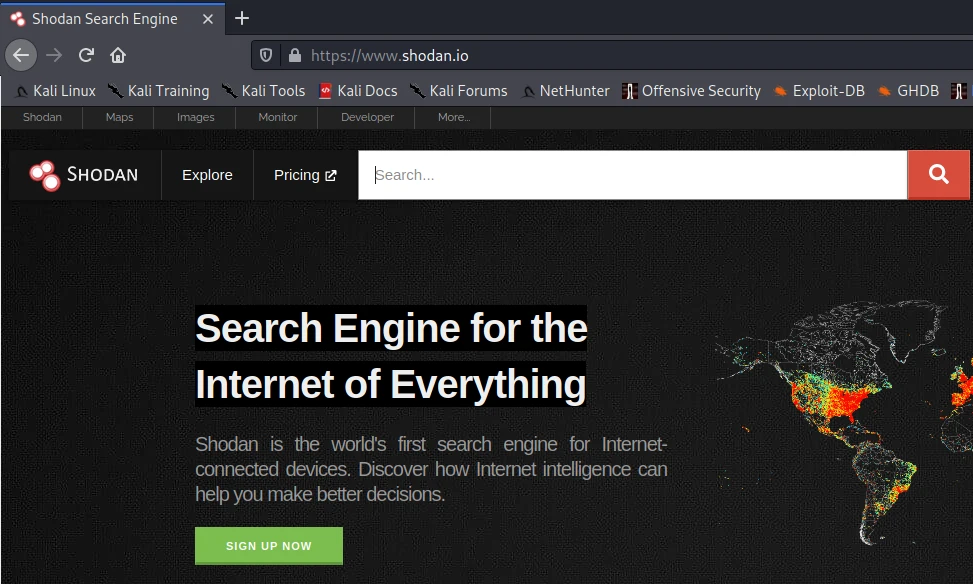
The facet panel on the left breaks the same result set down by port, country, product, and organization — useful before you drill into individual hosts:
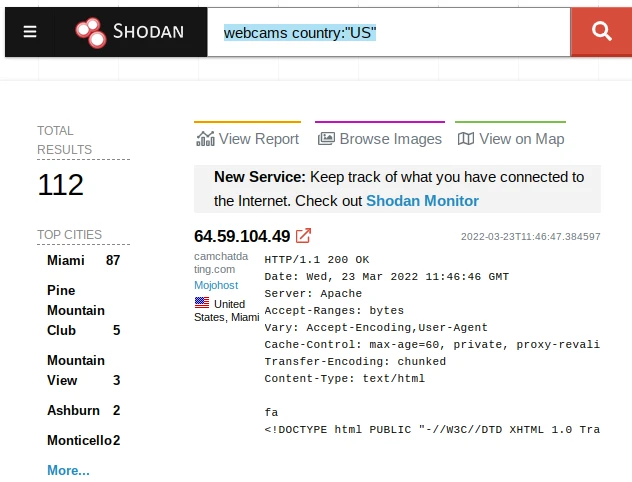
Check the observation or last-seen timestamp before treating a banner as current. Internet-wide indexes may show a service that has since moved, been patched, or disappeared.
Censys
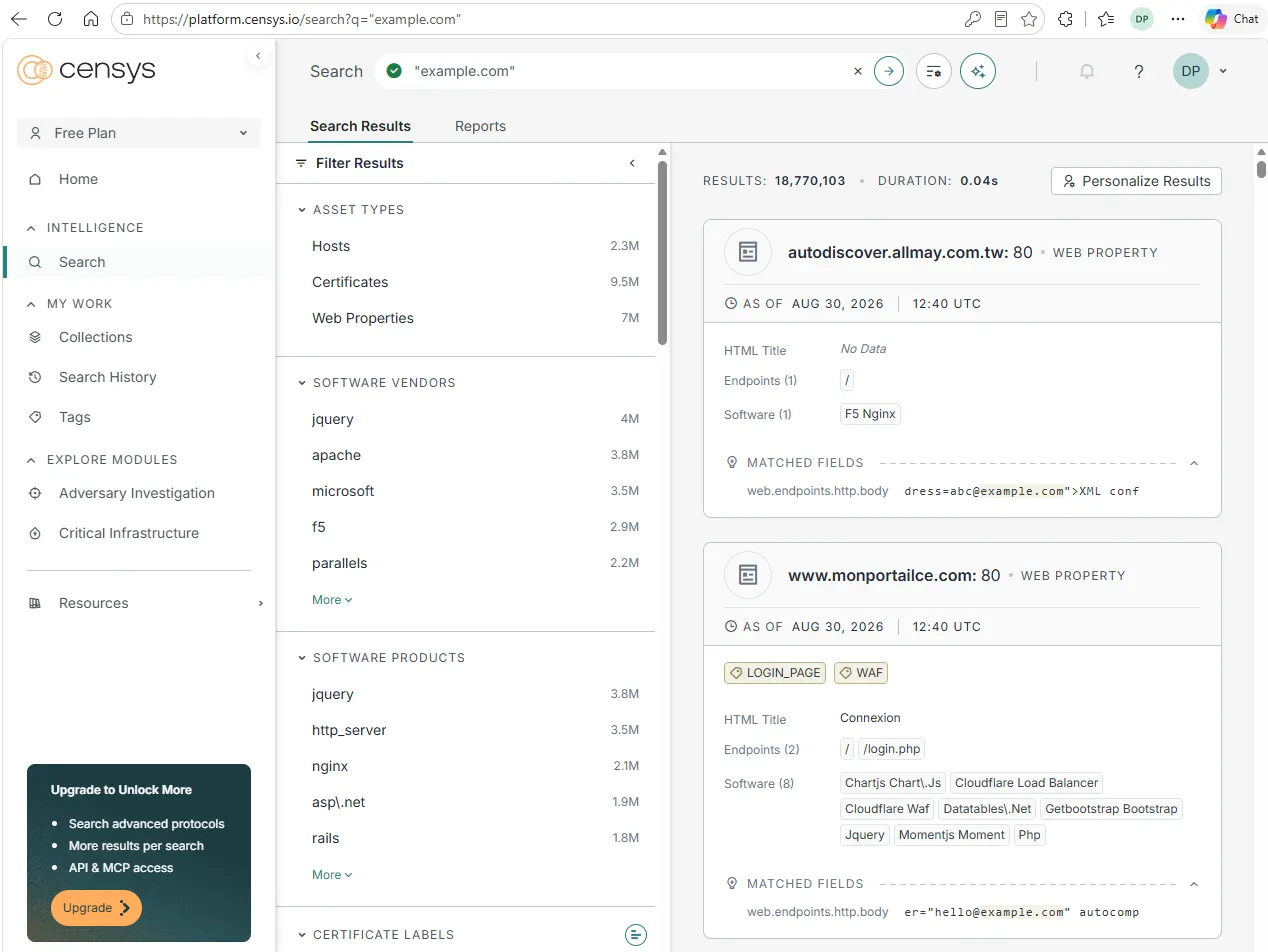
Censys answers the same questions as Shodan from an independent crawl, with a certificate-first view that often surfaces hosts Shodan misses. Censys uses CenQL in the current Platform. Start with a full-text domain search, then narrow using structured host or certificate fields:
"example.com"
host.services.tls.certificates.leaf_data.subject.common_name: "example.com"
host.services.port = "443"
Use Censys when Shodan returns sparse data, or when you are tracing certificate reuse across an organization's netblocks. A free account covers interactive searches; heavy or automated queries need a paid plan. As with Shodan, every hit is a lead to scope-check, not a target to probe. Censys exposes timestamps representing when host information was indexed or updated; check those before treating a banner as current. Pick one index as your primary and use the other when results look thin.
CenQL syntax, CLI install, and the full Shodan corroboration workflow are covered in the Shodan tutorial.
Hunter.io
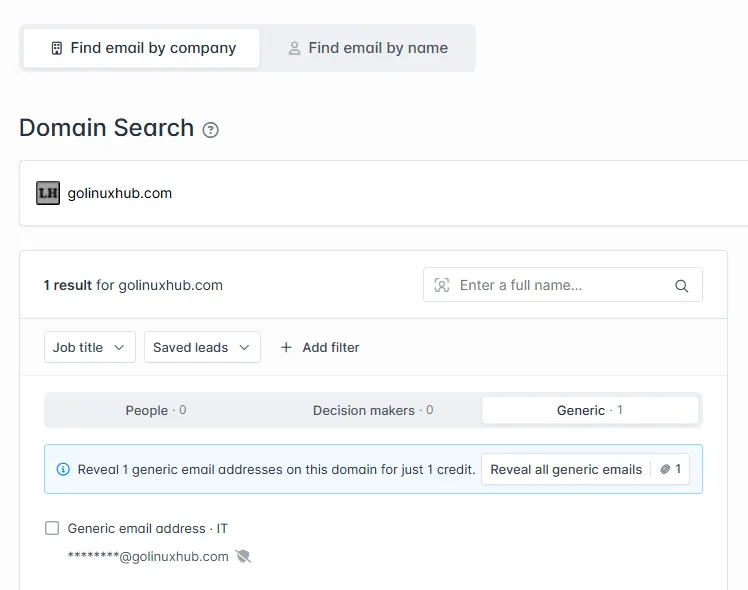
Hunter.io maps publicly indexed professional email addresses, generic mailboxes, and email patterns for an authorized domain. Open Domain Search at hunter.io/domain-search (not the onboarding dashboard), enter the apex domain from your rules of engagement, and review the People and Generic tabs.
Hunter does not search example.com. It classifies that IANA documentation domain as disposable, so the UI shows a Disposable domain message and the API returns no mailbox rows. For UI and API demos in this guide, use golinuxhub.com.
Register for an API key when you need scripted output:
export DOMAIN=golinuxhub.com
export HUNTER_API_KEY='YOUR_HUNTER_API_KEY'
Query the domain-search endpoint:
curl -s "https://api.hunter.io/v2/domain-search?domain=${DOMAIN}&api_key=${HUNTER_API_KEY}&limit=3"On golinuxhub.com, Hunter returned one generic IT mailbox indexed from public site pages. The response is long; the fields that matter for a hub-level scan are the address, its type, and a confidence score:
{
  "value": "admin1@golinuxhub.com",
  "type": "generic",
  "confidence": 76
}
Each result also carries a sources array (where Hunter saw the address) and sometimes a pattern such as {first}.{last} you can use to hypothesize addresses for names on a team page. Those guesses are leads, not validated accounts. For the full JSON shape, the -b hunter CLI integration, and API-key setup in one place, see the dedicated theHarvester and Hunter.io tutorial.
Wayback Machine
Live DNS and the current website hide pages that used to exist. The Wayback Machine and its CDX API list archived URLs and capture timestamps.
Query archived paths under the domain:
curl -s "https://web.archive.org/cdx/search/cdx?url=${DOMAIN}/*&output=text&fl=original,timestamp&limit=15"http://example.com:80/ 20020120142510
http://www.example.com:80/ 20020328012821
http://www.example.com:80/ 20020524041628
http://example.com:80/ 20020604040806
http://www.example.com:80/ 20020801235910Each line pairs a URL with a capture time. View a snapshot at https://web.archive.org/web/<timestamp>/<url>. Flag admin paths, old JavaScript, and config filenames for manual review. Feed confirmed names into the same master list you started above.
waybackurls turns the same CDX data into a plain URL list for diffing or piping into other tools. Install it on Kali when you need bulk output; the CDX curl one-liner is enough for spot checks.
Historical findings can describe fixed issues. Always cite the archive date beside the URL in your notes.
GitHub code search
Engineering teams leak secrets into public GitHub and GitLab repositories. GitHub code search scopes queries with qualifiers such as org:, repo:, path:, and content:, so you can hunt for a client's names and secret patterns without cloning anything. Start narrow:
"example.com" password
org:example-corp path:.env
"api_key" org:example-corp
Use path: for filenames and directories; for an exact dotfile, GitHub supports regex, for example org:example-corp path:/(^|\/)\.env$/. Report verified leaks with the repo URL, commit or file path, and date. Clone and scan only when scope allows.
Gitleaks and TruffleHog scan repository trees for keys and tokens after you have a legal copy of the code. If you confirm exposed secrets, secret-scanning tools such as Gitleaks or TruffleHog may be appropriate as part of the client's preventive controls, but running those scanners yourself is outside this passive-recon workflow.
Have I Been Pwned (HIBP)
Breach indexes show whether email addresses from the domain appeared in public dumps. Have I Been Pwned exposes a rate-limited API for authorized assessments. The example below shows the response shape; run it with your own API key when scope allows:
curl -s \
  -H "hibp-api-key: YOUR_HIBP_API_KEY" \
  -H "user-agent: golinuxcloud-osint-demo" \
"https://haveibeenpwned.com/api/v3/breachedaccount/user@example.com?truncateResponse=true"Representative response format:
[{"Name":"Adobe"},{"Name":"LinkedIn"}]A non-empty response means the address appeared in at least one known breach. Assess whether the exposure creates current password-reuse or credential-stuffing risk; recommend credential rotation where warranted and MFA as a broader account-protection control. Never paste cleartext passwords into tickets or slide decks.
SpiderFoot
SpiderFoot automates the manual pivots above: point it at a domain, IP, or email and it runs many collectors, then correlates everything in one workspace. For the workflow in this article, select its Passive use case on the New Scan screen so only modules that avoid touching the target are enabled.
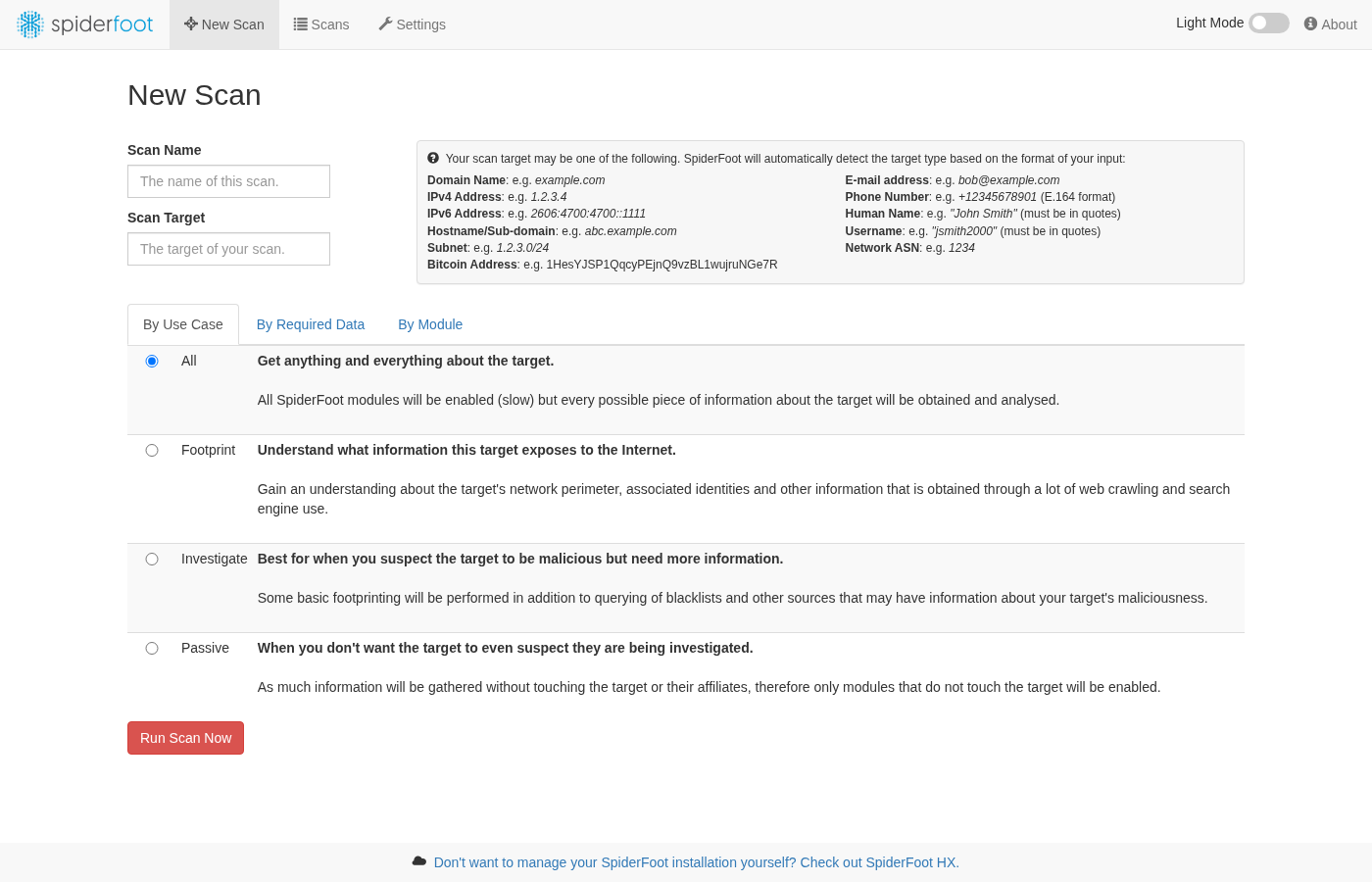
SpiderFoot is a single apt package on Kali (spiderfoot 4.0-0kali5), and its console runs at http://127.0.0.1:5001. Full install, web UI, and how to read the Summary, Browse, and Graph results are in the dedicated SpiderFoot tutorial. Whatever preset you pick, review the module list before you start, export only in-scope rows, and throttle modules when a provider rate-limits you.
VirusTotal
VirusTotal is useful in pentest OSINT for domain and hostname pivots, not malware analysis. It can expose relationships such as DNS resolutions, sibling domains and subdomains, and historical SSL certificates, with availability depending on the feature and account tier. Search example.com, open Relations, and note passive DNS and certificate overlaps before you add hosts to the master list.
VirusTotal's Public API has strict rate and usage limits, and its terms restrict use in commercial products, services, or business workflows. For client work, check the current VirusTotal API documentation before automated enrichment or account-backed features as part of the engagement.
Recon-ng
By this point you have hostnames, indexed services, archive URLs, people notes, and breach hits in different formats. Correlation means one master list with duplicates removed and scope flags attached. A spreadsheet works for small engagements; for repeatability on Kali, Recon-ng stores module output in a SQLite workspace so show hosts and show contacts read from the same database.
The pattern below is illustrative. Install marketplace modules on your Kali host before you run it:
recon-ngCreate a workspace, load one domain module, and inspect the table (install the module from marketplace search first if needed):
workspaces create client-recon
modules load recon/domains-contacts/whois_pocs
options set SOURCE example.com
run
show contacts
That pattern mirrors WHOIS contact collection you might already have from registrar data, but the rows stay in Recon-ng for CSV export. Install other marketplace modules only when you need them; a full Recon-ng tutorial is out of scope here.
Maltego Graph CE
Maltego Graph CE helps when the deliverable is a relationship graph: domain to DNS names, mail servers, people, and netblocks on one canvas. Install it on Kali with sudo apt install maltego, launch maltego, add a Domain entity, and run a footprint machine or individual transforms. Maltego Graph CE is free, but a Maltego ID sign-in is mandatory — there is no anonymous or offline mode. Some data integrations also consume credits or impose result limits.
Running the Footprint L1 machine on a single Domain entity expands the graph automatically. On golinuxhub.com it fans the domain out to its DNS records, the Cloudflare name server, an MX contact, and IPv6 netblocks:
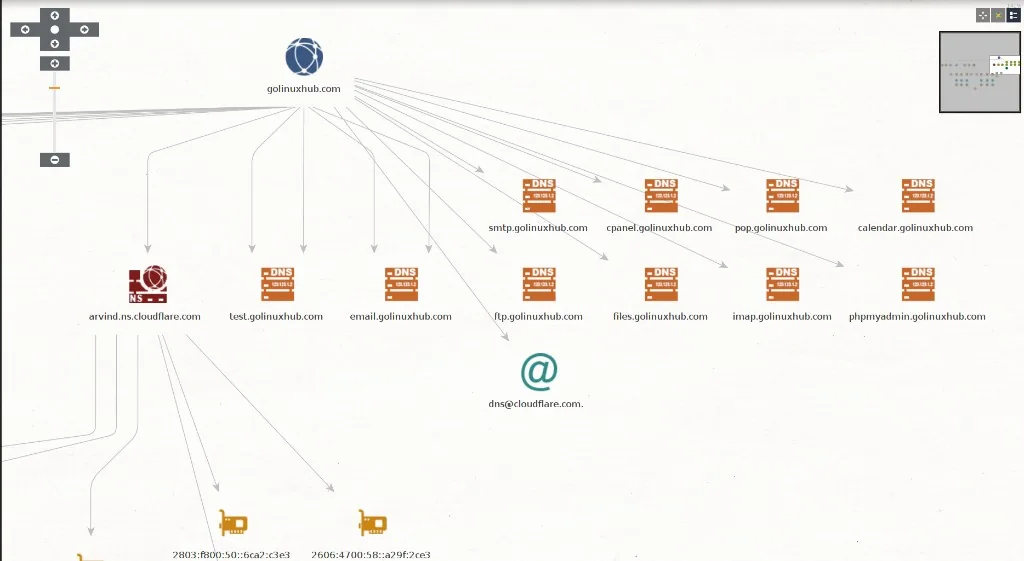
Every node is a lead to scope-check, not a confirmed asset — a shared Cloudflare name server or IPv6 netblock does not prove the client owns each linked host. Community Edition and individual transforms can impose result limits; check the current transform quota before relying on the graph as a complete inventory.
Use Maltego for stakeholder-facing visuals. Use theHarvester and spreadsheets for scriptable, repeatable collection. For quick browser pivots without a desktop graph, see Mitaka in-browser OSINT.
OSINT Framework
The OSINT Framework is a browsable link tree grouped by target type: domain, IP, email, username, social network, and more. It runs no queries itself, so treat it as a source-discovery aid rather than a scanner. I open the Domain Name and Email Address branches at kickoff to confirm I have not skipped a category such as paste sites, breach data, or DNS records, then jump to the specific tool for each lead. Used this way, it is the checklist that keeps you from rebuilding the same bookmark list on every engagement.
Username enumeration: Sherlock and Maigret
When your lead is a username instead of a domain or email, account-enumeration tools check that handle across hundreds of platforms in one run. Sherlock ships in Kali; install Maigret with pipx when you want richer per-profile metadata. On Kali, the correct package is sherlock (not python3-sherlock, which is an unrelated locking library):
sudo apt install sherlock
sherlock username123
Scoping a demo to a single site keeps it fast — here Sherlock (0.16.0-3 on this lab host) confirms a known GitHub account:
sherlock --site GitHub torvalds[*] Checking username torvalds on:
[+] GitHub: https://www.github.com/torvalds
[*] Search completed with 1 results- Input — a single username or handle.
- Output — candidate profile URLs across social networks, forums, and developer platforms.
- Caveat — a hit only means the username exists on that site.
False positives are common because different people reuse the same handle. Verify each profile manually before you attribute an account to a person, and never infer ownership just because the username resolves. Keep username pivots inside the rules of engagement, especially when they feed a social-engineering track.
Newer username and email OSINT suites add cross-platform profile metadata and optional email-registration checks in one run. On Kali, install user-scanner with pipx install user-scanner (1.5.1.1 tested on this lab host with user-scanner -u torvalds -s 5). Fingerprint is a hosted alternative that streams live username or email lookups in the browser; it requires account sign-in, has paid tiers, and sends your query to a third-party service — review its current pricing and privacy terms before client work. Whichever tool you pick, cross-correlate hits across independent sources before you treat a profile as the same person.
Image and metadata OSINT: ExifTool and Google Lens
Photos and documents carry OSINT of their own. ExifTool reads embedded EXIF metadata — camera model, editing software, timestamps, and sometimes GPS coordinates — from images and many other file types. It is preinstalled on Kali (exiftool 13.55 on this lab host):
exiftool suspicious-image.jpgReport only the metadata fields that matter to your scope. Remember that most social platforms strip EXIF on upload, so a missing GPS tag proves nothing. That path reads metadata already embedded in the file. Logging a viewer IP when someone opens a hosted image URL is a separate recon technique — see track IP address using an image for an authorized lab walkthrough. When an image has no useful metadata, a reverse or visual image search such as Google Lens or TinEye can show where else the same picture appears online. Neither approach confirms a location or identity on its own — treat both as leads to corroborate.
People, job posts, and organization clues
Technology choices and naming conventions leak through hiring pages long before you scan a network. For personnel testing within scope, public profiles fill in reporting chains and email formats.
Work manually at this stage:
- Careers and job posts — stacks (Okta, AWS, Kubernetes, Salesforce), team names, and office locations
- LinkedIn and conference bios — role titles and project keywords (respect platform terms; do not scrape at scale without permission)
- Email patterns —
first.last@,flast@, or regional domains inferred from a small set of public addresses - Press and filings — subsidiary names and domains that should be added to scope or exclusions
- Paste and breach indexes — OSINT Framework links under Email Address and Username when the RoE allows credential exposure review
You do not need a separate tool for each source. Capture screenshots or URLs, infer the likely email format, and add people only when the RoE covers social engineering or password spraying.
Passive reconnaissance workflow using these tools
You now know what each OSINT tool does. On an engagement, run them in an order that builds a scope-checked asset list before active enumeration.
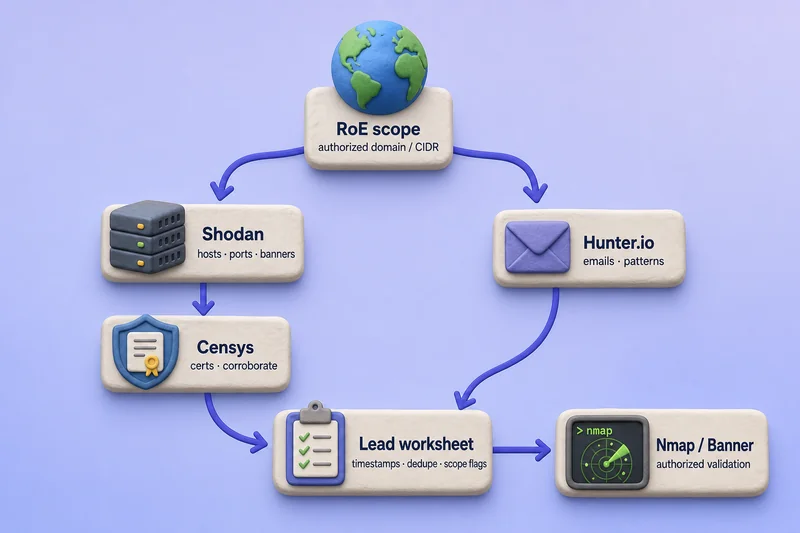
Shodan and Censys form the host-and-certificate branch; Hunter.io runs in parallel on the same authorized domain when mailbox exposure belongs in scope. CLI detail for Shodan and Censys lives in the Shodan tutorial.
Authorized organization / domain
        ↓
Domains and ownership (registrar, WHOIS where public)
        ↓
Certificate transparency (theHarvester, crt.sh)
        ↓
Passive DNS (SecurityTrails / VirusTotal) for historical names
        ↓
Candidate hosts / subdomains (dedupe into a master list)
        ↓
Internet-wide indexes (Shodan, Censys — banners, ports, products)
        ↓
Historical URLs / content (Wayback CDX, removed admin paths)
        ↓
People and technology stack (jobs, profiles, email patterns)
        ↓
Repository / breach exposure (GitHub search, HIBP)
        ↓
Optional automation (SpiderFoot passive use case) for gap filling
        ↓
Correlate and deduplicate (spreadsheet, Recon-ng workspace, Maltego graph)
        ↓
Check scope (in-scope asset? third-party? out of bounds?)
        ↓
Hand off to active enumeration (DNS, subdomain brute force, scanning)
Record for every row: source, query time, URL or command, and whether the asset is in scope. That audit trail matters when a client asks why you tested a hostname.
Passive vs Active Reconnaissance
Stop passive collection when you have a deduplicated asset list, scope-checked each item, and documented sources. The next phase validates and probes.
| Activity | Passive or active | Notes |
|---|---|---|
| crt.sh / CT query via theHarvester | Passive | Third-party log |
| Shodan or Censys lookup | Passive | Third-party index |
| Hunter.io domain search | Passive | Third-party index; example.com blocked as disposable |
| Sherlock / Maigret username check | Passive | Queries third-party sites you do not own |
| ExifTool metadata read | Passive | Local file parsing; no traffic to the target |
| Passive DNS (SecurityTrails, VirusTotal) | Passive | Third-party history |
| Wayback CDX query | Passive | Archive metadata |
| HIBP breach lookup | Passive | Third-party database |
| SpiderFoot passive use case | Passive | Third-party/public modules only |
| SpiderFoot with arbitrary or all modules | Depends on enabled modules | May query target infrastructure |
dig directly against target authoritative NS |
Active validation | Resolver sees your query |
| HTTP GET to in-scope URL | Active | Web server logs visit |
| Nmap scan | Active | Sends probes to target |
| DNS brute force | Active | High volume against DNS |
Continue with DNS enumeration, subdomain enumeration tools, and port scanning only on hosts the RoE lists. If a Shodan hit points at a cloud shared IP, confirm ownership before you test.
Troubleshooting
| Symptom | Likely cause | Fix |
|---|---|---|
| theHarvester returns zero hosts | CT source down or rate limited | Try crtsh,certspotter; confirm sources with theHarvester -h; retry later |
| crt.sh returns HTTP 502 | crt.sh or network path temporarily unavailable | Retry after a minute; use theHarvester crtsh source instead |
| Shodan shows no org results | Wrong org string or privacy proxy | Search ssl.cert.subject.cn or known netblocks from CT |
Hunter shows Disposable domain for example.com |
Hunter blocks IANA documentation domains | Use an authorized client apex or golinuxhub.com for syntax demos |
| Sherlock reports profiles that are not the target | Same username reused by different people | Verify each profile manually before attribution |
| ExifTool shows no GPS or camera fields | Platform stripped metadata on upload | Absent metadata is not evidence; try a reverse image search |
| Wayback CDX empty | Domain never archived or typo | Confirm spelling; try www. variant |
| HIBP API returns 401 | Missing or invalid API key | Create a key on the HIBP site |
| HIBP API returns 403 | Missing or invalid User-Agent | Add a descriptive user-agent header |
| Recon-ng module not found | Not installed from marketplace | marketplace search then marketplace install |
| Maltego transforms greyed out | Not signed in or plan limits reached | Log in with Maltego ID; check credit and result limits |
| SpiderFoot module errors | API key missing or rate limit | Disable noisy modules; add keys in SpiderFoot config; use Passive use case |
| Jump host drops SSH | Too many parallel tunnels to Kali | Run OSINT in one session on Kali; avoid many -J connections |
Summary
This page compares OSINT tools for penetration testing on Kali and the web, grouped by what you investigate: theHarvester and certificate transparency for hostnames, Shodan and Censys for Internet-facing services, Hunter.io and HIBP for email exposure, Sherlock or Maigret for usernames, ExifTool for image metadata, Wayback for historical URLs, GitHub for code leaks, SpiderFoot for automated multi-source runs, and SecurityTrails or VirusTotal for passive DNS and domain relationships. Recon-ng and Maltego handle correlation when a spreadsheet is not enough.
The passive reconnaissance workflow ties those tools together in engagement order so you know which source to open at each stage. theHarvester, Wayback CDX, and SpiderFoot CLI examples were captured on the pentest lab. Certificate transparency and crt.sh results vary with source availability. HIBP, Recon-ng, and Maltego are documented as workflow patterns or manual browser and GUI steps. Browser-first tools are marked manual in the comparison table.
When passive sources are exhausted, hand the master list to DNS enumeration, subdomain enumeration, and scanning lessons. Keep source URLs and timestamps on every finding so the client can trace how you chose each asset.
References
- OSINT Framework
- Penetration Testing Execution Standard — Intelligence gathering
- theHarvester (GitHub)
- Recon-ng (GitHub)
- SpiderFoot (GitHub)
- Sherlock (GitHub)
- Maigret (GitHub)
- ExifTool
- Shodan
- Hunter.io API v2 documentation
- Censys Search
- SecurityTrails
- VirusTotal
- Google Hacking Database
- Have I Been Pwned API
- Internet Archive Wayback CDX API
- Maltego
Frequently Asked Questions
What are OSINT tools?
OSINT tools query or organize publicly available information such as certificate logs, Internet indexes, archives, breach databases, and code repositories. Sources like crt.sh are websites you browse; tools like theHarvester automate collection. This guide focuses on OSINT tools for penetration testing, not journalism, geolocation, or missing-person investigations.
What is the difference between passive recon and OSINT?
Passive recon collects information without sending probes to the target owned systems. OSINT is the broader practice of using public sources such as certificate logs, search indexes, archives, and breach databases. Most OSINT in a pentest stays passive until you validate a hostname with DNS or HTTP.
Is OSINT legal for penetration testers?
Reading public data is usually lawful, but contracts, provider terms, and local law still apply. Written authorization and scope in the rules of engagement define what you may query, store, and report. Do not use breach data against accounts you are not authorized to test.
Which OSINT tools should pentesters use first?
Start with theHarvester and certificate transparency for hostnames, Shodan or Censys for Internet-facing services, Wayback for historical URLs, GitHub search and HIBP for exposure, then Recon-ng or Maltego to correlate. SpiderFoot helps when you want automated multi-source collection instead of manual pivots.
When does passive OSINT become active reconnaissance?
Querying crt.sh, Shodan, or the Wayback CDX API is passive because you read third-party indexes. Directly querying the target authoritative DNS server, fetching its web pages, brute-forcing names, or scanning hosts sends traffic into target-controlled infrastructure and moves beyond purely passive collection. Active validation must be explicitly permitted by the engagement scope and RoE; permission to perform passive OSINT does not automatically authorize scanning or exploitation.
Can I use password breach data in a pentest report?
Only when the rules of engagement allow credential exposure testing and the data comes from lawful sources such as Have I Been Pwned with an API key. Report that addresses appeared in breaches, assess current password-reuse risk, and recommend credential rotation where warranted plus MFA. Do not publish cleartext passwords or test out-of-scope accounts.
How does this workflow fit PTES?
PTES places intelligence gathering in phase two before threat modeling and vulnerability analysis. This guide covers that passive phase. Active validation and scanning belong in later phases and in companion lessons on DNS enumeration, subdomain tools, and Nmap.
