
| Tested on | Kali GNU/Linux Rolling 2026.2 (kali-rolling) |
|---|---|
| Package | frida==17.17.0frida-tools==14.10.4objection==1.12.5Burp Suite Community 2026.8-53343adb 1.0.41 / 34.0.5-debianHTTP Toolkit SSL Pinning Demo 1.4.1 (tech.httptoolkit.pinning_demo) |
| Applies to | Kali Linux with adb; rooted Android emulator or owned test device that can reach Burp |
| Lab environment | Pentest lab Genymotion Desktop lab Android HTTPS interception with Burp Frida Android tutorial |
| Privilege | Normal user for Frida, Objection, and Burp; root on the Android guest for frida-server and system CA install |
| Cert prep | CompTIA PenTest+ (mobile specialized systems / dynamic analysis) |
| Scope | Diagnose certificate pinning after proxy and CA trust work, then bypass two different mechanisms on a training APK: Network Security Config (platform) and OkHttp CertificatePinner (library). Does not repeat Burp CA install, Frida server install, Flutter/native reverse engineering, or Magisk module packs. |
| Related guides | MobSF app pentesting |
In this article we will diagnose and bypass Android SSL pinning with Frida, Objection, and Burp Suite on an authorized training APK. SSL pinning here means TLS/certificate pinning. Certificate pinning adds another identity check beyond normal CA trust. Depending on the implementation, the app may compare a certificate or, commonly, a hash of a certificate’s public key (SPKI) against values built into its configuration or code.
Android documentation refers to this as certificate pinning and discourages its use in most apps because certificate or CA changes can unexpectedly break connectivity. In this lab, we'll use a deliberately vulnerable training app to see how different types of pinning behave and how Frida can bypass them. I used Genymotion Android 10 (x86) from Kali with the HTTP Toolkit SSL Pinning Demo 1.4.1.
First prove it is certificate pinning
A TLS error under Burp is not automatically pinning. Routing, CA trust, and pin checks fail in different layers:
  Layer 1 - Routing          Layer 2 - CA trust           Layer 3 - Pin / identity check
  ┌──────────────────┐       ┌──────────────────┐        ┌──────────────────────┐
  │ Device proxy →   │       │ Burp CA in system │        │ OkHttp / NSC / raw /  │
  │ Kali:8080        │ ───►  │ or user store     │ ───►   │ native / Flutter TLS  │
  │ Listener reachable│       │ Browser HTTPS OK  │        │ Host/SPKI check fails │
  └──────────────────┘       └──────────────────┘        └──────────────────────┘
Before you blame pinning, confirm layers 1 and 2 with the Android HTTPS interception with Burp workflow: listener on the Kali interface the emulator can reach, device http_proxy set, Burp CA trusted, Intercept off, and an unpinned browser or training button returning HTTP 200 in Burp.
First, confirm that ADB can see the Android device:
adb devices -lList of devices attached
192.168.56.103:5555 device product:vbox86p model:Phone device:vbox86p transport_id:1Confirm the global proxy still points at Burp:
adb shell settings get global http_proxy192.168.56.120:8080Install the training APK if it is not already present. On this Genymotion x86 image, demo 1.7.1 failed with INSTALL_FAILED_NO_MATCHING_ABIS; 1.4.1 installed cleanly. This version choice was specific to my x86 Genymotion image. If a newer release supports your emulator's ABI, use that instead:
adb install -r ~/ssl-pinning-lab/pinning-demo-1.4.1.apkPerforming Streamed Install
SuccessWe will test an unpinned request first. If it succeeds, we know the Android proxy and Burp CA are working; a later failure on a pinned request can then be investigated as a pinning problem.
Launch the demo and tap UNPINNED REQUEST. The button turns green when the unpinned HTTPS call succeeds through the trusted Burp CA:
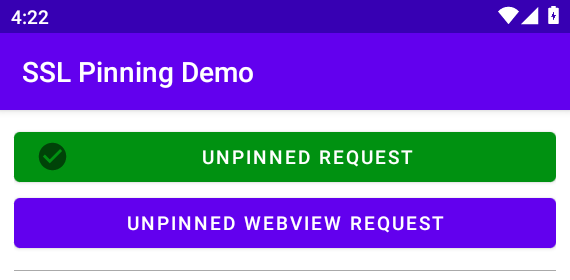
Logcat on that tap printed the demo URL and a normal success path:
adb logcat -d | grep 'System.out' | tail -5I System.out: URL: https://amiusing.httptoolkit.tech
I System.out: Response Code: 200
I System.out: onSuccess
I System.out: dispatchedNow tap OKHTTP PINNED REQUEST without any Frida hooks. The button turns red, and logcat shows that OkHttp rejected the certificate presented through Burp because its public key does not match the configured pins. The sha256/... values in the error are SHA-256 hashes of certificate public keys (SPKI):
adb logcat -d | grep -A8 'Certificate pinning failure' | head -12I System.out: javax.net.ssl.SSLPeerUnverifiedException: Certificate pinning failure!
I System.out: Peer certificate chain:
I System.out: sha256/fOJwjFXpmxdyWA18oDliloaHI3jltiDQO68A8jGQ3UY=: CN=ecc384.badssl.com,OU=PortSwigger CA,O=PortSwigger,C=PortSwigger
I System.out: sha256/avQ+MblMivtLyOk9ChZnDSR0R5xLo6md4oEGPO4KhIk=: CN=PortSwigger CA,OU=PortSwigger CA,O=PortSwigger,L=PortSwigger,ST=PortSwigger,C=PortSwigger
I System.out: Pinned certificates for ecc384.badssl.com:
I System.out: sha256/C5+lpZ7tcVwmwQIMcRtPbsQtWLABXhQzejna0wHFr8M=
I System.out: sha256/jQJTbIh0grw0/1TkHSumWb+Fs0Ggogr621gT3PvPKG0=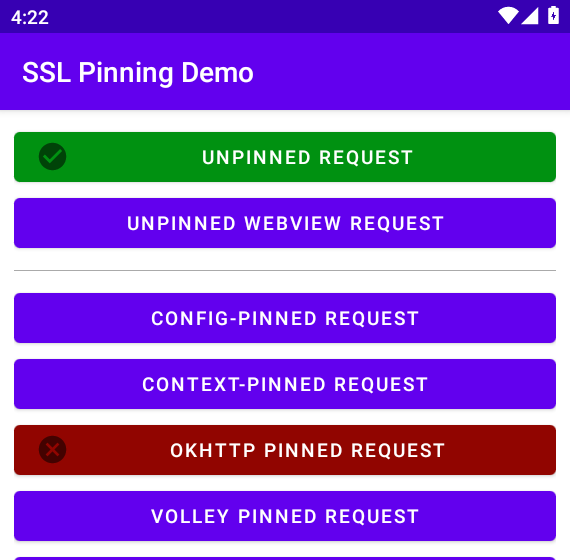
This comparison is important: the unpinned HTTPS request succeeds through the same Burp proxy, while the OkHttp-pinned request fails with Certificate pinning failure!. That gives us much stronger evidence that pinning, not the proxy or Burp CA setup, is causing this particular failure. If the unpinned path also fails, fix routing or CA trust first.
Common Android certificate pinning methods
Android apps can enforce certificate pinning in several places. The method matters because a Frida hook that works for one type may have no effect on another:
| Kind | Where it lives | Example in this lab |
|---|---|---|
| Android platform pinning | Network Security Config <pin-set> |
CONFIG-PINNED REQUEST |
| Library pinning | HTTP client libraries | OkHttp CertificatePinner |
| Custom application pinning | App compares cert/public-key hashes itself | RAW CUSTOM-PINNED REQUEST |
| Native pinning | Verification in native code / TLS stack | Flutter / .so paths (boundary only here) |
Android Network Security Config stores pins as SHA-256 hashes of SubjectPublicKeyInfo (SPKI), which represents the certificate's public-key information. During pin validation, at least one public key in the trusted certificate chain must match one of the configured pins. Custom trust anchors in the same XML file are separate: they decide which CAs are allowed, not which SPKI pins must match.
Use the table as a next-step map after you spot a mechanism:
| Mechanism | What to search for | Typical approach |
|---|---|---|
| Network Security Config pinning | <pin-set>, networkSecurityConfig |
Identify the pin-check path; also inspect <trust-anchors> because a custom CA policy can independently block Burp |
| OkHttp | CertificatePinner, certificatePinner( |
Hook CertificatePinner.check*() / clear pins on OkHttpClient.Builder |
| Custom TrustManager | X509TrustManager, checkServerTrusted() |
Targeted checkServerTrusted() / trust-validation hook; try Objection first as a quick Java-layer check |
| TrustKit | TrustKit classes / trustkit-config |
Library-specific hook |
| Custom hash check | SHA-256 / hash comparison after SSLSocket |
Reverse-engineer the exact comparison |
| Native / Flutter | .so, Dart/Flutter network stack |
Native-specific analysis (out of scope here) |
Android’s Network Security Configuration docs describe pins, backups, and expiration. Treat pinning as something you test when the app opted into it, not as a default every APK must ship. The training APK’s exact XML and OkHttp call sites show up in the NSC and OkHttp sections below, where you need them.
Verify Frida and Burp are ready
This page assumes Burp and Frida are already installed. Confirm they are ready before you hook anything:
| Tool | Role |
|---|---|
| Burp Suite | HTTPS interception proxy |
| Burp CA | Lets the test device trust certificates Burp generates |
| Frida | Hooks methods inside the running Android app |
frida-server |
Lets Frida talk to the rooted Android device |
| Objection | Ready-made Frida-based mobile testing commands |
| ADB | Communicates with and inspects the Android device |
You should already have:
- Burp listening where the emulator can reach it, with the Burp CA trusted on the guest (Android HTTPS interception with Burp)
- Matching
frida/frida-serveron Kali and the rooted guest (Frida Android tutorial)
On the Kali side I used a venv with pinned clients:
source ~/ssl-pinning-lab/venv/bin/activateConfirm the Frida client version:
frida --version17.17.0Confirm the installed Objection version:
objection versionobjection: 1.12.5Confirm frida-server is running on the guest:
adb shell 'ps -A | grep frida-server'root 2178 1 1074904 142784 poll_schedule_timeout f2487bb9 S frida-serverList processes and confirm the demo is visible to Frida:
frida-ps -Uai | grep -i pin PID Name Identifier
4375 SSL Pinning Demo tech.httptoolkit.pinning_demoKeep Burp Intercept off while you click demo buttons so requests are not stuck waiting for Forward. Proxy history or Logger should already show the unpinned host from the earlier proof step.
What Frida changes during an SSL pinning bypass
Frida does not rewrite the APK on disk. It attaches to the running process and replaces selected functions in memory for that session. In other words, we are not removing the pin from the APK file. We are changing what the relevant pin-checking method does while the app is running.
Without a hook, the path looks like this:
Android app
   |
   | HTTPS connection through Burp
   v
Normal certificate validation  (Burp CA already trusted → OK)
   |
   v
Certificate pin check
   |
   X Burp leaf / SPKI does not match the pinned identity → exception
With a pin-focused hook:
Frida attaches to the running app
   |
   v
hooks CertificatePinner.check$okhttp()  (or clears pins on the builder)
   |
   v
pin mismatch never throws
   |
   v
TLS continues → request appears decrypted in Burp
That is why diagnosis came first. If the device does not trust Burp's CA, bypassing the pin check alone will not make the request succeed. The TLS connection can still fail during normal certificate validation. The Frida script in the OkHttp section deliberately leaves normal trust validation alone so you can see the pin as the single remaining control.
Quick test with Objection
Objection provides ready-made Frida hooks through commands such as android sslpinning disable. It is useful as a quick first test. If a previously failing pinned request succeeds while Objection's hooks are active and the request appears in Burp, the app is probably using a Java-layer validation mechanism that Objection recognizes. If it still fails, inspect the implementation and use a more targeted Frida hook.
On Objection 1.12.5, start replaced the older explore command, and -n / --name identifies the process or package. Attach to the running demo and keep the session open:
objection -n tech.httptoolkit.pinning_demo start _ _ _ _
___| |_|_|___ ___| |_|_|___ ___
| . | . | | -_| _| _| | . | |
|___|___| |___|___|_| |_|___|_|_|
|___|(object)inject(ion) v1.12.5
Runtime Mobile Exploration
by: @leonjza from @sensepost
[tab] for command suggestions
tech.httptoolkit.pinning_demo (run) on (Android: 10) [usb] #At the Objection prompt, enable its SSL-pinning bypass. Objection will install hooks for several common Android certificate-validation and pinning paths:
android sslpinning disable(agent) Custom TrustManager ready, overriding SSLContext.init()
(agent) Found okhttp3.CertificatePinner, overriding CertificatePinner.check()
(agent) Found okhttp3.CertificatePinner, overriding CertificatePinner.check$okhttp()
(agent) Found com.android.org.conscrypt.TrustManagerImpl, overriding TrustManagerImpl.verifyChain()
(agent) Found com.android.org.conscrypt.TrustManagerImpl, overriding TrustManagerImpl.checkTrustedRecursive()
(agent) Registering job 833539. Name: android-sslpinning-disableKeep that job registered while you tap buttons. Although Objection reported that it hooked CertificatePinner, the OkHttp request still failed in this test. This is a useful result: seeing a successful hook message does not prove that the method actually responsible for the failure was bypassed. We therefore need to target the method used by this particular OkHttp build.
If Objection attaches and then exits immediately in a non-interactive shell, the hooks unload before you tap the button. Keep an interactive session (or a FIFO/script wrapper) until you finish clicking.
Older tutorials still show objection -g PACKAGE explore. Prefer -n and start for current Objection so readers are not stuck on a removed interface.
Bypass OkHttp CertificatePinner with Frida
The demo’s OkHttp button builds a CertificatePinner for ecc384.badssl.com. Because Burp CA trust is already proven, this experiment targets only OkHttp's certificate-pinning check. Normal Android certificate validation remains unchanged:
Normal TLS trust validation → already works
              ↓
OkHttp CertificatePinner → blocks Burp
              ↓
Hook CertificatePinner only
              ↓
Request succeeds
Save this lab script as bypass-okhttp-pinner.js:
// Targeted: OkHttp CertificatePinner only (no TrustManager / SSLContext changes)
Java.perform(function () {
  console.log('[*] Installing OkHttp CertificatePinner-only hooks');

  var CertificatePinner = Java.use('okhttp3.CertificatePinner');
  var Builder = Java.use('okhttp3.OkHttpClient$Builder');

  // Clear pins when the client is built (reliable on this OkHttp/Kotlin build)
  var buildOrig = Builder.build;
  Builder.build.implementation = function () {
    console.log('[+] OkHttpClient.Builder.build() clearing CertificatePinner');
    this.certificatePinner.value = CertificatePinner.DEFAULT.value;
    return buildOrig.call(this);
  };
  console.log('[*] Hooked OkHttpClient.Builder.build');

  try {
    CertificatePinner.check$okhttp.overload(
      'java.lang.String',
      'kotlin.jvm.functions.Function0'
    ).implementation = function (hostname, peerCertsFn) {
      console.log('[+] CertificatePinner.check$okhttp bypassed for ' + hostname);
      return;
    };
    console.log('[*] Hooked CertificatePinner.check$okhttp');
  } catch (e) {
    console.log('[-] check$okhttp hook failed: ' + e);
  }

  console.log('[*] Ready');
});You do not need to understand every line of Frida's JavaScript API yet. For this example, the script makes two important changes:
- It replaces the configured
CertificatePinnerwith OkHttp’s default instance, which has no pins, when the client is built - It skips the live
check$okhttppin check so the method returns before it can throw the pinning exception
Run the script against the demo package and leave this Frida terminal open while you test the button. Closing the session unloads the hooks:
frida -U -N tech.httptoolkit.pinning_demo -l bypass-okhttp-pinner.jsLeave that Frida session attached. Tap UNPINNED REQUEST (still green), then OKHTTP PINNED REQUEST. Only those two buttons should turn green; CONFIG and the other pins stay purple. Frida’s console should show the hooks install, then the builder clear and the live pin check returning early:
[*] Installing OkHttp CertificatePinner-only hooks
[*] Hooked OkHttpClient.Builder.build
[*] Hooked CertificatePinner.check$okhttp
[*] Ready
[+] OkHttpClient.Builder.build() clearing CertificatePinner
[+] CertificatePinner.check$okhttp bypassed for ecc384.badssl.com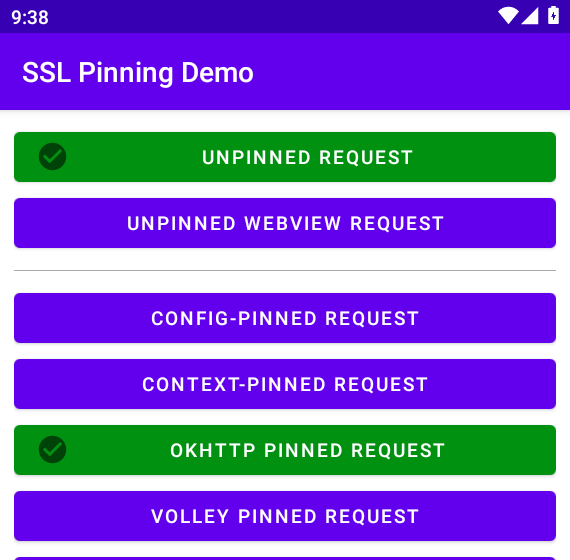
Confirm logcat agrees with the green button:
adb logcat -d | grep 'System.out' | tail -6I System.out: URL: https://ecc384.badssl.com/
I System.out: Response Code: 200
I System.out: onSuccess
I System.out: dispatchedThe $okhttp suffix may look unusual because it is not the public method name normally shown in OkHttp documentation. This Kotlin build exposes CertificatePinner.check$okhttp(String, Function0) at runtime, and that is the method that actually triggered the pinning failure in this lab. A Frida script that hooks only the familiar check(...) method can therefore miss the real call.
Keep the generic trust-manager / SSLContext.init() bypass in Objection’s toolkit for apps that fail before a pin check. For this experiment, after Burp CA trust is proven, pinning-only hooks keep the focus on the pin check itself.
Bypass Network Security Config pinning
The previous example bypassed pinning implemented by the OkHttp library. The CONFIG-PINNED REQUEST uses Android's Network Security Config instead, so the OkHttp hooks do not affect it. On this demo, that button uses HttpsURLConnection against sha256.badssl.com. After apktool d, the relevant XML looks like this:
<network-security-config>
    <domain-config>
        <domain includeSubdomains="false">sha256.badssl.com</domain>
        <pin-set>
            <pin digest="SHA-256">C5+lpZ7tcVwmwQIMcRtPbsQtWLABXhQzejna0wHFr8M=</pin>
            <pin digest="SHA-256">ABCDEFABCDEFABCDEFABCDEFABCDEFABCDEFABCDEFA</pin>
        </pin-set>
        <trust-anchors>
            <certificates src="@raw/lets_encrypt_isrg_root" />
        </trust-anchors>
    </domain-config>
</network-security-config>
This demo applies two Network Security Config restrictions to these domains: a <pin-set> and a custom Let’s Encrypt-only trust anchor. The <pin-set> checks public-key hashes, while <trust-anchors> controls which certificate authorities the app trusts. Therefore, bypassing only the pin check is not enough. The test also needs to accept Burp’s CA for these hosts.
Restriction 1: <pin-set>
        ↓
checkPins() rejects unexpected SPKI

Restriction 2: custom <trust-anchors>
        ↓
Burp CA is not an allowed CA

For this demo to work through Burp, we therefore have to handle both checks.
With Burp in the path and no hooks, unpinned still succeeds while CONFIG fails with a handshake error:
adb logcat -d | grep 'System.out' | tail -6I System.out: URL: https://amiusing.httptoolkit.tech
I System.out: Response Code: 200
I System.out: URL: https://sha256.badssl.com
I System.out: javax.net.ssl.SSLHandshakeException: java.lang.RuntimeException: java.lang.reflect.InvocationTargetException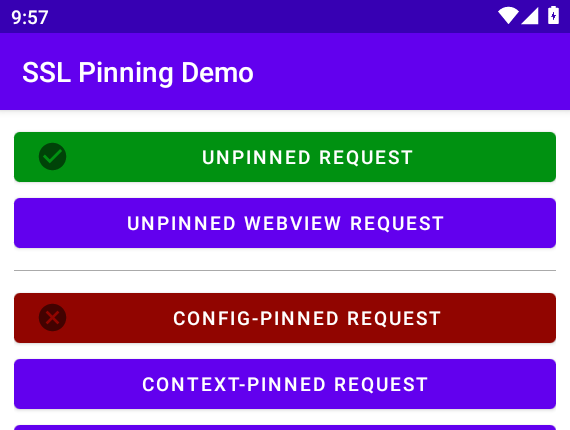
CONFIG-PINNED REQUEST fails
        ↓
read <pin-set> and domain trust-anchors in network_security_config.xml
        ↓
identify platform path (NetworkSecurityTrustManager / RootTrustManager)
        ↓
neutralize pin check and allow Burp's CA for these hosts
        ↓
CONFIG-PINNED turns green
        ↓
confirm the request in Burp
Save bypass-nsc-pins.js:
// Network Security Config bypass for the HTTP Toolkit demo's pinned domains
Java.perform(function () {
  console.log('[*] Installing Network Security Config hooks');

  var NetworkSecurityTrustManager = Java.use(
    'android.security.net.config.NetworkSecurityTrustManager'
  );
  NetworkSecurityTrustManager.checkPins.implementation = function (chain) {
    console.log('[+] NetworkSecurityTrustManager.checkPins bypassed');
    return;
  };
  console.log('[*] Hooked NetworkSecurityTrustManager.checkPins');

  var RootTrustManager = Java.use('android.security.net.config.RootTrustManager');
  var Arrays = Java.use('java.util.Arrays');
  var pinnedHosts = {
    'sha256.badssl.com': true,
    'rsa4096.badssl.com': true
  };

  RootTrustManager.checkServerTrusted.overload(
    '[Ljava.security.cert.X509Certificate;',
    'java.lang.String',
    'java.lang.String'
  ).implementation = function (certs, authType, host) {
    if (host && pinnedHosts[host]) {
      console.log('[+] RootTrustManager.checkServerTrusted accepted for pinned NSC host ' + host);
      return Arrays.asList(certs);
    }
    return this.checkServerTrusted(certs, authType, host);
  };
  console.log('[*] Hooked RootTrustManager.checkServerTrusted (NSC hosts only)');
  console.log('[*] NSC hooks ready');
});The two hooks solve two separate failures in this training APK. checkPins() neutralizes the XML <pin-set>. The second hook handles the separate CA-trust restriction. For the two demo hosts, it allows the certificate chain generated by Burp instead of rejecting it because Burp's CA is not the configured Let’s Encrypt trust anchor.
Attach, then tap UNPINNED REQUEST and CONFIG-PINNED REQUEST:
frida -U -N tech.httptoolkit.pinning_demo -l bypass-nsc-pins.js[*] Installing Network Security Config hooks
[*] Hooked NetworkSecurityTrustManager.checkPins
[*] Hooked RootTrustManager.checkServerTrusted (NSC hosts only)
[*] NSC hooks ready
[+] NetworkSecurityTrustManager.checkPins bypassed
[+] RootTrustManager.checkServerTrusted accepted for pinned NSC host sha256.badssl.comAfter those hook lines, confirm logcat shows a normal 200 for the config-pinned host:
adb logcat -d | grep 'System.out' | tail -4I System.out: URL: https://sha256.badssl.com
I System.out: Response Code: 200
I System.out: onSuccess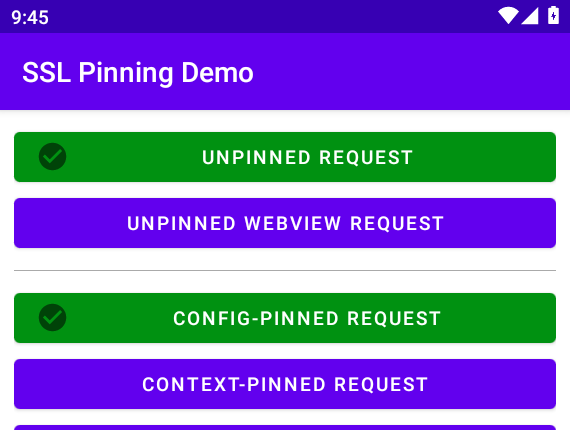
At this point, we have bypassed two different pinning implementations:
- Network Security Config → Android platform
- OkHttp
CertificatePinner→ library
Do not expect the OkHttp script to turn CONFIG green, or the NSC script to turn OkHttp green. Each script matches one mechanism.
If you own the app's source code: you normally do not need Frida just to inspect your own debug traffic. Android Network Security Config supports debug-overrides, which lets debug builds trust a testing CA without changing the release configuration. Frida is useful here because we are testing the APK without modifying its source.
Why universal scripts fail
So-called "universal" SSL-unpinning scripts try to hook many common certificate-validation methods at once. They are convenient for a quick test, but they cannot know how every Android app implements pinning. They may fail when:
- Expected classes or methods were renamed or obfuscated
- The app uses another OkHttp / Kotlin version than the script knows
- The app compares certificates itself after TLS succeeds
- Pinning lives only in native code or a Flutter / Dart stack
- Your hook attached after the relevant client was already initialized
On this demo, with the OkHttp CertificatePinner-only script still attached, tap RAW CUSTOM-PINNED REQUEST. OkHttp stays green; the raw button goes red with an app-defined error, not CertificatePinner:
adb logcat -d | grep 'System.out' | tail -4I System.out: java.lang.Error: Unrecognized cert hash.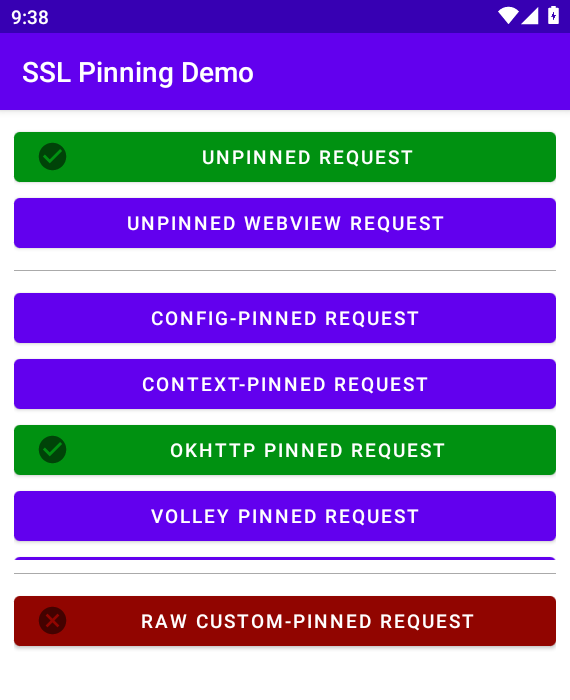
That mismatch is the point: one bypass does not bypass every pinning implementation. The next step would be to identify and hook that custom hash comparison rather than adding unrelated generic hooks.
When Java Frida hooks are not enough
The hooks demonstrated above target Java-layer behavior. If those hooks never fire or the connection still fails, investigate whether the app uses another networking or TLS implementation:
| Signal | Likely boundary |
|---|---|
No okhttp3 / TrustManager classes in the process |
Different HTTP stack |
| Pinning survives every Java TrustManager hook | Native TLS or custom verify in .so |
| Flutter / Dart network errors only | Dart HttpClient / boringssl path |
| Traffic still does not appear in Burp after known pin checks are neutralized | Proxy detection, direct sockets / non-proxy networking, another process, or an unhooked network stack |
Those cases need dedicated reverse-engineering pages and tested scripts. The Flutter row points at Dart's embedded BoringSSL path — Google's fork, not the system OpenSSL stack servers use; see OpenSSL vs LibreSSL vs BoringSSL for how that differs from distro TLS. Keep this article’s tested path on Network Security Config and OkHttp, with custom/raw and Flutter called out as boundaries.
Verify the bypass in Burp
A green button in the demo app tells us that the request succeeded, but we also want to prove that Burp actually intercepted and decrypted it. Open Proxy → HTTP history and select the request to ecc384.badssl.com.
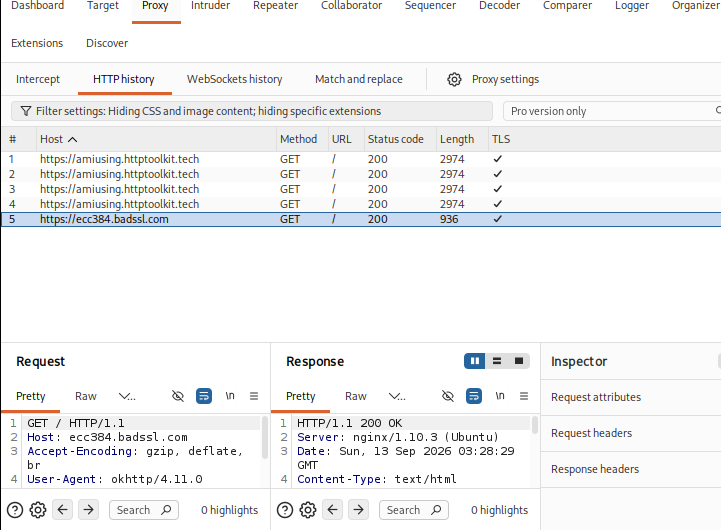
Because Burp successfully intercepted the HTTPS connection, you can now read the HTTP method, host and headers in the request pane:
GET / HTTP/1.1
Host: ecc384.badssl.com
Accept-Encoding: gzip, deflate, br
User-Agent: okhttp/4.11.0
Connection: keep-alive
Burp Logger is useful for quickly checking which hosts were contacted, but the request shown in HTTP history is better evidence because it demonstrates that Burp could read the application's HTTPS request after the bypass.
If you are documenting the test, record:
- Host and path that were pinned
- Pinning mechanism (OkHttp
CertificatePinner, NSC pin-set, custom hash, unknown) - Bypass method (Objection job, Frida script name, overload that fired)
- Evidence (Burp request pane + logcat / Frida console line)
Clear device proxy when you finish so later browsing does not depend on Burp:
adb shell settings put global http_proxy :0Troubleshoot common pinning failures
| Symptom | Likely cause | Fix |
|---|---|---|
| Unpinned and pinned both fail | Proxy unreachable or CA not trusted | Fix listener bind address, http_proxy, and CA install before Frida |
Unpinned works; pinned fails with Certificate pinning failure! |
Certificate pinning confirmed/likely | Identify whether it is NSC, an HTTP library, or custom code; try Objection for Java-layer testing, then use a targeted Frida hook |
| Objection hooks print, button stays red | Session exited or wrong overload / ART path | Keep Objection attached; switch to Frida and log which method runs |
| Frida attaches then immediately exits | Stdin EOF on non-TTY | Keep a FIFO or interactive terminal open |
| OkHttp green; config still red | Different mechanism (NSC vs OkHttp) | Use the NSC script; do not expect one hook set to cover both |
| OkHttp green; raw custom still red | Different pin implementation | Hook the custom checker; do not assume one script covers all buttons |
INSTALL_FAILED_NO_MATCHING_ABIS |
APK lacks the emulator ABI | Use an APK build that includes your ABI (x86 here) or a matching image |
| No traffic in Burp after apparent app success | App may not use the configured proxy / may use direct sockets or another network stack | Verify the app’s actual connection path (proxy settings, process traffic, alternate stacks) |
| TLS still fails after pin hooks fire | Another certificate/TLS validation check remains | Check trust policy, hostname verification, and whether your hook targets the method actually used by the app |
Summary
Certificate pinning should only be investigated after you know that the Android device can reach Burp and trusts its CA. In this lab, the unpinned request succeeded through Burp while the OkHttp request failed with SSLPeerUnverifiedException, allowing us to isolate the OkHttp pin check and bypass it with a targeted Frida hook.
The Network Security Config example required a different approach because it used both a <pin-set> and a restricted trust anchor. The custom raw request continued to fail after the OkHttp bypass, demonstrating that one Frida script does not bypass every pinning implementation.
When testing another app, follow the same process: first verify proxy and CA trust, identify how the failing request performs certificate validation, apply a hook for that mechanism, and finally confirm in Burp that the HTTPS request can be inspected.
References
- Network security configuration — Android Developers
- OWASP MASTG — Testing Network Communication — OWASP Mobile Application Security
- Frida documentation — Frida
- Objection — sensepost
- Objection wiki — using Objection — sensepost (
startformerlyexplore) - Burp Suite documentation — PortSwigger
- HTTP Toolkit Android SSL pinning demo — HTTP Toolkit
Frequently Asked Questions
How do I know an app uses SSL pinning?
First confirm that an unpinned HTTPS request works through the same Burp proxy and CA. Then test the suspected pinned request. Errors such as SSLPeerUnverifiedException: Certificate pinning failure!, or a failure that occurs only for the pinned request, are strong indicators that additional certificate validation is taking place.
Frida script vs Objection?
Objection packages common Frida hooks behind commands such as android sslpinning disable, which is good for a quick check. A Frida script is better when you need to see which overload runs, adjust hooks for a specific OkHttp build, or document exactly what you changed for the report.
Why does the bypass work on one app but not another?
Pinning implementations differ. Hooks that neutralize OkHttp CertificatePinner do not stop a Network Security Config pin-set, a custom certificate hash check, or a native TLS stack. Identify which certificate-validation code the failing request actually uses, then target that implementation rather than assuming the same hook works everywhere.
Does Android require certificate pinning?
No. Platform documentation describes how pinning works when an app opts in, and it discourages indiscriminate pinning for most applications because broken pins and missing backups cause outages. Many apps rely on the system trust store without pinning.
Can I bypass pinning without root?
Root is required for the frida-server workflow demonstrated in this article, not for every possible Frida workflow. On a non-rooted device, testers can instrument an authorized app using approaches such as Frida Gadget / repackaging or a debuggable / test build. Frida’s Android docs describe those non-root paths even though the introductory lab usually starts on a rooted device.
