
| Tested on | Kali GNU/Linux Rolling 2026.2 (kali-rolling) |
|---|---|
| Package | pwsh 7.6.2Invoke-AtomicRedTeam 2.1.0atomics folder from Red Canary (344 technique directories in this lab install) |
| Lab environment | Pentest lab |
| Privilege | Normal user for many discovery atomics; sudo or root only when an atomic’s YAML sets elevation_required |
| Cert prep | CompTIA PenTest+ Objective 2.3 (scripting / BAS concepts) |
| Scope | Install Invoke-AtomicRedTeam on Kali, pick a benign Linux atomic (T1057 process discovery), read the YAML, run it, check telemetry, clean up, map to ATT&CK, and place CALDERA and Infection Monkey beside Atomic. Not a CALDERA or Infection Monkey install guide. Not production BAS against live users. |
| Related guides | Modify Bash and Python recon scripts |
Breach and attack simulation (BAS) is about repeatable control checks, not a one-shot “find everything” engagement. Atomic Red Team gives you small MITRE ATT&CK-mapped procedures you can run, observe, and clean up. CALDERA and Infection Monkey sit in the same conversation, but they solve different problems.
This walkthrough installs Invoke-AtomicRedTeam on Kali, runs one safe Linux atomic end to end, and shows where the other two tools fit when you scale past single tests.
BAS vs penetration testing vs red team
These three labels get mixed in job posts and vendor decks. Keep the intent separate so you pick the right tool and the right report shape:
| Approach | Primary question | Cadence | Typical output |
|---|---|---|---|
| BAS | Do our controls still see this known behavior? | Frequent, often automated | Coverage gaps, alert quality, regression |
| Penetration test | What can we break, and how bad is the impact? | Periodic (weeks/months) | Findings with severity and exploit path |
| Red team | Can we achieve this business objective undetected? | Campaign-length | Narrative of access paths and detection misses |
BAS is control validation. You pick known ATT&CK techniques, execute them in a controlled way, and ask whether logging, EDR, SIEM, and response playbooks reacted. A pentest hunts for weaknesses and may chain novel paths. A red team emulates a threat actor against a goal (domain admin, data theft) and often avoids noisy “every technique” runs.
Atomic Red Team is a BAS-friendly library: one technique procedure at a time. It is not a full red-team C2 platform by itself.
What Atomic Red Team is
Atomic Red Team is an open library of small, portable tests mapped to ATT&CK techniques. Each technique folder holds YAML (and markdown) that describes:
- Technique ID and display name
- One or more atomic tests (procedures)
- Supported platforms
- Inputs and dependencies
- Executor commands
- Optional cleanup
Invoke-AtomicRedTeam is the PowerShell runner that loads those YAML files and executes them on Windows, Linux, or macOS (PowerShell 7 on Linux/macOS).
Think of it as a shared lab script catalog: same test ID on a Windows build and a Linux build, same ATT&CK label in your detection ticket.
Install Invoke-AtomicRedTeam on Kali
Confirm PowerShell 7 is available. On this Kali Rolling host it was already installed:
pwsh -NoProfile -Command '$PSVersionTable.PSVersion.ToString()'7.6.2Version 7.6.2 is enough for the module. If pwsh is missing, install PowerShell from Microsoft’s Linux packages first, then continue.
Install as your normal Kali user (not root) so $HOME/AtomicRedTeam lands under /home/kali/ and later discovery tests do not need elevation. This follows the upstream installer workflow. In controlled environments, review or download the installer script before executing it rather than blindly piping remote content into IEX.
pwsh -NoProfile -Command 'IEX (IWR "https://raw.githubusercontent.com/redcanaryco/invoke-atomicredteam/master/install-atomicredteam.ps1" -UseBasicParsing); Install-AtomicRedTeam -getAtomics -Force -InstallPath "$HOME/AtomicRedTeam"'Installation of Invoke-AtomicRedTeam is complete. You can now use the Invoke-AtomicTest function
See Wiki at https://github.com/redcanaryco/invoke-atomicredteam/wiki for complete detailsList the install path so you know where YAML and the module live:
ls -la "$HOME/AtomicRedTeam"total 24
drwxrwxr-x 4 kali kali 4096 Sep 5 06:19 .
drwx------ 7 kali kali 4096 Sep 5 06:18 ..
drwxrwxr-x 347 kali kali 12288 Sep 5 06:19 atomics
drwxrwxr-x 8 kali kali 4096 Sep 5 06:18 invoke-atomicredteamYou should see atomics (test definitions) and invoke-atomicredteam (the module), both owned by your lab user. On this lab install the atomics tree held 344 technique directories.
Import the module once per PowerShell session, then confirm the module file is where you expect:
pwsh -NoProfile -Command 'Import-Module "$HOME/AtomicRedTeam/invoke-atomicredteam/Invoke-AtomicRedTeam.psd1" -Force; Test-Path "$HOME/AtomicRedTeam/invoke-atomicredteam/Invoke-AtomicRedTeam.psd1"'TrueInvoke-AtomicTest prints PathToAtomicsFolder = /home/kali/AtomicRedTeam/atomics on each run when you install under that home directory. Keep that path pointed at the same atomics tree if you move the folder.
Choose a safe atomic for the lab
Start with a discovery or execution test that does not change firewall policy, dump credentials, or install persistence. On Linux, T1057 Process Discovery test 1 (ps) is a good first pick:
- It only runs
ps/ps aux - It writes process lists to
/tmp/loot.txt - It ships an explicit cleanup that deletes that file
- It maps cleanly to ATT&CK Process Discovery
List Linux-applicable tests for the technique. Invoke-AtomicRedTeam filters to the current OS by default:
pwsh -NoProfile -Command 'Import-Module "$HOME/AtomicRedTeam/invoke-atomicredteam/Invoke-AtomicRedTeam.psd1" -Force; Invoke-AtomicTest T1057 -ShowDetailsBrief'PathToAtomicsFolder = /home/kali/AtomicRedTeam/atomics
T1057-1 Process Discovery - psOnly the Linux/sh procedure shows on Kali. Windows tests such as tasklist stay hidden until you run on Windows or pass -anyOS for review (do not execute Windows-only commands on Linux).
Another gentle option is T1082-8 Hostname Discovery (hostname only, no cleanup file). Use T1057-1 when you want to practice cleanup.
Read the atomic definition before you run it
Upstream guidance is blunt: you are responsible for understanding a test before you execute it. Open the YAML (or use -ShowDetails) and check the same fields every time.
Show the full details for test 1:
pwsh -NoProfile -Command 'Import-Module "$HOME/AtomicRedTeam/invoke-atomicredteam/Invoke-AtomicRedTeam.psd1" -Force; Invoke-AtomicTest T1057 -TestNumbers 1 -ShowDetails'PathToAtomicsFolder = /home/kali/AtomicRedTeam/atomics
[********BEGIN TEST*******]
Technique: Process Discovery T1057
Atomic Test Name: Process Discovery - ps
Atomic Test Number: 1
Atomic Test GUID: 4ff64f0b-aaf2-4866-b39d-38d9791407cc
Description: Utilize ps to identify processes.
Upon successful execution, sh will execute ps and output to /tmp/loot.txt.
Attack Commands:
Executor: sh
ElevationRequired: False
Command:
ps >> #{output_file}
ps aux >> #{output_file}
Command (with inputs):
ps >> /tmp/loot.txt
ps aux >> /tmp/loot.txt
Cleanup Commands:
Command:
rm #{output_file}
Command (with inputs):
rm /tmp/loot.txt
[!!!!!!!!END TEST!!!!!!!]ElevationRequired: False matches the Privilege row: run this atomic as your normal user. Only reach for sudo when a different YAML sets elevation to true.
Read those blocks as a checklist:
| Field | What you confirm |
|---|---|
| Technique | ATT&CK ID and name for tickets and detection rules |
| Supported platforms | Linux/macOS/Windows; skip mismatches |
| Inputs | Defaults such as /tmp/loot.txt; override with -InputArgs if needed |
| Dependencies | -CheckPrereqs / -GetPrereqs when tools or files must exist |
| Execution | Exact commands and whether elevation is required |
| Cleanup | Commands that reverse file drops or temporary state |
The matching YAML excerpt on disk looks like this:
- name: Process Discovery - ps
  auto_generated_guid: 4ff64f0b-aaf2-4866-b39d-38d9791407cc
  description: |
    Utilize ps to identify processes.
    Upon successful execution, sh will execute ps and output to /tmp/loot.txt.
  supported_platforms:
  - linux
  - macos
  input_arguments:
    output_file:
      description: path of output file
      type: path
      default: /tmp/loot.txt
  executor:
    command: |
      ps >> #{output_file}
      ps aux >> #{output_file}
    cleanup_command: |
      rm #{output_file}
    name: sh
If elevation is required and your engagement forbids it, stop. If cleanup is empty, plan your own revert steps before you run.
Confirm prerequisites next. This test has none beyond ps:
pwsh -NoProfile -Command 'Import-Module "$HOME/AtomicRedTeam/invoke-atomicredteam/Invoke-AtomicRedTeam.psd1" -Force; Invoke-AtomicTest T1057 -TestNumbers 1 -CheckPrereqs'PathToAtomicsFolder = /home/kali/AtomicRedTeam/atomics
CheckPrereq's for: T1057-1 Process Discovery - ps
Prerequisites met: T1057-1 Process Discovery - psPrerequisites met means you can invoke without -GetPrereqs. When a test downloads helpers, run -GetPrereqs first on the lab host only.
Run the test on a machine with logging
Use a disposable lab VM that resembles the build you care about. If you have EDR or a SIEM agent, confirm it is online before the run. Without a commercial sensor, still capture an execution log so you have a timestamp to hunt in local logs.
Remove any leftover loot file and an old execution CSV so this run has a clean artifact path:
rm -f /tmp/loot.txt /tmp/art-exec.csvrm prints nothing when those paths are already absent. Tag the journal next so you have a human-readable marker near the atomic:
logger -t art-bas "ART start T1057-1"logger also stays quiet on success; it only writes a syslog or journal line with the art-bas tag. Run the atomic with an execution log path:
pwsh -NoProfile -Command 'Import-Module "$HOME/AtomicRedTeam/invoke-atomicredteam/Invoke-AtomicRedTeam.psd1" -Force; Invoke-AtomicTest T1057 -TestNumbers 1 -ExecutionLogPath /tmp/art-exec.csv'PathToAtomicsFolder = /home/kali/AtomicRedTeam/atomics
Executing test: T1057-1 Process Discovery - ps
Exit code: 0
Done executing test: T1057-1 Process Discovery - psExit code 0 means the shell commands finished. That is not the same as “security control failed.” Confirm the artifact the YAML promised:
ls -la /tmp/loot.txt-rw-rw-r-- 1 kali kali 49343 Sep 5 06:20 /tmp/loot.txtThe file is present, non-empty, and owned by kali, not root. Peek at the first process lines. The ps command output is what this atomic stages for discovery:
head -5 /tmp/loot.txt PID TTY TIME CMD
1025766 ? 00:00:00 bash
1026133 ? 00:00:06 pwsh
1026262 ? 00:00:00 sh
1026263 ? 00:00:00 psThose lines are ordinary process inventory. An attacker (or purple team) uses the same signal to decide what to kill, inject, or avoid.
Verify telemetry (command success is not enough)
Ask three questions after every atomic:
- Did the security control see the behavior?
- What telemetry exists (process create, file write, script block, syslog)?
- Did an alert or detection rule fire, or only raw logs?
On this Kali lab without a commercial EDR, the ART CSV still records the run. Inspect it:
cat /tmp/art-exec.csv"Execution Time (UTC)","Execution Time (Local)","Technique","Test Number","Test Name","Hostname","IP Address","Username","GUID","ProcessId","ExitCode"
"2026-09-05T10:20:10Z","2026-09-05T06:20:10Z","T1057","1","Process Discovery - ps","kali","System.Object[]","kali","4ff64f0b-aaf2-4866-b39d-38d9791407cc","1026262","0"You get technique, test number, GUID, PID, username kali, and exit code. Use the UTC timestamp when you query SIEM. The IP Address field may show a PowerShell object string on Linux; treat hostname and GUID as the reliable keys.
Confirm the journal marker you planted:
journalctl -t art-bas -n 3 --no-pager -qSep 05 06:20:04 kali art-bas[1026132]: ART start T1057-1That proves local logging received a correlated message. On a production-like endpoint you would also search for:
- Process creation for
ps/ps aux(Sysmon EID 1, auditdEXECVE, EDR process events) - File create/write on
/tmp/loot.txt - Parent process =
pwshorshlaunched by Invoke-AtomicRedTeam
If exit code is 0 and no process or file telemetry appears, the gap is collection or filtering, not “the atomic failed.” If telemetry exists but no alert fires, the gap is detection logic. Record that distinction in your notes the same way you would in a penetration test report.
The diagram below is the loop this article practices: read the YAML, run one test, check telemetry, then clean up.
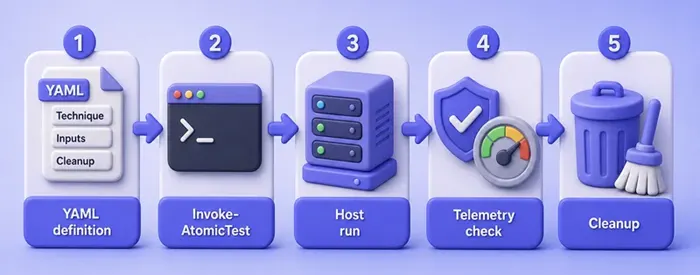
EDR console screenshots differ by product. On a sensor-backed endpoint, capture the process and file events that match the ART CSV timestamp before you move on.
Clean up after the atomic
Cleanup is part of the workflow, not an optional afterthought. Invoke the same test number with -Cleanup:
pwsh -NoProfile -Command 'Import-Module "$HOME/AtomicRedTeam/invoke-atomicredteam/Invoke-AtomicRedTeam.psd1" -Force; Invoke-AtomicTest T1057 -TestNumbers 1 -Cleanup'PathToAtomicsFolder = /home/kali/AtomicRedTeam/atomics
Executing cleanup for test: T1057-1 Process Discovery - ps
Done executing cleanup for test: T1057-1 Process Discovery - psVerify the loot file is gone:
ls -la /tmp/loot.txtls: cannot access '/tmp/loot.txt': No such file or directoryCleanup removed /tmp/loot.txt. If an atomic has no cleanup_command, document what you created and delete it yourself before you leave the lab session. Never assume “Exit code: 0” undid side effects.
Map the run to ATT&CK
Close the loop with a short technique → detection → observation note:
| Layer | This lab run |
|---|---|
| Technique | T1057 Process Discovery |
| Procedure | Atomic test 1: ps / ps aux to /tmp/loot.txt |
| Expected detection | Process create for ps; file write under /tmp/loot.txt; optional alert “process discovery via ps” |
| Observation | ART CSV GUID 4ff64f0b-…, user kali, exit 0; journal tag art-bas; /tmp/loot.txt owned by kali then removed by cleanup. No commercial EDR on this Kali host. Re-run on a sensor-backed endpoint for alert proof |
That table is enough for purple-team tracking. Expand it when you promote the same atomic to a Windows build with Sysmon or corporate EDR.
Scale with Invoke-AtomicRedTeam
Once one test is boring, scale carefully:
- By technique:
Invoke-AtomicTest T1082runs applicable tests for that technique (still read each one) - By number:
-TestNumbers 1,3for a short list - By GUID:
-TestGuidswhen you pin an exact procedure across atomics updates - Remote session:
-Sessionagainst PSRemoting targets you are authorized to use - Timeouts:
-TimeoutSecondsfor hung network tests - Logging: keep
-ExecutionLogPathfor every batch
Do not start by chaining dozens of techniques. Noise floods the SOC, cleanup debt grows, and you cannot tell which procedure produced which alert. Graduate from one atomic → a small ATT&CK tactic set → an orchestration platform when you need multi-host campaigns.
PowerShell skills for remoting and AD-oriented modules live in the PowerShell for pentesters lesson; this page stays on Atomic as the BAS unit test.
Where CALDERA fits
Apache CALDERA (v5.x; this research checked v5.3.0) is an adversary-emulation platform, not a folder of one-shot scripts.
Mental model:
| CALDERA piece | Role |
|---|---|
| Server | API + Magma UI; keep it off the public internet |
| Agents | Implant on endpoints (Sandcat is the common default) |
| Abilities | Individual ATT&CK-mapped actions (can include Atomic content via plugins) |
| Adversaries | Ordered packs of abilities (phases / atomic ordering) |
| Operations | A run of an adversary against selected agents |
| Planners | How the next ability is chosen (batch, buckets, and others) |
Use CALDERA when you need chained behavior across hosts with planning and operation history. Use Atomic when you need a single reproducible procedure for a detection ticket. CALDERA can consume Atomic-style abilities; that does not make Atomic and CALDERA the same product.
This article does not install CALDERA. Stand it up only in an isolated lab, patch to current 5.x (security advisories have applied to exposed servers), and treat the web UI as sensitive infrastructure.
Where Infection Monkey fits
Infection Monkey (lab check: v2.3.0) is an open BAS tool aimed at environment exposure, lateral movement, and control testing. A Monkey Island server directs agents that try to propagate and report how far they got.
Compared with Atomic:
- Atomic asks: “Does this one ATT&CK procedure produce telemetry?”
- Infection Monkey asks: “How far can an automated breach walk in this network, and which controls stop it?”
It is noisy by design when left unbounded. Scope networks, credentials, and exploit modules the same way you would scope a pentest. Do not treat it as a quiet purple-team unit test.
Compare Atomic Red Team, CALDERA, and Infection Monkey
The three tools sit in different layers of the same BAS conversation:
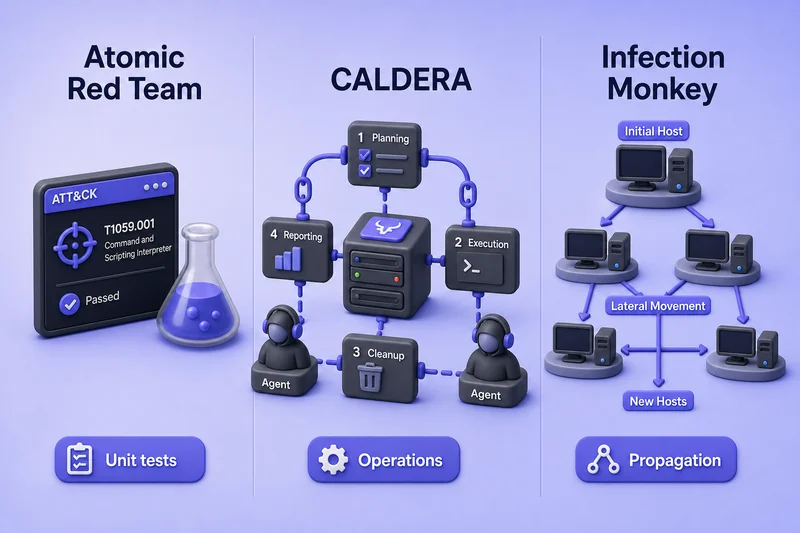
Atomic answers one ATT&CK procedure. CALDERA runs multi-step operations with agents. Infection Monkey pressures how far a breach can walk. The table spells out the same split in operator terms.
| Atomic Red Team | CALDERA | Infection Monkey | |
|---|---|---|---|
| Best for | Single ATT&CK procedure validation | Multi-step adversary operations | Automated breach / lateral-movement resilience |
| Unit of work | Atomic test (YAML) | Operation over abilities/agents | Propagation run on Monkey Island |
| ATT&CK mapping | First-class per test | First-class via abilities/adversaries | Partial / scenario-oriented |
| Operator effort | Low per test; you supply detection review | Medium (server, agents, planners) | Medium (Island + network scope) |
| Cleanup | Per-test cleanup_command when defined |
Operation stop + agent hygiene | Stop monkeys; revert lab state |
| Not a substitute for | Full red-team narrative | One-line detection unit tests | Quiet single-host ATT&CK proofs |
Pick Atomic to tune a rule. Pick CALDERA to rehearse a campaign. Pick Infection Monkey to stress segmentation and post-breach controls. Calling all three “the same BAS tool” hides those jobs.
Common mistakes
| Mistake | Why it hurts | Fix |
|---|---|---|
| Running atomics on production | Real users, real data, real outage risk | Dedicated lab or explicitly authorized test hosts only |
Skipping the YAML / -ShowDetails |
Unexpected elevation, network calls, or persistence | Read technique, platforms, inputs, cleanup every time |
| Treating exit code 0 as “EDR failed” | Command success ≠ missed detection | Check telemetry and alerts separately |
| Testing with no logging | You cannot measure controls | Online EDR/SIEM or at least ART CSV + host audit logs |
| Chaining too many techniques first | Alert fatigue and unclear ownership | One atomic → verify → cleanup → then expand |
| Forgetting cleanup | Leftover files and lingering IOCs | Always run -Cleanup and verify artifacts are gone |
Troubleshooting
| Symptom | Likely cause | Fix |
|---|---|---|
pwsh: command not found |
PowerShell 7 not installed | Install powershell from Microsoft’s Linux repo, then retry |
| Module not found after install | Wrong path or new shell without import | Import-Module "$HOME/AtomicRedTeam/invoke-atomicredteam/Invoke-AtomicRedTeam.psd1" (expect /home/kali/AtomicRedTeam/... for the Kali user) |
No Linux tests in -ShowDetailsBrief |
Technique has no Linux atomics, or path wrong | Confirm PathToAtomicsFolder; try another technique such as T1057 or T1082 |
| Prerequisites failed | Missing dependency binary or file | Run -GetPrereqs on the lab host; do not pull payloads onto production |
/tmp/loot.txt missing after invoke |
Wrong test number, failed executor, or custom -InputArgs |
Re-run -ShowDetails and confirm the resolved output path |
| Cleanup leaves files | Atomic has no cleanup, or path override | Delete artifacts manually; file a note for that GUID |
Summary
Atomic Red Team is the right starting point when you want repeatable ATT&CK unit tests for detection. On Kali you install Invoke-AtomicRedTeam with PowerShell 7 as your normal user, pick a benign Linux procedure such as T1057 process discovery, read the YAML (including ElevationRequired), run it with an execution log, ask whether telemetry and alerts appeared, then clean up.
BAS is not a pentest and not a red team. Exit code 0 only means the procedure ran. The security question is whether your controls saw it. CALDERA covers chained adversary operations with agents and planners; Infection Monkey covers automated exposure and lateral-movement pressure. Keep those roles distinct when you design a validation program.
Next step: re-run the same GUID on a Windows lab endpoint with your EDR connected, or move a short list of verified atomics into a CALDERA adversary once single-test detections are stable.
References
- Atomic Red Team — ATT&CK-mapped atomics library
- Invoke-AtomicRedTeam — PowerShell execution framework
- Installing Invoke-AtomicRedTeam (wiki)
- MITRE ATT&CK — technique catalog
- Apache CALDERA — adversary emulation platform (v5.x)
- Infection Monkey — open BAS / breach simulation
Frequently Asked Questions
Is Atomic Red Team the same as a penetration test?
No. Atomic Red Team runs known ATT&CK procedures to validate detection and controls. A penetration test searches for exploitable weaknesses and business impact. You can use atomics during a purple-team phase of an engagement, but the goals differ.
Does a successful atomic mean my EDR failed?
Not by itself. Exit code 0 means the test commands finished. Failure of a security control means missing telemetry, a missing alert, or both. Always check logs and detections after the run.
Can I run Atomic Red Team on Kali Linux?
Yes. Install PowerShell 7, then Invoke-AtomicRedTeam with the atomics folder. Linux-supported tests execute through sh or bash executors. Windows-only tests need a Windows host.
How is CALDERA different from Atomic Red Team?
Atomic Red Team is a library of individual ATT&CK tests. CALDERA is a platform that runs multi-step operations with agents, abilities, adversaries, and planners. CALDERA may incorporate Atomic-style abilities, but it is built for campaign-style emulation.
What is Infection Monkey used for in BAS?
Infection Monkey automates breach and lateral-movement style testing to show how far an attacker could propagate and which controls stop movement. It is broader and noisier than a single Atomic procedure.
Do I need to run cleanup after every atomic?
Yes whenever the YAML defines cleanup, and you should still revert any side effects you introduced when it does not. Leftover files and tools confuse later tests and can look like real attacker residue.
