
| Tested on | Kali GNU/Linux Rolling 2026.2 (kali-rolling) |
|---|---|
| Package | metasploit-framework 6.4.135-0kali1sliver 1.7.1-0kali4 (package present; concepts below)Python 3.13.12 teaching controller in this lesson |
| Lab environment | Pentest lab |
| Privilege | Normal user for the Python lab; sudo only for package installs |
| Cert prep | CompTIA PenTest+ PT0-003 — post-exploitation / C2 concepts |
| Scope | Compare Sliver, Mythic, Metasploit, and how CALDERA fits beside them. Short C2 basics (vs reverse shell, architecture, sessions/beacons, transports). Compact localhost lab proves check-in and a hostname task only. Not implant generation, redirectors, evasion, persistence, or full Mythic/Sliver installs. |
| Related guides | Post-exploitation persistence |
After you get a foothold, you still need a way to talk to that host. Command and control (C2) is that remote channel. This page is mainly a comparison of frameworks you will hear in PenTest+ and modern red-team labs, with just enough architecture so the table makes sense.
hostname task. Do not use it as a playbook for stealth, persistence, or bypassing defenses.
What C2 means in cybersecurity
Picture a remote-control loop, not one endless shell:
- Something on the target phones home.
- Your server accepts that check-in.
- You queue a task.
- The agent runs it and sends the output back.
Common names for those parts:
- Agent / implant: the program on the endpoint
- Beacon: one way that agent can talk (periodic check-in)
- Transport: how messages travel (HTTP(S), mTLS, DNS, and similar)
- Listener / team server: accepts check-ins and stores jobs
- Operator: you at the console
If an agent only calls home, pulls a hostname job, and posts the result, that is still C2.
In larger operations, operators may place infrastructure between the public edge and the team server. Redirector design and OPSEC are outside this beginner overview.
C2 vs reverse shell
A reverse shell is one interactive pipe. You type, the host replies, and that is mostly it.
A C2 framework adds a control plane around that idea:
| Reverse shell | C2 framework | |
|---|---|---|
| Channel | One interactive stdin/stdout pipe | Task queue, sessions, or periodic beacons |
| State | Little beyond the open socket | Agents, jobs, loot, logs, often multi-user |
| Scale | One host, one shell | Many agents, shared operator view |
| Transports | Often a single TCP path | Multiple C2 channels and failover options |
| Collaboration | Shared terminal if you pass the socket | Roles, ops, and audit trails in many tools |
| Typical use | Quick foothold or debug | Sustained post-exploitation or adversary emulation |
You still see reverse shells inside frameworks (Metasploit shell payloads, for example). The framework is the bookkeeping and tasking layer around the channel.
Compare dedicated C2 frameworks with CALDERA
Use this table when you came here to choose a tool. Metasploit teaches C2-shaped sessions. Sliver and Mythic are dedicated modern C2 platforms. CALDERA sits beside them as adversary emulation, not as the same kind of implant-focused C2.
| Metasploit | Sliver | Mythic | CALDERA | |
|---|---|---|---|---|
| Role | Exploit + post-exploitation platform | Dedicated modern implant C2 | Collaborative modular C2 | Adversary-emulation / BAS platform |
| UI | msfconsole (+ optional web) |
CLI client | Web UI | Web UI |
| Agent model | Sessions (shell / Meterpreter) | Session + beacon implants | Callbacks via C2 profiles | Agents running ATT&CK abilities |
| ATT&CK mapping | Not ATT&CK-centric; techniques are usually mapped during reporting | Not a first-class ATT&CK workflow; operators map activity in notes/reporting | ATT&CK tagging can be associated with commands/tasks, but ATT&CK is not the primary operating model | First-class ATT&CK abilities |
| Collaboration | Shared console habits | Multi-operator server | Built for team ops | Built for ops / purple team |
| Best use | Learn handlers and sessions | Dedicated red-team C2 lab | Team / modular C2 | ATT&CK-shaped emulation |
Havoc, AdaptixC2, and commercial Cobalt Strike also appear in modern red-team comparisons, but this article stays with the four frameworks relevant to this PenTest+ learning path.
Covenant appears in older training material, but newer open-source C2 discussions more often focus on Sliver, Mythic, Havoc, and similar actively used projects.
Which one to learn first
| If you are… | Start with |
|---|---|
| New to post-exploitation | Metasploit handlers and sessions |
| Want dedicated modern C2 | Sliver |
| Need team / web modularity | Mythic |
| Need ATT&CK adversary emulation | CALDERA |
C2 architecture
Follow four hops, left to right:
- Operator console: where you type tasks
- C2 server + listeners: where state and jobs live
- Transport: how traffic crosses the network
- Agents on endpoints: what check in and run work
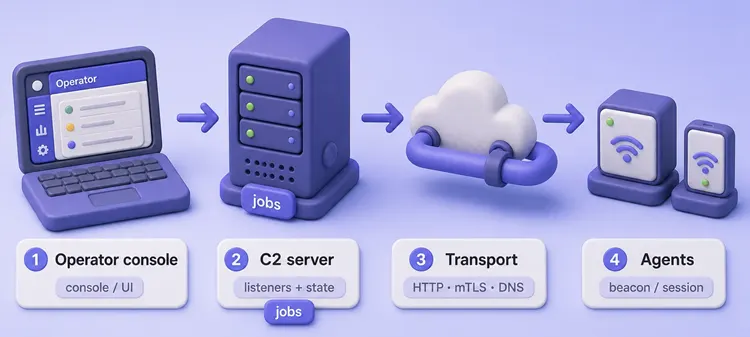
You usually do not open a raw socket straight to the agent. The server handles listeners, auth, job storage, and the transcript you paste into a report.
Sessions vs beacons
Almost every modern framework offers two timing styles:
| Model | Behavior | When people use it |
|---|---|---|
| Session | Interactive, near real-time channel | Hands-on work, pivots, live debugging |
| Beacon | Periodic check-in; tasks wait until the next call home | Longer dwell, less constant chatter, queued jobs |
Quick read:
- Session: you stay connected and work live
- Beacon: the agent sleeps, wakes, grabs tasks, then sleeps again
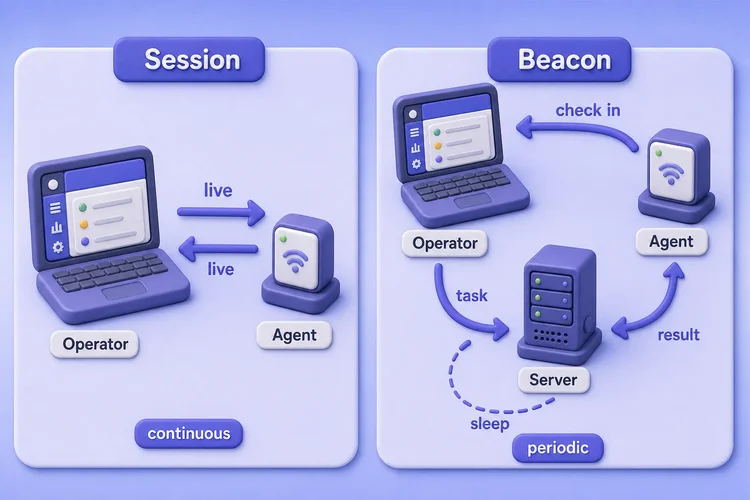
Say which model you used in the report. Defenders see different connection patterns for each.
Common C2 transports
A transport is only the delivery method between agent and listener. Defenders care because each one leaves a different trail.
| Transport | What it is | Lab / ops note |
|---|---|---|
| HTTP / HTTPS | Agent posts or long-polls over web-looking traffic | Common egress path; TLS context and domains matter for detection |
| mTLS | Both sides present certificates | Strong mutual auth; often used for operator↔server and some implant channels |
| DNS | Tasking and results stuffed into DNS queries/responses | Lower-bandwidth and often more detectable when tasking and result volume grows |
| Other | WireGuard, named pipes, cloud APIs, chat bots in some stacks | Treat as protocol choices, not magic invisibility |
Out of scope here: domain fronting, traffic shaping, and evasion recipes. For exams and labs, name the transport and which logs should show it.
Metasploit: handlers and sessions
Most people meet C2-shaped tooling first in Metasploit. It ships on Kali, and the handler/session idea is easy to see.
Metasploit is primarily an exploitation and post-exploitation framework. Its handlers and sessions teach C2 concepts, but it is not positioned like a dedicated team C2 such as Sliver or Mythic.
Confirm the framework version on your Kali host:
msfconsole -q -x 'version; exit'Framework: 6.4.135-dev
Console : 6.4.135-devexploit/multi/handler does not exploit anything. It only listens. When a payload calls back, Metasploit opens a session you can use.
Inspect the handler and a reverse TCP payload bound to localhost:
msfconsole -q -x 'use exploit/multi/handler; set PAYLOAD linux/x64/shell_reverse_tcp; set LHOST 127.0.0.1; set LPORT 4444; show options; exit'PAYLOAD => linux/x64/shell_reverse_tcp
LHOST => 127.0.0.1
LPORT => 4444
Payload options (linux/x64/shell_reverse_tcp):
Name Current Setting Required Description
---- --------------- -------- -----------
LHOST 127.0.0.1 yes The listen address (an interface may be specified)
LPORT 4444 yes The listen portThe usual flow:
- Set
LHOSTandLPORT - Run the handler
- Catch a session
- Run shell commands or post modules
Meterpreter adds structured commands on top of a session. For a full exploit path against a lab target, use the Metasploit tutorial.
Sliver: dedicated modern C2
Sliver (Bishop Fox) is a current open-source implant C2. Kali packages it as sliver.
What matters for comparison:
- Client/server split: operator console talks to a server
- Implants can use mTLS, HTTP(S), DNS, and WireGuard
- Sessions (interactive) and beacons (async tasking)
- Multi-operator server for shared labs
Check the package on Kali:
dpkg-query -W -f='${Package} ${Version}\n' sliversliver 1.7.1-0kali4Pieces to keep straight:
sliver-server: database, listeners, job statesliver-client: operator console over gRPC with mTLS- Port
31337: default operator/server multiplayer port. Current Sliver can expose direct gRPC/mTLS over TCP, or optionally wrap multiplayer with WireGuard; this is separate from implant C2 listeners - Implants: check in as sessions or beacons over the C2 listeners you start
Use Sliver when you want a maintained dedicated C2 with modern transports. Keep first runs on an isolated lab.
Mythic: modular team C2
Mythic is built for teams and runs mostly in Docker.
Mythic’s main differentiator is extensibility: agents and C2 profiles are separate components, so teams can swap or build them without replacing the core platform.
How the pieces fit:
- Payload types (agents): separate services
- C2 profiles: separate services that turn a wire protocol into Mythic’s message format
- Core stack includes the Mythic server, PostgreSQL, RabbitMQ, nginx, GraphQL, and supporting containers
- Operators: shared web UI for the operation
Agents check in through whatever C2 profile you installed (HTTP, WebSocket, and many community options). This lesson does not stand up Mythic’s full compose stack. Install it from the official docs when you have Docker resources and an authorized lab VLAN.
Where CALDERA fits
CALDERA (formerly commonly referenced as MITRE CALDERA; also appearing as Apache CALDERA in current upstream branding) is closer to purple-team BAS than “one operator, one implant.”
What it emphasizes:
- Agents (Sandcat and others) run abilities mapped to ATT&CK
- You build adversaries and operations from those abilities
- The goal is often “did detections fire?” not only interactive post-exploitation
Kali packages it as caldera. Put it next to Atomic Red Team when you want repeatable ATT&CK coverage. For Atomic-first BAS on Kali, see the Atomic Red Team tutorial.
Pick CALDERA when you want an ATT&CK-shaped operation. Pick Sliver or Mythic when you need a dedicated C2 session or beacon workflow.
Safe localhost C2 concept lab
This short demo is a tiny Python teaching controller and agent. It is not Sliver or Mythic. It only proves check-in → queue hostname → result log.
Create a working directory:
mkdir -p ~/c2-frameworks-lab/{controller,agent,out} && cd ~/c2-frameworks-labConfirm Python:
python3 --versionPython 3.13.12Save this controller as ~/c2-frameworks-lab/controller/c2_lab_server.py:
#!/usr/bin/env python3
"""Authorized-lab teaching C2 controller. hostname tasking only."""
from __future__ import annotations

import json
import threading
import time
from http.server import BaseHTTPRequestHandler, ThreadingHTTPServer
from pathlib import Path
from urllib.parse import urlparse

HOST, PORT = "127.0.0.1", 8787
STATE = Path(__file__).resolve().parent.parent / "out" / "lab_state.json"
LOCK = threading.Lock()
ALLOWED = {"hostname"}


def load() -> dict:
    if STATE.exists():
        return json.loads(STATE.read_text())
    return {"agents": {}, "tasks": {}, "results": []}


def save(state: dict) -> None:
    STATE.parent.mkdir(parents=True, exist_ok=True)
    STATE.write_text(json.dumps(state, indent=2) + "\n")


class Handler(BaseHTTPRequestHandler):
    def log_message(self, fmt, *args):
        print(f"[{time.strftime('%H:%M:%S')}] {fmt % args}")

    def _json(self, code: int, payload: dict) -> None:
        body = json.dumps(payload).encode()
        self.send_response(code)
        self.send_header("Content-Type", "application/json")
        self.send_header("Content-Length", str(len(body)))
        self.end_headers()
        self.wfile.write(body)

    def _body(self) -> dict:
        n = int(self.headers.get("Content-Length", "0"))
        return json.loads(self.rfile.read(n).decode()) if n else {}

    def do_POST(self):
        path, data = urlparse(self.path).path, self._body()
        with LOCK:
            state = load()
            if path == "/checkin":
                aid = data.get("agent_id", "unknown")
                state["agents"][aid] = {
                    "last_seen": time.strftime("%Y-%m-%dT%H:%M:%S"),
                    "host": data.get("host", ""),
                    "user": data.get("user", ""),
                }
                task = state["tasks"].pop(aid, None)
                save(state)
                self._json(200, {"ok": True, "task": task})
                return
            if path == "/queue":
                aid, cmd = data.get("agent_id"), data.get("cmd")
                if not aid or cmd not in ALLOWED:
                    self._json(400, {"ok": False, "error": "cmd not allowlisted"})
                    return
                task = {"task_id": f"t-{int(time.time())}", "cmd": cmd}
                state["tasks"][aid] = task
                save(state)
                self._json(200, {"ok": True, "task": task})
                return
            if path == "/result":
                state["results"].append(
                    {
                        "agent_id": data.get("agent_id"),
                        "task_id": data.get("task_id"),
                        "output": data.get("output", ""),
                        "at": time.strftime("%Y-%m-%dT%H:%M:%S"),
                    }
                )
                save(state)
                self._json(200, {"ok": True})
                return
        self._json(404, {"ok": False})


if __name__ == "__main__":
    print(f"Teaching C2 on http://{HOST}:{PORT}")
    ThreadingHTTPServer((HOST, PORT), Handler).serve_forever()
Save this agent as ~/c2-frameworks-lab/agent/lab_agent.py:
#!/usr/bin/env python3
"""Authorized-lab teaching agent. hostname only."""
from __future__ import annotations

import json
import os
import socket
import subprocess
import time
import urllib.request

CONTROLLER = "http://127.0.0.1:8787"
AGENT_ID = "lab-endpoint-1"
ALLOWED = {"hostname": ["hostname"]}


def post(path: str, payload: dict) -> dict:
    req = urllib.request.Request(
        f"{CONTROLLER}{path}",
        data=json.dumps(payload).encode(),
        headers={"Content-Type": "application/json"},
        method="POST",
    )
    with urllib.request.urlopen(req, timeout=5) as resp:
        return json.loads(resp.read().decode())


def main() -> None:
    host = socket.gethostname()
    user = os.environ.get("USER", "")
    print(f"Agent {AGENT_ID} as {user}@{host}")
    while True:
        reply = post("/checkin", {"agent_id": AGENT_ID, "host": host, "user": user})
        task = reply.get("task")
        if task:
            cmd = task["cmd"]
            print(f"Got task {task['task_id']}: {cmd}")
            output = subprocess.check_output(ALLOWED[cmd], text=True).strip()
            post(
                "/result",
                {"agent_id": AGENT_ID, "task_id": task["task_id"], "output": output},
            )
            print(f"Posted result: {output}")
            break
        time.sleep(2)


if __name__ == "__main__":
    main()
Start the controller and leave that terminal open until it binds http://127.0.0.1:8787:
python3 ~/c2-frameworks-lab/controller/c2_lab_server.pyIn a second terminal, queue the hostname task. The curl command cheat sheet covers -X, -H, and -d if you want more flag detail:
curl -sS -X POST http://127.0.0.1:8787/queue \
  -H 'Content-Type: application/json' \
-d '{"agent_id":"lab-endpoint-1","cmd":"hostname"}'{"ok": true, "task": {"task_id": "t-1788617655", "cmd": "hostname"}}Run the agent. It checks in as your current user, pulls the task, runs hostname without a shell, and posts the result:
python3 ~/c2-frameworks-lab/agent/lab_agent.pyAgent lab-endpoint-1 as kali@kali
Got task t-1788617655: hostname
Posted result: kaliRead the shared state file:
cat ~/c2-frameworks-lab/out/lab_state.json{
"agents": {
"lab-endpoint-1": {
"last_seen": "2026-09-05T10:14:15",
"host": "kali",
"user": "kali"
}
},
"tasks": {},
"results": [
{
"agent_id": "lab-endpoint-1",
"task_id": "t-1788617655",
"output": "kali",
"at": "2026-09-05T10:14:15"
}
]
}Look for:
- One agent record (
usermatches who ran the agent) - Empty
tasksafter delivery - A
resultsentry with the hostname
Stop the controller with Ctrl+C when you are done.
How defenders detect C2
Nobody hunts for a tool logo. Look for correlated signals:
| Signal | Why it matters |
|---|---|
| Periodic callback timing | Matches beacon behavior |
| New process + outbound connection | Endpoint and network correlation |
| Rare destination or domain | Unusual C2 infrastructure |
| DNS entropy or regular odd query rates | DNS C2 clue |
| TLS fingerprint or odd cert/SNI context | Unusual client stack |
| Long-lived process with intermittent network | Beacon implant pattern |
One HTTPS session to a common SaaS brand is weak evidence on its own. A new binary plus regular callbacks plus odd DNS is worth escalating. This overview stops at patterns; it does not implement JA3/JA4 or other fingerprint recipes.
Troubleshooting
| Symptom | Likely cause | Fix |
|---|---|---|
curl cannot connect to :8787 |
Controller not running or bound elsewhere | Start c2_lab_server.py; confirm ss -ltn | grep 8787 shows 127.0.0.1:8787 |
Queue returns cmd not allowlisted |
Command outside the teaching allowlist | Use only hostname |
| Agent prints nothing forever | No task queued for that agent_id |
Queue with lab-endpoint-1 before starting the agent |
| Metasploit handler idle | No payload called back, or wrong LHOST/LPORT | Keep study on 127.0.0.1; match payload host/port to the handler |
| Sliver client cannot reach the server | Server not running, wrong operator config, or package/startup issue | Confirm sliver package version and server logs; for serious use prefer upstream installation and docs |
Summary
C2 is the remote-control loop after access: agent check-in, server state, operator tasking, and logged results. A reverse shell is one interactive pipe. Dedicated frameworks add multi-agent state, transports, and usually collaboration.
How to choose:
- Metasploit for handlers and sessions when you are new
- Sliver for dedicated modern implant C2
- Mythic when you need modular agents, C2 profiles, and a team web UI
- CALDERA when the goal is ATT&CK-shaped adversary emulation beside Atomic Red Team
The localhost lab only proved check-in and a hostname result. Use it to lock the architecture, then move to an authorized Metasploit session lab or a benign Atomic technique when you want real tool practice.
References
- Bishop Fox Sliver — official repository and wiki
- Mythic documentation — architecture, agents, and C2 profiles
- CALDERA — adversary emulation platform (MITRE / Apache CALDERA references)
- Rapid7 Metasploit Framework — handlers, payloads, and sessions
- MITRE ATT&CK — Command and Control — tactic overview for mapping detections
Frequently Asked Questions
What is the difference between a beacon and an implant?
An implant (or agent) is the program on the endpoint. A beacon is one communication mode: periodic check-in, pull tasks, return results, then sleep. The same implant may also support an interactive session mode.
Is Metasploit a C2 framework?
Metasploit is mainly an exploitation and post-exploitation framework. Its handlers and sessions still behave like a C2 control plane in labs and pentests, which is why training puts it beside dedicated C2 products.
Is CALDERA a C2 framework?
CALDERA is an adversary-emulation platform. Agents can look C2-like while they run ATT&CK abilities, but its primary job is purple-team style operations and detection validation, not classic implant-focused red-team C2 like Sliver or Mythic.
Sliver vs Mythic — which should I learn first?
Start with Metasploit’s handler model if you are new. Try Sliver next for a dedicated implant-style CLI C2. Pick Mythic when you want a web UI and separate agent/C2-profile containers for team work.
How do defenders detect HTTP or DNS C2?
They look for regular callback timing, unusual domains or certificates, DNS that does not match normal clients, and host telemetry that ties a new process to that traffic. No single packet proves C2 alone.
