
| Tested on | Kali GNU/Linux Rolling 2026.2 (kali-rolling) |
|---|---|
| Package | adb 1.0.41 / 34.0.5-debianapktool 2.7.0drozer==3.1.0 (optional verification)InsecureShop 1.0 (com.insecureshop, targetSdkVersion 29) |
| Applies to | Kali Linux with adb; Android emulator or owned test device |
| Lab environment | Pentest lab Genymotion Android pentest lab |
| Privilege | Normal user for adb and Drozer on Kali; Drozer Agent runs as a normal Android app |
| Cert prep | CompTIA PenTest+ (mobile specialized systems) |
| Scope | Explain android:exported, Android 12+ rules, and how to enumerate and test Activities, Services, and BroadcastReceivers with the manifest, adb, and Drozer. Shows one permission-protected denial and why a normal custom permission is a weak boundary. Does not cover Content Provider deep testing, deep-link verification, or Drozer installation. |
| Related guides | Frida Android tutorial |
In this article we will test exported Android components on the intentionally vulnerable InsecureShop app. The goal is to identify which activities, services, and receivers other apps can reach, then prove or deny that access with adb and Drozer instead of treating every android:exported="true" line as a finding.
Android normally isolates each app in its own sandbox. Activities, services, and broadcast receivers provide controlled ways for apps and the Android system to interact across those boundaries. When a component is exported, callers outside the app may be allowed to reach it, subject to permissions and other access checks. Exported does not automatically mean vulnerable. You still need to show what an external caller can do once the component starts.
This lab assumes adb, apktool, and the InsecureShop APK are already available on Kali and the Android guest. Drozer is optional and used only for the normal-app caller checks.
What android:exported means
An Intent is an Android message that asks a component to perform an action. Examples include opening an Activity, starting a Service, or delivering a broadcast. Components that must accept Intents from outside the app are marked exported.
| Component | What it usually does | Why export matters |
|---|---|---|
| Activity | A component that usually represents a screen or user interaction | Another app may start it with an Intent |
| Service | Background work without its own UI | Another app may start or bind to the service |
| BroadcastReceiver | Handles broadcast Intents | Another app or the system may send it an Intent |
  Other app / adb / Drozer Agent          Target app sandbox
  ┌──────────────────────────┐           ┌────────────────────────────┐
  │ Crafts an Intent         │           │ Activity / Service /       │
  │ (explicit or implicit)   │ ──IPC──►  │ Receiver (if exported and  │
  └──────────────────────────┘           │ permission checks pass)    │
                                         └────────────────────────────┘
Two ideas get mixed up often:
- Exported: the component is available for cross-app interaction, subject to permissions and other access checks
- Vulnerable: an untrusted caller can cause harmful impact (data leak, auth bypass, unintended action)
A launcher Activity is exported on purpose. An exported Activity that skips login and shows private data is a different story. Your job is to map the surface, then validate impact.
Export can be set in two ways that matter for reading older manifests:
- Explicit:
android:exported="true"or"false"on the component - Implicit legacy export: on older target SDKs, the default could depend on whether the component declared an
<intent-filter>. For Activities, Services, and Receivers, a component with an intent filter could therefore be exported even whenandroid:exported="true"was not written explicitly
targetSdkVersion tells Android which platform behavior rules the app was designed to follow. That is why two APKs installed on the same Android device can be subject to different compatibility rules. InsecureShop uses targetSdkVersion 29, so several components still rely on that older intent-filter default. Android 12 tightened the rules for newer target SDKs, which the next section covers.
Android 12+ export rules
Starting with apps that target Android 12 (API 31) or higher, every Activity, Service, or BroadcastReceiver that declares an <intent-filter> must explicitly set android:exported. If such an app omits the attribute, it cannot be installed on a device running Android 12 or higher.
That change forces developers to answer a yes/no question for every filter-backed entry point. It does not remove exported components from the platform. It removes silent defaults that made older packages easier to misread during review.
Practical takeaways for testing:
- On
targetSdkVersion31+, expect explicitandroid:exportednext to every intent filter - On older targets such as this lab's InsecureShop (
targetSdkVersion29), a filter without the attribute still often means exported at runtime - When testing an older APK, compare the manifest with the component information reported by the running Android system or Drozer instead of deciding export status from one XML line alone
Official guidance and OWASP MASTG both recommend setting android:exported="false" on components that other apps never need, and protecting required exports with an appropriate permission.
Enumerate exported components
Start with the manifest. Static review is faster than poking Intents at random, and it gives you class names to test next. Confirm apktool is on your PATH before decoding:
apktool --version2.7.0-dirtyIf apktool is missing, install or refresh it with the apktool decompile and rebuild guide, then return here.
Pull the installed APK from the device, then decode it with apktool:
adb shell pm path com.insecureshoppackage:/data/app/com.insecureshop-0acAL89rV3ECok7X6ekQSQ==/base.apkYour /data/app/.../ directory will usually differ from mine. Copy the path returned by pm path on your device and remove the leading package: prefix when passing it to adb pull:
adb pull /data/app/com.insecureshop-0acAL89rV3ECok7X6ekQSQ==/base.apk ./base.apkadb pull prints a short transfer summary when it succeeds. Decode the package next:
apktool d -f -s base.apk -o decodedapktool writes a readable AndroidManifest.xml under decoded/. Focus on activity, service, receiver, and any android:exported or android:permission attributes. These excerpts are from the InsecureShop build used in this lab:
<activity android:exported="true" android:name="com.insecureshop.AboutUsActivity"/>
<activity android:exported="false" android:name="com.insecureshop.PrivateActivity"/>
<activity android:name="com.insecureshop.LoginActivity"/>
<service android:enabled="true" android:exported="true"
    android:name="net.gotev.uploadservice.UploadService"/>
Read those lines like this:
AboutUsActivityis explicitly exportedPrivateActivityis explicitly not exportedLoginActivityhas neitherandroid:exported="true"nor an intent filter that triggers the legacy default, so we expect a normal third-party app to be denied. We will verify that dynamically belowUploadServiceis explicitly exported
Activities that declare intent filters without android:exported (for example ChooserActivity and WebViewActivity) also appear in Drozer's exported list on this API 29 target. Use MobSF app pentesting when you want the same surface summarized from a full static scan.
Cross-check the package with dumpsys so runtime registration matches the XML:
adb shell dumpsys package com.insecureshop | sed -n '/Activity Resolver Table:/,/Service Resolver Table:/p' | head -40You should see intent-filter backed activities such as ChooserActivity and the launcher ProductListActivity in the Activity Resolver Table. That table is the system's view of what can be matched for incoming Intents.
| Component type | Manifest signal | First dynamic check |
|---|---|---|
| Activity | android:exported / intent filters |
adb shell am start -n … |
| Service | android:exported / intent filters |
adb shell am startservice -n … |
| BroadcastReceiver | android:exported / intent filters |
adb shell am broadcast … |
| ContentProvider | android:exported + read/write permission |
Out of deep scope here; see Drozer for a lab query |
Test exported activities
Prove that an exported Activity opens when another party sends an explicit Intent. InsecureShop's AboutUsActivity is a clean case: android:exported="true" and no protecting permission.
Start it with adb:
adb shell am start -n com.insecureshop/.AboutUsActivityStarting: Intent { cmp=com.insecureshop/.AboutUsActivity }On the emulator, the About screen appears without walking through login. The UI is sparse: a yellow About InsecureShop button on a white background.
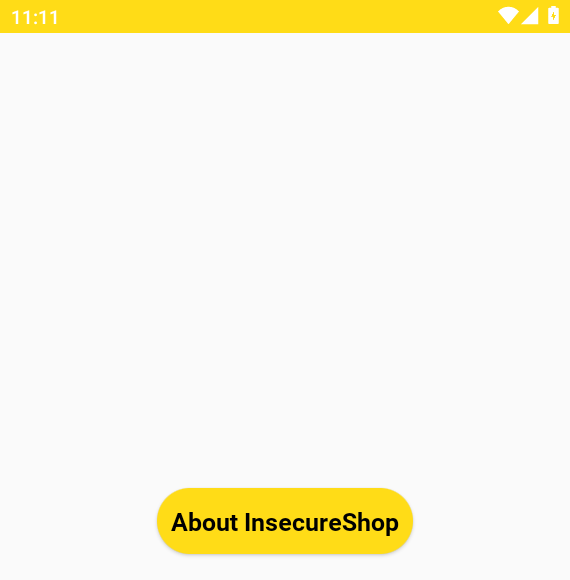
That screenshot is the runtime proof of reachability. It does not by itself prove sensitive data exposure; impact still depends on what the Activity shows or does with Intent extras.
Now the negative case for LoginActivity. Do not use an ADB-shell success alone to decide whether a normal third-party app can reach a non-exported component. Depending on the emulator or device and the ADB privilege level, the shell may have capabilities that an ordinary app does not. In this Genymotion lab, ADB successfully started LoginActivity:
adb shell am start -n com.insecureshop/.LoginActivityStarting: Intent { cmp=com.insecureshop/.LoginActivity }On many non-rooted devices the same command can return a SecurityException instead. Either way, shell behavior is not the third-party-app answer. Use Drozer's Agent for the meaningful cross-app test (install and connect steps live in the Drozer Android pentesting tutorial):
drozer console connect -c 'run app.activity.start --component com.insecureshop com.insecureshop.LoginActivity'Exception occured: Permission Denial: starting Intent { flg=0x10000000 cmp=com.insecureshop/.LoginActivity (has extras) } from ProcessRecord{8dd16df 6845:com.withsecure.dz:remote/u0a103} (pid=6845, uid=10103) not exported from uid 10105Android rejects the Agent because the component is not exported. That denial is the meaningful negative test for third-party reachability. This is why caller context matters during exported-component testing. Use PrivateActivity (android:exported="false") the same way if you want an explicitly marked non-export.
Test exported services
Services do not draw a screen, so success is quieter. Confirm the export in the manifest, then ask Android to start the component.
InsecureShop ships an exported upload helper:
<service android:enabled="true" android:exported="true"
    android:name="net.gotev.uploadservice.UploadService"/>
Start it with an explicit component name:
adb shell am startservice -n com.insecureshop/net.gotev.uploadservice.UploadServiceStarting service: Intent { cmp=com.insecureshop/net.gotev.uploadservice.UploadService }Starting service means the Intent was accepted for delivery. It does not prove the service performed a sensitive action. Service-start behavior also depends on the Android version, target SDK, and whether the caller or app is in the background. Treat the command above as the reproduced result for this Android 10 lab, not a guarantee that every modern device will start an exported service the same way.
For impact you still need the expected actions, extras, and what the implementation does with them. Blindly starting every exported service is enumeration, not a completed finding.
Drozer lists the same service without a declared permission:
drozer console connect -c 'run app.service.info -a com.insecureshop'Package: com.insecureshop
net.gotev.uploadservice.UploadService
Permission: nullPermission: null means no android:permission gate showed up on the service entry. Treat that as a reason to inspect the service's code and expected Intents, not as proof of a vulnerability by itself.
Test broadcast receivers
Broadcast receivers listen for Intents sent with sendBroadcast (or related APIs). Manifest-registered receivers with export enabled can be triggered by other apps when the action, categories, and data match.
InsecureShop declares no broadcast receivers in this build. Confirm that before inventing tests:
drozer console connect -c 'run app.broadcast.info -a com.insecureshop'Package: com.insecureshop
No matching receivers.That matches Drozer's attack-surface count of 0 broadcast receivers exported.
An explicit Intent names the target component directly. An implicit Intent describes an action and lets Android find a matching component through its intent filters. Since this InsecureShop build has no exported receivers, the following is syntax only, not a command from this lab. It uses an explicit broadcast because you already know the receiver name:
adb shell am broadcast -a com.example.app.ACTION_CUSTOM -n com.example.app/.MyReceiverReplace the action and component with values from the target app's manifest. Watch logcat and app behavior for evidence the receiver ran. If the receiver requires a permission, expect a denial instead of a quiet success.
Dynamically registered receivers do not appear as <receiver> entries in the manifest, so static manifest review alone cannot enumerate every receiver that may exist at runtime.
Permissions and protection levels
Export decides whether IPC is allowed in principle. Permissions decide which callers pass the gate. Read both before you call a component protected.
Common protection levels you will see in manifests and dumpsys:
| Level | What it means |
|---|---|
normal |
Automatically granted to apps that request it |
dangerous |
Generally requires runtime user approval |
signature |
Granted only to apps signed with the same certificate |
You may encounter deprecated or flag-based combinations such as signatureOrSystem / signature\|privileged in older or system applications, but they are outside this lab.
InsecureShop defines a custom permission used on its exported content provider:
<permission android:name="com.insecureshop.permission.READ"/>Confirm how the platform classifies that permission on the installed package:
adb shell dumpsys package com.insecureshop | grep -A1 'declared permissions' declared permissions:
com.insecureshop.permission.READ: prot=normal, INSTALLEDprot=normal is the default when no protection level is specified. Because normal permissions are granted automatically to applications that request them, this is not a strong boundary against a malicious third-party app.
Deep provider testing is out of scope on this page, but the permission check still makes a clean denial demo when Drozer queries without holding the permission:
drozer console connect -c 'run app.provider.query content://com.insecureshop.provider/insecure'Exception occured: Permission Denial: reading com.insecureshop.contentProvider.InsecureShopProvider uri content://com.insecureshop.provider/insecure from pid=6845, uid=10103 requires com.insecureshop.permission.READ, or grantUriPermission()This denial only proves that the Drozer Agent does not currently hold the permission. It does not prove that the provider is strongly protected. com.insecureshop.permission.READ has the normal protection level, so another Android app can request it in its manifest and Android normally grants it at install time. The Drozer query fails because the Drozer Agent did not request this permission, not because arbitrary apps are unable to obtain it.
The denial proves that Android enforced the permission against the Drozer Agent. It does not prove the permission provides a strong security boundary, because its normal protection level allows other apps to request it. If sensitive data is exposed behind this provider, a signature permission would provide a much stronger cross-app boundary.
To test the provider completely, you would use a small authorized test APK that declares:
<uses-permission android:name="com.insecureshop.permission.READ"/>Then repeat the provider query from that app. That deeper provider test is outside this article's scope.
The reasoning chain to keep is:
- Is the component exported?
- Does it require a permission?
- What is the protection level?
normal→ another app can usually request and receive it at installsignature→ only same-signer apps can normally obtain it
Activities and services can use android:permission the same way. Always read the permission name and protection level before writing "unprotected export" in a report.
ADB vs Drozer: why caller identity matters
ADB and Drozer can both send Intents, but they do not necessarily run with the same privileges. That difference matters when you are trying to prove whether an ordinary third-party app can reach a component.
With the Agent connected (see the Drozer tutorial for install and adb forward), summarize the surface from the Agent's point of view:
drozer console connect -c 'run app.package.attacksurface com.insecureshop'Attack Surface:
6 activities exported
0 broadcast receivers exported
1 content providers exported
1 services exported
is debuggableThose counts should line up with your manifest notes: explicit exports plus filter-backed defaults on this target SDK, plus the exported service and permission-gated provider. Start AboutUsActivity through Drozer when you want Agent-UID proof instead of shell-UID proof:
drozer console connect -c 'run app.activity.start --component com.insecureshop com.insecureshop.AboutUsActivity'Attempting to run shell moduleThe console returns quickly; the emulator shows the same About screen as the adb test. The earlier LoginActivity denial already showed the other side: a normal-app UID is blocked where privileged ADB may not be.
| Question | Prefer |
|---|---|
| What does the XML declare? | Manifest / MobSF / apktool |
| Can the shell start this component? | adb shell am … |
| Can another app start it? | Drozer Agent (or custom test APK) |
| What is exported right now? | app.package.attacksurface and related *.info modules |
When an exported component is actually vulnerable
An exported component becomes a meaningful security finding when you can show that an untrusted caller can use it to cause an unintended or sensitive result. Exported alone is attack surface, not severity.
A component is more likely a real issue when several of these are true:
- It is reachable by untrusted apps (exported, and permissions are missing or too weak)
- It performs a sensitive action or returns sensitive data
- It trusts Intent extras, URIs, or file paths without validation
- It trusts the caller to supply sensitive identifiers or paths without verifying that the caller is authorized to use them
- It bypasses authentication or authorization the UI normally enforces
- Impact is demonstrable (data read, state change, forced navigation into a privileged flow)
Examples that often deserve findings after you prove them:
- Exported Activity that opens an authenticated screen without a session check
- Exported Service that deletes data or triggers uploads based on attacker-controlled extras
- Exported Receiver that performs privileged work on a custom action anyone can broadcast
Examples that are usually not findings by themselves:
- Launcher Activity with
MAIN/LAUNCHER - Exported component protected by a strong
signaturepermission as designed - Export you can start with
adbbut Drozer correctly cannot start as a normal app
If a normal third-party app can reach a sensitive component because permissions or application-level checks are missing or too weak, document the resulting impact as the finding.
Common testing mistakes
A few mistakes can lead to incorrect conclusions during exported-component testing:
| Mistake | Why it misleads | Better approach |
|---|---|---|
| Treat every export as a vulnerability | Launchers and intentional IPC are exported on purpose | Require impact evidence |
Trust only adb shell am start |
ADB caller privileges vary by device or emulator; a shell or rooted environment may not represent a normal app | Confirm third-party reachability with Drozer or a test APK |
| Treat any Permission Denial as strong protection | A normal custom permission can usually be requested by another app |
Check the protection level before calling the gate strong |
| Skip intent-filter defaults on old target SDKs | Missing android:exported is not always "safe" |
Compare XML with Drozer or dumpsys |
| Stop after "Starting: Intent" | Delivery is not impact | Observe UI, data, or side effects |
| Forget Android 12+ explicit export rules | Old tutorials assume silent defaults forever | Check targetSdkVersion first |
Summary
Exported components are Android's mechanism for allowing selected app components to interact with callers outside their own application. In this lab, InsecureShop's manifest and Drozer attack surface both showed multiple exported activities, one exported service, no broadcast receivers, and one permission-gated provider. adb shell am start opened AboutUsActivity on screen, while Drozer's attempt to start non-exported LoginActivity returned a clear Permission Denial.
The useful habit is static discovery first, then a reachability test from the right caller context, then an impact check. android:exported="true" without a demonstrated harmful result is surface area. If a normal third-party app can reach a sensitive component because permissions or application-level checks are missing or too weak, document the resulting impact as the finding. The InsecureShop provider denial is a reminder that normal permissions enforce a check for one caller without creating a strong cross-app boundary.
When you need Agent-based enumeration beyond this page, continue with the Drozer tutorial. When you need method-level hooks inside the app process, move to Frida after the component map is clear.
References
- Android Developers:
<activity>android:exported - Android Developers: Safer component exporting (Android 12)
- Android Developers:
<permission>protectionLevel - MASTG-BEST-0052: Restrict Access to Android App Components
- OWASP MASTG: Android Platform APIs
Frequently Asked Questions
Is android:exported=true always a vulnerability?
No. Export means other apps may be allowed to send Intents to the component, subject to permissions and further checks. A finding needs reachability plus a security impact, such as sensitive data exposure or an unintended privileged action.
How do I test an exported Activity with ADB?
Use adb shell am start -n package/.ActivityName. Then confirm the resulting screen or behavior on the device. Do not treat the Starting: Intent message alone as proof of security impact. Remember that ADB privileges can differ from a normal third-party app.
What changed in Android 12?
For apps targeting API 31+, a component with an intent filter must explicitly declare android:exported; otherwise the app cannot be installed on Android 12+. Older target SDKs can still rely on legacy defaults, so always read targetSdkVersion before interpreting a manifest.
Can permissions protect exported components?
Yes. An exported component can still require a permission before the system allows the IPC. Protection level matters. A custom normal permission can generally be requested and automatically granted to another app, while a signature permission is restricted to apps signed with the same certificate. A Permission Denial only proves the gate ran for that caller.
Drozer vs ADB for exported components?
ADB is ideal for quick explicit Intents when you already know the component name. Drozer enumerates exported surfaces from another app's UID and is the better check for "can a third-party app reach this?" Use both: manifest and ADB for speed, Drozer when caller context matters.
