
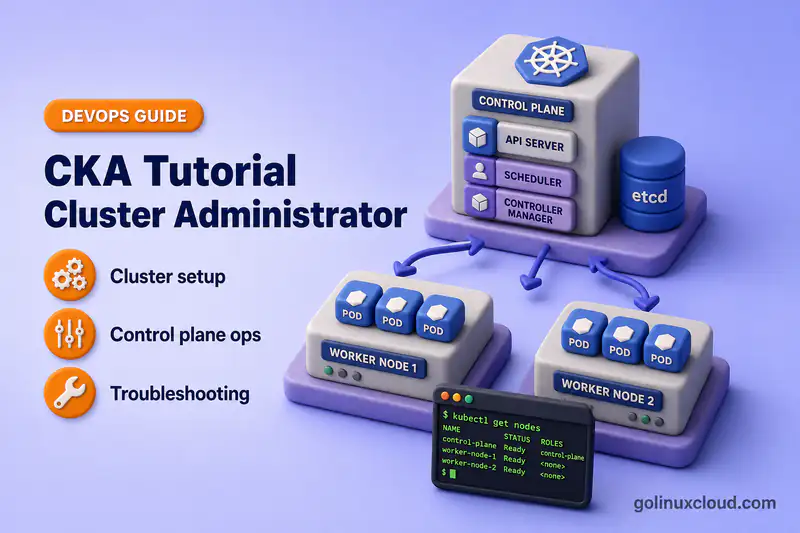
Free Online Course · Self-paced · Hands-on

CKA Tutorial: Certified Kubernetes Administrator Course

Free CKA exam prep course covering all five Linux Foundation domains, with hands-on kubeadm labs on Rocky Linux VMs tested on Kubernetes 1.36.

  • 6 chapters
  • 65 lessons
  • ~26h
  • Intermediate to Advanced
  • Tested with Kubernetes (kubeadm, kubelet, kubectl) 1.36.x
  • Updated Sep 2026
CKA Tutorial: Certified Kubernetes Administrator Course
By Last updated

About this course

This is a free, self-paced course that takes you from a set of blank Linux VMs to being ready for the Certified Kubernetes Administrator (CKA) exam from the Linux Foundation and CNCF. The syllabus covers all five domains of the current CKA curriculum, from cluster installation through troubleshooting, and every lesson is a tutorial you run on a real cluster rather than a summary of the docs.

The CKA is a performance-based exam, so reading about kubeadm only gets you so far. Every lesson here runs on a self-managed kubeadm cluster, which is the kind of cluster the exam asks you to install, upgrade, back up, and repair. Because you own the control plane, you can break etcd, the kubelet, or the API server on purpose and practise bringing them back, which a managed cloud cluster will not let you do.

If you are new to cluster administration, start with Before You Begin and build the lab first. The chapters put cluster setup and workloads before storage and troubleshooting, which is a learning order rather than the order the Linux Foundation lists the domains in. If you already run clusters, jump straight to etcd backup and restore, cluster upgrades, or the Troubleshooting chapter, which carries 30% of the exam.

What you'll learn

  • Build a multi-node cluster with kubeadm, containerd, and Calico, and manage it from a workstation kubeconfig
  • Add and drain nodes, run a highly available control plane, back up etcd, and upgrade the cluster
  • Control access with RBAC, ServiceAccounts, client certificates, and admission control
  • Install cluster components with Helm and Kustomize, and work with CRDs and Operators
  • Schedule workloads with probes, autoscaling, resource limits, taints, affinity, and PodDisruptionBudgets
  • Provision storage with PersistentVolumes, claims, StorageClasses, and dynamic provisioning
  • Expose applications with Services, Ingress, and Gateway API, and restrict traffic with NetworkPolicy
  • Troubleshoot failing Pods, nodes, control-plane components, DNS, and Service networking

Who this course is for

  • Linux sysadmins who already run services on VMs and now have to keep a Kubernetes cluster healthy
  • Platform engineers and SREs who own upgrades, etcd backups, and node maintenance on self-managed clusters
  • Developers who deploy to Kubernetes every day and want to understand what happens after kubectl apply
  • Anyone booked on, or considering, the Linux Foundation CKA exam

Prerequisites

  • Comfortable Linux command line, systemd, and basic networking (ports, DNS, routing)
  • Working knowledge of containers and YAML manifests
  • Three Linux VMs (one control plane, two workers) with 2 vCPU and 8 GiB RAM each; a host with 16 GB RAM or more runs all three
  • No cloud account or paid lab subscription, because the whole course runs on VMs you control

Exam objectives covered

Certified Kubernetes Administrator (CKA) blueprint — 5 domains · official objectives

  1. Storage10%

    • Implement storage classes and dynamic volume provisioning
    • Configure volume types, access modes and reclaim policies
    • Manage persistent volumes and persistent volume claims
  2. Troubleshooting30%

    • Troubleshoot clusters and nodes
    • Troubleshoot cluster components
    • Monitor cluster and application resource usage
    • Manage and evaluate container output streams
    • Troubleshoot services and networking
  3. Workloads & Scheduling15%

    • Understand application deployments and how to perform rolling update and rollbacks
    • Use ConfigMaps and Secrets to configure applications
    • Configure workload autoscaling
    • Understand the primitives used to create robust, self-healing, application deployments
    • Configure Pod admission and scheduling (limits, node affinity, etc.)
  4. Cluster Architecture, Installation & Configuration25%

    • Manage role based access control (RBAC)
    • Prepare underlying infrastructure for installing a Kubernetes cluster
    • Create and manage Kubernetes clusters using kubeadm
    • Manage the lifecycle of Kubernetes clusters
    • Implement and configure a highly-available control plane
    • Use Helm and Kustomize to install cluster components
    • Understand extension interfaces (CNI, CSI, CRI, etc.)
    • Understand CRDs, install and configure operators
  5. Services & Networking20%

    • Understand connectivity between Pods
    • Define and enforce Network Policies
    • Use ClusterIP, NodePort, LoadBalancer service types and endpoints
    • Use the Gateway API to manage Ingress traffic
    • Know how to use Ingress controllers and Ingress resources
    • Understand and use CoreDNS

Versions and testing environment

Every command in this course was run on this stack

ComponentVersionNotes
Kubernetes (kubeadm, kubelet, kubectl) 1.36.x Installed from the pkgs.k8s.io repositories on a one control-plane, two-worker kubeadm cluster
Rocky Linux 10.2 Every node and the workstation; the kubeadm install lesson also gives Ubuntu and Debian commands
containerd 2.2.x Container runtime on every node, with crictl 1.36 for node-level debugging
Calico 3.32.x Pod network plugin, and the policy engine the NetworkPolicy lessons rely on
etcd 3.6.x Stacked on the control plane; etcdctl and etcdutl drive the backup and restore lesson

Syllabus

6 chapters · 65 lessons · ~26h of reading

  1. 1 Before You Begin — Foundation and Lab Setup 9 lessons · ~2h 12m
    1. Part 1 Install Kubernetes with kubeadm (multi-node cluster) 25 min read
    2. Part 2 Install kubectl and configure kubeconfig 15 min read
    3. Part 3 kubectl commands and YAML examples 14 min read
    4. Part 4 Kubernetes architecture and control plane components 15 min read
    5. Part 5 Kubernetes namespaces with kubectl examples 12 min read
    6. Part 6 Labels and selectors 23 min read
    7. Part 7 Kubernetes annotations 9 min read
    8. Part 8 Labels vs annotations 7 min read
    9. Part 9 API resources and kubectl explain 12 min read
  2. 2 Cluster Architecture, Installation & Configuration — 25% 14 lessons · ~3h 37m
    1. Part 10 CNI, CSI, and CRI interfaces 16 min read
    2. Part 11 Add, remove, reset, and rejoin cluster nodes 16 min read
    3. Part 12 Cordon, drain, and uncordon nodes 16 min read
    4. Part 13 Highly available control plane with kubeadm 24 min read
    5. Part 14 Back up and restore etcd 15 min read
    6. Part 15 PKI, kubeconfig users, CSR, and certificate renewal 17 min read
    7. Part 16 Upgrade a Kubernetes cluster with kubeadm 27 min read
    8. Part 17 Kubernetes RBAC with examples 10 min read
    9. Part 18 Authentication, authorization, and admission control 11 min read
    10. Part 19 Kubernetes ServiceAccounts with examples 10 min read
    11. Part 20 Deploy cluster components with Helm 12 min read
    12. Part 21 Kustomize: bases, overlays, and patches 13 min read
    13. Part 22 CRDs and custom resources 16 min read
    14. Part 23 Install and configure a Kubernetes Operator 14 min read
  3. 3 Workloads & Scheduling — 15% 16 lessons · ~3h 45m
    1. Part 24 Kubernetes Pods and Pod lifecycle 17 min read
    2. Part 25 Deployments, rolling updates, and rollbacks 15 min read
    3. Part 26 Kubernetes StatefulSet with examples 13 min read
    4. Part 27 Kubernetes DaemonSet with examples 16 min read
    5. Part 28 Kubernetes Jobs with examples 12 min read
    6. Part 29 Kubernetes CronJobs with examples 11 min read
    7. Part 30 Liveness, readiness, and startup probes 11 min read
    8. Part 31 Kubernetes ConfigMap with examples 13 min read
    9. Part 32 Kubernetes Secrets with examples 12 min read
    10. Part 33 Requests, limits, and QoS classes 16 min read
    11. Part 34 ResourceQuota and LimitRange 13 min read
    12. Part 35 Taints and tolerations 15 min read
    13. Part 36 Scheduling, nodeSelector, and affinity 18 min read
    14. Part 37 Horizontal Pod Autoscaler 11 min read
    15. Part 38 PodDisruptionBudget 17 min read
    16. Part 39 Static Pods and mirror Pods 15 min read
  4. 4 Storage — 10% 5 lessons · ~1h 1m
    1. Part 40 Kubernetes volumes with practical examples 10 min read
    2. Part 41 PersistentVolume and PVC 15 min read
    3. Part 42 StorageClass and dynamic provisioning 11 min read
    4. Part 43 subPath volume mounts 10 min read
    5. Part 44 Fix Pending PVC and volume mount errors 15 min read
  5. 5 Services & Networking — 20% 9 lessons · ~2h 17m
    1. Part 45 Networking model, CNI, and kube-proxy 12 min read
    2. Part 46 Services, Endpoints, and EndpointSlices 17 min read
    3. Part 47 Troubleshoot a Service that is not working 15 min read
    4. Part 48 DNS, CoreDNS, and name resolution 18 min read
    5. Part 49 NetworkPolicy with examples 20 min read
    6. Part 50 Ingress rules with host, path, and TLS examples 16 min read
    7. Part 51 Gateway API with HTTPRoute examples 15 min read
    8. Part 52 kubectl port-forward with Pods, Deployments, and Services 11 min read
    9. Part 53 Fix FailedCreatePodSandBox and CNI errors 13 min read
  6. 6 Troubleshooting — 30% 12 lessons · ~2h 41m
    1. Part 54 Monitor resources with kubectl top 12 min read
    2. Part 55 kubectl logs, Events, and describe 18 min read
    3. Part 56 Debug Pods with kubectl exec and kubectl debug 9 min read
    4. Part 57 Kubernetes Pod troubleshooting workflow 12 min read
    5. Part 58 Fix CrashLoopBackOff 17 min read
    6. Part 59 Fix ImagePullBackOff and ErrImagePull 14 min read
    7. Part 60 Fix Pending and ContainerCreating Pods 14 min read
    8. Part 61 Fix OOMKilled and exit code 137 22 min read
    9. Part 62 Delete a stuck or Terminating Pod 12 min read
    10. Part 63 Fix Deployment not creating Pods 11 min read
    11. Part 64 Fix Node NotReady and kubelet errors 11 min read
    12. Part 65 Troubleshoot control plane components 9 min read

Hands-on labs

6 guided builds you run yourself

  1. Build a three-node cluster with kubeadm

    Prepare every node, initialize the control plane, install Calico, and join the workers until all three report Ready.

  2. Back up and restore etcd

    Take a snapshot with etcdctl, restore it with etcdutl, and confirm your API objects come back.

  3. Upgrade a cluster one minor version

    Switch the package repository, upgrade the control plane, then drain and upgrade each worker in turn.

  4. Build a highly available control plane

    Put HAProxy and Keepalived in front of stacked etcd control-plane nodes and test what happens when one fails.

  5. Route traffic with Gateway API

    Create a GatewayClass, Gateway, and HTTPRoute for path, hostname, weighted, and TLS routing.

  6. Bring a NotReady node back

    Trace a NotReady node through its conditions, Lease heartbeats, kubelet, and containerd until it reports Ready again.

Where to go after this course

  • Book the CKA examConfirm the live domains, price, and Kubernetes version on the Linux Foundation page before you schedule.
  • CKS courseThe security specialization. It requires a passed CKA and reuses the same kubeadm lab.
  • CKAD courseCovers the application side of the same cluster, including deployment strategies, multi-container Pods, and a practice task set.
  • Kubernetes Operator courseFor when installing Operators stops being enough and you want to write your own controller.

Frequently Asked Questions

What is the CKA exam format?

The CKA is an online, proctored, performance-based exam. You get two hours to solve a set of tasks from a command line on running Kubernetes clusters, and you need 66% to pass. Tasks are available in English, Simplified Chinese, and Japanese. The exam environment currently runs Kubernetes v1.35, and the Linux Foundation moves it to the newest minor release within about four to eight weeks of each Kubernetes release. Check the official CKA page for the current version before you book.

How much does the CKA cost, and how long is it valid?

The exam-only registration is listed at $445. It includes two exam attempts, two sessions on the Killer.sh exam simulator, and 12 months to schedule and sit the exam. A CKA earned now is valid for two years (certifications earned before April 1, 2024 were valid for three). To renew, pass the exam again before your expiry date. Under the Linux Foundation CARE program, earning or renewing the CKS on or after June 18, 2026 also extends your CKA to the same expiry date. Prices and bundles change, so confirm them on the official CKA page.

What documentation can I use during the CKA exam?

You can open the Kubernetes documentation at kubernetes.io/docs, the Kubernetes blog, the Helm documentation, and, for the CKA only, the Gateway API documentation. Each task can also link extra references in its Quick Reference box. You may use the search box on kubernetes.io, but you must not open external search results. The full rules are on the Linux Foundation's resources allowed page, so practise finding things in those sites rather than in bookmarks you will not have.

The lessons use Kubernetes 1.36, but the exam runs 1.35. Does that matter?

Not for learning the objectives. The exam trails the newest release by a few weeks, so the lab and the exam are usually one minor version apart in one direction or the other. The week before your exam, rebuild the lab on the version the exam page lists. With kubeadm that means pointing the pkgs.k8s.io repository at that minor version before you install, the same repository switch the upgrade lesson uses.

Should I take the CKAD or the CKA first?

Neither is a prerequisite for the other, and the Linux Foundation lists no prerequisites for the CKA. Pick by the work you do. If you write and ship applications, the CKAD course is the closer fit. If you build or run clusters, or you want the CKS later, take the CKA first, since the CKS requires a passed CKA.

Deepak Prasad

R&D Engineer

Founder of GoLinuxCloud with 15+ years of expertise in Linux, Python, Go, Laravel, DevOps, Kubernetes, Git, Shell scripting, OpenShift, AWS, Networking, and Security. With extensive experience, he excels across development, DevOps, networking, and security, delivering robust and efficient solutions for diverse projects.

  • Go (programming language)
  • Python (programming language)
  • DevOps
  • Computer Security
  • Cloud Computing
  • Kubernetes
  • Linux
  • Ansible (software)