
| Tested on | Kali GNU/Linux Rolling 2026.2 (kali-rolling) |
|---|---|
| Package | Contoso Lab BITB demo (HTML/CSS/JS) Python http.server on loopbackChromium 148 (screenshot capture) |
| Applies to | Any modern desktop browser that can open a local HTML lab |
| Lab environment | Isolated pentest lab; loopback-only training page recommended |
| Privilege | Normal user (no root required for the demo) |
| Scope | What BITB is, how fake SSO chrome works, a controlled Contoso demo that does not transmit or store entered values, real vs fake popup checks, detection tips, password managers and passkeys, and enterprise awareness. Does not ship credential-harvesting templates for real brands. |
| Related guides | Analyze phishing emails with ThePhish Install GoPhish phishing framework FiercePhish |
In this article we will explain Browser-in-the-Browser (BITB) phishing and run a controlled fictional Contoso SSO demo that does not transmit or store entered values. You will see how a fake login window is painted inside a real page, why the lookalike address bar seems trustworthy, and how defenders and users can tell it apart from a separate browser popup.
BITB does not exploit the browser to replace its real address bar. The attacker instead draws a convincing imitation inside the web page. The real browser URL still belongs to the page hosting the phishing content; only the painted URL inside the page claims to be the trusted identity provider. HTTPS does not make that painted address bar trustworthy.
What Is a Browser-in-the-Browser Attack?
Browser chrome means the interface drawn by the browser itself, such as the real address bar, tabs, and window controls. It does not mean the Google Chrome browser specifically.
A page's origin identifies where it actually came from, based primarily on its scheme, hostname, and port. For example, https://example.com and https://login.example.net are different origins.
A Browser-in-the-Browser attack draws an HTML/CSS overlay that looks like a separate browser window on top of a phishing page. That overlay usually copies familiar window chrome:
- Window-control buttons styled to resemble macOS or Windows
- A title bar
- A padlock or site/security icon
- A text string that looks like
https://login.example.com/...
Inside the painted chrome sits a login form that can ask for passwords, MFA codes, or OAuth consent.
Public BITB demonstrations showed how closely HTML and CSS can imitate familiar SSO popups. No browser zero-day is required: the deception relies on convincing the user that page-drawn browser chrome is genuine.
BITB succeeds when the victim trusts the URL painted inside the page instead of checking the real URL shown by browser-controlled UI. Advice that only says "check that the URL starts with https" fails here, because the fake bar can display any HTTPS-looking string while the browser is still actually displaying the phishing site's origin.
How a Normal SSO Popup Works
Many websites let users sign in through another identity provider, for example a company SSO service or a "Sign in with …" provider. OAuth 2.0 and OpenID Connect are commonly used to implement these flows. A common pattern is:
- The website the user is trying to sign into, called the relying party, opens the identity provider with
window.open(or a library that does). - The browser opens a separate tab or popup as a new browsing context.
- That context is controlled by the browser. The browser decides what chrome to show; this commonly includes genuine location or origin UI, but the exact appearance varies by browser and popup settings. Page CSS cannot paint over that browser-controlled UI.
- After authentication, the identity provider returns the result of the login flow to the application.
Users learn to expect a small centered window, a familiar IdP URL, and a security icon. BITB copies that visual appearance without creating a separate browser-controlled browsing context.
Legitimate flow

  Relying-party page
          │
          │ window.open
          ▼
  Separate browsing context
  (browser-controlled chrome)
          │
          ▼
  Identity provider origin
How BITB Creates a Fake Browser Window
On a BITB page, the "popup" is usually a high z-index overlay: a dimmed backdrop plus a <div> styled as a window. CSS z-index controls which page elements appear in front of others, so a high value lets the fake window appear above the rest of the page.
JavaScript can make the fake title bar draggable. The address bar is ordinary text and the lock is simply an image or SVG. None of these visual elements changes the page's real URL.
For example, if the parent page is http://127.0.0.1:42042/, displaying https://login.contoso-id.example inside a <div> does not change the actual address. JavaScript exposes the real page URL through window.location.
BITB flow

  Phishing page (real origin)
          │
          │ shows overlay <div>
          ▼
  Painted browser chrome
  (fake URL string + lock)
          │
          ▼
  Credential form on the
  same phishing origin
That means:
- The parent tab URL never has to change to the IdP hostname.
- A normal DOM overlay stays inside the page's rendering area when dragged.
- DevTools inspection of the overlay shows DOM nodes belonging to the phishing document, not a separate browsing context.
Attackers sometimes nest an iframe inside the fake chrome. Even then, the chrome around the iframe is still page content. The fake URL bar remains untrusted paint.
Why the Fake Address Bar Looks Convincing
People treat the address bar as the browser's voice. BITB exploits that by copying cues that normally mean "safe":
- A padlock or site/security icon styled to resemble browser UI
- An
https://prefix and a familiar hostname shape - Rounded URL pills similar to Chromium or Safari
- Window controls that match macOS or Windows themes
- A darkened page behind the "popup," like many real modal SSO flows
HTTPS on the phishing site can make intuition worse. The parent page may truly be served over TLS, so the browser's real security indicator is valid for the wrong site, while the painted icon claims to be a different host. The victim may see a legitimate security indicator in the real browser UI and a second, convincing imitation inside the page. If they focus on the imitation rather than the real browser-controlled URL, they may trust the wrong hostname.
.example domains in this article's lab are reserved for documentation and testing, so the sample cannot accidentally send a student to a live phishing host.
Controlled BITB Demonstration
This lab uses a fictional Contoso portal. It demonstrates the overlay technique without transmitting or storing entered values. Form submit is intercepted in the browser, shows a training note, and clears the form fields.
Download the two harmless lab files that accompany this tutorial:
mkdir -p ~/bitb-labmkdir creates the folder if it is missing. Download the Contoso portal HTML next:
curl -fsSL -o ~/bitb-lab/index.html \
  https://www.golinuxcloud.com/browser-in-the-browser-phishing-attack/contoso-bitb-lab.html
The curl command writes the portal page when the download succeeds. Fetch the real-popup companion page next:
curl -fsSL -o ~/bitb-lab/real-popup.html \
  https://www.golinuxcloud.com/browser-in-the-browser-phishing-attack/contoso-real-popup.html
Confirm both files landed in the lab directory:
ls -lh ~/bitb-lab/total 12K
-rw-r--r-- 1 user user 9.7K Sep 13 16:29 index.html
-rw-r--r-- 1 user user 803 Sep 13 16:29 real-popup.htmlThose files include:
- A parent page that stays on
http://127.0.0.1:42042/ - A fake URL string
https://login.contoso-id.example/oauth/authorize - A form handler that calls
event.preventDefault(), shows a training note, and resets the form - A second button that opens
/real-popup.htmlthroughwindow.open
Serve the files over loopback instead of opening them directly with file://. This gives both pages a normal web origin and lets /real-popup.html resolve exactly as it would on a website. --bind 127.0.0.1 makes the lab reachable only from the local machine. Other systems on your network cannot connect to this training server.
cd ~/bitb-lab && python3 -m http.server 42042 --bind 127.0.0.1Serving HTTP on 127.0.0.1 port 42042 (http://127.0.0.1:42042/) ...Open http://127.0.0.1:42042/ in Chromium or Firefox. The landing page explains that the fake window is HTML on this origin:
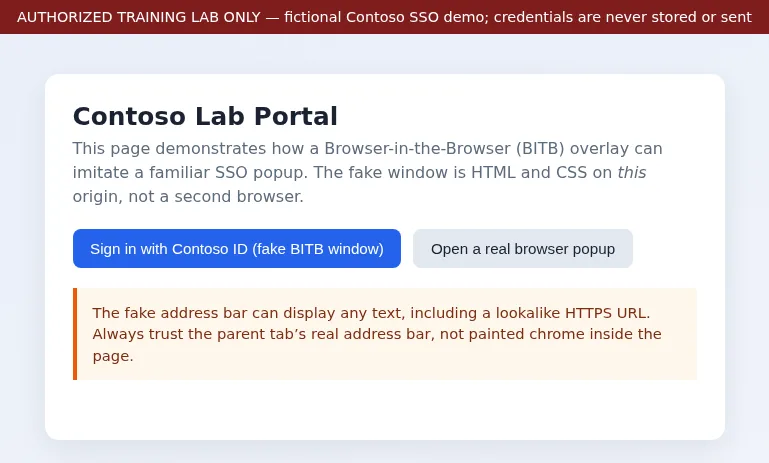
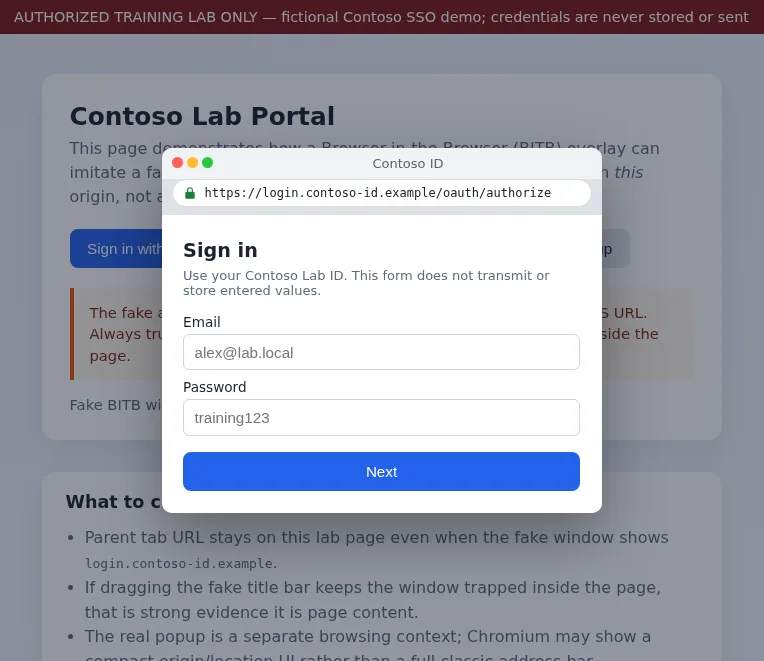
The banner should state that credentials are never stored or sent. Click Sign in with Contoso ID (fake BITB window). The overlay appears with painted chrome and a lookalike HTTPS URL while the parent tab remains on 127.0.0.1:
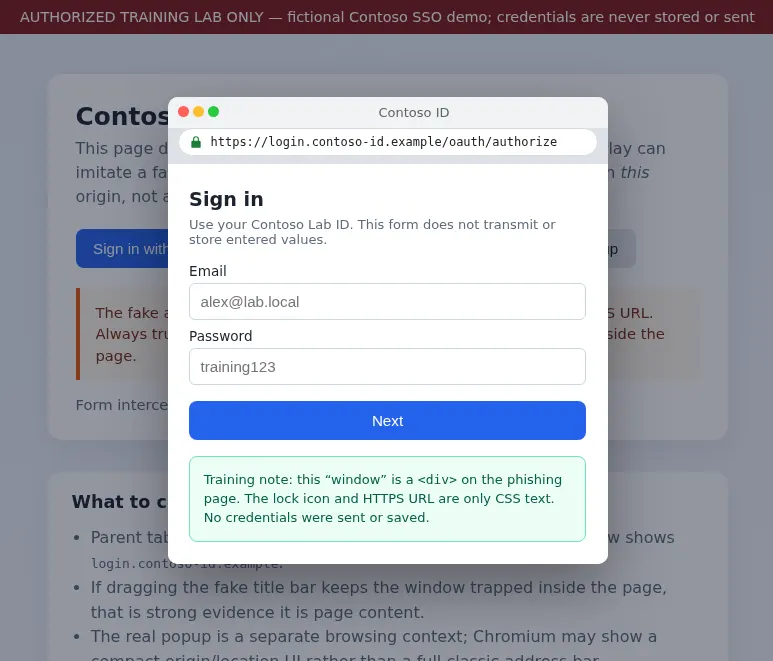
Enter dummy values only, such as alex@lab.local and training123. Never use a real password in a phishing demonstration. Click Next. The page must show the training note and clear the fields immediately instead of navigating away or calling a backend:
Close the overlay, then click Open a real browser popup. Allow popups if the browser blocks them. The new window loads real-popup.html through window.open as a separate browsing context. On this Chromium lab capture, the popup showed a compact browser-controlled origin/location strip with 127.0.0.1:42042/real-popup.html, not a full classic address bar. That still counts as browser-controlled UI, not page CSS:
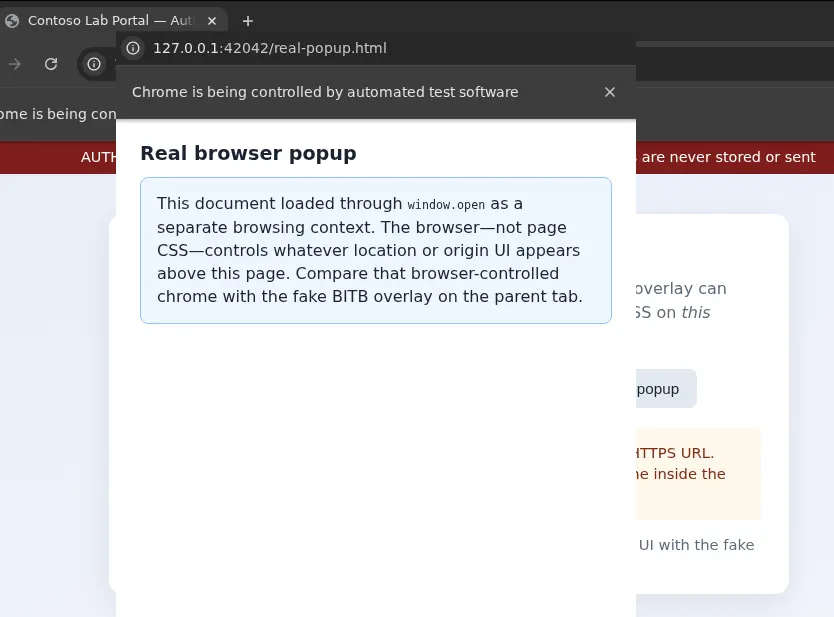
On the Kali lab capture, the parent URL stayed http://127.0.0.1:42042/ while the fake bar claimed login.contoso-id.example, and the real popup URL was http://127.0.0.1:42042/real-popup.html.
Real Browser Popup vs Fake BITB Window
| Check | Real SSO popup | BITB overlay |
|---|---|---|
| Who draws location/origin UI | The browser (exact chrome varies) | The phishing page's CSS/text |
| Parent tab URL | May stay on the relying party while the popup loads the IdP | Parent remains on the page hosting the BITB overlay; the fake bar is only page content |
| Behavior when moved | A separate popup may move independently of the parent page; exact behavior depends on browser/OS, and some browsers open a tab instead | DOM overlay remains constrained by the page/browser content area |
| DevTools (for analysts) | Separate browsing context for the popup document | Overlay nodes live in the parent DOM |
| Password manager UI | Often attaches to the real origin of the popup | May refuse to fill, or fill for the phishing origin only |
If a supposed login window is clearly trapped inside the page when you drag it, that is strong evidence that it is page content rather than a separate browser window. However, window behavior differs across browsers, so use this together with checking the real parent URL rather than as a standalone test.
DevTools is mainly useful for analysts and testers investigating a suspicious page. It is not a realistic check you expect ordinary users to perform during every login.
How to Detect a BITB Attack
Use layered checks rather than a single cue:
- Check the browser-controlled URL. Do not trust a URL displayed inside page content. Simple harvesters expose the mismatch in the real bar—for example a Facebook-styled form on
127.0.0.1in the Zphisher lab. BITB hides that mismatch behind painted chrome instead. - Try moving the apparent popup. If it remains trapped inside the page, that is strong evidence it is an overlay.
- Verify the identity-provider destination. A different hostname is normal with federated SSO. For example, a company website may redirect you to its identity provider. The important point is that the identity-provider hostname should appear in the browser's real location UI, not only inside the web page.
- Treat unexpected SSO prompts cautiously, especially on sites that do not normally ask you to sign in this way.
- For technical investigation, inspect the parent page with DevTools. A fake window appears as ordinary DOM elements.
Browser extensions that score high z-index overlays, fake URL bars, and IdP hostnames on foreign origins can help, but they are heuristics. Legitimate marketing modals can look similar. Treat extension alerts as a reason to stop and verify, not as perfect proof.
Password Managers and Passkeys vs BITB
Many password managers associate saved credentials with the website where they were created. As a result, they may refuse to autofill those credentials on an unrelated phishing origin. This provides a useful warning, but users can still bypass that protection by manually typing a password.
Passkeys (WebAuthn) provide much stronger protection against classic BITB password theft because authentication is tied to the real website, not to text painted inside the page.
A passkey is registered to a relying-party ID (RP ID), normally based on the site's domain. A phishing page on another domain cannot obtain a valid login response for the genuine domain simply by displaying that domain in a fake address bar.
Attackers may still use social engineering, for example claiming that the passkey failed and asking for a password instead, so users should still verify the real browser-controlled origin.
MFA alone does not eliminate BITB. If the victim types a password and a one-time code into the attacker's form, an attacker-controlled phishing workflow may be able to relay both to the genuine service in real time. Phishing-resistant authenticators and origin-bound passkeys shrink that window far more than SMS codes do.
Enterprise Detection and User Awareness
Security awareness should make one distinction especially clear: the browser's real interface can be trusted to show the current location, while an address bar drawn inside a web page cannot:
- Awareness labs: show a safe overlay like the Contoso demo next to a real
window.openpopup. - Reporting language: ask users to capture the parent URL and describe whether the window appeared trapped inside the page.
- SSO design: when a popup is not required, a full-page redirect to the identity provider makes the real destination easier for users to verify in the browser address bar.
- During web security reviews, flag login interfaces that imitate browser chrome or display an IdP hostname inside page content as though it were a trusted address bar.
- Do not treat "require HTTPS" or "tighten ACLs" as BITB-specific fixes. Those controls matter for other risks, but they do not stop painted chrome on a lookalike site the user already opened.
Product security reviews should also reject first-party UI that intentionally mimics browser chrome around login forms. Training users to trust painted URL bars makes BITB easier for everyone else.
Limitations of the Technique
BITB is powerful against hurried users, but it has limits:
- Careful users who always read the parent URL are harder to fool.
- Passkeys and origin-aware password managers make it much harder for a phishing page to reuse credentials intended for the genuine site.
- Overlay quality varies across themes and zoom levels; mismatched fonts or non-draggable chrome can look wrong.
- The fake window cannot truly control browser chrome or become a separate browsing context.
- Browser reputation services, secure web gateways, or phishing classifiers may block the phishing page before the user reaches the fake login window.
- The attacker still needs the victim to visit the phishing page first through email, ads, or watering holes.
BITB does not provide code execution or browser compromise by itself; its purpose is to deceive the user about where authentication is taking place.
Summary
Browser-in-the-Browser phishing paints a fake browser window inside a real page so a lookalike SSO form appears to sit on a trusted identity-provider URL. The fake browser chrome is only HTML/CSS belonging to the page. Even if that page itself uses HTTPS, the URL painted inside it is still not browser-controlled.
In the Contoso lab on Kali, a loopback demo showed a painted https://login.contoso-id.example/... bar while the parent tab stayed on 127.0.0.1, and a real window.open popup for comparison. Chromium presented that popup with compact browser-controlled origin UI. Submitting the fake form only displayed a training note and cleared the fields; entered values were not transmitted or stored.
The main lesson is simple: an address bar drawn inside a web page is not an address bar you can trust. Check the real browser-controlled URL before entering credentials into an unexpected SSO prompt. Passkeys add strong protection because authentication is bound to the real relying-party domain rather than the hostname painted on the page. Keep authorized phishing simulations inside scoped labs rather than cloning live brand templates.
References
- mr.d0x: Browser In The Browser (BITB) Attack
- MDN: Window.open()
- W3C Web Authentication (WebAuthn)
- MADWeb 2025: Detecting Browser-in-the-Browser (work-in-progress)
- IANA Special-Use Domain Names (.example)
Frequently Asked Questions
Can a BITB popup show a real HTTPS URL?
It can display text that looks like any HTTPS URL, including well-known identity-provider hostnames. That string is not the browser's address bar. The real origin is still the parent page URL.
Does MFA prevent BITB?
Not by itself. If someone types a password and an MFA code into the attacker's form, an attacker-controlled phishing workflow may be able to relay both to the genuine service. Phishing-resistant methods such as origin-bound passkeys are much stronger than OTP codes entered into a fake window.
Can password managers detect it?
Many managers only autofill for registered origins, which reduces accidental fills on a random phishing domain. Users who type passwords manually still bypass that protection, and manager UI differs by product.
Do passkeys help against BITB?
Yes for the classic password-stealing case. WebAuthn ties the ceremony to the relying-party ID the browser asserts, not to painted text in a fake window. Watch for fallback prompts that ask for a password after a staged "passkey failure."
Can the fake popup be moved outside the page?
A BITB overlay is page content, so dragging stays inside the browser's content area. That is strong evidence it is not a separate window. Real window.open behavior varies by browser and may open a popup or a tab, so combine the drag clue with the parent URL check.
