
| Tested on | Kali GNU/Linux Rolling 2026.2 (kali-rolling) |
|---|---|
| Package | set 8.0.3+git20241021-0kali1curltcpdump |
| Lab environment | Pentest lab |
| Privilege | Normal user for the lab HTML and curl checks; sudo for apt, editing /etc/setoolkit/set.config, setoolkit (SET exits unless root), and tcpdump |
| Cert prep | CompTIA PenTest+ |
| Scope | Controlled SET credential-harvester lab: custom training page, HTTP form POST, listener evidence, traffic inspection, SET vs Gophish, troubleshooting, and defensive indicators. Does not cover cloning production logins, mass mailing the public internet, or harvesting real user passwords. |
| Related guides | Install Gophish Create a Gophish campaign |
SET is useful when you need to see how a phishing page is served and how a form POST lands in a listener. It is the wrong tool when you need campaign dashboards. This lab stays on localhost with a page you write yourself and credentials that never existed outside the lab.
lab-user / DummyPass-TrainingOnly-123.
What SET is and when to use it
The Social-Engineer Toolkit (SET) is TrustedSec’s open-source framework for social-engineering assessment. On Kali it ships as the set package and starts with setoolkit.
Treat it as an interactive toolkit, not a campaign manager:
- Menu-driven attack vectors (web, email, media, and more)
- Credential harvester that serves a page and logs POSTed fields
- Useful for teaching delivery, form posting, and what evidence looks like
For phishing awareness programs with recipients, open rates, and click metrics, prefer Gophish. Use SET when you want to stand next to the listener and watch one controlled submission arrive.
Safe lab topology
Keep every hop on an isolated path:
- Kali runs SET (listener + page server)
- A browser or
curlon the same host (or another host on the host-only LAN) opens the training URL - The form POSTs dummy fields back to SET
- Nothing is exposed with ngrok, port forwards, or public DNS
[Kali / setoolkit]  --HTTP:8088-->  [browser or curl]
        ^                                 |
        |         POST username/password  |
        +---------------------------------+
Bind the harvester to 127.0.0.1 when you only need local tests. Use a host-only IP only when a second lab VM must reach the page. Never use a public address for this tutorial.
Install SET and set the web port
Confirm the package on Kali Rolling:
dpkg-query -W -f='${Package} ${Version}\n' setset 8.0.3+git20241021-0kali1That version string is what this article used. If set is missing, install it with apt:
sudo apt updateapt update refreshes package indexes. When it finishes without errors, install SET:
sudo apt install -y setOn this lab the package was already present, so apt reported the newest version is installed and exited cleanly.
Default WEB_PORT in /etc/setoolkit/set.config is 80. Binding port 80 needs root and often collides with other lab services, so point the harvester at 8088 for this lab:
sudo grep '^WEB_PORT=' /etc/setoolkit/set.configWEB_PORT=80Change the value (keep a backup of the file first if you share the VM):
sudo sed -i 's/^WEB_PORT=.*/WEB_PORT=8088/' /etc/setoolkit/set.configConfirm the new port:
sudo grep '^WEB_PORT=' /etc/setoolkit/set.configWEB_PORT=8088SET regenerates /etc/setoolkit/set_config.py from that file when setoolkit starts, so the next launch picks up 8088.
Start SET and open the harvester path
Create the training page in the next section first (or keep that terminal ready). Then launch SET with sudo:
sudo setoolkitPort 8088 does not need root by itself, but the Kali set package still refuses to start as a normal user. On this lab, setoolkit without sudo printed Not running as root and exited. Use sudo setoolkit for the whole menu and harvester session. SET then writes under /root/.set/ because the process runs as root.
Accept the terms of service the first time (y). From the main menu, take only this path and ignore the other vectors for now:
1— Social-Engineering Attacks2— Website Attack Vectors3— Credential Harvester Attack Method3— Custom Import
Credential Harvester can also use built-in Web Templates or Site Cloner. This article uses Custom Import so you control the HTML and never impersonate a live production login.
When SET asks for the IP address for the POST back, enter 127.0.0.1 for a localhost-only lab. That address is rewritten into form action attributes when SET scrapes the page, and it is the address your browser must reach.
Leave SET paused on those prompts until the training page below exists, then continue with the path and URL answers in the lab flow section.
Create a controlled training landing page
Build a tiny authorized portal you own as your normal Kali user (not only as root). Put it outside SET’s install tree so imports stay simple:
mkdir -p ~/set-phishing-labPrint the absolute path. You will paste this into SET’s Custom Import prompt later (do not type /root/... unless you really created the files as root):
realpath ~/set-phishing-lab/home/kali/set-phishing-labOn a standard Kali VM that line is usually /home/kali/set-phishing-lab. If your login name differs, trust realpath over any copied path from this article.
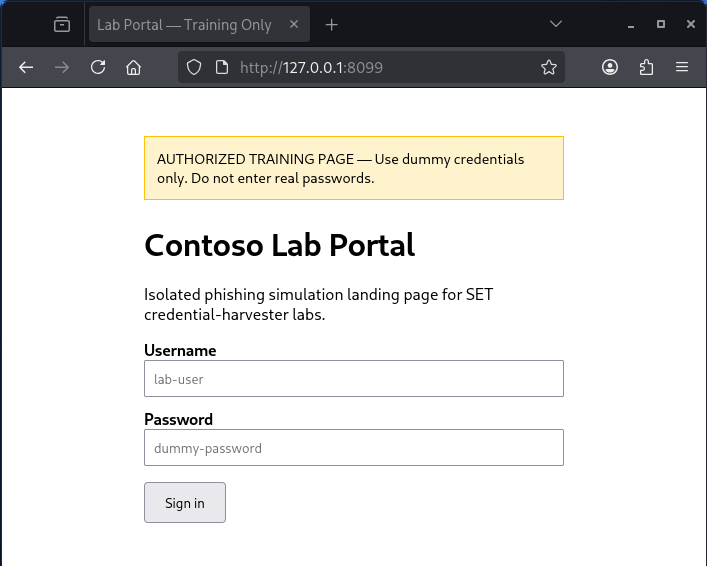
Write ~/set-phishing-lab/index.html with a clear training banner, a standard POST form, and dummy field names:
cat > ~/set-phishing-lab/index.html << 'EOF'
<!DOCTYPE html>
<html lang="en">
<head>
  <meta charset="utf-8">
  <title>Lab Portal — Training Only</title>
  <style>
    body { font-family: system-ui, sans-serif; max-width: 420px; margin: 3rem auto; padding: 0 1rem; }
    .banner { background: #fff3cd; border: 1px solid #ffc107; padding: 0.75rem; margin-bottom: 1.5rem; font-size: 0.9rem; }
    label { display: block; margin-top: 0.75rem; font-weight: 600; }
    input[type=text], input[type=password] { width: 100%; padding: 0.5rem; box-sizing: border-box; }
    button { margin-top: 1rem; padding: 0.6rem 1.2rem; }
  </style>
</head>
<body>
  <div class="banner">AUTHORIZED TRAINING PAGE — Use dummy credentials only. Do not enter real passwords.</div>
  <h1>Contoso Lab Portal</h1>
  <p>Isolated phishing simulation landing page for SET credential-harvester labs.</p>
  <form method="POST" action="/">
    <label for="username">Username</label>
    <input id="username" name="username" type="text" autocomplete="off" placeholder="lab-user">
    <label for="password">Password</label>
    <input id="password" name="password" type="password" autocomplete="off" placeholder="dummy-password">
    <button type="submit">Sign in</button>
  </form>
</body>
</html>
EOF
cat writes the file and returns silently when it succeeds. Confirm the form posts to / with method="POST":
grep -E 'form method|name="username"|name="password"' ~/set-phishing-lab/index.html <form method="POST" action="/">
<input id="username" name="username" type="text" autocomplete="off" placeholder="lab-user">
<input id="password" name="password" type="password" autocomplete="off" placeholder="dummy-password">Standard method="POST" and named inputs are what the harvester expects. Heavy JavaScript SPAs, OAuth redirects, and forms that post to third-party origins will not behave like this simple page. That limit is the point of the next sections.
Site Cloner (menu option 2) pulls remote HTML and rewrites form actions. Assets, CSP, and client-side login flows often break the clone. Prefer your own training page for learning; if you discuss cloning in a report, say it is a partial HTML replica, not a fully functional login.
Understand the form submission flow
Everything interesting happens in one HTTP round trip after the page loads:
Browser renders index.html
        |
        |  GET /
        v
SET (or Apache) serves the training page
        |
User submits dummy username/password
        |
        |  POST /  (application/x-www-form-urlencoded)
        v
SET harvester parses body fields
        |
Logs PARAM lines / POSSIBLE USERNAME|PASSWORD hints
        |
Returns a short HTML meta-refresh (redirect target from site.template)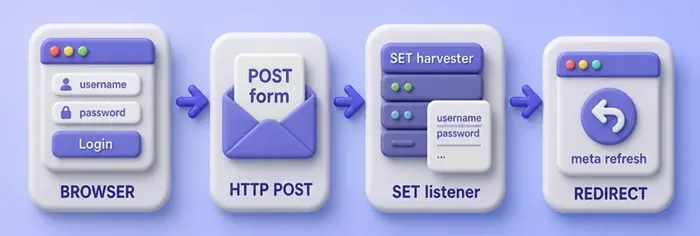
What to record for evidence:
- Listener bind address and port
- Exact URL the browser opened
- Field names that appeared (
username,password) - That values were lab dummies, not production secrets
- Redirect URL after POST
Page delivery, POST, parse, and redirect are the educational core. Menu clicks alone do not explain it.
Run the lab phishing flow
Back in sudo setoolkit, finish Custom Import:
- IP for POST back:
127.0.0.1 - Path to the website: the absolute directory from
realpathearlier, with a trailing/— for example/home/kali/set-phishing-lab/on a standard Kali VM - Copy choice:
1(justindex.html) - URL of the website you imported:
http://127.0.0.1
Because SET is running as root, paste the full /home/kali/... path (or whatever realpath printed). A bare ~/set-phishing-lab/ under sudo would look in /root/, which is the wrong place if you built the page as user kali.
SET copies the page under /root/.set/web_clone/ and starts the credential harvester on WEB_PORT. When it is ready the SET terminal prints that the harvester is running on port 8088 and that information will appear as it arrives.
From a second terminal, fetch the page and confirm the training banner is present:
curl -sS http://127.0.0.1:8088/ | grep -E 'AUTHORIZED TRAINING|Contoso Lab Portal|form method' <div class="banner">AUTHORIZED TRAINING PAGE — Use dummy credentials only. Do not enter real passwords.</div>
<h1>Contoso Lab Portal</h1>
<form method="POST" action="/">Submit dummy credentials with curl so you can show the exact POST body later:
curl -sS -D- -o /tmp/set-post-body.html \
  -X POST 'http://127.0.0.1:8088/' \
  -H 'Content-Type: application/x-www-form-urlencoded' \
--data 'username=lab-user&password=DummyPass-TrainingOnly-123'HTTP/1.0 200 OK
Server: BaseHTTP/0.6 Python/3.13.12
Date: Sat, 05 Sep 2026 08:37:21 GMT
Content-type: text/htmlThe body is a meta-refresh toward the imported URL (here http://127.0.0.1), not a real authenticated session:
cat /tmp/set-post-body.html<html><head><meta HTTP-EQUIV="REFRESH" content="0; url=http://127.0.0.1"></head></html>Watch the SET terminal at the same time. A successful lab POST prints WE GOT A HIT!, then POSSIBLE USERNAME FIELD FOUND: username=lab-user and POSSIBLE PASSWORD FIELD FOUND: password=DummyPass-TrainingOnly-123, and asks you to hit Control-C when you want a report.
Those lines are campaign evidence for the lab report: listener saw a POST, field names matched login heuristics, values were your dummies. Press Ctrl-C in SET when you are done so it can write its HTML report under the SET reports path.
You can also open http://127.0.0.1:8088/ in a local browser, type the same dummy pair, and watch the same HIT lines appear.
What SET can and cannot capture
The harvester records what the browser posts to the URL it serves. Success depends on:
- A normal HTML form with
method="POST"and named inputs - Form
actionpointing at the harvester (SET rewrites manyactionURLs during scrape) - The client actually sending
application/x-www-form-urlencoded(or similar) fields to that host
It does not magically equal a full production login:
| Situation | Typical result |
|---|---|
| Simple HTML form on your training page | Fields appear as PARAM / POSSIBLE USERNAME|PASSWORD lines |
| Clone of a modern SPA / SSO portal | Missing assets, broken JS, or posts that never hit SET |
| OAuth / OIDC redirect to an IdP | Browser leaves your page; SET never sees the password |
| Form posts to a third-party absolute URL | Harvester never receives the body |
| HTTPS with a bad lab cert | Browser warnings; users may refuse to continue |
| Password managers / WebAuthn | No reusable password field to harvest |
Do not claim “site clone equals fully functional login capture” in a report. Say what was served, what was posted, and what still blocked a realistic phishing path.
Inspect the traffic with tcpdump or Burp
Seeing the bytes makes the menu sequence real. With the harvester still listening, write a pcap on the lab port. Use -w alone here — -A only helps when tcpdump prints packets to the terminal, not when it writes a capture file:
sudo tcpdump -i lo -n -s0 -w /tmp/set-harvester.pcap 'tcp port 8088'In another terminal, repeat the dummy POST, stop tcpdump with Ctrl-C, then read ASCII from the saved file:
sudo tcpdump -nn -A -r /tmp/set-harvester.pcap | grep -E 'POST /|Host:|username=|HTTP/1'POST / HTTP/1.1
Host: 127.0.0.1:8088
username=lab-user&password=DummyPass-TrainingOnly-123
HTTP/1.0 200 OKThat is the same body SET parsed. For a GUI workflow, point the browser at Burp Suite as an intercepting proxy, submit the training form once, and inspect the Proxy history entry for POST / with those dummy fields. Still use dummy credentials only.
Wireshark on the lo interface with display filter tcp.port == 8088 shows the same POST if you prefer a packet UI. The tcpdump command cheat sheet covers capture filters and -A ASCII dumps in more depth.
SET vs Gophish
Pick the tool that matches the assessment goal:
| Goal | Prefer |
|---|---|
| Learn page delivery, form POST, and listener evidence on Kali | SET credential harvester |
| Interactive web / media / QR vectors in one toolkit | SET |
| Track recipients, opens, clicks, and timelines | Gophish |
| Reusable email templates and sending profiles for awareness programs | Gophish |
| One-off lab demo beside a student | SET |
| Multi-day authorized campaign with metrics for leadership | Gophish |
Install and campaign steps live in the Gophish guides linked in the intro table. For prebuilt social login templates served from localhost with a Bash menu, compare Zphisher on Kali. This page stays on SET’s HTTP harvester path.
Troubleshooting
| Symptom | Likely cause | Fix |
|---|---|---|
| Browser cannot open the page | Wrong IP/port, firewall, or harvester not started | Confirm SET printed running on port 8088; use http://127.0.0.1:8088/; check ss -tlnp | grep 8088 |
| Empty reply from server / curl 52 | Built-in Python handler issues on some Kali/Python builds | Update set, try APACHE_SERVER=ON in set.config, or serve via Apache as SET documents |
| Form submits but SET shows no HIT | action points elsewhere, GET instead of POST, or JS bypass |
View page source; ensure method="POST" and action targets the harvester; test with curl --data |
| CSS/images missing after clone | Relative assets or CSP on cloned sites | Use Custom Import with a self-contained training page |
| JavaScript-heavy clone looks blank | SPA expects APIs/cookies SET does not provide | Do not rely on Site Cloner for SPAs; teach with a static form |
| Mixed content blocked | HTTPS page posting to HTTP harvester | Keep the whole lab on HTTP localhost, or configure SET SSL properly |
| Port 80 already in use | Another web service bound | Set WEB_PORT=8088 as in this article |
| HIT shows fields but odd names | App uses non-login field names | Still logged as PARAM:; rename training inputs to username/password for clearer demos |
Detection and defensive lessons
After the lab, list what a defender or careful user could have noticed:
- Unusual host or port (
127.0.0.1:8088instead of the real portal hostname) - Certificate name mismatch if HTTPS were forced in a wider exercise
- Form
action/ POST destination not matching the brand domain - New listening service on the workstation (
setoolkit/ Python on 8088) - Email or chat lure text that does not match normal IT tone (out of scope here, but part of real phishing)
For users: hover links, check the address bar before typing passwords, and prefer MFA/WebAuthn so a harvested password alone fails. For defenders: alert on new local listeners during exercises, inspect proxy logs for unexpected POST targets, and treat cloned-looking pages on odd hosts as suspicious even when TLS is present.
Summary
You installed SET on Kali, pointed WEB_PORT at an unused port, and imported a training page you control instead of cloning a production login. The important sequence is simple: the harvester serves HTML, the browser (or curl) POSTs form fields, SET prints POSSIBLE USERNAME/PASSWORD lines, and a meta-refresh returns a controlled redirect.
The main pitfall is assuming Site Cloner equals a working phishing kit. Modern logins, SSO, and JavaScript apps often never post secrets to your listener. Stick to dummy credentials, isolated networks, and honest report language about what the HTTP flow actually captured.
When you need recipient tracking and campaign metrics, move to Gophish. When you need to teach the POST path beside a student, SET’s credential harvester remains a clear Kali lab tool. Keep it inside authorization boundaries.
References
- Social-Engineer Toolkit (TrustedSec / GitHub)
- TrustedSec
- Gophish
- Kali Tools — set
Frequently Asked Questions
What does the SET credential harvester do?
It serves a web page (cloned, templated, or imported), rewrites many form actions toward your listener, accepts HTTP POST bodies, prints matching fields in the SET terminal, and can redirect the browser with a short HTML meta-refresh.
Why is my SET phishing page on localhost not loading?
Confirm the harvester printed its listening port, browse http://127.0.0.1:PORT/, and check that nothing else owns that port. If curl returns an empty reply on Kali’s built-in server, try Apache mode in set.config or update the set package.
Should I use SET or Gophish for phishing simulations?
Use SET for interactive lab teaching of page delivery and form capture. Use Gophish when you need campaign management, recipient lists, and open/click metrics under authorization.
Can SET capture passwords from modern SSO login pages?
Often no. OAuth and OIDC send the user to an identity provider SET does not control, and many SPAs never POST a password to your cloned origin. Report that limitation instead of claiming a full capture.
Is it legal to run SET phishing modules?
Only with explicit authorization on systems and users in scope. Unauthorized phishing is illegal. Keep this tutorial’s localhost dummy-credential lab inside a written rules of engagement when you move beyond your own VMs.
