
| Tested on | Kali GNU/Linux Rolling 2026.2 (kali-rolling) |
|---|---|
| Package | FiercePhish v1.2.2 (2017-06-13 GitHub release)Laravel 5.4.* / PHP >=5.6.4 per composer.jsonPHP 8.4.24 on Kali Rolling 2026.2 |
| Applies to | Kali Linux for installer inspection and campaign-concept review |
| Lab environment | Pentest lab |
| Privilege | Normal user to download and inspect scripts; sudo for the root installer test |
| Cert prep | CompTIA PenTest+ PT0-003 - social engineering tooling awareness |
| Scope | Explain FiercePhish architecture and campaign concepts, inspect the upstream installer on Kali, document release status and modern Linux limits, and contrast the tool with current phishing simulation platforms. Does not walk through sending live phishing mail to real people. |
FiercePhish is a legacy phishing-campaign management framework. This guide explains what it was built to do, how its installer behaves on current Kali Linux, and how its targets, templates, and campaigns fit together.
FiercePhish is useful for understanding how older PHP/Laravel phishing platforms organized targets, templates, and campaigns. For a new phishing lab, use a maintained framework such as Gophish. Keep this walkthrough on authorized systems and dummy recipients, and write that scope into your rules of engagement first.
What Is FiercePhish?
FiercePhish is an open-source phishing engagement framework originally released by Chris King (@raikiasec) as FirePhish and renamed FiercePhish in early 2017. FiercePhish is not itself an email client or a vulnerability scanner. It is a management application that organizes the pieces of a phishing simulation: who receives the test, what message is used, when it is scheduled, and what happened afterward.
FiercePhish is a web application built with Laravel, a PHP web framework. Its browser interface lets an authorized operator manage targets, reusable email templates, campaigns, schedules, and logs.
Although the software is old, its main campaign concepts still appear in modern phishing-simulation platforms:
- Separate phishing campaigns with their own target lists and schedules
- Reusable email templates and a simple one-off send path
- Activity and email logs for after-action review
- Operator accounts with optional two-factor authentication
Its main value today is learning the campaign structure used by older phishing-simulation platforms.
Current Project and Release Status
Upstream code lives at Raikia/FiercePhish. The latest published GitHub release is v1.2.2 (13 June 2017). Wiki changelog entries also stop in the 2017 timeframe. The repository README still lists planned features, but that wording is stale.
Although the repository has a later 2024 commit, the published application release remains v1.2.2 from 2017 and the codebase still uses the legacy Laravel stack. composer.json still pins:
- PHP
>=5.6.4 - Laravel
5.4.*
These dependency versions give a clearer picture of the application's age than the older feature descriptions in the README. FiercePhish should therefore be treated as legacy software rather than an actively developed phishing platform.
FiercePhish Architecture
FiercePhish uses a traditional Linux web-application stack. Apache serves the Laravel/PHP application, MySQL stores campaign data, Supervisor keeps background queue workers running, and cron starts scheduled Laravel tasks. Artisan is Laravel's command-line utility and is used for tasks such as database migrations. The installer also tries to configure mail services.
  Browser
     │
     ▼
  Apache + PHP
     │
     ▼
  Laravel application (/var/www/fiercephish)
     ├── MySQL (campaigns, targets, templates)
     ├── Queue workers (Supervisor)
     ├── Scheduler (cron / artisan)
     └── Mail configuration ──► SMTP / IMAP
SMTP handles outgoing email; IMAP lets the application access a mailbox. Those mail services are separate from the FiercePhish web interface itself. A working FiercePhish web interface does not automatically mean email delivery is working. Sending mail also depends on SMTP configuration, DNS/domain setup, and network access.
In the web interface, the main sections are:
| Area | Role |
|---|---|
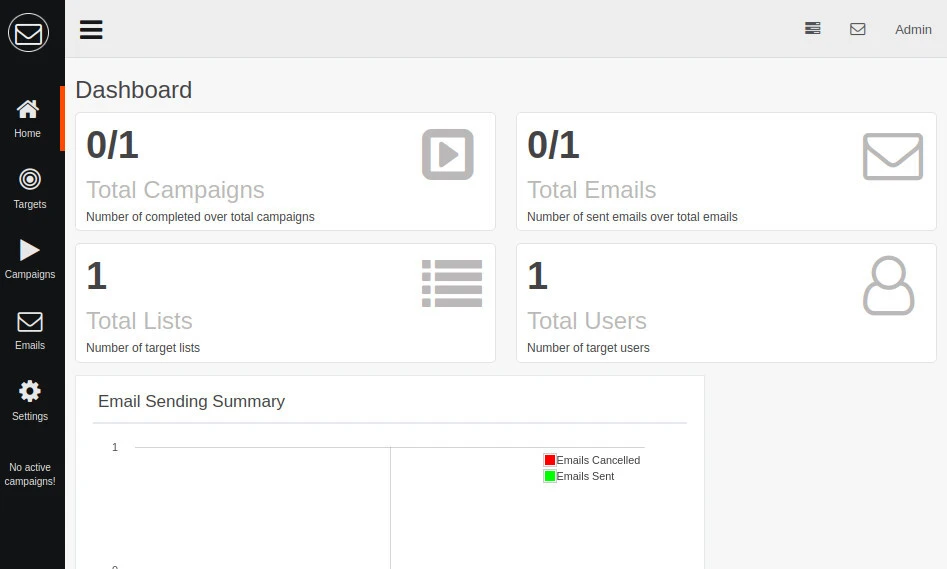
| Dashboard | High-level counts for campaigns, emails, and users |
| Targets | Individual recipients and named lists, including CSV import |
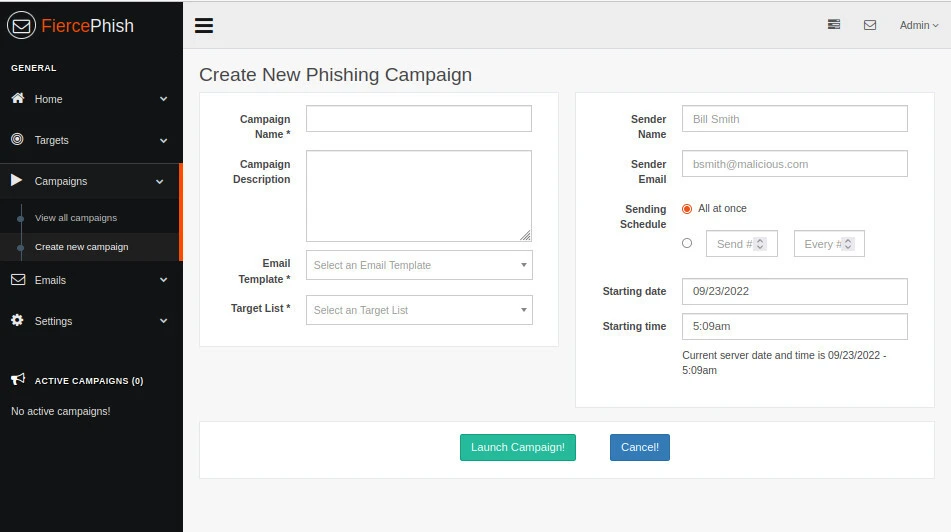
| Campaigns | Bind a template, a target list, a sender profile, and an optional schedule |
| Emails | Templates, simple send, inbox, and mail logs |
| Settings | Users, application/database/email configuration, import/export, logs |
The campaign screenshots below come from an earlier FiercePhish lab and are included to show the web interface and campaign model. Layout may differ slightly from a fresh v1.2.2 install, but the navigation model is the same. The dashboard summarizes campaign and email totals:
The create-campaign form in this historical FiercePhish lab capture binds a template, a target list, a sender identity, and an optional schedule. Populated sample values such as bsmith@malicious.com are leftover lab placeholders, not a recommended sender configuration:
Build an Isolated Training Lab
The installer inspection in this guide uses Kali GNU/Linux Rolling 2026.2 in an isolated pentest lab. The workflow downloads install.sh, records its SHA-256 hash, inspects the operating-system checks, and tests the installer's behavior both with and without root privileges.
The campaign screenshots come from an earlier FiercePhish lab and are included to show the web interface and campaign model.
Keep FiercePhish work off production networks and off mail domains you do not control. Do not buy domains or configure public MX records just to follow the campaign concepts below.
Inspect the FiercePhish Installer
Download the installer before running it so you can inspect its operating-system checks and package-installation steps first.
Create a working directory:
mkdir -p ~/fiercephish-labmkdir prints nothing when it succeeds. Change into that directory and fetch the installer with the curl command without executing it:
cd ~/fiercephish-lab && curl -fsSL -o install.sh https://raw.githubusercontent.com/Raikia/FiercePhish/master/install.shAfter the download completes, confirm that install.sh is a shell script:
file install.shinstall.sh: Bourne-Again shell script, ASCII text executableA SHA-256 hash gives you a stable fingerprint of the downloaded script. Comparing it with a repository copy is a quick way to check that you inspected the same file:
sha256sum install.sh70d81122916296e9d888177103781e6a1081b7dca01c644741568ebb3d7f767e install.shBecause this command downloads master, the SHA-256 value can change whenever the upstream script changes. Compare the downloaded script with the repository copy from the same revision. The downloaded script and the copy from the same repository revision should produce the same SHA-256 value.
Inspect the OS gate before you run anything. -n includes line numbers and -E allows the alternatives separated by |:
grep -nE 'Ubuntu|OS_VERSION|Could not identify' install.sh | head -2026:OS_VERSION=""
233: notice "It is designed to work with Ubuntu and currently only works for Ubuntu 16.04, Ubuntu 16.10, and Ubuntu 20.04"
244: OS_VERSION=${DISTRIB_RELEASE}
245: if [[ $OS = 'Ubuntu' ]]
247: if [[ $OS_VERSION = "16.04" || $OS_VERSION = "16.10" || $OS_VERSION = "18.04" || $OS_VERSION = "20.04" ]]
249: notice "Found that you are running ${LYELLOW}${OS} ${OS_VERSION}${WHITE}! This is a supported operating system!"
250: elif [[ $OS_VERSION = "14.04" ]]
252: error "You are running ${LYELLOW}${OS} ${OS_VERSION}${LRED}. As of FiercePhish v1.2.0, this OS version is not officially supported."
253: error "You can read how to get FiercePhish working with ${LYELLOW}${OS} ${OS_VERSION}${LRED} here: "
254: error " https://github.com/Raikia/FiercePhish/wiki/Ubuntu-14.04-Installation-Guide"
257: error "You are running ${LYELLOW}${OS} ${OS_VERSION}${LRED}. This is not supported by this installer."
261: error "You are running ${LYELLOW}${OS} ${OS_VERSION}${RESTORE}. This isn't supported by the installer yet"
265: error "Could not identify what OS is running! This installer works on Ubuntu only right now"
616: if [[ $OS = "Ubuntu" ]]
624: if [[ $OS = "Ubuntu" ]]
628: if [[ $OS_VERSION = "16.04" || $OS_VERSION = "16.10" || $OS_VERSION = "18.04" || $OS_VERSION = "20.04" ]]
638: if [[ $OS = "Ubuntu" ]]
640: if [[ $OS_VERSION = "16.04" || $OS_VERSION = "16.10" || $OS_VERSION = "18.04" || $OS_VERSION = "20.04" ]]
648: if [[ $OS = "Ubuntu" ]]
650: if [[ $OS_VERSION = "16.04" || $OS_VERSION = "16.10" || $OS_VERSION = "18.04" || $OS_VERSION = "20.04" ]]The banner lists Ubuntu 16.04, 16.10, and 20.04, but the actual condition also accepts Ubuntu 18.04. The upstream README includes 18.04 as well, so the installer's banner is incomplete. The accepted releases are therefore Ubuntu 16.04, 16.10, 18.04, and 20.04. The script is not a Kali installer.
The installer checks root privileges before it checks the operating system. Running the installer without root privileges stops at the privilege check:
bash install.sh#################################################################
#################### FiercePhish Installer ####################
#################### By Chris King ####################
#################### @raikiasec ####################
#################################################################
[~] This installer automatically installs FiercePhish and all the other services needed.
[~] It is designed to work with Ubuntu and currently only works for Ubuntu 16.04, Ubuntu 16.10, and Ubuntu 20.04
[!] You must run the installation script as rootRunning the same installer with sudo passes the root check but then fails the operating-system check because Kali is not an accepted Ubuntu release:
sudo bash install.sh#################################################################
#################### FiercePhish Installer ####################
#################### By Chris King ####################
#################### @raikiasec ####################
#################################################################
[~] This installer automatically installs FiercePhish and all the other services needed.
[~] It is designed to work with Ubuntu and currently only works for Ubuntu 16.04, Ubuntu 16.10, and Ubuntu 20.04
[~] Detecting OS distribution...
[!] Could not identify what OS is running! This installer works on Ubuntu only right nowcomposer.json declares PHP >=5.6.4 and Laravel 5.4.*. The PHP constraint has no upper bound, but that does not mean the 2017 Laravel dependency stack is compatible with the PHP 8.4.24 available on Kali Rolling 2026.2. Do not assume compatibility merely because the Composer version constraint is satisfied.
Local and remote installation use different configuration flows. When install.sh is piped to Bash, it uses ~/fiercephish.config across two runs. When the downloaded script is launched locally, it prompts for configuration interactively. This guide only inspects the installer on Kali and does not continue into framework installation or mail delivery.
Campaign and Template Concepts
FiercePhish organizes campaigns around targets, target lists, email templates, sender settings, and schedules.
In FiercePhish terminology, a target is a recipient record used in an authorized simulation. A target list groups those records so they can be assigned to a campaign.
| Object | What it stores | Why it matters |
|---|---|---|
| Target | One recipient profile (name, email, optional notes) | Represents one recipient whose campaign activity can be tracked separately |
| Target list | Named group of targets, often imported from CSV | Lets one campaign address many recipients without re-entering them |
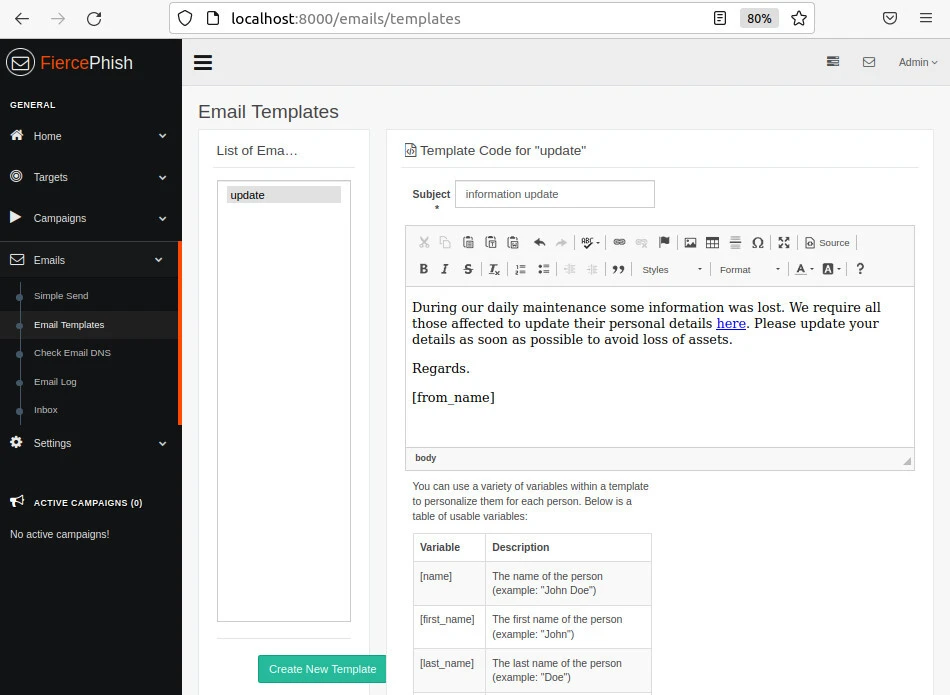
| Email template | Subject and HTML/text body used for phishing mail | Separates content authoring from sending |
| Campaign | Template + list + sender settings + optional schedule | Combines the recipients, message, sender settings, and schedule into one phishing simulation |
| Simple send | One-off message outside a full campaign | Sends an individual test message without first building a full campaign/list workflow |
The relationship is:
Targets → Target list
                │
Email template ─┼─► Campaign → queue → SMTP
                │
Sender / schedule
Use Dummy Recipients for a Test Campaign
To explore the campaign workflow without using real recipients:
- Create two or three targets that resolve only to mailboxes you control
- Put them in a list such as
lab-dummy-recipients - Create a bland template that clearly identifies itself as a security exercise
- Create a campaign that points at that list and template
- Keep the campaign unsent if your goal is only to study the UI and campaign relationships
Do not import production HR exports, customer CRMs, or scraped addresses. To study the interface without delivery, create the objects and review the dashboard without sending the campaign. For an authorized lab that includes mail delivery, use only mailboxes and mail infrastructure you control.
Review Campaign Reporting
FiercePhish provides operational information about campaigns and email activity:
- Dashboard totals for campaigns, emails, and users
- Campaign pages showing configured campaigns and their state
- Email logs for send attempts and related events
- Application logs under Settings for troubleshooting the Laravel app itself
The email-template editor is where subject lines and body text live. Historical lab captures look like this:
For an authorized test message sent to a dummy mailbox, record:
- Which campaign and template were used
- Which recipient addresses were included
- Whether the test message was delivered to the inbox, classified as spam, or not delivered
- Any SMTP errors from the installer-configured mail stack
Use a dedicated mail-analysis workflow such as ThePhish with TheHive and Cortex to investigate messages that have already been received.
Limitations on Modern Linux
The current compatibility limitations are:
| Limitation | Current impact |
|---|---|
| OS gate | Installer accepts only selected Ubuntu releases; Kali fails OS detection after the root check |
| PHP / Laravel age | composer.json still targets Laravel 5.4.* with PHP >=5.6.4; modern-PHP compatibility is unverified |
| Dependency tooling | Installer still pulls Composer, npm/bower-era front-end pieces, and older MySQL setup assumptions |
| Maintenance | Last published release is v1.2.2 from 2017; later repository commits have not modernized the Laravel application stack |
| Mail complexity | The legacy SMTP/IMAP setup adds dependencies that are unnecessary when the goal is only to study the campaign model |
The installer accepts Ubuntu 16.04, 16.10, 18.04, and 20.04 during OS detection. This does not mean that all legacy dependencies will still install successfully on those releases today. For new Kali-based phishing labs, use Gophish.
FiercePhish vs Modern Phishing Simulation Platforms
| Topic | FiercePhish | Gophish |
|---|---|---|
| Primary stack | PHP / Laravel 5.4 web app | Go binary with local admin UI |
| Release status | v1.2.2 published in 2017 | Maintained |
| Kali fit | Official installer rejects Kali; legacy PHP/Laravel dependencies are not a good match for current Kali | Straightforward standalone deployment; see linked Gophish install guide |
| Campaign model | Targets, lists, templates, campaigns | Groups, templates, landing pages, campaigns |
| Appropriate use | Legacy study and comparison | New authorized phishing labs |
For a Kali-first install path, start with Install Gophish phishing framework. For campaign construction after that install, continue with create phishing campaign with Gophish.
Troubleshooting Old Dependencies
| Symptom | Likely cause | Fix |
|---|---|---|
You must run the installation script as root |
Installer run without root privileges | Re-run with sudo only on an isolated lab VM |
Could not identify what OS is running |
Non-Ubuntu host such as Kali | Stay on Kali for inspection, or switch to Gophish for a maintained phishing lab |
Composer or artisan failures |
Legacy Laravel dependencies may not work with the installed PHP and package versions | Avoid replacing Kali's system PHP or forcing incompatible dependency versions just to satisfy this legacy application. Use a maintained framework instead |
Running curl … | bash directly |
Installer executes before local inspection | Download install.sh, inspect and hash it, then execute the local copy only when appropriate |
| Mail never leaves the VM | Incomplete SMTP/DNS setup or blocked lab network | Confirm whether outbound networking and SMTP are intentionally disabled before treating this as an application failure |
| UI missing expected menus | Incomplete migrate/queue setup or failed install | Review installer logs on the host where the install was attempted before changing more packages |
Summary
FiercePhish is a 2017-era Laravel phishing framework that still illustrates campaign management ideas: targets, lists, templates, schedules, and operator reporting. Its latest GitHub release remains v1.2.2, and the official installer is written for older Ubuntu releases rather than Kali.
On Kali Rolling 2026.2, install.sh stops at the root privilege check when run as a normal user. With root privileges, it proceeds to OS detection and rejects Kali because the installer accepts only selected Ubuntu releases. For new authorized phishing labs on Kali, use a maintained framework such as Gophish.
FiercePhish is best retained as legacy study material rather than deployed as a current phishing platform.
References
- Raikia/FiercePhish - upstream repository and README
- FiercePhish v1.2.2 release - latest published GitHub release
- FiercePhish Wiki - installation notes, changelog, and feature pages
- Gophish - actively maintained open-source phishing framework
Frequently Asked Questions
Is FiercePhish still actively developed?
The last published GitHub release is v1.2.2 from June 2017, and the application still depends on Laravel 5.4. Treat it as legacy software. Later repository commits have not modernized the Laravel application stack for current PHP or Linux releases.
Can I install FiercePhish on Kali Linux?
No. The official installer requires root privileges and then checks the Linux distribution. Kali fails that OS check because the script accepts only selected Ubuntu releases. The Laravel dependency stack is also old enough that compatibility with Kali's current PHP packages should not be assumed.
Which Ubuntu versions does the official installer support?
The installer checks for Ubuntu 16.04, 16.10, 18.04, and 20.04. Ubuntu 20.04 is the newest release in that list. These are versions recognized by the installer's OS check; recognition does not guarantee that every legacy dependency will still install successfully.
Should I still use curl piped into bash to install it?
No. Download install.sh, inspect it, and compare its hash to the repository copy before you decide whether to run it. The remote-pipe method uses ~/fiercephish.config; local execution prompts interactively.
What should I use instead for a new phishing lab?
For Kali-based authorized phishing simulations, use a maintained framework such as Gophish. FiercePhish remains useful mainly for understanding older campaign-management designs.
