
| Tested on | Kali GNU/Linux Rolling 2026.2 (kali-rolling) |
|---|---|
| Package | dvwa 2.5-0kali1 on http://127.0.0.1:42001 |
| Lab environment | Pentest lab |
| Cert prep | CompTIA PenTest+ PT0-003: web application injection testing (XSS) |
| Privilege | Normal user for browser and curl; sudo for dvwa-start if the service is stopped |
| Scope | What makes XSS possible, reflected vs stored vs DOM, DVWA demos for each type, HTML/attribute/JS/URL context, Burp checks, why a simple alert fails, impact (including HttpOnly limits), prevention and CSP as defense-in-depth, XSS vs CSRF. Does not teach WAF-bypass payload catalogs or replace the DVWA learning map. |
Cross-site scripting (XSS) happens when untrusted data reaches a place in the page where the browser treats it as code. The useful mental model is not a list of payloads. It is input → context → execution.
This lesson uses DVWA on http://127.0.0.1:42001 for reflected, stored, and DOM XSS at Low. For modules and security levels, use the DVWA learning map. For package install, see install DVWA on Kali Linux.
alert(1) or a broken <img> tag. Do not exfiltrate real user data.
What makes XSS possible?
XSS is possible when data you control crosses into an executable browser context without safe encoding or a safe DOM API.
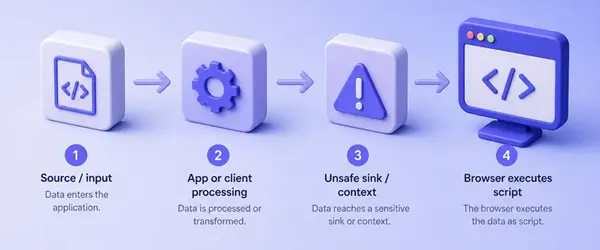
Read the chain left to right:
- Source / input: a query parameter, form field, header, cookie, or hash fragment
- Processing: server template, client JavaScript, or both
- Context or sink: the value reaches HTML, an attribute, JavaScript, or an unsafe DOM API such as
innerHTMLordocument.write - Execution: the browser interprets attacker-controlled data as executable markup or JavaScript
Encoding or safe DOM APIs can prevent untrusted data from becoming executable syntax. CSP can additionally restrict execution if an injection bug remains. That is why memorizing one <script>alert(1)</script> string is a weak habit.
Reflected vs stored vs DOM XSS
| Type | Where the flaw lives | How the payload arrives | Typical impact shape |
|---|---|---|---|
| Reflected | Server builds HTML for this response | Same request (often a crafted link) | One victim who opens the link |
| Stored | Server persists untrusted data and serves it later | Attacker submits once; victims load a normal page | Any user who views the stored content |
| DOM | Client-side JavaScript moves data into a sink | URL, storage, or message handled in the browser | Depends on who hits the vulnerable client path |
DOM XSS is not "XSS that lives in the URL." The URL is often the source. The vulnerability is the JavaScript that writes that value into the page unsafely.
Lab setup for this tutorial
Start DVWA if it is not running:
sudo dvwa-startThen in the browser:
- Open
http://127.0.0.1:42001 - On first run, left menu → Setup / Reset DB → Create / Reset Database
- Log in with
admin/password - Left menu → DVWA Security → Low → Submit
Keep a Terminal for curl checks (see the curl command for -G and -H). For authenticated requests, copy PHPSESSID from DevTools (Firefox: Storage → Cookies) and set:
export DVWA_COOKIE='PHPSESSID=your_session_here; security=low'Confirm the variable in the same Terminal:
echo "${DVWA_COOKIE}"You should see your real session string, not the placeholder. The SQL injection with sqlmap lesson documents the same cookie steps in more detail if you need a longer walkthrough.
Reflected XSS demo on DVWA
Reflected XSS shows your input in the current response. Open left menu → XSS (Reflected).
Identify reflection
Submit a normal name such as testuser. The page should greet you with that string. From Terminal, the same request returns the name inside a <pre> block:
curl -s -G -H "Cookie: ${DVWA_COOKIE}" \
  --data-urlencode "name=testuser" \
"http://127.0.0.1:42001/vulnerabilities/xss_r/" | grep -o '<pre>Hello [^<]*</pre>'<pre>Hello testuser</pre>The name parameter is reflected into HTML text. That is the context you must break out of or inject into.
Inspect context and prove execution
At Low, DVWA concatenates the parameter into HTML without encoding. Simplified from the package source:
$html .= '<pre>Hello ' . $_GET[ 'name' ] . '</pre>';A broken <img> confirms that your input is being parsed as HTML, but it does not by itself prove JavaScript execution. For an actual XSS proof in this lab, use a harmless handler such as <img src=x onerror=alert(1)>, or a script tag:
<script>alert(1)</script>Paste that as the name and Submit. The browser should show a dialog with 1:
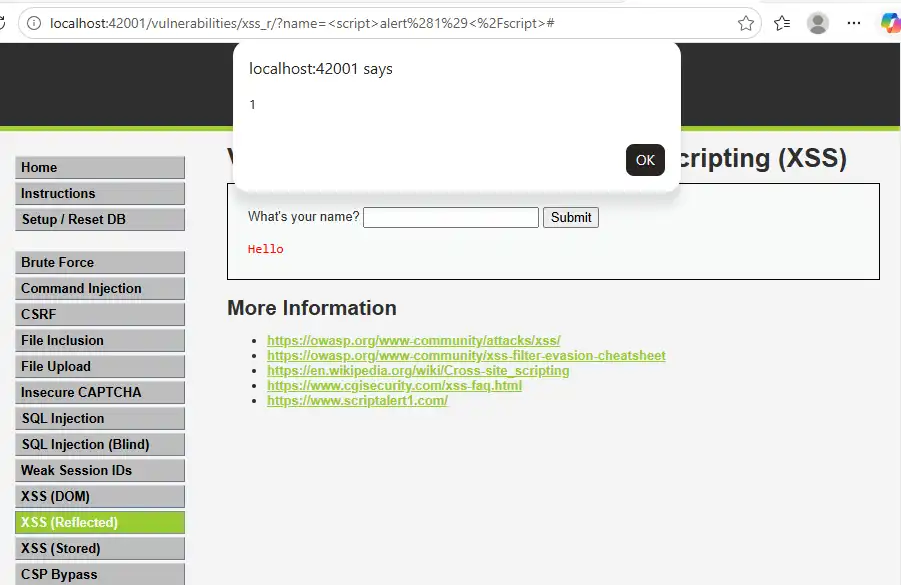
From Terminal, confirm the payload is present as real markup in the response (not HTML-encoded text):
curl -s -G -H "Cookie: ${DVWA_COOKIE}" \
  --data-urlencode "name=<script>alert(1)</script>" \
"http://127.0.0.1:42001/vulnerabilities/xss_r/" | grep -o '<pre>Hello .*' | head -1<pre>Hello <script>alert(1)</script></pre>curl proves reflection into HTML. The alert dialog proves the browser executed JavaScript. You need both ideas: reflection alone is not XSS until something executable runs.
Why it worked: the server echoed untrusted data into the HTML body. No encoding step sat between the source (name) and the sink (page HTML).
Stored XSS demo on DVWA
Stored XSS persists. One submit can affect later visits (and other users) when the app reads the database and builds HTML.
Open left menu → XSS (Stored). Clear the guestbook if old entries clutter the page, then sign with:
- Name:
Alice - Message:
<img src=x onerror=alert(1)>(fits the message length limit;<script>alert(1)</script>also works)
After Submit, accept the alert if it appears. Then reload XSS (Stored) without signing again. The alert should fire again from the stored guestbook entry. That persistence is the stored-XSS proof: submit once, later page loads still execute.
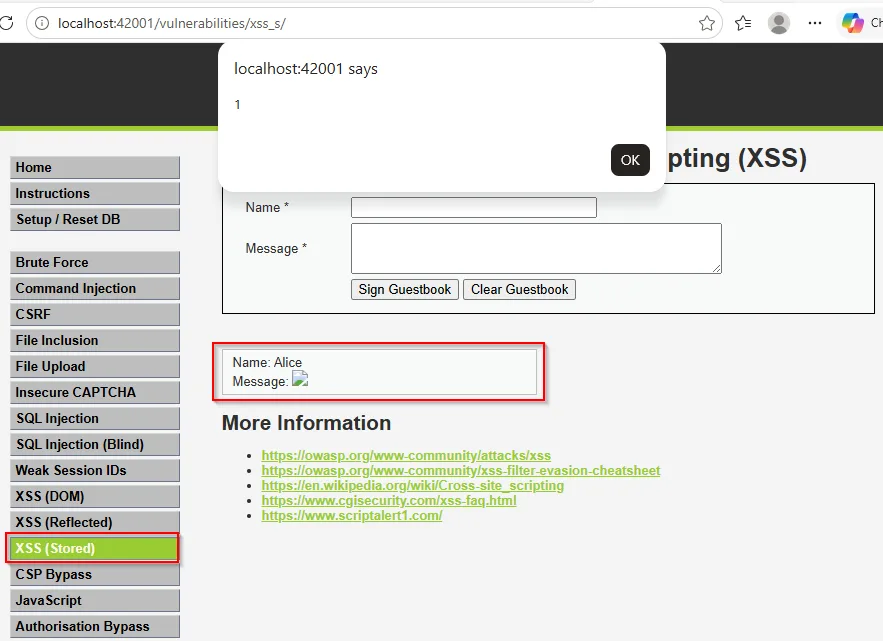
From Terminal, clear the guestbook first (this POST returns HTML you can ignore):
curl -s -H "Cookie: ${DVWA_COOKIE}" -X POST \
  -d 'btnClear=Clear+Guestbook' \
  "http://127.0.0.1:42001/vulnerabilities/xss_s/" -o /dev/null
curl writes nothing useful here because of -o /dev/null. Sign the guestbook next and keep only the stored comment block:
curl -s -H "Cookie: ${DVWA_COOKIE}" -X POST \
  --data-urlencode 'txtName=Alice' \
  --data-urlencode 'mtxMessage=<img src=x onerror=alert(1)>' \
  --data-urlencode 'btnSign=Sign Guestbook' \
  "http://127.0.0.1:42001/vulnerabilities/xss_s/" \
| grep -o 'guestbook_comments">.*</div>'guestbook_comments">Name: Alice<br />Message: <img src=x onerror=alert(1)><br /></div>The HTML still contains the handler after the POST. Reload in the browser to confirm execution on a later load. Impact is usually larger than reflected XSS because victims do not need a crafted link. Anyone who opens the guestbook runs the stored markup in their session.
DOM XSS demo on DVWA
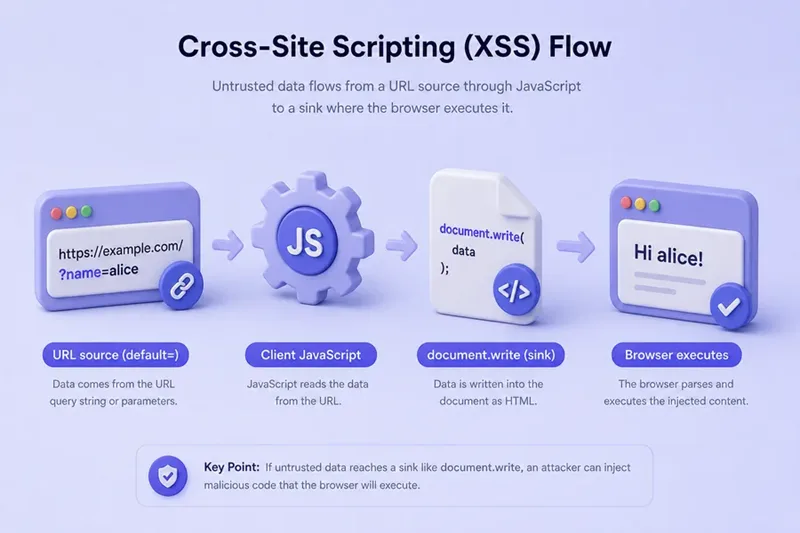
DOM XSS lives in client-side code. On DVWA, XSS (DOM) reads the default query value from document.location.href and writes it with document.write.
Open left menu → XSS (DOM) once so you are authenticated on that module, then paste this URL into the address bar:
http://127.0.0.1:42001/vulnerabilities/xss_d/?default=%3Cscript%3Ealert(1)%3C/script%3EThat encodes < and > but leaves the / in </script> as a real slash. Do not encode the slash as %2F. DVWA passes the value through decodeURI(), and decodeURI does not turn %2F back into /, so a fully encoded </script> never becomes a real closing tag. On this lab, the dialog shows 1. Capture the alert with the address bar visible:
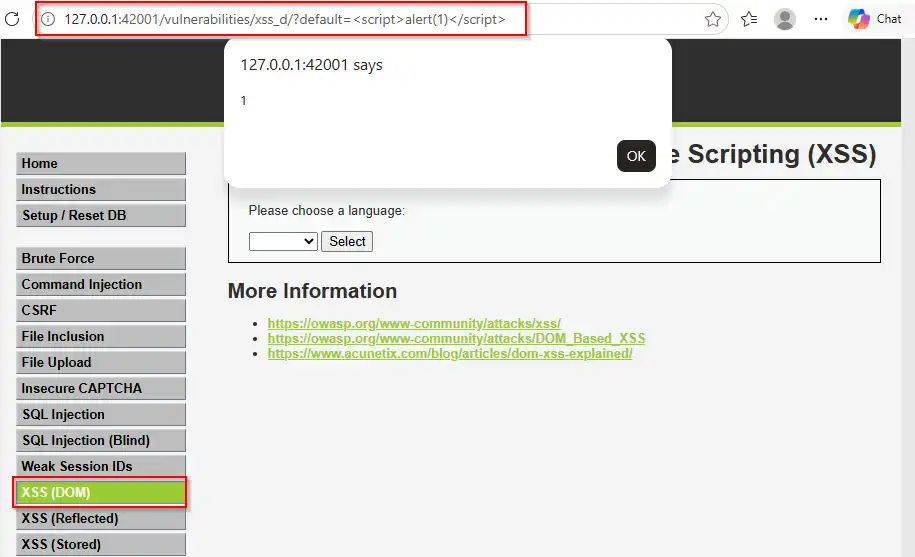
The vulnerable pattern in the page (simplified) is:
var lang = document.location.href.substring(
  document.location.href.indexOf("default=") + 8
);
document.write("<option value='" + lang + "'>" + decodeURI(lang) + "</option>");
Source: the URL (default=).
Sink: document.write into the select markup.
Confirm the page ships that client logic (the server does not need to echo your payload into the HTML for the bug to exist):
curl -s -H "Cookie: ${DVWA_COOKIE}" \
  "http://127.0.0.1:42001/vulnerabilities/xss_d/?default=English" \
| grep -E 'document.write|default=' | head -5 if (document.location.href.indexOf("default=") >= 0) {
var lang = document.location.href.substring(document.location.href.indexOf("default=")+8);
document.write("<option value='" + lang + "'>" + decodeURI(lang) + "</option>");
document.write("<option value='' disabled='disabled'>----</option>");
document.write("<option value='English'>English</option>");The HTML from curl never contained your script as a reflected server echo. The browser executed what client JavaScript wrote from the URL.
Juice Shop's search bar is another controlled DOM XSS lab if you add that target later. The teaching point stays the same: find the source, find the sink, then prove execution.
Context matters more than memorizing payloads
A payload is only meaningful in a context:
| Context | What the page is doing | What matters |
|---|---|---|
| HTML text | Value sits between tags | Inject tags or break out of the enclosing element |
| HTML attribute | Value sits inside value="...", href='...', etc. |
Close the quote / attribute, then inject |
| JavaScript | Value sits inside a script string or expression | Break out of the string or expression |
| URL-derived data | JavaScript reads a query string, fragment, or URL | Trace where the value is written; the actual XSS context depends on the sink |
A javascript: URL can matter when a sink places your value into a navigable or scriptable URL attribute, but a query parameter is not an XSS context by itself. The same <script>alert(1)</script> string that works in DVWA's HTML text reflection often fails in an attribute or JSON context. Test by reading the response (or DOM) around your input, not by spraying a cheat sheet.
Test XSS with Burp Suite
Use Burp Suite when you want to edit the request without fighting the browser form:
- Proxy DVWA with intercept off
- Submit a unique marker such as
xsstest123on XSS (Reflected) or XSS (Stored) - Find the request in Proxy → HTTP history
- Send to Repeater
- In the response, find every place
xsstest123appears, then note whether it is HTML-encoded and whether it sits between tags, inside an attribute, or inside JavaScript before you craft a payload
For DOM XSS, Repeater alone is not enough. You must load the URL in a browser (or Burp's browser) so client JavaScript runs. History still helps you capture the exact URL and cookies.
Why a simple <script>alert(1)</script> does not always work
Raise DVWA Security to Impossible, open XSS (Reflected), and submit:
<script>alert(1)</script>No alert should appear. The Hello line prints the payload as text (angle brackets visible as characters, not as a script). Optionally open View Page Source (or the Network response) and confirm the body contains <script> / > entities instead of a live <script> tag:

Common reasons a "standard" alert fails:
- Output is encoded (
<script>) - You are in the wrong context (attribute vs HTML text)
- The app strips or rewrites part of the input (weak filters still break naive payloads)
- A framework auto-escapes template variables
- CSP blocks the script execution path even though the injection itself may still exist
- The sink is DOM-based and your test never ran client JavaScript
- The value was transformed (URL encoding, length limits, WAF) before it reached the sink
Do not treat filter evasion catalogs as the next step here. Fix your understanding of context first. Set security back to Low when you continue practicing.
Impact of XSS
Realistic impact includes:
- Acting as the victim inside the site (clicks, form posts, account changes the UI allows)
- Reading data the page can access (DOM content, some storage, non-HttpOnly cookies)
- Changing what the user sees (fake login forms, overlay phishing, defacement)
- Chaining into further abuse when the app trusts the browser session
HttpOnly cookies are not readable from JavaScript. XSS does not "always steal the session cookie." HttpOnly prevents JavaScript from directly reading that cookie, but XSS can still perform authenticated actions as the victim because the browser continues sending the cookie with same-origin requests.
Prevent XSS
The main fix is context-aware output encoding (or framework auto-escaping) so untrusted data never becomes executable syntax. Use output encoding when the value should be text. If users are intentionally allowed to submit HTML, use a proven HTML sanitizer instead of encoding everything or writing a custom filter.
On DVWA Impossible, reflected XSS uses htmlspecialchars on the name before it enters HTML text. That matches the encoded Hello line you saw in the browser.
Also:
- Prefer safe DOM APIs (
textContent,setAttributewith care) overinnerHTML/document.writefor untrusted data - Sanitize intentional HTML with a well-maintained allowlist library, not homemade regex
- Use CSP as defense-in-depth, not as a substitute for fixing injection
CSP can block many inline and remote script paths. It does not excuse leaving innerHTML = userInput in the app.
XSS vs CSRF
| XSS | CSRF | |
|---|---|---|
| Core idea | Attacker script runs in the victim's browser origin | Attacker tricks the browser into sending an authenticated request |
| Needs script execution in the site? | Yes | No (often a forged form or link) |
| Typical fix | Encode / safe sinks / sanitize / CSP | Anti-CSRF tokens, SameSite cookies, careful CORS |
| Can one enable the other? | XSS can often bypass CSRF defenses by reading tokens from the page | CSRF alone does not grant arbitrary script in the origin |
Summary
XSS is untrusted data reaching an executable browser context. Anchor every test on input → context → execution, then classify whether the path is reflected, stored, or DOM-based.
On DVWA at Low you proved all three: reflection of name into HTML, guestbook persistence that survives reload, and a default URL source written through document.write. Context and encoding explain why the same alert string fails on Impossible. Burp helps vary parameters for reflected and stored cases; DOM still needs a real browser.
For the next web module, return to the DVWA learning map, or continue injection practice with the SQL injection lesson. Keep proofs harmless and scoped to your lab.
References
- OWASP Cross Site Scripting (XSS): https://owasp.org/www-community/attacks/xss/
- OWASP DOM Based XSS: https://owasp.org/www-community/attacks/DOM_Based_XSS
- OWASP XSS Prevention Cheat Sheet: https://cheatsheetseries.owasp.org/cheatsheets/Cross_Site_Scripting_Prevention_Cheat_Sheet.html
- PortSwigger Web Security Academy (XSS): https://portswigger.net/web-security/cross-site-scripting
- MDN Content Security Policy: https://developer.mozilla.org/en-US/docs/Web/HTTP/CSP
- DVWA GitHub repository: https://github.com/digininja/DVWA
Frequently Asked Questions
What is the difference between reflected, stored, and DOM XSS?
Reflected XSS puts attacker input into the current response. Stored XSS saves input and serves it on later loads. DOM XSS is introduced by client-side JavaScript that moves a source into an unsafe sink.
Does XSS always steal session cookies?
No. JavaScript cannot read cookies marked HttpOnly. XSS can still perform authenticated actions as the victim because the browser keeps sending the cookie on same-origin requests, but that is not the same as reading the cookie value.
Why does my alert payload fail on a real site?
Common causes are output encoding, a different HTML or JavaScript context, sanitization, framework escaping, CSP, or a DOM-only bug that your test never executed in the browser.
Is DOM XSS just XSS in the URL?
No. The URL is often the source. The vulnerability is client-side code that writes that value into the page unsafely (for example with innerHTML or document.write).
Does CSP prevent XSS by itself?
CSP is defense-in-depth. It can block many script paths, but you still need correct encoding and safe DOM usage. Do not treat CSP as a substitute for fixing injection.
How does XSS differ from CSRF?
XSS runs attacker script in the site's origin. CSRF tricks the browser into sending an authenticated request without needing script execution in that origin. Fixes differ: encoding and safe sinks for XSS; tokens and cookie policies for CSRF.
