
| Tested on | Kali GNU/Linux Rolling 2026.2 (kali-rolling) |
|---|---|
| Package | andriller 3.6.3adb 1.0.41 / 34.0.5-debianpython3-tkpython3-venvsqlite3 3.53.4Genymotion Android 10 / API 29 guest ( adb root) |
| Applies to | Kali Linux with adb; Android emulator or owned test device with USB debugging |
| Lab environment | Pentest lab Genymotion Android pentest lab |
| Privilege | Normal user on Kali; Genymotion adbd ran as root in this lab (required for private /data/data database pulls) |
| Cert prep | CompTIA PenTest+ (mobile specialized systems) |
| Scope | Install Andriller CE, create known artifacts, connect over ADB, run logical acquisition (root DB pull and Android Backup), review HTML/XLSX reports, and verify SQLite content. Does not cover chip-off, JTAG, or commercial suite comparisons. |
| Related guides | Android exported components Decompile and rebuild APKs with apktool |
In this article we will install Andriller CE on Kali, plant known contacts, SMS, call-log, and download markers on a Genymotion Android 10 guest, then extract and verify those artifacts with Andriller over ADB.
A logical acquisition collects files, databases, backups, and other data that Android makes accessible through software interfaces such as ADB. It is different from physical acquisition methods such as chip-off or JTAG, which attempt to obtain data directly from device storage hardware. Andriller is a logical tool. Genymotion cannot reproduce locked-phone hardware extraction.
What Is Andriller?
Andriller CE is an open-source Python tool for Android forensics. It talks to a device over ADB, pulls selected databases or Android Backup archives, runs built-in decoders, and writes HTML plus Excel reports.
At a high level, the workflow looks like this:
Android device
      │
      │ ADB
      ▼
Andriller on Kali
      │
      ├── Copies accessible databases or backup data
      ├── Decodes supported artifacts
      └── Creates HTML and XLSX reports
What Andriller can recover depends on what ADB can access. Root ADB gives it substantially more access than a typical production Android device.
The project lives at den4uk/andriller on GitHub (MIT license). This lab used PyPI package andriller version 3.6.3.
The basic GUI workflow is straightforward: choose an output directory, click Check to detect the Android device, click Extract, and then open the generated REPORT.html. Decoders, lock-screen helpers, and parse tabs for existing .ab / .tar files sit in the same window.
What Andriller Can Recover in This Lab
Actual results depend heavily on Android version, ADB privilege, encryption state, backup policy, and whether Andriller's decoder understands the database schema.
| Recovered or demonstrated in this Genymotion lab | Not available here (and often not via Andriller) |
|---|---|
Selected databases under /data/data when adbd is root |
Chip-off / JTAG physical imaging |
Android Backup (.ab) after on-device confirmation on Android 10 |
Reliable modern lock-screen bypass |
| Decoded SMS and call logs when tables match decoders | Guaranteed WhatsApp or third-party app plaintext without keys |
| HTML and XLSX summary reports | Realistic encrypted FBE user profiles without credentials |
Andriller historically uses Android Backup as a fallback when root access is unavailable. Android Backup is a legacy acquisition path and is increasingly restricted on modern Android. In particular, Android 12 changed adb backup behavior for apps targeting API 31+. For apps targeting API 31+, Android excludes application data from adb backup by default; developers can opt in for debugging by making the app debuggable. Device version, target SDK, and the app's backup configuration can all affect what is actually included. The Android 10 backup workflow shown later is therefore a legacy-compatible lab path, not something to expect on every current phone.
On this Genymotion image, adb shell id returned uid=0(root), so Extract pulled databases directly. Your physical phone will often be user-only ADB.
Tested Android and Andriller Environment
| Component | Lab value |
|---|---|
| Kali | Rolling 2026.2 |
| Andriller | 3.6.3 in a Python venv |
| ADB | 1.0.41 |
Host sqlite3 |
3.53.4 (report verification) |
| Android guest | Genymotion Android 10 / API 29 |
| ADB permission | root |
Install the packages this walkthrough uses. Use apt-get when you need the apt package manager on Debian-family Kali:
sudo apt-get install -y android-tools-adb python3-tk python3-venv sqlite3adb is already the newest version (1:34.0.5-13).
python3-tk is already the newest version (3.14.6-1).
python3-venv is already the newest version (3.14.6-1).
...
Setting up sqlite3 (3.53.4-2) ...Install Andriller in a Python virtual environment so its older Python dependencies stay separate from Kali's system Python packages:
python3 -m venv ~/andriller-venvvenv prints nothing when it succeeds. Activate it in the same shell before pip:
source ~/andriller-venv/bin/activateActivation only changes the prompt. Install Andriller into that environment:
pip install andriller -USuccessfully installed Jinja2-2.11.3 MarkupSafe-2.0.1 ... andriller-3.6.3 ...Confirm the module version:
python -m andriller --version3.6.3Version 3.6.3 is still the latest published Andriller release, but it dates from 2022. Expect some decoders to be outdated for newer Android database schemas; later in this lab we encounter exactly that with the contacts database. Andriller 3.6.3 is an older application. This lab successfully ran it with the Python version supplied by Kali 2026.2, but if installation or runtime errors appear on a later Python release, use an isolated compatible Python environment rather than modifying Kali's system Python packages.
Create Known Test Artifacts
We deliberately create a few unique test values before acquisition. If the same values appear in Andriller's report and copied databases later, we know exactly which artifacts were recovered successfully.
Confirm the guest is online:
adb devices -lList of devices attached
192.168.56.103:5555 device product:vbox86p model:Phone ...Your serial will differ. With one device connected, later commands can omit -s.
Contact (Contacts app)
Open Android's Contacts app on the guest and create:
- Name:
Lab Contact Andriller - Phone:
5550100999
Using the Contacts app keeps this step simple; our goal is only to create a known value that we can look for after acquisition.
Call log
Record a millisecond timestamp you will also see in Andriller's HTML. On Kali:
date +%s%3N1789278438000This lab used 1789278438000 (UTC 2026-09-13 05:47:18), which matches the call-log report screenshot below. Substitute your own date +%s%3N value if you re-run the seed later.
Insert the call-log row with that timestamp, number 5550100888, and duration 42:
adb shell content insert --uri content://call_log/calls --bind number:s:5550100888 --bind type:i:1 --bind date:l:1789278438000 --bind duration:i:42 --bind new:i:1Android stores 1 as the call type for an incoming call. Andriller decodes that raw value into the more readable Received label in its report. The insert exits quietly when it succeeds. Query the provider to confirm the row:
adb shell content query --uri content://call_log/calls --projection number:duration:type:dateRow: 0 number=5550100888, duration=42, type=1, date=1789278438000SMS marker (training seed only)
This step only seeds a known SMS in the emulator. It is not part of the Andriller acquisition process. Never use this direct SQLite modification step on real forensic evidence. We are changing the database deliberately only to create a known marker in the disposable training emulator.
The fallback needs sqlite3 inside this rooted Genymotion image; many retail Android builds do not include that command. Confirm the binary exists first:
adb shell 'command -v sqlite3'/system/bin/sqlite3If nothing is returned, skip this SMS-seeding method rather than trying to install tools onto the target.
When the SMS content provider rejects inserts, open a root shell and insert directly:
adb shellInside the guest shell:
suThen open the telephony database and insert the marker (use a fresh date +%s%3N from Kali if you want a new time; this lab used 1789278544000):
sqlite3 /data/data/com.android.providers.telephony/databases/mmssms.dbAt the sqlite> prompt:
INSERT INTO sms (address, body, date, read, type)
VALUES ('5550100777', 'Andriller_lab_SMS_marker', 1789278544000, 1, 1);
.quit
Type exit twice to leave su and adb shell. Android stores 1 for an inbox SMS. Andriller translates that raw database value into Inbox in the HTML report.
Shared-storage file
Push a marker into shared storage. This gives us a useful comparison case: the file will exist in the Downloads folder, but that does not mean Android's DownloadManager recorded a download event. The file is on the guest, but it does not necessarily create an Android DownloadManager history record in downloads.db.
Write the file on Kali:
printf 'andriller-known-artifact\n' > /tmp/andriller-lab-marker.txtprintf writes the file with no stdout. Push it into the guest Downloads folder:
adb push /tmp/andriller-lab-marker.txt /sdcard/Download/andriller-lab-marker.txt/tmp/andriller-lab-marker.txt: 1 file pushed, 0 skipped. 25 bytes/s (25 bytes in 0.001s)Expect Andriller's Download History decoder to stay at (0) unless something registers the file in DownloadManager.
Check ADB Access Before Acquisition
We already used ADB to create the lab markers. Before starting Andriller, check which privilege level its extraction will inherit. USB debugging must be on, and the host must authorize the RSA fingerprint when prompted. Emulator ADB over TCP uses adb connect host:port as in the Genymotion Android pentest lab.
adb shell iduid=0(root) gid=0(root) ...On this Genymotion image, uid=0(root) gave Andriller enough access to copy the private Android databases used later in the lab. That is not what you should normally expect from a typical production Android device. Genymotion provides a much more permissive environment for testing. On a typical production Android device, ADB normally runs with the less-privileged shell identity (uid=2000) rather than root.
Launch the GUI from the venv:
python -m andrillerThe command opens the Tk GUI and does not print a success line in the terminal. The main window shows Extraction (USB), Parse tabs, Output path, Check, and Extract:
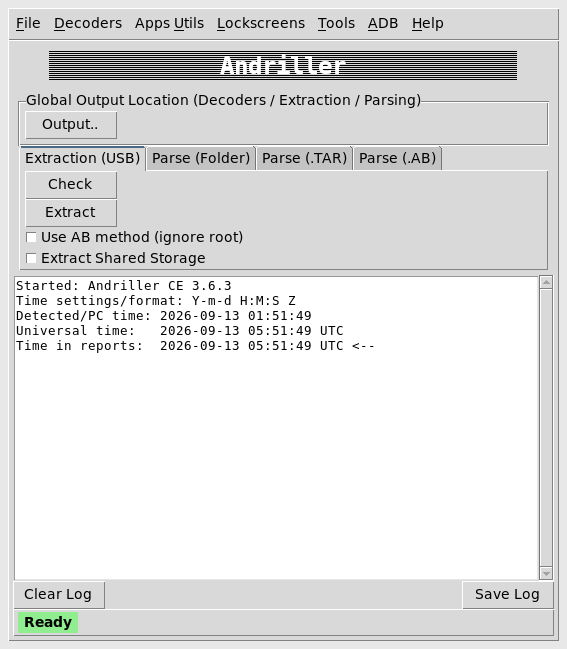
Work the controls in order:
- Click Output.. and choose an empty evidence directory such as
~/andriller-out. - Click Check and verify the Serial ID matches
adb devices. If Check does not show the same device serial asadb devices, stop here and fix the ADB connection before starting an extraction. - Because this Genymotion device has root ADB, leave Use AB method (ignore root) unchecked. Andriller will then use its direct database-pull path. Checking this box forces the legacy Android Backup path instead.
- Click Extract.
Perform a Logical Acquisition
Root database pull (this Genymotion lab)
With root ADB, Andriller can directly copy selected SQLite databases from protected Android application and system-provider data directories, including locations under /data/data. Leave Use AB method (ignore root) unchecked so Andriller uses that direct-access path.
In this lab Andriller copied several Android databases, including:
contacts2.db,calllog.dbmmssms.dbcalendar.db,downloads.dblocksettings.db
into a timestamped folder under the output path, then decoded matching tables into HTML pages plus REPORT.html and REPORT.xlsx.
Wait for Andriller to finish before opening the output folder. A successful run creates a timestamped extraction directory containing a data/ directory together with REPORT.html / REPORT.xlsx after decoding. List the output path to see the folder name:
ls ~/andriller-out/andriller_extraction_2026-09-13_01.49.07Your timestamped directory name will differ. Use that exact folder name in later sqlite3 and sha256sum commands instead of a wildcard.
Android Backup path (unrooted or forced AB)
If ADB is not root, or you enable Use AB method (ignore root), Andriller runs adb backup. Android shows a Full backup screen. Leave the optional password empty unless your procedure requires encryption, then tap BACK UP MY DATA at the bottom of the dialog:
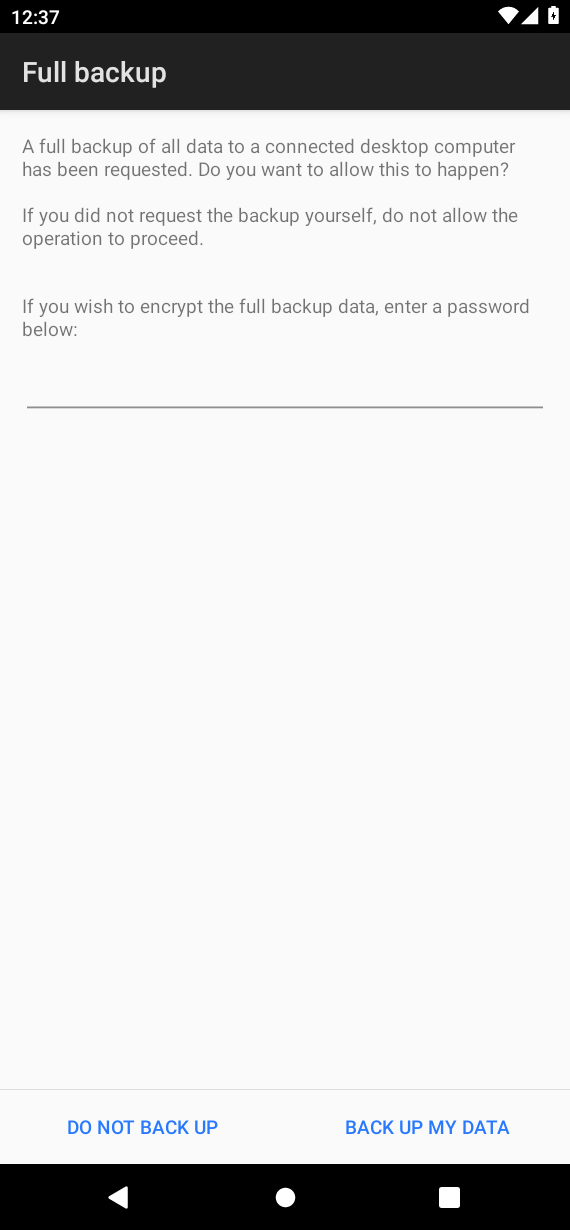
Android Backup is a legacy acquisition path and is increasingly restricted on modern Android. In particular, Android 12 changed adb backup behavior for apps targeting API 31+. For apps targeting API 31+, Android excludes application data from adb backup by default; developers can opt in for debugging by making the app debuggable. Device version, target SDK, and the app's backup configuration can all affect what is actually included. Do not expect the Android 10 result shown here to reproduce on every modern retail device. Even when a backup archive is created, it may contain little or no private application data.
On this guest a confirmed backup produced a multi-megabyte .ab file (Android Backup, Compressed, Not-Encrypted). The resulting .ab file is an Android Backup archive. It is a logical backup container, not a raw image of the device's flash storage. Parsing that archive alone recovered far less app-private data than the root DB pull.
Review the Andriller Report
When decoding finishes, open REPORT.html in a browser. The summary lists device metadata and each decoded category with counts:
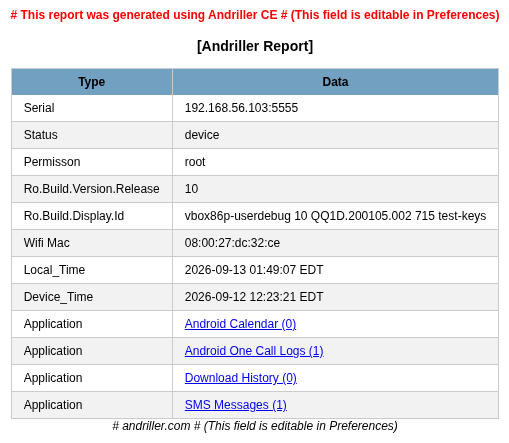
Andriller records both Local_Time and Device_Time. They differ substantially in this lab. Before building a timeline, determine what each clock represents and record any timezone or clock offset instead of assuming every artifact uses the same clock.
In this lab the report showed:
| Field / category | Lab result |
|---|---|
| Permission | root |
| Android release | 10 |
| SMS Messages | (1) |
| Android One Call Logs | (1) |
| Android Calendar | (0) |
| Download History | (0) |
Click SMS Messages to open the detail table. The planted marker should appear:
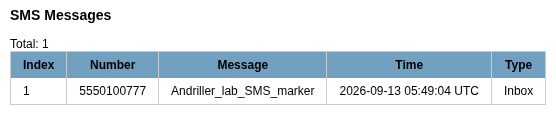
The report preserves the phone number and marker text we inserted, converts the millisecond timestamp into a readable UTC time, and translates raw SMS type=1 into Inbox.
Call logs should list 5550100888 with duration 42 and the seed time you recorded (2026-09-13 05:47:18 UTC in this lab):
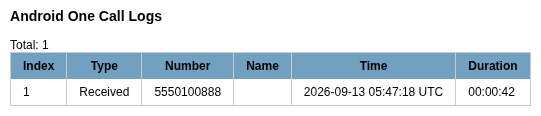
Andriller converted the raw type=1 call into Received and the duration=42 value into 00:00:42.
Calendar stayed at zero because no events were planted. Download History stayed at zero because the shared-storage marker never entered DownloadManager, as noted when you pushed the file.
Verify Recovered SQLite and Application Data
Android stores many system artifacts in SQLite databases. Andriller copies these .db files and its decoders translate their tables into readable HTML. Querying the SQLite files directly lets us check whether the report interpretation matches the underlying data.
Andriller's report is a convenient summary, but for important artifacts, compare the decoded report with the copied source database when possible. Here we verify the planted SMS and call-log markers directly in the copied SQLite databases under the extraction data/ directory. Replace <extraction-directory> with the folder name from ls ~/andriller-out/ (for example andriller_extraction_2026-09-13_01.49.07). Using a wildcard after multiple runs can expand to more than one path and break the command.
SMS:
sqlite3 ~/andriller-out/<extraction-directory>/data/mmssms.db "SELECT address, body, type FROM sms;"5550100777|Andriller_lab_SMS_marker|1Call log:
sqlite3 ~/andriller-out/<extraction-directory>/data/calllog.db "SELECT number, duration, type FROM calls;"5550100888|42|1Both planted contact values (Lab Contact Andriller and 5550100999) were present in the acquired contacts2.db. The database was acquired successfully, but Andriller's decoder expected a different table layout and failed with no such table: calls. That is a decoder/schema mismatch, not evidence that the contact was missing. This demonstrates an important forensic distinction: acquisition and decoding are separate steps. A decoder can fail even when the underlying evidence was successfully acquired.
sqlite3 ~/andriller-out/<extraction-directory>/data/contacts2.db "SELECT data1 FROM data WHERE data1 LIKE '%Lab%' OR data1 LIKE '5550100999';"Lab Contact Andriller
5550100999Keep Andriller's own MD5 file as part of the tool output, but generate SHA-256 hashes for the evidence files you rely on. Record hashes of the acquired evidence files before performing any operation that could modify them. The SELECT queries shown here are read-only, but hashing early gives you a baseline against which later copies can be checked. Also record the device serial, acquisition time, Android version, Andriller version, and the acquisition method used. Example for one database:
sha256sum ~/andriller-out/<extraction-directory>/data/mmssms.db551648fabe81c7800ca053c76ba05e585f2862473dfcaa3bc4ce6357d5a140a8 /home/.../data/mmssms.dbYour path will differ; record the digest from your own extraction folder.
Android Encryption and Modern Platform Limitations
Modern Android uses file-based encryption (FBE). Some user data is credential-encrypted and normally remains unavailable until the user unlocks the device after boot. Andriller does not bypass that encryption. Without suitable logical access such as authorized ADB or root access, supported backup access, or access after the user's credential-encrypted storage is unlocked, Andriller cannot simply read those private databases.
Lock-screen helpers in the Andriller menu are legacy-oriented and must not be described as a reliable PIN or pattern bypass for current devices. This article does not walk through lock cracking.
Acquiring an application's database file does not guarantee that its contents are immediately readable. Messaging apps such as WhatsApp may encrypt application data and require separate key material before it can be decoded. Prefer dedicated workflows when those apps are in scope.
Genymotion vs Physical Device Forensics
| Genymotion lab | Physical / production device |
|---|---|
Easy ADB, often root adbd |
Usually unrooted user ADB |
| Great for decoder practice with planted markers | Usually stricter ADB permissions; acquisition behavior varies by OEM, Android version, and device state |
| Clock skew between host and guest is common | Still document device vs examiner time |
| No chip-off, JTAG, or secure-element realism | Hardware methods need specialized labs |
Use Genymotion to learn Andriller's reports and SQLite checks. Validate critical procedures again on the authorized device class you will assess.
Common Andriller Errors
| Symptom | Likely cause | Fix |
|---|---|---|
| Check shows no Serial ID | No ADB device or unauthorized RSA key | Run adb devices; accept the USB debugging prompt |
| Extract hangs on backup | Full backup dialog waiting on the phone | Tap BACK UP MY DATA; leave password empty unless required |
backup.ab only a few bytes |
Backup denied or cancelled | Re-run Extract and confirm on-device |
| Backup completes but contains little or no app data on Android 12+ | Modern adb backup restrictions / app backup policy |
Treat Android Backup as limited; document the restriction and use an authorized acquisition method appropriate to the device |
HTML category shows (0) |
Empty table or decoder mismatch | Query the raw .db under data/ with sqlite3 |
no such table: calls on contacts2.db |
Contacts schema vs decoder expectations | The database was acquired, but the Andriller decoder does not match this Android schema. Verify the relevant contacts tables directly with SQLite |
| GUI will not start | Missing python3-tk or display |
Install python3-tk; use a desktop session or X forwarding |
Nothing from /data/data on retail phone |
No root and AB excludes private apps | Document limitation; adjust scope or use authorized elevated methods |
Summary
Andriller CE turns an ADB session into HTML and Excel reports by pulling selected Android databases or parsing an Android Backup archive. In this Genymotion Android 10 lab, root ADB let Andriller acquire several protected Android databases and correctly decode one planted SMS and one call-log entry. Contacts existed in SQLite but the built-in contacts decoder did not match the schema, which is why manual verification still matters.
Andriller can attempt Android Backup when root access is unavailable, but this is now a legacy and increasingly restricted path. On modern Android devices it may recover little or no private application data. Genymotion is useful for learning how to create known artifacts, run acquisitions, and verify Andriller reports, but it does not reproduce hardware-level or locked-device forensic acquisition.
On another authorized device, follow the same approach: first understand what evidence should exist, record the acquisition conditions, check what Andriller decoded, and verify important artifacts against the acquired source data. For app package review after acquisition, pair this with MobSF app pentesting on an authorized APK.
References
- Andriller GitHub repository — source, install notes, and releases
- Andriller on PyPI — packaged releases
- Android Debug Bridge —
adband backup overview - Android Backup — platform backup behavior
- NIST SP 800-101 Rev. 1: Guidelines on Mobile Device Forensics — acquisition and evidence-handling context
Frequently Asked Questions
Does Andriller require root?
No, but what Andriller can recover is much more limited without root. Andriller can attempt Android Backup on compatible devices, but modern Android versions and app backup policies may exclude private application data. The more complete database extraction shown in this tutorial depended on root ADB in Genymotion.
Can Andriller bypass an Android PIN?
Do not treat Andriller as a reliable way to bypass modern lock screens. Any lock-related helpers are limited and device-dependent. This article does not use them.
Does Andriller work on modern Android?
Andriller 3.6.3 can still be useful for training and for compatible ADB-accessible devices, but its latest published release dates from 2022. On newer Android versions, encryption, backup restrictions, changed database schemas, and app-specific storage can limit both acquisition and decoding.
Can Genymotion be used for Android forensic testing?
Yes for learning acquisition, planted markers, and report verification. No for chip-off, JTAG, secure hardware extraction, or realistic locked retail phones.
Andriller vs other Android forensic tools?
Andriller is a lightweight open-source logical toolkit with HTML/XLSX reporting. Static analyzers such as MobSF solve different problems. Compare tools only after you retest them on the same authorized target.
