
| Tested on | Kali GNU/Linux Rolling 2026.2 (kali-rolling) |
|---|---|
| Package | ffuf 2.2.1-1wfuzz 3.1.0-6curl |
| Lab environment | Pentest lab |
| Privilege | Normal user for ffuf/wfuzz; sudo only for apt install |
| Scope | Web content discovery with ffuf (directories, extensions, parameters, POST/JSON, virtual hosts, recursion, filters, auto calibration, Burp replay) and a shorter Wfuzz alternative plus comparison. Does not cover binary/protocol fuzzers, credential spraying, or Gobuster/Feroxbuster deep dives (see related discovery guides). |
If you are new to web fuzzing, start here:
- You guess many path or parameter names from a wordlist
- The tool swaps each guess into one place in an HTTP request (the
FUZZkeyword) - You compare responses to find pages the site never linked publicly
This guide uses ffuf for almost every example. Wfuzz shows up later as a shorter alternative, not a second full course.
What web fuzzing means here
Think of web fuzzing as smart guessing over HTTP, not crashing a binary with random bytes.
What it is:
- Send many similar requests
- Change one part each time (path, parameter, header, or JSON field)
- Compare status codes, body size, and content
What it is not (in this article):
- AFL-style binary fuzzing
- Protocol mutation frameworks
- Password spraying with
rockyou.txt
What you hope to find:
- Hidden directories and files (
/admin/,config.bak) - Parameter names and values (
?debug=,?file=) - Extra virtual hosts on one IP (
Host: staging.example.com) - Interesting POST or JSON fields
A hit is only a lead. Open it in a browser or proxy before you report it.
If you still need a first inventory of linked and crawled URLs, use find hidden endpoints first, then come back for filters, -ac, parameters, and vhosts.
Understand the FUZZ keyword
ffuf looks for the word FUZZ in your URL, header, or body. For each line in the wordlist, it replaces FUZZ with that line and sends the request. Everything else stays the same.
Simple mental model:
- Wordlist line (example:
admin) - Placeholder
FUZZbecomesadmin - HTTP request goes out
- Response comes back (status, size, words, lines)
- Match or filter decides if you see it

When you read a result line, look at all four columns:
- Status (200, 301, 403, …)
- Size (bytes)
- Words
- Lines
Do not trust status alone. Many apps return HTTP 200 for “page not found.”
Prepare the authorized lab
This guide uses Metasploitable 2 from the pentest lab setup walkthrough — the same authorized HTTP target as find hidden endpoints. Export once per shell (re-run in a new terminal):
export TARGET=192.168.56.127
export WEB_URL="http://${TARGET}"
export WORDLIST=/usr/share/wordlists/dirb/common.txt
# Proxmox Group 2 lab: export TARGET=10.10.10.30
Confirm Apache answers before you fuzz:
curl -s -o /dev/null -w '%{http_code} %{size_download}\n' "$WEB_URL/"200 8912Request a path that should not exist on Metasploitable:
curl -s -o /dev/null -w '%{http_code} %{size_download}\n' "$WEB_URL/doesnotexistzzzz"404 276What to notice on this lab target:
- Real hits return
200or301 - Missing paths return
404, not HTTP 200 with a soft error page - Filter with
-fc 404or-mc 200,301on Metasploitable
Some modern apps return HTTP 200 for every path with the same body size (soft 404). The filtering and -ac sections below teach that pattern with sample output. On Metasploitable, prefer status-code filters; for hands-on soft-404 practice, point WEB_URL at DVWA on Kali (http://127.0.0.1:42001/) after you install it locally.
Install the tools when needed. Refresh apt indexes first with apt:
sudo apt updateapt update only refreshes package lists. Then install:
sudo apt install -y ffuf wfuzzCheck ffuf:
ffuf -Vffuf version: 2.1.0-devNotes on versions:
- Kali package used here:
ffuf 2.2.1-1 - Banner may still say
2.1.0-dev - Use
apt-cache policy ffufif you need the Debian package string
Check Wfuzz:
wfuzz -h 2>&1 | head -n 5 /usr/lib/python3/dist-packages/wfuzz/__init__.py:34: UserWarning:Pycurl is not compiled against Openssl. Wfuzz might not work correctly when fuzzing SSL sites. Check Wfuzz's documentation for more information.
default
default
********************************************************
* Wfuzz 3.1.0 - The Web Fuzzer *The OpenSSL warning is common on Kali. HTTP labs still work. Be careful with HTTPS until that backend is fixed.
First directory discovery scan
Start with the Kali wordlist against Metasploitable Apache. Hide 404 responses so only reachable paths remain:
ffuf -w "$WORDLIST" -u "$WEB_URL/FUZZ" -fc 404 -t 20Sample hits (trimmed):
 :: URL              : http://192.168.56.127/FUZZ
 :: Filter           : Response status: 404

dav                  [Status: 301, Size: 319, Words: 20, Lines: 10, Duration: 2ms]
phpMyAdmin           [Status: 301, Size: 326, Words: 20, Lines: 10, Duration: 2ms]
phpinfo.php          [Status: 200, Size: 48026, Words: 2540, Lines: 554, Duration: 5ms]
twiki                [Status: 301, Size: 321, Words: 20, Lines: 10, Duration: 2ms]
Those paths match what Gobuster finds on the same target. Open each hit in a browser or proxy before you report it.
The filtering section below uses illustrative soft-404 output (HTTP 200 miss pages). Metasploitable returns honest 404 codes — use -fc 404 on this lab and treat the size-filter examples as the pattern for apps that lie about status codes. On those apps, real hits might show Size: 49 while junk paths repeat Size: 208 with HTTP 200.
Filtering matters more than raw speed
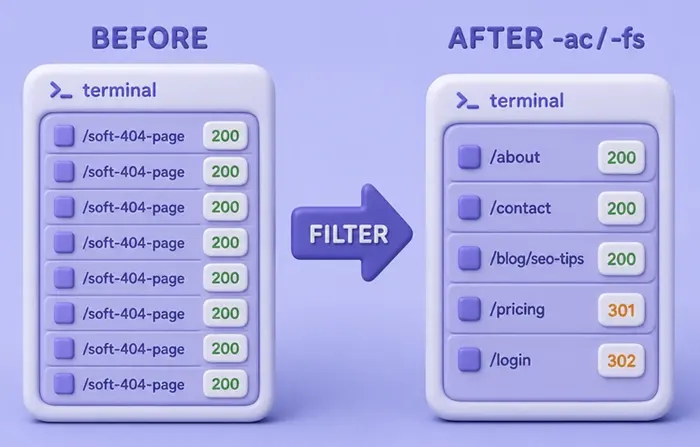
Many apps show a custom “not found” page with HTTP 200. So:
200≠ “this path is real”- You must filter the common miss page
Common ffuf filter and match flags:
| Flag | Meaning |
|---|---|
-fc |
Hide these status codes |
-fs |
Hide these response sizes (bytes) |
-fw |
Hide these word counts |
-fl |
Hide these line counts |
-fr |
Hide bodies that match a regex |
-mc / -ms / -mw / -ml |
Keep only these codes / sizes / words / lines |
On this lab, hide size 208 (the soft 404 you measured with curl):
ffuf -w "$WORDLIST" -u "$WEB_URL/FUZZ" -fs 208 -t 8 :: Filter : Response size: 208
admin [Status: 200, Size: 49, Words: 4, Lines: 1, Duration: 1ms]
backup [Status: 200, Size: 42, Words: 3, Lines: 1, Duration: 1ms]
api [Status: 200, Size: 29, Words: 1, Lines: 1, Duration: 1ms]
secret.txt [Status: 200, Size: 29, Words: 1, Lines: 2, Duration: 1ms]
login.php [Status: 200, Size: 67, Words: 4, Lines: 1, Duration: 2ms]
config.bak [Status: 200, Size: 21, Words: 1, Lines: 2, Duration: 1ms]After filtering:
- Six useful hits remain
- Junk paths are gone
- If size jitters on another app, try
-fwor-flinstead
Use auto calibration
Typing -fs 208 by hand works. -ac does the boring part for you.
What -ac does:
- Sends a few probes that should not exist
- Compares those miss responses
- Looks for a shared size, word count, or line count
- Adds a filter automatically
ffuf -w "$WORDLIST" -u "$WEB_URL/FUZZ" -ac -t 8 :: Calibration : true
admin [Status: 200, Size: 49, Words: 4, Lines: 1, Duration: 1ms]
backup [Status: 200, Size: 42, Words: 3, Lines: 1, Duration: 2ms]
api [Status: 200, Size: 29, Words: 1, Lines: 1, Duration: 1ms]
secret.txt [Status: 200, Size: 29, Words: 1, Lines: 2, Duration: 1ms]
login.php [Status: 200, Size: 67, Words: 4, Lines: 1, Duration: 2ms]
config.bak [Status: 200, Size: 21, Words: 1, Lines: 2, Duration: 1ms]Same six hits as -fs 208, without typing the size.
Extra flags (learn later if you need them):
-acs basicor-acs advanced: pick a probe strategy (-acsimplies-ac)-acc string: your own calibration probe (can repeat)-ach: calibrate per host (useful for vhost scans)
If probes share nothing useful, ffuf adds no filter. Fall back to manual -fs or -fw.
Discover files and extensions
Use -e when you want each word tried with file endings.
Example: try bare name plus .txt, .bak, and .php:
ffuf -w "$WORDLIST" -u "$WEB_URL/FUZZ" -e .txt,.bak,.php -fs 208 -t 8 :: Extensions : .txt .bak .php
:: Filter : Response size: 208
admin [Status: 200, Size: 49, Words: 4, Lines: 1, Duration: 1ms]
backup [Status: 200, Size: 42, Words: 3, Lines: 1, Duration: 1ms]
login.php [Status: 200, Size: 67, Words: 4, Lines: 1, Duration: 1ms]
secret.txt [Status: 200, Size: 29, Words: 1, Lines: 2, Duration: 1ms]
config.bak [Status: 200, Size: 21, Words: 1, Lines: 2, Duration: 1ms]Beginner tips:
files.txthere is tiny (secret,config,backup,admin,login)- On real tests, use tech-aware lists (PHP, backups, configs)
- Keep
-fs/-acso soft 404s do not flood the screen
Parameter name fuzzing
After you map paths, look for query names the HTML never shows.
Pattern:
- Unknown name:
?FUZZ=test - Known name, unknown value:
?debug=FUZZ
Guess parameter names first:
ffuf -w "/usr/share/wordlists/dirb/common.txt" -u "$WEB_URL/search?FUZZ=test" -fs 31 -t 8 :: URL : ${WEB_URL}/search?FUZZ=test
:: Filter : Response size: 31
q [Status: 200, Size: 23, Words: 3, Lines: 1, Duration: 1ms]
debug [Status: 200, Size: 21, Words: 1, Lines: 1, Duration: 1ms]
file [Status: 200, Size: 33, Words: 5, Lines: 1, Duration: 1ms]Why -fs 31?
?id=test(unknown name) returned size31on this lab- Real names change the body, so they survive the filter
Then fuzz values for one known name:
ffuf -w "/usr/share/wordlists/dirb/common.txt" -u "$WEB_URL/search?debug=FUZZ" -mc all -t 8 :: URL : ${WEB_URL}/search?debug=FUZZ
1 [Status: 200, Size: 18, Words: 1, Lines: 1, Duration: 1ms]
true [Status: 200, Size: 21, Words: 1, Lines: 1, Duration: 1ms]
../../etc/passwd [Status: 200, Size: 33, Words: 1, Lines: 1, Duration: 1ms]
testlab [Status: 200, Size: 24, Words: 1, Lines: 1, Duration: 1ms]
FLAG [Status: 200, Size: 21, Words: 1, Lines: 1, Duration: 1ms]On this lab every value reflects differently. On real apps:
- Filter the common “invalid” page
- Keep outliers by size, words, or regex
POST and JSON fuzzing
APIs often need JSON, not only GET paths.
Useful flags:
-X POST: method-H 'Content-Type: application/json': header-d '{...}': body (putFUZZwhere you want to guess)
This lab accepts POST /api/login with username and password. Fix the password, fuzz usernames, hide failed logins (401):
ffuf -w "/usr/share/wordlists/dirb/common.txt" -u "$WEB_URL/api/login" -X POST \
  -H 'Content-Type: application/json' \
  -d '{"username":"FUZZ","password":"alicepass"}' \
-mc all -fc 401 -t 8 :: Method : POST
:: Data : {"username":"FUZZ","password":"alicepass"}
:: Filter : Response status: 401
alice [Status: 200, Size: 45, Words: 1, Lines: 1, Duration: 1ms]What this means:
- Only
aliceworks with passwordalicepass - You can swap roles next (fixed user, fuzz password)
Logged-in browser traffic? Capture the request in Burp, then use Intruder or ffuf -request.
Virtual host discovery
One IP can serve many hostnames. DNS may not list them all.
Idea:
- Connect to the same IP/URL
- Change only the
Hostheader withFUZZ
Raw run (noisy on this lab):
ffuf -w "/usr/share/wordlists/dirb/common.txt" -u "$WEB_URL/" -H 'Host: FUZZ.lab.local' -mc all -t 8Without a filter, every name can return 200. Measure the default host size (here 53), then hide it:
ffuf -w "/usr/share/wordlists/dirb/common.txt" -u "$WEB_URL/" -H 'Host: FUZZ.lab.local' -fs 53 -t 8 :: Header : Host: FUZZ.lab.local
:: Filter : Response size: 53
www [Status: 200, Size: 42, Words: 2, Lines: 1, Duration: 1ms]
dev [Status: 200, Size: 56, Words: 5, Lines: 1, Duration: 1ms]
staging [Status: 200, Size: 48, Words: 2, Lines: 1, Duration: 1ms]Survivors on this lab: www, dev, staging.
Fuzzing many hosts in one run? Prefer -ach so each host gets its own baseline.
Recursion
Recursion means: when ffuf finds a folder, it starts a new scan inside that folder.
Strategies:
default: mostly follows redirect-style directory signalsgreedy: recurses on more matches (more traffic)
Beginner rules:
- Keep
-recursion-depthlow (start at1) - Keep filters (
-fs/-ac) on - Use a short wordlist first
This lab run used depth 1 and greedy:
ffuf -w "$WORDLIST" -u "$WEB_URL/FUZZ" -fs 208 \
-recursion -recursion-depth 1 -recursion-strategy greedy -t 4[INFO] Adding a new job to the queue: ${WEB_URL}/admin/FUZZ
[INFO] Adding a new job to the queue: ${WEB_URL}/backup/FUZZ
[INFO] Adding a new job to the queue: ${WEB_URL}/api/FUZZ
${WEB_URL}/admin
${WEB_URL}/admin/users
${WEB_URL}/backup
${WEB_URL}/backup/db.sql
${WEB_URL}/api
${WEB_URL}/api/v1Nested paths like /admin/users only appear after /admin is queued.
If recursion explodes:
- Lower
-recursion-depth - Switch to
default - Shrink the wordlist
- Or turn recursion off and fuzz folders by hand
Replay interesting results through Burp
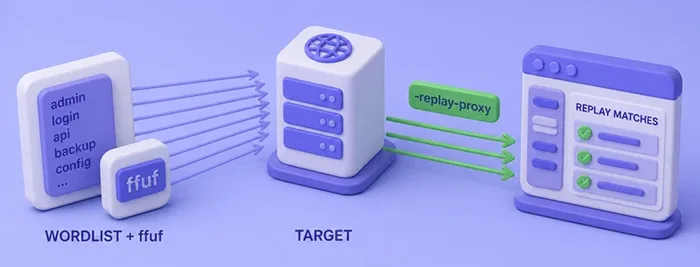
Do not send every fuzz request into Burp. History gets unreadable.
Two different proxy flags:
-x: all requests go through the proxy-replay-proxy: only matched requests are replayed after filters
Example with Burp on 127.0.0.1:8080:
ffuf -w "$WORDLIST" -u "$WEB_URL/FUZZ" -fs 208 \
  -replay-proxy http://127.0.0.1:8080 -t 8
Prefer -replay-proxy for triage. Use the Burp Suite proxy tutorial for listener and Repeater setup.
Wfuzz as an alternative
Wfuzz also uses FUZZ (and FUZ2Z, …). Syntax differs:
- Wordlist:
-z file,list.txt(not-w) - Hide by chars:
--hh - Hide by status:
--hc
Same soft-404 hide (208 bytes) with Wfuzz:
wfuzz -z file,"$WORDLIST" --hh 208 -t 8 "$WEB_URL/FUZZ"Target: ${WEB_URL}/FUZZ
Total requests: 11
000000001: 200 0 L 4 W 49 Ch "admin"
000000002: 200 0 L 3 W 42 Ch "backup"
000000003: 200 0 L 1 W 29 Ch "api"
000000004: 200 1 L 1 W 29 Ch "secret.txt"
000000005: 200 0 L 4 W 67 Ch "login.php"
000000006: 200 1 L 1 W 21 Ch "config.bak"
Processed Requests: 11
Filtered Requests: 5Reach for Wfuzz when you want:
- Multiple payload spots in one request (
FUZZ/FUZ2Z) - Encoders and iterators
- A filter style you already know
For daily directory, vhost, and -ac work on Kali, stay with ffuf.
ffuf vs Wfuzz
| Topic | ffuf | Wfuzz |
|---|---|---|
| Core syntax | -u + -w, keyword FUZZ |
URL with FUZZ, payloads via -z |
| Typical fit | Path, vhost, and param scans on Kali | Multi-payload and encoder-heavy cases |
| Filtering | -fc/-fs/-fw/-fl/-fr plus matchers |
--hc/--hh/--hw/--hl and related |
| Auto calibration | -ac, -acs, -acc, -ach |
Manual filters / baselines |
| Recursion | Built-in depth and strategy | Less central; often scripted |
| Beginner path | One binary, short flags, JSON -o |
More payload concepts up front |
Do not pick a tool only because an old blog said it is “faster.” Match the request shape and the filters you need.
Choose the right wordlist
The list matters more than thread count.
| Task | Prefer | Avoid as the only list |
|---|---|---|
| Directories / files | Web content lists (dirb/common.txt, DirBuster, SecLists Web-Content) |
rockyou.txt |
| Parameter names | Parameter-name lists | Password lists |
| Virtual hosts | Subdomain / vhost name lists | Directory lists |
| Lab smoke tests | Large lists like $WORDLIST |
Huge lists on fragile targets |
On this Kali image you already have:
/usr/share/wordlists/dirb/common.txt(~4.6k lines)- DirBuster
directory-list-2.3-small.txt
Install the seclists package for larger Discovery trees. Building and trimming lists is covered in the wordlist generator guide.
Remember: password lists and web-content lists solve different jobs.
Troubleshooting
| Symptom | Likely cause | Fix |
|---|---|---|
| Every path returns 200 | Soft 404 or catch-all app | Measure miss size/words; use -fs/-fw or -ac |
| Thousands of results | Baseline not filtered | Calibrate; tighten matchers; shrink the list |
| Mostly 403 results | Path exists but blocked, or WAF | Treat 403 as interesting; slow -rate/-t; confirm scope |
| Vhost fuzz returns everything | Default vhost answers all Host values | Filter default size/body; try -ach |
| Redirects everywhere | Trailing slash or HTTP→HTTPS rules | Note Location; use -r only when you understand loops |
| Recursion explodes | Depth/strategy too aggressive | Lower depth; use default; smaller list |
| Too many requests / timeouts | Threads or fragile target | Lower -t, set -rate, raise -timeout |
| Empty ffuf output | Filters too strict | Remove -fs temporarily; widen -mc |
| Wfuzz TLS failures | PyCURL/OpenSSL mismatch on Kali | Use HTTP labs first; fix the Python curl backend for HTTPS |
Connection refused to $WEB_URL |
Target powered off or wrong IP | Confirm Metasploitable is running; ping "$TARGET" from Kali |
Summary
Web fuzzing here means guessing one part of an HTTP request from a wordlist and reading how the response changes. With ffuf you put FUZZ in a path, parameter, JSON field, or Host header on a target you are allowed to test.
The hard part for beginners is noise, not speed:
- Soft 404 pages often return 200
- Measure a miss with curl
- Filter with
-fs/-fw, or let-accalibrate - Keep recursion shallow until the first layer is clean
- Send only matches to Burp with
-replay-proxy
Wfuzz is useful for multi-payload and encoder work. Day-to-day discovery on Kali still starts with ffuf, the right wordlist family, and filters you trust. Map linked endpoints first with the hidden endpoints guide when you need crawlers; finish interesting hits in Burp.
References
Frequently Asked Questions
What is ffuf used for in web penetration testing?
ffuf puts wordlist values into one marked part of an HTTP request (path, parameter, header, or body) and shows responses that pass your filters. People use it to find hidden directories and files, guess parameter names, find virtual hosts, and probe POST or JSON fields on authorized targets.
Why does ffuf return HTTP 200 for every directory?
Many apps serve a custom not-found page with status 200. ffuf is reporting what the server sent. Filter by size, words, or lines, or turn on -ac so the common miss page disappears from the results.
What does ffuf -ac auto calibration do?
Before the main scan, ffuf requests a few paths that should not exist. If those misses share a size, word count, or line count, ffuf adds a matching filter for you. You do not have to type -fs by hand.
When should I use Wfuzz instead of ffuf?
Use Wfuzz for multiple payload positions, encoder chains, or a filter style you already know. Use ffuf for routine directory, vhost, and calibrated scans on Kali, especially when you want -ac and -replay-proxy.
Is directory fuzzing the same as using rockyou.txt?
No. Directory and parameter discovery need web-content or parameter-name lists. Password lists such as rockyou belong to credential attacks, not content discovery.
Is web fuzzing legal?
Only against systems you own or are explicitly authorized to test. High request rates can violate policy or law outside your scope.
