
| Tested on | Kali GNU/Linux Rolling 2026.2 (kali-rolling) |
|---|---|
| Package | gophish 0.12.1-0kali5Mailpit (Docker) for lab SMTP capture |
| Lab environment | Pentest lab |
| Privilege | sudo for gophish-start / package install; normal browser user for the admin UI |
| Scope | Campaign orchestration and measurement: sending profile, users/groups, email template, landing page, launch, event meanings, results analysis, CSV export, short webhooks/API note, Gophish vs SET. Includes lab SMTP with Mailpit. Does not repeat Gophish installation. |
| Related guides | SMTP and SMB enumeration |
Gophish is a campaign manager for controlled phishing simulations. You define who gets the message, what the email says, where the link goes, then you measure what people did.
This page assumes Gophish is already installed and you can log into the admin UI. For install and first login on Kali, use the Install Gophish guide.
What Gophish does in a phishing campaign
Think of one campaign as a pipeline:
- Recipients (Users & Groups)
- Message (Email Template)
- Destination page (Landing Page)
- Delivery path (Sending Profile / SMTP)
- Interaction events (sent, opened, clicked, submitted, reported)
- Reporting (dashboard + CSV)
Gophish does not invent SMTP for you. It relays through a sending profile you configure.
Set up a Gophish phishing lab on Kali
Use a closed lab: Gophish admin UI, a phishing listener URL for tracked links, and a local SMTP catcher so messages never hit the public internet.
Lab endpoints on this host:
- Admin UI:
https://127.0.0.1:3333(self-signed cert is normal) - Phishing listener:
http://127.0.0.1:8080(campaign URL field) - Mailpit SMTP:
127.0.0.1:1025 - Mailpit inbox:
http://127.0.0.1:8025
Install steps stay on the Install Gophish guide. Below is only what you need running before you build a campaign.
Authorize the simulation scope
Rules for this tutorial:
- Recipients are fake lab addresses only (
alex@lab.local,sam@lab.local) - Landing page is a training check-in, not a cloned bank or IdP login
- Form fields are dummy text (
team,next_step), not password fields - Leave Capture Passwords unchecked unless your written scope explicitly requires credential-capture testing and safe storage
Start Gophish and log in
On Kali, start the packaged service when needed:
sudo gophish-startDefault lab credentials on Kali are shown by that helper (admin / kali-gophish on a fresh install). Change the password after first login.
Confirm the admin UI answers:
curl -sk -o /dev/null -w '%{http_code}\n' https://127.0.0.1:3333/login200A 200 on /login means the admin server is up.
Run Mailpit for lab SMTP
Gophish needs an SMTP relay. Run Mailpit in Docker so mail stays on your lab host.
What Mailpit gives you:
- SMTP on
127.0.0.1:1025(Gophish sending profile Host) - Web inbox on
http://127.0.0.1:8025(open messages and click tracked links) - No real internet delivery and no mailbox passwords for lab recipients
Start (or recreate) a local-only container. Binding to 127.0.0.1 keeps the ports off the LAN:
sudo docker run -d --name mailpit-gophish --restart unless-stopped \
  -p 127.0.0.1:1025:1025 -p 127.0.0.1:8025:8025 axllent/mailpit:latest
If the name already exists, either reuse that container or remove it first (sudo docker rm -f mailpit-gophish) and run the command again.
Confirm it is healthy and the ports map correctly:
sudo docker ps --filter name=mailpit-gophish --format 'table {{.Names}}\t{{.Status}}\t{{.Ports}}'NAMES STATUS PORTS
mailpit-gophish Up About an hour (healthy) 127.0.0.1:1025->1025/tcp, 127.0.0.1:8025->8025/tcp, 1110/tcp1025 is SMTP; 8025 is the UI. Open http://127.0.0.1:8025 in a browser and leave that tab available for later campaign tests.
Quick UI check from the shell:
curl -s -o /dev/null -w '%{http_code}\n' http://127.0.0.1:8025/200A 200 means the inbox UI is up. Next you point Gophish’s sending profile at 127.0.0.1:1025.
Configure a Gophish sending profile
Open Sending Profiles → New Profile. This is how Gophish hands mail to SMTP.
Lab values (Mailpit):
- Name:
lab-mailpit - From:
security-awareness@lab.local(plain address; avoidName <email>with Mailpit) - Host:
127.0.0.1:1025 - Username / Password: leave empty
- Ignore Certificate Errors: checked is fine for this lab
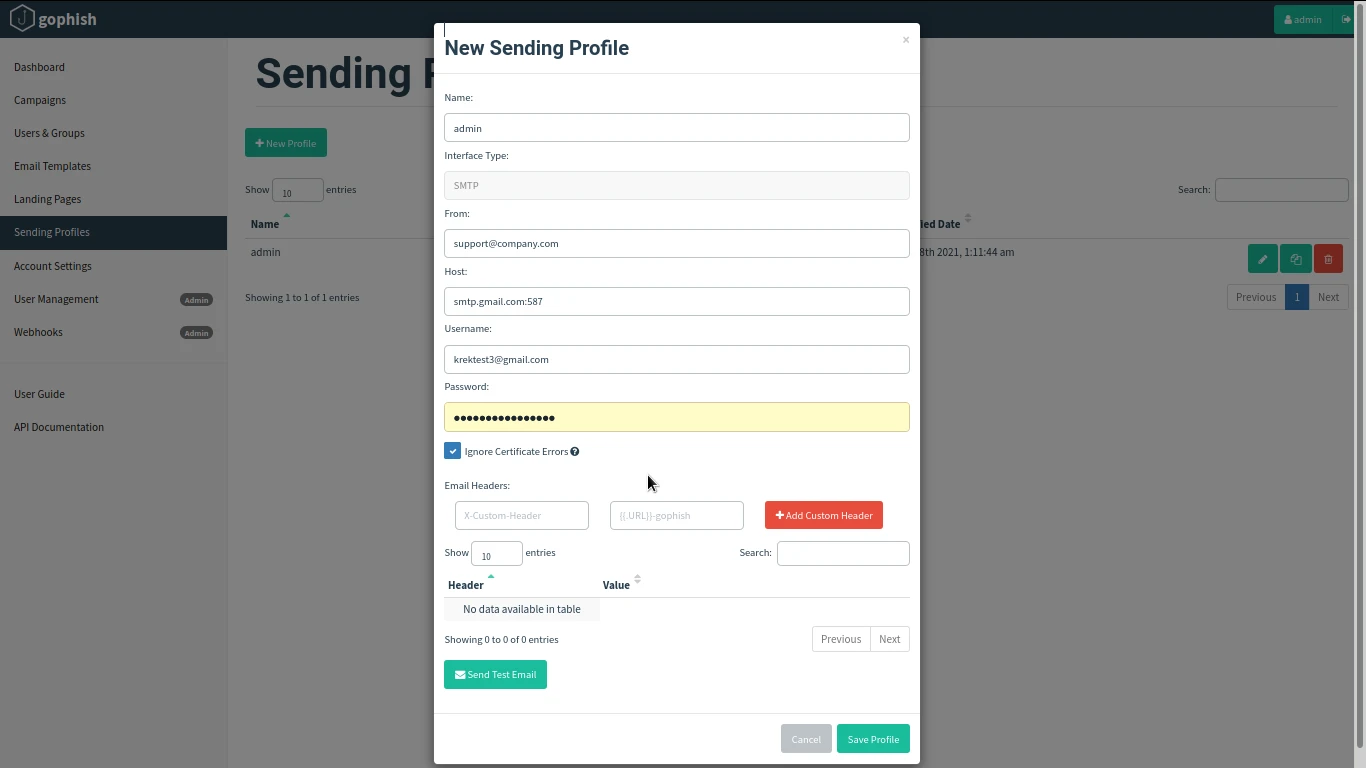
What this screen means:
- From = address recipients see (and SMTP
MAIL FROM) - Host = where Gophish connects (
host:port) - Empty auth = OK for local Mailpit; real relays usually need credentials
Before Save Profile:
- Click Send Test Email to an address you control (for example
alex@lab.local) - Confirm the message appears in Mailpit at
http://127.0.0.1:8025
A successful test proves reachability and From syntax. It does not prove corporate deliverability (SPF/DKIM/gateway).
Create a Gophish recipient group
Open Users & Groups → New Group.
CSV / row fields:
- First Name
- Last Name
- Position
Lab group:
- Name:
lab-awareness-group - Alex Test /
alex@lab.local/ Analysist - Sam Test /
sam@lab.local/ Engineer
Type a row → + Add → repeat. Then Save changes.
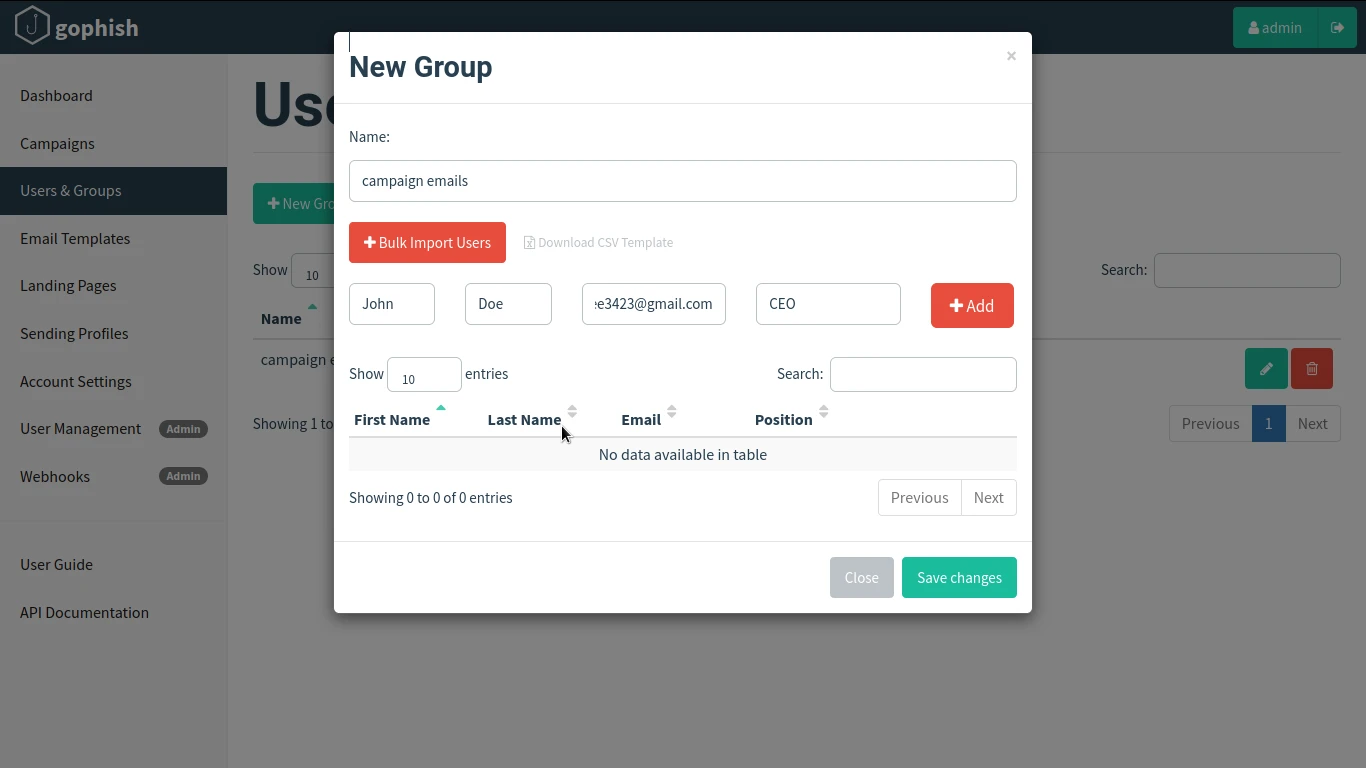
What to check on this screen:
- Table shows both users (not “No data available”)
- Emails are lab-only addresses you own
- Position is optional metadata for later filtering in results
Build a Gophish email template
Open Email Templates → New Template.
Keep wording as awareness training. Do not clone a real vendor login or invoice brand.
Useful variables:
{{.FirstName}},{{.LastName}},{{.Email}},{{.Position}}{{.URL}}= unique tracked link (required for click events)
Lab template:
- Name:
lab-security-reminder - Subject:
Security awareness reminder for {{.FirstName}} - Body (Text or HTML): greeting + training note that includes
{{.URL}} - Optional: Add Tracking Image for “Email Opened” (approximate only)
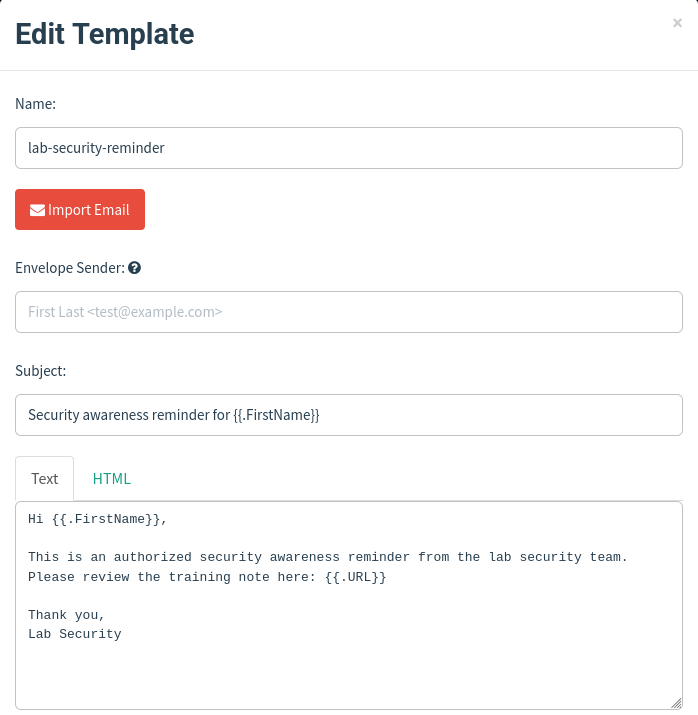
What this means:
{{.FirstName}}personalizes subject/body per recipient{{.URL}}is rewritten per person so clicks map back to that row- Without
{{.URL}}, you mainly get “Email Sent,” not useful click tracking
Build a Gophish landing page
Open Landing Pages → New Page.
Use a short training form with dummy fields (not a cloned IdP login):
- Team name (
name="team") - One thing you will do next (
name="next_step") method="POST"on the form
Capture settings (scroll below the HTML editor if needed):
- Capture Submitted Data: on
- Capture Passwords: off
- Redirect To: optional harmless URL
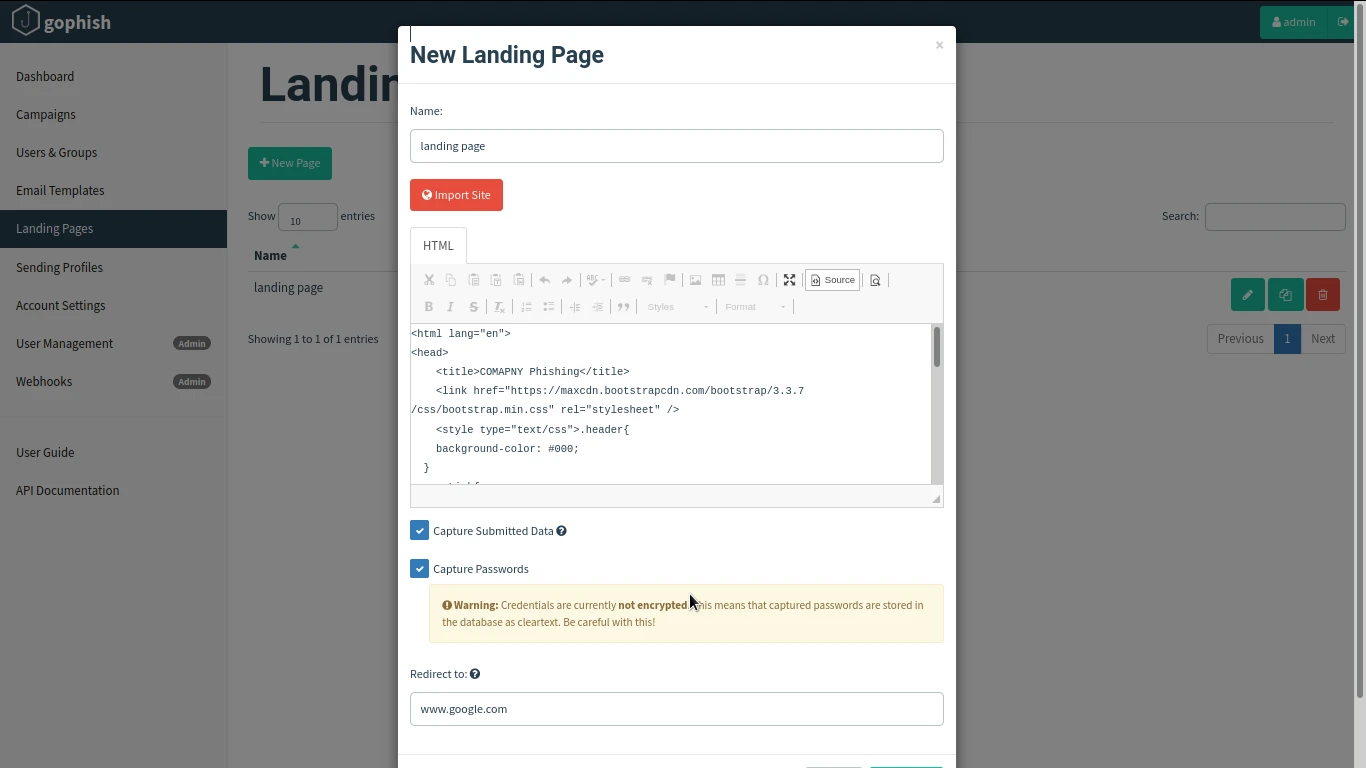
What this means:
- Named inputs are what appear under Submitted Data
- Password capture stores cleartext in Gophish’s DB if enabled; leave it off for this lab
- Import Site can clone pages; skip that for this awareness lesson
Launch a Gophish phishing campaign
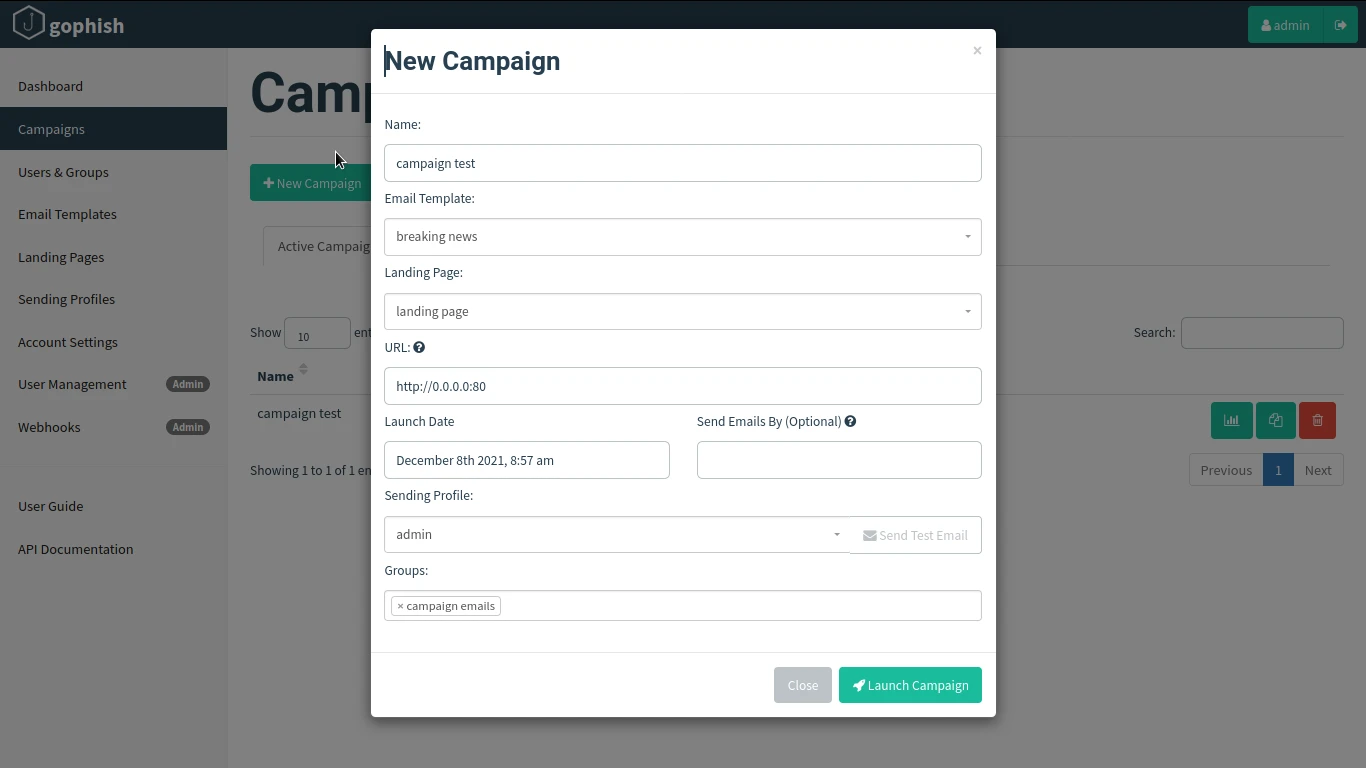
Open Campaigns → New Campaign. Wire every piece:
| Field | Lab value |
|---|---|
| Name | lab-q3-awareness |
| Email Template | lab-security-reminder |
| Landing Page | lab-training-page |
| URL | http://127.0.0.1:8080 |
| Sending Profile | lab-mailpit |
| Groups | lab-awareness-group |
| Launch Date | now, or a future schedule |
URL rules:
- Campaign URL must be a host recipients can open
- Match the phishing listener (
127.0.0.1:8080on this lab) - Never put
http://0.0.0.0in this field (bind address ≠ link host) - Bare
http://127.0.0.1:8080/in a browser returns 404; tracked links use?rid=…
Click Launch Campaign. You should get a “Campaign Scheduled” (or started) confirmation.
Right after launch:
- Mailpit shows one message per recipient
- Subjects include each first name
- Bodies contain
http://127.0.0.1:8080?rid=… - Results start at Sent only (Opened / Clicked / Submitted still 0)
Understand Gophish campaign events
Open the campaign results page (chart icon). Main event types:
| Event | Meaning | Caveat |
|---|---|---|
| Email Sent | Handed to SMTP | Not proof the human read it |
| Email Opened | Tracking image (or related signal) loaded | Often incomplete or inflated |
| Clicked Link | Tracked {{.URL}} was fetched |
Could be user, sandbox, or scanner |
| Submitted Data | Landing form POST captured | Only as good as your form + capture settings |
| Email Reported | User reported the mail (if integrated) | Often 0 in simple labs |
Typical timeline order:
- Campaign Created
- Email Sent (per recipient)
- Clicked Link
- Submitted Data
Clicked ≠ compromised. It only means the tracked URL was requested. Treat clicks as coaching unless Submitted Data (or scoped credential capture) shows a deeper miss.
Analyze Gophish campaign results
After recipients open Mailpit, click the training link, and submit dummy form values, open Campaigns → lab-q3-awareness results.
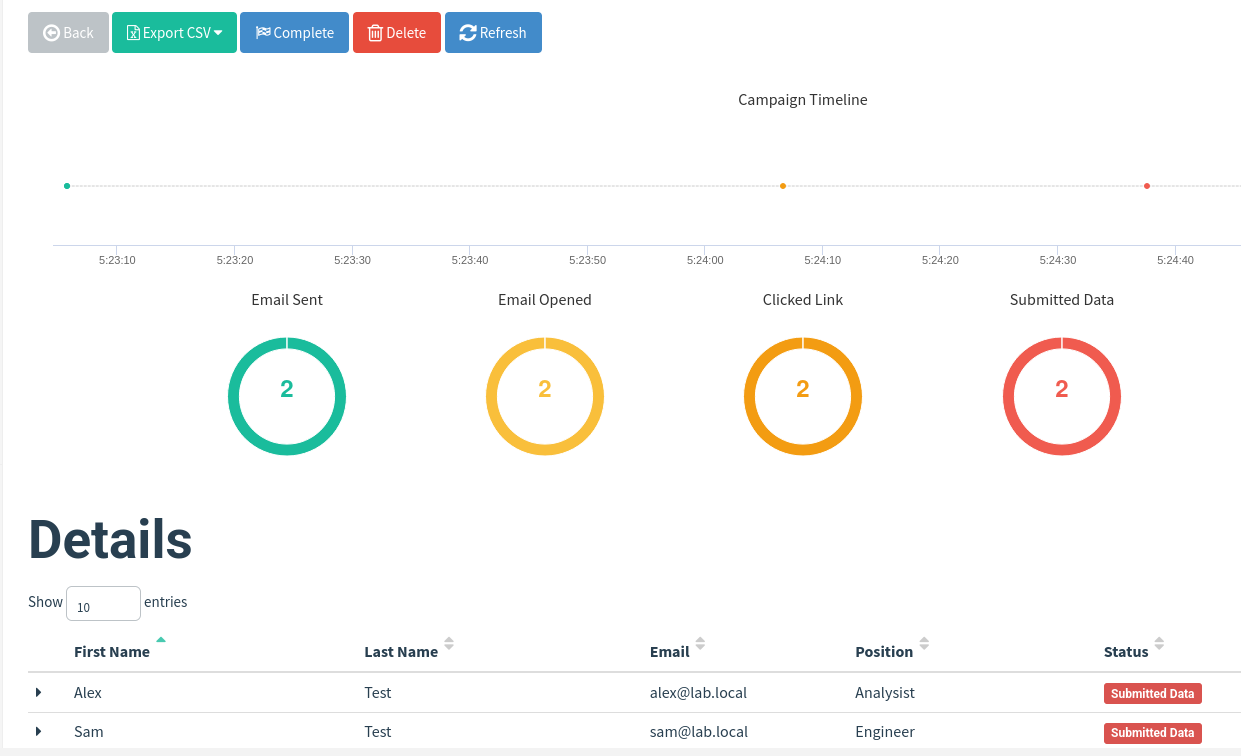
How to read this lab result:
- Email Sent: 2 = both messages left Gophish via Mailpit
- Email Opened: 2 = soft signal only (image/privacy quirks apply)
- Clicked Link: 2 = both tracked URLs were opened
- Submitted Data: 2 = both training forms were posted (strongest signal here)
- Details table status Submitted Data = per-person latest state
- Timeline dots = same events ordered in time
Assessment layers:
- Delivery — Sent vs Error
- Attention — Opened (noisy)
- Interaction — Clicked Link
- Action — Submitted Data
- Defense — Email Reported (when available)
Do not paste real secrets from submissions into reports. This lab only used dummy team / next_step values.
Export Gophish campaign results to CSV
On the results page, use Export CSV (visible in the toolbar above).
Minimal report outline:
- Campaign name, launch window, audience size
- Sending profile and landing URL
- Counts: sent / opened / clicked / submitted / reported / error
- Findings in plain language
- Remediation: training topics and process fixes, not blame
Prefer CSV for a first report. Use the API later if you automate.
Use Gophish webhooks and API
Gophish can notify other systems when campaign events happen.
- Webhooks (Admin): push event payloads to a URL you control (SIEM, training platform, chat bot)
- API: create campaigns, poll
/api/campaigns/{id}/summaryand/api/campaigns/{id}/resultswith your API key from Account Settings
Use webhooks when another tool should react in near real time. Use API polling when you build a scheduled report job. This article stops at awareness of those hooks; it is not a full API programming guide. Official references are linked at the end.
Troubleshoot Gophish campaign problems
| Symptom | Likely cause | Fix |
|---|---|---|
| Test email works, campaign mail fails | Wrong profile selected; group empty; launch date in the future | Confirm profile/group; check launch time; read Gophish logs |
| Links use wrong host | Campaign URL set to 0.0.0.0 or an unreachable IP |
Set URL to a host recipients can open; restart listener if port changed |
| Landing page unreachable | Phish server not listening; firewall; wrong port in URL | Confirm phish_server.listen_url in config.json; curl the URL |
| Events not recorded | Missing {{.URL}}; wrong rid; capturing disabled |
Put {{.URL}} in the template; open the exact link from the email |
| Opens look wrong | Image blocking or scanners | Treat opens as approximate; prioritize clicks/submits |
| SMTP rejection | Auth, TLS, or relay policy | Fix sending profile; use lab SMTP first |
| Browser warning on admin UI | Self-signed admin cert | Expected on lab TLS; proceed only on your host |
| Submitted data missing | Capture Submitted Data off; form has no named inputs; GET instead of POST | Enable capture; use named fields; submit the form |
| Admin UI 403 on scripts | Missing referer / CSRF when automating login | Use the browser UI or API key; do not scrape login forms casually |
On Kali, if the phishing listener binds only to port 80 and links 404, set phish_server.listen_url to something like 127.0.0.1:8080, restart Gophish, and put that same base URL in the campaign.
Gophish vs SET
| Topic | Gophish | Social Engineer Toolkit (SET) |
|---|---|---|
| Best at | Multi-user campaigns, templates, dashboards, CSV | Interactive attack lab menus, quick one-off vectors |
| Tracking | Built-in sent/open/click/submit timeline | Not a full campaign analytics product |
| Audience | Awareness programs and scoped simulations | Teaching and opportunistic lab phishing |
| Reporting | Dashboard + CSV + API/webhooks | Manual evidence collection |
| Learning path | This article + install guide | SET phishing |
Pick Gophish when you need measurable simulations across a group. Pick SET when you are learning individual techniques in a lab menu workflow. Broader context sits in social engineering attacks.
Summary
Gophish turns phishing simulations into a repeatable workflow: sending profile, recipients, template with {{.URL}}, landing page, then a campaign that ties those pieces to a reachable listener URL. Measurement matters as much as sending. Read Sent, Opened, Clicked, Submitted, and Reported with their limits in mind, especially imperfect open tracking.
On the Kali lab used here, Mailpit proved SMTP handoff. After both recipients clicked the tracked links and submitted the training form, results showed Sent / Opened / Clicked / Submitted at 2 each. Export CSV for stakeholders, keep password capture off unless scope demands it, and never point a campaign at people outside authorization.
Install and first login stay on the Gophish install guide. For a different style of lab phishing menu, compare with SET next.
References
Frequently Asked Questions
What is a Gophish campaign?
A campaign connects a recipient group, email template, landing page, sending profile, and public phishing URL, then records events as messages are sent and people interact with tracked links and forms.
Why are Gophish “Email Opened” counts inaccurate?
Open tracking usually depends on a tracking image loading. Many clients block images, and security products may fetch images without a human reading the mail. Treat opens as a soft signal and prioritize clicks and submissions.
Does a Clicked Link event mean the user was compromised?
No. It means the tracked URL was requested. That can be a person, a link scanner, or a sandbox. Submitted Data (or scoped credential capture) is a stronger signal for this style of awareness exercise.
What URL should I put in the Gophish campaign?
Use a hostname or IP that recipients can actually open, matching where the Gophish phishing listener is reachable. Do not use 0.0.0.0 in email links.
How do I export Gophish results?
Open the campaign results page and use Export CSV (or related export options). You can also pull summary and results through the Gophish API with your API key.
Can I use Gophish against real employees?
Only with explicit authorization and an agreed rules of engagement. Use test accounts while you learn. Do not collect real passwords in training labs.
