
| Tested on | Kali GNU/Linux Rolling 2026.2 (kali-rolling) |
|---|---|
| Package | hydra 9.7-1burpsuite 2026.8-0kali1docker.io / docker-compose 2.40.3-3DVWA ghcr.io/digininja/dvwa:latest on 127.0.0.1:4280 |
| Applies to | Kali Linux with Hydra and Burp Suite Community; local DVWA Docker lab |
| Lab environment | Pentest lab Install DVWA on Kali (Docker Compose path) |
| Privilege | Normal user for Hydra and Burp; sudo for Docker Compose |
| Cert prep | CompTIA PenTest+ PT0-003 — password attacks and web authentication testing |
| Scope | Capture a DVWA login request, distinguish success vs failure responses, run a small Hydra http-get-form test, compare Burp Intruder, and cover CSRF tokens, rate limits, false positives, and prevention. Does not cover internet targets, credential stuffing, or large leaked password dumps. |
| Related guides | SSH brute force with Hydra Wordlist generator |
In this article we will test web login brute-force protection against a local DVWA Docker lab on Kali using Hydra and Burp Suite Intruder.
You will capture the request, pick a failure string from a real failed login, identify the valid password from a tiny controlled list with Hydra, see how Intruder does the same job in the browser proxy, then look at CSRF tokens, rate limiting, and common false positives. Use only systems you own or are authorized to assess.
How Web Login Brute-Force Testing Works
A web login password-guessing test repeatedly submits credentials to a live login form and compares the responses. In this lab, we already know the username admin, so we keep the username fixed and try a small list of passwords. A broader brute-force test may vary both the username and password.
This is different from offline cracking with John or hashcat. Offline work never hits the login endpoint. Online form testing always talks to the live application, so cookies, CSRF tokens, lockouts, and response wording all matter.
At a high level, the workflow looks like this:
Browser / Burp
     │  capture POST or GET login
     ▼
Identify fields + failure/success signals
     │
     ├── Hydra http-get-form / http-post-form
     └── Burp Intruder payloads
     │
     ▼
Verify candidate in a real browser session
Hydra automates credential guesses from the command line. Burp Intruder sends payloads through a captured HTTP request and makes it easy to compare the resulting responses. In both cases, you need a reliable way to distinguish a failed login from a successful one.
Build a Local DVWA Test Target
Use the official DigiNinja Compose stack so the lab binds to loopback port 4280. Full install options are in Install DVWA on Kali.
This section assumes Docker and the Compose plugin are already installed. If not, use the linked DVWA installation guide first.
Clone the repository onto Kali:
git clone --depth 1 https://github.com/digininja/DVWA.git ~/DVWAStart the Compose stack from that directory (loopback port 4280):
cd ~/DVWA && sudo docker compose up -dContainer dvwa-db-1 Started
Container dvwa-dvwa-1 StartedBefore opening DVWA in the browser, confirm that its web server is responding. -I requests only the HTTP headers, while -s hides curl's progress output:
curl -sI http://127.0.0.1:4280/login.php | head -5HTTP/1.1 200 OK
Server: Apache/2.4.68 (Debian)
...Open http://127.0.0.1:4280/setup.php, create or reset the database, then log in with the default admin / password.
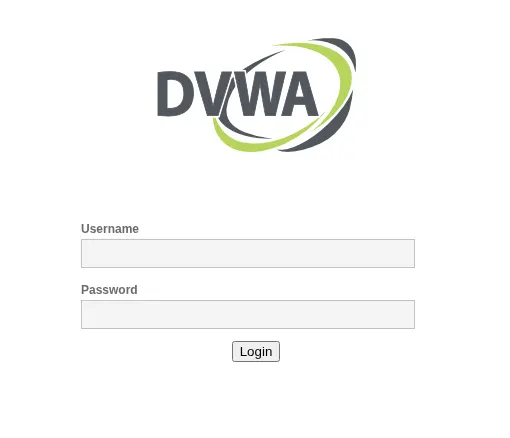
DVWA's Brute Force module is not the site's main login page. You must first authenticate to DVWA itself, and then test the separate vulnerable login form inside the Brute Force module. The PHPSESSID cookie proves to DVWA that you are allowed to access that training module.
Set DVWA Security to low for the first Hydra run. Open Brute Force in the left menu. You must stay logged into DVWA while you attack the module form.
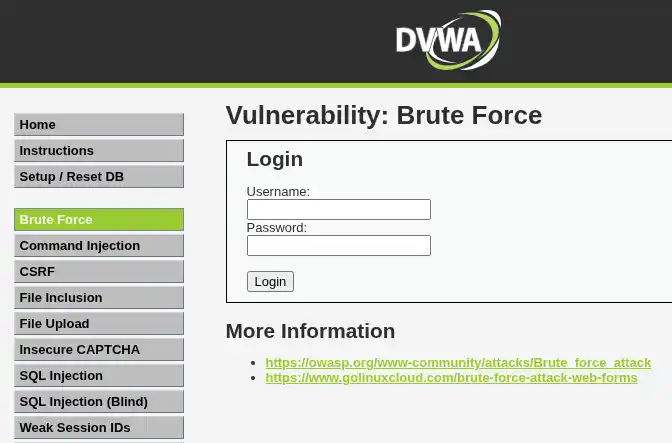
Create a working directory for the tiny password list:
mkdir -p ~/web-brute-labmkdir prints nothing when the path already exists or is created. Write five passwords, including the known DVWA default:
printf '%s\n' wrong1 wrong2 password letmein admin123 > ~/web-brute-lab/passwords.txtprintf writes the file with no stdout. Confirm the five lines:
cat ~/web-brute-lab/passwords.txtwrong1
wrong2
password
letmein
admin123We already know that DVWA's default admin password is password. Placing it in the middle of the list lets us see two failed attempts before Hydra reaches the valid password.
Capture the Login Request
Point the browser at Burp's proxy (default 127.0.0.1:8080) as in the Burp Suite proxy tutorial, or use browser DevTools. Submit a wrong password on the Brute Force form and inspect the request in Proxy → HTTP history.
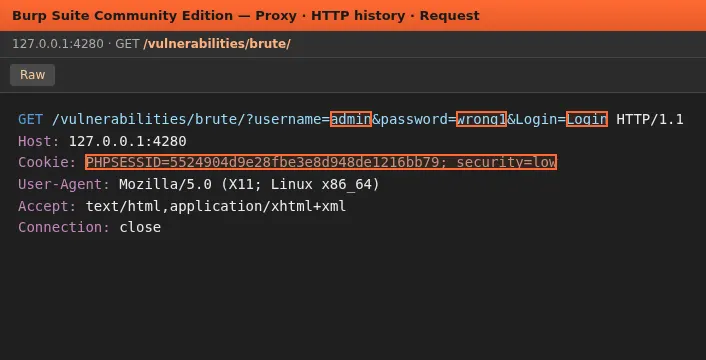
On DVWA low, the Brute Force module uses GET with these parameters:
GET /vulnerabilities/brute/?username=admin&password=wrong1&Login=Login HTTP/1.1
Host: 127.0.0.1:4280
Cookie: PHPSESSID=<session>; security=low
Before building the Hydra command, record:
- Path and query or body fields (
username,password,Login) - Session cookie (
PHPSESSID) plussecurity=low - Text that appears only on failure (next section)
Identify Username, Password and Failure Conditions
Submit a wrong password and read the page. DVWA prints a clear failure string:
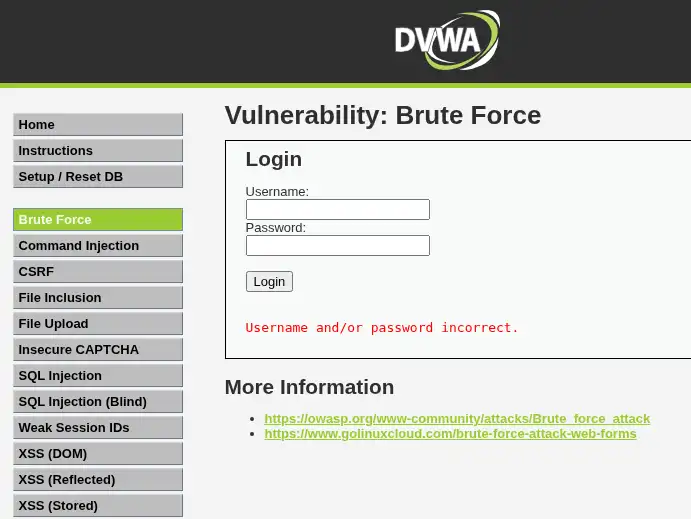
The failure marker you will feed Hydra is:
Username and/or password incorrect.Submit the real password password once and note the success text:
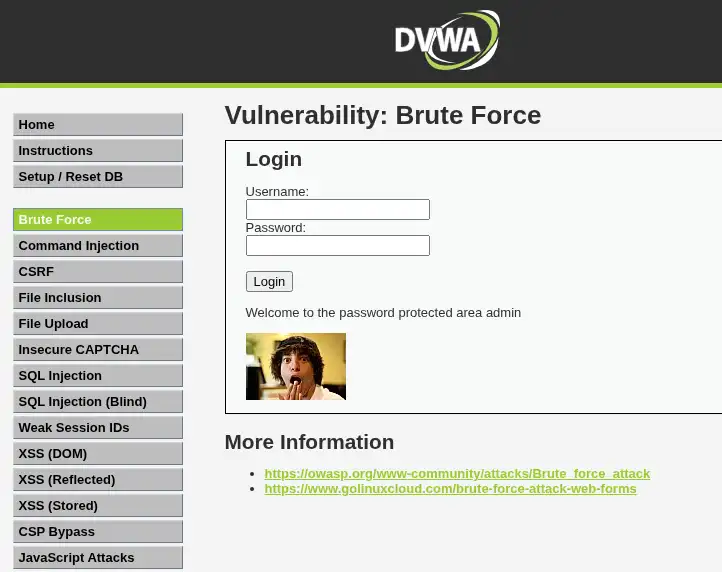
Success shows Welcome to the password protected area admin. Hydra can match either a failure string (F=) or a success string (S=). Prefer one clear marker and verify any hit in the browser.
With F=, Hydra assumes a password is wrong when the response contains that text. If the text disappears, Hydra treats the response as a possible success. This is why choosing the correct failure string matters so much.
It is also worth comparing a valid username + wrong password with a nonexistent username + wrong password. If the two responses consistently differ, for example in their message, status code, redirect, length, or timing, the login may reveal whether a username exists. DVWA uses the same generic error here, so this lab continues with password guessing.
Test a Login Form with Hydra
Hydra ships on Kali. Confirm the version:
hydra -h 2>&1 | head -1Hydra v9.7 ...Copy a fresh PHPSESSID from Burp or DevTools after you log into DVWA and set security to low. PHPSESSID is unique to your DVWA login session, so do not copy a value from a screenshot or example. Use the value from your own browser session. Put it in a shell variable for the examples below:
SESS='REPLACE_WITH_YOUR_PHPSESSID'Before the full command, map each piece:
| Part | Meaning |
|---|---|
-l admin |
Try one known username |
-P passwords.txt |
Read passwords from this file |
127.0.0.1 |
Target host |
-s 4280 |
Target web-server port |
http-get-form |
Test a GET-based web form |
^USER^ |
Replace with the username |
^PASS^ |
Replace with each password |
H=Cookie... |
Send the authenticated DVWA session cookie |
F=... |
Text that identifies a failed login |
-V |
Print each attempt |
-t 1 |
Use one concurrent task |
We deliberately use one task in this small lab so requests arrive sequentially and the output is easy to follow.
Build the form string from four pieces:
- Path:
/vulnerabilities/brute/ - Parameters:
username=^USER^&password=^PASS^&Login=Login - Session header:
H=Cookie\: PHPSESSID=${SESS}; security=low - Failure condition:
F=Username and/or password incorrect.
Hydra separates these pieces with :. Hydra 9.7's http-get-form syntax places optional headers before the condition string:
/path:params:H=Cookie\: ...:F=failure textEscape only the colon after Cookie. Do not put a backslash before the semicolon between cookie pairs, or the Cookie header becomes invalid and DVWA redirects to login.php.
Run Hydra with one thread against the small list:
hydra -l admin -P ~/web-brute-lab/passwords.txt 127.0.0.1 -s 4280 http-get-form "/vulnerabilities/brute/:username=^USER^&password=^PASS^&Login=Login:H=Cookie\: PHPSESSID=${SESS}; security=low:F=Username and/or password incorrect." -V -t 1[DATA] attacking http-get-form://127.0.0.1:4280/vulnerabilities/brute/:...
[ATTEMPT] target 127.0.0.1 - login "admin" - pass "wrong1" - 1 of 5 [child 0] (0/0)
[ATTEMPT] target 127.0.0.1 - login "admin" - pass "wrong2" - 2 of 5 [child 0] (0/0)
[ATTEMPT] target 127.0.0.1 - login "admin" - pass "password" - 3 of 5 [child 0] (0/0)
[4280][http-get-form] host: 127.0.0.1 login: admin password: password
1 of 1 target successfully completed, 1 valid password foundHydra tried wrong1 and wrong2, then reported admin / password. That match means the failure string was absent on that response, not that Hydra "logged into DVWA" for you. Open the Brute Force form in the browser and confirm that pair still lands on the Welcome page before you treat it as a finding.
For classic HTML login pages that use POST, switch the module to http-post-form and put the body fields in the same params slot. Shape:
/login:username=^USER^&password=^PASS^:F=Login failedhttp-get-form puts the parameters into the request URL; http-post-form sends them in the request body. The failure-string and Cookie rules stay the same. DVWA's main login.php is POST with CSRF; start on the low Brute Force GET form until the method is solid.
Test the Same Login with Burp Intruder
Send the captured Brute Force request from Proxy to Intruder.
- Clear payload positions, then mark only the password value.
- For this lab use Sniper, which uses one payload set. If you mark several positions, Sniper tests the payloads against each position in turn. Use Cluster bomb when you deliberately want combinations from separate username and password payload sets.
- On Payloads, load
~/web-brute-lab/passwords.txt. - Start the attack and sort by Length or filter on the failure string.
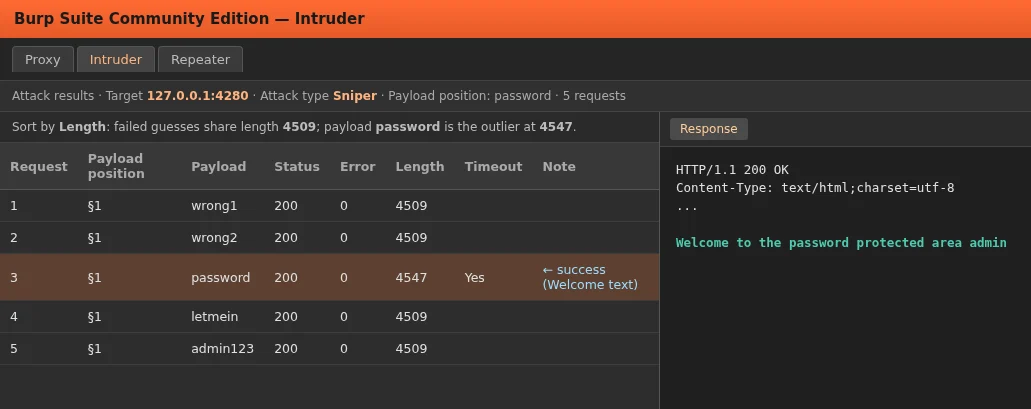
Failed attempts include Username and/or password incorrect. and share length 4509 in this lab. The successful password attempt drops that string, includes the Welcome text, and lands at length 4547, so it stands out when you sort by Length. Treat the length difference as a clue, not proof. Open the response and confirm the expected success marker.
Keep the Resource pool at one concurrent request while you are learning. Parallel threads make length comparison noisier and can invalidate CSRF tokens on higher DVWA levels.
Intruder is useful while you are learning the request and comparing responses. Once the URL, parameters, cookies, and failure condition are proven, you can transfer the same information to Hydra for command-line testing.
CSRF Tokens and Dynamic Login Requests
DVWA's main login.php page and the Brute Force module at high security include a per-request CSRF user_token field. DVWA generates a new CSRF user_token as the page is rendered, so a previously captured user_token cannot be relied on across a sequence of attempts.
View page source or the Burp request after loading the form at high. You should see a hidden field similar to:
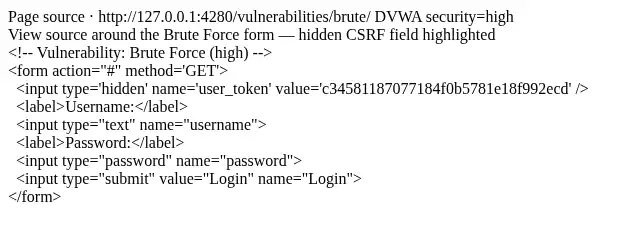
<input type='hidden' name='user_token' value='c34581187077184f0b5781e18f992ecd' />The visible form still looks like Username / Password / Login. The CSRF token only appears in HTML or in the intercepted request body or query string.
The problem is that Hydra's form template is static: it knows how to replace ^USER^ and ^PASS^, but it does not first load the page and extract a changing CSRF value for every guess. Repeated automation therefore needs to load the relevant page, obtain the current user_token, and submit that token with the corresponding login request. For CSRF-protected forms, use Burp Intruder with a macro that GETs the form page, extracts user_token, and updates the next login request, or write a small script that does the same.
A macro is a small sequence of requests Burp can replay automatically. Here it can first load the form, obtain the current user_token, and then use that value in the login request. Keep the test sequential while working with changing CSRF tokens. Multiple concurrent requests can interfere with the expected fetch-token → submit-login sequence.
Rate Limiting, Lockouts and CAPTCHA
DVWA medium demonstrates a simple server-side delay rather than a full rate-limiting system. Failed attempts call sleep(2). This is not network latency. In this lab a wrong password took about 2 seconds at medium versus about 20 ms at low:
Time one failed attempt with a medium-security session cookie (refresh SESS after you set security to medium in the DVWA UI):
time curl -s -o /dev/null -b "PHPSESSID=${SESS}; security=medium" "http://127.0.0.1:4280/vulnerabilities/brute/?username=admin&password=bad&Login=Login"real 0m2.026sThat delay slows dictionary-style password guessing, where the tester tries passwords from a predefined list such as passwords.txt. Production apps often add account lockouts, CAPTCHAs, MFA, and IP-based throttling. Lowering -t reduces concurrency, but changing Hydra's threading does not bypass an application-enforced delay, CAPTCHA, MFA, or account lockout. If responses suddenly change to a lockout message, stop and document the control rather than increasing threads.
How to Recognize False Positives
Hydra treats a login as valid when the failure string is missing. If you pick a string that never appears, every attempt looks successful.
Wrong failure string on the same lab:
hydra -l admin -P ~/web-brute-lab/passwords.txt 127.0.0.1 -s 4280 http-get-form "/vulnerabilities/brute/:username=^USER^&password=^PASS^&Login=Login:H=Cookie\: PHPSESSID=${SESS}; security=low:F=ThisStringNeverAppearsOnPage" -t 1[4280][http-get-form] host: 127.0.0.1 login: admin password: wrong1
1 of 1 target successfully completed, 1 valid password foundThat hit on wrong1 is a false positive. False positives can also happen when:
- Expired
PHPSESSIDso every response is the DVWA login page (no failure string) - Escaping
;as\;inside the Cookie header so the session never reaches the Brute Force module - Matching on a string that appears on both success and failure pages
- Redirects: a successful login may redirect to another page, but an expired session may also redirect to
login.php. Do not treat the HTTP status or redirect alone as proof; inspect the final response and use a marker tied to actual authentication state
Always verify candidates manually in the browser before you treat them as findings.
Prevent Web Login Brute-Force Attacks
Defenders should assume automated guessers exist. Practical controls include:
- Progressive delays, adaptive throttling, or carefully designed temporary lockouts after repeated failures
- MFA for sensitive accounts
- Risk-based CAPTCHA or other additional friction after suspicious repeated failures
- Generic error messages that do not reveal whether the username exists — this reduces username enumeration because attackers cannot easily distinguish "unknown user" from "wrong password"
- Block commonly used and known-compromised passwords when users set or change credentials
- Monitoring and alerting on authentication burst traffic
- Prefer SSO or passkeys where the risk model allows it
During a test, record which controls you hit (delay, lockout, CAPTCHA, CSRF). Report the issues separately. A weak or default credential remains a credential weakness even if the application slows repeated guesses. Separately document whether the login implements effective throttling, lockout, MFA, CAPTCHA, or other protections against automated guessing.
Common Problems
| Symptom | Likely cause | Fix |
|---|---|---|
| Hydra reports the first wrong password as valid | Failure string never appears (bad F= or redirect to login.php) |
Capture a real failed response; fix Cookie; retest with -V |
| Every request returns the main DVWA login page | Expired/wrong PHPSESSID or malformed Cookie header |
Log into DVWA again, copy the new session cookie, and retest one known failed request before running Hydra |
| Cookie seems ignored | \; escaped inside Cookie value |
Escape only Cookie\:; leave ; between cookies alone |
| Hydra finds nothing with a correct password | Session expired or security cookie wrong | Refresh PHPSESSID, set security=low, retry |
| Works in browser, fails in Hydra on high | CSRF user_token required |
Use Burp macro / script; do not expect static Hydra tokens |
| Attack suddenly slows | Medium delay or lockout | Document the control; lower threads |
Summary
Web login brute-force testing exercises a live authentication form by sending repeated credential guesses. In this DVWA Docker lab on Kali, a five-word password list and Hydra's http-get-form module identified admin / password as the valid pair once the failure string and session cookie were correct. Burp Intruder exercises the same request with easier response comparison. A static Hydra form template is not suitable when each attempt requires a freshly fetched CSRF token; Burp session handling or a purpose-built script can manage that changing state. Delays or lockouts should show up in the report as working controls.
False positives usually mean the failure condition or session is wrong, not that every password works. Keep lists small until the method is proven, verify hits in the browser, and never aim these tools at systems outside your authorization.
References
- THC-Hydra — source and module documentation
- Burp Suite documentation — Proxy and Intruder
- DVWA (DigiNinja) — vulnerable web lab
- OWASP Authentication Cheat Sheet — login hardening guidance
Frequently Asked Questions
Why does Hydra report false positives?
Hydra marks a guess as valid when your chosen failure string is absent from the response. A wrong string, an expired session that returns the site login page, or a broken Cookie header can make every attempt look successful. Confirm each hit in a browser.
How do I specify a failure string?
In Hydra 9.x place optional headers before the condition. F=text means the credentials are considered invalid when that text appears. S=text means they are considered valid when that text appears. Example shape: /path:user=^USER^&pass=^PASS^:H=Cookie\: sess=abc:F=Login failed. Copy the exact text from a real failed response.
Can Hydra handle CSRF tokens?
Not when the application requires a fresh dynamic token for every attempt and you are using a static http-get-form / http-post-form template. Use Burp session handling or macros, or a script that fetches a new token for each attempt.
Hydra vs Burp Intruder?
Intruder is useful when you want to inspect and compare individual responses and wire CSRF macros. Hydra is convenient for larger lists once cookies and conditions are correct. Many testers capture with Burp, then move a proven pattern to Hydra.
What rate limiting should a login form use?
At minimum use progressive delays, adaptive throttling, or carefully designed temporary lockouts after repeated failures, plus monitoring. MFA and risk-based CAPTCHA after suspicious repeated failures raise the cost of guessing without locking out legitimate users forever. Exact thresholds depend on your threat model and support process.
