
| Tested on | Kali GNU/Linux Rolling 2026.2 (kali-rolling) |
|---|---|
| Package | dvwa 2.5-0kali1php8.4 8.4.23-1docker.io 28.5.2+dfsg4docker-compose 2.40.3-3 |
| Applies to | Kali Linux |
| Privilege | sudo or root |
| Scope | Install DVWA from the Kali package, Docker Compose, or a manual web stack; start and stop the lab; initialize the database; access from an isolated VM network; and troubleshoot common errors. Does not cover exploitation walkthroughs, Burp configuration, or public deployment. |
| Related guides | Pentest lab setup |
Damn Vulnerable Web Application (DVWA) is a PHP and MariaDB web lab for practicing common web flaws in a controlled environment. After DVWA is running, authorized stress tests against the same listener include slow POST denial of service labs in DDoS attack example on loopback only. On current Kali rolling releases, the fastest path is the native dvwa package, which installs application files, PHP, MariaDB, a dedicated nginx configuration, systemd integration, and the dvwa-start / dvwa-stop helpers. Docker Compose tracks the upstream repository when you want a disposable container lab. A manual Apache stack remains useful when you want to see how the pieces fit together.
Choose a DVWA installation method
| Method | Best for | Default URL | Jump to |
|---|---|---|---|
| Kali package | Fastest Kali-native setup | http://127.0.0.1:42001 |
Kali package |
| Docker Compose | Disposable upstream environment | http://127.0.0.1:4280 |
Docker |
| Manual web stack | Learning Apache, PHP, and MariaDB integration | Custom (often http://127.0.0.1/dvwa/) |
Manual setup |
The Kali package and the official Docker Compose file use different ports. Bookmark the URL that matches the method you chose so you do not open port 80 by habit when the package lab listens on 42001.
Install DVWA from the Kali repository
This is the primary walkthrough. The package installs DVWA under /usr/share/dvwa, ships nginx configuration under /etc/dvwa, depends on MariaDB and PHP 8.4, and registers dvwa.service. You do not need to add PHP 7.4, the SURY repository, or a separate Node.js runtime before installing it.
Check the available package
Refresh the package index so apt sees the current Kali rolling repository:
sudo apt updateQuery which dvwa version Kali offers:
apt policy dvwadvwa:
Installed: (none)
Candidate: 2.5-0kali1
Version table:
2.5-0kali1 500
500 http://http.kali.org/kali kali-rolling/main amd64 PackagesThe Candidate line is the version apt install would pull. The amd64 Packages text identifies the repository index used on this Kali installation. Kali publishes dvwa as an architecture-independent package (Architecture: all in dpkg -s dvwa). If Candidate shows (none), verify that the system uses the kali-rolling repository and rerun sudo apt update.
Install DVWA
Install the package and its dependencies:
sudo apt install -y dvwaThe install pulls in MariaDB server, nginx, PHP 8.4 with FPM and MySQL extensions, and Apache-related packages listed as dependencies. Application files land under /usr/share/dvwa, helpers under /usr/bin/dvwa-start and /usr/bin/dvwa-stop, and the unit file at /usr/lib/systemd/system/dvwa.service.
Confirm the installed version:
dpkg-query -W dvwadvwa 2.5-0kali1Start and access DVWA
Start the lab with the Kali helper:
dvwa-start┏━(Message from Kali developers)
┃
┃ Please wait for the dvwa service to start
┃
┃ [*] Web UI: http://127.0.0.1:42001
┃ [i] You might need to refresh your browser once it opens
┃
┗━
ERROR: Need to complete the first time setup to initialise database (after logging into DVWA)
- Default User : admin
- Default Password: passwordThis message means the dvwa database exists but its application tables have not been initialized. Complete the web setup before treating it as an error. If ERROR: Missing DVWA database appears, check systemctl status dvwa mariadb and journalctl -u dvwa --no-pager because the service should create the database during startup.
Open DVWA in a browser on Kali:
http://127.0.0.1:42001Default lab credentials after database creation:
Username: admin
Password: password
Verify the service
Check that systemd reports the service as running:
systemctl status dvwa --no-pager● dvwa.service - The Damn Vulnerable Web Application in its own nginx server
Loaded: loaded (/usr/lib/systemd/system/dvwa.service; disabled; preset: disabled)
Active: active (running) since Fri 2026-07-31 12:43:16 EDT; 4s ago
Main PID: 37266 (nginx)Confirm nginx is listening on port 42001:
sudo ss -lntp | grep 42001LISTEN 0 511 0.0.0.0:42001 0.0.0.0:* users:(("nginx",pid=37266,fd=5))Send an HTTP request to confirm the web UI responds:
curl -I http://127.0.0.1:42001HTTP/1.1 302 Found
Server: nginx/1.30.1
Location: login.php
Set-Cookie: PHPSESSID=...; path=/A 302 redirect to login.php means PHP and nginx are serving the application. Complete database setup next if you have not already done so.
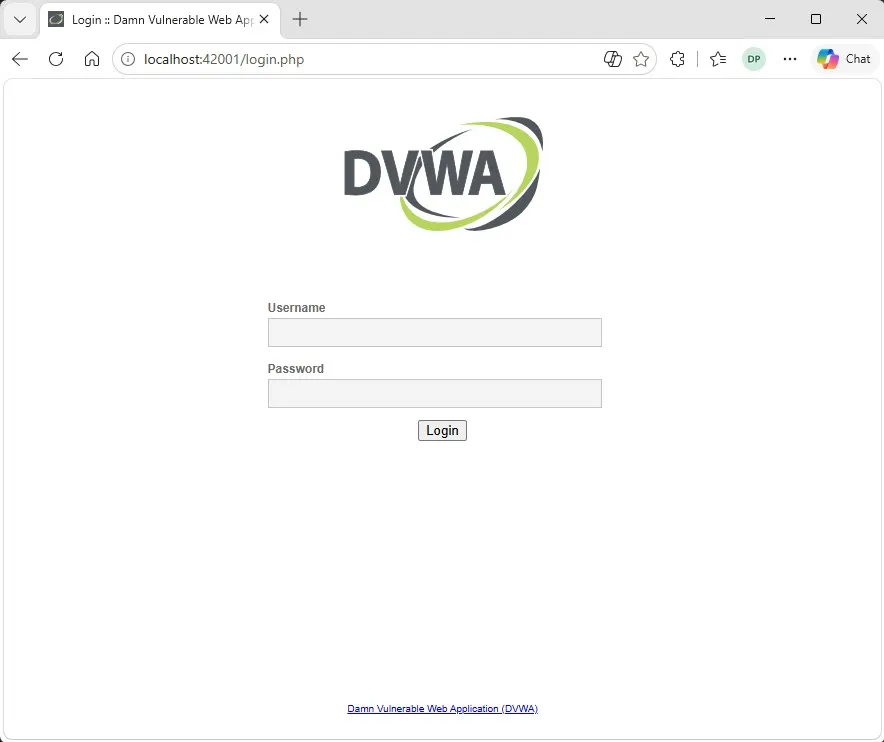
In a browser on Kali, open http://127.0.0.1:42001 and you should see the DVWA login page:
Configure the DVWA database (Kali package)
The Kali package does not require manual SQL grants before the first login. Use the web workflow only:
- Open
http://127.0.0.1:42001in a browser on Kali. - Follow the setup link to the database configuration page.
- Click Create / Reset Database.
- Wait for the success message, then open the login page.
- Sign in with
admin/password. - Open DVWA Security and confirm you can change the security level.
If the button fails, check MariaDB with systemctl status mariadb and read journalctl -u dvwa --no-pager before editing SQL by hand.
Stop, restart, and update DVWA
These commands cover day-to-day lab use with the Kali package.
Stop the lab
dvwa-stopThe helper stops dvwa.service and prints recent journal lines so you can confirm a clean shutdown.
Restart through systemd
When you want a hard restart without the browser helper:
sudo systemctl restart dvwaView logs
journalctl -u dvwa --no-pagerFollow logs while troubleshooting startup:
journalctl -u dvwa -fUpdate the Kali package
sudo apt updatesudo apt install --only-upgrade dvwaCheck the installed build after an upgrade:
dpkg-query -W dvwaWhy the service stays disabled
dvwa.service is disabled after package install. Kali treats DVWA as an on-demand lab application, not an always-on network service. dvwa-start starts MariaDB dependencies as needed and brings nginx up on port 42001. Use dvwa-stop when you finish practice so the vulnerable app is not left running unintentionally.
Install DVWA with Docker Compose
Docker Compose is the preferred alternative when you want the upstream repository layout or an environment you can delete with one command. The official compose.yml publishes port 4280 on loopback, not port 80 on the host.
This section assumes Docker Engine is available. For a full Docker install on Debian-family systems, see Install Docker on Debian.
Install Docker and Compose on Kali
Refresh indexes and install Docker from Kali's repository:
sudo apt updatesudo apt install -y docker.io docker-compose git curlEnable and start the Docker daemon:
sudo systemctl enable --now dockerVerify the client reports a server version:
sudo docker versionClient:
Version: 28.5.2+dfsg4
Server:
Engine:
Version: 28.5.2+dfsg4Confirm Compose is available:
docker compose versionDocker Compose version 2.40.3-3Clone and start the official stack
Clone the upstream repository:
git clone https://github.com/digininja/DVWA.gitcd DVWAStart the stack in the background:
sudo docker compose up -dThe default Compose file pulls ghcr.io/digininja/dvwa:latest, starts MariaDB 10, and publishes Kali loopback port 4280. Its pull_policy: always setting uses the current prebuilt image unless you deliberately change the policy to build.
Compose starts dependencies in order but does not wait for the database or application to become ready. Poll loopback with a two-minute timeout:
if timeout 120 bash -c \
    'until curl -fsSI http://127.0.0.1:4280 >/dev/null; do sleep 2; done'
then
    curl -I http://127.0.0.1:4280
else
    sudo docker compose ps
    sudo docker compose logs --tail=100
fi
When the readiness check succeeds, expect:
HTTP/1.1 302 Found
Location: login.php
A 302 Found response with Location: login.php means the container stack is ready for browser setup. If the timeout branch runs, read docker compose ps and the last log lines before retrying docker compose up -d.
Open DVWA in a browser on Kali:
http://127.0.0.1:4280List running containers:
sudo docker compose psRead startup logs when a container exits immediately:
sudo docker compose logsStop and remove the stack:
sudo docker compose downAdd -v when you also want to delete the database volume for a completely fresh instance.
Manual Apache, PHP, and MariaDB setup
Use this optional path when you want to assemble Apache, PHP, and MariaDB yourself. Skip it when the Kali package or Docker method already meets your lab goals.
Install the web stack from Kali repositories
Install current Kali PHP packages. Do not add external PHP repositories:
sudo apt updatesudo apt install -y apache2 mariadb-server php php-mysql php-gd libapache2-mod-php gitConfirm the PHP CLI version Kali installed:
php --versionPHP 8.4.23 (cli) (built: Jul 2 2026 18:36:55) (NTS)Enable and start MariaDB and Apache:
sudo systemctl enable --now mariadb apache2Deploy DVWA source files
Clone the repository into the web root:
sudo git clone https://github.com/digininja/DVWA.git /var/www/html/dvwaCopy the sample configuration:
sudo cp /var/www/html/dvwa/config/config.inc.php.dist /var/www/html/dvwa/config/config.inc.phpEdit /var/www/html/dvwa/config/config.inc.php and set database host 127.0.0.1, database name dvwa, and the username and password you create in the next step.
Set ownership so Apache can read the tree:
sudo chown -R www-data:www-data /var/www/html/dvwaCreate the database and user
Log in to MariaDB as root:
sudo mariadbCreate a dedicated database and user with modern MariaDB syntax:
CREATE DATABASE dvwa;
CREATE USER 'dvwa'@'localhost' IDENTIFIED BY 'dvwa_pass';
GRANT ALL PRIVILEGES ON dvwa.* TO 'dvwa'@'localhost';
FLUSH PRIVILEGES;
EXIT;
Match the username and password in config.inc.php to the values you chose here.
Enable required PHP settings
Edit the Apache PHP configuration for your installed version. On Kali 2026.2 the path is /etc/php/8.4/apache2/php.ini:
sudo nano /etc/php/8.4/apache2/php.iniSet these directives to On:
allow_url_fopen = On
allow_url_include = On
display_errors = On
display_startup_errors = On
The first two settings support the remote-file-inclusion lab modules. The last two expose PHP and database configuration errors during this local practice setup instead of leaving you with an unexplained blank page.
Restart Apache so PHP picks up the change:
sudo systemctl restart apache2Initialize DVWA in the browser
Open:
http://127.0.0.1/dvwa/Click Create / Reset Database, then log in with admin / password. For generic Apache and MariaDB service administration beyond this lab, see systemctl command when managing apache2 and mariadb units.
Access DVWA from another lab VM
Loopback access is the safest default. Open http://127.0.0.1:42001 for the Kali package or http://127.0.0.1:4280 for Docker Compose inside the same Kali session.
When you need a second VM on an isolated network:
- Attach both VMs to a Host-only or Internal virtual network.
- Use the Kali VM IP from that network, not bridged access to your home LAN.
- Confirm the listener with
sudo ss -lntp | grep -E ':(42001|4280)\b'.
The listening address shown by ss does not by itself prove that another VM can reach DVWA. Kali's packaged nginx configuration denies non-loopback clients by default, even though the socket may show 0.0.0.0:42001.
For access from one isolated peer VM, add its address after allow 127.0.0.1; in both location blocks inside /etc/dvwa/vhost/dvwa-nginx.conf:
allow 127.0.0.1;
allow <PEER_VM_IP>;
deny all;
Validate the nginx configuration and restart DVWA:
sudo nginx -t -c /etc/dvwa/nginx.confsudo systemctl restart dvwaFrom the peer VM, test reachability:
curl -I http://<KALI_LAB_IP>:42001HTTP/1.1 302 Found
Location: login.php302 Found with Location: login.php confirms nginx and PHP accepted the remote request. A 403 Forbidden response usually means the peer address is still blocked by the deny all rule.
For Docker Compose, the default compose.yml binds 127.0.0.1:4280, so another VM cannot reach the web container until you change the host address. Replace the loopback binding with the Kali VM address on the isolated network:
ports:
  - "<KALI_LAB_IP>:4280:80"
Recreate the web container so Docker applies the changed mapping:
sudo docker compose up -d --force-recreateFrom the peer VM:
curl -I http://<KALI_LAB_IP>:4280HTTP/1.1 302 Found
Location: login.phpallow rules on a bridged interface or production LAN.
For proxy-based testing, start Burp Suite inside Kali and point the browser at the correct port for your install method.
Troubleshooting
| Symptom | Likely cause | Fix |
|---|---|---|
Unable to locate package dvwa |
Stale indexes or non-Kali repositories | Run sudo apt update, then apt policy dvwa and confirm Candidate is not (none) on kali-rolling |
dvwa-start: command not found |
Package not installed or broken PATH |
Run sudo apt install dvwa and confirm /usr/bin/dvwa-start exists with command -v dvwa-start |
| Port 42001 not listening | Service stopped or MariaDB dependency failed | Run dvwa-start, then systemctl status dvwa mariadb and journalctl -u dvwa --no-pager |
| Database setup fails on the web page | MariaDB not running or wrong credentials in manual installs | For the package, run systemctl status mariadb; for manual installs, verify config.inc.php matches the SQL user you created |
| Blank PHP page | Missing PHP module or fatal PHP error | For manual installs, install php-gd and php-mysql; read Apache error logs under /var/log/apache2/ |
| Required PHP module missing | Incomplete manual PHP install | Run php -m and install the matching php8.4-* packages Kali provides |
| Apache or nginx port conflict | Another service bound to port 80 or 42001 | Run sudo ss -lntp and stop the conflicting unit before starting DVWA |
| Permission denied under the web root | Wrong ownership on cloned files | Run sudo chown -R www-data:www-data /var/www/html/dvwa for manual installs |
| Docker port 4280 already in use | Another container or host service | Run sudo ss -lntp | grep 4280 and change the left side of the ports mapping in compose.yml |
docker compose not found |
Compose plugin not installed | Install docker-compose from Kali or the Docker Compose plugin, then rerun docker compose version |
toomanyrequests during docker compose up |
Docker Hub rate limit on mariadb:10 |
Authenticate to Docker Hub, retry later, or pre-pull docker.io/library/mariadb:10 before docker compose up -d |
| Browser opens port 80 but package uses 42001 | Wrong bookmark or habit from other labs | Use http://127.0.0.1:42001 for the Kali package and http://127.0.0.1:4280 for Docker Compose |
Peer VM gets 403 Forbidden on port 42001 |
Packaged nginx allows only loopback by default | Add the peer VM IP to both location blocks in /etc/dvwa/vhost/dvwa-nginx.conf, then sudo nginx -t -c /etc/dvwa/nginx.conf and sudo systemctl restart dvwa |
dvwa-start prints setup message on first run |
Application tables not initialized yet | Open the setup page and click Create / Reset Database. If ERROR: Missing DVWA database appears, check systemctl status dvwa mariadb and journalctl -u dvwa --no-pager |
Reset or remove DVWA
Kali package
To reset DVWA's database content, open http://127.0.0.1:42001/setup.php and click Create / Reset Database. Restarting with dvwa-stop and dvwa-start restarts the services but preserves the existing database.
Remove the package and configuration:
sudo apt purge -y dvwaDocker Compose
From the cloned DVWA directory:
sudo docker compose down -vThe -v flag deletes the MariaDB volume so the next docker compose up -d starts with an empty database.
References
- DVWA GitHub repository
- Kali Linux
dvwapackage source - Kali Linux tool documentation — DVWA
- MariaDB CREATE USER documentation
- PHP runtime configuration
- Docker Compose documentation
Summary
On current Kali rolling releases, sudo apt install dvwa is the fastest supported path to a local DVWA lab. The package wires PHP 8.4, MariaDB, nginx, and systemd together, exposes the application on port 42001, and gives you dvwa-start and dvwa-stop for day-to-day use. Complete the database from the web UI with Create / Reset Database, then sign in with admin and password.
Docker Compose from the official repository is the practical alternative when you want an isolated stack you can tear down with docker compose down. Remember that upstream Docker publishes 4280 on loopback, not 42001. The manual Apache and MariaDB method is optional—it teaches how the components connect, but it is slower and easier to misconfigure than the packaged install.
Keep DVWA on localhost or a host-only lab network, add explicit nginx allow rules before peer VM access, and stop the service when you finish practice. When you are ready to work through flaws, continue with DVWA SQL injection or Damn Vulnerable Web Application exploits using the same lab instance.
Frequently Asked Questions
What port does DVWA use on Kali Linux?
The Kali dvwa package listens on port 42001 through a dedicated nginx instance. The official Docker Compose stack from the DVWA repository publishes port 4280 on loopback. Manual Apache or nginx installs use whichever URL you configure, often port 80.
What are the default DVWA login credentials?
After you create the database through the web setup page, log in with username admin and password password. Change these in a shared lab only when your exercise requires it.
Why does dvwa-start print database errors on first run?
On a normal first run, dvwa-start may report that you need to complete the web setup to initialise database tables. The dvwa database and user are created during service startup. If ERROR Missing DVWA database appears, check systemctl status dvwa mariadb and journalctl -u dvwa because that message is not expected when startup succeeds.
Should I install PHP 7.4 or add the SURY repository for DVWA on Kali?
No. The current Kali dvwa package pulls in PHP 8.4 and its extensions. Installing an older PHP release from a third-party repository before apt install dvwa causes conflicts and is not required.
How do I install DVWA with apt on Kali?
Run sudo apt update, confirm apt policy dvwa shows a candidate version, then sudo apt install dvwa. Start the lab with dvwa-start and open http://127.0.0.1:42001 in a browser on Kali.
