
| Tested on | Kali GNU/Linux Rolling 2026.2 (kali-rolling) |
|---|---|
| Package | python3-flask (Jinja2 via Flask); browser or curl for probes |
| Lab environment | Pentest lab |
| Cert prep | CompTIA PenTest+ PT0-003: injection classes beyond SQLi and XSS |
| Privilege | Normal user to run the lab app and send requests |
| Scope | What SSTI is, SSTI vs XSS vs OS command injection, benign detection, engine identification methodology, template context, realistic impact, Burp checks, and prevention. Does not publish exploit chains for every engine or claim every SSTI is RCE. |
| Related guides | DVWA learning map |
A server-side template injection vulnerability (SSTI) happens when untrusted input becomes template code, not template data.
In short:
- Safe apps pass your value into a fixed template as data
- Vulnerable apps build the template source from your input
- The server-side engine then parses your directives
That is different from browser XSS and from OS command injection.
This lesson uses a tiny intentional Flask/Jinja2 lab on localhost. DVWA has no SSTI module, so this mini-app keeps proofs honest without a payload dump.
127.0.0.1. Prefer arithmetic proofs such as {{7*7}}. Do not paste destructive payloads into production.
What SSTI is
Safe path:
template fixed → engine fills {{ name }} from a variable → HTML outVulnerable path:
user input → concatenated into template source → engine interprets attacker directives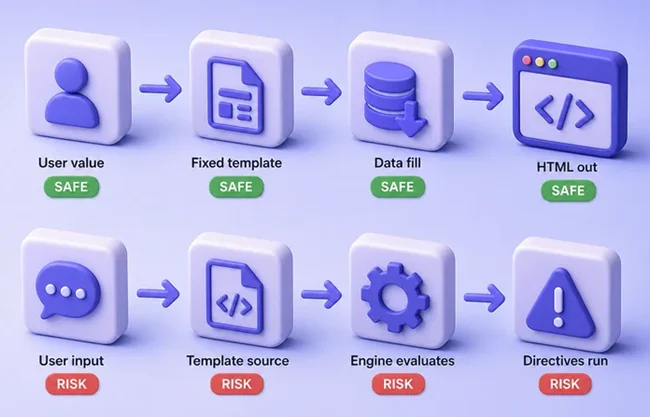
On our lab app the bad line is:
return render_template_string("Hello " + name)Whatever arrives in name is compiled as Jinja2 source. That is the SSTI.
SSTI vs XSS vs command injection
| Class | Who interprets the input | Typical proof | Primary fix direction |
|---|---|---|---|
| XSS | Browser / client script engine | Markup or event handler runs in the page | Context-aware output encoding / safe DOM APIs; CSP as defense-in-depth |
| SSTI | Server-side template engine | Arithmetic or directives evaluate in the response | Do not build templates from user input |
| OS command injection | Shell / OS command processor | Extra OS command runs | Do not shell out on concatenated strings |
Quick checks:
- Browser runs script → think XSS (XSS attack tutorial)
- Server turns
7*7into49in the HTML → think SSTI - OS runs an extra shell command → think command injection
Start the SSTI lab
Create a lab directory (authorized local use only):
mkdir -p ~/ssti-labmkdir prints nothing when the folder is created or already exists. Save ~/ssti-lab/app.py with this route:
from flask import Flask, request, render_template_string

app = Flask(__name__)

@app.get("/")
def index():
    name = request.args.get("name", "guest")
    # Intentionally vulnerable: user input becomes template source
    return render_template_string("Hello " + name)

if __name__ == "__main__":
app.run(host="127.0.0.1", port=5055, debug=False)Confirm Flask is importable:
python3 -c 'from importlib.metadata import version; print(version("flask"))'3.1.3A version line means Flask is installed and ready. If import fails, install Flask with your distro package or a venv, then start the app in its own Terminal:
python3 ~/ssti-lab/app.pyLeave that process running. You should see Flask listening on http://127.0.0.1:5055. Open a second Terminal for probes.
Shell tip: prefer --data-urlencode for probes with {{…}} so the shell does not expand braces.
Detect template evaluation
A safe SSTI detection payload should prove template evaluation without reading files or running OS commands. Send a normal name first:
curl -s 'http://127.0.0.1:5055/?name=Alice'Hello AlicePlain text came back unchanged. That is the baseline.
Now try a benign Jinja2 expression:
curl -s -G --data-urlencode 'name={{7*7}}' 'http://127.0.0.1:5055/'Hello 49What this shows:
- The server evaluated
{{7*7}} 49in the body is the SSTI signal- You did not need a browser alert dialog
In the browser, open the same URL and confirm Hello 49.
Engines use different syntax (Jinja2, Twig, Freemarker, Thymeleaf, and others). Start with a small arithmetic probe, then adjust from errors. Do not spray every public payload list at a live client.
Identify the template engine
Work methodically:
- Try a few syntax families (
{{…}},${…},#{…}, and similar) - Read lab error messages when they appear
- Treat framework clues as a guess, then confirm with responses
Framework clues (not proof):
- Flask often uses Jinja2
- Symfony often uses Twig
- Spring apps may use Thymeleaf
Do not identify an engine from {{7*7}} alone. Several engines can evaluate that. Fingerprint with multiple expressions and errors.
On this Jinja2 lab, ${7*7} should stay literal:
curl -s 'http://127.0.0.1:5055/?name=${7*7}'Hello ${7*7}Nothing was evaluated. That syntax is not Jinja expression syntax here.
Next, try string multiplication. On Jinja2, {{7*'7'}} often becomes seven sevens. Twig can answer differently to the same expression:
curl -s -G --data-urlencode "name={{7*'7'}}" 'http://127.0.0.1:5055/'Hello 7777777What this shows:
- Jinja2-style evaluation on this lab
- One probe is not enough to name the engine forever
- Record several probe results together before you escalate
Understand template context
Where your input lands changes which probe works.
Plaintext / template-body context (this lab):
- Template looks like
Hello USER_INPUT - Lab code:
"Hello " + name {{7*7}}becomes new template syntax →49is a strong signal
Code / expression context:
- Template looks like
Hello {{ USER_INPUT }} - You are already inside an expression
- Another
{{7*7}}may break the template or do nothing useful - You often need to close or escape the current expression first
If a naked {{7*7}} fails, ask whether you are already inside an expression, attribute, or sandbox, not only whether "SSTI is absent."
Impact
Impact depends on engine, sandbox, and context:
- Data exposure from objects the template can already reach
- Object graph access in some configurations
- File or OS access in some engines and configs
- Server-side code execution when the engine exposes dangerous call paths
Severity can range from limited template tricks or data disclosure to server compromise. Confirmed evaluation is already a finding. Do not treat every SSTI as RCE. Escalate only when authorized and when the engine allows it.
Test with Burp Repeater
Proxy the lab with Burp Suite, open http://127.0.0.1:5055/?name=test, send the request to Repeater, and change name through:
- A unique marker (
ssti-marker-1) {{7*7}}- An alternate syntax family that should stay literal on Jinja2
Compare response bodies. Confirmed evaluation shows the computed value without a browser script dialog.
Prevention
Primary fix: do not construct templates from user input.
- Keep template source in files or trusted code
- Pass user values as data into a fixed template
- Sandboxing limits what templates can reach; it is not a substitute for trusted template source
- Autoescaping helps against some XSS in generated HTML; it does not stop SSTI when input is compiled as template syntax
Use a sandbox only when user-authored templates are a real product need, and keep that path narrow.
Summary
SSTI is untrusted input compiled as template code on the server. On the Flask/Jinja2 lab, Alice stays text, {{7*7}} becomes 49, and {{7*'7'}} helps fingerprint Jinja2 when compared with other probes. That is not XSS and not OS command injection.
Impact ranges from confirmed evaluation to deeper object or OS access. Prevention is fixed templates plus data parameters, not brace deny-lists or autoescape alone. For shell-backed features, use the OS command injection lesson instead.
References
- PortSwigger Web Security Academy (Server-side template injection): https://portswigger.net/web-security/server-side-template-injection
- OWASP Server Side Template Injection: https://owasp.org/www-project-web-security-testing-guide/latest/4-Web_Application_Security_Testing/07-Input_Validation_Testing/18-Testing_for_Server-side_Template_Injection
- Jinja documentation: https://jinja.palletsprojects.com/
- Flask documentation: https://flask.palletsprojects.com/
Frequently Asked Questions
What does {{7*7}} mean when testing SSTI?
It is a benign detection payload. If the response contains 49 where the expression was, the server-side template engine likely evaluated the input as template code. Confirm the engine with additional probes before you assume Jinja2 or Twig.
Is SSTI the same as XSS?
No. XSS runs in the browser. SSTI is evaluated by the template engine on the server while building the response.
Does every SSTI mean remote code execution?
No. Confirmed template evaluation is already a finding. Whether you reach OS commands depends on the engine, sandbox, and configuration.
Why use a local Flask app instead of DVWA?
DVWA focuses on other classic modules. A tiny intentional Jinja2 app keeps SSTI proofs reproducible without depending on a DVWA feature that is not there.
