
| Tested on | Pentest lab — Kali GNU/Linux Rolling 2026.2 at 192.168.56.120; Genymotion Android 10 (API 29) at 192.168.56.103:5555 for Dynamic AnalyzerProxmox lab — same MobSF Docker workflow when Genymotion or a rooted AVD is reachable from the Kali VM |
|---|---|
| Package | Docker image opensecurity/mobile-security-framework-mobsf:v4.5.2 |
| Lab environment | Pentest lab Genymotion Desktop lab Android Studio AVD lab |
| Privilege | sudo for Docker; browser, REST API, and adb as a normal user |
| Cert prep | CompTIA PenTest+ (application / mobile testing concepts) |
| Scope | Start MobSF 4.5.x with Docker, upload InsecureShop, read the static report, map leads to MASVS/MASTG, run Dynamic Analyzer on a rooted emulator, and validate one exported activity at runtime. Does not cover iOS deep-dives, full Frida courses, CI automation, or scanning apps you are not authorized to test. |
| Related guides | Frida Android tutorial |
MobSF can perform both static and dynamic Android application analysis. This tutorial runs MobSF v4.5.2 in Docker on Kali, scans the intentionally vulnerable InsecureShop APK, and then validates selected static findings on a rooted Genymotion device.
Treat MobSF findings as leads until you verify the affected code, reachability, and runtime behavior. For the Android runtime, finish either the free Android Studio AVD path (Google APIs image, API ≤ 30 for Dynamic Analyzer) or Genymotion on the physical host before the dynamic sections. This walkthrough was tested with Genymotion.
MobSF Android test environment
The tested setup uses the following network layout:
| Role | Where it runs | Address used in this article |
|---|---|---|
Kali (MobSF Docker, browser, adb client) |
VirtualBox guest | 192.168.56.120 |
| Genymotion Android (dynamic target) | Physical host (not inside Kali) | 192.168.56.103:5555 |
A practical workflow is:
- Finish a rooted emulator lab so Kali can see the device with
adb devicesasdevice. Use Genymotion Desktop lab (tested here) or a free Android Studio AVD with Google APIs at API ≤ 30 and no Play Store. - Start MobSF with Docker and a persistent data directory. Static analysis needs only the browser on Kali.
- Upload InsecureShop and triage overview, manifest, permissions, code, and certificate.
- Map one or two leads to MASVS / MASTG language.
- Restart MobSF with the analyzer identifier for your emulator (
host:portoremulator-5554), run Dynamic Analyzer, then validate one exported activity withadb. - Skim Frida and the scorecard only after you have at least one validated finding.
Static sections below work even if the emulator is powered off. Dynamic sections need a supported rooted runtime reachable from Kali (this lab used Genymotion at 192.168.56.103:5555).
What MobSF does
MobSF is an open-source web framework for mobile app security assessment. You upload an APK (or IPA), and it produces a scored report from automated checks.
What the static pass typically covers:
- Unpacks the APK and reads
AndroidManifest.xml - Reads the signing certificate
- Decompiles DEX into Java-like sources
- Flags weak patterns (debug builds, cleartext HTTP, risky WebViews, exported components, and similar)
With a supported rooted emulator or VM it can also install the app, proxy traffic on port 1337, and stage Frida for follow-up hooks.
Static vs dynamic analysis
| Mode | What MobSF looks at | Emulator needed? |
|---|---|---|
| Static | APK package, manifest, code, resources, certificate | No |
| Dynamic | Runtime behavior after install (proxy, logs, instrumentation) | Yes |
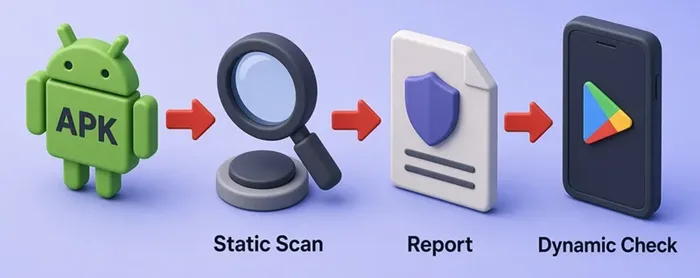
Static triage is enough to prioritize work. Dynamic analysis answers “does this fire on a device?” For CLI MASVS-oriented rules on the same APK without a GUI, use APKHunt.
Start MobSF with Docker
Pin the official image. On this lab I used v4.5.2. If Docker is missing on Kali (Debian-based), use install Docker on Debian first. Confirm Kali's host-only address is 192.168.56.120 before you rely on Genymotion later:
ip -4 addr show | grep '192.168.56'Sample output:
inet 192.168.56.120/24 brd 192.168.56.255 scope global noprefixroute eth1Pull the image:
docker pull opensecurity/mobile-security-framework-mobsf:v4.5.2Sample output:
v4.5.2: Pulling from opensecurity/mobile-security-framework-mobsf
Digest: sha256:af94f81f8b13872cdf556327fab58f52d446299fe153be6e1eeec177f31b503b
Status: Image is up to date for opensecurity/mobile-security-framework-mobsf:v4.5.2
docker.io/opensecurity/mobile-security-framework-mobsf:v4.5.2
Create a persistent MobSF data directory before the first container start. This keeps uploaded APKs, scan data, and the internal database when you restart the container for dynamic analysis later:
mkdir -p "${HOME}/mobsf-data"mkdir prints nothing on success. Give the MobSF container user ownership of that directory:
sudo chown -R 9901:9901 "${HOME}/mobsf-data"This command also exits silently when ownership changes cleanly. Start MobSF for static analysis first. Publish the UI (8000) and the dynamic proxy (1337) now so the same persistent setup can be reused for dynamic analysis later. MobSF also recommends --add-host=host.docker.internal:host-gateway for Linux Docker setups where the Android runtime or an ADB forward is exposed through the Docker host. In this lab, Genymotion itself is reached directly at 192.168.56.103:5555. For Docker container basics (pull, run, ps), skim that guide once if the commands are new:
docker run -d --name mobsf --add-host=host.docker.internal:host-gateway -p 8000:8000 -p 1337:1337 -v "${HOME}/mobsf-data:/home/mobsf/.MobSF" opensecurity/mobile-security-framework-mobsf:v4.5.2Docker prints a container ID when the container starts. Confirm both ports are mapped and the container is healthy:
docker ps --filter name=mobsf --format 'table {{.Names}}\t{{.Image}}\t{{.Status}}\t{{.Ports}}'Sample output:
NAMES     IMAGE                                                 STATUS                    PORTS
mobsf     opensecurity/mobile-security-framework-mobsf:v4.5.2   Up 16 minutes (healthy)   0.0.0.0:1337->1337/tcp, [::]:1337->1337/tcp, 0.0.0.0:8000->8000/tcp, [::]:8000->8000/tcp
You should see both 0.0.0.0:8000->8000/tcp and 0.0.0.0:1337->1337/tcp. Confirm the login page answers before you upload anything:
curl -s -o /dev/null -w '%{http_code}\n' http://127.0.0.1:8000/login/Sample output:
200Open http://127.0.0.1:8000/ from a browser on Kali and sign in with the default mobsf / mobsf (change these on shared hosts). Optional API upload is covered briefly later, so note the REST API key now:
docker logs mobsf 2>&1 | sed 's/\x1b\[[0-9;]*m//g' | grep 'REST API Key' | tail -1Sample output:
REST API Key: <your-container-key>When you reach Dynamic Analyzer later, you will restart this container with MOBSF_ANALYZER_IDENTIFIER pointed at Genymotion. You can complete the static analysis while Genymotion is offline; the emulator is required only when you reach Dynamic Analyzer.
Upload a deliberately vulnerable APK
Use a legal training APK. InsecureShop is intentionally vulnerable and suitable for an isolated lab.
Create a working directory:
mkdir -p "${HOME}/mobsf-lab"mkdir prints nothing on success. Download the release with curl and -fL:
curl -fL -o "${HOME}/mobsf-lab/insecureshop.apk" "https://github.com/optiv/InsecureShop/releases/download/v1.0/insecureshop.apk"Confirm the size (about 4–5 MB):
ls -lh "${HOME}/mobsf-lab/insecureshop.apk"Sample output:
-rw-r--r-- 1 kali kali 4.6M Sep 5 07:38 /home/kali/mobsf-lab/insecureshop.apkUpload in the browser
- Open
http://127.0.0.1:8000/and log in. - Click Upload & Analyze, or drag
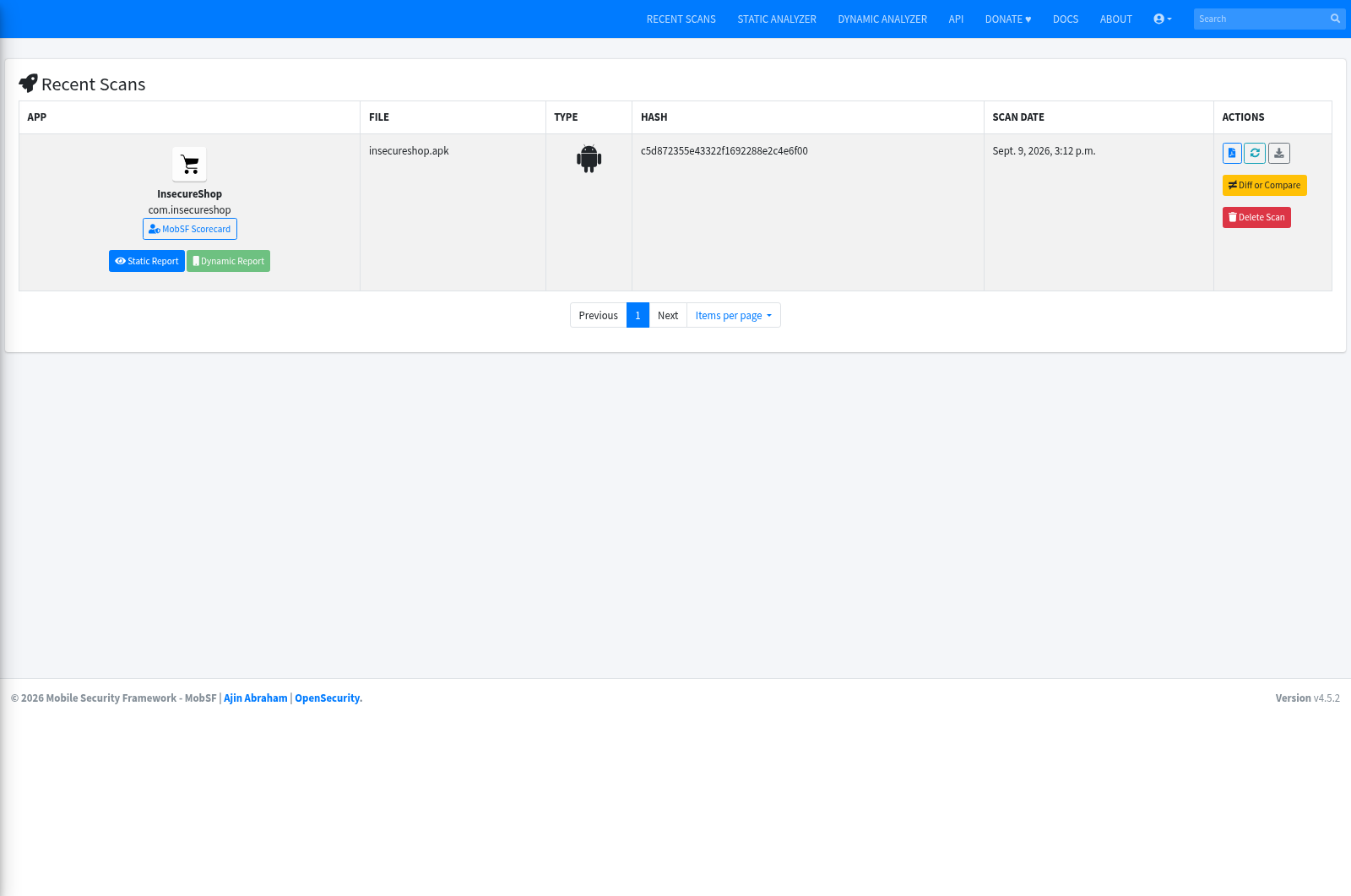
insecureshop.apkonto the page. - Wait for the scan to finish (first run can take several minutes).
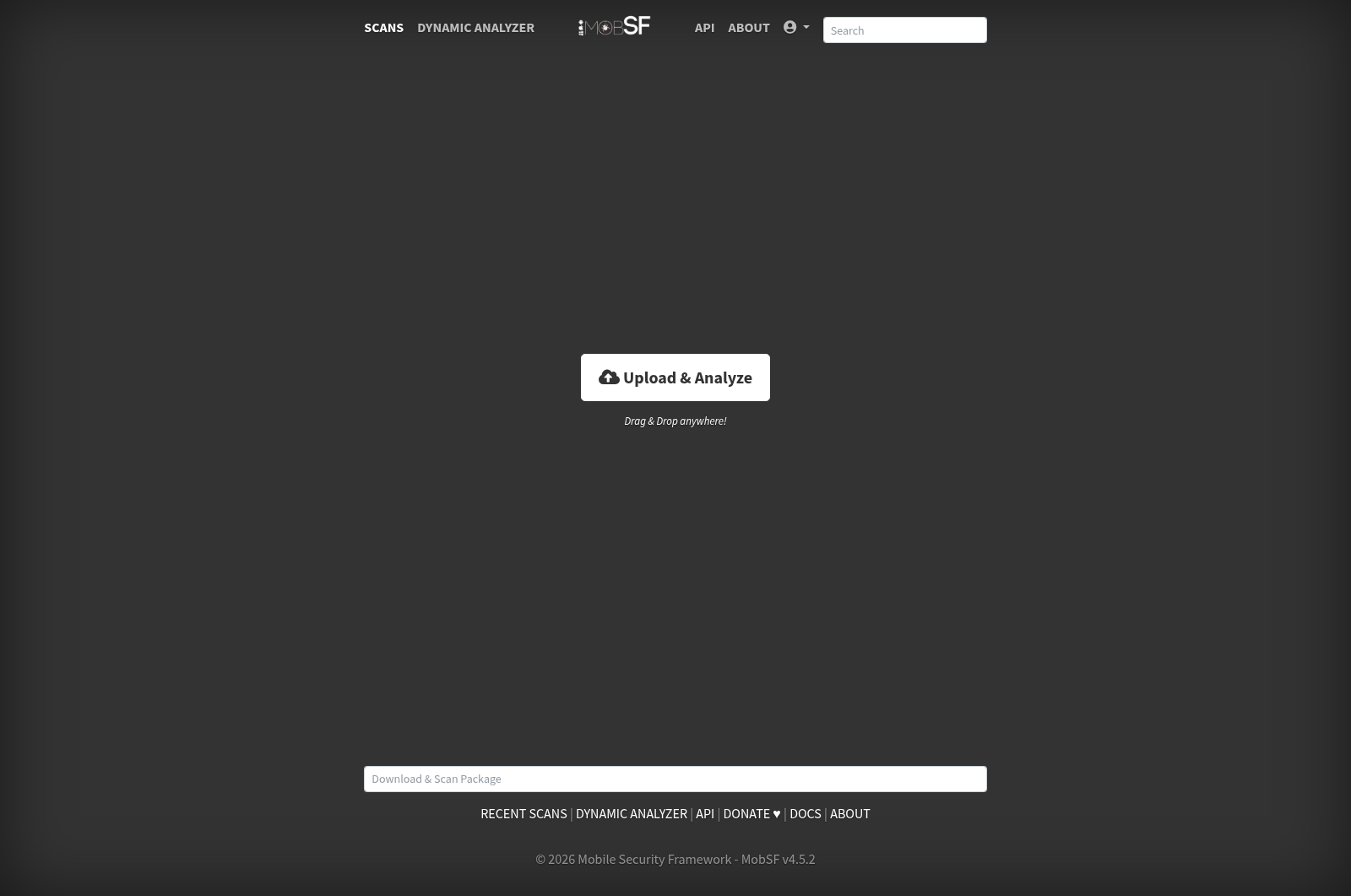
Open Recent Scans and click InsecureShop when the row appears.
Optional: upload via API
This is only a quick upload shortcut. Set MOBSF_API_KEY to the value from docker logs, then:
curl -s -F "file=@${HOME}/mobsf-lab/insecureshop.apk" http://127.0.0.1:8000/api/v1/upload -H "Authorization: ${MOBSF_API_KEY}"Sample output:
{
    "analyzer": "static_analyzer",
    "status": "success",
    "hash": "c5d872355e43322f1692288e2c4e6f00",
    "scan_type": "apk",
    "file_name": "insecureshop.apk"
}
"status": "success" means MobSF accepted the APK. Continue the scan in the web interface. For API automation, /api/v1/scan uses the values returned by the upload request, including hash, scan_type, and file_name.
Read the app overview
The top of the static report is inventory: name, hashes, exported counts, and the security score.
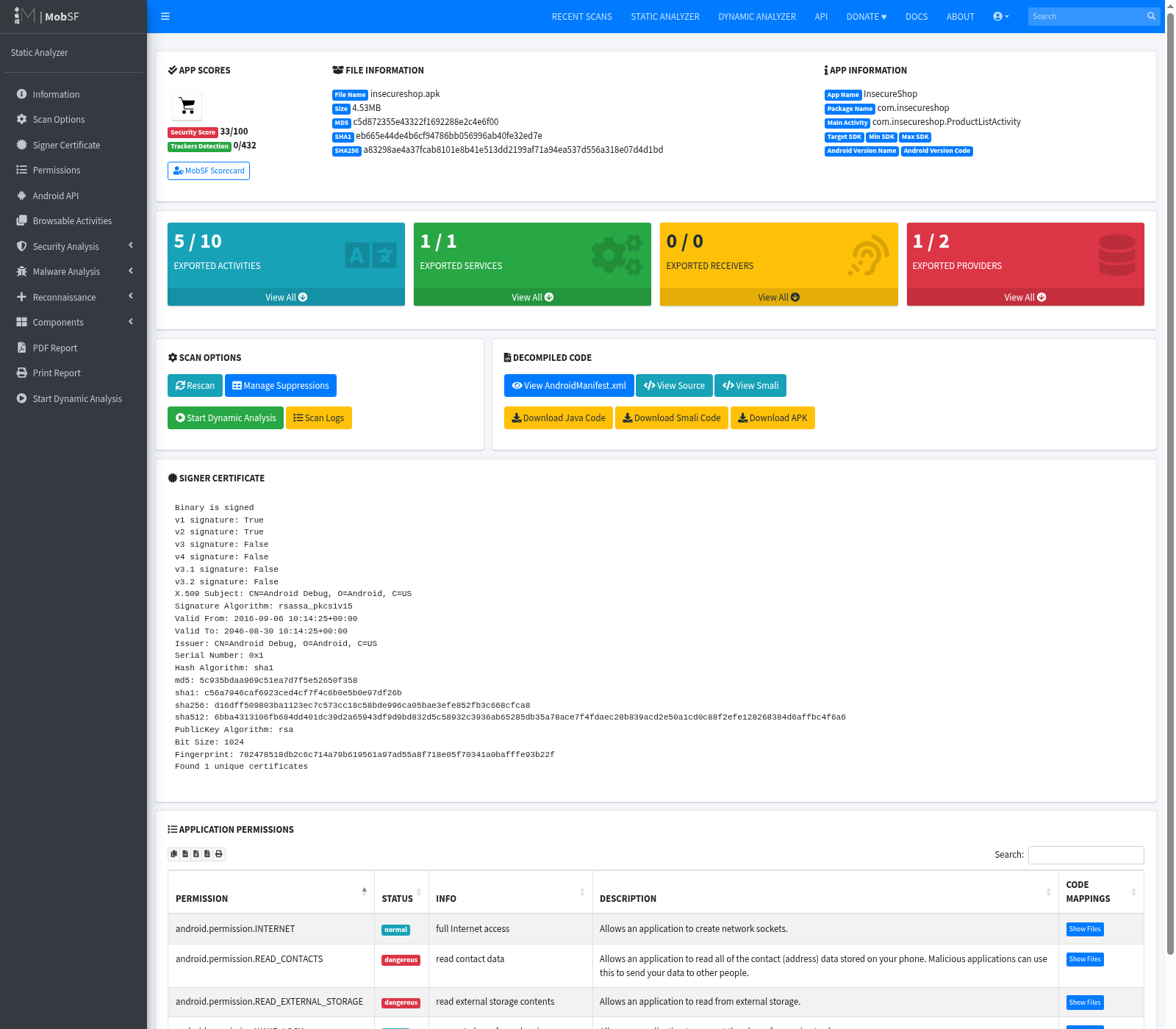
Lab snapshot from this scan:
| Field | Value |
|---|---|
| App / package | InsecureShop / com.insecureshop |
| Main activity | com.insecureshop.ProductListActivity |
| Size | 4.53MB |
| MD5 | c5d872355e43322f1692288e2c4e6f00 |
| SHA256 | a83298ae4a37fcab8101e8b41e513dd2199af71a94ea537d556a318e07d4d1bd |
| Security score | 33/100 |
| Exported activities | 5 listed (including AboutUsActivity and WebView activities) |
| Trackers detected | 0 |
Record the package name, hashes, exported component counts, and signing summary before you dive into individual findings. The security score is a prioritization hint. See Report interpretation below for how to use it.
Manifest and permission analysis
Permissions requested are not proof of abuse. Ask whether the permission is used, and whether that use exposes sensitive data on the target SDK. Permission severity must be interpreted against the app's target SDK and Android version.
Open Manifest Analysis and Permissions.
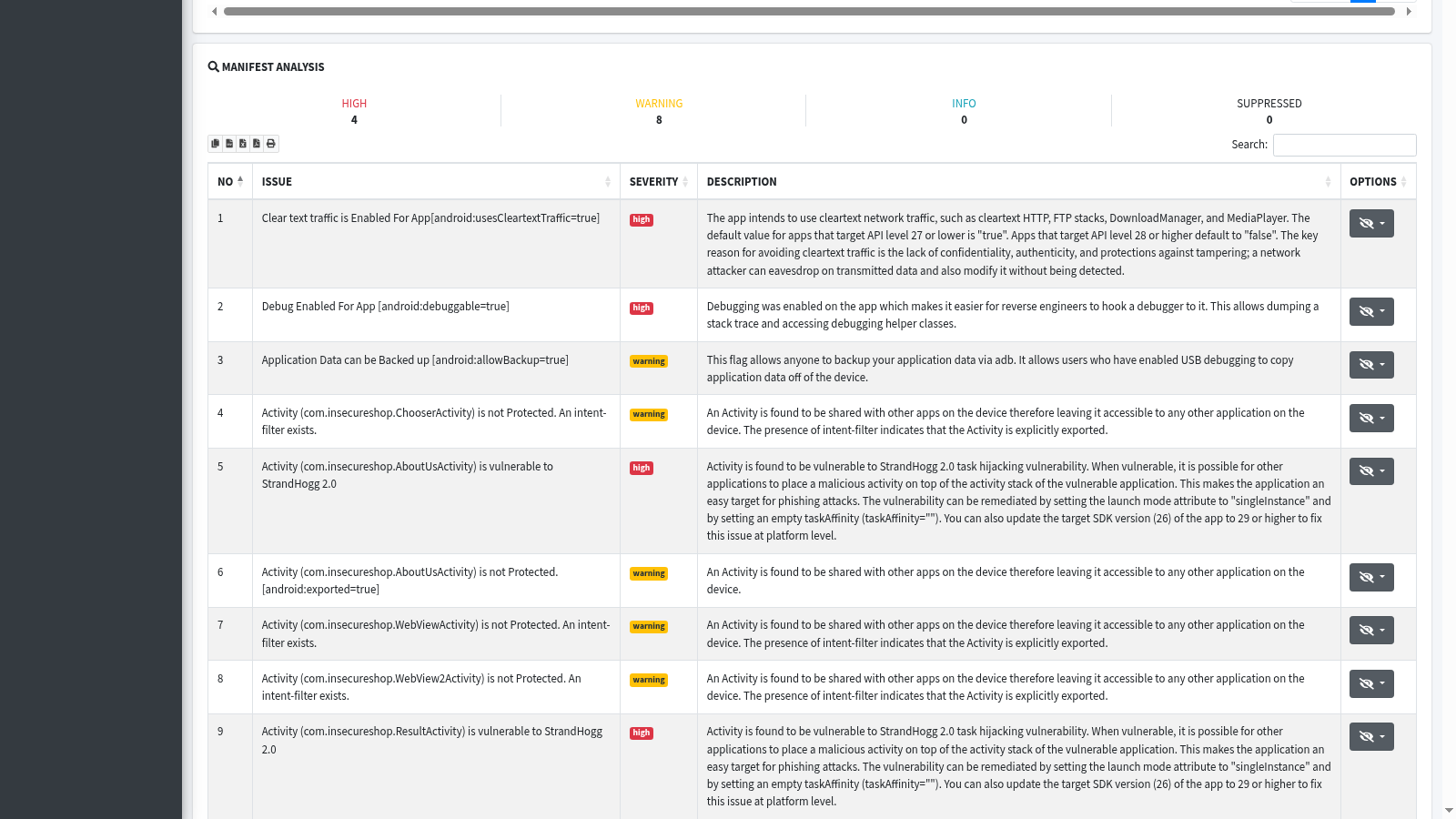
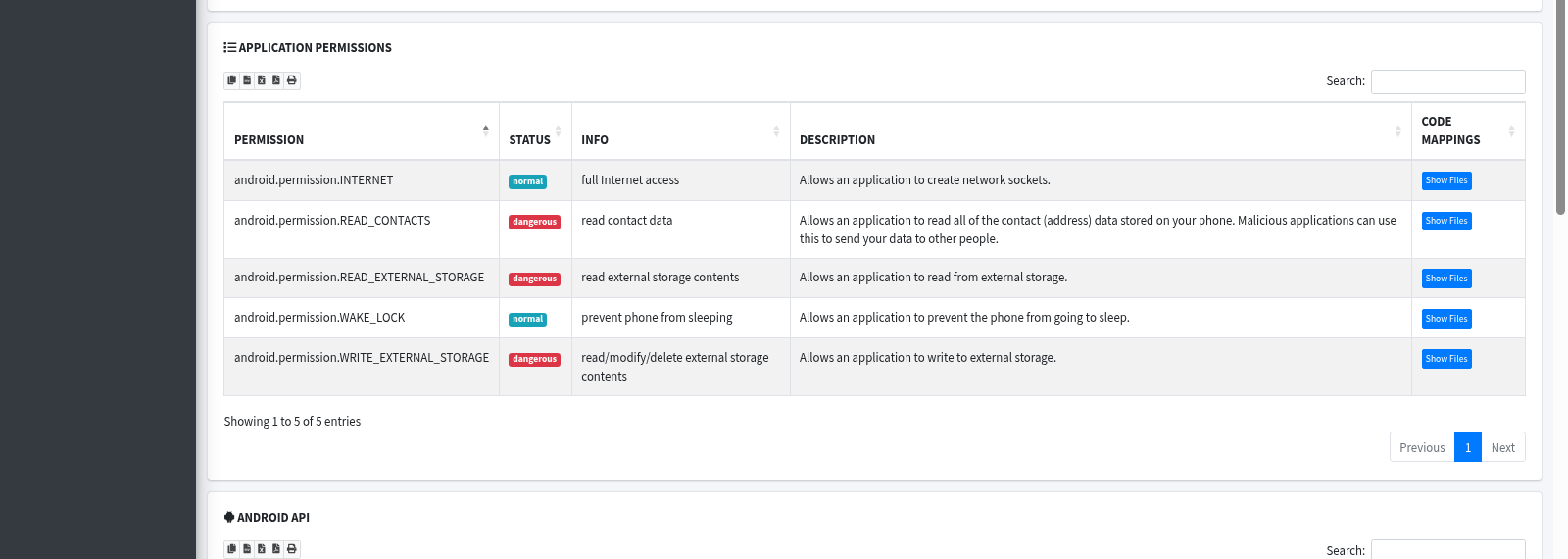
Focus areas on this InsecureShop scan:
android:usesCleartextTraffic=trueandroid:debuggable=true- Exported activities without a protecting permission (including
AboutUsActivity) - Network security / cleartext implications for HTTP stacks
- Dangerous permissions:
READ_EXTERNAL_STORAGE,WRITE_EXTERNAL_STORAGE,READ_CONTACTS
Dangerous means Android treats the capability as sensitive. It does not mean MobSF already proved misuse. Storage permissions matter especially on older target SDK training apps; scoped storage on newer targets changes what the same permission names allow.
If the manifest also defines android:networkSecurityConfig, inspect that XML before concluding that cleartext traffic is allowed. On Android 7.0 (API 24) and later, usesCleartextTraffic is ignored when the app defines a Network Security Configuration, so inspect that configuration before deciding whether cleartext traffic is effectively permitted.
Code, secret, and URL findings
Open Code Analysis. Expect high and warning rows mixed with library noise.
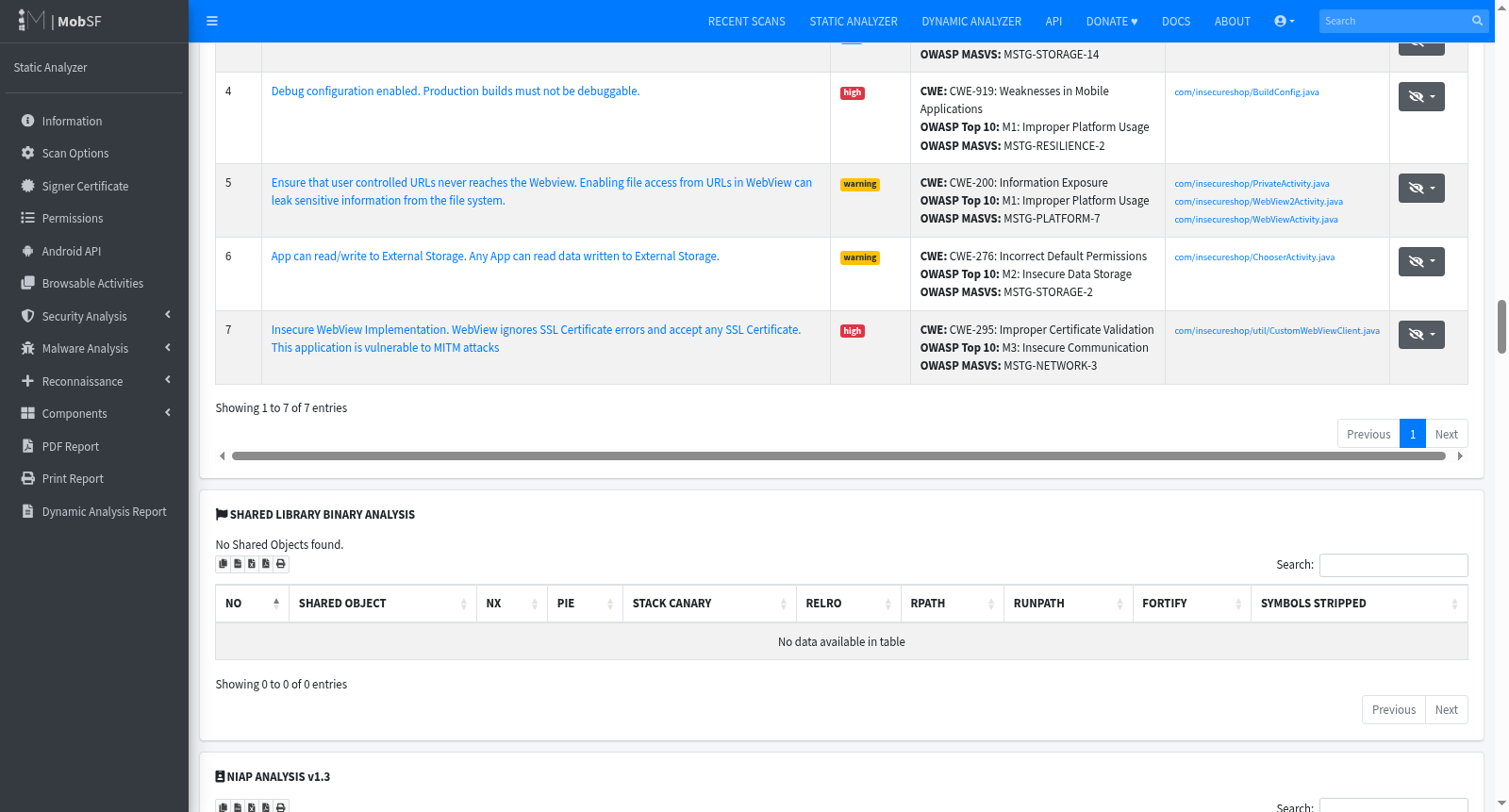
Three findings worth reviewing from this scan:
| Finding | Evidence on InsecureShop | False-positive risk |
|---|---|---|
| WebView certificate-validation flaw | CustomWebViewClient calls handler.proceed() on SSL errors |
Low once you open the file |
| Hardcoded “secret” strings | Cognito identity pool id / library strings | High (identifiers and third-party code often look secret) |
| URLs | https://www.insecureshopapp.com and similar in activities |
Medium (confirm sensitivity and whether the host is still relevant) |
MobSF labels the WebView issue as high severity with CWE-295. Open View Source for com/insecureshop/util/CustomWebViewClient.java:
public final class CustomWebViewClient extends WebViewClient {
    @Override
    public void onReceivedSslError(WebView view, SslErrorHandler handler, SslError error) {
        if (handler != null) {
            handler.proceed();
        }
    }
}
handler.proceed() continues the load after a certificate failure. That is a strong static confirmation for insecure endpoint identity checks. A Cognito identity pool ID is a cloud identifier, not a secret by itself. Review IAM roles before you call it a credential leak.
Certificate and signing analysis
Click Signer Certificate (or read the certificate block on the overview).
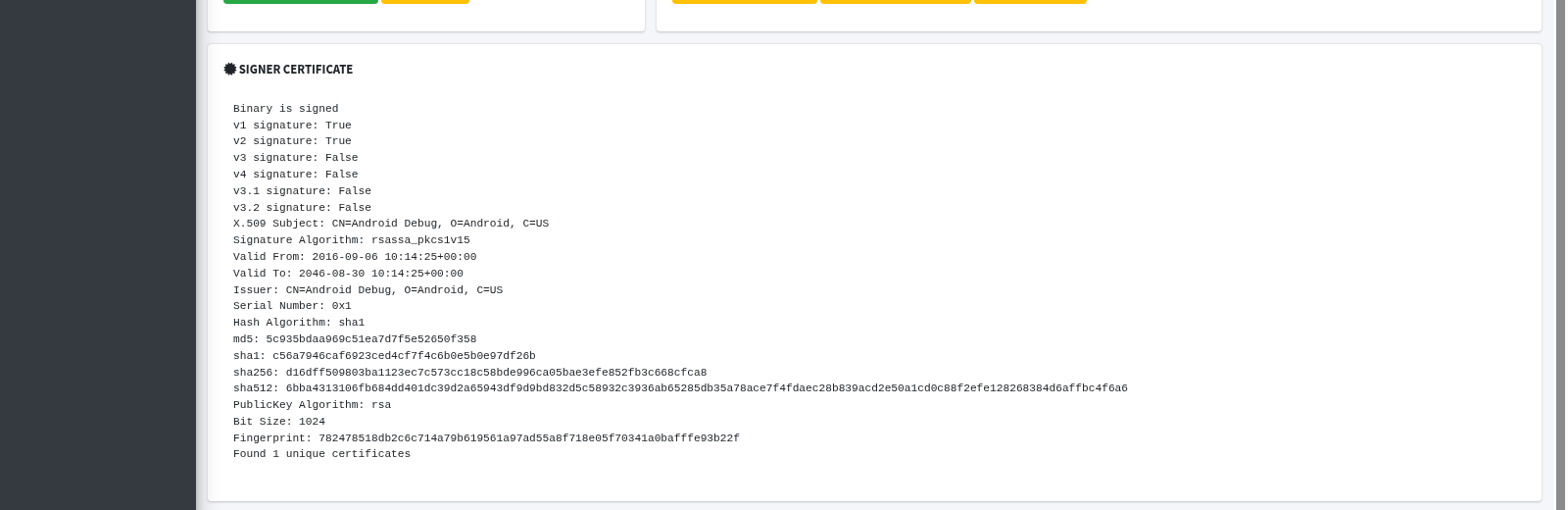
Lab certificate highlights:
- Subject / issuer:
CN=Android Debug, O=Android, C=US - v1 and v2 signatures present
- Hash algorithm shown as SHA-1 in the certificate panel (MobSF warns about collision risk)
A production APK should not ship with the standard Android debug certificate. Treat SHA-1 notes as signing hygiene in context of scheme and deployment. That note alone is not automatic proof of a practical signature bypass.
Map findings to OWASP MASVS / MASTG
Do not recreate the whole catalog. Map the leads you care about so the report uses current language.
| MobSF finding (lab) | Current OWASP area | Notes |
|---|---|---|
usesCleartextTraffic=true |
MASVS-NETWORK | Also inspect android:networkSecurityConfig before concluding effective cleartext policy |
handler.proceed() on SSL error |
MASVS-NETWORK | Code-confirmed above |
| Exported unprotected activity | MASVS-PLATFORM | Confirm whether sensitive behavior is externally reachable |
android:debuggable=true |
MASVS-RESILIENCE | Production builds should not expose debugging |
| Debug signing certificate | MASVS-RESILIENCE / release integrity context | Expected in a training APK; inappropriate for production distribution |
| Cognito identity pool ID | Storage / cloud config review | Identifier rather than a secret by itself |
MobSF may still show legacy MSTG-* identifiers inside finding text. Prefer current OWASP MASVS / MASTG categories when you write the client report.
Configure MobSF Dynamic Analyzer
Static analysis does not need an emulator. Dynamic analysis does. MobSF's current Android Dynamic Analyzer supports rooted Android runtimes through Android 11 / API 30. This does not limit static APK analysis of apps targeting newer Android versions.
Start the Genymotion device on the physical host (finish that lab first if adb still shows nothing). From Kali, set the tested Genymotion ADB endpoint and confirm it is reachable on the same host-only segment as 192.168.56.120:
export ANDROID_ADB=192.168.56.103:5555Connect and list devices. You want device, not offline or an empty list:
adb connect "${ANDROID_ADB}"Sample output:
connected to 192.168.56.103:5555List attached devices and confirm the state column is device:
adb devices -lSample output:
List of devices attached
192.168.56.103:5555    device product:vbox86p model:Phone device:vbox86p transport_id:1
Restart MobSF with that identifier so the container's Dynamic Analyzer can reach Genymotion. Remove the static-only container first, then start a replacement that keeps both ports and the same persistent data volume:
docker rm -f mobsfdocker rm -f prints the container name when it removes the old instance. Start the dynamic-ready container:
docker run -d --name mobsf --add-host=host.docker.internal:host-gateway -e MOBSF_ANALYZER_IDENTIFIER="${ANDROID_ADB}" -p 8000:8000 -p 1337:1337 -v "${HOME}/mobsf-data:/home/mobsf/.MobSF" opensecurity/mobile-security-framework-mobsf:v4.5.2Wait until http://127.0.0.1:8000/login/ returns 200 again, then sign in. Open Dynamic Analyzer -> Android Dynamic Analyzer. On this lab MobSF connected to Android 10 (API 29) at 192.168.56.103:5555, prepared ("MobSFy'd") the runtime by installing and configuring the components needed for dynamic analysis, including Frida support and the MobSF CA, installed InsecureShop, and marked the testing environment ready.
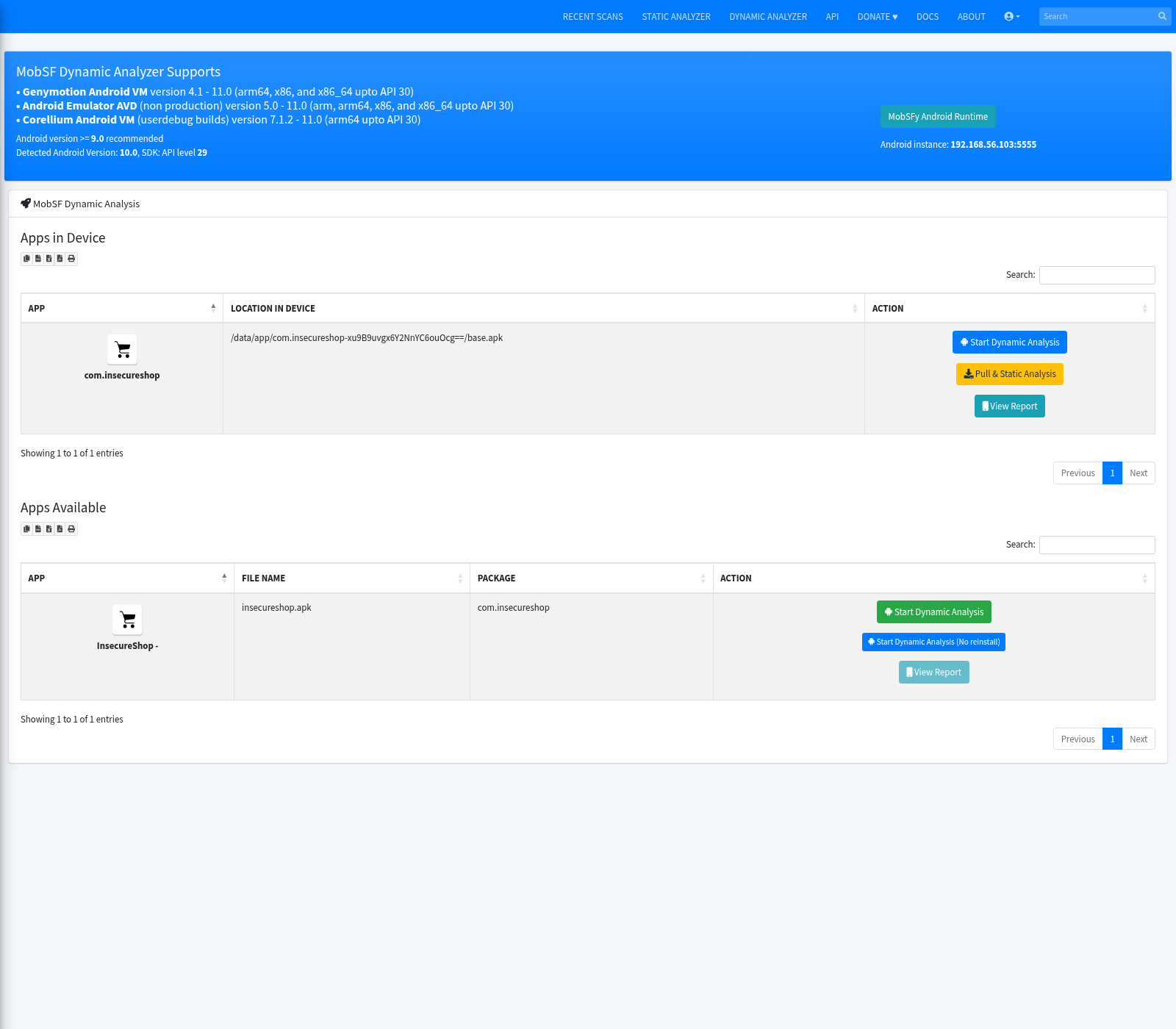
In the Apps Available (or Apps in Device) table, click Start Dynamic Analysis for InsecureShop. The first MobSFy run can take several minutes. When the session is up you get activities, exported activities, and deeplink metadata for the instrumented package.
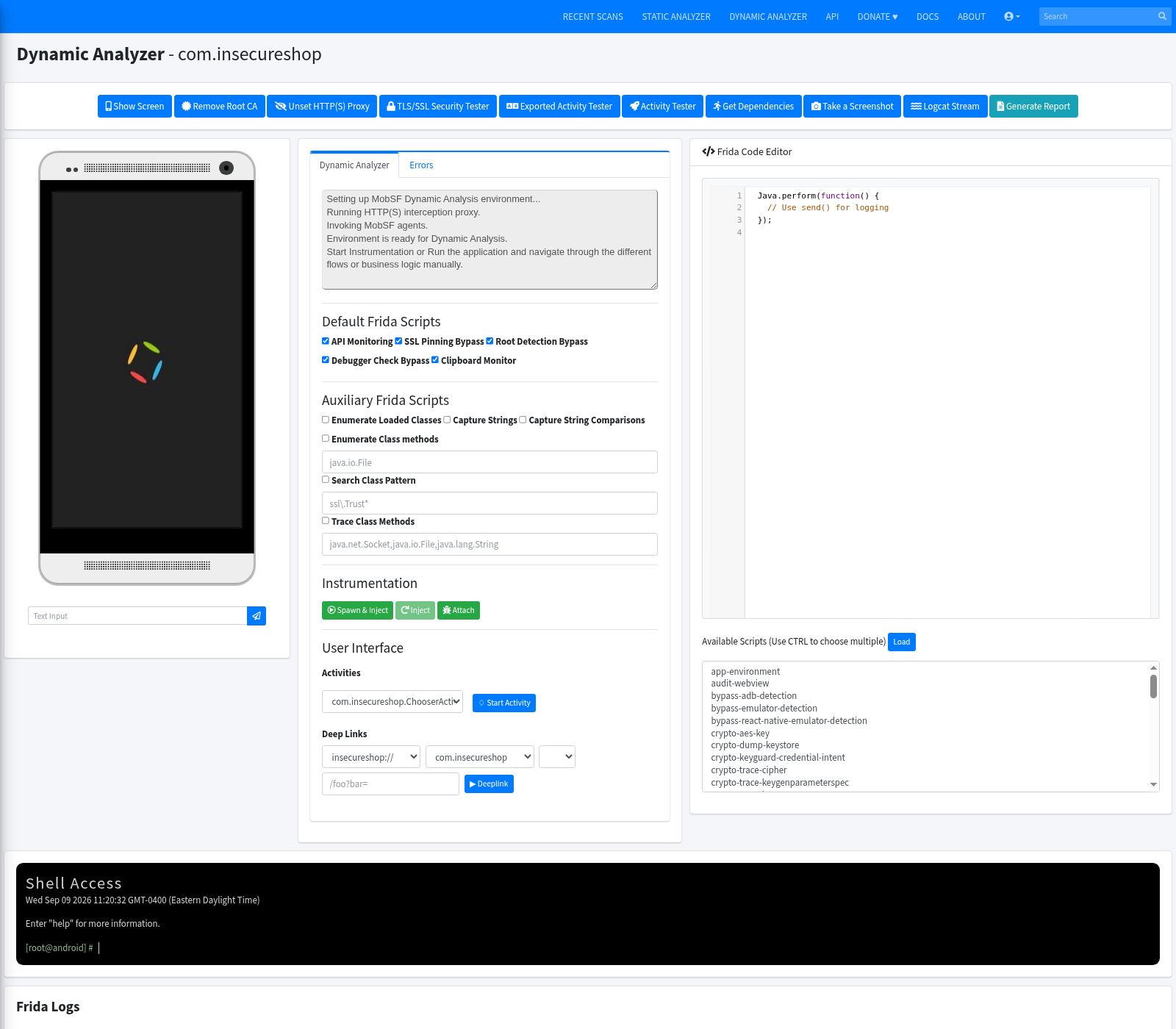
On supported Genymotion Android versions, MobSF applies the global proxy during dynamic setup, so you normally do not need to configure the device proxy manually.
What to record while the session runs:
- Logcat / MobSF live logs while you click through the app
- HTTP(S) traffic through the proxy on port
1337 - Exported-activity launch attempts (next section)
- Whether WebView paths behave as the static finding predicted
When you finish, stop the session from the UI (or POST /api/v1/dynamic/stop_analysis) so the device proxy settings do not stay pointed at MobSF.
Run dynamic analysis on Genymotion
Once the runtime is prepared and InsecureShop is available, spend a few minutes in the app while MobSF collects runtime context. Open the app from Dynamic Analyzer, click through screens that use WebViews or deeplinks, and watch what changes in the MobSF session view.
Useful runtime checks in this phase:
- Review live logs and app activity changes
- Confirm whether traffic appears through the proxy on port
1337 - Note which exported activities are exposed in the dynamic view
- Decide which static lead is worth validating next
This phase tells you whether the APK's attack surface is only theoretical or is easy to exercise on a device.
Validate exported activity reachability
Static claim: AboutUsActivity is exported without a protecting permission. That is attack surface under MASVS-PLATFORM.
Manifest evidence:
<activity android:exported="true" android:name="com.insecureshop.AboutUsActivity"/>Runtime check from the host (same Genymotion adb endpoint). Launch the activity by component name:
adb -s "${ANDROID_ADB}" shell am start -n com.insecureshop/.AboutUsActivitySample output:
Starting: Intent { cmp=com.insecureshop/.AboutUsActivity }Confirm it became the resumed activity:
adb -s "${ANDROID_ADB}" shell dumpsys activity activities | grep -E 'mResumedActivity|AboutUsActivity' | head -10Sample output (trimmed):
intent={flg=0x10000000 cmp=com.insecureshop/.AboutUsActivity}
mActivityComponent=com.insecureshop/.AboutUsActivity
Activities=[ActivityRecord{... com.insecureshop/.AboutUsActivity ...}]
On the device the About screen opens without needing the normal in-app navigation path.
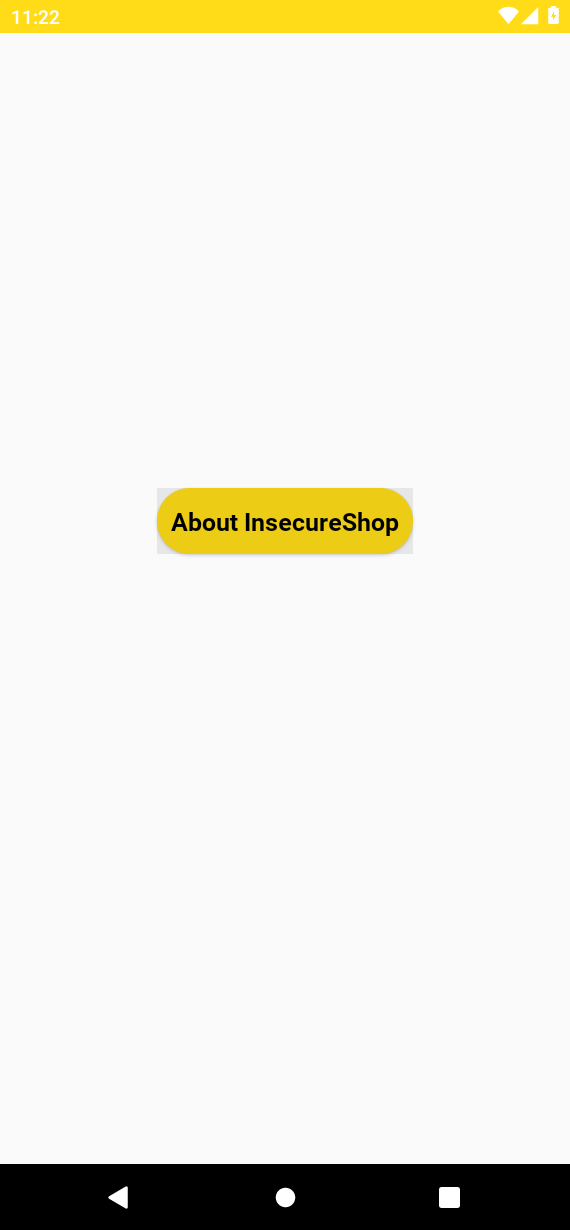
This confirms that the activity is externally reachable. Whether that becomes a reportable vulnerability depends on whether the activity exposes sensitive data or functionality.
Conclusion for this lab:
- Static: exported and unprotected in the manifest (confirmed)
- Dynamic: any app or
adbsession that can send the intent can open the activity (confirmed on Genymotion) - Report language: attack-surface / IPC finding; severity depends on what the activity exposes. Here it is a simple About UI, which demonstrates unprotected reachability rather than meaningful security impact by itself
The WebView certificate-validation flaw stays code-confirmed. Full MITM proof against that WebView path is a separate proxy exercise once traffic is flowing through port 1337.
Frida integration
During MobSFy, MobSF installs a matching frida-server on the Android runtime (this lab pulled Frida server v17.17.0 for x86). MobSF uses Frida for runtime instrumentation, but the static analysis and exported-activity validation above do not require you to write Frida scripts.
Practical rules:
- Match the Frida client on Kali with the
frida-serverversion on the device - Use Frida after the Dynamic Analyzer environment is already MobSFy’d
- Keep hooks in scope of your RoE
Static triage and the exported-activity check above do not require Frida.
Report interpretation
Open MobSF Scorecard from the overview when you are ready to summarize the scan.
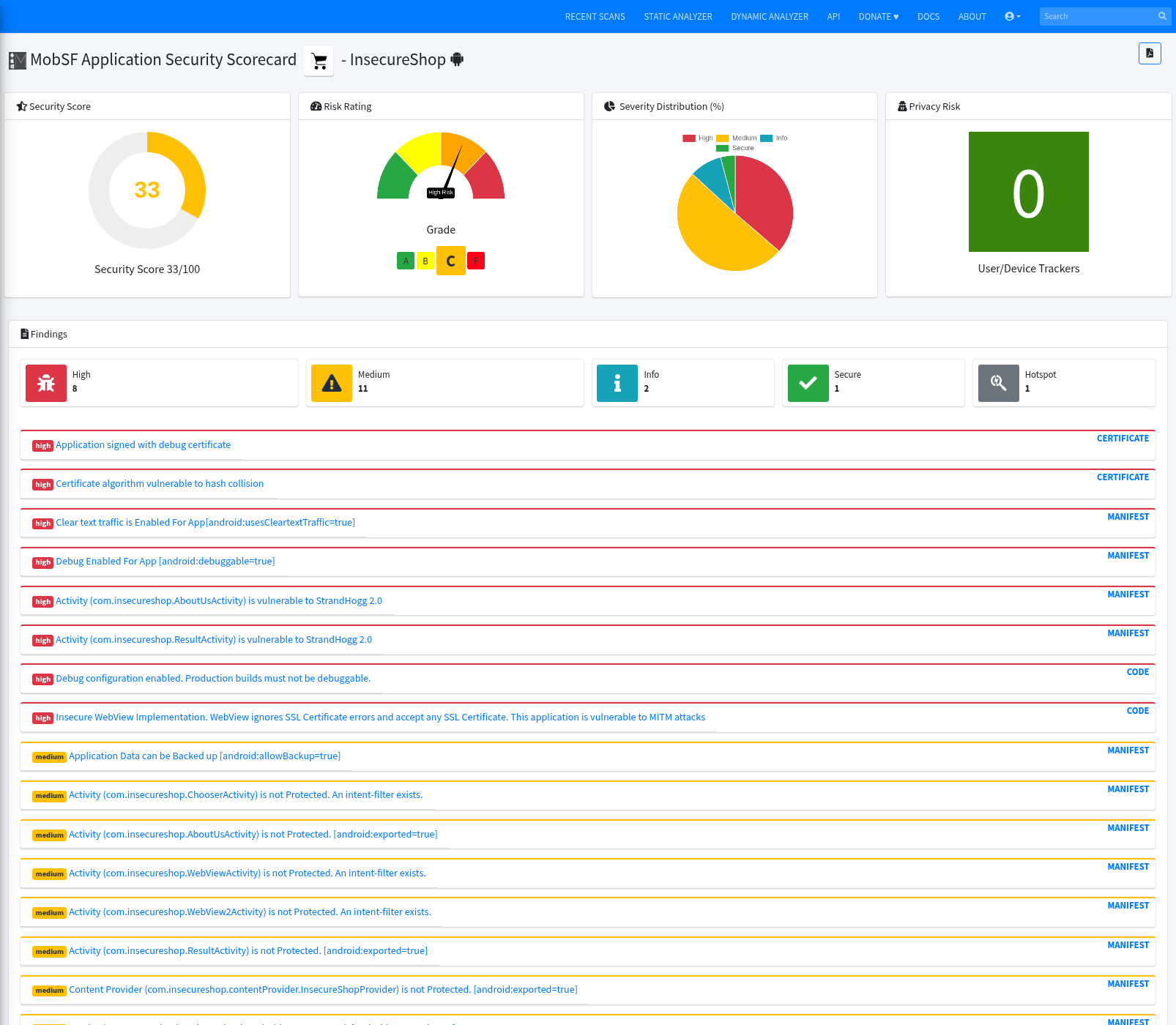
| Bucket | Count (this lab) |
|---|---|
| Security score | 33/100 |
| High | 8 |
| Warning | 11 |
| Info | 2 |
| Secure | 1 |
| Hotspot | 1 |
| Trackers detected | 0 |
How to read it:
- Score and severity buckets rank work
- They are not a pass/fail pentest grade
- Export PDF for stakeholders, but keep your own validated list (WebView SSL in code;
AboutUsActivityexport proven on Genymotion)
Troubleshooting
| Symptom | Likely cause | Fix |
|---|---|---|
| Scan timeout / hang | First run or low resources | docker logs -f mobsf; wait; rescan |
| APK malformed / upload fails | Truncated download | Re-run curl -fL; check ls -lh ~4.6M |
| Android Runtime not found | No emulator or wrong identifier | Set MOBSF_ANALYZER_IDENTIFIER to a reachable host:port; confirm adb devices shows device |
| Dynamic Analyzer cannot launch | API > 30, Play image, or adb bridge | Rooted API ≤ 30; Genymotion/AVD without Play Store; republish ports 8000 and 1337 |
| Frida mismatch | Client vs frida-server versions differ |
Align versions; re-MobSFy if needed |
| Proxy / network problems | Port 1337 not published or device proxy stuck |
Re-run with -p 1337:1337; stop dynamic analysis when finished |
| Packed / obfuscated app | Limited decompilation | Expect thinner code findings; rely on manifest, cert, and dynamic behavior |
unhealthy in docker ps |
host.docker.internal missing on Linux |
Add --add-host=host.docker.internal:host-gateway; confirm UI with curl |
| Static report disappears after restart | Container was recreated without persistent storage | Re-run MobSF with -v "${HOME}/mobsf-data:/home/mobsf/.MobSF" for both static and dynamic starts |
Summary
MobSF 4.5.x in Docker gives a reproducible Android triage lab on Kali when you keep scan data in a persistent volume. On InsecureShop the static score landed at 33/100. The WebView certificate-validation flaw is visible in decompiled code, and AboutUsActivity is an exported, unprotected entry that opens from adb on Genymotion once Dynamic Analyzer has prepared the device.
Do not treat the overall score as the pentest verdict. Permissions and high findings are starting points. Validate what matters, map those leads to MASVS/MASTG language, and keep Frida for instrumentation after the runtime is ready.
Next steps that fit this lab: finish a proxy session through port 1337 against the WebView path, or compare the same APK with APKHunt for CLI MASVS-oriented output.
References
- Mobile Security Framework (MobSF) GitHub
- MobSF documentation — Docker
- MobSF documentation — Docker options
- MobSF documentation — Dynamic Analyzer with Docker
- OWASP MASVS
- OWASP MASTG
- InsecureShop (Optiv)
Frequently Asked Questions
Does MobSF automatically find real vulnerabilities?
No. It finds patterns and attack-surface indicators. Validate the code path, configuration, reachability, and runtime behavior before you report a vulnerability.
Can MobSF analyze an APK without source code?
Yes. You upload the APK package. MobSF unpacks it, reads the manifest and certificate, and decompiles bytecode for static rules. You do not need the original project source.
What does the MobSF security score mean?
It is a weighted summary of automated checks. A low score means triage those findings first. It is not a pass or fail pentest grade by itself.
Why does MobSF report so many false positives?
Rules match patterns. Third-party libraries and ordinary strings can hit. Open the linked file and decide if the issue is real.
Why is the Dynamic Analyzer not working?
MobSF needs a supported rooted Android emulator or VM (API 30 or lower) and the correct analyzer identifier for Docker. Confirm adb devices shows device, then set MOBSF_ANALYZER_IDENTIFIER to that host:port and restart the container.
Do I need Frida to use MobSF?
No. Static triage works without Frida. MobSF can install frida-server during MobSFy for later hooks; you only need Frida when you instrument the prepared runtime.
