
| Cert prep | CompTIA PenTest+ PT0-003 — social engineering concepts and attack types |
|---|---|
| Scope | Defines social engineering, organizes attack types by channel, targeting, technique, and objective, explains recognition signals and defenses, and routes controlled campaign work to tool-specific guides. Does not teach login cloning, payload delivery, or unauthorized testing. |
| Related guides | Penetration testing rules of engagement |
Social engineering attacks manipulate human trust and routine to make someone disclose information, run something harmful, or grant access they would normally deny. The label covers a wide surface — email, SMS, voice calls, social platforms, and physical presence — but most ranking pages treat every name as if it were the same kind of category.
This guide separates what changes between attacks: how contact happens, who is targeted, what story or trick is used, and what the attacker wants at the end. That taxonomy makes it easier to recognize an attempt and pick the right control than memorizing a flat list of twenty attack names.
What social engineering actually means
Social engineering is the abuse of normal human behavior — helpfulness, urgency, authority bias, fear of breaking procedure — to obtain an action or disclosure. The attacker does not need to exploit a software bug first. They need a believable reason for you to cooperate.
A successful attempt usually chains several small steps:
- Establish or borrow trust (brand, coworker, vendor, law enforcement)
- Create pressure or a plausible task (invoice due today, account locked, visitor at the door)
- Request the action (click, call back, share a code, hold the door)
- Convert that cooperation into value (credentials, data, malware execution, physical entry)
That is different from calling it "psychological hacking." The psychology matters, but defenders and testers describe outcomes in plain terms: who was contacted, through what channel, with what pretext, and what changed afterward.
Social engineering attack taxonomy
Most glossaries mix four ideas as if they were interchangeable:
| Dimension | What it describes | Examples |
|---|---|---|
| Channel | How the attacker reaches the target | Email, SMS, voice, physical presence, web or social platform |
| Targeting | How selective the audience is | Broad phishing, spear phishing, whaling |
| Technique | The story or method used | Impersonation, pretexting, baiting, watering hole, tailgating |
| Objective | What the attacker wants | Credentials, information disclosure, user execution, physical access |
One email phish can be broad (targeting) over email (channel) using a fake IT help desk (technique) to harvest passwords (objective). Tailgating is physical (channel) with impersonation (technique) to reach a restricted area (objective). Keeping the dimensions separate stops you from treating "vishing" and "credential harvesting" as the same kind of thing — one is delivery, the other is goal.
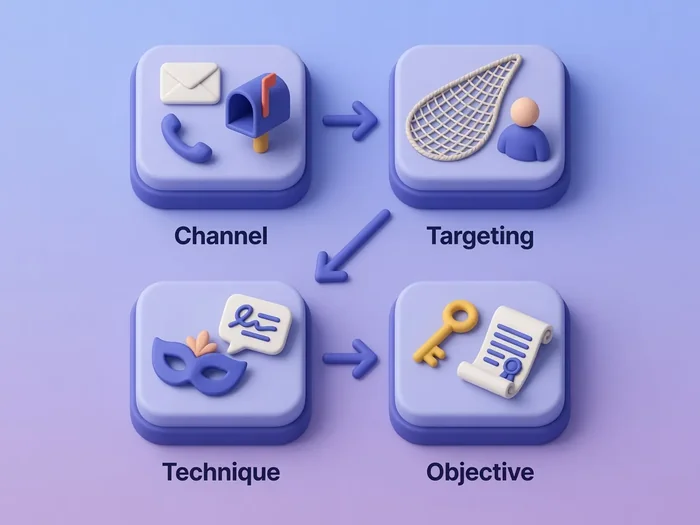
When you read an incident report or exam question, map each term to one column first. If a control only addresses email, it may do nothing for SMS or a visitor at the loading dock.
Phishing, spear phishing, whaling, and BEC
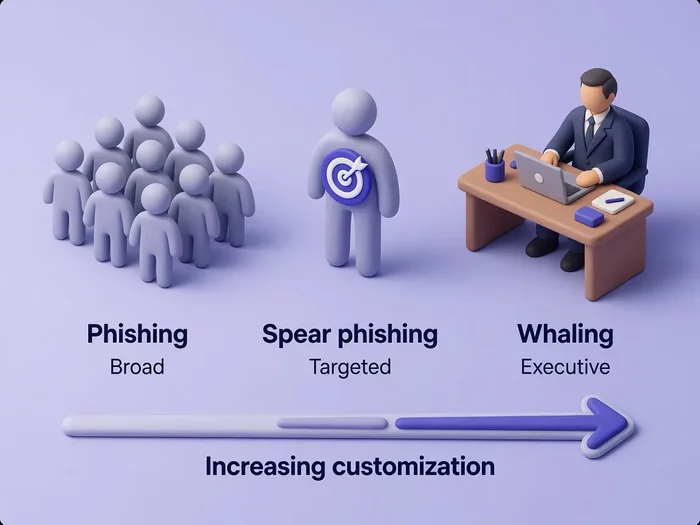
Phishing family attacks use electronic messages that mimic a trusted sender. The difference is audience size and how much customization the attacker invests.
| Type | Audience | Customization | Typical goal |
|---|---|---|---|
| Phishing | Large, untargeted lists | Generic template | Clicks, malware, or credential capture at scale |
| Spear phishing | Named individuals or roles | Research on person, project, or vendor | Higher click or reply rate on a believable lure |
| Whaling | Senior executives or high-value approvers | Deep org context, wire-fraud or legal tone | Fraudulent transfers, sensitive files, or account takeover |
Phishing casts a wide net: "Your mailbox is full — reset now." Spear phishing names you, your manager, or a real project: "Updated NDA for the Acme deal — review attached." Whaling targets the CFO, general counsel, or CEO with language that matches how those roles actually approve money or data.
Modern variants still fit the same targeting column:
- Angler phishing uses social platforms or fake support replies to hijack a customer complaint thread
- Clone phishing resends a real message with a swapped link or attachment
- Business Email Compromise (BEC) uses a compromised or impersonated business identity to request payments, invoice changes, payroll updates, or sensitive data. CEO fraud is one common BEC scenario.
Targeted lures often start with reconnaissance from public sources — company websites, professional profiles, job postings, vendor relationships, and social media. That context makes spear phishing and whaling sound legitimate. See OSINT tools for pentesters for how authorized testers map that surface.
Smishing and vishing
Smishing is phishing over SMS or chat apps. Vishing is voice phishing: live calls or convincing voicemail callbacks. Both exploit the same trust mechanics as email, but the channel changes what defenders should expect.
Common smishing patterns:
- Fake delivery or toll notices with a short link
- "Bank fraud" texts asking you to verify a transaction
- MFA fatigue paired with a follow-up text ("Did you just approve a login? Reply NO")
Common vishing patterns:
- Caller claims to be IT support and asks for a one-time code
- "Executive assistant" requests an urgent wire transfer after a brief rapport call
- Callback scams that leave a number matching a spoofed caller ID
- Attackers impersonate IT or the help desk after triggering an MFA prompt, then pressure the user to approve it or reveal a verification code
| Channel | Strength for attacker | What defenders watch |
|---|---|---|
| Smishing | High open rates; short URLs hide destination | Unexpected texts, odd sender IDs, links to non-corporate domains |
| Vishing | Real-time pressure; harder to forward to security | Unsolicited callbacks, requests for OTPs or passwords, refusal to use official ticket queues |
Neither channel is "more advanced" than email — they are different inboxes with different filtering tools. Train users to hang up and call back on a published number, and treat unexpected MFA prompts as incidents even when the voice or text sounds local.
Impersonation, pretexting, baiting, and quid pro quo
These techniques overlap in conversation but answer different questions.
Impersonation is pretending to be a specific trusted identity or role: employee, vendor technician, auditor, police officer, or known executive. The signal is who the attacker claims to be.
Pretexting is building a believable scenario that explains why the contact is happening now: payroll audit, merger confidentiality, broken badge reader, emergency maintenance window. A strong pretext matches how your organization actually works.
Baiting offers something tempting so the victim takes an action — curiosity, perceived value, or urgency:
- Infected USB drive left in a parking lot or office
- Fake "free software" download or media file
- Document or gift presented as desirable but carrying malware
- A shared photo link backed by an IP logging service when testers have authorization — see track IP address using an image
Quid pro quo offers something in exchange for cooperation — free software, gift cards, "refund" processing — and often rides on impersonation plus pretext. Treat baiting and quid pro quo as technique-column entries, not separate channels.
You can impersonate without much story ("I'm from IT — what's your password?") or pair impersonation with a detailed pretext ("I'm with the copier lease team; your model is end-of-life and we need the admin VLAN port for the replacement survey"). Defenses combine identity verification (callback, ticket number, visitor escort) with procedure checks (was this maintenance scheduled?).
Credential harvesting
Credential harvesting is an objective: collect usernames, passwords, tokens, or session cookies usable elsewhere. Delivery might be email phishing, smishing, a fake login page, or a vishing call that walks the victim through typing a code.
Indicators that a message or site exists mainly to harvest credentials:
- Login prompt for a service you did not initiate
- URL hostname that almost matches a real brand (
login-company-support.com) - Request to approve an MFA push you did not start
- Form asking for password and MFA in one step outside your normal SSO flow
Pair technical controls (phishing-resistant MFA, conditional access, password managers that refuse wrong domains) with reporting channels so users can forward suspicious login prompts without shame. Controlled lab guides cover portal cloning and token capture; this page stays at recognition and defense.
Watering hole attacks
A watering hole attack compromises or abuses a place the target population already trusts and visits — industry forum, software update mirror, regional news site, or supplier portal. Victims do not need to click an email link; they only need to browse a resource they consider normal.
Watering hole attacks are often grouped with social engineering because they exploit trust in a familiar website. Many implementations are technically drive-by compromises: the user visits a site during normal browsing and exploitation may happen without a persuasive message at all.
That still makes watering hole distinct from phishing in practice:
| Phishing | Watering hole |
|---|---|
| Attacker pushes a message to the victim | Victim pulls content from a compromised or malicious site |
| Success often depends on clicking now | Success may depend on routine visits over days |
| Easier to trace to a campaign | Harder to notice until multiple users show the same malware or redirect |
Defenders combine web filtering, endpoint detection, software update integrity checks, and threat intelligence on sites common to your sector. Developers and IT teams should treat third-party script supply chains with the same skepticism as email attachments.
Physical social engineering
Physical techniques use presence, observation, or discarded material instead of an inbox. They often support the same objectives — access, information, or device compromise — but bypass email gateways entirely.
| Technique | What happens | Notes |
|---|---|---|
| Tailgating | Follow an authorized person through a controlled door without badging | Insider may not realize they enabled entry |
| Piggybacking | Authorized person knowingly allows an unauthorized person to enter | Social pressure ("can you hold the door?") is common |
| Shoulder surfing | Observe screens, keyboards, or badges in public spaces | Airports, cafes, open-plan offices |
| Dumpster diving | Recover discarded documents, labels, or media | Shredding policy and clean-desk rules matter |
| Surveillance | Watch patterns — shift changes, delivery routes, badge formats | Feeds later impersonation or tailgating |
| Baiting / USB drop | Attacker leaves removable media or another tempting object hoping someone uses it | Relies on curiosity or perceived value |
Tailgating and piggybacking differ in whether the insider realizes they are helping an unauthorized entry. Both are defeated by challenge culture, visible badge checks, and turnstiles that enforce one person per credential.
For methodology, evidence collection, and safe lab demonstrations on locks and visitor processes, see physical security penetration testing. This page stays at recognition and control mapping.
How to recognize a social engineering attempt
No single indicator proves malice, but combinations deserve pause. Train teams to report patterns, not to investigate alone.
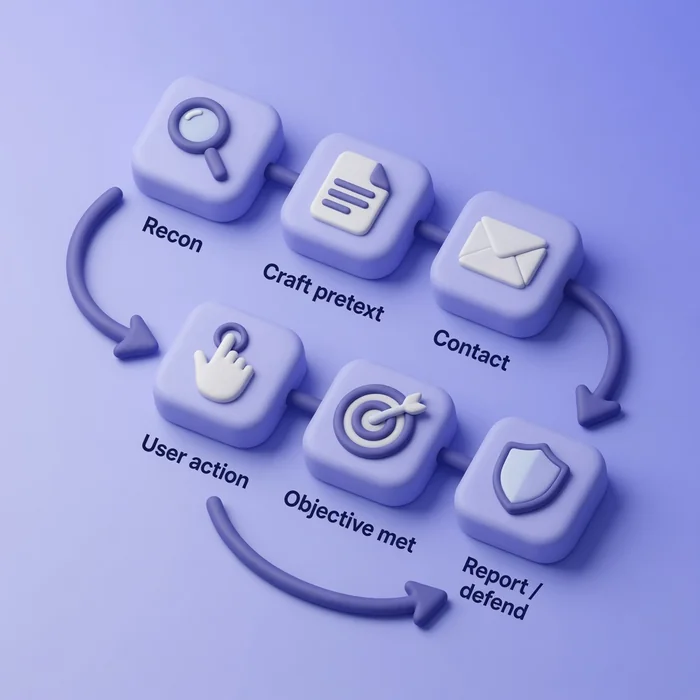
Common signals:
- Urgency: pay now, account closes in an hour, executive waiting on you
- Unusual channel: IT support over personal SMS, finance over WhatsApp
- Identity inconsistency: display name matches a VIP but the email domain does not
- Unexpected authentication: MFA push you did not start, or request to read a code aloud
- Suspicious link or domain: misspelled hostname, URL shortener on a payroll notice
- Procedure bypass: "skip the ticket system just this once"
- Unexpected physical access: unknown courier at a secure door without escort
A legitimate urgent request from leadership should still verify through a known channel. Reporting culture matters as much as technical filters — users who fear punishment hide early warnings.
Defenses by attack type
Controls should match the dimension you are defending. One policy rarely covers every channel.
| Attack pattern | Useful controls |
|---|---|
| Broad phishing (email) | Secure email gateway, link rewriting, user reporting button, security awareness with real examples |
| Spear phishing / whaling / BEC | Executive-procedure training, out-of-band approval for wires and invoice changes, DMARC monitoring, targeted simulations |
| Smishing | Mobile threat awareness, block reporting for SMS short codes, help-desk scripts that never ask for OTPs over text |
| Vishing / MFA help-desk scams | Callback policy on published numbers, IVR challenges, logging and alerting on help-desk password resets, never approve unexpected MFA prompts |
| Impersonation / pretexting | Role-based verification scripts, vendor callback lists, scheduled maintenance communications |
| Baiting / USB drops | USB port policy, autorun disabled, staff training on found media, endpoint detection |
| Credential harvesting | Phishing-resistant MFA (FIDO2/WebAuthn where possible), password managers with domain lock, conditional access |
| Watering hole | Web filtering, EDR, integrity checks on updates, threat intel on sector-frequent sites |
| Tailgating / piggybacking | Mantraps or turnstiles, escort policy, challenge training for employees |
| Shoulder surfing / dumpster diving | Clean desk, privacy filters, shredding, secure disposal of media |
Technical and procedural layers work together. A phishing-resistant MFA rollout helps credential objectives; it does little if visitors can walk through a lobby unchallenged.
In authorized simulations, useful metrics include report rate, click or interact rate, safe credential submission, and response time. Reporting and remediation trends matter more than click rate alone.
Authorized security teams may use tools such as Gophish, the Social Engineering Toolkit, or Zphisher to simulate social-engineering attacks in scoped assessments. Tool-specific setup and campaign workflows are covered in those guides.
Summary
Social engineering attacks succeed by fitting into normal work: a plausible sender, a believable urgency, and a small request that bypasses the checks you would apply if you had more time. Organizing attacks by channel, targeting, technique, and objective clarifies terms that ranking pages often flatten — phishing versus whaling is about audience, vishing versus smishing is about voice versus text, and credential harvesting is the goal behind many different lures.
Recognition comes from spotting pressure, channel mismatch, and procedure bypass together, not from memorizing every marketing label attackers reuse. Defenses stack by pattern: email controls and BEC approval workflows for finance fraud, callback culture for voice and MFA help-desk scams, phishing-resistant authentication for credential objectives, USB policy for baiting, and physical challenge habits for tailgating.
Use this page as the taxonomy and defense map. Run controlled simulations only where written engagement allows, and follow dedicated tool guides when you need campaign setup detail.
References
- NIST SP 800-115 — Technical Guide to Information Security Testing and Assessment
- CISA — Phishing Guidance
- PTES — Penetration Testing Execution Standard
- MITRE ATT&CK — Drive-by Compromise (T1189)
- MITRE ATT&CK — Phishing (T1566)
Frequently Asked Questions
What is the difference between phishing and spear phishing?
Phishing targets a large audience with a generic message. Spear phishing targets specific people or roles using details from research — names, projects, vendors — so the lure feels personal. Both may use email; the difference is targeting breadth and customization.
How is whaling different from spear phishing?
Whaling is spear phishing aimed at senior executives or other high-value approvers. The pretext often involves wire transfers, legal matters, or confidential mergers. The technique is the same; the victim profile and potential impact are what change.
What is business email compromise (BEC)?
BEC uses a compromised or impersonated business email account to request fraudulent payments, invoice changes, payroll updates, or sensitive data. CEO fraud is a common BEC scenario where attackers impersonate or spoof executive approval chains.
What is the difference between smishing and vishing?
Smishing uses SMS or text chat to deliver the lure. Vishing uses voice calls or voicemail callbacks. Smishing relies on quick taps on short links; vishing relies on real-time pressure and social cues over the phone.
What is baiting in social engineering?
Baiting leaves something tempting — a USB drive, free software, or desirable document — hoping curiosity or perceived value makes someone plug in, download, or open it. USB drops in parking lots are a physical baiting example.
What is the difference between tailgating and piggybacking?
Tailgating usually means an unauthorized person follows someone through a controlled door without the insider realizing they helped. Piggybacking means the authorized person knowingly allows someone else to enter — often after a social request to hold the door.
What is pretexting in social engineering?
Pretexting is inventing a believable scenario that explains why the attacker is contacting you now — IT audit, delivery problem, emergency maintenance. Impersonation is who they claim to be; pretexting is the story that makes the request sound routine.
What is credential harvesting?
Credential harvesting is collecting usernames, passwords, one-time codes, or session tokens for reuse. It is an attack objective that can arrive through phishing email, fake login pages, smishing links, or vishing calls — not a separate delivery channel.
How does a watering hole attack work?
An attacker compromises or spoofs a website the target group already visits — industry news, forums, supplier portals. Victims may be infected or redirected during normal browsing. Many watering-hole cases are drive-by compromises rather than direct persuasion.
How do you prevent social engineering attacks?
Match controls to the pattern: email filtering and reporting for phishing, out-of-band approval for BEC, callback procedures for vishing, phishing-resistant MFA for credential theft, USB policy for baiting, and visitor escorts plus challenge culture for physical entry. No single control covers every channel.
