
| Tested on | Red Hat Enterprise Linux 10.2 (Coughlan) |
|---|---|
| Package | podman-5.8.2-5.el10_2.x86_64quay.io/keycloak/keycloak:26.7.3 |
| Applies to | Any Linux host with Podman or Docker |
| Privilege | Keycloak admin access for authentication flows and realm ACR mapping; normal user with enrolled TOTP for browser tests |
| Lab environment | Keycloak 26.7.3 on http://127.0.0.1:8080/ — Install Keycloak with Podman |
| Scope | Step-up authentication with Condition - Level of Authentication, LoA 1 password and LoA 2 OTP, realm ACR-to-LoA mapping, acr_values and essential claims requests, step-up from an existing SSO session, acr claim verification at the relying party, max-age behavior, and unsupported essential ACR errors. Does not cover TOTP enrollment, passkeys, conditional subflow theory, or SAML step-up. |
| Related guides | Install Keycloak with Podman Keycloak TOTP two-factor authentication Keycloak authentication flows explained Create a custom Keycloak authentication flow Keycloak OpenID Connect tutorial |
Step-up authentication lets a signed-in user keep a lighter login for routine pages while your OIDC client demands a stronger factor before wire transfers, admin actions, or other sensitive operations. Keycloak implements this with numeric Levels of Authentication (LoA) inside the browser flow and exposes the result as the acr claim in ID and access tokens.
This lab maps LoA 1 to password-only login and LoA 2 to password plus OTP on Keycloak 26.7.3. You bind a dedicated browser flow, map text ACR values silver and gold, request acr_values from client stepup-lab-client, step up from an existing LoA 1 session with an OTP-only prompt, and decode acr at the token endpoint instead of trusting the login UI alone. Enroll TOTP for user mfa-otp-only first — see Keycloak TOTP two-factor authentication for enrollment; this page assumes that credential already exists.
What Step-Up Authentication Solves
A retail banking app might let users browse balances after password login (LoA 1) but require OTP before confirming a transfer (LoA 2). Without step-up, you either force MFA on every login or trust the SSO cookie for high-risk actions — both are poor fits.
With step-up authentication, the application can request a stronger authentication level only when the user reaches a sensitive operation:
- The client sends a requested LoA through
acr_valuesor an essentialclaimsparameter. - Keycloak runs only the extra authenticators needed above the level already satisfied in the current auth session.
- Tokens carry the achieved level in
acrso your API can enforce policy server-side.
  Routine page (LoA 1)              Sensitive action (LoA 2)
  ┌────────────────────┐             ┌────────────────────────────┐
  │ acr_values=1       │             │ acr_values=2 or gold       │
  │ Password only      │──SSO cookie─►│ OTP step-up (no password)  │
  └─────────┬──────────┘             └─────────────┬──────────────┘
            │                                      │
            v                                      v
  ┌────────────────────┐             ┌────────────────────────────┐
  │ ID token acr: 1    │             │ ID token acr: 2 or gold    │
  └────────────────────┘             └────────────────────────────┘
This pattern differs from role-gated MFA in Keycloak conditional authentication flows — step-up is driven by what the client requests, not by user group membership alone.
ACR, LoA and acr_values
OIDC defines Authentication Context Class Reference (acr) as a statement of how the user authenticated. Keycloak maps between human-readable ACR strings and numeric LoA values used in flow conditions.
| Term | Meaning in Keycloak |
|---|---|
| LoA | Integer level configured on Condition - Level of Authentication (1, 2, …) |
| ACR | String in tokens — numeric ("1", "2") or mapped text (silver, gold) |
acr_values |
Optional authorization request parameter listing acceptable ACR/LoA values (non-essential by default) |
claims + essential |
JSON parameter when the client must receive one of the listed levels or fail |
Realm attribute acr.loa.map holds JSON such as {"silver":1,"gold":2}. When the client sends acr_values=gold, Keycloak resolves it to LoA 2 before evaluating conditional subflows.
A useful way to remember the difference is:
ACR = the string value requested and returned through OIDC
LoA = the numeric level Keycloak evaluates inside the authentication flow

ACR "gold" → LoA 2
ACR "2"    → LoA 2
Design LoA 1 and LoA 2
Keycloak's LoA step-up flow is cumulative. LoA 2 should include everything required for LoA 1, plus the additional authentication step.
| Level | Lab authenticator | Max age (seconds) | Banking-style use |
|---|---|---|---|
| LoA 1 | Username/password | 36000 (10 hours) |
View dashboard |
| LoA 2 | OTP Form after LoA 1 | 0 |
Confirm payment |
LoA 1 max age aligns with default SSO session length so repeat LoA 1 logins reuse password auth within the session. LoA 2 max age 0 means the level applies to the current authentication event — your app should still verify acr on every sensitive API call because browser query parameters can be tampered with.
Export admin variables once per shell:
export KC_BASE='http://127.0.0.1:8080'
export REALM='golinuxcloud'

ADMIN_TOKEN=$(curl -sS -X POST "${KC_BASE}/realms/master/protocol/openid-connect/token" \
  -d 'grant_type=password' -d 'client_id=admin-cli' \
  -d 'username=admin' -d 'password=ChangeMe!2026' | \
  python3 -c "import sys,json; print(json.load(sys.stdin)['access_token'])")
Confirm Keycloak is reachable before editing flows:
curl -sS -o /dev/null -w 'keycloak:%{http_code}\n' \
  "${KC_BASE}/realms/${REALM}/.well-known/openid-configuration"
Sample output:
keycloak:200HTTP 200 confirms that the realm's OIDC endpoint is reachable.
Configure Flows and LoA Mappings
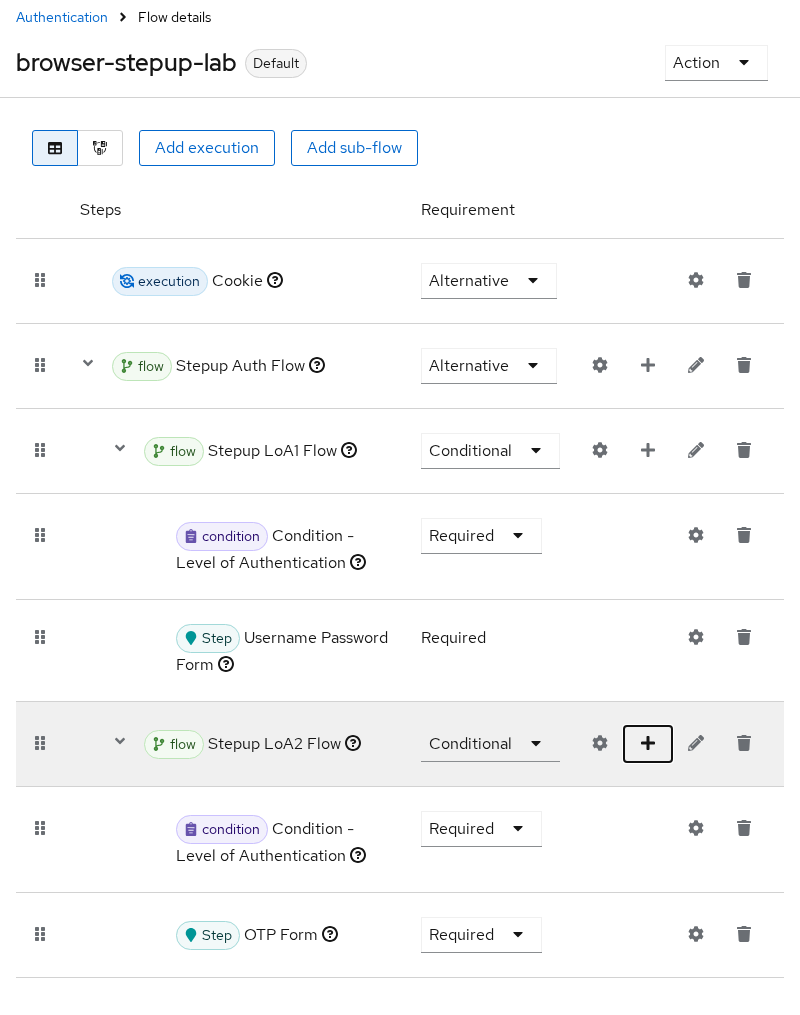
Create top-level flow browser-stepup-lab with the structure from the Keycloak administration guide: Cookie (alternative), Stepup Auth Flow (alternative) containing two conditional subflows ordered from lowest LoA to highest.
browser-stepup-lab
├── [ALTERNATIVE] Cookie
└── [ALTERNATIVE] Stepup Auth Flow
    ├── [CONDITIONAL] Stepup LoA1 Flow
    │     ├── [REQUIRED] Condition - Level of Authentication  (LoA 1, max age 36000)
    │     └── [REQUIRED] Username Password Form
    └── [CONDITIONAL] Stepup LoA2 Flow
          ├── [REQUIRED] Condition - Level of Authentication  (LoA 2, max age 0)
          └── [REQUIRED] OTP Form
Cookie checks whether the browser already has a Keycloak SSO session. If the existing session does not satisfy the authentication level requested by the client, the LoA conditions determine which additional authentication steps must run.
Build this in Authentication → Flows in the Admin Console, or reproduce the tree with the Admin REST API as in Create a custom Keycloak authentication flow. Condition config keys are loa-condition-level and loa-max-age.
Open Authentication → Flows → browser-stepup-lab and confirm the execution tree matches the diagram — Cookie and Stepup Auth Flow as alternatives, with LoA 1 and LoA 2 conditional subflows ordered lowest-first:
Set realm ACR mapping under Realm settings → General → ACR to LoA Mapping, or patch the realm attribute:
curl -sS -X GET -H "Authorization: Bearer ${ADMIN_TOKEN}" \
  "${KC_BASE}/admin/realms/${REALM}" | python3 -c "
import sys, json
r = json.load(sys.stdin)
attrs = r.get('attributes') or {}
attrs['acr.loa.map'] = json.dumps({'silver': 1, 'gold': 2})
print(json.dumps({'attributes': attrs}))
" > /tmp/stepup-realm-patch.json
The helper writes a minimal realm PATCH body with the acr.loa.map JSON — inspect it if your realm already carries custom attributes:
python3 -c "import json; print(json.load(open('/tmp/stepup-realm-patch.json'))['attributes']['acr.loa.map'])"Sample output:
{"silver": 1, "gold": 2}Apply the mapping:
curl -sS -o /dev/null -w 'acr-map:%{http_code}\n' -X PUT \
  -H "Authorization: Bearer ${ADMIN_TOKEN}" -H 'Content-Type: application/json' \
  "${KC_BASE}/admin/realms/${REALM}" -d @/tmp/stepup-realm-patch.json
Sample output:
acr-map:204Default ACR vs Minimum ACR
Keycloak clients can also define ACR requirements at client level.
- Default ACR Values chooses the level when the authorization request does not specify
acr_valuesor anacrclaim request. - Minimum ACR Value enforces a minimum authentication level for that client.
Do not rely on Default ACR Values as a security boundary. A client request can explicitly ask for another level.
Minimum ACR Value is useful when an entire client must always require a minimum assurance level. For step-up inside the same application — for example, LoA 1 for viewing an account and LoA 2 only for making a payment — the application can request the higher ACR for the sensitive operation and still verify the returned acr.
Bind the new flow as the realm browser flow while you test — restore the default browser flow when you finish if other lab articles expect it:
curl -sS -o /dev/null -w 'bind:%{http_code}\n' -X PUT \
  -H "Authorization: Bearer ${ADMIN_TOKEN}" -H 'Content-Type: application/json' \
  "${KC_BASE}/admin/realms/${REALM}" \
  -d '{"browserFlow":"browser-stepup-lab"}'
Sample output:
bind:204Create public OIDC client stepup-lab-client with redirect URI http://127.0.0.1:8765/callback (standard flow only). This isolated localhost lab omits PKCE only to keep the authorization-code steps short. Do not copy that client configuration into a real public client. Browser and native public clients should use Authorization Code flow with PKCE — see Keycloak PKCE tutorial.
Request Step-Up from the OIDC Client
LoA 1 — password only
Build an authorization URL with numeric LoA 1:
printf '%s\n' \
  "${KC_BASE}/realms/${REALM}/protocol/openid-connect/auth?client_id=stepup-lab-client&response_type=code&scope=openid&redirect_uri=http%3A%2F%2F127.0.0.1%3A8765%2Fcallback&prompt=login&acr_values=1"
Sample output:
http://127.0.0.1:8080/realms/golinuxcloud/protocol/openid-connect/auth?client_id=stepup-lab-client&response_type=code&scope=openid&redirect_uri=http%3A%2F%2F127.0.0.1%3A8765%2Fcallback&prompt=login&acr_values=1Open the URL, sign in as mfa-otp-only / MfaOtpOnly!2026. Keycloak stops after password — no OTP prompt when LoA 1 is the target.
LoA 2 — full login (password + OTP)
Request mapped text ACR gold (LoA 2) with prompt=login so Keycloak runs both factors from a clean session:
printf '%s\n' \
  "${KC_BASE}/realms/${REALM}/protocol/openid-connect/auth?client_id=stepup-lab-client&response_type=code&scope=openid&redirect_uri=http%3A%2F%2F127.0.0.1%3A8765%2Fcallback&prompt=login&acr_values=gold"
prompt=login forces password reauthentication before OTP when an SSO cookie is already present:

After password, Keycloak shows the OTP form because LoA 2 requires the second factor:
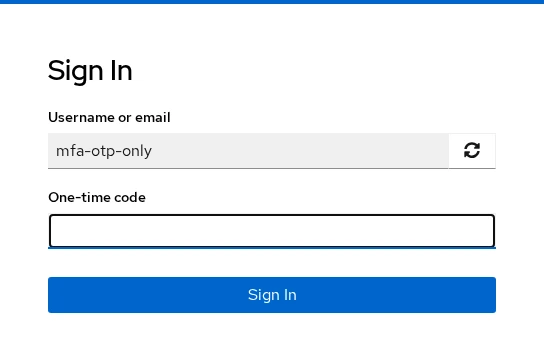
The returned tokens carry acr=gold.
Step-up from an existing LoA 1 session
Complete a LoA 1 login first, then start a second authorization request in the same browser profile without prompt=login:
printf '%s\n' \
  "${KC_BASE}/realms/${REALM}/protocol/openid-connect/auth?client_id=stepup-lab-client&response_type=code&scope=openid&redirect_uri=http%3A%2F%2F127.0.0.1%3A8765%2Fcallback&acr_values=2"
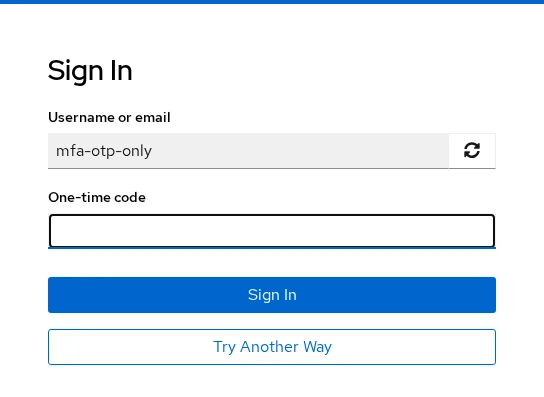
Keycloak skips password and prompts only for OTP — that is the step-up path users expect after routine SSO:
Use essential claims when the client must receive an exact level or fail — URL-encode the JSON when constructing links:
claims={"id_token":{"acr":{"essential":true,"values":["gold"]}}}Validate the Returned acr Claim
Never trust the requested acr_values alone — a user can edit query parameters in the browser. Exchange the authorization code and inspect tokens at your API.
After step-up login, exchange the code (replace AUTH_CODE with the value from the redirect):
curl -sS -X POST "${KC_BASE}/realms/${REALM}/protocol/openid-connect/token" \
  -d 'grant_type=authorization_code' \
  -d 'client_id=stepup-lab-client' \
  -d 'code=AUTH_CODE' \
  -d 'redirect_uri=http://127.0.0.1:8765/callback' | python3 -c "
import sys, json, base64
tok = json.load(sys.stdin)
for name in ('access_token', 'id_token'):
    payload = tok[name].split('.')[1]
    payload += '=' * (-len(payload) % 4)
    claims = json.loads(base64.urlsafe_b64decode(payload))
    print(name, 'acr=', claims.get('acr'), 'user=', claims.get('preferred_username'))
"
Sample output after LoA 2 step-up:
access_token acr= 2 user= mfa-otp-only
id_token acr= 2 user= mfa-otp-only
After LoA 1-only login the same decode shows acr= 1. After acr_values=gold, expect acr= gold. Your application must validate the returned acr against the assurance level required for the operation. If you use textual values such as silver and gold, keep the same mapping in your application policy — or simply require the expected value such as acr=gold for the sensitive operation. Keycloak maps gold → LoA 2; your transfer endpoint can require acr=gold directly.
The realm default acr client scope adds the mapper — confirm it remains a default client scope so new clients inherit acr without custom mapper work (covered in Keycloak OpenID Connect tutorial).
Existing Sessions, Max Age and Reauthentication
Max age on each Condition - Level of Authentication controls how long that level remains satisfied inside the auth session.
| Setting | Lab value | Effect |
|---|---|---|
| LoA 1 max age | 36000 |
Password level reused for later LoA 1 requests within SSO lifetime |
| LoA 2 max age | 0 |
LoA 2 tied to the current authentication; document API checks for payment-grade actions |
When a user already holds LoA 1 and the client requests LoA 2, only the OTP execution runs — password is not repeated. That behavior depends on ordering: LoA 1 subflow must appear before LoA 2 in the parent flow.
If no acr_values or claims parameter is sent, Keycloak authenticates at the first configured LoA subflow (LoA 1 in this tree). If the previous LoA has expired but the Keycloak SSO session is still valid, Keycloak can continue the SSO login while returning acr=0. Your application should therefore inspect the returned acr instead of assuming that an existing SSO session still satisfies LoA 1.
With Max Age = 0, Keycloak documents LoA 2 as valid only for the current authentication. A later authorization request that explicitly requests LoA 2 should therefore require the LoA 2 authenticator again. Test this behavior in your own Keycloak version rather than treating an existing high-LoA SSO session as permanently elevated.
Unsupported ACR Behavior
Non-essential acr_values: in this Keycloak 26.7.3 lab, an unsupported non-essential value such as acr_values=99 did not fail the authorization request. Because acr_values is only a preference, the client must inspect the returned acr claim rather than assume the requested value was achieved.
In this lab, the unsupported request did not fail. The returned token contained:
access_token acr= gold
id_token acr= gold
This test was run in the browser session that had already authenticated at gold. Therefore, acr_values=99 did not create a new assurance level; Keycloak returned the authentication context already satisfied by that session. This is valid OIDC behavior because acr_values requests a voluntary claim. If the requested value cannot be provided, the provider can return the authentication context actually satisfied by the session instead. The important point is that the returned acr may differ from the value in acr_values, so the application must validate the token rather than assume the requested authentication level was reached.
Essential claims: when claims marks acr as essential and lists only unmapped text values, Keycloak rejects the request before login. The browser shows an error page:

Probe the failure with curl (claims URL-encoded):
CLAIMS=$(python3 -c "import urllib.parse,json; print(urllib.parse.quote(json.dumps({'id_token':{'acr':{'essential':True,'values':['platinum']}}})))")
curl -sS -o /dev/null -w 'essential-acr:%{http_code}\n' \
  "${KC_BASE}/realms/${REALM}/protocol/openid-connect/auth?client_id=stepup-lab-client&response_type=code&scope=openid&redirect_uri=http%3A%2F%2F127.0.0.1%3A8765%2Fcallback&prompt=login&claims=${CLAIMS}"
Sample output:
essential-acr:400HTTP 400 matches the essential contract — the client must handle failure instead of proceeding with a weaker session.
Troubleshooting
| Symptom | Likely cause | Fix |
|---|---|---|
| OTP on every LoA 1 login | LoA 2 subflow ordered before LoA 1, or client always sends high acr_values |
Reorder subflows lowest-first; default client ACR separately |
| Step-up asks for password again | No SSO session / different browser profile | Complete LoA 1 in same browser; avoid prompt=login on step-up |
acr missing in token |
acr client scope not attached | Add default client scope acr or realm mapper |
acr_values=gold ignored |
Missing acr.loa.map entry |
Map gold → 2 at realm or client attributes |
| Essential ACR always fails | Value not achievable in any conditional subflow | Add LoA condition or relax essential list |
| TOTP never offered at LoA 2 | User lacks OTP credential | Enroll via Keycloak TOTP two-factor authentication |
Restore the default browser binding when other lab guides expect the built-in browser flow:
curl -sS -o /dev/null -w 'restore:%{http_code}\n' -X PUT \
  -H "Authorization: Bearer ${ADMIN_TOKEN}" -H 'Content-Type: application/json' \
  "${KC_BASE}/admin/realms/${REALM}" \
  -d '{"browserFlow":"browser"}'
Sample output:
restore:204Summary
Step-up authentication ties OIDC acr / acr_values to Keycloak Level of Authentication conditions inside a dedicated browser flow. LoA 1 covers password login for routine access; LoA 2 adds OTP for sensitive actions. Realm mapping translates friendly ACR names (silver, gold) to those integers.
Tested behavior on Keycloak 26.7.3: LoA 1 returned acr 1 without OTP; an in-session request for LoA 2 showed an OTP-only screen and tokens with acr 2; fresh acr_values=gold required both factors and returned acr gold. Decode acr at the token endpoint — query parameters alone are not proof of assurance.
Max age governs reuse within the auth session: long LoA 1 max age reduces password friction, while LoA 2 max age 0 means Keycloak documents that level as valid only for the current authentication. Essential claims fail closed on unmapped values; non-essential acr_values are preferences — always read the returned acr claim. When entirely different login methods must map to ACR strings (password vs passkey vs certificate), use client-policy ACR routing rather than stacked LoA subflows.
References
- Keycloak Server Administration Guide — Step-up authentication
- OpenID Connect Core 1.0 — acr and acr_values
- Keycloak ACR to LoA mapping
Frequently Asked Questions
What is ACR in Keycloak?
ACR (Authentication Context Class Reference) is the OIDC claim that states how strongly the user authenticated. Keycloak fills it from the Level of Authentication achieved in the browser flow — either as a numeric string matching LoA ("1", "2") or as a mapped label such as gold when you configure acr.loa.map.
Does step-up always show the full login form?
No. When the auth session already satisfies LoA 1 and the client requests LoA 2, Keycloak runs only the additional executions — in this lab, the OTP form without repeating password entry.
Can a client require MFA through OIDC parameters alone?
The client can request a higher LoA through acr_values or essential claims, but users must already have the OTP credential enrolled. Keycloak cannot prompt for TOTP if no OTP factor exists on the account.
Where is acr returned?
In both the ID token and access token when the acr client scope (and its mapper) is active. Resource servers should read access token acr; browser apps often inspect the ID token after login.
What happens when the client requests an unsupported LoA?
With non-essential acr_values, Keycloak may still issue tokens at a different level than requested — inspect the returned acr claim. With essential claims listing only unmapped values, authentication fails with an error response instead of issuing tokens.
