
| Tested on | Red Hat Enterprise Linux 10.2 (Coughlan) |
|---|---|
| Package | podman-5.8.2-5.el10_2.x86_64quay.io/keycloak/keycloak:26.8.0curl-8.12.1-4.el10_2.4.x86_64jq-1.7.1-11.el10_2.2.x86_64 |
| Applies to | Any Linux host with Podman or Docker |
| Privilege | Normal user for curl. The SCIM service account needs the realm-management role manage-users |
| Scope | Create, read, search, update, deactivate, and delete Keycloak users and groups through the SCIM 2.0 API, including PATCH, filters, pagination, body search, and one enterprise user attribute. Does not cover enabling SCIM or creating the client-credentials client. |
| Related guides | Keycloak SCIM vs LDAP LDAP vs SAML vs OIDC vs SCIM Keycloak OpenID Connect tutorial Keycloak client credentials Keycloak realms |
This walkthrough covers the complete Keycloak SCIM user provisioning lifecycle: create alice, search and update her, create an engineering group, manage membership, deactivate the account, and finally delete the test resources.
Prerequisite: Working SCIM Authentication
Keycloak 26.8 includes the SCIM API as a supported feature and enables it by default, so this server started without --features=scim-api. The realm-level SCIM switch has to be on as well. Finish the client, the SCIM audience mapper, and a working token in the Keycloak SCIM API guide before the first POST. The requests below start at the user and group calls. They do not rebuild the client.
That guide assigns view-users, which is enough to read. Creating or changing a user returns 403 until the service account also has manage-users. manage-users covers SCIM write operations for both users and groups in this setup.
In the Admin Console, open Clients, then scim-client, then Service account roles. Choose Assign role, filter to realm roles, and assign realm-management / manage-users.

Inherited is False on that row, so the role is assigned directly to service-account-scim-client.
If you use kcadm.sh inside the same container from the authentication guide, add the role in one call. It prints nothing when the assignment succeeds:
podman exec keycloak-scim-api /opt/keycloak/bin/kcadm.sh add-roles -r golinuxcloud --uusername service-account-scim-client --cclientid realm-management --rolename manage-usersSet the SCIM base URL. Later requests append /Users or /Groups to it:
BASE=http://127.0.0.1:8080/realms/golinuxcloud/scim/v2Request a fresh access token with curl. The audience mapper from the authentication guide has to be in place, or Keycloak rejects the token before it looks at the JSON body.
TOKEN=$(curl -s -X POST 'http://127.0.0.1:8080/realms/golinuxcloud/protocol/openid-connect/token' -H 'Content-Type: application/x-www-form-urlencoded' -d 'grant_type=client_credentials' -d 'client_id=scim-client' -d 'client_secret=scim-lab-secret-2026' | jq -r .access_token)With the token ready, the first user create will also confirm that the client has write access.
On this server, ServiceProviderConfig tells you which optional SCIM features are actually switched on. Read it once so you do not plan on bulk operations:
curl -sS -H "Authorization: Bearer $TOKEN" -H 'Accept: application/scim+json' "$BASE/ServiceProviderConfig" | jq '{patch:.patch.supported, filter:.filter, bulk:.bulk, sort:.sort.supported, changePassword:.changePassword.supported}'{
"patch": true,
"filter": {
"supported": true,
"maxResults": 100
},
"bulk": {
"supported": false,
"maxOperations": 0,
"maxPayloadSize": 0
},
"sort": false,
"changePassword": false
}PATCH and filters work. Bulk does not: maxOperations is 0. Sort and password change are off. A POST to /Bulk is not a supported path on this Keycloak 26.8.0 server.
This page uses local Keycloak users. Federated user storage can behave differently. Current Keycloak documentation notes that users created into a non-importing external provider may not be retrievable later through SCIM.
SCIM User Resource and Required Fields
A SCIM user is a JSON document. Keycloak stores it as a realm user, and the id in the response is the Keycloak user id. You reuse that id in later GET, PUT, PATCH, and DELETE calls.
externalId is optional. It is typically the ID used by the external provisioning system to correlate its record with the Keycloak user. Unlike Keycloak's SCIM id, it is not mapped automatically. Configure a User Profile attribute with the SCIM mapping externalId before relying on it. Without that mapping, it was not returned by the following read in this test.
The core schema marks only userName as required. On this realm, email is required for the user role, but SCIM still created the user without email. A missing userName is the rejection shown later.
These are the fields this page writes, and where they show up in the Admin Console:
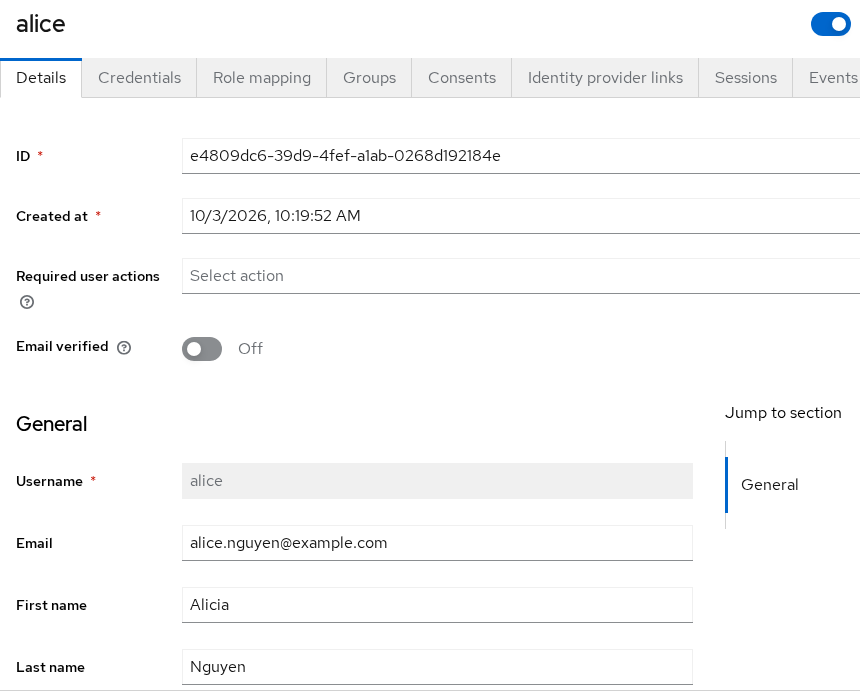
userNameis the Keycloak usernamename.givenNameis First namename.familyNameis Last nameemails[0].valueis Emailactiveis the Enabled switch
name.formatted comes back filled in, built from the given and family names. SCIM responses can also be trimmed with attributes or excludedAttributes. For example, attributes=userName,emails returns those fields and leaves the others out. Keycloak still includes id, schemas, and meta. excludedAttributes does the opposite: it returns the normal resource while omitting the named fields. Later group examples use the same mechanism because groups and members are not returned by default.
Create and Read a User
Create alice with a work email and both name fields. active set to true leaves the account enabled.
curl -sS -X POST "$BASE/Users" -H "Authorization: Bearer $TOKEN" -H 'Content-Type: application/scim+json' -H 'Accept: application/scim+json' -d '{"schemas":["urn:ietf:params:scim:schemas:core:2.0:User"],"userName":"alice","name":{"givenName":"Alice","familyName":"Nguyen"},"emails":[{"value":"alice@example.com","type":"work","primary":true}],"active":true}' | jq '{id,userName,name,emails,active,location:.meta.location}'{
"id": "e4809dc6-39d9-4fef-a1ab-0268d192184e",
"userName": "alice",
"name": {
"formatted": "Alice Nguyen",
"familyName": "Nguyen",
"givenName": "Alice"
},
"emails": [
{
"value": "alice@example.com",
"type": "work",
"primary": true
}
],
"active": true,
"location": "http://127.0.0.1:8080/realms/golinuxcloud/scim/v2/Users/e4809dc6-39d9-4fef-a1ab-0268d192184e"
}Keycloak answered 201 Created. Copy the id into USER_ID. The shell prints nothing when you assign it:
USER_ID=e4809dc6-39d9-4fef-a1ab-0268d192184eRead that user back by id. This is the call to make after a create when you want the stored document, not the search list:
curl -sS -H "Authorization: Bearer $TOKEN" -H 'Accept: application/scim+json' "$BASE/Users/$USER_ID" | jq '{id,userName,name,emails,active}'{
"id": "e4809dc6-39d9-4fef-a1ab-0268d192184e",
"userName": "alice",
"name": {
"formatted": "Alice Nguyen",
"familyName": "Nguyen",
"givenName": "Alice"
},
"emails": [
{
"value": "alice@example.com",
"type": "work",
"primary": true
}
],
"active": true
}The stored user matches the document you posted. formatted is Alice Nguyen even though the request did not send that field.
Posting that same userName again does not update Alice. It conflicts with the user you just created:
curl -sS -X POST "$BASE/Users" -H "Authorization: Bearer $TOKEN" -H 'Content-Type: application/scim+json' -H 'Accept: application/scim+json' -d '{"schemas":["urn:ietf:params:scim:schemas:core:2.0:User"],"userName":"alice","name":{"givenName":"Alice","familyName":"Nguyen"},"emails":[{"value":"alice@example.com","primary":true}]}'{"schemas":["urn:ietf:params:scim:api:messages:2.0:Error"],"status":"409","scimType":"uniqueness","detail":"A resource with the same unique attribute already exists"}HTTP 409 and scimType uniqueness. Change Alice with PATCH or PUT. Do not create her a second time.
Search Users with Filters and Pagination
A search is GET /Users with a filter. Quote the value and let curl encode it. userName eq "alice" returns one list entry, not a bare user document.
curl -sS -G "$BASE/Users" -H "Authorization: Bearer $TOKEN" -H 'Accept: application/scim+json' --data-urlencode 'filter=userName eq "alice"' | jq '{totalResults,startIndex,itemsPerPage,users:[.Resources[].userName]}'{
"totalResults": 1,
"startIndex": 1,
"itemsPerPage": 1,
"users": [
"alice"
]
}totalResults is the number of matches. itemsPerPage is how many documents are in this response. A miss is not a 404. Searching for a username that does not exist returns 200 with totalResults 0 and an empty Resources array.
Pagination needs a second user, or the second page is empty. Create bob the same way, with an email and both names:
curl -sS -X POST "$BASE/Users" -H "Authorization: Bearer $TOKEN" -H 'Content-Type: application/scim+json' -H 'Accept: application/scim+json' -d '{"schemas":["urn:ietf:params:scim:schemas:core:2.0:User"],"userName":"bob","name":{"givenName":"Bob","familyName":"Singh"},"emails":[{"value":"bob@example.com","type":"work","primary":true}],"active":true}' | jq '{id,userName}'{
"id": "525d1a0b-f532-4c63-a8bf-b0dcfc9714a8",
"userName": "bob"
}Bob was created (HTTP 201). Ask for one user per page. startIndex is 1-based, so the first page is startIndex=1:
curl -sS -G "$BASE/Users" -H "Authorization: Bearer $TOKEN" -H 'Accept: application/scim+json' --data-urlencode 'startIndex=1' --data-urlencode 'count=1' | jq '{totalResults,startIndex,itemsPerPage,users:[.Resources[].userName]}'{
"totalResults": 2,
"startIndex": 1,
"itemsPerPage": 1,
"users": [
"alice"
]
}totalResults stays 2 even though this page holds one user. The next page starts at 2:
curl -sS -G "$BASE/Users" -H "Authorization: Bearer $TOKEN" -H 'Accept: application/scim+json' --data-urlencode 'startIndex=2' --data-urlencode 'count=1' | jq '{totalResults,startIndex,itemsPerPage,users:[.Resources[].userName]}'{
"totalResults": 2,
"startIndex": 2,
"itemsPerPage": 1,
"users": [
"bob"
]
}A compound filter joins two comparisons with and. This one matches Alice only, because Bob's family name is Singh:
curl -sS -G "$BASE/Users" -H "Authorization: Bearer $TOKEN" -H 'Accept: application/scim+json' --data-urlencode 'filter=userName eq "alice" and name.familyName eq "Nguyen"' | jq '{totalResults,users:[.Resources[].userName]}'{
"totalResults": 1,
"users": [
"alice"
]
}Only Alice matches both conditions. Use the attribute path Keycloak lists on /Schemas, such as userName or name.familyName, not the Admin Console label.
Search with POST /Users/.search
GET filtering is simpler for a short expression. POST /Users/.search moves the search parameters into the request body and is useful when a filter becomes long.
This SearchRequest returns active users whose username starts with a or b. In SCIM filters, sw means starts with.
curl -sS -X POST "$BASE/Users/.search" -H "Authorization: Bearer $TOKEN" -H 'Content-Type: application/scim+json' -H 'Accept: application/scim+json' -d '{"schemas":["urn:ietf:params:scim:api:messages:2.0:SearchRequest"],"filter":"(userName sw \"a\" or userName sw \"b\") and active eq true","startIndex":1,"count":10}' | jq '{totalResults,startIndex,itemsPerPage,users:[.Resources[].userName]}'{
"totalResults": 2,
"startIndex": 1,
"itemsPerPage": 2,
"users": [
"alice",
"bob"
]
}Alice and Bob both match. Their usernames start with a or b, and both accounts are active. count was 10, and itemsPerPage is 2 because those are the only matches. meta.location on a hit from this call included /Users/.search/ in the path. Use the id with GET /Users/{id} when you want the user URL.
Update Users with PUT vs PATCH
PUT replaces the user document. PATCH changes the fields you name and leaves the rest. On this Keycloak 26.8.0 server, a PUT replacement also required the resource id in the request body.
Send a replacement that changes the email but leaves id out:
curl -sS -X PUT "$BASE/Users/$USER_ID" -H "Authorization: Bearer $TOKEN" -H 'Content-Type: application/scim+json' -H 'Accept: application/scim+json' -d '{"schemas":["urn:ietf:params:scim:schemas:core:2.0:User"],"userName":"alice","name":{"givenName":"Alice","familyName":"Nguyen"},"emails":[{"value":"alice.nguyen@example.com","type":"work","primary":true}],"active":true}'{"schemas":["urn:ietf:params:scim:api:messages:2.0:Error"],"status":"400","scimType":"invalidSyntax","detail":"Invalid reference to resource"}HTTP 400, and the email is unchanged. Repeat the same body with id set to USER_ID:
curl -sS -X PUT "$BASE/Users/$USER_ID" -H "Authorization: Bearer $TOKEN" -H 'Content-Type: application/scim+json' -H 'Accept: application/scim+json' -d '{"schemas":["urn:ietf:params:scim:schemas:core:2.0:User"],"id":"'"$USER_ID"'","userName":"alice","name":{"givenName":"Alice","familyName":"Nguyen"},"emails":[{"value":"alice.nguyen@example.com","type":"work","primary":true}],"active":true}' | jq '{userName,name,emails,active}'{
"userName": "alice",
"name": {
"formatted": "Alice Nguyen",
"familyName": "Nguyen",
"givenName": "Alice"
},
"emails": [
{
"value": "alice.nguyen@example.com",
"type": "work",
"primary": true
}
],
"active": true
}HTTP 200. The email is now alice.nguyen@example.com. The given name is still Alice, because the replacement document said so. Treat PUT as replacement semantics: writable values you want to preserve should be included in the replacement document. PATCH is safer when you only intend to change one field.
Change only the given name with PATCH. The body is a PatchOp document, and the path is the SCIM attribute, not a Keycloak field name:
curl -sS -X PATCH "$BASE/Users/$USER_ID" -H "Authorization: Bearer $TOKEN" -H 'Content-Type: application/scim+json' -H 'Accept: application/scim+json' -d '{"schemas":["urn:ietf:params:scim:api:messages:2.0:PatchOp"],"Operations":[{"op":"replace","path":"name.givenName","value":"Alicia"}]}' | jq '{userName,name,emails}'{
"userName": "alice",
"name": {
"formatted": "Alicia Nguyen",
"familyName": "Nguyen",
"givenName": "Alicia"
},
"emails": [
{
"value": "alice.nguyen@example.com",
"type": "work",
"primary": true
}
]
}The given name is Alicia, formatted followed it, and the email from the PUT is still there. PATCH did not require you to resend the email.
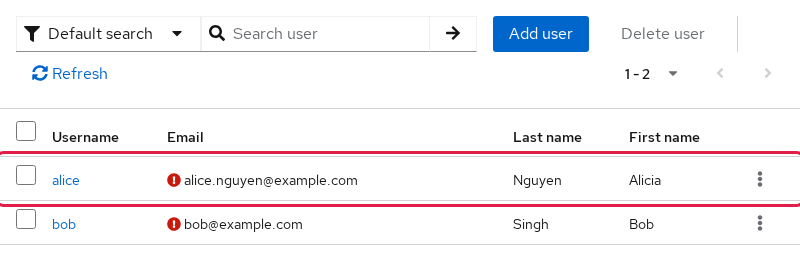
Open Users in the Admin Console. The list shows both accounts, with Alice's updated email and first name. The mark beside the email is Keycloak noting that the address is not verified. It is not a failed SCIM write.
Open alice. The page title is her username, and General shows the email, first name, and last name from the SCIM document:
Create and Manage SCIM Groups
A SCIM group is a Keycloak group. The id Keycloak returns is the group id you would see under Groups, and the path is /engineering. It is not a realm role. After this create, realm roles do not include engineering.
Keycloak does not accept group membership in the initial POST /Groups payload. Create the group first, then add members with PATCH. A body that includes members is rejected:
curl -sS -X POST "$BASE/Groups" -H "Authorization: Bearer $TOKEN" -H 'Content-Type: application/scim+json' -H 'Accept: application/scim+json' -d '{"schemas":["urn:ietf:params:scim:schemas:core:2.0:Group"],"displayName":"engineering","members":[{"value":"'"$USER_ID"'"}]}'{"schemas":["urn:ietf:params:scim:api:messages:2.0:Error"],"status":"400","scimType":"invalidSyntax","detail":"Managing members on updates are not supported"}HTTP 400. The detail text says "updates" even on this create. The group was not created.
Create the group with displayName only. That is the name shown in the console:
curl -sS -X POST "$BASE/Groups" -H "Authorization: Bearer $TOKEN" -H 'Content-Type: application/scim+json' -H 'Accept: application/scim+json' -d '{"schemas":["urn:ietf:params:scim:schemas:core:2.0:Group"],"displayName":"engineering"}' | jq '{id,displayName,location:.meta.location}'{
"id": "520ad182-c499-4fd3-9ca5-33dbf376ff5e",
"displayName": "engineering",
"location": "http://127.0.0.1:8080/realms/golinuxcloud/scim/v2/Groups/520ad182-c499-4fd3-9ca5-33dbf376ff5e"
}HTTP 201. Save the group id the same way you saved the user id:
GROUP_ID=520ad182-c499-4fd3-9ca5-33dbf376ff5eRename a SCIM Group
A group update is a PATCH on the group itself. This one replaces displayName:
curl -sS -X PATCH "$BASE/Groups/$GROUP_ID" -H "Authorization: Bearer $TOKEN" -H 'Content-Type: application/scim+json' -H 'Accept: application/scim+json' -d '{"schemas":["urn:ietf:params:scim:api:messages:2.0:PatchOp"],"Operations":[{"op":"replace","path":"displayName","value":"platform-engineering"}]}' | jq '{id,displayName}'{
"id": "520ad182-c499-4fd3-9ca5-33dbf376ff5e",
"displayName": "platform-engineering"
}HTTP 200. The group id stayed the same and the name is now platform-engineering. Set it back to engineering before the membership calls, so the later screenshot and responses use that name:
curl -sS -X PATCH "$BASE/Groups/$GROUP_ID" -H "Authorization: Bearer $TOKEN" -H 'Content-Type: application/scim+json' -H 'Accept: application/scim+json' -d '{"schemas":["urn:ietf:params:scim:api:messages:2.0:PatchOp"],"Operations":[{"op":"replace","path":"displayName","value":"engineering"}]}' | jq '{id,displayName}'{
"id": "520ad182-c499-4fd3-9ca5-33dbf376ff5e",
"displayName": "engineering"
}HTTP 200. The group is engineering again. A group GET without attributes returns displayName and leaves members out.
Add and Remove Group Members
Add Alice with a PATCH on the group, not on the user. The operation is add, the path is members, and value is a list of member objects. Each object needs the user id:
curl -sS -X PATCH "$BASE/Groups/$GROUP_ID" -H "Authorization: Bearer $TOKEN" -H 'Content-Type: application/scim+json' -H 'Accept: application/scim+json' -d '{"schemas":["urn:ietf:params:scim:api:messages:2.0:PatchOp"],"Operations":[{"op":"add","path":"members","value":[{"value":"'"$USER_ID"'"}]}]}' | jq '{id,displayName,members}'{
"id": "520ad182-c499-4fd3-9ca5-33dbf376ff5e",
"displayName": "engineering"
}HTTP 200, and members is absent. That does not mean the add failed. The group schema marks members as returned only when requested. Read the group again with attributes=displayName,members:
curl -sS -G "$BASE/Groups/$GROUP_ID" -H "Authorization: Bearer $TOKEN" -H 'Accept: application/scim+json' --data-urlencode 'attributes=displayName,members' | jq '{displayName,members}'{
"displayName": "engineering",
"members": [
{
"value": "e4809dc6-39d9-4fef-a1ab-0268d192184e",
"display": "alice",
"type": "User"
}
]
}Alice is a member. display is her username, and type is User.
The same membership from the user side uses attributes=groups. The type string is different there:
curl -sS -G "$BASE/Users/$USER_ID" -H "Authorization: Bearer $TOKEN" -H 'Accept: application/scim+json' --data-urlencode 'attributes=userName,groups' | jq '{userName,groups}'{
"userName": "alice",
"groups": [
{
"value": "520ad182-c499-4fd3-9ca5-33dbf376ff5e",
"display": "engineering",
"type": "direct"
}
]
}type is direct, meaning Alice is a member of this group itself rather than only through a parent group. An indirect membership means the user reaches the group through Keycloak's group hierarchy rather than being directly assigned to that group. A default GET of the user omits groups the same way a default group GET omits members.
To find which SCIM groups contain Alice, filter groups by her user ID:
curl -sS -G "$BASE/Groups" -H "Authorization: Bearer $TOKEN" -H 'Accept: application/scim+json' --data-urlencode "filter=members.value eq \"$USER_ID\"" | jq '{totalResults,groups:[.Resources[].displayName]}'{
"totalResults": 1,
"groups": [
"engineering"
]
}engineering is the group that contains Alice. This list does not include the members array. Ask for attributes=members on the group id when you need the people in it.
In the Admin Console, open engineering and select Members. Alice is listed with the email and first name from the earlier updates:
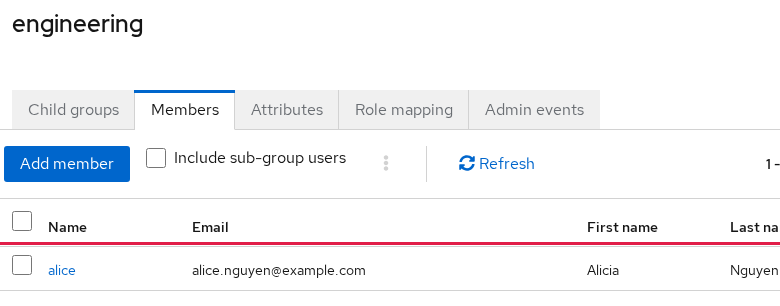
Remove her with op set to remove. To remove one specific member, include that user's ID in the PATCH path rather than removing the entire members attribute.
curl -sS -X PATCH "$BASE/Groups/$GROUP_ID" -H "Authorization: Bearer $TOKEN" -H 'Content-Type: application/scim+json' -H 'Accept: application/scim+json' -d '{"schemas":["urn:ietf:params:scim:api:messages:2.0:PatchOp"],"Operations":[{"op":"remove","path":"members[value eq \"'"$USER_ID"'\"]"}]}' | jq '{displayName,members}'{
"displayName": "engineering"
}The PATCH response hides members. Read them back with the same attributes parameter:
curl -sS -G "$BASE/Groups/$GROUP_ID" -H "Authorization: Bearer $TOKEN" -H 'Accept: application/scim+json' --data-urlencode 'attributes=displayName,members' | jq '{displayName,members}'{
"displayName": "engineering"
}members is gone. Alice is no longer in engineering. The group itself exists.
Map Keycloak User Attributes to the SCIM Enterprise Schema
This example maps the Keycloak user-profile attribute department to the standard SCIM Enterprise User attribute urn:ietf:params:scim:schemas:extension:enterprise:2.0:User:department.
GET /Schemas describes the SCIM schemas and attributes that Keycloak exposes through this realm. Before any mapping, only the core user and group schemas are advertised:
curl -sS -H "Authorization: Bearer $TOKEN" -H 'Accept: application/scim+json' "$BASE/Schemas" | jq '[.Resources[].id]'[
"urn:ietf:params:scim:schemas:core:2.0:Group",
"urn:ietf:params:scim:schemas:core:2.0:User"
]Some SCIM attributes require a Keycloak User Profile mapping before their values persist. The department example below shows the mapping that worked in this 26.8.0 test. Configure the SCIM mapping while creating the User Profile attribute. In the Admin Console open Realm settings, then User profile, then Create attribute.
- Set the attribute name to
department. - Under permissions, allow Admin to view and edit. This page also allows User to view.
- Open the SCIM section and set SCIM attribute to
urn:ietf:params:scim:schemas:extension:enterprise:2.0:User:department. - Save.
These Admin permissions matter to SCIM. Admin view allows the mapped attribute to appear in SCIM responses, while Admin edit allows SCIM PUT and PATCH requests to change it. The colon before department is part of the value that published the attribute.
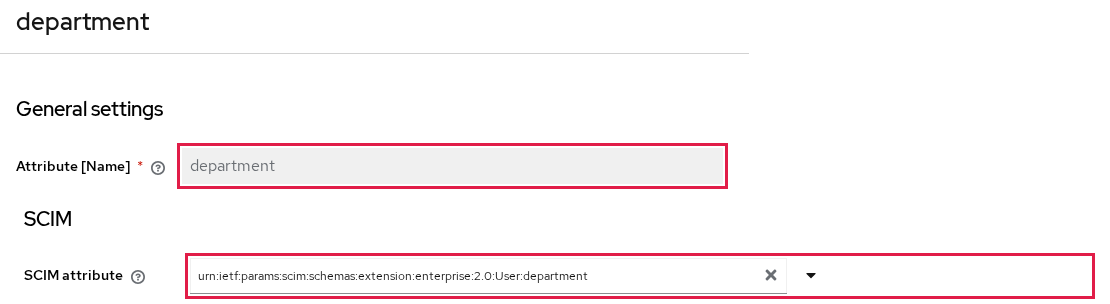
The attribute name is department, and the SCIM attribute is the enterprise URN ending in :department. The same user-profile screen is where other user attributes are defined. The SCIM mapping is what exposes this one on the API.
Read /Schemas again. The enterprise schema is now present, and its only attribute is the one you mapped:
curl -sS -H "Authorization: Bearer $TOKEN" -H 'Accept: application/scim+json' "$BASE/Schemas" | jq '[.Resources[]|{id,attrs:[.attributes[].name]}]'[
{
"id": "urn:ietf:params:scim:schemas:core:2.0:Group",
"attrs": [
"displayName",
"members",
"externalId"
]
},
{
"id": "urn:ietf:params:scim:schemas:core:2.0:User",
"attrs": [
"profileUrl",
"preferredLanguage",
"timezone",
"nickName",
"displayName",
"groups",
"active",
"externalId",
"locale",
"title",
"userName",
"emails",
"name",
"userType"
]
},
{
"id": "urn:ietf:params:scim:schemas:extension:enterprise:2.0:User",
"attrs": [
"department"
]
}
]Set Alice's department with PATCH. The path is the full enterprise URN, then :department:
curl -sS -X PATCH "$BASE/Users/$USER_ID" -H "Authorization: Bearer $TOKEN" -H 'Content-Type: application/scim+json' -H 'Accept: application/scim+json' -d '{"schemas":["urn:ietf:params:scim:api:messages:2.0:PatchOp"],"Operations":[{"op":"add","path":"urn:ietf:params:scim:schemas:extension:enterprise:2.0:User:department","value":"Platform"}]}' | jq '{schemas,userName,department:."urn:ietf:params:scim:schemas:extension:enterprise:2.0:User"}'{
"schemas": [
"urn:ietf:params:scim:schemas:core:2.0:User",
"urn:ietf:params:scim:schemas:extension:enterprise:2.0:User"
],
"userName": "alice",
"department": {
"department": "Platform"
}
}The enterprise schema id is now on the user, and department is Platform. Read the user once more so you are not trusting only the PATCH echo:
curl -sS -H "Authorization: Bearer $TOKEN" -H 'Accept: application/scim+json' "$BASE/Users/$USER_ID" | jq '{userName,department:."urn:ietf:params:scim:schemas:extension:enterprise:2.0:User"}'{
"userName": "alice",
"department": {
"department": "Platform"
}
}The value is there. In the Admin Console it is the user attribute department. You can also filter on it:
curl -sS -G "$BASE/Users" -H "Authorization: Bearer $TOKEN" -H 'Accept: application/scim+json' --data-urlencode 'filter=urn:ietf:params:scim:schemas:extension:enterprise:2.0:User:department eq "Platform"' | jq '{totalResults,users:[.Resources[].userName]}'{
"totalResults": 1,
"users": [
"alice"
]
}The filter returns Alice. Bob has no department, so he is not in the list. In this 26.8.0 test, the department value persisted only after that user-profile attribute was mapped to the Enterprise User schema.
Deactivate and Delete Users
Deactivate is active set to false. The user remains in the realm and can be read. Delete removes the record.
Replace active with PATCH. You do not send the rest of the user:
curl -sS -X PATCH "$BASE/Users/$USER_ID" -H "Authorization: Bearer $TOKEN" -H 'Content-Type: application/scim+json' -H 'Accept: application/scim+json' -d '{"schemas":["urn:ietf:params:scim:api:messages:2.0:PatchOp"],"Operations":[{"op":"replace","path":"active","value":false}]}' | jq '{userName,active}'{
"userName": "alice",
"active": false
}HTTP 200 and active is false. Refresh the Users list. Alice's row is marked Disabled. Bob stays enabled:
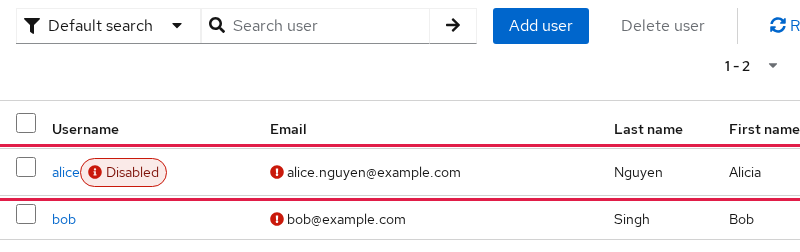
Delete Alice when you are finished with the test account. A successful delete has an empty body:
curl -sS -o /dev/null -w '%{http_code}\n' -X DELETE -H "Authorization: Bearer $TOKEN" "$BASE/Users/$USER_ID"204204 means the user is gone. A second GET is the check, and it does not return an empty user:
curl -sS -H "Authorization: Bearer $TOKEN" -H 'Accept: application/scim+json' "$BASE/Users/$USER_ID"{"schemas":["urn:ietf:params:scim:api:messages:2.0:Error"],"status":"404","detail":"Resource not found with id e4809dc6-39d9-4fef-a1ab-0268d192184e"}The status is 404 and detail names the id. Delete the group the same way. This also returned 204:
curl -sS -o /dev/null -w '%{http_code}\n' -X DELETE -H "Authorization: Bearer $TOKEN" "$BASE/Groups/$GROUP_ID"204Delete Bob with his own id (525d1a0b-f532-4c63-a8bf-b0dcfc9714a8) so the realm does not keep the pagination user. That DELETE also returned 204.
Common Validation and Conflict Errors
The calls above used a complete document. These are the failures worth recognizing, because the HTTP status and scimType tell you which check rejected the call.
| Symptom | Likely cause in this tested setup | Fix |
|---|---|---|
400 username is required |
The JSON has no userName |
Send userName |
400 invalidFilter |
Invalid SCIM filter syntax or unsupported attribute/operator combination | Fix the filter expression, or the attribute and operator combination |
409 uniqueness |
That userName already exists |
PATCH the existing user, or pick another username |
400 Invalid reference to resource |
PUT omitted id |
Include id in the replacement document |
400 Managing members on updates are not supported |
POST /Groups included members |
Create the group, then PATCH members |
| 403 and a SCIM error schema | The token cannot manage users | Assign manage-users, then request a new token |
500 unknown_error on /Schemas after adding a user-profile attribute |
The new attribute has no SCIM mapping | Configure its SCIM attribute mapping |
members missing after a successful PATCH |
Members are omitted unless requested | GET the group with attributes=members |
A create with no userName is rejected before Keycloak looks at the name object. The status on this call was 400:
curl -sS -X POST "$BASE/Users" -H "Authorization: Bearer $TOKEN" -H 'Content-Type: application/scim+json' -H 'Accept: application/scim+json' -d '{"schemas":["urn:ietf:params:scim:schemas:core:2.0:User"],"name":{"givenName":"Alice","familyName":"Nguyen"}}'{"schemas":["urn:ietf:params:scim:api:messages:2.0:Error"],"status":"400","scimType":"invalidSyntax","detail":"username is required"}scimType is invalidSyntax. The detail text says username in lower case, which is the Keycloak user-profile name, not the SCIM userName spelling.
On the realm used for this test, the user profile marks email as required for the user role. A SCIM create that omits it can succeed on Keycloak 26.8.0. erin has no email in this body:
curl -sS -X POST "$BASE/Users" -H "Authorization: Bearer $TOKEN" -H 'Content-Type: application/scim+json' -H 'Accept: application/scim+json' -d '{"schemas":["urn:ietf:params:scim:schemas:core:2.0:User"],"userName":"erin","name":{"givenName":"Erin","familyName":"Cole"},"active":true}' | jq '{userName,active,emails}'{
"userName": "erin",
"active": true,
"emails": null
}Keycloak answered 201. There is no emails array. The requirement here is configured for the user role. SCIM operates through an administrative user-profile context, so that user-only requirement did not block this SCIM create. If an attribute must also be mandatory for administrative provisioning, configure the User Profile requirement accordingly.
Delete that user so she does not stay in the realm. On this run the id was f0c32d4d-c72c-44a4-937e-194d54a8ed06:
curl -sS -o /dev/null -w '%{http_code}\n' -X DELETE -H "Authorization: Bearer $TOKEN" "$BASE/Users/f0c32d4d-c72c-44a4-937e-194d54a8ed06"204A token whose service account does not have manage-users fails earlier. On this 26.8.0 server the body was {"schemas":["urn:ietf:params:scim:api:messages:2.0:Error"],"status":"403"} with no detail string. Assign the role, request a new token, and send the create again. The old token does not pick up the role.
In this 26.8.0 test, creating the department user-profile attribute without a SCIM mapping caused GET /Schemas to return HTTP 500 and {"error":"unknown_error","error_description":"For more on this error consult the server log."}. Adding kc.scim.schema.attribute resolved it. Configure the mapping when you create the attribute.
Summary
POST /Users creates the account. GET searches it, PUT replaces the document when the body includes id, and PATCH changes one field. DELETE returns 204, and the next read is 404.
Create the group on its own, then PATCH membership. The create does not accept members. Read members with attributes=members.
Map a Keycloak user-profile attribute to a SCIM attribute before relying on it. Bulk is off on this server. Set active to false when the account should stay in the realm but stop working. DELETE removes the record.
References
- Keycloak 26.8.0 released
- Keycloak 26.8 Server Administration Guide, Managing SCIM
- Keycloak 26.8, Managing SCIM users
- Keycloak 26.8, Managing SCIM groups
- Keycloak 26.8, Filtering SCIM resources
- Keycloak 26.8, Mapping user attributes to SCIM schemas
- RFC 7644, System for Cross-domain Identity Management: Protocol
Frequently Asked Questions
How do I create a Keycloak user with SCIM?
POST a JSON user to /realms/{realm}/scim/v2/Users with a bearer token that includes manage-users. Send userName, and send name and emails when the account should show a name and an address in the Admin Console. Keycloak answers 201 and returns the new user id. On Keycloak 26.8.0, a create that omitted email returned 201 on the realm used for this test. The email requirement was configured for the user role, and SCIM used an administrative user-profile context. A missing userName returned 400 with username is required.
Does Keycloak support SCIM PATCH?
Yes, on Keycloak 26.8.0. ServiceProviderConfig reports patch.supported as true. Send a PatchOp document to the user or group URL. replace on name.givenName changes that field and leaves the email in place. PUT is the call that replaces the whole document, and on this server it needs id in the body.
How do I filter Keycloak SCIM users?
GET /Users with filter, for example userName eq "alice". Curl should URL-encode the value. and joins two comparisons, such as userName eq "alice" and name.familyName eq "Nguyen". A miss returns 200 with totalResults of 0. Page the list with startIndex (starting at 1) and count. This server caps a filtered page at 100. A long filter can go in the body of POST /Users/.search instead of the query string.
Can SCIM deactivate instead of delete a Keycloak user?
Yes. PATCH the user with replace on active and the value false. The account stays in the realm and the Admin Console shows it as Disabled. DELETE is the call that removes the user. It returns 204, and a later GET by that id returns 404.
Can Keycloak SCIM manage group membership?
Yes. Create the group with POST /Groups and displayName. Do not put members in that create. Keycloak returns 400. Then PATCH the group. add on members takes a list of {value: userId} objects. remove uses the path members[value eq "userId"]. Read members with GET and attributes=members, because the default group response leaves them out. GET /Users/{id}?attributes=groups shows the same membership from the user, with type direct or indirect. The group is a Keycloak group, not a realm role.
