
| Tested on | Red Hat Enterprise Linux 10.2 (Coughlan) |
|---|---|
| Package | quay.io/keycloak/keycloak:26.7.3 |
| Applies to | Any Keycloak 26.x deployment — declarative User Profile custom attributes, validation, and permissions |
| Privilege | Keycloak admin access in the target realm — bootstrap admin on the lab container is enough |
| Lab environment | Keycloak 26.7.3 on http://127.0.0.1:8080/ with golinuxcloud realm and user tokenuser — Install Keycloak with Podman |
| Scope | Custom user attributes defined in User Profile: create a field, set values, registration/account forms, requiredness, validators, permissions, managed vs unmanaged policy, compact JSON config, and a short token-mapping pointer. Does not duplicate full protocol-mapper or Admin API tutorials. |
| Related guides | Keycloak protocol mappers Create and manage Keycloak users Keycloak realms explained |
In current Keycloak, custom user attributes should normally be defined in Realm settings → User profile. The User Profile defines:
- Attribute name
- Whether the field is required
- Validation rules
- Who can view or edit it
- Where Keycloak renders the field
In this article we will add a department attribute on Keycloak 26.7.3. You will:
- Validate the field
- Show it on registration and user forms
- Assign a value on
tokenuser - See how it can later be mapped into a token
Keycloak already manages username, email, firstName, and lastName through User Profile. Custom fields such as department are added alongside them.
Why use custom user attributes?
Username, email, and name cover identity. Most applications also need business-specific facts about a person, for example:
- Department or cost center
- Employee ID
- Preferred locale
- Customer tier
Those values usually do not belong as separate realm roles. Storing them only in your app database also splits the source of truth away from the identity Keycloak already owns.
Custom user attributes let you:
- Collect and validate the field during registration or account update
- Let admins set or correct values in Admin Console
- Expose the value to applications later through a protocol mapper claim when a client needs it
Choose the right construct for the problem:
- Attributes — profile data that describes the user
- Realm or client roles — authorization (“can this user approve invoices?”)
- Groups — membership in a team or organizational unit
The rest of this guide focuses on defining the attribute in User Profile so Keycloak stores and validates it consistently.
User attributes vs User Profile
| Term | Meaning |
|---|---|
| User attribute | The actual value stored for a user, for example department=Platform Engineering |
| User Profile | The realm-level schema that defines how that attribute behaves |
- Without a User Profile entry, Keycloak may ignore undeclared keys depending on unmanaged-attribute policy.
- With a managed attribute, the same field appears consistently in admin forms, registration, account updates, and validated Admin API writes.
Add a custom user attribute in Keycloak
- Switch to realm
golinuxcloud. - Open Realm settings → User profile → Create attribute.
- Set Attribute name to
department(API key, no spaces). - Set Display name to
Department(label on generated forms). - Leave Multivalued off for fields such as department or employee ID. Turn it on only when one user should store multiple values for the same attribute.
An attribute group is only a visual grouping for related fields on generated forms. It does not change how the attribute is stored.
- Assign Attribute group
user-metadataso the field appears under that section header. Ifuser-metadatadoes not exist yet, create it from the Attribute groups tab first, or leave the attribute ungrouped. - Save.
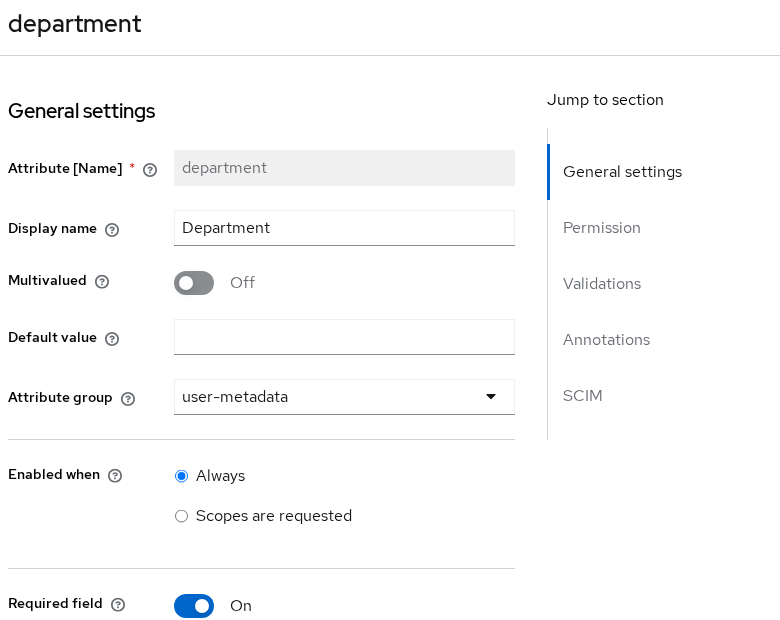
- Display name is what people see on forms.
- Attribute name is the stable key in JSON and protocol mappers.
After you save, return to the User Profile attribute list:
- Keycloak already lists the built-in identity fields.
- Your custom fields appear alongside them.
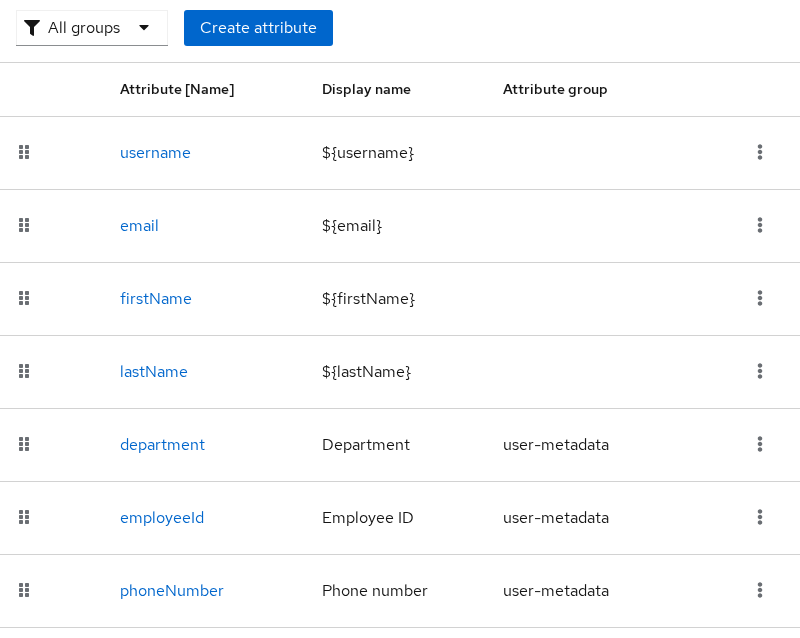
- For new custom fields, define them in User Profile rather than adding undeclared keys directly to users.
- Repeat the same pattern for
employeeIdwith a stricter format when you need an admin-facing identifier.
Set the attribute value on a user
After the schema exists:
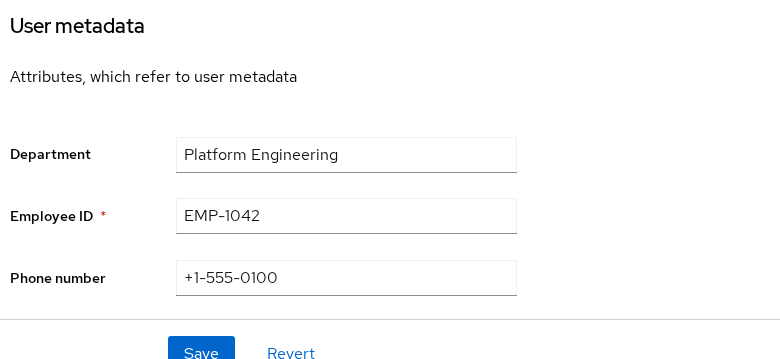
- Open Users →
tokenuser. - Set
departmenttoPlatform Engineering.
The Admin Console renders fields from User Profile, so the value appears under the User metadata section instead of a separate legacy attributes tab.
When updating a user through the Admin REST API:
- Include any profile fields that are required in the administrative context.
- If you build the payload manually, first read the existing user and preserve fields you do not intend to change.
Show custom attributes on registration and account forms
Keycloak reuses the same User Profile definition in several user-facing and administrative screens:
| Context | Where readers see it |
|---|---|
| Registration | Self-registration form when enabled on the realm |
| Update profile | Login required-action and account updates |
| IDP review | First-broker-login review when linking an external IdP |
| Account console | End-user Personal info at /realms/{realm}/account/ |
| Administrative | Admin Console user screens and Admin REST API |
- Because all of these screens use the same profile definition, you configure the field once instead of maintaining separate forms.
- When registration is enabled,
departmentappears on the public registration page without a custom theme.
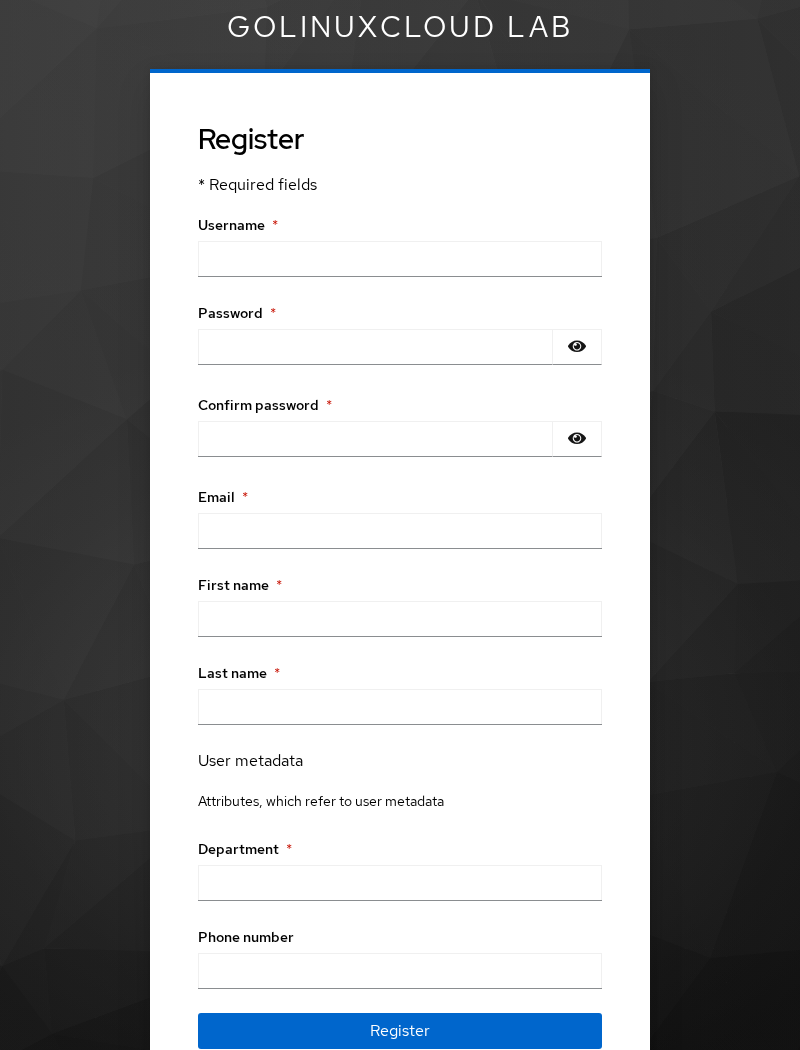
employeeIddoes not appear on that registration form when it is configured for administrative handling.departmentis exposed to the end-user registration context.- That difference comes from requiredness and permissions, not from a missing attribute definition.
Make a user attribute required
Keycloak supports contextual requiredness, not only “always required.”
Here user and admin are User Profile role/context identifiers, not realm roles you create:
usermeans end-user profile flows such as registration and account updates.adminmeans administrative user management.
| Field | Lab requiredness | Effect |
|---|---|---|
department |
Required for user |
End-user contexts must supply it |
employeeId |
Required for admin |
Administrative create/update must include it |
- You can also scope requiredness to OIDC scopes where a client truly needs conditional fields.
- Start with role-based rules first.
- If an existing user lacks a newly required field, password grants may return
Account is not fully set upuntil an admin or the user completes the profile.
Required-action behavior is covered in Create and manage Keycloak users.
Validate custom user attributes
Validators run on Admin API writes and self-service forms. Configure them on the attribute → Validations tab (or in JSON).
| Attribute | Validators | Custom error message |
|---|---|---|
department |
length min 2 / max 64; pattern ^[A-Za-z][A-Za-z0-9 -]{1,63}$ |
Department must start with a letter… |
employeeId |
pattern ^EMP-[0-9]{4,6}$; length max 16 |
Employee ID must match EMP- followed by 4–6 digits |
- Enter an invalid value in the Admin Console or registration form and save.
- Keycloak displays the configured validation message on that field.
Verify validation through the Admin REST API
Resolve the user’s internal ID first, then send a deliberately invalid profile update:
ADMIN_TOKEN=$(curl -s -X POST 'http://127.0.0.1:8080/realms/master/protocol/openid-connect/token' \
  -H 'Content-Type: application/x-www-form-urlencoded' \
  -d 'client_id=admin-cli' -d 'username=admin' -d 'password=ChangeMe!2026' -d 'grant_type=password' \
  | python3 -c 'import sys,json; print(json.load(sys.stdin)["access_token"])')

USER_ID=$(curl -s 'http://127.0.0.1:8080/admin/realms/golinuxcloud/users?username=tokenuser&exact=true' \
  -H "Authorization: Bearer ${ADMIN_TOKEN}" \
  | python3 -c 'import sys,json; print(json.load(sys.stdin)[0]["id"])')

curl -s -X PUT "http://127.0.0.1:8080/admin/realms/golinuxcloud/users/${USER_ID}" \
  -H "Authorization: Bearer ${ADMIN_TOKEN}" -H 'Content-Type: application/json' \
  -d '{"username":"tokenuser","email":"tokenuser@golinuxcloud.lab","firstName":"Token","lastName":"User","enabled":true,"attributes":{"department":["!!!bad"],"employeeId":["EMP-12"]}}'
Both values are intentionally invalid so you can see that Keycloak returns a separate validation error for each field.
Sample error response:
{"errors":[{"field":"employeeId","errorMessage":"Employee ID must match EMP- followed by 4-6 digits.","params":["employeeId","^EMP-[0-9]{4,6}$"]},{"field":"department","errorMessage":"Department must start with a letter and use letters, numbers, spaces, or hyphens only.","params":["department","^[A-Za-z][A-Za-z0-9 -]{1,63}$"]}]}- Keycloak returns HTTP
400with per-field messages. - A valid update uses values such as
department: Platform EngineeringandemployeeId: EMP-1042.
Control who can view or edit attributes
Permissions control who can see and edit each attribute in profile contexts. The same user / admin identifiers apply here.
| Permission | Roles | Lab department |
Lab employeeId |
|---|---|---|---|
| View | admin, user |
Users see the field on account console | Users can see the ID |
| Edit | admin only |
Users cannot self-edit department | Only admins set employee ID |
- If an attribute appears but the end user cannot change it, check Permissions before treating that as a bug.
- Admin-only edit is a common pattern for HR-assigned fields.
Managed vs unmanaged attributes
- Managed attributes are declared in User Profile.
- Unmanaged attributes are undeclared keys written without schema.
unmanagedAttributePolicy controls whether undeclared keys are accepted:
| Policy | Behavior |
|---|---|
DISABLED (default) |
Undeclared attributes are ignored in User Profile contexts |
ENABLED |
Any key/value is allowed. Flexible, but hard to validate |
ADMIN_VIEW |
Admins can view unmanaged attributes in administrative contexts but cannot edit them |
ADMIN_EDIT |
Only administrators may set unmanaged keys |
For new deployments, prefer a strict policy such as DISABLED, or ADMIN_EDIT when administrators still need to manage legacy undeclared attributes.
Test unmanaged handling on tokenuser:
curl -s -o /dev/null -w '%{http_code}\n' -X PUT \
  "http://127.0.0.1:8080/admin/realms/golinuxcloud/users/${USER_ID}" \
  -H "Authorization: Bearer ${ADMIN_TOKEN}" -H 'Content-Type: application/json' \
  -d '{"username":"tokenuser","email":"tokenuser@golinuxcloud.lab","firstName":"Token","lastName":"User","enabled":true,"attributes":{"department":["Platform Engineering"],"employeeId":["EMP-1042"],"legacyCode":["ORPHAN-1"]}}'
Sample output:
204Read the user back and check attributes. legacyCode should be absent when the policy is DISABLED:
curl -s "http://127.0.0.1:8080/admin/realms/golinuxcloud/users/${USER_ID}" \
-H "Authorization: Bearer ${ADMIN_TOKEN}" | python3 -m json.tool- A 204 response does not prove the undeclared attribute was stored.
- Confirm
departmentandemployeeIdremain, and thatlegacyCodeis missing.
User Profile JSON configuration
Use the JSON editor sub-tab under User profile for:
- Bulk edits
- GitOps
kcadm.sh update users/profile
The payload contains attributes, groups, and optional unmanagedAttributePolicy.
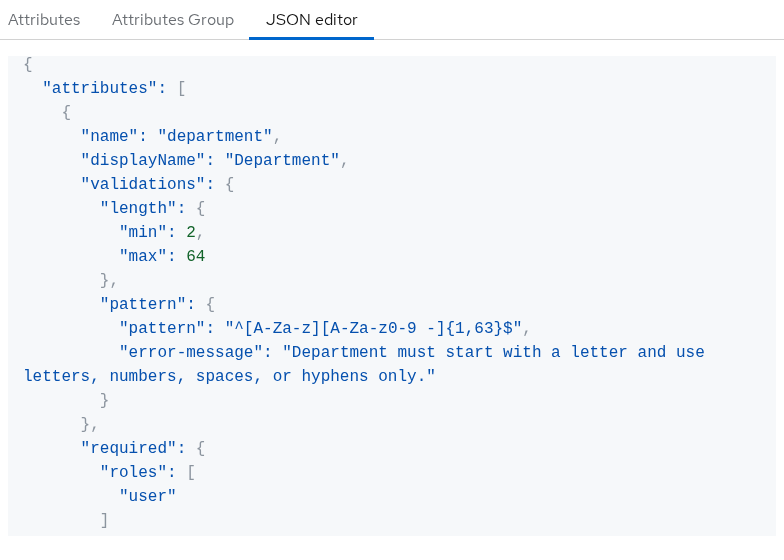
Compact department example:
{
  "unmanagedAttributePolicy": "DISABLED",
  "attributes": [
    {
      "name": "department",
      "displayName": "Department",
      "group": "user-metadata",
      "required": { "roles": ["user"] },
      "permissions": {
        "view": ["admin", "user"],
        "edit": ["admin"]
      },
      "validations": {
        "length": { "min": 2, "max": 64 },
        "pattern": {
          "pattern": "^[A-Za-z][A-Za-z0-9 -]{1,63}$",
          "error-message": "Department must start with a letter and use letters, numbers, spaces, or hyphens only."
        }
      },
      "multivalued": false
    }
  ],
  "groups": [
    {
      "name": "user-metadata",
      "displayHeader": "User metadata",
      "displayDescription": "Attributes, which refer to user metadata"
    }
  ]
}- Apply the JSON through
PUT /admin/realms/{realm}/users/profile. - Or edit and export it from the User Profile JSON editor.
Add a user attribute to a token
- Creating a User Profile attribute does not automatically put it in tokens.
- Use a User Attribute protocol mapper to expose
departmentas a claim. - Use User Profile to define and validate the user field.
- Use a protocol mapper only when that field also needs to appear in tokens.
Full mapper setup is covered in Keycloak protocol mappers.
After the mapper is linked and department is set on the user, the access token payload should include:
department: Platform EngineeringIf the claim is missing:
- Confirm the User Profile value first.
- Then check the mapper and client scope on the protocol mappers page.
Common problems
| Symptom | Likely cause | Fix |
|---|---|---|
| Custom field invisible on forms | Attribute not in User Profile or wrong group | Create managed attribute; assign Attribute group |
| Admin can edit, user cannot | permissions.edit is admin only |
Intended for admin-only fields; adjust permissions if users should self-serve |
Profile update blocked / Account is not fully set up |
New required field empty on user | Set value in Admin Console or relax required roles |
| API accepts write but attribute missing | Unmanaged key under DISABLED policy |
Add managed attribute; read the user back after write |
| Attribute on user, not in JWT | No protocol mapper or scope not linked | Add a user-attribute protocol mapper and assign the client scope |
| Registration shows department but not employeeId | Different requiredness/permissions for user vs admin |
Expected when employeeId is admin-facing only |
| Theme shows old static fields | Legacy theme bypasses dynamic profile | Use the default profile renderer or update theme templates |
Validation error on API PUT |
Pattern/length validator failed | Read errors[].errorMessage in the 400 response |
| Existing profile values changed or disappeared after API update | Update payload did not preserve values expected by your workflow or profile | Fetch the current user first and include fields you intend to preserve |
Summary
- In Keycloak 26.x, custom user fields belong in User profile.
- Declare managed attributes such as
departmentwith a display name, group, requiredness, validators, and permissions. - Keycloak then renders registration, account, and admin forms from that one definition.
- Validate values on the form first, then through the Admin API when you automate.
- Prefer a strict unmanaged-attribute policy for new deployments.
- Use a protocol mapper only when the stored attribute also needs to appear in tokens.
References
- Keycloak Server Administration Guide — User profile
- Keycloak Admin REST API — User profile
- Keycloak Validator SPI
Frequently Asked Questions
What is the difference between a user attribute and User Profile?
A user attribute is the stored value on one user (department=Platform Engineering). User Profile is the realm schema that defines which attributes exist, how they validate, who can edit them, and where they appear.
Why did my script write an attribute but it disappeared?
The key is probably not a managed attribute and unmanagedAttributePolicy is DISABLED (default). Declare the field in User Profile, or use ADMIN_EDIT only if administrators truly need orphan keys. Read the user back after a 204 write.
Can users edit department in the lab?
No. The lab sets department Edit permission to admin only while still allowing View for users. That pattern suits HR-assigned fields.
Why does login say Account is not fully set up?
A required User Profile field is empty on the account, often after you add a new required attribute to an existing user. Fill the field in Admin Console or complete the update-profile required action.
Does User Profile automatically add claims to tokens?
No. User Profile governs storage and validation. Add a protocol mapper (see the protocol mappers guide) to emit an attribute into access tokens, ID tokens, or UserInfo.
Are user and admin under Required the same as realm roles?
No. In User Profile configuration, user and admin are profile contexts: end-user flows versus administrative user management. They are not application realm roles you create under Realm roles.
