
| Tested on | Red Hat Enterprise Linux 10.2 (Coughlan) |
|---|---|
| Package | quay.io/keycloak/keycloak:26.7.3 |
| Applies to | Keycloak 26.x — screenshots and commands tested on 26.7.3 |
| Privilege | Keycloak admin access in the target realm — bootstrap admin on the lab container is enough |
| Lab environment | Keycloak 26.7.3 on http://127.0.0.1:8080/ with golinuxcloud realm — Install Keycloak with Podman |
| Scope | Automatically assign default realm roles and group memberships to new Keycloak users, verify the result, and understand what happens to existing users. |
| Related guides | Create and manage Keycloak users Keycloak LDAP group mapper Keycloak realms explained |
If every new Keycloak user needs the same role, assigning it manually to each account quickly becomes repetitive. For example, suppose every new user in the golinuxcloud realm should receive an employee-baseline role and become a member of the /Employees group.
Keycloak can do this automatically using default roles and default groups. The same mechanisms also apply when users are created through self-registration, the Admin REST API, or Identity Brokering.
How automatic role and group assignment works
Keycloak can assign baseline access in two ways when a user is created:
- Default roles give every new user the same realm roles automatically.
- Default groups put every new user into selected groups automatically. Roles mapped on those groups can then reach the user through inheritance.
The walkthrough below teaches each mechanism separately, then shows how to combine them. All steps use the golinuxcloud realm in the Admin Console unless noted otherwise.
Method 1: Automatically assign a default role
What is a Keycloak default role?
A default role is a role that every newly created user should receive automatically. If every new account needs employee-baseline, configure that role as a realm default.
Internally, Keycloak manages default roles through a built-in composite role named default-roles-{realm}. In the golinuxcloud realm, that composite is default-roles-golinuxcloud. You do not manually assign this composite to each new user. Keycloak does that automatically.
You configure:
  employee-baseline as a default role
           │
           ▼
Keycloak adds it inside:
  default-roles-golinuxcloud
           │
           ▼
Keycloak automatically gives this composite to new users
           │
           ▼
New user effectively receives:
  employee-baseline
So Keycloak does not directly add employee-baseline to every new user's role list. It assigns default-roles-golinuxcloud, and employee-baseline is inherited from that composite.
Important: default roles and default groups behave differently when you change them later. Adding a default group does not automatically join existing users to that group. Users who already hold default-roles-{realm} can gain a role that you later add to that composite. The What happens to existing users? section tests this difference.
Before you change any defaults, create a user named existing-user. You'll return to this account later to test whether defaults apply retroactively.
Create employee-baseline and add it as a default role
A realm role applies at the realm level rather than belonging to one specific client or application. This example uses realm roles to keep the walkthrough simple. See Keycloak realm roles vs client roles for the full distinction.
- Open Realm roles → Create role.
- Set Role name to
employee-baselineand save. - Open Realm settings → User registration tab → Default roles.
- Click Assign role, choose
employee-baseline, and confirm.
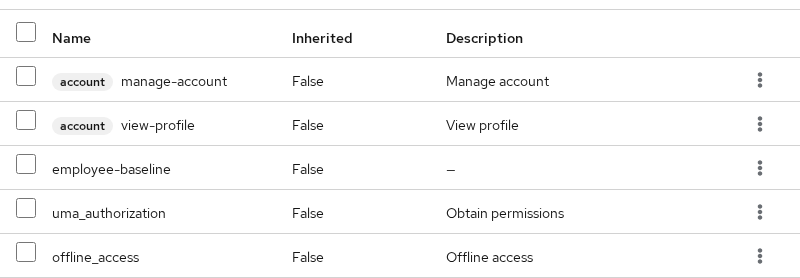
You may also see Keycloak's built-in default roles in this list. Leave them unchanged for this example.
Create a new user and verify the default role
Create a user only after you configure the default role:
- Open Users → Create new user.
- Set Username to
newhire-role-test, leave Enabled on, and save. - Open Users →
newhire-role-test→ Role mapping with Hide inherited roles unchecked.
You should see default-roles-golinuxcloud with Inherited=False and employee-baseline with Inherited=True.
Why does Keycloak show the default role as inherited?
If employee-baseline appears with Inherited=True, the configuration is working as expected.
In Keycloak's Role mapping screen, Inherited=False means the role is assigned directly to the object you are viewing. Inherited=True means the role comes indirectly through another role or group.
DIRECT
  newhire-role-test
  └── default-roles-golinuxcloud      Inherited=False

VIA COMPOSITE
  default-roles-golinuxcloud
  └── employee-baseline                 Inherited=True
Effective roles are all roles the user ultimately has after Keycloak includes direct assignments, composite-role inheritance, and group inheritance.
Method 2: Automatically assign a default group
What is a default group?
A group is a collection of users. Instead of assigning the same roles to every user individually, you can assign roles to a group. Members of that group inherit those roles.
A default group tells Keycloak to put every newly created or imported user into that group automatically. Any roles mapped on the group then become effective roles for those users. See Keycloak groups and nested groups for the full group model.
Create /Employees, map a role, and set it as default
This step introduces a second realm role, ops-viewer, to show role inheritance through a group rather than through the default composite.
Create the role and group:
- Open Realm roles → Create role, set Role name to
ops-viewer, and save. - Open Groups → Create group, set Name to
Employees, and save (path/Employees). - Open Groups →
Employees→ Role mapping. - Click Assign role → filter realm roles → select
ops-viewer.
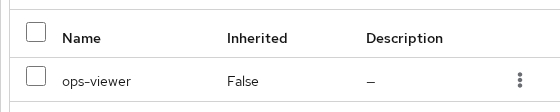
On the group screen, Inherited=False means ops-viewer is assigned directly to the Employees group. When a user becomes a member of Employees, Keycloak treats ops-viewer as an inherited role on that user.
Register /Employees as a default group:
- Open Realm settings → User registration → Default groups tab.
- Click Assign group, select
Employees, and confirm.

Create a new user and verify group membership
Create another user after the default group is configured:
- Open Users → Create new user.
- Set Username to
newhire1, leave Enabled on, and save. - Open Users →
newhire1→ Groups. The account should show/Employees.

Open Role mapping with Hide inherited roles unchecked:
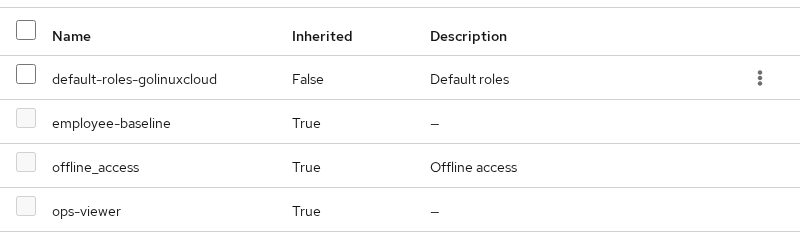
Because newhire1 belongs to /Employees, and ops-viewer is mapped directly to that group, ops-viewer appears with Inherited=True:
VIA GROUP
  /Employees
  └── ops-viewer                        Inherited=True
The user also still receives employee-baseline through the default composite from Method 1.
Default roles vs default groups
Use a default role when every account needs the same permission. For example, if everyone who signs up must receive employee-baseline, make that a default role.
Use a default group when users should also be organized as a collection that can share roles and attributes. If every new employee should belong to /Employees, make that a default group. Roles such as ops-viewer can then be mapped to the group rather than directly to every user.
| Default role | Default group | |
|---|---|---|
| Mechanism | Added to default-roles-{realm} composite |
Automatic group membership |
| User receives | default-roles-{realm} directly; configured child roles are inherited through it |
Membership in configured group |
| Additional permissions | Roles inherited from the default composite | Roles inherited from group mappings |
| Added later | Existing holders of the composite see newly added child roles | Existing users are not automatically added to the group |
| Use when | Every account needs the same baseline permission | Users should share a group that also carries roles |
Use default roles and default groups together
Many teams use both mechanisms on the same realm:
  New user created
           │
           ├── Default roles  → default-roles-golinuxcloud
           │                      └── employee-baseline (inherited)
           │
           └── Default groups → /Employees
                    │
                    └── ops-viewer (inherited from group mapping)
User newhire1 in the example above receives employee-baseline through the default composite and ops-viewer through the default group. That is the combined onboarding pattern this article demonstrates.
What happens to existing users?
Default groups and default roles behave differently when you change configuration later.
Default group added later
Default groups are not retroactive. User existing-user was created before /Employees was configured as a default group.
Open Users → existing-user → Groups. The account is not a member of /Employees. To onboard legacy users into /Employees, join the group manually or run a bulk update. Defaults will not backfill membership.
Role added to the default composite later
Existing users that already hold default-roles-golinuxcloud gain newly added child roles through composite expansion.
This does not mean Keycloak searches every existing user and assigns the new role individually. The existing user already has default-roles-golinuxcloud. When you change what that composite contains, the user's effective roles change automatically.
Create a throwaway role late-default and add it to the default composite:
- Open Realm roles → Create role, set Role name to
late-default, and save. - Open Realm settings → User registration → Default roles.
- Click Assign role and add
late-default.
Do not make any changes to existing-user. Open Users → existing-user → Role mapping with Hide inherited roles unchecked. late-default should appear as an inherited role because existing-user already holds the default composite.
Because late-default was added as a child of default-roles-golinuxcloud, existing users that already have the default composite also receive late-default as an effective role. You do not need to assign the new role individually to those users. This differs from default groups, which are assigned only when the user is created or imported.
Do defaults apply to identity-provider users?
Identity Brokering means Keycloak lets a user sign in through another identity provider, such as an external OIDC or SAML provider, and creates or imports a corresponding local Keycloak user.
Yes. When Keycloak creates or imports that local user through Identity Brokering, the configured default roles and default groups are applied.
Default assignment vs access token contents
This article verifies that the user has the role in Keycloak. Whether that role appears in a particular client's access token also depends on that client's role scope and client-scope configuration. User assignment and token inclusion are separate questions.
Can a client role be a default role?
Yes. The Assign role dialog on Realm settings → User registration → Default roles can include client roles when you filter by client. The same composite mechanism applies: the client role becomes a child of default-roles-{realm} and reaches new users through composite inheritance. A fresh realm's built-in defaults already include client roles such as view-profile from the account client.
This walkthrough uses realm roles only to keep the example simple.
Optional: Configure and verify through the Admin REST API
The commands below automate the same configuration and verification shown in the Admin Console. You do not need both paths.
The REST examples need an administrator access token. The bootstrap administrator belongs to the master realm, so the example obtains the admin token there and then uses it to administer the golinuxcloud realm. Replace ChangeMe!2026 with your administrator password.
ADMIN_TOKEN=$(curl -s -X POST 'http://127.0.0.1:8080/realms/master/protocol/openid-connect/token' -d 'client_id=admin-cli' -d 'username=admin' -d 'password=ChangeMe!2026' -d 'grant_type=password' | python3 -c 'import sys,json; print(json.load(sys.stdin)["access_token"])')Register /Employees as a default group:
GROUP_ID=$(curl -s -H "Authorization: Bearer ${ADMIN_TOKEN}" \
  'http://127.0.0.1:8080/admin/realms/golinuxcloud/group-by-path/Employees' \
  | python3 -c 'import sys,json; print(json.load(sys.stdin)["id"])')

curl -s -o /dev/null -w '%{http_code}\n' -X PUT \
  -H "Authorization: Bearer ${ADMIN_TOKEN}" \
  "http://127.0.0.1:8080/admin/realms/golinuxcloud/default-groups/${GROUP_ID}"
Sample output:
204204 means Keycloak accepted the default-group assignment successfully.
Create newhire1 and list inherited realm roles:
curl -s -o /dev/null -w '%{http_code}\n' -X POST \
  'http://127.0.0.1:8080/admin/realms/golinuxcloud/users' \
  -H "Authorization: Bearer ${ADMIN_TOKEN}" \
  -H 'Content-Type: application/json' \
  -d '{"username":"newhire1","enabled":true}'
Resolve newhire1's user ID before listing role mappings:
USER_ID=$(curl -s -H "Authorization: Bearer ${ADMIN_TOKEN}" \
  'http://127.0.0.1:8080/admin/realms/golinuxcloud/users?username=newhire1&exact=true' \
  | python3 -c 'import sys,json; print(json.load(sys.stdin)[0]["id"])')

curl -s -H "Authorization: Bearer ${ADMIN_TOKEN}" \
  "http://127.0.0.1:8080/admin/realms/golinuxcloud/users/${USER_ID}/role-mappings/realm/composite" \
  | python3 -c "import sys,json; print('\n'.join(sorted(r['name'] for r in json.load(sys.stdin))))"
Sample output:
default-roles-golinuxcloud
employee-baseline
offline_access
ops-viewer
uma_authorization
List group membership:
curl -s -H "Authorization: Bearer ${ADMIN_TOKEN}" \
  "http://127.0.0.1:8080/admin/realms/golinuxcloud/users/${USER_ID}/groups" \
  | python3 -c "import sys,json; [print(g['path']) for g in json.load(sys.stdin)]"
Sample output:
/EmployeesCheck existing-user group membership:
EXISTING_USER_ID=$(curl -s -H "Authorization: Bearer ${ADMIN_TOKEN}" \
  'http://127.0.0.1:8080/admin/realms/golinuxcloud/users?username=existing-user&exact=true' \
  | python3 -c 'import sys,json; print(json.load(sys.stdin)[0]["id"])')

curl -s -H "Authorization: Bearer ${ADMIN_TOKEN}" \
  "http://127.0.0.1:8080/admin/realms/golinuxcloud/users/${EXISTING_USER_ID}/groups" \
  | python3 -c "import sys,json; [print(g['path']) for g in json.load(sys.stdin)]"
An empty result means existing-user belongs to no groups.
Common problems
| Symptom | Likely cause | Fix |
|---|---|---|
| New user missing expected role | User existed before configuration, role not in default composite, or wrong realm | Create a fresh user after configuring defaults; open Default roles in golinuxcloud and confirm the role is listed |
| Role visible on user but missing from access token | Client scope or role scope configuration | Inspect the client's role scope mappings; user assignment and token inclusion are separate |
| Role appears on existing users after default change | Composite default-roles-{realm} expands live |
Expected for default roles. Removing the role from Default roles affects all users who inherit that composite; it is not a per-user removal |
| Default group not applied | User predates default group configuration | Join group manually or bulk-update legacy users |
| Extra role from nowhere | Default group has role mappings | Inspect group Role mapping, not only user defaults |
| Cannot remove one inherited default role from a user | Role is inherited from default-roles-{realm} composite |
Remove or change the role in the composite design, or use a different role/group assignment model when individual exceptions are required |
| Wrong realm | Admin Console still on master |
Switch to golinuxcloud via Manage realms before testing |
Summary
Keycloak can automatically assign roles and group memberships to new users through default roles and default groups. Default roles reach new users through the default-roles-golinuxcloud composite, making configured child roles such as employee-baseline effective through inheritance. Default groups such as /Employees attach at user creation time and can deliver further roles through group mappings.
The distinction that saves debugging time: adding a default group does not retrofit existing accounts such as existing-user, while adding a role to the default composite can affect every user who already holds default-roles-golinuxcloud. Create a fresh user after each change to verify what new accounts actually receive.
References
- Keycloak Server Administration Guide — Default roles
- Keycloak Server Administration Guide — Groups
- Keycloak Server Administration Guide — Identity brokering
Frequently Asked Questions
Where do I configure default roles in Keycloak 26?
Open Realm settings → User registration → Default roles. The UI edits the default-roles-{realm} composite role.
Does adding a default group automatically add existing users?
No. Users that already existed when the group became a realm default are not automatically added to it. Add those users manually or through a bulk operation.
Why did an existing user gain a new default role?
Default roles are composite children. Users who already hold default-roles-{realm} pick up new composite members immediately in their effective roles.
Can I use default groups instead of many default roles?
Yes. Map realm roles on the default group and let inheritance deliver permissions. The example used ops-viewer on /Employees for that pattern.
Do defaults apply to users from an identity provider?
Yes. Keycloak applies defaults when it creates local user records through Identity Brokering.
Why is a default role visible on the user but missing from the JWT?
User role assignment and token claims are controlled separately. Check the client's role scope mappings and client scopes.
