
| Tested on | Red Hat Enterprise Linux 10.2 (Coughlan) |
|---|---|
| Package | podman-5.8.2-5.el10_2.x86_64quay.io/keycloak/keycloak:26.8.0libxml2-2.12.5-10.el10_2.2.x86_64 |
| Applies to | Any Linux host with Podman or Docker |
| Privilege | Normal user (rootless Podman). Realm setup uses the Keycloak bootstrap admin |
| Scope | How a Keycloak realm acting as the SAML IdP puts realm roles, a client role, and group membership into the outgoing assertion. Does not cover identity-provider mappers that import roles from an upstream IdP, general realm RBAC, NameID, or assertion signing. |
| Related guides | What is Keycloak? Keycloak realms Authentication vs authorization Keycloak SAML metadata What is single sign-on? |
A service provider that authorizes from SAML does not read Keycloak's role table. It reads attribute values inside the assertion. Keycloak authenticates the user and builds that assertion. The service provider still decides what those role and group strings mean for authorization. A realm role, a client role, and a group are three different sources, and each one needs the mapper that matches what that service provider expects.
Realm company is the IdP. The steps below start from a working SAML login and stop at the Attribute elements. A custom user attribute such as department is a different mapper, covered in Keycloak SAML attribute mapping.
Quick Answer
To send Keycloak roles and groups in a SAML assertion:
- Assign the roles to the user and keep the built-in Role list mapper on the SAML client. Set Role attribute name to the name the service provider expects.
- Add a Group list mapper and set Group attribute name the same way.
- Turn Full group path on when the service provider wants
/Finance, and off when it wantsFinance.
Roles vs Groups in a SAML Assertion
A Keycloak role is not a SAML group. The Role list mapper reads roles. The Group list mapper reads group membership. Mixing them up is how an assertion ends up with Role=finance-user when the service provider was looking for a group path.
      ROLE LIST                   GROUP LIST
Realm and client roles         Group membership
          ↓                           ↓
 SAML attribute Role        SAML attribute groups
          ↓                           ↓
     finance-user                  /Finance
    report-viewer
Choose the mapper based on what the service provider expects in the assertion. The attribute name in the last column is what this test sent. It is not a Keycloak default you should copy blindly.
| What the SP expects | Mapper | Value in this test |
|---|---|---|
| Role names | Role list | finance-user, and report-viewer until a Role Name Mapper rewrites it |
| A group path | Group list, Full group path on | /Finance |
| The group name only | Group list, Full group path off | Finance |
| One role rewritten to a custom string | Role Name Mapper, then Role list | reports.report-viewer |
An identity provider mapper under Identity providers runs the other way. It copies values from an assertion that arrived from an upstream IdP onto the local user. This page does not configure that importer.
Prerequisite SAML Login
This guide assumes the two-Keycloak SAML login from Keycloak SAML SSO is already working. Realm company is the IdP and realm apps is the SP/broker. The SAML client in company uses the apps entity ID and ACS URL.
The assertion excerpts below use this pair:
| Setting | Value in this test |
|---|---|
| IdP | Realm company on http://127.0.0.1:18089, container keycloak-saml-roles-idp |
| SP/broker | Realm apps on http://127.0.0.1:18090 |
| SAML client ID | http://127.0.0.1:18090/realms/apps |
| ACS URL | http://127.0.0.1:18090/realms/apps/broker/company-idp/endpoint |
| User with mappings | alice / Alice!2026 |
| User without those mappings | bob / Bob!2026 |
A new SAML client in this 26.8.0 realm already has the client scope role_list assigned as Default. That scope holds the Role list mapper. Group membership is not in that scope. You add it yourself.
Create the Test Roles and Group
A realm role and a client role live in different namespaces:
- A realm role belongs to the whole realm, so
finance-useris identified simply by that name. - A client role belongs to one client's role namespace, so
report-viewerbelongs specifically to the clientreports.
Alice's mappings in this test look like this:
Alice
├── realm role
│   └── finance-user
├── client role
│   └── reports
│       └── report-viewer
└── group
    └── Finance
The Role list mapper and the Group list mapper read different branches:
Role list   ──►  Role = finance-user
            └──► Role = report-viewer

Group list  ──►  groups = /Finance
Create the realm role in company:
podman exec keycloak-saml-roles-idp /opt/keycloak/bin/kcadm.sh \
create roles -r company -s name=finance-user -s description='Realm role for finance users'Created new role with id 'finance-user'The id is the role name. The reports client is not part of this SAML login. I use it only to create an easy-to-read client role named reports / report-viewer. Client roles belong to a client namespace whether or not that client participates in this SAML flow.
podman exec keycloak-saml-roles-idp /opt/keycloak/bin/kcadm.sh \
create clients -r company -s clientId=reports -s name=Reports -s protocol=openid-connect -s publicClient=true -s enabled=trueCreated new client with id '0ba3a79c-870b-46e3-8027-14df5af9d537'Add the client role on that id:
podman exec keycloak-saml-roles-idp /opt/keycloak/bin/kcadm.sh \
create clients/0ba3a79c-870b-46e3-8027-14df5af9d537/roles -r company -s name=report-viewer -s description='Client role for the reports app'Created new role with id 'report-viewer'Create the group. The path of a top-level group is the name with a leading slash.
podman exec keycloak-saml-roles-idp /opt/keycloak/bin/kcadm.sh \
create groups -r company -s name=FinanceCreated new group with id 'f75a60bb-4b4b-428c-8819-94b1e960d125'Create the user in realm company. Keycloak users covers the Admin Console path. This test used the Admin API:
podman exec keycloak-saml-roles-idp /opt/keycloak/bin/kcadm.sh \
create users -r company -s username=alice -s email=alice@example.com -s firstName=Alice -s lastName=Nguyen -s enabled=true -s emailVerified=trueCreated new user with id 'a2fbb876-95f8-4197-b798-9f7ee9843d76'The user exists. Set a permanent password so the SAML login does not ask Alice to change it:
podman exec keycloak-saml-roles-idp /opt/keycloak/bin/kcadm.sh \
  set-password -r company --username alice --new-password 'Alice!2026'
The password command prints nothing when the password is stored. Temporary stays off.
In the company Admin Console, open Users, select alice, and open Role mapping. Assign:
- the realm role
finance-user - the client role
reports/report-viewer
Leave default-roles-company in place. default-roles-company is the realm's default role composite and was assigned to these newly created users in this test. A composite role contains other roles, so that assignment can put additional role names in the assertion even though you did not assign each child role directly to Alice.
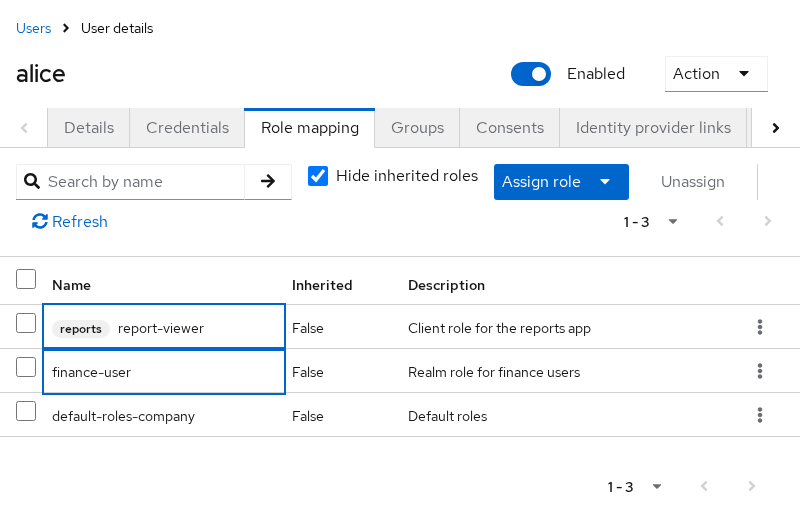
Hide inherited roles is checked, so the table shows the roles assigned directly to Alice:
finance-useris assigned, not inherited.report-vieweris assigned, not inherited.default-roles-companyis assigned, not inherited. It was already on Alice when the user was created in this realm.
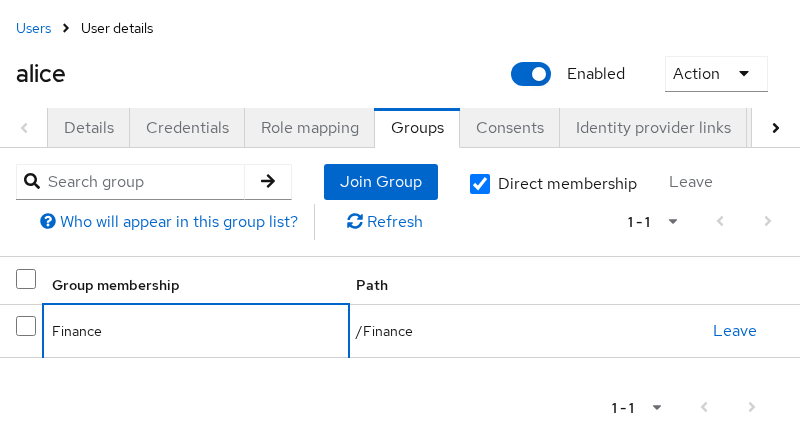
Open Groups and join Finance. The path column shows /Finance.
Create bob the same way, with password Bob!2026, and do not assign finance-user, report-viewer, or Finance. Bob still has default-roles-company, because that default composite was already assigned when the user was created in this realm.
Emit Keycloak Roles with SAML Mappers
For this SAML client, keeping Full scope allowed enabled caused the assertion to include all of Alice's effective roles. This walkthrough leaves it enabled briefly to demonstrate that behavior, then disables it and explicitly scopes the client to the roles the service provider needs.
For a new configuration, that restricted setup is the one to keep. The earlier full-scope assertion is only there to show what happens when role scope mappings are not restricted.
Open Client scopes, then role_list, then the mapper named role list. In this tested 26.8.0 realm, the pre-created role_list mapper started like this. Check your own realm rather than assuming that state.
- Single Role Attribute: Off
- Role attribute name:
Role - SAML Attribute NameFormat: Basic
The property defaults to true when you add a Role list mapper yourself. The built-in scope in this realm was Off.
Single Role Attribute changes the shape of the XML:
- Off: one
AttributenamedRoleper role. - On: one
AttributenamedRolecontaining severalAttributeValueelements.
With the switch off, the role name is the AttributeValue, not a different attribute name. Alice's first assertion contained eight of those elements:
finance-userreport-viewerdefault-roles-companyuma_authorizationoffline_accessmanage-accountmanage-account-linksview-profile
report-viewer is only the client role's short name. The assertion does not add reports. in front of it. The other six names come from default-roles-company and from the roles inside that composite. The Role mapping table hid those inner roles because Hide inherited roles was checked. The assertion still emitted them.
Two of the elements look like this. The live AttributeValue also carries the XML Schema type attributes.
<saml:Attribute Name="Role" NameFormat="urn:oasis:names:tc:SAML:2.0:attrname-format:basic">
  <saml:AttributeValue>finance-user</saml:AttributeValue>
</saml:Attribute>
<saml:Attribute Name="Role" NameFormat="urn:oasis:names:tc:SAML:2.0:attrname-format:basic">
  <saml:AttributeValue>report-viewer</saml:AttributeValue>
</saml:Attribute>
Turn Single Role Attribute on and save. The next assertion uses one Attribute named Role and puts each role in its own AttributeValue. This is the order observed in this test. Do not build service-provider logic that depends on that order.
<saml:Attribute Name="Role" NameFormat="urn:oasis:names:tc:SAML:2.0:attrname-format:basic">
  <saml:AttributeValue>finance-user</saml:AttributeValue>
  <saml:AttributeValue>uma_authorization</saml:AttributeValue>
  <saml:AttributeValue>manage-account-links</saml:AttributeValue>
  <saml:AttributeValue>manage-account</saml:AttributeValue>
  <saml:AttributeValue>report-viewer</saml:AttributeValue>
  <saml:AttributeValue>offline_access</saml:AttributeValue>
  <saml:AttributeValue>view-profile</saml:AttributeValue>
  <saml:AttributeValue>default-roles-company</saml:AttributeValue>
</saml:Attribute>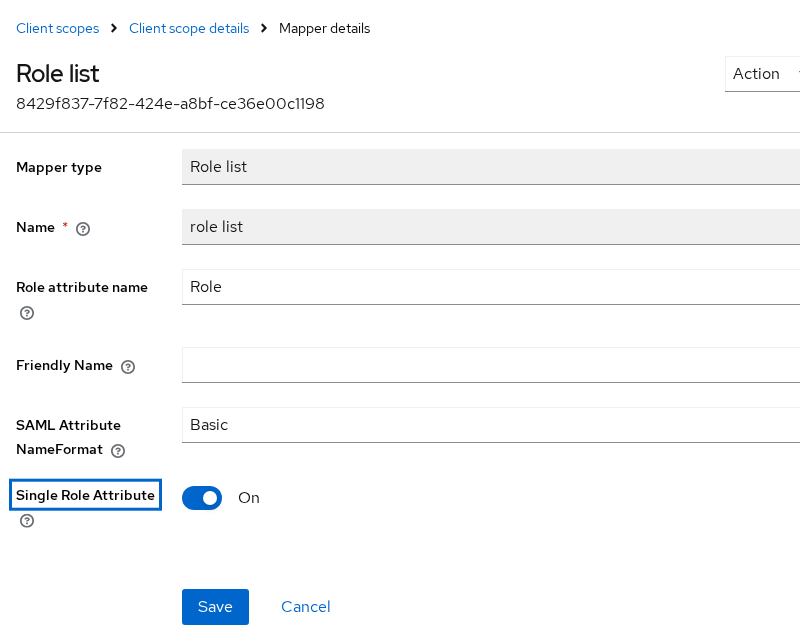
Three fields on that form are easy to mix up:
- Role attribute name is the SAML
Name. - The mapper's own Name field,
role list, never appears in the assertion. - Friendly Name was left empty, so this element has no
FriendlyName.
For this SAML mapper, assign the client scope as Default so its mappers are applied to the assertion.
- A dedicated client scope belongs only to one client.
- A normal client scope such as
role_listis attached to SAML clients as Default, so every assertion for those clients includes it.
Emit Group Membership
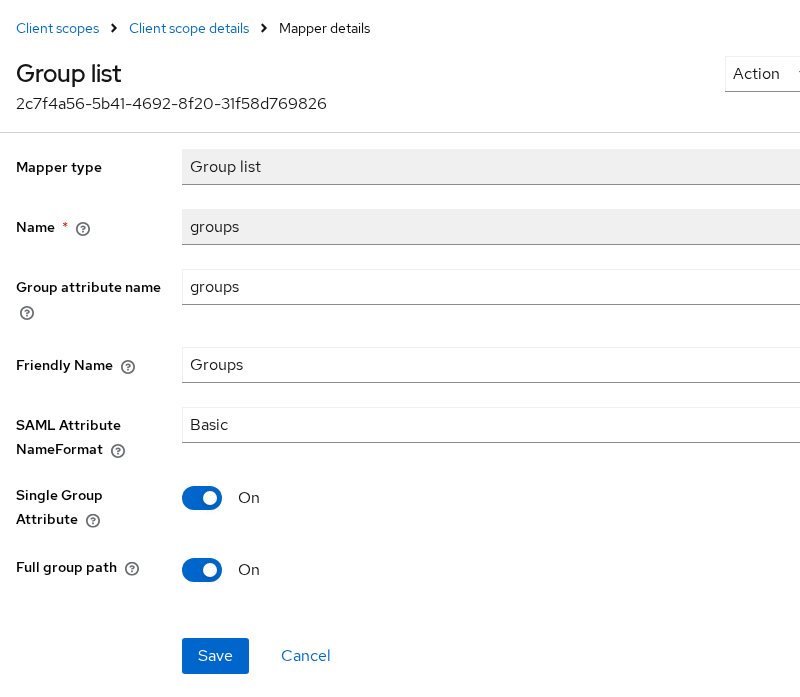
A dedicated scope is a poor place for a mapper you want on more than one SAML client. Create a client scope named saml-groups with protocol SAML, add a mapper of type Group list, and assign that scope to the SAML client as Default.
Set the fields as follows:
- Name:
groups - Group attribute name:
groups - Friendly Name:
Groups - SAML Attribute NameFormat:
Basic - Single Group Attribute: On
- Full group path: On
The form's suggested Group attribute name is member. I set it to groups because that is the name this test reads. Another service provider may want member, memberOf, or a name of its own. Do not assume the attribute is named groups.
The Group list mapper sends membership, and only membership:
- It sends the user's group names and paths.
- It does not send arbitrary attributes stored on those groups.
- It does not turn group-assigned roles into group names.
This section covers normal realm groups. Keycloak Organization groups use separate organization SAML mappers and are outside this article.
With Full group path on, Alice's assertion adds:
<saml:Attribute FriendlyName="Groups" Name="groups" NameFormat="urn:oasis:names:tc:SAML:2.0:attrname-format:basic">
  <saml:AttributeValue>/Finance</saml:AttributeValue>
</saml:Attribute>
The service provider normally identifies the attribute by Name. FriendlyName="Groups" is a label. Do not treat it as the primary identifier unless that service provider explicitly documents otherwise.
Turn Full group path off and sign in again. The same attribute name stays groups. The value becomes Finance, without the leading slash. This test used the single group /Finance. For a nested group such as Finance/Managers, the same switch changes the value:
- Full group path on:
/Finance/Managers - Full group path off: only the group name
Single Group Attribute works like Single Role Attribute:
- On: one
Attributewith oneAttributeValueper group. - Off: a separate
Attributeelement per group, each still namedgroups.
Alice is in one group, so both settings produce one value. The switch matters when a user is in several groups. This test did not rely on the order of those values.
Realm Roles vs Client Roles
By default, the Role list mapper emits the role's short name. Both the realm role finance-user and the reports client role report-viewer appear as plain strings, with no client namespace attached. Nothing in the assertion says which client owns report-viewer.
A Role Name Mapper rewrites one role before the Role list mapper emits it. Add it on the SAML client's dedicated scope so it applies only to that client. In the Role selector, Keycloak identifies a client role as clientId.roleName.
- Role:
reports.report-viewer - New Role Name:
reports.report-viewer, the string that will appear in the assertion
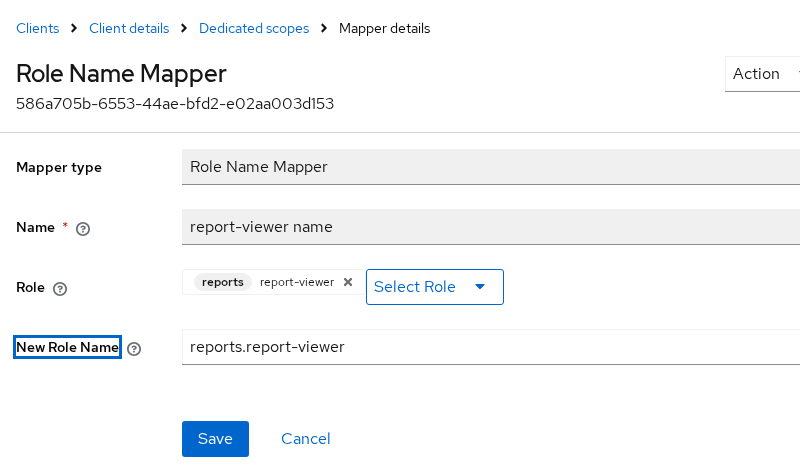
The next Role attribute changed only the rewritten role:
finance-userstayed unchanged.report-viewerwas replaced byreports.report-viewer.- Role attribute name stayed
Role. The mapper changes the value, not the attribute name.
The Role field uses a different reference for each kind of role:
- A realm role uses the role name alone.
- A client role uses
clientId.roleName.
If a realm role and a client role can share the same short name, the assertion itself does not reveal which namespace produced that value. Use a Role Name Mapper to make the value unique when the service provider needs that distinction.
Control Attribute Names and Values
Role attribute name and Group attribute name each become a SAML Name. They are independent. Renaming Role does not rename groups.
- Friendly Name becomes
FriendlyName. The Role list mapper in this test left it empty, so theRoleelement has noFriendlyName. - The text inside
AttributeValueis the role or group value. A Role Name Mapper changes that text for one role. Full group path changes it for groups. NameFormat=Basicwritesurn:oasis:names:tc:SAML:2.0:attrname-format:basic. URI Reference changes only that format URI. It does not turnName="Role"into a URL.
Inspect the Final Assertion
Open the apps account console while you are signed out of both realms:
http://127.0.0.1:18090/realms/apps/account
Choose Sign in with Company IdP. Sign in on port 18089. The browser POSTs a field named SAMLResponse to the ACS on port 18090.
Capture that POST in browser DevTools, or with a SAML tracing extension. If you copy the value from the parsed form parameters, it is already the base64 text. If you copy the raw request body, URL-decode it first. Put the base64 text in SAML_RESPONSE and decode it:
printf '%s' "$SAML_RESPONSE" | base64 -d | xmllint --format - > saml-response.xmlThe command writes saml-response.xml and prints nothing when the value is valid base64.
The broker then stops on Update Account Information. That form is the apps realm asking for a local profile. It is not proof that roles or groups were missing from the assertion. The POST already happened. This page does not fill that form in.
Read the role and group attributes:
xmllint --xpath '//*[local-name()="Attribute"][@Name="Role" or @Name="groups"]' saml-response.xmlSign in again after each mapper change and decode over the same file. The Attribute elements in the sections above are what that command returned at each step.
Map Only the Entitlements the SP Needs
Those extra Role values appear because Full scope allowed lets this client see all of Alice's effective role mappings, including default-roles-company and the account roles inside it. If the service provider interprets every Role value as an application entitlement, unrelated Keycloak roles such as offline_access or account-management roles may be exposed to its authorization logic. For this service provider, only finance-user and report-viewer are needed, so restrict the client's role scope mappings to those two roles. This restricted setup is the one to keep.
Open the SAML client, then Client scopes, then the dedicated scope, then the Scope tab. Turn Full scope allowed off. Assign only finance-user and the reports client role report-viewer.
Alice's next assertion kept groups and reduced Role to the two names in scope.
- Role scope mappings filter the roles emitted by the Role list mapper.
- They do not remove the Group list mapper or Alice's group membership.
Full group path was off by then, so the group value is Finance:
<saml:Attribute FriendlyName="Groups" Name="groups" NameFormat="urn:oasis:names:tc:SAML:2.0:attrname-format:basic">
  <saml:AttributeValue>Finance</saml:AttributeValue>
</saml:Attribute>
<saml:Attribute Name="Role" NameFormat="urn:oasis:names:tc:SAML:2.0:attrname-format:basic">
  <saml:AttributeValue>finance-user</saml:AttributeValue>
  <saml:AttributeValue>reports.report-viewer</saml:AttributeValue>
</saml:Attribute>
default-roles-company and the account roles were gone. The Role Name Mapper still rewrote the client role, because that mapper sits on the dedicated scope and the client role remained in scope.
Sign in as bob with the same scope limit. Bob is not in Finance and does not have finance-user or report-viewer. In this 26.8.0 test, Bob's response contained no AttributeStatement once there were no mapped role or group values. Keycloak did not emit empty Role or groups attributes.
Match the scopes to what the service provider actually reads:
- If it only wants groups, remove
role_listfrom the client's default client scopes. OtherwiseRoleis still there for every user who has an in-scope role. - If it does not use group membership, there is no reason to assign the
saml-groupsscope.
Troubleshoot Missing or Duplicate Values
| Symptom | Likely cause | Fix |
|---|---|---|
Many Attribute elements are all named Role |
Single Role Attribute is off | Turn it on when the SP expects one attribute with several values |
Role contains offline_access and manage-account |
Full scope allowed is on, so default realm roles are included | Turn Full scope allowed off and assign only the roles the SP should see |
The client role appears as report-viewer |
Role list emits the short role name | Add a Role Name Mapper when the SP must see reports.report-viewer |
The SP expected /Finance and found Finance |
Full group path is off | Turn Full group path on |
The SP expected member and found groups |
Group attribute name was set to groups for this test |
Set Group attribute name to the name that SP documents |
| The group attribute is missing for one SAML client | saml-groups is not a Default scope on that client |
Assign the scope as a Default client scope |
A user with no extra roles still gets Role values |
Full scope allowed is on, so the realm's default role composite is included | Limit the client scope, or accept those default names |
No Role or groups attributes are present |
In this setup the user has no mapped in-scope role or group, or the corresponding mapper scope is not applied | Verify the user's mappings, the role scope mappings, and the Default client scopes |
The SP matched Groups and missed groups |
It compared FriendlyName instead of Name |
Match on Name, which comes from Group attribute name |
Summary
A Role list mapper writes Keycloak role names into the outgoing assertion. On this 26.8.0 realm the built-in role_list scope started with Single Role Attribute off, so each role was its own Attribute named Role. Turning that switch on put the same names into one attribute as separate AttributeValue elements. A Group list mapper is a separate mapper. With Full group path on, membership in Finance was /Finance. With it off, the value was Finance.
The Role list mapper does not prefix a client role with the client ID. report-viewer stayed a bare name until a Role Name Mapper rewrote it to reports.report-viewer. finance-user was unchanged. The service provider normally matches the SAML Name, not FriendlyName.
For a SAML client, turning Full scope allowed off and assigning only the required role scope mappings keeps unrelated roles out of the assertion. In this test the restricted assertion contained:
Role=finance-userRole=reports.report-viewergroups=Finance, because group membership is a separate mapper
Bob, with neither an in-scope role nor a group, had no AttributeStatement in this 26.8.0 capture. Do not assume the group attribute is named groups. Set Group attribute name to the name that service provider documents.
References
- Keycloak 26.8.0 Server Administration: protocol mappers
- Keycloak 26.8.0 Server Administration: client scopes
- SAML V2.0 Core: AttributeStatement
Frequently Asked Questions
Can Keycloak send groups in a SAML assertion?
Yes. Add a Group list mapper to a SAML client scope, assign that scope to the SAML client as Default, and set Group attribute name to the name the service provider expects.
- Full group path on: a top-level group named Finance is sent as /Finance.
- Full group path off: the value is Finance.
Can Keycloak send realm and client roles?
Yes. The Role list mapper writes both.
- A realm role appears as its name, such as finance-user.
- A client role appears as its short name, such as report-viewer, unless a Role Name Mapper rewrites it.
- Client roles are not automatically prefixed with the client ID.
What is the Role List mapper?
It is the built-in SAML protocol mapper on the role_list client scope. It copies the user's role names into the assertion.
- Single Role Attribute on: every role is one Attribute with separate values.
- Single Role Attribute off: one Attribute element per role, each still named from Role attribute name.
How do I remove the full group path?
On the Group list mapper, turn Full group path off. The attribute name stays whatever you set in Group attribute name. Only the value changes, from a path such as /Finance to the group name Finance.
Should an SP authorize from Keycloak roles or groups?
Use the source that matches the values the service provider documents. A role is not sent as a group, and a group is not sent as a role. For a SAML client, turning Full scope allowed off and assigning only the required role scope mappings keeps unrelated roles out of the assertion.
