
| Tested on | Red Hat Enterprise Linux 10.2 (Coughlan) |
|---|---|
| Package | quay.io/keycloak/keycloak:26.7.3 |
| Applies to | Any Keycloak 26.x deployment — OIDC protocol mappers and custom JWT claims |
| Privilege | Keycloak admin access in the target realm — bootstrap admin on the lab container is enough |
| Lab environment | Keycloak 26.7.3 on http://127.0.0.1:8080/ with golinuxcloud realm, client orders-api, and user tokenuser — Install Keycloak with Podman |
| Scope | Add custom claims to access tokens and ID tokens with built-in OIDC protocol mappers — user attribute, group membership, audience, nested JSON claims, access vs ID vs UserInfo toggles, Evaluate verification, and troubleshooting. Does not cover custom ProtocolMapper SPI development. |
| Related guides | Keycloak clients explained |
In this article we will add custom claims to Keycloak JWT tokens on 26.7.3. A Keycloak protocol mapper controls what additional information appears in a token. For example, if a user has department=Platform Engineering, a mapper can add that value to the access token as a department claim.
Protocol mappers are configured through client scopes. In this article, we will create a reusable client scope, add several mappers to it, and verify exactly what appears in the resulting JWT.
If a claim is missing, the usual causes are missing source data, the mapper being configured for the wrong token type, or the client scope not being active for the client.
How a Keycloak protocol mapper works
A protocol mapper takes information available to Keycloak—or a value configured on the mapper—and adds it to a token claim. For a User Attribute mapper, the flow is especially simple: user attribute → mapper → token claim.
  User attribute ──► User Attribute mapper ──► access / ID token / UserInfo
  Group membership ─► Group Membership mapper ─► groups claim
  Roles ───────────► role mappers ───────────► realm_access / resource_access
  Audience ────────► Audience mapper ─────────► aud claim

  Example path:

  tokenuser.department = "Platform Engineering"
           │
           ▼
  department-claim mapper (lab-claims scope)
           │
           ▼
  access token JSON:  "department": "Platform Engineering"
What we will add to the token
For the examples below, we use the golinuxcloud realm, an OIDC client named orders-api, and a user named tokenuser. Create the client and user first if they do not exist yet. By the end of this walkthrough the access token will include:
"department": "Platform Engineering"from a User Attribute mapper"groups": ["/Engineering/Backend"]from a Group Membership mapper"aud"includingorders-apifrom an Audience mapper"org": { "unit": "Platform Engineering" }from a nested claim name
The first token request below shows only department. Later sections add the other claims one at a time.
Protocol mapper vs client scope
| Protocol mapper | Client scope | |
|---|---|---|
| What it does | Defines one rule for adding or changing a token claim | Groups related mappers and settings together |
| Example | department attribute → department claim |
lab-claims |
| Reuse | Works wherever its client scope applies | A shared scope can be linked to multiple clients |
In the current Admin Console, you normally configure a mapper either in a shared client scope or in the client's dedicated scope.
If only one client needs the claim, use that client's dedicated scope. If several clients need the same claim, create a shared client scope and link it to those clients. See Keycloak client scopes explained for default vs optional vs dedicated linking.
| Location | Admin Console path |
|---|---|
| Shared client scope | Client scopes → create scope → Mappers |
| Dedicated client scope | Clients → client → Client scopes → {clientId}-dedicated |
Add a custom claim to a Keycloak access token
The most common task is mapping a user profile field into a token claim—for example department → department.
Create the user attribute
By default, Keycloak only accepts attributes defined in the realm's User Profile configuration. Add department under Realm settings → User profile first. If your realm explicitly allows unmanaged attributes, the behavior can differ. The full User Profile workflow is in Keycloak user attributes and User Profile.
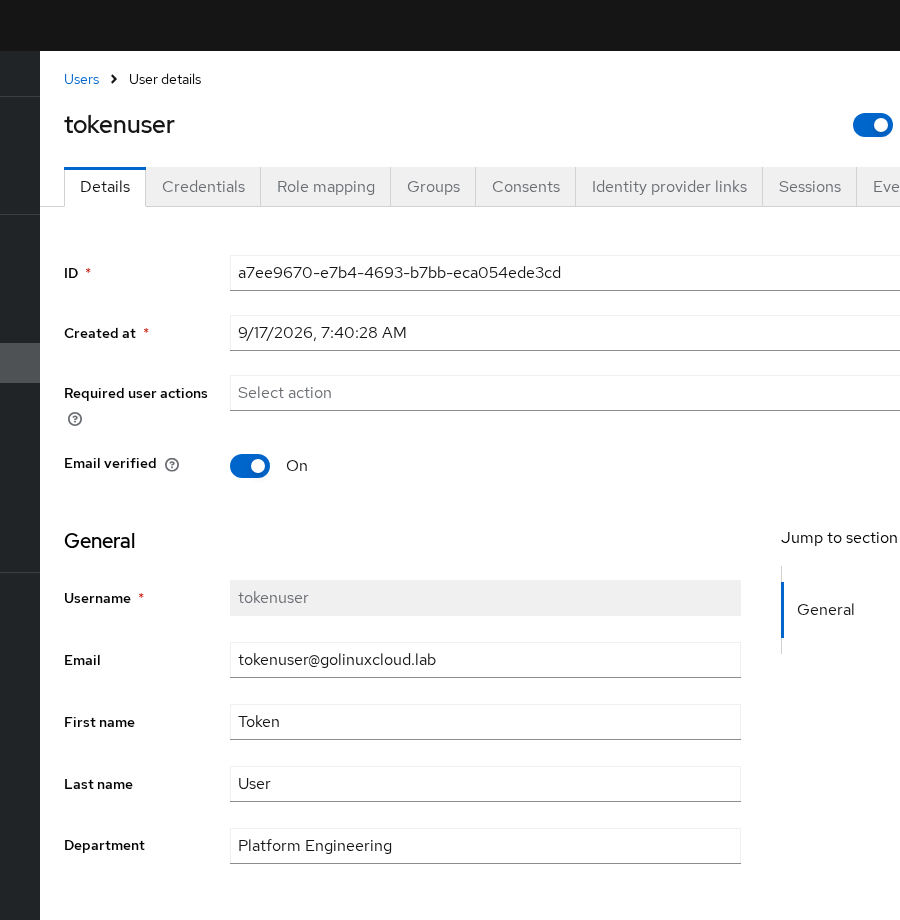
Open Users → tokenuser → Details (or Attributes, depending on console layout) and set department to Platform Engineering. For the group mapper later, join tokenuser to Engineering → Backend so its group path is /Engineering/Backend. If that hierarchy does not exist yet, see Keycloak groups and nested groups.
Create the client scope
We use a shared scope named lab-claims in this example so the same claim mappings could later be reused by another client. If the claims were specific to orders-api, you could instead create them in its dedicated client scope.
- Open Client scopes → Create client scope.
- Set Name to
lab-claims, Type to None, protocol openid-connect. - Save, then open Mappers.
Add the User Attribute mapper
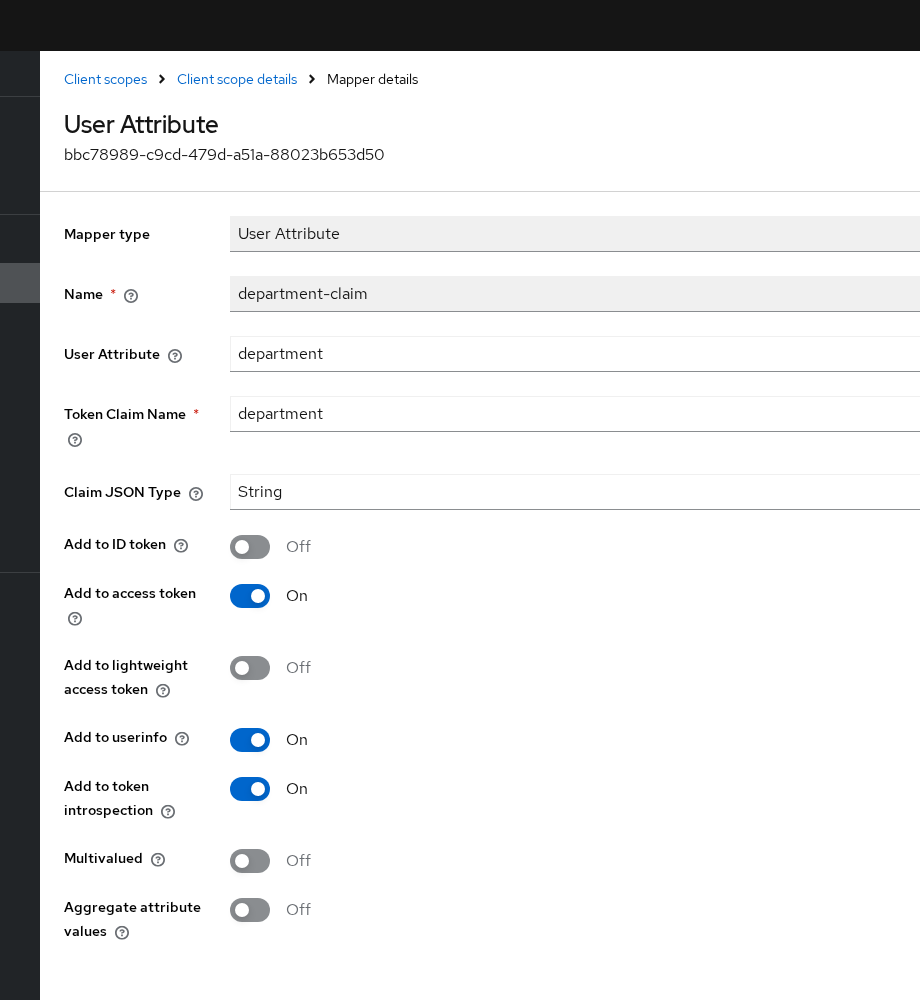
Choose Configure a new mapper → User Attribute and use these settings for department-claim:
| Field | Value |
|---|---|
| Name | department-claim |
| User Attribute | department |
| Token Claim Name | department |
| Claim JSON Type | String |
| Add to ID token | Off |
| Add to access token | On |
| Add to userinfo | On |
Link the client scope
Open Clients → orders-api → Client scopes → Add client scope, select lab-claims, and add it as Default. Keycloak will then apply the scope when orders-api requests tokens, without requiring the application to add lab-claims to the scope parameter.
Request and decode a fresh access token
The curl examples use Keycloak's Direct Access Grant only to obtain test tokens quickly. On orders-api, enable Direct access grants. The commands below assume Client authentication = Off; if orders-api is confidential, also authenticate the client with its secret.
The curl examples assume tokenuser has password TokenUser!2026; create or reset it under Users → tokenuser → Credentials if needed. User account steps are covered in Create and manage Keycloak users.
A JWT contains a Base64URL-encoded JSON payload between the first and second dots in the token. The curl command requests a fresh token. The Python part decodes the JWT payload locally and prints only department and azp; it does not send the token anywhere else:
curl -s -X POST 'http://127.0.0.1:8080/realms/golinuxcloud/protocol/openid-connect/token' \
  -H 'Content-Type: application/x-www-form-urlencoded' \
  -d 'username=tokenuser' \
  -d 'password=TokenUser!2026' \
  -d 'grant_type=password' \
  -d 'client_id=orders-api' \
-d 'scope=openid' | python3 -c "import sys,json,base64; t=json.load(sys.stdin)['access_token']; p=t.split('.')[1]; p+='='*(-len(p)%4); c=json.loads(base64.urlsafe_b64decode(p)); print(json.dumps({k:c[k] for k in ('department','azp') if k in c}, indent=2))"{
"department": "Platform Engineering",
"azp": "orders-api"
}department appears because the user attribute exists and the mapper targets the access token. azp is the authorized party: the client that requested the token (orders-api). Request a new token after every mapper change. Old JWTs stay valid until they expire. Built-in scopes may still add other claims; the decode above filters to the claim this section created.
Access token vs ID token vs UserInfo
A mapper can add the same claim to the access token, ID token, UserInfo response, or any combination of them. Enable only the outputs your application actually uses.
- Access token: sent to an API
- ID token: gives the client application information about the authenticated user
- UserInfo: an OIDC endpoint the client can call to retrieve permitted user claims
| Output | Typical use | Example in this article |
|---|---|---|
| Access token | API authorization and custom claims | department (access on) |
| ID token | Identity for the client application | department excluded (ID off) |
| UserInfo | Live profile fetch with the access token | department when toggled on |
Decode the access token, ID token, and UserInfo response from the same grant:
python3 <<'PY'
import json, base64, urllib.parse, urllib.request

body = urllib.parse.urlencode({
    'username': 'tokenuser',
    'password': 'TokenUser!2026',
    'grant_type': 'password',
    'client_id': 'orders-api',
    'scope': 'openid',
}).encode()
tok_req = urllib.request.Request(
    'http://127.0.0.1:8080/realms/golinuxcloud/protocol/openid-connect/token',
    data=body,
    headers={'Content-Type': 'application/x-www-form-urlencoded'},
)
with urllib.request.urlopen(tok_req) as resp:
    tokens = json.load(resp)

def claims(jwt, keys):
    p = jwt.split('.')[1]
    p += '=' * (-len(p) % 4)
    c = json.loads(base64.urlsafe_b64decode(p))
    return {k: c.get(k) for k in keys if c.get(k) is not None}

print('access', json.dumps(claims(tokens['access_token'], ('department', 'groups')), indent=2))
print('id', json.dumps(claims(tokens['id_token'], ('department', 'groups')), indent=2))

ui_req = urllib.request.Request(
    'http://127.0.0.1:8080/realms/golinuxcloud/protocol/openid-connect/userinfo',
    headers={'Authorization': f"Bearer {tokens['access_token']}"},
)
with urllib.request.urlopen(ui_req) as resp:
    ui = json.load(resp)
print('userinfo', json.dumps({k: ui.get(k) for k in ('department', 'preferred_username')}, indent=2))
PYaccess {
"department": "Platform Engineering"
}
id {}
userinfo {
"department": "Platform Engineering",
"preferred_username": "tokenuser"
}department is intentionally access-token-only because Add to ID token is off on department-claim. The empty id object means none of the filtered keys were present on the ID token. UserInfo still returns department because Add to userinfo is on.
Add group membership to the token
A Group Membership mapper reads the user's existing Keycloak group memberships; it does not create or assign groups.
On lab-claims, add Group Membership mapper engineering-groups:
| Field | Value |
|---|---|
| Token Claim Name | groups |
| Full group path | On |
| Add to access token | On |
| Add to ID token | On |
With tokenuser in Engineering → Backend, Keycloak can put either Backend or the full path /Engineering/Backend into the token. Full paths are useful when the same group name exists under different parent groups. Turn Full group path off when only the short group name is needed.
With full path on, a fresh access token includes:
{
  "groups": [
    "/Engineering/Backend"
  ]
}
With full path off, the same membership becomes "groups": ["Backend"]. Request a new token after you change the toggle.
Add an audience claim
The aud claim identifies the intended recipient of the token. An API—called a resource server in OAuth/OIDC—can check that its expected audience is present before accepting the token. For example, if orders-api accepts only tokens containing orders-api in aud, a token intended for another service should be rejected.
Add Audience mapper orders-api-audience on lab-claims:
| Field | Value |
|---|---|
| Included Client Audience | orders-api |
| Add to access token | On |
| Add to ID token | Off (typical when only the API needs the audience) |
Do not add every client in the realm to aud. Each API should accept tokens aimed at its own client ID (or a small set of trusted APIs).
After this mapper, a fresh access token includes orders-api in aud (Keycloak may also keep other audiences from built-in scopes, such as account):
{
  "aud": [
    "orders-api",
    "account"
  ]
}
Audience vs Audience Resolve: the mapper used here explicitly adds orders-api to aud. Keycloak also provides Audience Resolve, which can automatically add a client to aud when the user has roles for that client.
Create nested JSON claims
Token Claim Name accepts dot notation. Keycloak builds nested JSON instead of a flat key with a period in the name. If the claim name itself must contain a literal dot, escape the dot as \. instead of using normal dot notation.
Mapper org-unit-nested on lab-claims maps user attribute department to claim name org.unit:
| Field | Value |
|---|---|
| User Attribute | department |
| Token Claim Name | org.unit |
| Claim JSON Type | String |
| Add to access token | On |
| Add to ID token | Off |
The access token renders:
"org": {
  "unit": "Platform Engineering"
}
not "org.unit": "Platform Engineering". Choose the JSON type that matches the value your application expects. Use String for normal text values such as Platform Engineering. Use JSON only when the source contains valid JSON that should become a structured object in the token.
Realm and client role mappers
You usually do not need to create custom protocol mappers just to put normal Keycloak roles into a token. Keycloak already provides role mappers through its built-in roles client scope.
Realm roles land in realm_access.roles, and client roles land in resource_access.<clientId>.roles. That built-in scope covers most applications unless you need a different claim name or custom role layout.
| Mapper (built-in) | Source | Default claim |
|---|---|---|
| User Realm Role | Realm role assignments | realm_access.roles |
| User Client Role | Client role assignments | resource_access.${client_id}.roles |
Keycloak realm roles vs client roles shows assignment, composite roles, and Full scope allowed with the same orders-api client. Add a custom role mapper only when you need a non-standard claim name or a filtered role list.
Evaluate protocol mapper output
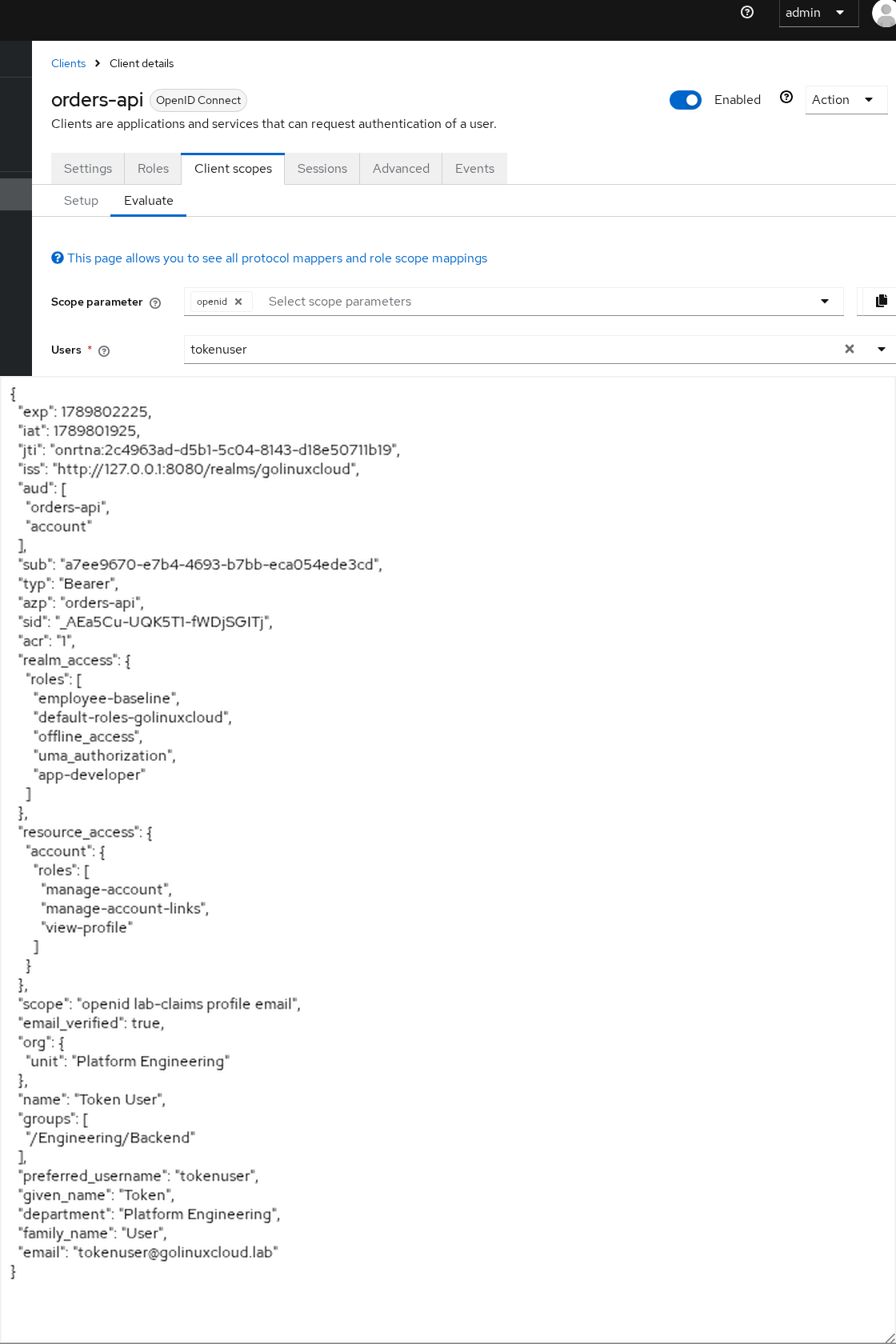
The Evaluate tab lets you preview the token Keycloak would generate for a specific user without signing in through your application. Open Clients → orders-api → Client scopes → Evaluate.
- Set User to
tokenuser. - Set Scope parameter to
openid(add optional scopes if you test those mappers). - Open Generated access token and confirm
department,groups,org, andaud.
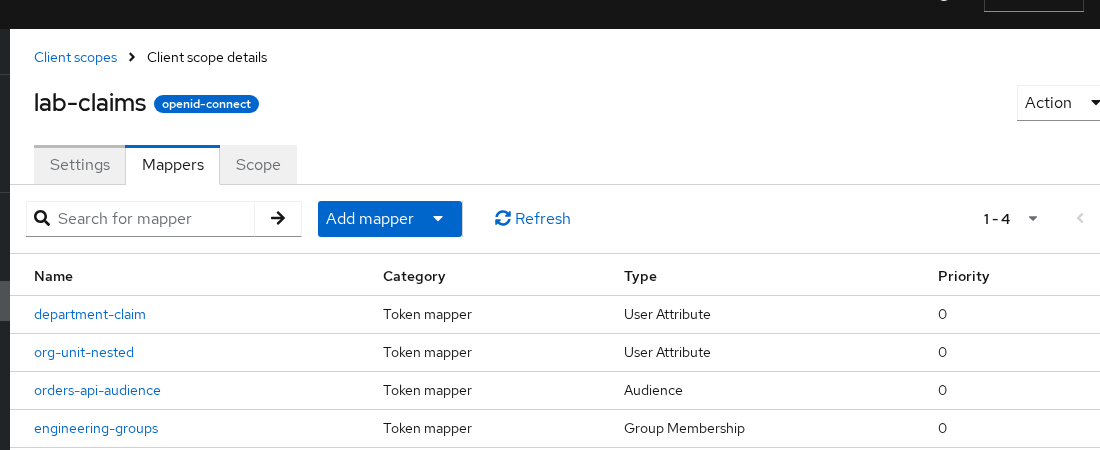
After all mappers from this article are on lab-claims, the scope Mappers tab lists them together:
Decode a fresh access token after every mapper in this article is in place:
curl -s -X POST 'http://127.0.0.1:8080/realms/golinuxcloud/protocol/openid-connect/token' \
  -H 'Content-Type: application/x-www-form-urlencoded' \
  -d 'username=tokenuser' \
  -d 'password=TokenUser!2026' \
  -d 'grant_type=password' \
  -d 'client_id=orders-api' \
-d 'scope=openid' | python3 -c "import sys,json,base64; t=json.load(sys.stdin)['access_token']; p=t.split('.')[1]; p+='='*(-len(p)%4); c=json.loads(base64.urlsafe_b64decode(p)); print(json.dumps({k:c.get(k) for k in ('department','groups','org','aud','azp') if c.get(k) is not None}, indent=2))"{
"department": "Platform Engineering",
"groups": [
"/Engineering/Backend"
],
"org": {
"unit": "Platform Engineering"
},
"aud": [
"orders-api",
"account"
],
"azp": "orders-api"
}Use Evaluate to confirm Keycloak's token output first, before troubleshooting the application itself. If the claim appears there but not in your application, the problem is likely outside the mapper configuration.
Custom protocol mappers: If none of Keycloak's built-in mapper types can produce the claim you need, developers can create custom mapper types using Keycloak's Java Protocol Mapper SPI. That requires a custom provider JAR and is outside the scope of this article.
Troubleshoot missing Keycloak claims
| Symptom | Likely cause | Fix |
|---|---|---|
| User-attribute claim missing | Attribute empty or not declared in User Profile | Set the attribute on the user; declare it in User profile |
| Mapper exists but claim is missing | Scope not linked to client, or optional scope not requested | Add scope as default/optional on the client; include scope in the OIDC request |
| Claim in ID token but API expects access token | Add to access token off | Enable access token on the mapper; APIs should validate access tokens |
| Claim in access token but SPA reads ID token | Add to ID token off by design | Enable ID token toggle or read the access token / UserInfo |
| Claim has the wrong JSON structure | Claim JSON Type mismatch or dot nesting | Use String for text values; use org.unit for nesting; escape literal dots with \. |
| Group claim contains only the short group name | Full group path off | Enable Full group path on the group mapper |
API rejects the token because of aud |
Audience mapper missing or wrong client | Map the API's expected client ID |
| Token still contains the old claim value | Old JWT still cached | Request a new token; access tokens are short-lived |
Always decode the same token type your API validates. Request a new token after every mapper change.
Summary
Protocol mappers let you add information such as user attributes, groups, roles, and audiences to Keycloak tokens. In this example, the department user attribute became a department claim in the access token.
Always check three things when a claim is missing: whether the source value exists, whether the mapper is enabled for the token type you are reading, and whether the client scope containing the mapper applies to the client. Request a fresh token after making changes.
Use a shared client scope when several clients need the same claims. Use the client's dedicated scope when the mapper applies only to that client.
References
- Keycloak Server Administration Guide — Protocol mappers
- Keycloak Server Administration Guide — Client scopes
- Protocol Mappers reference — built-in mapper fields and types
- OpenID Connect Core — Standard Claims
- RFC 7519 — JSON Web Token (JWT)
Frequently Asked Questions
How do I add a custom claim to a Keycloak access token?
Create or open a client scope, add a protocol mapper (User Attribute, Group Membership, Hardcoded claim, or Audience), enable Add to access token, and link the scope to your client as default or optional. Set the source data on the user, request a fresh token, and decode the access token payload to verify the claim.
Why is my claim in the ID token but not the access token?
Each mapper has separate Add to access token and Add to ID token switches. Browser apps often read the ID token while APIs validate the access token—enable the output that matches your consumer.
Should I put mappers on a client or on a client scope?
In the current Admin Console, configure mappers in a shared client scope or in the client's dedicated scope. The dedicated scope {clientId}-dedicated is for single-client mappers; shared scopes like lab-claims let you reuse the same claim set across many clients.
What does the audience mapper do?
It adds an aud value so an API can check whether the token was intended for that API. Map the client ID the API expects, not every client in the realm.
Why does org.unit become nested JSON?
Dots in Token Claim Name create nested objects. org.unit becomes { "org": { "unit": "..." } }. Escape a literal dot as \. when you need a flat claim name that contains a period.
