
| Tested on | Red Hat Enterprise Linux 10.2 (Coughlan) |
|---|---|
| Package | podman-5.8.2-5.el10_2.x86_64quay.io/keycloak/keycloak:26.7.3 |
| Applies to | Any Linux host with Podman or Docker |
| Privilege | Normal user for curl and browser tests; Keycloak admin access to inspect flows and realm bindings |
| Lab environment | Keycloak 26.7.3 on http://127.0.0.1:8080/ — Install Keycloak with Podman |
| Scope | Authentication flow mental model, executions and subflows, Required/Alternative/Conditional/Disabled semantics, default Browser flow inspection, realm flow bindings, safe copy-and-bind workflow, and read-only debugging with events. Does not replace step-by-step custom flow design, the conditional authenticator catalog, or custom authenticator SPI development. |
| Related guides | Create a custom Keycloak authentication flow Keycloak TOTP and 2FA Keycloak sessions explained Keycloak clients explained Keycloak realms explained |
Keycloak does not hard-code login as one fixed sequence such as “username → password → OTP.”
Instead, Keycloak runs an authentication flow. A flow is an ordered tree of authentication steps called executions, and those steps can be grouped inside subflows.
Each execution or subflow has a requirement such as Required, Alternative, Conditional, or Disabled, which determines how Keycloak evaluates that part of the login.
This guide explains that model on Keycloak 26.7.3 before you change anything. You inspect the built-in browser flow, understand how Required, Alternative, Conditional, and Disabled affect evaluation, map flow bindings to login entry points, and use realm events and authentication logs when debugging login behavior. Custom flow design stays in the dedicated custom-flow tutorial—here the focus is understanding and debugging the tree you already have.
Authentication flow mental model
Think of a flow as a small program Keycloak runs during login:
  OIDC / SAML request
        │
        ▼
  Realm binding picks top-level flow  (e.g. browserFlow → "browser")
        │
        ▼
  Walk executions top to bottom by priority
        │
        ├── REQUIRED step fails  ──► login fails
        ├── ALTERNATIVE succeeds ──► skip sibling alternatives
        ├── CONDITIONAL subflow    ──► run only if conditions pass
        └── DISABLED             ──► skip
        │
        ▼
  Authentication complete → tokens / redirect
A single user-facing login page is often the visible tip of several nested subflows. The Browser flow on Keycloak 26.x includes cookie SSO, optional identity-provider redirect, organization identity-first login, and a forms subflow with username/password plus conditional second factor. Misreading one Alternative sibling as Required is a common source of “OTP never appears” or “SSO stopped working” tickets.
Flows, subflows, and executions
Keycloak stores four related concepts in Authentication → Flows:
| Concept | What it is | Admin Console signal |
|---|---|---|
| Flow | Top-level or nested container | Named alias (browser, direct grant, your copy) |
| Subflow | Flow embedded inside another flow | Row with flow badge; expands to children |
| Execution | One authenticator step | Row with execution or Step badge (Cookie, Username Password Form) |
| Condition | Predicate inside a conditional subflow | Row with condition badge (Condition - user configured) |
List flows in realm golinuxcloud:
export KC_BASE='http://127.0.0.1:8080'
export REALM='golinuxcloud'

ADMIN_TOKEN=$(curl -sS -X POST "${KC_BASE}/realms/master/protocol/openid-connect/token" \
  -d 'grant_type=password' -d 'client_id=admin-cli' \
  -d 'username=admin' -d 'password=ChangeMe!2026' | \
  python3 -c "import sys,json; print(json.load(sys.stdin)['access_token'])")
With the admin token set, list every flow alias in the realm:
curl -sS -H "Authorization: Bearer ${ADMIN_TOKEN}" \
  "${KC_BASE}/admin/realms/${REALM}/authentication/flows" | \
  python3 -c "import sys,json; [print(f\"{f['alias']:22} builtIn={str(f.get('builtIn')):5} provider={f.get('providerId','')}\") for f in json.load(sys.stdin)]"
Sample output:
browser                builtIn=True  provider=basic-flow
direct grant           builtIn=True  provider=basic-flow
registration           builtIn=True  provider=basic-flow
reset credentials      builtIn=True  provider=basic-flow
clients                builtIn=True  provider=client-flow
first broker login     builtIn=True  provider=basic-flow
docker auth            builtIn=True  provider=basic-flow
browser-lab-copy       builtIn=False provider=basic-flow
Built-in flows ship with Keycloak. You can adjust some requirement values on them, but structural changes belong on a copy such as browser-lab-copy. Priority and nesting live on each flow’s Executions tab—not in this summary list.
Required, Alternative, Conditional, and Disabled
Each execution or subflow row has exactly one requirement. That value is the control knob—not the authenticator name.
| Requirement | Meaning for the evaluator |
|---|---|
| Required | If this execution is reached, it must succeed. Failure fails the current flow or subflow. |
| Alternative | One Alternative at the same level must succeed when that level does not also contain a Required execution. Keycloak evaluates alternatives in priority order and stops after one succeeds. |
| Conditional | Subflow only. Think of it as a switch: all conditions true → subflow behaves as Required; any condition false → subflow behaves as Disabled. |
| Disabled | Skip this row completely. |
Important:
RequiredandAlternativeare not two independent groups at the same level. If a level contains aRequiredexecution, Keycloak does not evaluate theAlternativeexecutions at that level.This is why changing
formsfrom Alternative to Required in the default browser flow can stop the Cookie alternative from providing SSO.
Required vs Alternative (truth table)
At the same nesting level, siblings marked Alternative compete; Required rows must pass when reached.
| Sibling A | Sibling B | What happens |
|---|---|---|
| Alternative: Cookie | Alternative: forms | Valid SSO cookie → Cookie succeeds → forms skipped. No cookie → Cookie not tried or fails → forms runs. |
| Required: Username Password | Conditional: 2FA subflow | Username/password must succeed; then conditional 2FA rules apply inside the subflow. |
| Alternative: OTP | Alternative: WebAuthn | First configured method that succeeds satisfies the group; the other is not shown. |
Conditional subflow (truth table)
A Conditional subflow wraps a condition chain plus real authenticators:
| Condition executions inside | Subflow result |
|---|---|
| All Required conditions evaluate true | Child authenticators run (for example OTP form). |
| Any condition false | Entire subflow skipped—login continues with the next sibling outside the subflow. |
| User has no configured 2FA credential | Condition - User Configured evaluates false → the Browser - Conditional 2FA subflow is skipped |
Conditions are not optional hints—they gate the subflow. That is why a user without TOTP never sees an OTP field even when OTP is configured as Alternative inside the conditional branch.
In the default browser flow, the two conditions answer different questions:
- Condition - User Configured — does the user have a second-factor authenticator in this subflow configured, such as OTP?
- Condition - credential — was a configured credential such as a passwordless WebAuthn/passkey already used earlier in this authentication? The default configuration uses this to avoid asking for another factor after passwordless authentication.
How Keycloak evaluates a flow
Evaluation rules that match what you see in the Admin Console:
- Order — Sort rows by
priority(lower number runs earlier). Drag handles in the UI change priority; the API exposes the same value. - Level — Indentation is nesting depth. Children run inside a parent subflow before the parent marks itself complete.
- Alternative group — If the level contains no
Requiredexecution, Keycloak evaluatesAlternativesiblings in priority order until one succeeds. - Required chain — Required rows must succeed when evaluated; there is no “skip on failure” within a required authenticator.
- Conditional gate — For a Conditional subflow, evaluate condition executions first; only if they pass run the subflow’s authenticator steps.
- Disabled — Never invoked.
  Level 0  [Alternative] Cookie          priority 10
           [Disabled]    Kerberos        priority 20
           [Alternative] IdP Redirector   priority 25
           [Alternative] forms           priority 30
             Level 1  [Required] Username Password Form
                      [Conditional] Browser - Conditional 2FA
                        Level 2  [Required] Condition - user configured
                                   [Required] Condition - credential
                                   [Alternative] OTP Form
When a browser OIDC request arrives, Keycloak loads the realm’s browser binding and walks this tree. No single “if OTP enabled” flag exists outside the flow—the tree is the policy.
Built-in Browser flow walkthrough
Open Authentication → Flows → browser in the Admin Console. Expand forms and Browser - Conditional 2FA so the condition and authenticator rows below are visible. The execution tree matches the API output that follows.
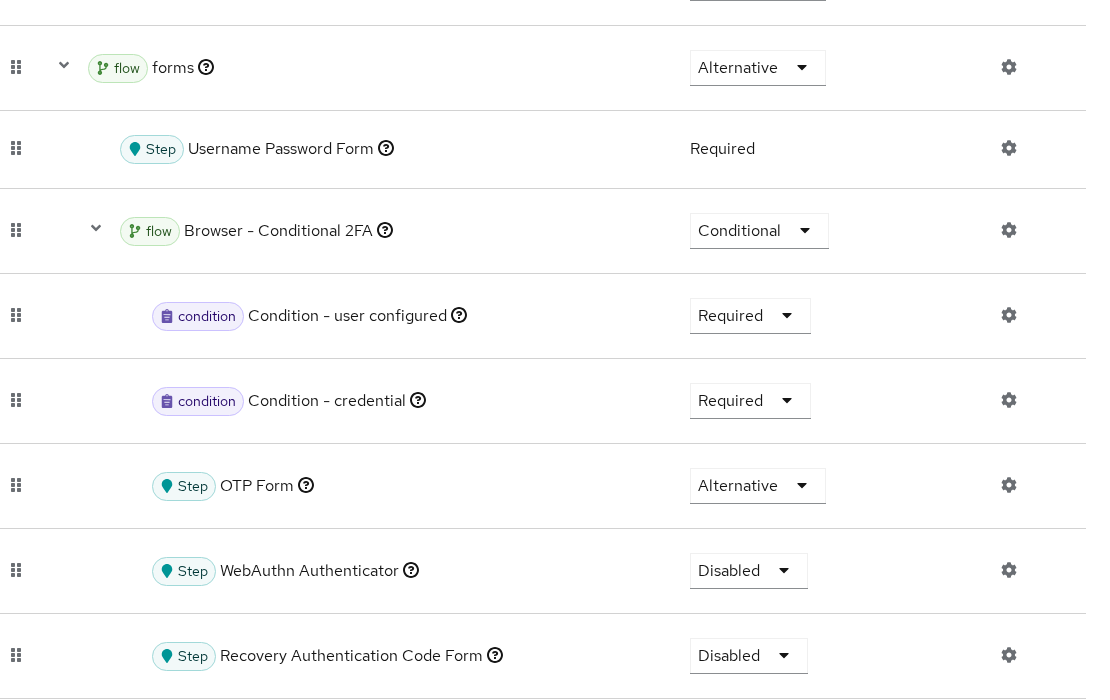
Export the same tree from the Admin REST API:
curl -sS -H "Authorization: Bearer ${ADMIN_TOKEN}" \
  "${KC_BASE}/admin/realms/${REALM}/authentication/flows/browser/executions" | \
  python3 -c "
import sys,json
for e in json.load(sys.stdin):
    indent='  '*e.get('level',0)
    print(f\"{indent}[{e.get('requirement'):12}] {e.get('displayName')} (priority={e.get('priority')})\")
"
Sample output:
[ALTERNATIVE ] Cookie (priority=10)
[DISABLED    ] Kerberos (priority=20)
[ALTERNATIVE ] Identity Provider Redirector (priority=25)
[ALTERNATIVE ] Organization (priority=26)
  [CONDITIONAL ] Browser - Conditional Organization (priority=10)
    [REQUIRED    ] Condition - user configured (priority=10)
    [ALTERNATIVE ] Organization Identity-First Login (priority=20)
[ALTERNATIVE ] forms (priority=30)
  [REQUIRED    ] Username Password Form (priority=10)
  [CONDITIONAL ] Browser - Conditional 2FA (priority=20)
    [REQUIRED    ] Condition - user configured (priority=10)
    [REQUIRED    ] Condition - credential (priority=20)
    [ALTERNATIVE ] OTP Form (priority=30)
    [DISABLED    ] WebAuthn Authenticator (priority=40)
    [DISABLED    ] Recovery Authentication Code Form (priority=50)
Password login path
User tokenuser has only a password credential—no OTP. A fresh browser login (prompt=login) walks:
- Cookie (Alternative) — no usable session for this prompt → not satisfied
- Kerberos — disabled
- Identity Provider Redirector — skipped when no default IdP applies
- Organization subflow — typically skipped when organization login is not configured
- forms (Alternative) — runs Username Password Form (Required)
- Browser - Conditional 2FA —
Condition - User Configuredevaluates false becausetokenuserhas no configured second-factor credential, so the conditional subflow is skipped
Login completes after password validation. For how sessions and cookies relate to later requests, see Keycloak sessions explained.
Cookie SSO shortcut
A second OIDC request without prompt=login, in the same browser context, hits Cookie first:
- Cookie (Alternative) — existing
KEYCLOAK_SESSIONsatisfies the step - Remaining level-0 alternatives, including forms, are skipped
- Keycloak issues the authorization code without showing the username form
That is the intended SSO behavior—not a bypass bug. If SSO breaks after a flow edit, check whether Cookie was disabled or moved below a failing execution.
Flow bindings and entry points
A flow binding tells Keycloak which top-level authentication flow to use for a particular kind of authentication request.
For example, browserFlow = browser means that browser-based login starts with the flow named browser.
Each Keycloak realm stores binding aliases separately from the flow definitions. Realm bindings on golinuxcloud:
curl -sS -H "Authorization: Bearer ${ADMIN_TOKEN}" \
  "${KC_BASE}/admin/realms/${REALM}" | python3 -c "
import sys,json
r=json.load(sys.stdin)
for k in ['browserFlow','registrationFlow','directGrantFlow','resetCredentialsFlow','clientAuthenticationFlow','dockerAuthenticationFlow','firstBrokerLoginFlow']:
    print(f'{k:28} {r.get(k)}')
"
Sample output:
browserFlow                  browser
registrationFlow             registration
directGrantFlow              direct grant
resetCredentialsFlow         reset credentials
clientAuthenticationFlow     clients
dockerAuthenticationFlow     docker auth
firstBrokerLoginFlow first broker login| Binding field | Entry point | Typical trigger |
|---|---|---|
browserFlow |
Browser OIDC/SAML login | /protocol/openid-connect/auth redirect |
directGrantFlow |
Direct Access Grants | grant_type=password at token endpoint |
registrationFlow |
Self-registration | Register link on login theme |
resetCredentialsFlow |
Forgot password | Reset credentials link |
clientAuthenticationFlow |
Client auth | Confidential client authenticates to token endpoint |
firstBrokerLoginFlow |
Identity brokering | First login via external IdP |
dockerAuthenticationFlow |
Docker registry | docker login against Keycloak |
The Flows list shows bindings in the Used by column—a green check means the flow is bound. Copied flows such as browser-lab-copy show Not in use until you point a binding at them.
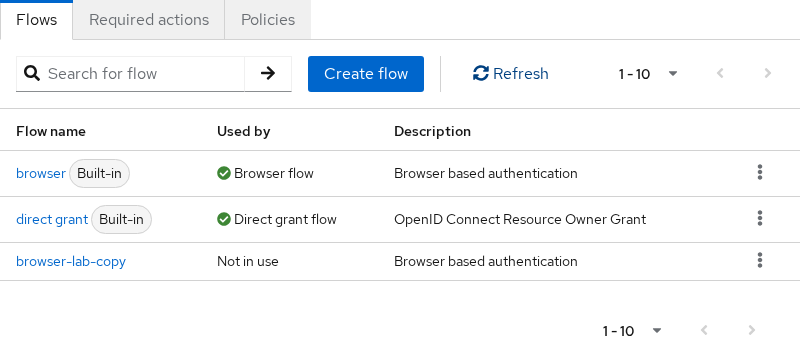
Clients can override the browser binding under Advanced → Authentication flow overrides when one application needs a different tree; the realm binding remains the default for everyone else. Client capability flags (Standard flow, Direct access grants) still gate whether an entry point is reachable—see Keycloak clients explained.
Direct grant contrast
Password grant at the token endpoint uses a separate, flatter flow bound as directGrantFlow. Export its executions the same way:
curl -sS -H "Authorization: Bearer ${ADMIN_TOKEN}" \
  "${KC_BASE}/admin/realms/${REALM}/authentication/flows/direct%20grant/executions" | \
  python3 -c "
import sys,json
for e in json.load(sys.stdin):
    indent='  '*e.get('level',0)
    print(f\"{indent}[{e.get('requirement'):12}] {e.get('displayName')} (priority={e.get('priority')})\")
"
Sample output:
[REQUIRED    ] Username Validation (priority=10)
[REQUIRED    ] Password (priority=20)
[CONDITIONAL ] Direct Grant - Conditional OTP (priority=30)
  [REQUIRED    ] Condition - user configured (priority=10)
  [REQUIRED    ] OTP (priority=20)
Same requirement semantics, different entry point. Changing browser does not change direct grant—a common mistake when teams disable password grant in the client but leave directGrantFlow untouched at the realm level.
Safely test a copied flow
Keycloak ships built-in authentication flows such as browser. You can change some execution requirements on a built-in flow, but structural customization should be done on a copy.
For anything beyond a small requirement change, duplicate the flow first. That gives you a separate tree that you can add to, reorder, test, and roll back without redesigning the built-in flow.
Copy the built-in browser flow:
curl -sS -o /dev/null -w 'copy-flow:%{http_code}\n' -X POST \
  -H "Authorization: Bearer ${ADMIN_TOKEN}" -H 'Content-Type: application/json' \
  "${KC_BASE}/admin/realms/${REALM}/authentication/flows/browser/copy" \
  -d '{"newName":"browser-lab-copy"}'
HTTP 201 creates browser-lab-copy with builtIn=false. Confirm the copy is editable and not built-in:
curl -sS -H "Authorization: Bearer ${ADMIN_TOKEN}" \
  "${KC_BASE}/admin/realms/${REALM}/authentication/flows" | \
python3 -c "import sys,json; f=[x for x in json.load(sys.stdin) if x['alias']=='browser-lab-copy'][0]; print('builtIn=', f.get('builtIn'))"builtIn= FalseBind the copy at the realm only when you are ready to test—then revert:
curl -sS "${KC_BASE}/admin/realms/${REALM}" -H "Authorization: Bearer ${ADMIN_TOKEN}" > /tmp/realm.jsonPoint browserFlow at the copy in a throwaway JSON file:
python3 -c "
import json
with open('/tmp/realm.json') as f: r=json.load(f)
r['browserFlow']='browser-lab-copy'
with open('/tmp/realm-bind.json','w') as f: json.dump(r,f)
"
Push the binding change to the realm:
curl -sS -o /dev/null -w 'bind-copy:%{http_code}\n' -X PUT \
  -H "Authorization: Bearer ${ADMIN_TOKEN}" -H 'Content-Type: application/json' \
  -d @/tmp/realm-bind.json "${KC_BASE}/admin/realms/${REALM}"
Restore the default binding immediately after your test. Reset browserFlow in JSON first:
python3 -c "
import json
with open('/tmp/realm.json') as f: r=json.load(f)
r['browserFlow']='browser'
with open('/tmp/realm-restore.json','w') as f: json.dump(r,f)
"
Apply the restore payload:
curl -sS -o /dev/null -w 'restore-browser:%{http_code}\n' -X PUT \
  -H "Authorization: Bearer ${ADMIN_TOKEN}" -H 'Content-Type: application/json' \
  -d @/tmp/realm-restore.json "${KC_BASE}/admin/realms/${REALM}"
Step-by-step customization (adding executions, OTP policies, publishing to production) belongs in Create a custom Keycloak authentication flow—this section stops at copy, bind, and rollback.
Debug with events and logs
Before editing requirements, record what the default flow actually did. Enable realm events once per lab:
python3 -c "
import json
with open('/tmp/realm.json') as f: r=json.load(f)
r['eventsEnabled']=True
r['adminEventsEnabled']=True
types=set(r.get('enabledEventTypes') or [])
types.update(['LOGIN','LOGIN_ERROR'])
r['enabledEventTypes']=sorted(types)
with open('/tmp/realm-events.json','w') as f: json.dump(r,f)
"
Upload the updated realm configuration:
curl -sS -o /dev/null -w 'enable-events:%{http_code}\n' -X PUT \
  -H "Authorization: Bearer ${ADMIN_TOKEN}" -H 'Content-Type: application/json' \
  -d @/tmp/realm-events.json "${KC_BASE}/admin/realms/${REALM}"
Run a browser login against client pkce-lab-spa, then query recent LOGIN events:
curl -sS -H "Authorization: Bearer ${ADMIN_TOKEN}" \
  "${KC_BASE}/admin/realms/${REALM}/events?type=LOGIN&max=3" | python3 -c "
import sys,json,datetime
for e in json.load(sys.stdin):
    ts=datetime.datetime.fromtimestamp(e['time']/1000).strftime('%Y-%m-%d %H:%M:%S')
    d=e.get('details',{})
    print(f\"{ts}  client={e.get('clientId')}  user={d.get('username')}  auth_type={d.get('auth_type')}\")
"
Sample output:
2026-09-24 23:45:25  client=pkce-lab-spa  user=tokenuser  auth_type=code
2026-09-24 23:45:20  client=pkce-lab-spa  user=tokenuser  auth_type=code
Events confirm login outcomes; they do not list individual execution names such as Cookie → forms → OTP Form. For execution-level detail, temporarily raise org.keycloak.authentication log level in start-dev, reproduce once, and grep container logs—or use the tree walkthrough above to predict the path before you change a requirement.
Admin events record structural changes such as flow copies. After the browser/copy call above, Admin events shows an operation like CREATE AUTH_FLOW authentication/flows/browser/copy.
Use Events → Admin events in the console when you need to know who rebound browserFlow during an incident.
Common flow design mistakes
| Symptom | Likely cause | Fix |
|---|---|---|
| SSO stopped working for all apps | Cookie set to Disabled or moved after a failing Required step | Restore Cookie as top Alternative on a copied flow; test before binding |
| OTP never appears | Conditional 2FA subflow skipped—user lacks a configured 2FA credential, or conditions misconfigured | Enroll TOTP for the user; verify Condition - User Configured; see Keycloak TOTP and 2FA |
| OTP always required | OTP execution set to Required instead of inside a Conditional branch | Match the built-in tree: conditions gate the subflow; OTP stays Alternative inside |
| Password grant still works after “disabling login” | Only browserFlow changed; directGrantFlow still active |
Disable Direct access grants on the client and audit directGrantFlow |
| Cannot structurally customize the built-in flow | Built-in flow structure is protected | Duplicate browser, customize the copy, then bind the copy when ready |
An Alternative execution never runs |
A sibling at the same level is Required |
Do not mix Required and competing Alternative executions at the same level |
| Custom flow “Not in use” | Copy exists but no binding references it | Set browserFlow (or client override) to the new alias |
Summary
Keycloak authentication is flow-driven: realm bindings pick which tree runs for browser login, direct grant, registration, and other entry points. Each tree is an ordered list of executions and subflows with Required, Alternative, Conditional, or Disabled requirements that govern evaluation order and success.
On Keycloak 26.7.3, the default browser flow explains everyday behavior—Cookie short-circuits to SSO, forms collects username and password, and Browser - Conditional 2FA adds OTP only when Condition - User Configured and the other conditions inside that subflow pass. Alternative siblings are evaluated only when the level contains no Required execution; Conditional subflows gate entire branches; Disabled rows disappear from the path entirely.
Inspect the built-in tree, use LOGIN events for login outcomes and authentication logs for execution-level detail, duplicate into browser-lab-copy before structural changes, and revert browserFlow to browser if a binding experiment fails. When you need a production custom tree, continue with the custom authentication flow guide—carrying the requirement semantics from this page with you.
References
- Keycloak Server Administration Guide — Authentication flows
- Keycloak Server Administration Guide — Configuring authentication
- Keycloak Admin REST API — Authentication management
Frequently Asked Questions
Why can I not edit a built-in flow?
Built-in flow structure is protected, but requirement values on executions can often be changed. For structural changes—adding executions, removing rows, or reordering subflows—duplicate the flow (Action → Copy or the REST copy endpoint), edit the copy, then point the realm or client binding at the new alias.
What is the difference between Required and Alternative?
Required executions must succeed when evaluated—failure fails the flow. Alternative siblings compete at the same level only when that level does not also contain a Required execution. Keycloak tries alternatives in priority order and stops at the first success. Cookie versus forms at the top of the browser flow is the classic Alternative group.
When does a Conditional subflow run?
Keycloak evaluates the condition executions inside the subflow first. If every required condition is true, the subflow behaves as Required and its authenticators run. If any condition is false, the subflow behaves as Disabled and evaluation continues with the next sibling outside it.
What does priority order change?
Priority controls evaluation order among siblings at the same level. Moving Cookie below another Alternative can let a different step win first—for example showing the login form even when a session cookie exists. Always test priority changes on a copied flow before rebinding production.
How do I restore the default browser flow?
Set the realm browserFlow back to browser under realm settings or via the Admin API, and ensure no client Authentication flow override still points at an experimental copy. Delete unused copies only after bindings no longer reference them.
