
| Tested on | Red Hat Enterprise Linux 10.2 (Coughlan) |
|---|---|
| Package | quay.io/keycloak/keycloak:26.7.3 |
| Applies to | Any Keycloak 26.x deployment — OIDC service accounts and client_credentials machine-to-machine tokens |
| Privilege | Keycloak admin access in the target realm — bootstrap admin on the lab container is enough |
| Lab environment | Keycloak 26.7.3 on http://127.0.0.1:8080/ with golinuxcloud realm, API client orders-api, and new M2M client billing-sync — Install Keycloak with Podman |
| Scope | Service accounts and client_credentials flow—enable confidential M2M clients, built-in service account users, role assignment, role intersection with client scope mappings, token requests with client secret, no refresh token behavior, protected API authorization checks, and troubleshooting invalid_client / missing roles. Does not cover custom client authenticator SPI development. |
| Related guides | Public vs confidential Keycloak clients Keycloak clients explained |
In this article we will enable a Keycloak service account and request machine-to-machine access tokens with the client_credentials grant on Keycloak 26.7.3. The lab client billing-sync authenticates as itself—no human login—and calls the orders-api resource server with a JWT that carries order-reader.
Service accounts still need the same role and scope discipline as human users. A confidential client with Client authentication enabled gets a built-in service user, but that user receives no roles until you assign them, and client scope mappings still filter what appears in the token. The walkthrough covers enablement, role assignment, and a token request you can replay with curl.
User login vs service account
Interactive OIDC flows authenticate a human. Machine-to-machine (M2M) flows authenticate the client application itself.
  Human login (authorization code / password grant)
  ─────────────────────────────────────────────────
  ┌────────┐   user credentials    ┌──────────┐   user session   ┌─────────────┐
  │ Person │ ────────────────────► │ Keycloak │ ───────────────► │ Access token│
  └────────┘                       └──────────┘   sub = user id  │ sub = user  │
                                                                   └─────────────┘

  Service account (client_credentials grant)
  ──────────────────────────────────────────
  ┌──────────────┐  client_id + secret   ┌──────────┐  no user session  ┌─────────────┐
  │ billing-sync │ ─────────────────────► │ Keycloak │ ────────────────► │ Access token│
  │ (cron job)   │                       └──────────┘                   │ sub = SA user│
  └──────────────┘                                                       │ azp = client │
                                                                         └─────────────┘
The access token still has a sub claim, but it points at the client's built-in service account user (service-account-billing-sync), not a person who typed a password.
What this service account lab creates
You need the golinuxcloud realm and client orders-api with role order-reader from earlier lessons.
At the end of this lab you will have:
- Confidential client
billing-syncwith Client authentication on and Service accounts roles enabled - Service account user
service-account-billing-syncwith realm roleemployeeand client roleorders-api/order-reader - Role scope mappings on the
rolesclient scope that expose onlyemployeeandorder-readerin the token - A successful
client_credentialstoken request and a failed attempt with a wrong secret - Decoded JWT showing
realm_access,resource_access.orders-api, andaud: orders-api - A simulated
orders-apiauthorization check that accepts the token
  billing-sync (M2M client)                orders-api (resource server)
  ├── Client secret in vault               ├── Expects aud = orders-api
  ├── Service account user                 ├── Checks resource_access.orders-api.roles
  └── client_credentials ──► JWT ─────────►└── Allows order-reader
Enable the service account
A service account is not a separate product feature you install—it is a confidential OIDC client with service accounts turned on.
Create client billing-sync:
- Switch to realm
golinuxcloud. - Open Clients → Create client.
- Set Client ID to
billing-syncand save. - On Settings (or Capability config in newer layouts), enable:
- Client authentication — makes the client confidential
- Service accounts roles — creates the built-in service account user and allows
client_credentials
- Turn off browser-oriented flows you do not need for M2M (Standard flow, Direct access grants).
- Set Full scope allowed to Off so role intersection behavior is visible in the lab.
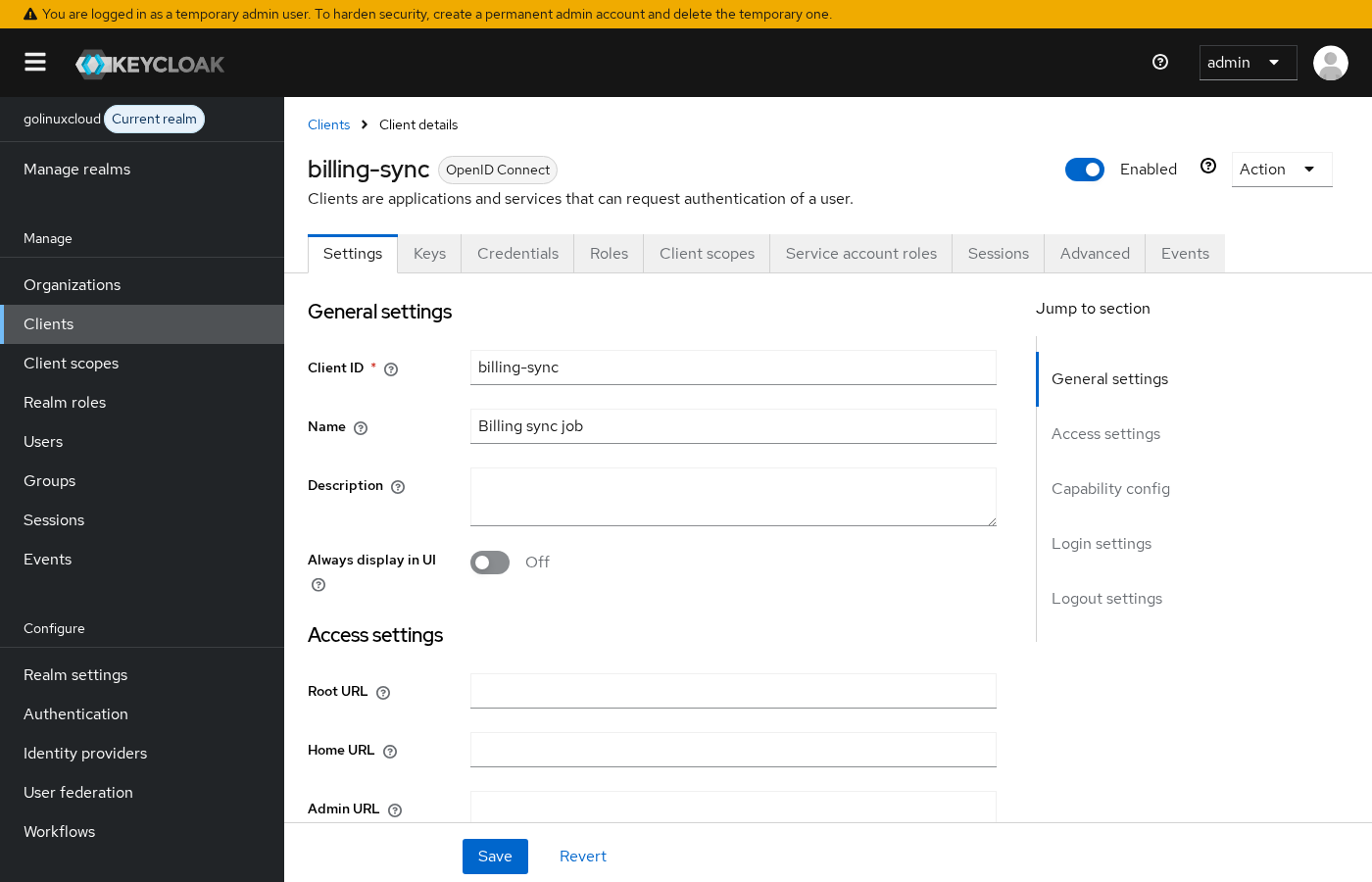
Copy the client secret from the Credentials tab. The lab secret is shown inline in curl examples below—rotate it if this realm is shared.
Both toggles matter together:
- Client authentication off → public client →
client_credentialsblocked withunauthorized_client - Service accounts roles off → confidential client exists but cannot obtain a service-account token
Built-in service account user
When you enable Service accounts roles, Keycloak creates a dedicated user in the same realm:
- Username pattern:
service-account-<clientId>(lab:service-account-billing-sync) - Enabled by default, not meant for password login
- Appears under Clients →
billing-sync→ Service account roles (not in the normal Users list unless you search for it)
Open Service account roles to assign realm and client roles the same way you would for a human user. The token's sub claim is this user's UUID; preferred_username is service-account-billing-sync.
Do not create a fake human user with a long-lived password for cron jobs or microservice calls—use the service account path this section enables.
Assign service account roles
Role assignment on the service account user is necessary but not sufficient for the token. Admin Console shows what the identity holds; the JWT shows what client scopes expose.
On Clients → billing-sync → Service account roles, assign:
- Realm role
employee - Client role
orders-api/order-reader
The service account now holds both roles in effective mappings. Request a token next and you will see why assignment alone is not enough when Full scope allowed is off.
Role intersection (assigned ∩ scope mappings)
This is the step most M2M tutorials skip—and the main reason teams report "role assigned but not in token."
Token roles are the intersection of:
- Roles assigned to the service account user (directly or via composites/groups)
- Roles exposed through the client's linked client scopes (role scope mappings on scopes such as
roles)
  Service account holds          roles scope exposes          Token contains
  ─────────────────────          ───────────────────          ──────────────
  employee                    ∩  employee                 =  employee
  developer (composite)          (employee only mapped)
  order-reader on orders-api  ∩  order-reader             =  order-reader
  uma_authorization              (not mapped)             =  (omitted)
With Full scope allowed off on billing-sync, a freshly assigned role does not appear in the JWT until you add a matching entry under Client scopes → roles → Scope (role scope mappings).
Add mappings on the shared roles scope:
- Open Client scopes →
roles→ Scope tab. - Under Realm Roles, assign
employee. - Under Client Roles, select client
orders-apiand assignorder-reader.
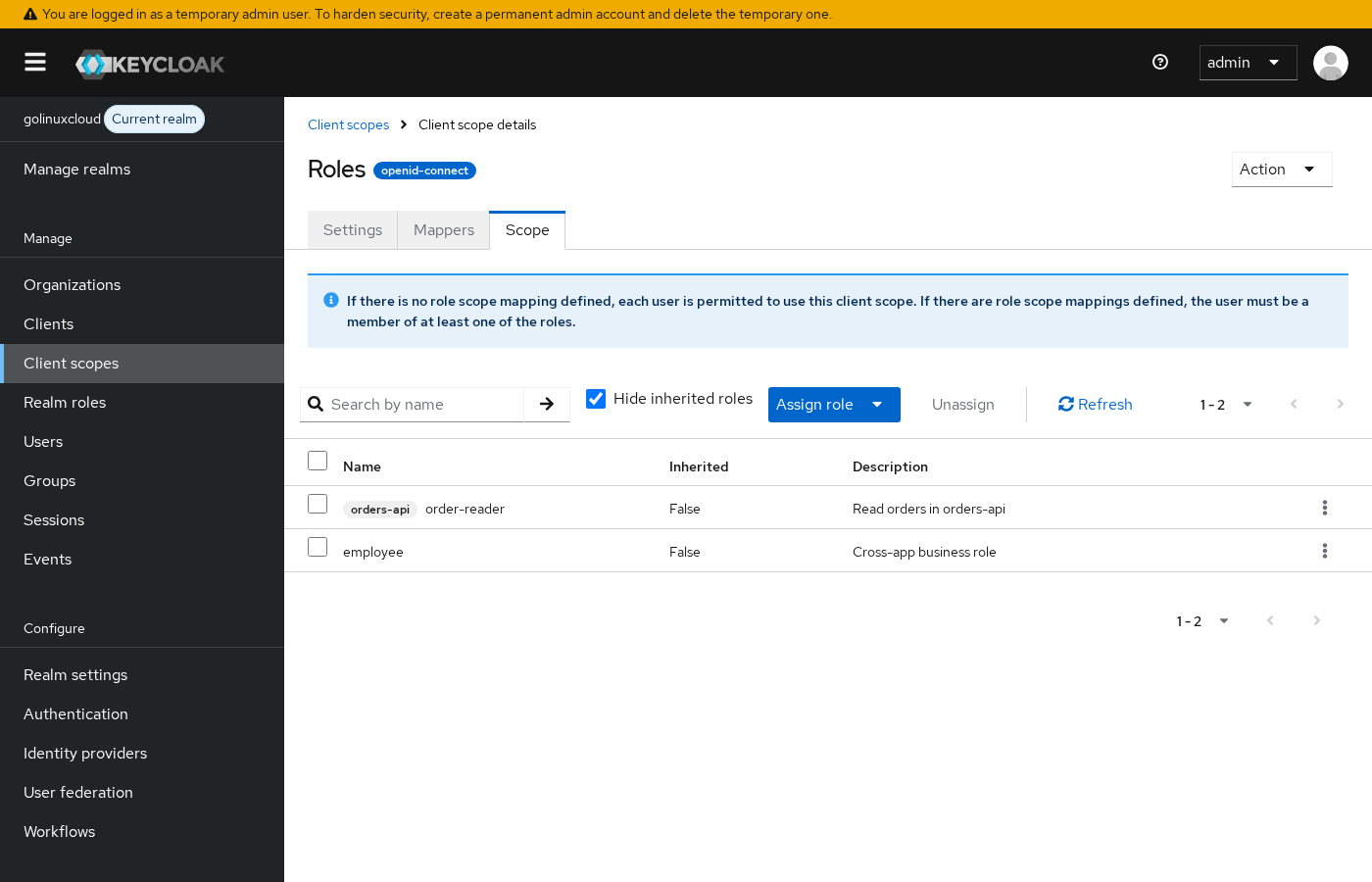
To prove intersection, assign composite realm role developer to the service account but do not add developer to the roles scope mappings. Admin Console lists developer; the access token still shows only employee because developer is outside the scope.
See Keycloak realm roles vs client roles for composite inheritance and Keycloak client scopes explained for how scopes link to clients.
Request an access token
The OIDC token endpoint issues M2M tokens when grant_type=client_credentials and the client authenticates with its secret.
Request a token for billing-sync with curl:
curl -s -X POST 'http://127.0.0.1:8080/realms/golinuxcloud/protocol/openid-connect/token' -H 'Content-Type: application/x-www-form-urlencoded' -d 'grant_type=client_credentials' -d 'client_id=billing-sync' -d 'client_secret=GFxbhTZNFYm9U0gK2DXA5Gee5geZQu21gdKSyGWeIU9faVurpWpUcJfSYILJdKu7GUm7OtwUxQwzVR36WdAg6H'Sample response (access token trimmed):
{
  "access_token": "eyJhbGciOiJSUzI1NiIsInR5cCIgOiAiSldUIiwia2lkIiA6ICJUMk9SQ0dkbnd0Wl96UWpsYXY2WUc1S2h2a29KMndCdnFzWFlyc0FlcEhRIn0...",
  "expires_in": 300,
  "refresh_expires_in": 0,
  "token_type": "Bearer",
  "not-before-policy": 0,
  "scope": "profile email"
}
There is no refresh_token field—expected for client_credentials, covered in the next section. Decode the access token payload to read role claims:
curl -s -X POST 'http://127.0.0.1:8080/realms/golinuxcloud/protocol/openid-connect/token' -H 'Content-Type: application/x-www-form-urlencoded' -d 'grant_type=client_credentials' -d 'client_id=billing-sync' -d 'client_secret=GFxbhTZNFYm9U0gK2DXA5Gee5geZQu21gdKSyGWeIU9faVurpWpUcJfSYILJdKu7GUm7OtwUxQwzVR36WdAg6H' | python3 -c "import sys,json,base64; t=json.load(sys.stdin)['access_token']; p=t.split('.')[1]; p+='='*(-len(p)%4); c=json.loads(base64.urlsafe_b64decode(p)); print(json.dumps({k:c.get(k) for k in ('realm_access','resource_access','azp','aud','preferred_username')}, indent=2))"Sample decoded payload:
{
  "realm_access": {
    "roles": [
      "employee"
    ]
  },
  "resource_access": {
    "orders-api": {
      "roles": [
        "order-reader"
      ]
    }
  },
  "azp": "billing-sync",
  "aud": "orders-api",
  "preferred_username": "service-account-billing-sync"
}
azp is the client that requested the token (billing-sync). aud tells resource servers which API the token targets—orders-api in this lab.
Before role scope mappings
If you request a token immediately after assigning roles but before adding scope mappings (with Full scope allowed off), decode the access token the same way—the payload shows empty role buckets even though Service account roles lists employee and order-reader:
{
  "realm_access": null,
  "resource_access": null,
  "azp": "billing-sync",
  "preferred_username": "service-account-billing-sync"
}
Roles are assigned in Admin Console; the scope layer has not released them into the JWT yet.
Why there is normally no refresh token
client_credentials is a one-shot grant for non-interactive clients. Keycloak returns an access token and does not create a user session tied to a person sitting at a browser.
| Grant | Refresh token | User session |
|---|---|---|
| Authorization code (with offline scope) | Often yes | Yes |
| Resource-owner password | Sometimes | Yes |
client_credentials |
No (normal) | No |
When the access token expires (expires_in, commonly 300 seconds in dev), the job requests a new token with the same client_credentials call. Missing refresh_token is not a failure—it is the default design.
Long-lived delegated access for automated jobs that must act on behalf of a user belongs to offline tokens and refreshable sessions, not service accounts.
Client authentication options
The lab uses a client secret in the token POST body—the fastest path for learning. Production M2M should prefer stronger authenticators when your platform supports them.
| Method | Typical use | Lab note |
|---|---|---|
| Client secret | Dev, private network, vault-stored credential | What this article exercises |
| Signed JWT (private key) | Cloud-native workloads, no shared secret rotation | Configure under Credentials → client authenticator |
| mTLS / X.509 | High-trust service mesh or API gateways | Requires TLS termination setup |
A shared secret in source control is a common source of invalid_client after rotation. Store secrets in a vault, rotate on leak, and prefer asymmetric client authentication for production microservices.
Call a protected API
This section is not a full API development guide—it shows what orders-api would check on the JWT your job already obtained.
Store the access token in a shell variable and export it so the Python check in the next step can read it:
export M2M_TOKEN=$(curl -s -X POST 'http://127.0.0.1:8080/realms/golinuxcloud/protocol/openid-connect/token' -H 'Content-Type: application/x-www-form-urlencoded' -d 'grant_type=client_credentials' -d 'client_id=billing-sync' -d 'client_secret=GFxbhTZNFYm9U0gK2DXA5Gee5geZQu21gdKSyGWeIU9faVurpWpUcJfSYILJdKu7GUm7OtwUxQwzVR36WdAg6H' | python3 -c 'import sys,json; print(json.load(sys.stdin)["access_token"])')Simulate orders-api authorization—the resource server validates audience and client roles before running business logic:
python3 -c "import base64,json,os; t=os.environ['M2M_TOKEN'].split('.')[1]; t+='='*(-len(t)%4); c=json.loads(base64.urlsafe_b64decode(t)); roles=c.get('resource_access',{}).get('orders-api',{}).get('roles',[]); aud=c.get('aud'); print('API auth OK' if aud=='orders-api' and 'order-reader' in roles else 'API auth FAIL: aud=%s roles=%s' % (aud, roles))"Sample output when the token matches lab expectations:
API auth OKA real API would also validate issuer, signature, and exp with a JWT library or OAuth resource-server middleware. If the API rejects the token despite correct roles, check aud—add an audience mapper in Keycloak protocol mappers when the resource server expects a specific audience claim.
Service account vs offline token
Service accounts and offline tokens solve different problems.
Service account (client_credentials) |
Offline token (refresh + offline_access) |
|
|---|---|---|
| Identity in token | The client itself (service-account-<clientId>) |
The human user who consented |
| Refresh token | Not issued by default | Issued when scope allows |
| Use case | Cron job, microservice, ETL worker | Mobile app background sync, long-lived user delegation |
| Session | No interactive user session | Tied to user's offline session record |
Use a service account when no human is present. Use offline access when a user delegated rights and you need refresh without re-login. Session lifecycle details live in the planned sessions lesson referenced from Create and manage Keycloak users.
Service account vs fake human user
Avoid creating a batch-user human account with a static password for machine jobs.
| Approach | Problem |
|---|---|
| Shared human user for scripts | Password rotation breaks automation; audit trails show a person who never logged in |
| Service account | Client-bound identity, secret or key rotation per client, clear azp in tokens |
Keycloak models M2M correctly with service accounts—use them instead of weakening human account policies.
Common problems
| Symptom | Likely cause | Fix |
|---|---|---|
unauthorized_client / Public client not allowed to retrieve service account |
Client authentication off (public client) | Enable Client authentication; use a confidential client |
unauthorized_client / Invalid client credentials |
Wrong secret, rotated credential, or typo in client_id |
Copy secret from Credentials tab; retry token POST |
invalid_client (HTTP 401) |
Missing client_secret on confidential client |
Send secret in POST body or use configured JWT/mTLS authenticator |
| Service account tab missing | Service accounts roles disabled | Enable on client Settings / Capability config |
Role on service account, empty realm_access / resource_access |
Full scope allowed off and no role scope mapping | Map role on Client scopes → roles → Scope, or enable full scope for dev only |
| Composite role assigned, only parent in token | Child roles not in scope mappings | Map each role you need emitted, or map the composite on the scope |
| Token from wrong realm | URL uses master instead of golinuxcloud |
POST to /realms/golinuxcloud/protocol/openid-connect/token |
No refresh_token in response |
Normal for client_credentials |
Request a new access token when exp passes |
| API returns 401 despite roles in JWT | aud mismatch or API checks wrong client namespace |
Align audience mapper with API expectation; read resource_access.<clientId>.roles |
employee missing but order-reader present |
Realm role not in scope mapping | Add realm role to roles scope Scope tab |
Wrong-secret example for comparison:
curl -s -X POST 'http://127.0.0.1:8080/realms/golinuxcloud/protocol/openid-connect/token' -H 'Content-Type: application/x-www-form-urlencoded' -d 'grant_type=client_credentials' -d 'client_id=billing-sync' -d 'client_secret=wrong-secret'{"error":"unauthorized_client","error_description":"Invalid client or Invalid client credentials"}Summary
Keycloak service accounts let confidential clients authenticate as themselves with the client_credentials grant—no human login and normally no refresh token. The lab client billing-sync obtained a JWT whose sub is service-account-billing-sync, whose azp is billing-sync, and whose resource_access.orders-api.roles includes order-reader for the downstream API.
The intersection rule is the troubleshooting key: roles on the service account user must also be exposed through client scope role mappings when Full scope allowed is off. Assignment alone left realm_access and resource_access null; adding employee and order-reader to the roles scope mappings released them into the token.
For production, replace long-lived shared secrets with signed JWT or mTLS client authentication, keep M2M clients off browser login flows, and validate aud at the resource server. Tighten token shape next with audience or custom claim mappers, or narrow default scopes on the M2M client.
References
- Keycloak Server Administration Guide — Service accounts
- OpenID Connect Core — Client Authentication
- RFC 6749 — Client Credentials Grant
- Keycloak documentation — Client scopes and role scope mappings
Frequently Asked Questions
Why does client_credentials return unauthorized_client on my SPA client?
The client is public—client authentication is off. Browser applications cannot use service accounts. Create a separate confidential client for backend jobs and enable Service accounts roles on that client.
I assigned a role to the service account—why is it missing from the token?
Check Full scope allowed and role scope mappings on the client's linked scopes (usually roles). With full scope off, only roles listed on the scope's Scope tab appear in the JWT. Assignment in Service account roles is necessary but not sufficient.
Is missing refresh_token a bug?
No. Keycloak normally omits refresh_token for client_credentials. Request a new access token when the current one expires.
Can I use a human user password for a nightly batch job instead?
You can, but you should not. Shared human credentials break rotation, blur audit trails, and bypass the service account model Keycloak provides for M2M workloads.
What should orders-api validate on the JWT?
At minimum: signature and exp from your OIDC provider, iss matching your realm, aud including orders-api if your API enforces audience, and resource_access.orders-api.roles (or realm roles if that is your policy). The lab token used order-reader under resource_access.orders-api.
