
| Tested on | Red Hat Enterprise Linux 10.2 (Coughlan) |
|---|---|
| Package | podman-5.8.2-5.el10_2.x86_64quay.io/keycloak/keycloak:26.8.0libxml2-2.12.5-10.el10_2.2.x86_64 |
| Applies to | Any Linux host with Podman or Docker |
| Privilege | Normal user (rootless Podman). Realm setup uses the Keycloak bootstrap admin |
| Scope | How a Keycloak realm acting as the SAML IdP chooses the assertion NameID format and value, including Force name ID format and a User Attribute mapper for NameID. Does not cover arbitrary Attribute elements, assertion signing, or vendor-specific AWS or Salesforce NameID rules. |
| Related guides | What is Keycloak? Keycloak realms Keycloak SAML metadata Map Keycloak roles and groups into SAML assertions Authentication vs authorization |
A service provider that identifies the user from SAML reads the NameID element, not the Keycloak username field by itself. The format and the value are two different choices. Setting the client to email or persistent does not, on its own, guarantee the subject the service provider asked for.
The steps below start from the two-realm login in Keycloak SAML SSO. Realm company is the IdP. Realm apps is the broker. A department value inside an Attribute element is a different mapper, covered in Keycloak SAML attribute mapping.
Quick Answer
Keycloak's SAML NameID has two independent parts: a format and a value. The service provider can include a NameIDPolicy in its SAML AuthnRequest. That policy asks the IdP to return a specific NameID format. Force name ID format makes Keycloak ignore that request and use the client's Name ID format.
- The SAML client's Name ID format selects the format Keycloak prefers.
- For a custom subject such as an employee ID, use User Attribute Mapper For NameID and make its Name ID Format match the format Keycloak is sending.
What SAML NameID Identifies
NameID sits inside the assertion's Subject section. In simple terms, it is the identifier that says which user this SAML login is about. It is not a role or a group. How the service provider uses that identifier for account lookup or account creation depends on its configuration.
This test used the same pair of realms for every login:
| Setting | Value in this test |
|---|---|
| IdP | Realm company on http://127.0.0.1:18091, container keycloak-saml-nameid-idp |
| SP/broker | Realm apps on http://127.0.0.1:18092 |
| SAML client ID | http://127.0.0.1:18092/realms/apps |
| User | alice / Alice!2026, email alice@example.com |
Alice already had a working SAML login. The only thing that changed between captures was the NameID configuration. Because Principal type = Subject NameID, the apps broker uses the incoming NameID to recognize the same external user on later logins. Local username creation is part of the broker's first-login behavior and should not be confused with the Principal Type setting itself.
FORMAT (the Format attribute)     EXAMPLE VALUE IN THIS LAB
emailAddress                      alice@example.com
persistent                        E-1042
unspecified                       alice
Those three rows are results from this test, not a rule that every service provider must use the same row. Persistent does not inherently mean an employee ID. Configure both the format and the value to match what the service provider expects.
NameID Format vs NameID Value
The format is the Format attribute on NameID. The value is the text between the tags. Changing the format does not necessarily change the value, and changing the value does not change the format.
Keycloak's client setting Name ID format is not copied into the assertion as the word you see in the dropdown:
usernameproducedFormat="urn:oasis:names:tc:SAML:1.1:nameid-format:unspecified"and the valuealice.email, when that format was actually used, producedurn:oasis:names:tc:SAML:1.1:nameid-format:emailAddressand the valuealice@example.com.persistent, when that format was actually used, producedurn:oasis:names:tc:SAML:2.0:nameid-format:persistent.
The first login, with Name ID format left at username and Force name ID format off, looked like this:
<saml:NameID Format="urn:oasis:names:tc:SAML:1.1:nameid-format:unspecified">alice</saml:NameID>The dropdown said username. The XML said unspecified. The value was the Keycloak username. A service provider that accepts only emailAddress will not treat that element as an email, even though Alice has alice@example.com on her user record.
The broker also has a NameID policy format. That value is what the AuthnRequest asks the IdP to use. In this test the broker always sent a policy. Unspecified is still a policy. It is not the same as leaving the request silent.
Here, effective format simply means the format Keycloak finally decides to put into the outgoing <NameID Format="...">. Keycloak picks that format in this order, then looks for a NameID mapper that matches it:
SP AuthnRequest
    │
    └── NameIDPolicy present?
             │
             ├── Yes + Force OFF
             │      └── requested format wins
             │
             └── No, or Force ON
                    └── SAML client's Name ID format wins
                               │
                               ▼
                    Effective NameID format
                               │
                               ▼
              matching NameID mapper?
                  │             │
                 Yes            No
                  │             │
          mapper supplies       Keycloak uses its
          the value             normal value source
The request's NameIDPolicy is used unless Force name ID format is on. Otherwise the SAML client's Name ID format supplies the format. A matching mapper can replace the value. It does not choose the format.
Keycloak Name ID Format Setting
On the SAML client in realm company, open the client whose client ID is the apps entity ID. The setting is on the Settings tab, under SAML capabilities. Name ID format is the format Keycloak uses when the request does not name a policy, or when Force name ID format is on.
Set Name ID format to email and leave Force name ID format off. In this test the broker's NameID policy format was still Unspecified. The next assertion did not change:
<saml:NameID Format="urn:oasis:names:tc:SAML:1.1:nameid-format:unspecified">alice</saml:NameID>The console showed email. The assertion still carried the username. This is an easy setting to misread: changing the client dropdown did not change the assertion because the AuthnRequest was still asking for Unspecified and Force was off.
When to Use Force Name ID Format
Force name ID format controls whether the request or the client setting wins:
- Off: use the NameID policy requested by the service provider.
- On: ignore the requested policy and emit the client's configured Name ID format.
- In either state, the service provider can reject a format or value it does not support. Force changes Keycloak's response, not the service provider's acceptance rules.
On the apps broker, the matching field is NameID policy format. This test set it to Email while the company client was still username and Force was off. Keycloak honored the request:
<saml:NameID Format="urn:oasis:names:tc:SAML:1.1:nameid-format:emailAddress">alice@example.com</saml:NameID>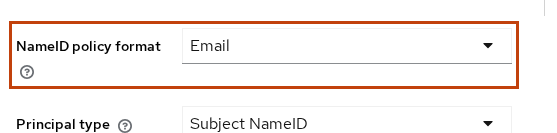
NameID policy format is the request. Principal type Subject NameID tells this broker which part of the assertion identifies and tracks the external user. It does not create the local username, and it does not choose the NameID format.
The same four combinations in this 26.8.0 test:
| Client Name ID format | Force name ID format | Broker NameID policy | NameID that came back |
|---|---|---|---|
username |
Off | Unspecified | unspecified, value alice |
email |
Off | Unspecified | unspecified, value alice |
email |
On | Unspecified | emailAddress, value alice@example.com |
username |
On | unspecified, value alice |
The final row shows that Force works both ways: the client can override an Email request with its configured username format. The broker asked for email. Force was on and the client format was username, so the assertion stayed alice. A service provider that only accepts an email subject can reject that response. This Keycloak broker did not. It accepted the subject and tracked the external user from that NameID value.
With Force on and Name ID format set to email, the unspecified request no longer won. The assertion was alice@example.com with format emailAddress.
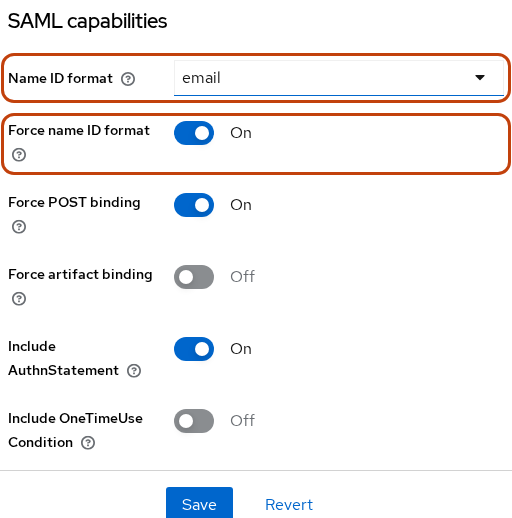
Name ID format is email and Force name ID format is On. That is the client configuration for the email assertion above.
Use Email or a Custom User Attribute as NameID
When the effective NameID format is emailAddress, Keycloak uses the user's built-in Email field as the NameID value. Alice's field is alice@example.com, so that is the value you saw above. You do not need a separate NameID mapper just to send the user's email address.
A custom identifier is different. This test used employeeId with the value E-1042. In this 26.8.0 realm the attribute had to exist on the realm User Profile before the user record would keep it. Define the name first, then set the value on the user.
Open Users, select alice, and set Employee ID to E-1042.
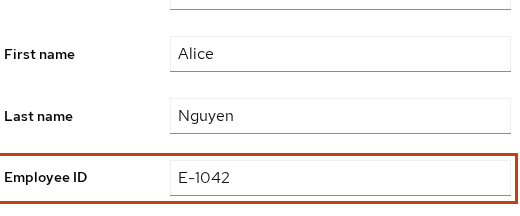
Employee ID is the profile display name. The mapper reads the attribute name employeeId, not the label.
A User Attribute mapper for NameID does not add an Attribute element. It replaces the NameID value when its Name ID Format matches the format Keycloak is about to send. Add it on the SAML client's dedicated scope:
- Open the SAML client, then Client scopes, then the dedicated scope.
- Add a mapper of type User Attribute Mapper For NameID.
- Set Name ID Format to
urn:oasis:names:tc:SAML:2.0:nameid-format:persistent. - Set User Attribute to
employeeId.
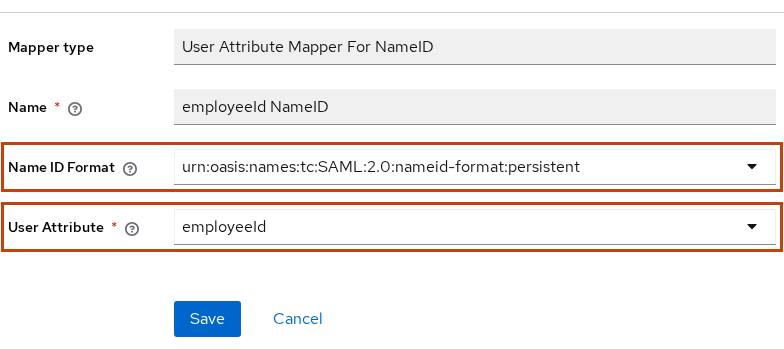
In this Keycloak 26.8.0 UI, the NameID mapper offered emailAddress, unspecified, persistent, and transient.
The mapper changes the value, not the format.
- Its Name ID Format is a full URN, not the short word
persistentfrom the client dropdown. - When the effective NameID format is persistent, use
employeeIdas the value.
With the client Name ID format set to persistent, Force name ID format on, and the broker policy left at Unspecified, the next assertion was:
<saml:NameID Format="urn:oasis:names:tc:SAML:2.0:nameid-format:persistent">E-1042</saml:NameID>The format stayed persistent. The value became E-1042 instead of the Keycloak-generated persistent NameID.
If the mapper's Name ID Format does not match the effective format, Keycloak skips the mapper. This test pointed the same mapper at emailAddress while the client was still sending persistent. employeeId did not appear. When the mapper no longer matched the effective format, Keycloak fell back to its previously generated persistent NameID.
Persistent vs Email vs Unspecified
None of these formats is the correct NameID for every service provider. Configure both the format and the value to match what the service provider expects.
| Format | Typical value behavior | Good when |
|---|---|---|
Unspecified / username in this lab |
alice |
The SP expects the username |
alice@example.com |
The SP expects the mailbox | |
| Persistent, Keycloak-generated | A stable, opaque, client-specific value | The SP needs a repeatable identifier that does not reveal the username or email |
| Persistent with a custom mapper | The value comes from the mapped attribute, such as employeeId |
The SP requires a specific stable business identifier |
| Transient | A new temporary identifier | The SP should not correlate the same subject across logins |
This lab does not test transient. Keycloak's broker does not allow Principal type = Subject NameID together with transient NameID Policy. That makes sense for this broker setup because a transient NameID is intentionally temporary, while Subject NameID is being used to recognize the external identity.
Before the mapper, persistent format sent G-46c1ab4c-2276-48e6-821a-49612c2d24c8. A second login returned the same value. Keep these properties separate:
- It is a Keycloak-generated persistent NameID, not Alice's user id,
employeeId, or the assertion id. - Keycloak stores it against the user for that SAML client and reuses it on later logins.
- Alice can have a different generated persistent NameID for a different SAML client.
Email shows the mailbox. If Alice's email changes later, the subject changes with it. Do not treat email as a permanent account key unless that service provider says the mailbox is the identifier. When employeeId supplies the NameID, changing employeeId changes the subject seen by the service provider on the next login. Treat that attribute as immutable if the service provider uses it as its account key.
When the mapper no longer matched the effective format, Keycloak fell back to its previously generated persistent NameID. The mapper did not delete that stored value. It only replaced the text in the assertion while the formats agreed.
Verify NameID in the Assertion
Open the apps account console while you are signed out of both realms:
http://127.0.0.1:18092/realms/apps/account
Choose Sign in with Company IdP. Sign in on port 18091 as alice. The browser POSTs a field named SAMLResponse to the broker endpoint on port 18092.
If you copy the value from the parsed form parameters, it is already the base64 text. If you copy the raw request body, URL-decode it first. Put the base64 text in SAML_RESPONSE and decode it:
printf '%s' "$SAML_RESPONSE" | base64 -d | xmllint --format - > saml-response.xmlThe command writes saml-response.xml and prints nothing when the value is valid base64.
The broker may then stop on Update Account Information. That form is the apps realm asking for a local profile. It is not proof that NameID was missing. The POST already happened.
Read the subject:
xmllint --xpath '//*[local-name()="NameID"]' saml-response.xml<saml:NameID Format="urn:oasis:names:tc:SAML:1.1:nameid-format:emailAddress">alice@example.com</saml:NameID>That line is the email capture, with Force name ID format on. Check both parts:
Formatis the format the service provider will compare.- The text inside the element is the subject value the service provider receives.
Sign in again after each NameID change and decode over the same file.
Match the Service Provider Requirement
Check the service provider's SAML documentation before choosing a NameID format and value. It should name the format URN and say which user field belongs in the value.
Use the pair you can prove in the XML:
- The service provider wants the mailbox: Name ID format
email, and either Force name ID format on or a NameID policy of Email. Confirm the value isalice@example.com, notalice. - The service provider wants a stable id that is not the mailbox: Name ID format
persistent, Force on if the request would otherwise ask for something else, and a User Attribute mapper whose Name ID Format is the persistent URN. Confirm the value is your attribute, not the Keycloak-generated persistent NameID, unless that generated value is what you intend to keep. - The service provider accepts the username: leave Name ID format at
username. Expect format unspecified and the valuealice.
If the service provider compares the format and you only changed the value, or the other way around, the login can fail even though the assertion contains a NameID.
Common NameID Mapping Failures
| Symptom | Likely cause | Fix |
|---|---|---|
Name ID format is email but NameID is still alice |
Force name ID format is off and the request asked for unspecified | Turn Force name ID format on, or set the SP NameID policy format to Email |
Format is emailAddress and the SP wanted an employee id |
Email format sends the email property | Use persistent format and a User Attribute mapper, if that is what the SP documents |
Persistent mapper exists but NameID is still G-… |
The mapper's Name ID Format does not match the effective format | Compare the mapper's full URN with the decoded NameID Format |
| A custom attribute never saves on the user | The name is not in the realm User Profile | Add the attribute to the User Profile, then set the value |
| SP reports a NameID or subject mismatch | The NameID format or value does not match what the service provider expects | Compare the decoded NameID with the service provider's documentation. This broker accepted every subject above |
Summary
NameID is the subject of the SAML assertion. The Format attribute and the text inside the element answer different questions. On this 26.8.0 client, the dropdown value username produced format unspecified and the value alice. Changing the dropdown to email did nothing while Force name ID format was off and the broker still asked for unspecified.
Force name ID format made the client setting win. With it on, email produced alice@example.com. With it on and the client left at username, an Email request from the broker still came back as alice. Force does not make the service provider accept that subject. The email property is the value for email format. A User Attribute mapper for NameID replaced the persistent value with E-1042 only when the mapper's Name ID Format was the persistent URN. When the mapper no longer matched the effective format, Keycloak fell back to its previously generated persistent NameID.
Email shows the mailbox and changes when the mailbox changes. The Keycloak-generated persistent NameID stayed the same across two logins for this SAML client and did not reveal the username. When employeeId supplies the subject, changing that attribute changes what the service provider sees next. Configure both the format and the value to match what the service provider expects. Decode the assertion and verify the NameID element before considering the SAML setup complete.
References
Frequently Asked Questions
How do I use email as NameID in Keycloak?
Set the SAML client's Name ID format to email. If the service provider's AuthnRequest asks for a different format, turn Force name ID format on. The NameID value is the user's email property, such as alice@example.com, and the Format attribute is urn:oasis:names:tc:SAML:1.1:nameid-format:emailAddress. Changing only the dropdown, with Force off and a request for unspecified, leaves the username in the assertion.
What does Force Name ID Format do?
It tells Keycloak to ignore the NameID policy in the authentication request and use the client's Name ID format. With it off, a request for email can produce an email NameID even when the client dropdown says username. With it on, the client setting wins, including when that means the service provider does not get the format it asked for. The service provider can still reject that response.
Should NameID be persistent?
Only when the service provider needs a stable subject that is not the mailbox or the username. In this test a Keycloak-generated persistent NameID stayed the same on a second login for that SAML client. Do not assume the same value is shared with every service provider. Email is a poor permanent key if the mailbox can change. Persistent is a poor choice when the service provider requires an email address.
Can I map a custom attribute to NameID?
Yes. Add a User Attribute mapper for NameID on the SAML client's dedicated scope. Set User Attribute to the profile attribute, such as employeeId, and set the mapper's Name ID Format to the same URN Keycloak will put on the NameID element. If those formats differ, Keycloak skips the mapper and sends the usual value for that format.
Why does my SP reject the NameID?
The NameID format, the value, or both do not match what that service provider expects. Decode the NameID element and compare Format and the text inside it with the service provider's documentation. A Keycloak broker that uses Subject NameID can accept a subject that another application rejects. An email dropdown with Force left off is a common reason the value is still the username.
