
| Tested on | Red Hat Enterprise Linux 10.2 (Coughlan) |
|---|---|
| Package | podman-5.8.2-5.el10_2.x86_64quay.io/keycloak/keycloak:26.7.3 |
| Applies to | Any Linux host with Podman or Docker |
| Privilege | Keycloak admin access to edit authentication flows; normal user accounts for browser login matrix tests |
| Lab environment | Keycloak 26.7.3 on http://127.0.0.1:8080/ — Install Keycloak with Podman |
| Scope | How Conditional subflows decide whether a branch runs, built-in condition semantics, Conditional OTP Form vs Direct Grant conditional OTP, compact lab setup, role-gated OTP example, Alternative vs Required OTP policies, four-state login matrix, and troubleshooting skipped subflows. Does not cover forcing MFA enrollment for every group member — see Create a custom Keycloak authentication flow. |
| Related guides | Keycloak authentication flows explained Create a custom Keycloak authentication flow Keycloak TOTP two-factor authentication Create and manage users in Keycloak Install Keycloak with Podman |
Conditional authentication lets Keycloak run part of a login flow only when specific conditions are true. For example, you can show an OTP challenge only when the user has a particular role and already has OTP configured.
A Conditional subflow runs its child authenticators when every Required condition inside it evaluates true; otherwise Keycloak skips the entire branch and continues with the next sibling execution.
This guide answers one question on Keycloak 26.7.3:
How do Conditional subflows decide whether an authentication branch runs?
The role-gated OTP example below shows how those rules behave in a real login flow. It is not a “require MFA for every group member” recipe — a role member without enrolled OTP completes password login because Condition - user configured fails and the subflow is skipped. To force enrollment instead, see Create a custom Keycloak authentication flow.
How Conditional Subflows Evaluate
Only a subflow row can use requirement Conditional. Condition executions placed outside a Conditional subflow are not evaluated as gates — they are inert until you nest them correctly.
Evaluation order inside a Conditional subflow:
- Keycloak walks Required condition rows in priority order.
- If any condition returns false, the subflow is treated as Disabled — child authenticators never run.
- If all conditions return true, authenticators inside the subflow run using their own requirements (Alternative, Required, and so on).
  Parent subflow (forms)
    ├── [REQUIRED]     Username Password Form
    └── [CONDITIONAL]  Group MFA                    ← gate
          ├── [REQUIRED]  Condition - user role     ─┐
          ├── [REQUIRED]  Condition - user configured ├─ ALL must be true
          └── [ALTERNATIVE] OTP Form               ─┘  then this can run
Alternative does not mean “optional for the user.” It means this execution is one possible successful authenticator at that level. In this lab it runs only after the surrounding Conditional subflow becomes active.
Truth table: two Required conditions
The lab Group MFA subflow chains role membership and OTP enrollment:
| Condition - user role | Condition - user configured | Subflow runs OTP? |
|---|---|---|
true (has mfa-lab-required) |
true (OTP credential exists) | Yes — OTP Form shown |
| true | false (no OTP credential) | No — subflow skipped |
| false (missing role) | true | No — subflow skipped |
| false | false | No — subflow skipped |
Because these conditions are combined with AND, a user in the target group without enrolled TOTP completes password login with no OTP prompt — the role passed but Condition - user configured failed, so the subflow was skipped intentionally.
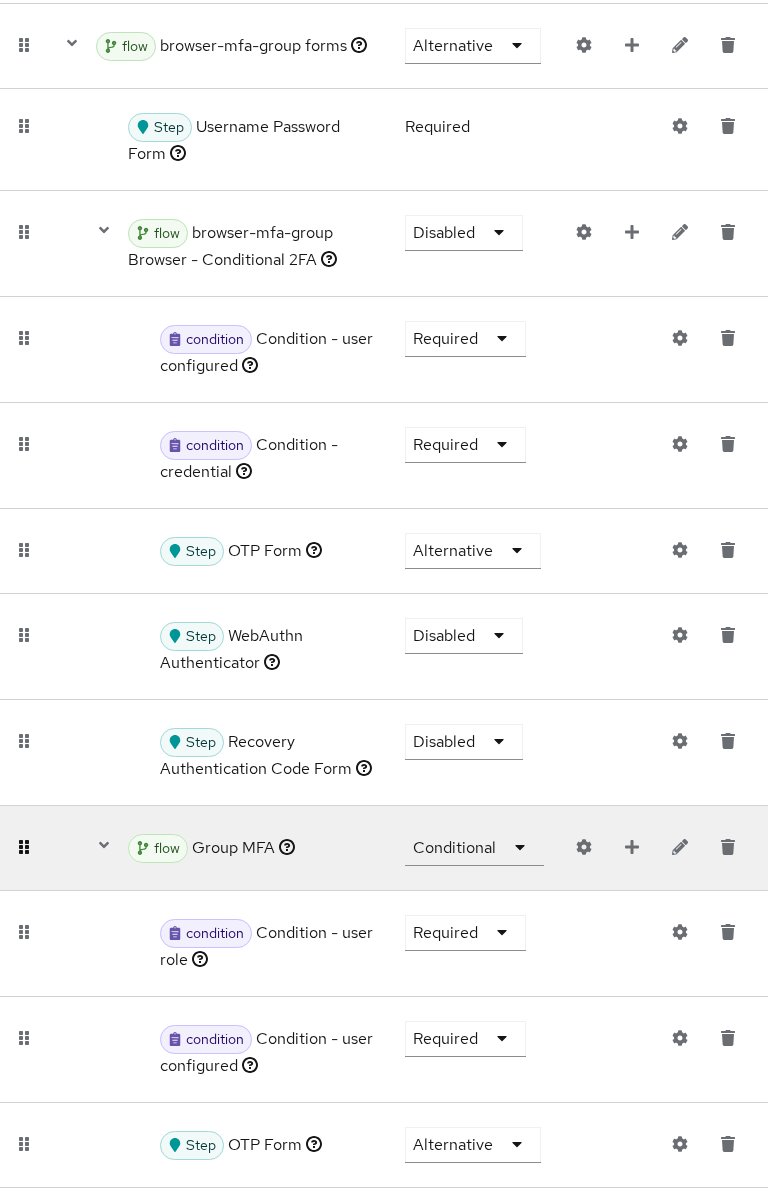
The Admin Console tree above shows the exact branch this article tests: browser-mfa-group forms expanded, default Browser - Conditional 2FA disabled, and Group MFA conditional with both condition rows Required before OTP Form.
Lab Setup
You can reproduce the example from search without reading the full custom-flow course first. Create these realm objects:
Role and group
- Under Realm roles, create
mfa-lab-required. - Under Groups, create
mfa-lab-group. - Open Groups → mfa-lab-group → Role mapping → Assign role and add
mfa-lab-required.
Flow copy
- Open Authentication → Flows.
- Select browser, click Duplicate, and name the copy
browser-mfa-group.
Inside browser-mfa-group forms
- Leave Username Password Form as Required.
- Set the copied Browser - Conditional 2FA subflow to Disabled.
- Click Add sub-flow, name it Group MFA, and set requirement to Conditional.
- Inside Group MFA, add Condition - user role as Required. Open the gear icon, set User role to
mfa-lab-required. - Add Condition - user configured as Required.
- Add OTP Form as Alternative.
Test users
Create four users for the matrix later in this guide:
| User | Password | In mfa-lab-group |
Enroll OTP before matrix |
|---|---|---|---|
mfa-group-otp |
MfaGroupOtp!2026 |
Yes | Yes |
mfa-group-plain |
MfaGroupPlain!2026 |
Yes | No |
mfa-otp-only |
MfaOtpOnly!2026 |
No | Yes |
tokenuser |
TokenUser!2026 |
No | No |
Enroll TOTP for mfa-group-otp through the Account Console before expecting the OTP challenge — see Keycloak TOTP two-factor authentication.
For binding browserFlow, rollback, and Admin API automation, continue with Create a custom Keycloak authentication flow.
Built-In Conditions
| Condition | What it checks |
|---|---|
| Condition - user role | Realm or client role membership (condUserRole; optional Negate output) |
| Condition - user configured | Whether the user is configured for the other authenticator(s) in this subflow |
| Condition - credential | Whether one of the configured credential types has already been used during the current authentication |
| Condition - user attribute | User attribute name/value match |
| Condition - client scope | OAuth client scope on the requesting client |
| Condition - Level of Authentication | Requested LoA vs achieved level |
| Condition - sub-flow executed | Whether another subflow already ran in this session |
Conditions inside a Conditional subflow must be Required. Setting a condition to Alternative or Disabled breaks the gate — the subflow may never run or may evaluate unpredictably.
Condition - user configured vs Condition - credential
These two conditions sound similar but answer different questions:
Condition - User Configured
        ↓
Does this user have the credential needed
by the other authenticator in this subflow?


Condition - credential
        ↓
Was this credential type already used
during this login?
Condition - user configured checks whether the user is configured for the other authenticator executions in the same Conditional subflow. In this lab the relevant authenticator is OTP Form, so the condition effectively answers: “Does this user already have OTP configured?”
Condition - credential checks usage during the current authentication. The built-in Browser - Conditional 2FA subflow uses it to detect webauthn-passwordless authentication so Keycloak does not immediately ask for another 2FA step after a passkey login.
Do not describe Condition - credential as “does this user have an OTP credential?” — that is what Condition - user configured answers.
Inverting a condition with Negate output
Condition - user role supports Negate output. When enabled, the condition returns true when the user lacks the named role — useful for “deny everyone except admins” patterns paired with Deny access (see Keycloak authentication flows explained for requirement types).
Open the gear icon on Condition - user role, set User role, and toggle Negate output when you need the inverted check. Test on a dedicated lab copy before changing production role gates.
Conditional Subflow vs Conditional OTP Form
Keycloak ships three related patterns that search results often mix together:
| Name | What it is |
|---|---|
| Conditional subflow | Generic conditional container: all Required conditions must pass before its authenticators run |
Conditional OTP Form (auth-conditional-otp-form) |
Browser OTP authenticator with built-in OTP decision policy: user attribute, role, request header, and fallback |
| Direct Grant - Conditional OTP | Conditional subflow used by Keycloak's direct grant flow |
The similar names are easy to confuse, but Conditional OTP Form and Direct Grant - Conditional OTP are different Keycloak components.
The built-in Browser - Conditional 2FA subflow is the reference Conditional subflow — it chains Condition - user configured and Condition - credential before OTP Form. Your custom Group MFA copy disables that default branch and replaces it with a role gate.
Direct grant uses its own conditional OTP subflow:
[CONDITIONAL ] Direct Grant - Conditional OTP
  [REQUIRED    ] Condition - user configured
  [REQUIRED    ] OTP
Direct Grant uses the same Conditional-subflow semantics, but in a different authentication flow. Its Direct Grant - Conditional OTP subflow contains Condition - user configured and the OTP validator. Changing the Browser flow does not change Direct Grant behavior.
Role-Gated OTP Example
Keycloak has no first-class “user is in group X” condition. Map a realm role onto the group, then use Condition - user role — the pattern in flow copy browser-mfa-group on this lab.
Target tree inside browser-mfa-group forms:
  browser-mfa-group forms
    ├── [REQUIRED]     Username Password Form
    ├── [DISABLED]     Browser - Conditional 2FA
    └── [CONDITIONAL]  Group MFA
          ├── [REQUIRED]     Condition - user role
          ├── [REQUIRED]     Condition - user configured
          └── [ALTERNATIVE]  OTP Form
This example demonstrates conditional evaluation, not mandatory MFA for every group member:
- Role member with OTP enrolled → Conditional subflow runs → OTP challenge
- Role member without OTP → Condition - user configured fails → subflow skipped → password only
To require OTP setup for every matching user instead of allowing that skip, change the policy — see Alternative vs Required OTP below and the enrollment-focused walkthrough in Create a custom Keycloak authentication flow.
Combine Multiple Conditions
Multiple Required conditions compose with logical AND. Keycloak ANDs conditions within one Conditional subflow. If you need OR logic, use separate tested branches or implement a custom ConditionalAuthenticator; the exact parent requirements depend on the surrounding flow.
Recommended MFA gate chain for this article's evaluation example:
- Condition - user role — limits OTP to members of
mfa-lab-group(viamfa-lab-required) - Condition - user configured — skips OTP when the user has not enrolled TOTP yet
- OTP Form (Alternative) — presents the second factor when both conditions pass
Optional third condition examples:
- Add Condition - credential with credential type
webauthn-passwordlesswhen you want the same passkey-detection semantics as the built-in 2FA subflow - Add Condition - client scope when only confidential clients with scope
mfa-requiredshould trigger MFA
Every additional Required condition gives the subflow another check that must succeed before OTP can run. That is why mfa-group-plain (in group, no OTP credential) finishes at password — the second condition fails and the subflow is skipped.
Alternative vs Required OTP
If any Required condition in a Conditional subflow evaluates false, Keycloak treats the entire subflow as Disabled. Nothing inside runs — not even an OTP Form marked Required.
What Required on OTP Form changes is what happens after the conditional branch becomes active. Keycloak's developer guide explains that a Required OTP authenticator can schedule OTP setup when the user is not configured.
| Row | Requirement in this lab | Why |
|---|---|---|
| OTP Form | Alternative | This article deliberately skips OTP for role members who have not enrolled it |
| OTP Form = Required | Valid alternative policy | Use when matching users must configure OTP instead of being allowed to skip MFA |
For the policy in this article:
Condition - user role        REQUIRED
Condition - user configured  REQUIRED
OTP Form                     ALTERNATIVE
        ↓
ask OTP only if it already exists
If you removed Condition - user configured and set OTP Form to Required:
Condition - user role        REQUIRED
OTP Form                     REQUIRED
        ↓
OTP exists     → ask for code
OTP not setup  → trigger OTP setup required action
Priority still matters: the Conditional subflow must sort after Username Password Form. If Group MFA runs first, users see OTP before password validation — see the custom-flow troubleshooting table in Create a custom Keycloak authentication flow.
Test Four User States
Bind browserFlow to browser-mfa-group only for the test window. Use prompt=login so cookie SSO does not skip the forms branch.
| User | In mfa-lab-group |
OTP enrolled | Expected login |
|---|---|---|---|
mfa-group-otp |
Yes | Yes | Password → OTP prompt |
mfa-group-plain |
Yes | No | Password only |
mfa-otp-only |
No | Yes | Password only |
tokenuser |
No | No | Password only (baseline) |
Browser results with browser-mfa-group bound:
mfa-group-otp— OTP challenge appeared after password (Conditional subflow ran)mfa-group-plain,mfa-otp-only,tokenuser— password login completed with no OTP step
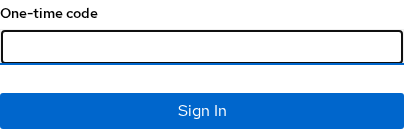
The OTP challenge appears only after the tested mfa-group-otp user reaches the active Group MFA branch. With this flow configuration, that means the role and user-configured conditions evaluated true.
Restore browserFlow to browser when testing finishes so other lab articles keep the default tree.
Troubleshoot a Skipped Conditional Subflow
When a Conditional subflow “does nothing,” verify conditions before rewriting the tree.
Enable LOGIN events under Realm settings → Events in the Admin Console. After matrix logins, open Events and filter by type LOGIN.
Events confirm authentication completed but do not print per-condition booleans. For structural mistakes (condition outside subflow, wrong requirement, bad priority), compare the Admin Console execution tree with the truth table above. Turn on org.keycloak.authentication at DEBUG in Quarkus logging when you need SPI-level traces during custom condition development.
| Symptom | Likely cause | Fix |
|---|---|---|
| OTP for every TOTP user | Default Browser - Conditional 2FA still active | Disable the copied default 2FA subflow |
| OTP never for group members | Wrong role in condition config or missing group role mapping | Set User role; map role onto group |
| OTP before password | Conditional subflow priority above username form | Lower subflow priority until after password |
| Subflow skipped for enrolled group member | Condition - user configured false | Enroll OTP or remove that condition if policy allows |
| Condition ignored entirely | Condition row outside Conditional subflow | Move conditions inside a Conditional subflow |
Advanced: When a Custom Condition SPI Is Needed
Built-in conditions cover roles, attributes, credential usage, client scopes, LoA, and previously executed subflows. If your policy depends on something Keycloak cannot evaluate — such as an external risk engine or a custom network rule — you can implement a custom ConditionalAuthenticator SPI. That is an advanced extension and is outside this tutorial.
Summary
Conditional authentication in Keycloak is AND logic inside a Conditional subflow: every Required condition must pass before OTP or other authenticators run. The built-in Browser - Conditional 2FA subflow demonstrates the pattern with user configured and credential; a role-gated Group MFA copy disables that default branch and applies OTP only to group members who already enrolled TOTP.
Conditional OTP Form and Direct Grant - Conditional OTP are different components — do not confuse them with browser Conditional subflows. Combine Condition - user role with Condition - user configured, set OTP Form to Alternative, and test four user states before binding a copy to browserFlow. The Admin Console execution tree explains skips; realm LOGIN events confirm successful logins.
When built-in conditions are not enough, add a custom condition SPI — but exhaust role, attribute, credential, and LoA conditions first. Forcing MFA enrollment for every role member stays in Create a custom Keycloak authentication flow; requirement vocabulary stays in Keycloak authentication flows explained.
References
- Keycloak Server Administration Guide — Authentication flows
- Keycloak Server Administration Guide — Conditions in conditional flows
- Keycloak GitHub — ConditionalRoleAuthenticatorFactory
Frequently Asked Questions
Do all conditions need to be true?
Yes. Inside a Conditional subflow, every Required condition must evaluate true. If any condition is false, Keycloak skips the entire subflow and continues with the next sibling execution outside it.
What is the difference between Conditional and Alternative?
Conditional applies only to subflows — it gates whether the subflow runs at all. Alternative applies to authenticators or subflows at the same level — siblings compete and the first success wins. Conditions themselves should be Required, not Alternative.
How do I require MFA for one group?
Map a realm role onto the group, add a Conditional subflow with Condition - user role set to that role, and place OTP Form inside. Use Condition - user configured with OTP Form set to Alternative when you want OTP only for users who already enrolled. Use OTP Form set to Required without Condition - user configured when matching users must configure OTP. Disable the default Browser - Conditional 2FA on your flow copy so global OTP policy does not override the gate.
Why is my Conditional subflow skipped?
The usual causes are a failed role check, missing OTP enrollment when Condition - user configured is present, a condition row left outside the Conditional subflow, or the subflow requirement set to Required instead of Conditional. Compare the Admin Console execution tree with the truth table row for that user.
What is the difference between Condition - user configured and Condition - credential?
Condition - user configured checks whether the user is configured for the other authenticator executions in the same Conditional subflow. Condition - credential checks whether a credential type was already used during the current login — for example, webauthn-passwordless after a passkey sign-in.
Can I create a custom condition?
Yes. Implement ConditionalAuthenticatorFactory, deploy the provider JAR, and add the new condition inside a Conditional subflow as Required. Use built-in conditions first — custom SPIs add operational overhead during Keycloak upgrades.
