
| Tested on | Red Hat Enterprise Linux 10.2 (Coughlan) |
|---|---|
| Package | quay.io/keycloak/keycloak:26.7.3 |
| Applies to | Any Keycloak 26.x deployment — choosing and configuring OIDC public vs confidential clients |
| Privilege | Keycloak admin access in the target realm — bootstrap admin on the lab container is enough |
| Lab environment | Keycloak 26.7.3 on http://127.0.0.1:8080/ with golinuxcloud realm — Install Keycloak with Podman |
| Scope | Public vs confidential decision, Client authentication ON/OFF (replacing Access Type), architecture choice table, how to configure each type, and the consequences (PKCE for public clients, client_credentials for confidential). Not a full PKCE, redirect-URI, or service-account role-mapping tutorial. |
| Related guides | Keycloak clients explained Keycloak service accounts Keycloak realm roles vs client roles |
In this article we will compare public and confidential OIDC clients in Keycloak 26.7.3 so you can pick the right type for each application. The difference is not that one client type is inherently more secure than the other. It depends on whether the application can safely keep a credential such as a client secret.
Public clients (browser SPAs, installed mobile apps) cannot keep a client secret. Confidential clients (server-side web apps, backend services that obtain tokens, batch jobs) can. In the current Admin Console that maps directly to Client authentication OFF or ON.
If you need client vocabulary first, read Keycloak clients explained before this page.
Public vs confidential clients at a glance
| Public client | Confidential client | |
|---|---|---|
| Can keep a client secret? | No — anything in the browser or mobile binary is exposed | Yes — the credential remains on a server or secrets manager you control |
| Client authentication | OFF | ON |
| Typical apps | SPA, mobile app, desktop app with embedded login | Server-side web application, backend service that obtains tokens, batch/daemon application |
Machine-to-machine (client_credentials) |
Not allowed | Supported when service accounts are enabled |
A public client still authenticates users. User login is separate from client authentication. Confidential means the client application itself can authenticate to Keycloak during token requests.
Public vs confidential clients in the Keycloak Admin Console
Client authentication OFF means a public client. Client authentication ON means a confidential client.
Keycloak 26.x replaces the old Access Type dropdown with Client authentication on Clients → client → Settings → Capability config.
| Admin Console today | Client type |
|---|---|
| Client authentication OFF | Public client |
| Client authentication ON | Confidential client |
Older tutorials may tell you to choose Access Type public or confidential. In the current Admin Console, use Client authentication OFF or ON instead.
| Old setting | Current interpretation |
|---|---|
public |
Client authentication OFF |
confidential |
Client authentication ON |
bearer-only |
Deprecated; for a resource-server-only client, configure an OIDC client with no grant flows enabled |
Keycloak 26.7 documents that the old Bearer-only switch is deprecated and will be removed. Prefer an OIDC client that does not enable login grants when the application only represents a service or resource server.
Which client type should you use?
| Application | Keycloak client type |
|---|---|
| Browser SPA | Public |
| Native / mobile app | Public |
| Desktop or native CLI with user login | Usually public |
| Server-rendered web app | Confidential |
| Backend service that obtains its own token | Confidential |
| Batch / cron process | Confidential |
| Backend-for-frontend (BFF) | Confidential; the BFF handles OIDC server-side, so the browser typically does not act as a Keycloak client directly |
| API that only validates bearer tokens | Does not need a client secret merely because it is an API |
JavaScript bundles, mobile APKs, and desktop binaries ship to the user's device. Any static string you embed, including a so-called hidden client secret, can be extracted. Obfuscation does not make a browser app confidential.
Native mobile apps are public for the same reason: credentials embedded in the installed application cannot be treated as secret. If you use a backend-for-frontend pattern, the BFF can be a confidential client because its credential remains on the server. The browser normally talks to the BFF using the application's session rather than storing an OAuth client secret itself.
A resource API that only validates incoming access tokens is a separate case. Being a backend API alone does not automatically mean it needs client credentials.
How to configure a public client
For a browser SPA such as storefront-spa:
- Set Client authentication to OFF.
- Enable Standard flow.
- Under Capability config, set PKCE Method to
S256and enable Require PKCE when you want Keycloak to enforce it. - Register exact SPA callback URLs under Valid redirect URIs. Avoid production wildcards.
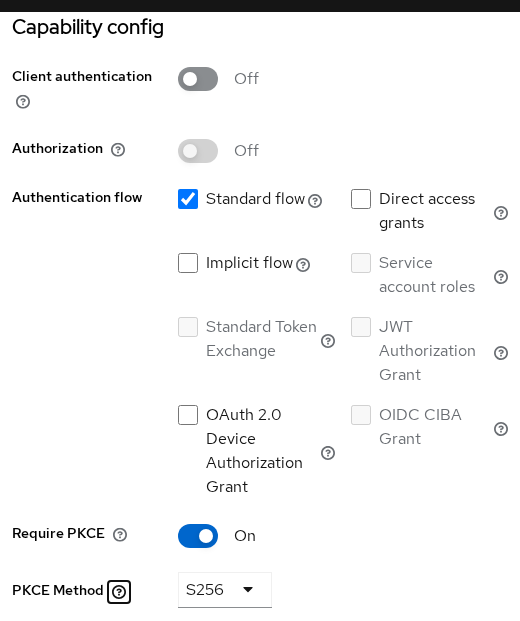
Public clients cannot rely on a client secret, so redirect URIs should be as tight as possible. Redirect URI validation stops Keycloak from sending authorization responses to unregistered locations. PKCE separately stops someone who steals an authorization code from redeeming it.
| Redirect URI practice | Why |
|---|---|
| Exact callbacks per environment | Keycloak rejects callbacks not on the list (invalid_redirect_uri) |
No * wildcards in production |
A compromised subdomain widens the attack surface |
| Separate lab and prod client records when feasible | Keeps localhost URIs out of production |
| Match scheme, host, port, and path | 127.0.0.1 and localhost are different URIs |
Never call token endpoints with a client secret from frontend code.
How to configure a confidential client
For a server-side application such as storefront-web:
- Set Client authentication to ON.
- Enable Standard flow when users log in through this client.
- Open Credentials and configure a client authenticator.
- Enable Service account roles only when the application needs the
client_credentialsgrant.
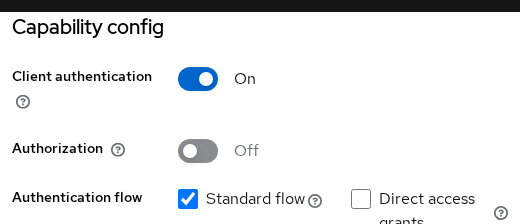
The OAuth credential lives in environment variables, a secrets manager, or the container platform, not in HTML sent to the browser. When Client authentication is ON, Keycloak needs proof that the caller is the registered application:
| Method | Typical use |
|---|---|
| Client secret | Default; server apps read from env or secrets manager |
| Signed JWT / private key | Signed assertion instead of a shared secret |
| X.509 / mTLS | Certificate-based client auth in hardened environments |
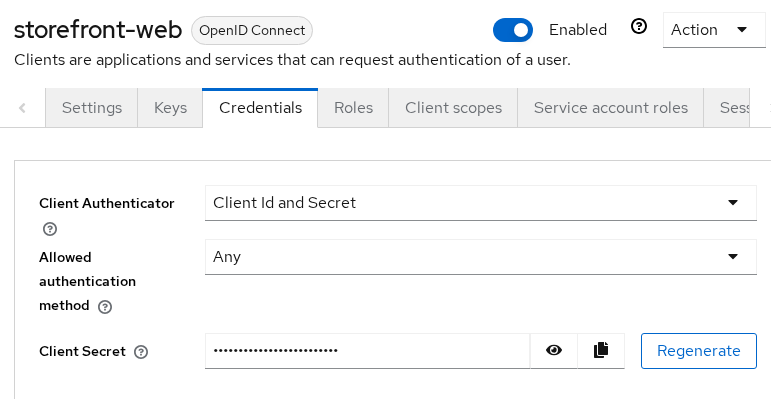
Rotate the secret if it leaks and update every server instance that reads it. The value never belongs in frontend repositories or mobile app config checked into git.
User authentication (username, password, MFA) is unrelated. That is the human logging in, not the OAuth client proving its identity.
Why public clients use PKCE
Public clients have no shared secret to present at the token endpoint, so they should use the authorization code flow with PKCE (Proof Key for Code Exchange), not the legacy implicit flow.
PKCE binds the authorize request to the later code exchange:
- The client creates a random
code_verifierand keeps it locally. - It sends a
code_challenge(usually theS256hash of the verifier) on the authorize request. - When exchanging the authorization code for tokens, it sends the original
code_verifier. Keycloak checks that it matches the earlier challenge.
An attacker who intercepts only the authorization code cannot redeem it without the verifier.
On Keycloak 26.7.3, set this under Settings → Capability config → Require PKCE and PKCE Method → S256:

| Mechanism | Purpose |
|---|---|
| Client authentication | Proves to Keycloak that the application making a back-channel request is the registered confidential client |
| PKCE | Proves that the application exchanging an authorization code is the same one that started the login request |
They are complementary. PKCE does not create a client identity, encrypt tokens, or make a public client confidential. A confidential server app may also use PKCE. A public SPA with PKCE remains public: there is still no client secret, and client_credentials stays unavailable.
Can a public Keycloak client use client_credentials?
No. In Keycloak, client_credentials requires a client that can authenticate itself and has Service account roles enabled. That is how a backend service obtains a token without a user logging in.
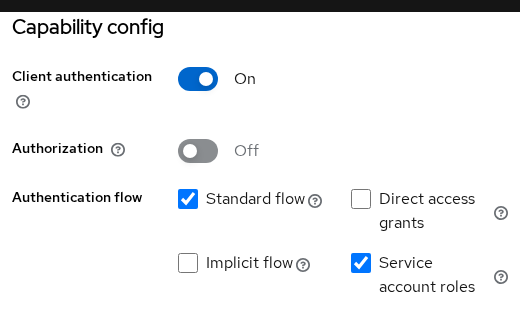
To use client_credentials:
- Client authentication ON
- Service account roles ON
- A configured client authenticator such as the generated secret
Then assign the service-account roles or scopes the application needs. Role assignment is not required merely to obtain a token; it controls what permissions and role claims the token carries. Public clients cannot use service accounts. For role mapping and token claims, see Keycloak service accounts.
A confidential client with service accounts enabled can call the token endpoint like this:
curl -s -X POST 'http://127.0.0.1:8080/realms/golinuxcloud/protocol/openid-connect/token' \
  -H 'Content-Type: application/x-www-form-urlencoded' \
  -d 'grant_type=client_credentials' -d 'client_id=storefront-web' -d 'client_secret=YOUR_CLIENT_SECRET'
Replace YOUR_CLIENT_SECRET with the value from Clients → storefront-web → Credentials. Sample trimmed response:
{"access_token":"eyJ...","expires_in":300,"token_type":"Bearer","scope":"profile email"}The access token azp claim is storefront-web. The client authenticated as itself, not as an end user.
The same grant against public storefront-spa fails:
curl -s -X POST 'http://127.0.0.1:8080/realms/golinuxcloud/protocol/openid-connect/token' \
  -H 'Content-Type: application/x-www-form-urlencoded' \
  -d 'grant_type=client_credentials' -d 'client_id=storefront-spa'
Sample output:
{"error":"unauthorized_client","error_description":"Public client not allowed to retrieve service account"}A public client cannot use the service-account client_credentials flow. For backend jobs or machine-to-machine calls, create a confidential client and enable service accounts.
Common mistakes
| Mistake | Why it fails | Fix |
|---|---|---|
| Client secret in React or Angular source | Secret is public to every visitor | Public client + PKCE; keep secrets on the server |
| Public client for cron job / API integration | client_credentials blocked |
Confidential client + service accounts |
| Assuming PKCE encrypts access tokens | PKCE only binds the code exchange | Use HTTPS and short-lived tokens; PKCE is not encryption |
* redirect URI in production |
Any matching path can receive codes | List explicit callbacks per environment |
| Following old Access Type screenshots | UI field names changed | Map to Client authentication ON/OFF |
| Confusing user login with client auth | User password ≠ client secret | User auth is the person; client auth is the application |
| Disabling Standard flow but expecting browser login | No authorization code path | Enable Standard flow for interactive OIDC |
| Reusing SPA client for backend job | Wrong trust model | Separate confidential client per workload |
| Treating every backend API as confidential | Token validation alone does not need client credentials | Use confidential only when the app obtains tokens itself |
Summary
Choose public when the app cannot keep a credential (SPA, mobile). Choose confidential when a server you control can authenticate to Keycloak (server-rendered app, token-obtaining backend, batch job).
On Keycloak 26.x, Client authentication OFF is public and ON is confidential. That replaces the legacy Access Type dropdown. Public clients should use authorization code with PKCE (S256) and tight redirect URIs. Confidential clients use a secret or another authenticator, and enable service accounts only when they need client_credentials.
References
- Keycloak Server Administration Guide — OIDC clients
- OAuth 2.0 RFC 6749 — Client Types
- RFC 7636 — Proof Key for Code Exchange (PKCE)
- OpenID Connect Core 1.0
Frequently Asked Questions
Should a React or Vue SPA be a public or confidential client?
Public. Frontend code cannot protect a client secret. Register the SPA as a public client, enable authorization code flow with PKCE (S256), and keep strict redirect URIs.
What replaced Access Type in Keycloak?
Client authentication on the client Settings tab under Capability config. OFF means public; ON means confidential. The old bearer-only option is deprecated; for a resource-server-only client, configure an OIDC client with no grant flows enabled.
Can I use PKCE instead of a client secret on a server app?
You can use PKCE alongside a confidential client, but PKCE does not replace client authentication for machine clients. Server apps should stay confidential and store secrets or keys server-side.
Why does client_credentials fail on my SPA client?
The client is public. Keycloak blocks service-account token grants for public clients by design. Create a separate confidential client for backend jobs.
Is a mobile app always a public client?
An installed mobile application should be treated as a public client because a shared secret distributed with the app cannot remain confidential. If you use a BFF, the BFF can be a confidential client and the browser or app typically talks to that BFF with an application session rather than acting as a Keycloak client itself.
