
| Tested on | Red Hat Enterprise Linux 10.2 (Coughlan) |
|---|---|
| Package | podman-5.8.2-5.el10_2.x86_64quay.io/keycloak/keycloak:26.8.0curl-8.12.1-4.el10_2.4.x86_64 |
| Applies to | Any Linux host with Podman or Docker |
| Privilege | Normal user (rootless Podman). Realm setup uses the Keycloak bootstrap admin |
| Scope | How to configure SAML SSO when one Keycloak realm is the IdP and another Keycloak realm is the SP/broker, including the AuthnRequest, the ACS URL, and one SP-initiated login. Does not cover IdP-initiated SSO, custom NameID formats, attribute mappers, assertion encryption, or single logout. |
| Related guides | What is Keycloak? Keycloak realms Keycloak users What is single sign-on? Keycloak OpenID Connect tutorial |
Configure SAML SSO with two Keycloak realms on one host. Realm company is the identity provider. Realm apps is the service provider and broker, and its account console is the application you sign in to. A broker is Keycloak acting as an intermediary: the application trusts the apps realm, while apps delegates authentication to the upstream company IdP.
Because this minimal setup maps only the NameID and no profile attributes, the first broker login asks Alice to fill in the missing email and name before it creates her local apps account. Both servers listen on loopback.
What SAML Means in Keycloak
SAML 2.0 is a browser-based single sign-on protocol. After the identity provider authenticates the user, the browser carries a SAML response back to the service provider. That response contains an XML assertion describing the authenticated user.
Keycloak can participate in SAML from either side, and the Admin Console represents those two roles differently:
- In the company realm, the SAML client is Keycloak's configuration record for the remote service provider. Its client ID is the SP's entity ID, and its valid redirect URI is the SP's ACS URL.
- A SAML identity provider lives in the application realm. It names the upstream IdP to trust. Toward that IdP, this realm acts as the service provider.
- The account console in this lab is not the SAML service provider. It is an OpenID Connect client of realm
apps.
┌──────────────────┐
│ Account console  │
└────────┬─────────┘
         │ OIDC
         ▼
┌──────────────────┐
│ apps realm       │
│ OIDC provider    │
│ SAML SP / broker │
└────────┬─────────┘
         │ SAML
         ▼
┌──────────────────┐
│ company realm    │
│ SAML IdP         │
└──────────────────┘
Realm apps is therefore the OIDC provider for its local account-console client while acting as the SAML service provider and broker toward realm company. OAuth and OpenID Connect hand the account console a token. In this lab, SAML returns an XML response through the browser using HTTP-POST, and Keycloak signs that response. Signing and the POST binding are the choices this lab uses. They are not the only options SAML allows.
Keycloak as IdP vs Keycloak as SP/Broker
An identity provider and a service provider are the two peers in one SAML relationship. Keycloak can be either peer. In this lab it is both, in two realms, so you can see each field without a second product.
| Keycloak A | Keycloak B | |
|---|---|---|
| Role | SAML identity provider | SAML broker, acting as the service provider |
| Realm | company |
apps |
| Admin Console | http://127.0.0.1:18083 |
http://127.0.0.1:18084 |
| What you create | A SAML client | A SAML identity provider, alias company-idp |
| Entity ID | http://127.0.0.1:18083/realms/company |
http://127.0.0.1:18084/realms/apps |
| URL in the login | SSO service http://127.0.0.1:18083/realms/company/protocol/saml |
ACS http://127.0.0.1:18084/realms/apps/broker/company-idp/endpoint |
User alice exists only in realm company until the first successful login. Identity brokering then creates a local user in apps from the assertion. This lab does not attach an LDAP store.
SAML Login Flow: IdP, SP, Browser and Assertion
This guide demonstrates SP-initiated SSO. You start at the apps account console. Realm apps, acting as the SAML service provider, creates an authentication request and the browser delivers it to realm company. After Alice signs in, the browser POSTs the SAML response to the assertion consumer service (ACS) URL. IdP-initiated login is a separate flow and is not configured here.
Browser
  │
  │  Open the apps account console
  ▼
Keycloak apps realm
(SAML SP / broker)
  │
  │  SAML AuthnRequest
  ▼
Browser ──────────────► Company realm (SAML IdP)
                        │
                        │  Alice authenticates
                        ▼
                        SAMLResponse
                        └─ contains Assertion
                        │
                        ▼
Browser ── POST SAMLResponse ──► ACS on apps realm
                                 │
                                 │  validate the response
                                 │  create or link the local user
                                 ▼
                                 apps session
                                 │
                                 ▼
                                 Account console opens
The browser only transports the SAML messages between the two realms. Realm apps, not the browser, validates the response, signature, destination, audience, and assertion conditions.
Several SAML values look like URLs, so it helps to separate what each one identifies:
- Entity ID: the unique identifier a SAML participant uses to identify itself to the other side. It often looks like a URL, but it is primarily an identifier and does not have to be a page you open in a browser. Keycloak's default is the realm URL.
- AuthnRequest: XML generated by the service provider asking the IdP to authenticate the user. In this front-channel flow, the browser carries that request to the IdP.
- SSO URL: the IdP endpoint that receives that AuthnRequest. Here it is
http://127.0.0.1:18083/realms/company/protocol/saml. - SAMLResponse: the response the identity provider returns after authentication.
- Assertion: the XML inside the SAMLResponse. It describes the authenticated user and a few related attributes.
- ACS URL: the SP endpoint where the browser delivers the SAMLResponse. Here it is
http://127.0.0.1:18084/realms/apps/broker/company-idp/endpoint. - RelayState: an optional value carried through the login so the service provider can return the user to the original destination. In this login that destination is the apps account console. RelayState is navigation context, not the user's identity.
During this front-channel login, the apps container does not fetch the assertion directly from port 18083. The browser transports the AuthnRequest and the SAMLResponse between the two realms.
Lab Architecture on RHEL 10
Two start-dev containers on one host are enough. Keycloak A publishes 127.0.0.1:18083. Keycloak B publishes 127.0.0.1:18084. Each --hostname value is the URL the browser uses, including the published port. Without that, the SAML metadata advertises port 8080 inside the container, and the browser posts the assertion to a port nothing is listening on.
┌─────────────────────────────┐          ┌─────────────────────────────┐
│ Keycloak A                  │          │ Keycloak B                  │
│ 127.0.0.1:18083             │          │ 127.0.0.1:18084             │
│ Realm company               │ ◄──────► │ Realm apps                  │
│ SAML identity provider      │          │ SAML broker (the SP)        │
└─────────────────────────────┘          └─────────────────────────────┘
If the Quay image is not on the host, the first podman run pulls it. Install Keycloak with Podman is the runtime setup when Podman itself is missing. Realm data lives in the container filesystem, so removing the container deletes the realms.
The publish address is loopback. From another machine, forward both 18083 and 18084 with SSH local port forwarding, then open the same URLs on your side.
Start the identity provider first. The bootstrap admin is admin / ChangeMe!2026.
podman run -d --name keycloak-saml-idp -p 127.0.0.1:18083:8080 \
  -e KC_BOOTSTRAP_ADMIN_USERNAME=admin -e KC_BOOTSTRAP_ADMIN_PASSWORD='ChangeMe!2026' \
quay.io/keycloak/keycloak:26.8.0 start-dev --hostname=http://127.0.0.1:180831b2c65c6e9e368cec6fd47e2bea243ee8b4719c81ee82925321c0f03644f411fpodman run -d prints the container id and returns before Keycloak accepts HTTP. First boot takes 30 to 90 seconds. Ask curl for the headers:
curl -sI http://127.0.0.1:18083/HTTP/1.1 302 Found
Location: http://127.0.0.1:18083/admin/302 to /admin/ means this server is up. A connection refused means it is still starting. Wait and run the same curl again.
Start the broker on the next port, with its own hostname:
podman run -d --name keycloak-saml-sp -p 127.0.0.1:18084:8080 \
  -e KC_BOOTSTRAP_ADMIN_USERNAME=admin -e KC_BOOTSTRAP_ADMIN_PASSWORD='ChangeMe!2026' \
quay.io/keycloak/keycloak:26.8.0 start-dev --hostname=http://127.0.0.1:18084737bdebd00a341856763af3f3c6d1448f128a01545336f37e92e17083c2eb1c1Wait for the same redirect on port 18084:
curl -sI http://127.0.0.1:18084/HTTP/1.1 302 Found
Location: http://127.0.0.1:18084/admin/Sign in as admin on each console and create the SAML realms there. Leave master for administration.
Configure the Minimal Two-Keycloak Trust
Create the realms before the SAML objects. On port 18083, create realm company. In that realm, create user alice with email alice@example.com, first name Alice, and last name Nguyen. Set a permanent password Alice!2026 (turn Temporary off). On port 18084, create realm apps. Leave apps without a local password user. Alice will arrive through the broker.
Add the SAML identity provider
In realm apps, you configure the remote IdP under Identity providers. That does not make apps the IdP in this SAML relationship. It tells Keycloak which external SAML IdP to trust. Toward that upstream IdP, realm apps acts as the SAML service provider.
Open Identity providers, choose SAML v2.0, and set the alias to company-idp. Set the display name to Company IdP. Keycloak builds the redirect URI from the alias. That URI is the ACS URL:
http://127.0.0.1:18084/realms/apps/broker/company-idp/endpoint
Do not import metadata from http://127.0.0.1:18083 inside the broker container. 127.0.0.1 always means the network namespace of the process making the connection. From inside the apps container, that address is the apps container itself, not the host and not Keycloak A. Read the descriptor on the host and type the URLs in.
Confirm these SAML settings:
- Service provider entity ID:
http://127.0.0.1:18084/realms/apps - Identity provider entity ID:
http://127.0.0.1:18083/realms/company - Single Sign-On service URL:
http://127.0.0.1:18083/realms/company/protocol/saml - NameID policy format: Unspecified
- Principal type: Subject NameID
- HTTP-POST binding response: On
- HTTP-POST binding for AuthnRequest: On
- Validate Signatures: On
- Want Assertions signed: Off
- Want Assertions encrypted: Off
Principal type = Subject NameID tells the broker to identify the external user from the assertion's NameID, which is why alice becomes the local username in this lab.
HTTP-POST binding for AuthnRequest controls how the apps broker sends its authentication request to company. HTTP-POST binding response controls how the broker responds to SAML requests it receives from that external IdP. This SP-initiated login mainly relies on the AuthnRequest setting.
Keep Validate Signatures enabled in this lab so the broker verifies the IdP's signed response. Paste the identity provider's signing certificate into Validating X509 certificates. That value is the X509Certificate element in the metadata below. It is the public certificate for the IdP signing key. The broker does not need the IdP private key. It only needs the certificate so it can verify the response signature.
The saved provider shows the three IDs that tie the two realms together:
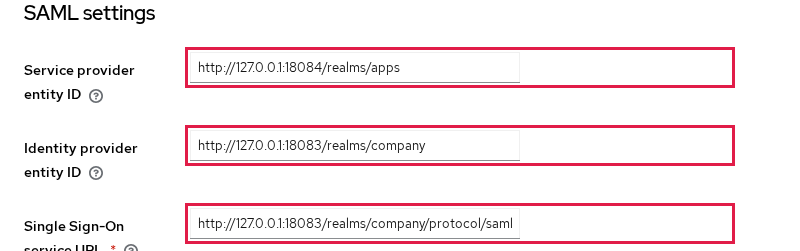
Service provider entity ID is realm apps. The identity provider entity ID and the single sign-on URL both belong to realm company.
Read the IdP metadata
SAML metadata is an XML document that publishes the values another SAML peer needs to configure trust, including the entity ID, SSO endpoints, supported bindings, and signing certificates. Realm company publishes that document as soon as the realm exists. Fetch it from the host:
curl -fsS http://127.0.0.1:18083/realms/company/protocol/saml/descriptor \
| grep -oE 'entityID="[^"]+"|SingleSignOnService Binding="urn:oasis:names:tc:SAML:2.0:bindings:HTTP-POST" Location="[^"]+"'entityID="http://127.0.0.1:18083/realms/company"
SingleSignOnService Binding="urn:oasis:names:tc:SAML:2.0:bindings:HTTP-POST" Location="http://127.0.0.1:18083/realms/company/protocol/saml"entityID is the identity provider entity ID. The HTTP-POST SingleSignOnService location is the SSO URL. Both must match the broker, including 127.0.0.1 and port 18083. The same document holds the signing certificate you pasted above. The apps broker also publishes its own SP metadata at /realms/apps/broker/company-idp/endpoint/descriptor. An external IdP can import that instead of typing the SP entity ID and the ACS URL by hand.
Create the SAML client
On realm company, the SAML client is the record of the remote service provider, not a short nickname for an app. Its client ID is the SP entity ID, which is why the value looks like a URL instead of something such as apps-client. Create a client with client type SAML and set the client ID to:
http://127.0.0.1:18084/realms/apps
Set the name to Apps realm. Under valid redirect URIs, paste the ACS URL from the broker. Save, and leave the signature defaults that this login depends on:
- Sign documents: On
- Sign assertions: Off
- Client signature required: Off
- Force POST binding: On
- Name ID format:
username
The client ID identifies the service provider to realm company. The valid redirect URI restricts where realm company may send the SAML response.
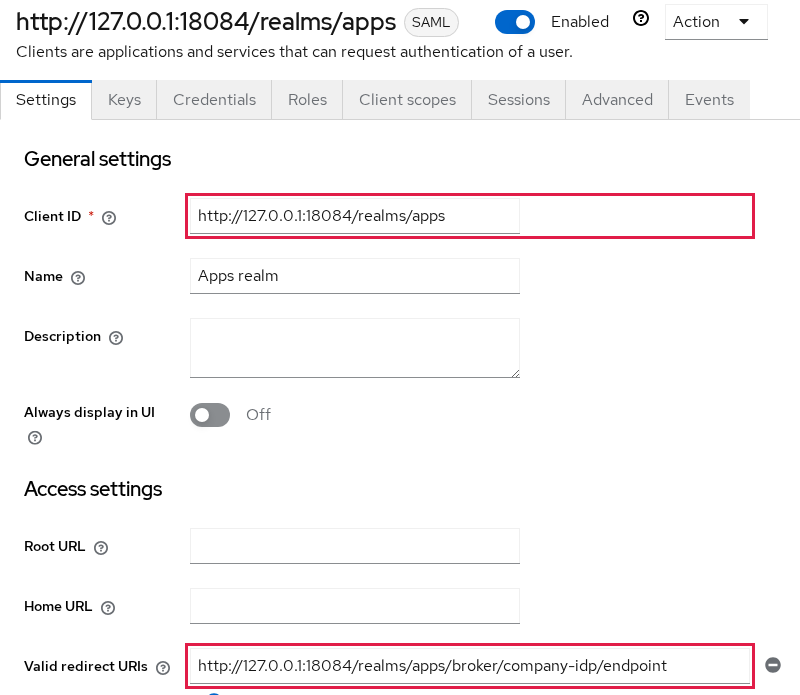
Name ID format stays at the default username, so the NameID value is alice. The format string in the assertion is a separate field, covered with the response below.
Sign documents and Sign assertions are not the same switch. With the broker settings from earlier, the message looks like this:
company SAML client
Sign documents: On
Sign assertions: Off

signature ──► SAML Response
        ┌──────────────────────┐
        │ Response             │
        │  ┌────────────────┐  │
        │  │ Assertion      │  │
        │  └────────────────┘  │
        └──────────────────────┘
Assertion is not separately signed.

apps SAML broker
Validate Signatures: On
Want Assertions signed: Off
Validate Signatures makes the broker validate signed SAML messages received from the IdP. In this lab, the signature is on the outer response. Want Assertions signed is different: it requires the inner assertion itself to carry a signature. That is why it stays off for this client.
Test the First SAML Login
Open the apps account console while you are signed out of both realms:
http://127.0.0.1:18084/realms/apps/account
The page is a normal Keycloak login, plus the broker button. The button label is the display name Company IdP.
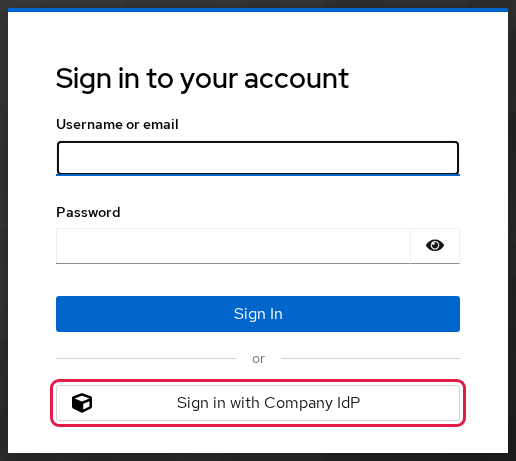
This button belongs to realm apps. Clicking it does not authenticate Alice locally. It tells the broker to start a SAML AuthnRequest toward realm company. The browser leaves port 18084 and opens the company login on port 18083. Sign in as alice / Alice!2026.
Keycloak then returns to the apps realm and stops on Update Account Information. The username is already alice. Email, first name, and last name are empty in this lab because those values were not mapped from the incoming SAML assertion. Type alice@example.com, Alice, and Nguyen, then submit.
The account console opens as that user:
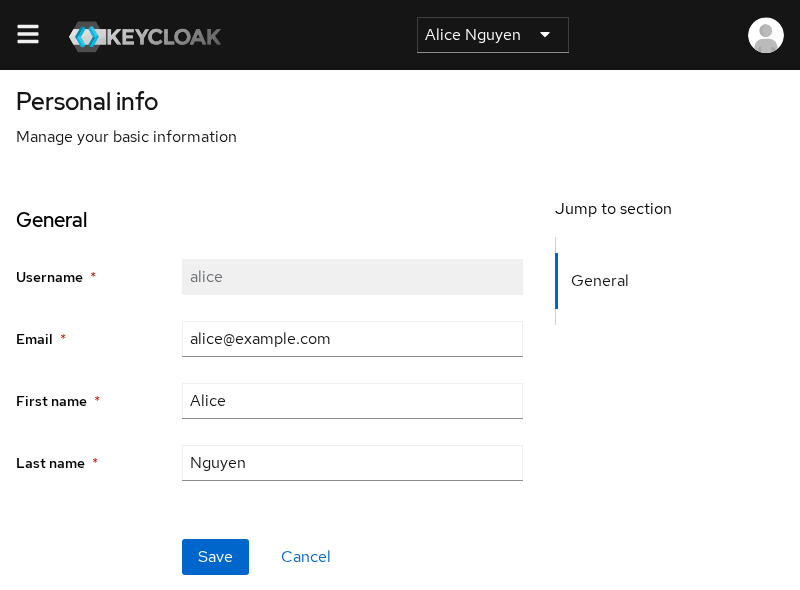
Username alice came from the NameID. The email and name fields are what you submitted on the first-broker-login form. A second login as alice skips that form and opens the account console directly. On later logins, Keycloak uses the stored identity-provider link to associate the incoming NameID with the same local apps user instead of creating another account. Realm apps now has a local user linked to the company-idp identity provider. Alice's password remains in realm company. The broker-created apps user represents her locally. This SAML login did not copy her company password into apps.
Inspect the SAML Response
The browser POSTs a form field named SAMLResponse to the ACS URL. The value is base64. Decoded, the response is XML. The real response contains more XML, including the signature and the condition elements. This reduced view keeps only the fields that connect the message back to the settings in this lab:
<samlp:Response Destination="http://127.0.0.1:18084/realms/apps/broker/company-idp/endpoint" InResponseTo="ID_38d83b89-6feb-4817-a493-5723f3d8892e" Version="2.0">
  <saml:Issuer>http://127.0.0.1:18083/realms/company</saml:Issuer>
  <samlp:StatusCode Value="urn:oasis:names:tc:SAML:2.0:status:Success"/>
  <saml:NameID Format="urn:oasis:names:tc:SAML:1.1:nameid-format:unspecified">alice</saml:NameID>
  <saml:Audience>http://127.0.0.1:18084/realms/apps</saml:Audience>
</samlp:Response>
These fields are the most useful ones to inspect when tracing this login:
Destinationis the ACS URL, the same value as the client's valid redirect URI.InResponseToties this response back to the AuthnRequest that started the login.Issueris the company entity ID, the same value as the broker's identity provider entity ID.Version="2.0"identifies the SAML version. StatusSuccessmeans the IdP reported successful authentication. The broker still checks the signature, destination, audience, and assertion conditions before it accepts the login.- NameID identifies Alice to the broker. Its value is
alice. - The NameID format is a separate property. In this response it is
unspecified, even though the value itself comes from the Keycloak username. - That result comes from the broker requesting Unspecified while the client uses
usernameas the value source. - The
Audiencemust identify the intended service provider. Realmappsvalidates it before accepting the assertion. - The response also contains attributes such as
Role. Attribute mapping is outside this first-login lab.
The response is signed with RSA-SHA256. The assertion element is not signed on its own, which is why Want Assertions signed stays Off. The assertion and the bearer subject confirmation include expiration timestamps, so a captured SAMLResponse cannot be reused indefinitely. Keycloak validates these time conditions when the broker receives the response.
Where Metadata, NameID, Mappers and Signatures Fit
Once the basic login works, these settings control what Keycloak puts into or expects from the SAML exchange:
- Metadata is the descriptor you fetched. A peer that can reach the identity provider can import the entity ID, the SSO URL, and the signing certificate from it instead of typing them.
- NameID carries the subject identifier for the login. Persistent ids, email NameIDs, and Force name ID format change the value the broker stores as the username. The format string and that value stay separate, as in the response above.
- Mappers copy assertion attributes onto the broker user. In this minimal lab, email and the names were not mapped, so the profile form asked for them.
- Sign documents and Sign assertions stay separate, as the diagram above shows. Encryption makes the assertion contents unreadable to intermediaries carrying the SAML message. The service provider decrypts it with its private key. This lab does not turn encryption on.
- Single logout is a later message. Closing the account console does not sign Alice out of realm
company.
Troubleshooting
| Symptom | Likely cause | Fix |
|---|---|---|
Browser opens port 8080 and the connection fails |
--hostname omitted the published port, so metadata says :8080 |
Recreate the container with --hostname=http://127.0.0.1:18083 or :18084 |
| Import from URL on the broker fails or times out | The SP container cannot reach host 127.0.0.1:18083 |
Read the descriptor with curl on the host and paste the entity ID, SSO URL, and certificate |
Invalid signature in response from identity provider |
In this 26.8.0 test, Want Assertions signed was On while Sign assertions was Off | Turn Want Assertions signed Off, or turn Sign assertions On and keep the validating certificate |
| Error mentioning destination or an invalid redirect | ACS URL, client redirect URI, and Destination disagree |
Use http://127.0.0.1:18084/realms/apps/broker/company-idp/endpoint in all three places |
| Login returns to the broker, or the user cannot be matched | NameID format or value does not match what the broker expects | Inspect NameID in the SAMLResponse and the broker NameID policy |
| Update Account Information asks for email and names | In this minimal lab, those profile fields were not mapped from the assertion | Fill the form once. Later logins reuse the local user |
Summary
Realm company was the SAML identity provider and realm apps was the broker for one SP-initiated login. The apps realm built an AuthnRequest, Alice signed in on port 18083, and the browser POSTed the SAMLResponse to the ACS on port 18084. Realm apps then created its own local login session and opened the account console. Alice's password stayed in company.
Issuer, Destination, NameID, and Audience are the fields to read on that POST. The response was signed and the assertion was not, so Want Assertions signed had to stay off in this 26.8.0 test. Email was not mapped from the assertion, so the first login asked for it.
Use a real hostname and TLS before anyone else depends on this pair. start-dev on loopback only keeps the entity IDs and the ACS URL obvious. NameID format, mappers, encryption, and single logout each change one part of this same exchange after the first login already works. IdP-initiated SSO is a different flow.
References
- SAML v2.0 identity providers in the Keycloak 26.8 Server Administration Guide covers the broker's service provider entity ID, identity provider entity ID, SSO URL, AuthnRequest binding, and assertion-signing settings.
- Identity brokering explains how a Keycloak realm trusts an external IdP and creates a local user from that login.
- SAML clients covers the client ID, redirect URI, Sign documents, and Sign assertions on the IdP side.
- SAML 2.0 Core defines the authentication request, the response, and the assertion.
- SAML 2.0 Metadata defines the entity descriptor, including the entity ID and the single sign-on service.
Frequently Asked Questions
Can Keycloak act as a SAML IdP?
Yes. Create a SAML client in the realm that should sign users in. The client ID is the service provider's entity ID, and a valid redirect URI is the service provider's ACS URL. In this lab that realm is company and the client ID is http://127.0.0.1:18084/realms/apps.
Can Keycloak act as a SAML SP?
Yes. To make a Keycloak realm act as a SAML SP/broker toward an upstream IdP, add that upstream system under Identity providers, then SAML v2.0. In this lab that realm is apps, the alias is company-idp, and the ACS URL is http://127.0.0.1:18084/realms/apps/broker/company-idp/endpoint.
What is a SAML client in Keycloak?
A SAML client is the identity provider's record of a service provider. It is not the application process. Keycloak uses it to decide which entity ID may request a login and which ACS URL may receive the assertion.
What is the Keycloak ACS URL?
The assertion consumer service URL is where the browser posts the SAML response. For a Keycloak broker it is http://<host>/realms/<realm>/broker/<alias>/endpoint. The identity provider must list that exact URL as a valid redirect URI on the SAML client, and the response Destination must be the same URL.
Does Keycloak support SAML 2.0?
Yes. Realm metadata advertises urn:oasis:names:tc:SAML:2.0:protocol, and the login response in this lab has Version="2.0" with status Success.
