
| Tested on | Red Hat Enterprise Linux 10.2 (Coughlan) |
|---|---|
| Package | quay.io/keycloak/keycloak:26.7.3 |
| Applies to | Any Keycloak 26.x deployment — OIDC client scopes, default vs optional scopes, and token claim shaping |
| Privilege | Keycloak admin access in the target realm — bootstrap admin on the lab container is enough |
| Lab environment | Keycloak 26.7.3 on http://127.0.0.1:8080/ with golinuxcloud realm and client orders-api — Install Keycloak with Podman |
| Scope | Default, optional, and dedicated client scopes; creating and assigning scopes; how scopes shape JWT claims; realm default scopes; Evaluate tab; troubleshooting missing claims — not Authorization Services scopes, full role-mapping tutorials, protocol mapper SPI development, or experimental parameterized scopes |
| Related guides | Keycloak realms explained |
Keycloak client scopes group protocol mappers and role scope mappings that control what information can appear in tokens. Shared client scopes can be linked to multiple clients. Each OIDC client also has client-specific mappers and role scope mappings, which the Admin Console exposes through its non-shareable Dedicated scope.
A shared scope linked as Default is applied automatically when Keycloak issues tokens for that client. The same shared scope linked as Optional applies only when the client requests it using the OIDC scope parameter.
For example, profile and email are commonly linked as Default scopes, while phone can be linked as Optional. In the lab below, requesting scope=openid phone adds phone_number and phone_number_verified to the access token.
This guide explains Default and Optional scope assignment, how the per-client Dedicated scope differs from shared scopes, how to create and link a scope, and how to verify the resulting JWT claims. The examples use OIDC public client orders-api and test user tokenuser in the golinuxcloud realm. To reproduce the curl command token examples, enable Direct access grants on the client. The password grant is used here only to make scope testing easy from the command line. For full client registration steps, see Keycloak clients explained.
Four meanings of "scope" in Keycloak
Keycloak uses scope in more than one sense. The table below separates them so you do not open the wrong Admin Console screen.
| Term | Meaning |
|---|---|
| Client scope | Shared Keycloak configuration containing protocol mappers and role scope mappings |
| OIDC scope parameter | Values the client requests in scope=, such as openid, profile, phone |
| Role scope mapping | Controls which of a user's roles are permitted to be represented in tokens issued to a client |
| Authorization scope | Permission or action used by Keycloak Authorization Services (fine-grained authz) |
This article is about client scopes. The other meanings appear only where they affect client-scope behavior.
What is a Keycloak client scope?
A client scope bundles configuration Keycloak applies when it builds OIDC tokens:
- Protocol mappers — map user attributes, roles, audiences, or hardcoded values into token claims
- Role scope mappings — restrict which of the user's roles are available when Keycloak builds tokens for the client
- Consent metadata — controls how a client scope is shown when Keycloak asks the user to approve requested access
Keycloak supports shared realm client scopes such as profile, roles, and phone. It also lets an OIDC client have its own protocol mappers and role scope mappings; the Admin Console exposes these through the {clientId}-dedicated scope. A client scope is the attachable container for shared scopes; a protocol mapper is one transform rule inside it. Editing a mapper under phone affects every client that links phone, not just orders-api.
Common OIDC mapper types inside scopes include:
- User attribute — map
phoneNumber→phone_number - User realm role — populate
realm_access.roles - User client role — populate
resource_access.<clientId>.roles - Hardcoded claim — static value such as
tenant_id - Audience — adjust
audfor resource servers
Do not confuse a scope being applied with its name always appearing in the token's scope claim. The client scope setting Include in token scope controls whether Keycloak adds that scope name to the token's scope value. A default scope can still run its mappers when its name is omitted from scope.
  Client: orders-api
        │
        ├── Default scopes (applied automatically) ──► profile, email, lab-claims, roles, …
        │
        ├── Optional scopes (OIDC scope=) ──► phone, address, offline_access, …
        │
        └── orders-api-dedicated (per-client only)
                  └── protocol mapper lab-tenant-id ──► tenant_id claim

  Request flow:

  ┌───────────┐    scope param     ┌─────────────────┐    effective token    ┌──────────────┐
  │  Client   │ ────────────────►  │  Client scopes  │ ─── configuration ──► │ Access token │
  │ orders-api│                    │  linked to app  │                       │   (JWT)      │
└───────────┘ └─────────────────┘ └──────────────┘| Concept | What it is | What it is not |
|---|---|---|
| Client scope | Shared policy + mapper container linked to one or more clients | A Keycloak client (application registration) |
| Protocol mapper | One transform rule (attribute → claim, hardcoded value, audience, …) | The scope itself |
| Dedicated scope | Per-client mapper bucket in the Admin Console (orders-api-dedicated) |
A realm-wide reusable scope you can unlink and attach elsewhere |
For deeper mapper configuration patterns, see Keycloak protocol mappers and custom claims.
Why does Keycloak use client scopes?
Without client scopes, you would configure the same token mappings separately for every application. If five applications all need the user's name, email address, and roles, repeating the same mapper configuration on five clients is hard to maintain.
A shared client scope lets you configure that token behavior once and link it to multiple clients:
                        ┌── storefront-web
  profile client scope ─┼── orders-api
                        └── support-portal
If you later change a mapper in the shared profile scope, linked clients use the updated configuration when that scope is applied.
Client scopes also let you control when that configuration runs:
- Default — apply it automatically for the client
- Optional — apply it only when the client requests that scope
- Dedicated — keep client-specific mappers and role scope mappings with one client instead of sharing them
For example, an application may always need basic profile and email claims but need a phone number only for a particular feature. Keep profile and email as Default scopes and phone as Optional, so phone-related claims are included only when phone is requested.
Default client scopes
A scope assigned to a client as Default is applied automatically whenever Keycloak issues tokens or assertions for that client. Default client scopes apply to both OIDC tokens and SAML assertions. Optional linking is OIDC-only.
For OIDC, default scope mappers run even when the client omits an explicit scope parameter in the token request. The built-in roles default scope is why many clients emit realm_access and resource_access without extra configuration.
After you link a custom scope as Default on orders-api, open Clients → orders-api → Client scopes and confirm it appears in the assigned list with type Default:
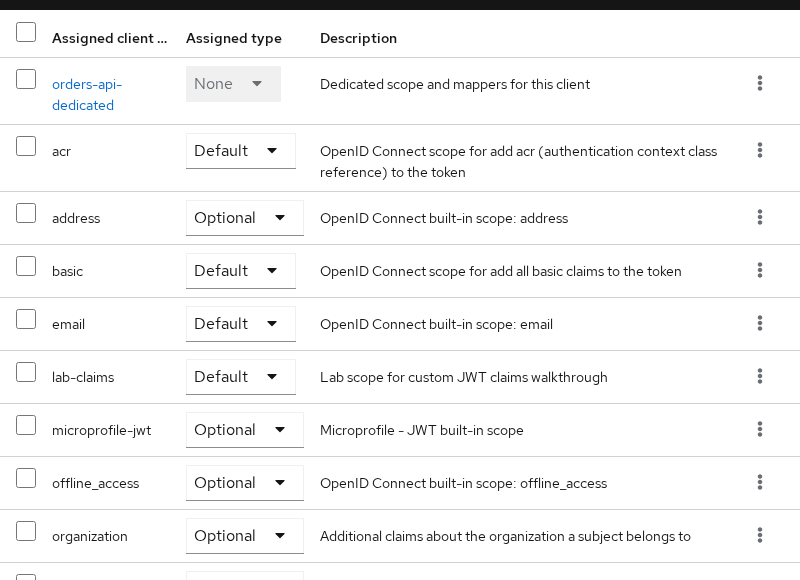
Typical default scopes on an OIDC client include:
profileandemail— name and email claimsroles— realm and client role mappersacr— authentication context class reference metadata
Use a Default scope when its mappers and role mappings should apply automatically for that client without requiring an explicit scope request. Role scope mappings on a scope can still prevent that scope from applying to a particular user.
Optional client scopes
Optional scopes apply only when the OIDC client requests them in the scope parameter (authorization request or token request, depending on the grant). This pattern is OIDC-specific; SAML clients use attribute mappers differently.
Built-in optional scopes on orders-api include phone, address, offline_access, and microprofile-jwt. With phone linked as Optional, its mappers are applied only when the client requests phone in the scope parameter. If the user's phone attributes are populated and the mapper targets the access token, the resulting token can include phone_number and phone_number_verified.
Open Client scopes → phone → Mappers and confirm the User Attribute values on the built-in mappers before you set attributes on the user:
- phone number → claim
phone_number(User AttributephoneNumber) - phone number verified → claim
phone_number_verified(User AttributephoneNumberVerified)
Set the matching attributes on tokenuser before you request the phone scope:
phoneNumber=+1-555-0100phoneNumberVerified=true
If a mapper reads a custom user attribute such as phoneNumber, make sure the attribute exists on the user. With User Profile enabled, also check whether the attribute is declared there or whether your realm's unmanaged-attribute policy allows it. See Keycloak user attributes and User Profile for the full attribute workflow.
Request a token without phone in the scope parameter and decode the access token payload:
curl -s -X POST 'http://127.0.0.1:8080/realms/golinuxcloud/protocol/openid-connect/token' -H 'Content-Type: application/x-www-form-urlencoded' -d 'username=tokenuser' -d 'password=TokenUser!2026' -d 'grant_type=password' -d 'client_id=orders-api' | python3 -c "import sys,json,base64; t=json.load(sys.stdin)['access_token']; p=t.split('.')[1]; p+='='*(-len(p)%4); c=json.loads(base64.urlsafe_b64decode(p)); print(json.dumps({k:c.get(k) for k in ('scope','phone_number','phone_number_verified')}, indent=2))"Sample output without phone in the request:
{
  "scope": "profile email",
  "phone_number": null,
  "phone_number_verified": null
}
The token carries profile and email from default scopes. phone_number is absent because phone is optional and was not requested.
Add scope=openid phone to the same password grant:
curl -s -X POST 'http://127.0.0.1:8080/realms/golinuxcloud/protocol/openid-connect/token' -H 'Content-Type: application/x-www-form-urlencoded' -d 'username=tokenuser' -d 'password=TokenUser!2026' -d 'grant_type=password' -d 'client_id=orders-api' -d 'scope=openid phone' | python3 -c "import sys,json,base64; t=json.load(sys.stdin)['access_token']; p=t.split('.')[1]; p+='='*(-len(p)%4); c=json.loads(base64.urlsafe_b64decode(p)); print(json.dumps({k:c.get(k) for k in ('scope','phone_number','phone_number_verified')}, indent=2))"Sample output with optional phone requested:
{
  "scope": "openid phone profile email",
  "phone_number": "+1-555-0100",
  "phone_number_verified": true
}
The scope claim lists phone, and those two mappers added the claims shown above.

Create and assign a client scope
Creating and linking a scope is the core workflow most readers search for: build a scope, add a mapper, assign it to a client as Default or Optional, then verify the token.
A shared client scope such as lab-claims is created at the realm level first. You then link that same scope to individual clients as Default or Optional.
This walkthrough uses shared scope lab-claims, which maps user attribute department into claim department. Skip the create steps if the scope already exists in your realm.
Create scope lab-claims
- Open Client scopes → Create client scope.
- Set Name to
lab-claims, protocol OpenID Connect, and save. - Open Mappers → Configure a new mapper → User Attribute.
- Set Name to
department-claim, User Attribute todepartment, Token Claim Name todepartment, and enable Add to access token.

At the realm level, lab-claims can exist without being a realm default or optional scope. None in the realm list means the scope is available but not automatically assigned to every new client:
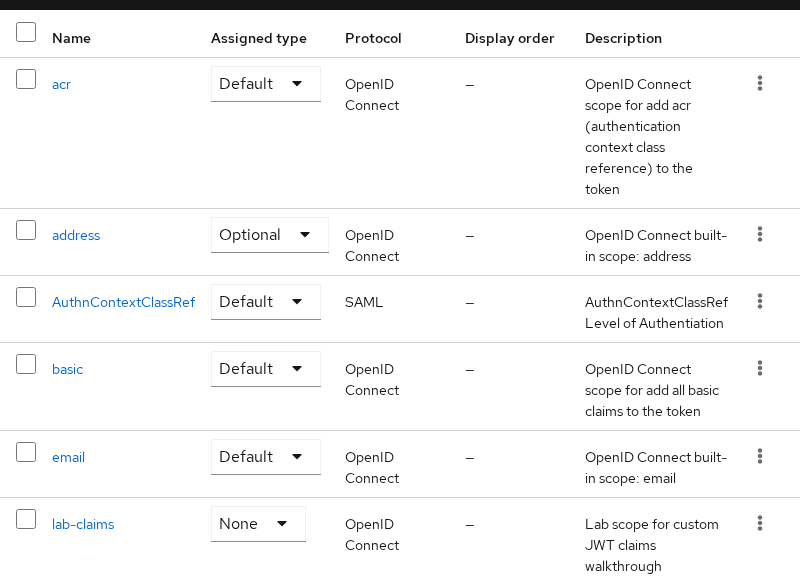
None here does not mean the scope is unusable. It means Keycloak does not attach it automatically to newly created clients as a realm Default or realm Optional scope.
Assign the scope to orders-api
Before you link lab-claims, the client's assigned scope list does not include it:
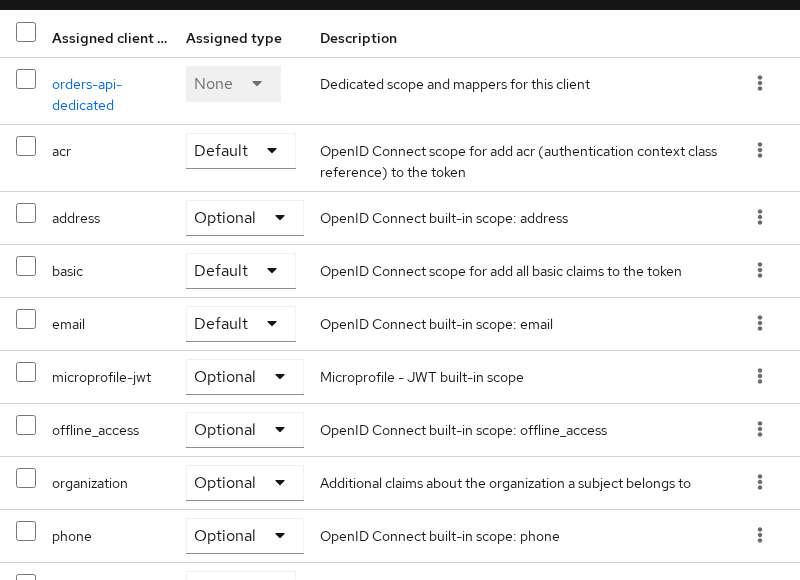
Link the scope to the client:
- Open Clients →
orders-api→ Client scopes. - Click Add client scope and select
lab-claims. - Choose Default so the mapper runs automatically when Keycloak issues tokens for this client without an extra
scope=parameter.
After assignment, lab-claims appears with type Default in the assigned list (see the screenshot in Default client scopes).
Request a token and read department:
curl -s -X POST 'http://127.0.0.1:8080/realms/golinuxcloud/protocol/openid-connect/token' -H 'Content-Type: application/x-www-form-urlencoded' -d 'username=tokenuser' -d 'password=TokenUser!2026' -d 'grant_type=password' -d 'client_id=orders-api' | python3 -c "import sys,json,base64; t=json.load(sys.stdin)['access_token']; p=t.split('.')[1]; p+='='*(-len(p)%4); c=json.loads(base64.urlsafe_b64decode(p)); print(json.dumps({k:c.get(k) for k in ('scope','department')}, indent=2))"Sample output with lab-claims linked as Default:
{
  "scope": "profile email",
  "department": "Platform Engineering"
}
department appears even though lab-claims is not listed in the scope claim, because this scope keeps Include in token scope off while still running its mappers as a default scope.
Test the same scope as Optional
Remove lab-claims from the client's Default list, then add it again through Add client scope → Optional.
Request a token without naming lab-claims in scope=:
curl -s -X POST 'http://127.0.0.1:8080/realms/golinuxcloud/protocol/openid-connect/token' -H 'Content-Type: application/x-www-form-urlencoded' -d 'username=tokenuser' -d 'password=TokenUser!2026' -d 'grant_type=password' -d 'client_id=orders-api' | python3 -c "import sys,json,base64; t=json.load(sys.stdin)['access_token']; p=t.split('.')[1]; p+='='*(-len(p)%4); c=json.loads(base64.urlsafe_b64decode(p)); print(json.dumps({k:c.get(k) for k in ('scope','department')}, indent=2))"Sample output when lab-claims is optional and not requested:
{
  "scope": "profile email",
  "department": null
}
Add scope=openid lab-claims:
curl -s -X POST 'http://127.0.0.1:8080/realms/golinuxcloud/protocol/openid-connect/token' -H 'Content-Type: application/x-www-form-urlencoded' -d 'username=tokenuser' -d 'password=TokenUser!2026' -d 'grant_type=password' -d 'client_id=orders-api' -d 'scope=openid lab-claims' | python3 -c "import sys,json,base64; t=json.load(sys.stdin)['access_token']; p=t.split('.')[1]; p+='='*(-len(p)%4); c=json.loads(base64.urlsafe_b64decode(p)); print(json.dumps({k:c.get(k) for k in ('scope','department')}, indent=2))"Sample output when the optional scope is requested:
{
  "scope": "openid profile email",
  "department": "Platform Engineering"
}
Notice that department appears even though lab-claims does not appear in the token's textual scope claim. Include in token scope remains disabled for lab-claims. Requesting an optional scope controls whether its configuration is applied; Include in token scope separately controls whether the scope name is written into the resulting scope claim.
Default scopes run automatically. Optional scopes run only when the client includes them in scope=. Link lab-claims back as Default on orders-api if you continue with the sections below.
Dedicated client scope
On an OIDC client, the Admin Console shows a dedicated client scope named {clientId}-dedicated on the Client scopes tab. For orders-api, the link reads orders-api-dedicated.
Dedicated scopes hold mappers and role scope mappings that belong to one client only. You cannot unlink this scope and attach it to a different client, and you cannot share it across the realm like profile or phone. In the Admin Console this appears as a dedicated scope, but internally its mappers and role scope mappings belong directly to the client; the dedicated scope is a UI abstraction.
Use a dedicated scope when:
- One application needs a claim no other client should receive
- You are prototyping a mapper before promoting it to a shared realm scope
Use a shared realm client scope when:
- Several clients need the same mapper configuration
- You want consent text and scope assignment managed in one place
Add hardcoded claim mapper lab-tenant-id on orders-api-dedicated:
- Open Clients →
orders-api→ Client scopes. - Click the
orders-api-dedicatedlink. - Open Mappers → Configure a new mapper → Hardcoded claim.
- Set Name to
lab-tenant-id, Token Claim Name totenant_id, Claim value togolinuxcloud-lab, and enable Add to access token.

Request a fresh access token and read tenant_id:
curl -s -X POST 'http://127.0.0.1:8080/realms/golinuxcloud/protocol/openid-connect/token' -H 'Content-Type: application/x-www-form-urlencoded' -d 'username=tokenuser' -d 'password=TokenUser!2026' -d 'grant_type=password' -d 'client_id=orders-api' | python3 -c "import sys,json,base64; t=json.load(sys.stdin)['access_token']; p=t.split('.')[1]; p+='='*(-len(p)%4); c=json.loads(base64.urlsafe_b64decode(p)); print('tenant_id:', c.get('tenant_id'))"Sample output:
tenant_id: golinuxcloud-labMappers and role scope mappings configured in the Dedicated scope apply directly to that client; the client does not request scope=orders-api-dedicated.
Realm default client scopes
Do not confuse realm default client scopes with a client's assigned default scopes. They operate at different layers.
| Layer | Admin Console path | Effect |
|---|---|---|
| Realm default client scopes | Client scopes → Default client scopes tab | Automatically linked to newly created OIDC clients according to the realm's default client-scope configuration |
| Client assigned defaults | Clients → client → Client scopes → Default | Always applied to tokens for that one client |
Realm-level defaults seed new clients with profile, email, roles, and siblings. Changing a scope's realm-level Assigned type does not automatically change existing clients; it controls how that scope is linked when new clients are created. You still edit each client's Client scopes tab for one-off differences.
When a new client is missing claims that older clients have, compare both the realm default tabs and the per-client Assigned client scope lists.
Role scope mappings and missing roles
Client scopes can include role scope mappings that restrict which of the user's roles are available when Keycloak builds tokens for the client. When a scope defines role mappings, the user must hold at least one matching effective role. Otherwise Keycloak skips that scope — including its protocol mappers — and the scope name may be absent from the token's scope claim.
That is separate from assigning roles under Users → Role mapping. If a claim mapper runs but a role claim is missing, or Full scope allowed on the dedicated scope is limiting token roles, see Keycloak realm roles vs client roles for realm_access, resource_access, and token decode examples with the same orders-api lab client.
Evaluate client scopes and token claims
The Evaluate tab on a client's Client scopes screen simulates token output without running a full browser login flow. Pick a user, set a Scope parameter, and inspect generated access token, ID token, and UserInfo payloads.
Open Clients → orders-api → Client scopes → Evaluate. Select Users tokenuser. In this lab, the Scope parameter already contains openid; add phone so both appear as selected entries.
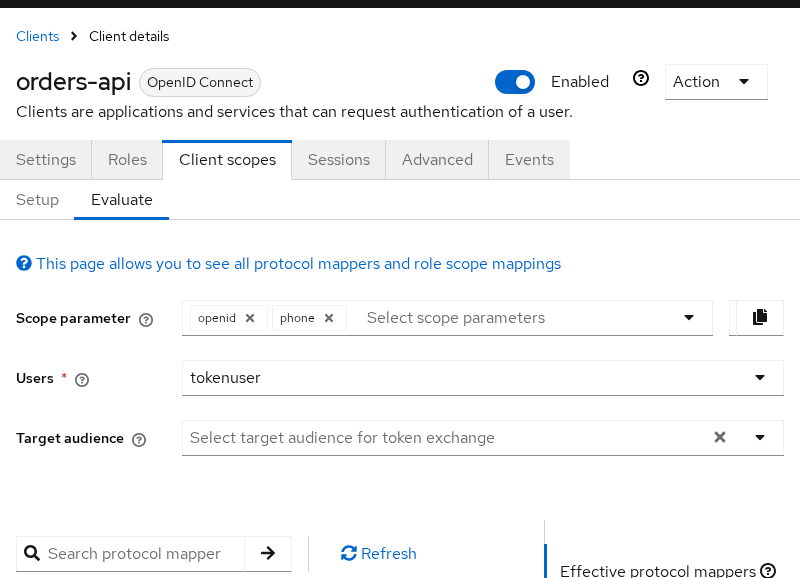
Scroll down on the same page to inspect the generated access token JSON. It should include phone_number, department, tenant_id, and the scope list you expect for that user and scope parameter.
Use Evaluate when a claim appears in Admin Console mappers but your application still sees an old payload. Compare generated JSON to a live token before chasing application-side caching.
Troubleshooting missing client scope claims
| Symptom | Likely cause | Fix |
|---|---|---|
| Optional claim always missing | Scope not in client's Optional list | Add the realm scope under Clients → client → Client scopes → Add client scope → Optional |
| Claim missing even after linking | Client never sent scope=phone (or your scope name) |
Include the scope in the authorization or token request scope parameter |
| Mapper exists, claim still empty | Mapper targets ID token only | Enable Add to access token on the mapper (or read the ID token instead) |
| Attribute mapper returns null | User attribute unset or blocked by User Profile policy | Set the attribute on the user; declare it in User Profile or confirm unmanaged-attribute policy |
| Scope linked but mappers never run | Role scope mappings on the scope exclude this user | Assign a matching role or remove restrictive role scope mappings on that scope |
Claim present, scope name missing from scope claim |
Include in token scope is off | This can be expected for either Default or Optional client scopes; verify the resulting claims rather than assuming the scope was not applied |
| Role in Admin Console, not in token | Role scope mapping or Full scope allowed limiting exposure | Follow the realm roles vs client roles guide for role scope mappings and Full scope allowed |
| Worked yesterday, stale in API | Old access token cached | Obtain a new token after changing scope or mapper configuration |
| Mapper on wrong object | Edited dedicated vs shared scope | Confirm whether the mapper lives on orders-api-dedicated or a shared scope linked to the client |
| Comparing wrong token type | ID token vs access token vs UserInfo differ | Decode the same token type your resource server validates |
Summary
Keycloak client scopes group protocol mappers and role scope mappings that control what information can appear in tokens. Shared scopes link to clients as Default (applied automatically) or Optional (applied when requested in scope=). Each OIDC client also has client-specific configuration exposed through its Dedicated scope in the Admin Console.
When claims are missing, check the client's assigned scopes, whether optional scopes were requested in scope=, mapper Add to access token toggles, and role scope mappings on the linked scopes. Use Evaluate to inspect the effective token before you chase application-side caching. For role claim shape and Full scope allowed, use the realm roles guide linked above.
References
- Keycloak Server Administration Guide — Client scopes
- Keycloak Server Administration Guide — Protocol mappers
- OpenID Connect Core — scope values
Frequently Asked Questions
What is the difference between a client scope and a protocol mapper?
A client scope is the attachable unit linked to clients. It groups mappers, role scope mappings, and consent settings. A protocol mapper is one rule inside that scope that maps a source (user attribute, role, hardcoded value) to a token claim. Change a mapper in a shared client scope once and all clients linked to that scope use the updated mapper configuration when that scope is applied.
What does "scope" mean in Keycloak?
Keycloak uses scope for client scopes (this article), the OIDC scope parameter, role scope mappings on a scope, and Authorization Services permissions. This page covers client scopes — shared configuration you link as Default or Optional, plus each OIDC client's Dedicated scope in the Admin Console.
Do default scopes require scope= in the OIDC request?
No. Default client scopes are applied automatically when Keycloak issues tokens for that client. Their mappers run even when the client omits an explicit scope parameter. Optional scopes must be linked to the client and requested in the OIDC scope parameter, for example scope=openid phone.
Can I unlink orders-api-dedicated from orders-api?
No. orders-api-dedicated represents the mappers and role scope mappings that belong directly to orders-api; it is not a reusable client scope that you can unlink and attach to another client. Move or copy the mapper into a shared client scope if multiple clients need it.
Why does phone_number stay null when I request scope=phone?
If phone_number is missing, check that the phone scope is linked as Optional, the client requested scope=phone, the user's phoneNumber attribute has a value, and the phone-number mapper is enabled for the token type you are inspecting. Check phoneNumberVerified separately if phone_number_verified is missing.
