
| Tested on | Red Hat Enterprise Linux 10.2 (Coughlan) |
|---|---|
| Package | quay.io/keycloak/keycloak:26.7.3 |
| Applies to | Any Keycloak 26.x deployment — client registration concepts and Admin Console fields |
| Privilege | Keycloak admin access in the target realm — bootstrap admin on the lab container is enough |
| Lab environment | Keycloak 26.7.3 on http://127.0.0.1:8080/ with golinuxcloud realm — Install Keycloak with Podman |
| Scope | What a Keycloak client is, why Keycloak needs clients, realm vs client, OIDC vs SAML choice, client ID, URLs, redirect URIs, web origins, client authentication, capability toggles, client scopes overview, legacy Access Type mapping, and common client errors. Does not cover full OIDC grant configuration or SAML metadata exchange. |
| Related guides | Create and manage Keycloak users Keycloak groups and nested groups Keycloak start vs start-dev |
A Keycloak client is the registration of an application or service that uses Keycloak for authentication, SSO, tokens, or SAML assertions. For example:
- Web application
- Browser SPA
- API or resource server
- Backend or machine client
Each can have its own client configuration inside a Keycloak realm.
The client tells Keycloak how that application is allowed to interact with it — for example:
- Which redirect URIs are trusted
- Whether the application can authenticate itself
- Which login flows it can use
Common misconfiguration effects:
- Bad redirect URIs can stop the login flow
- Incorrect Web Origins can cause browser CORS failures
- Disabled capability settings can prevent the client from using the required OAuth/OIDC flow
This guide walks through the 26.7.3 Admin Console in the golinuxcloud realm. OIDC grant details and SAML metadata belong in dedicated protocol guides; here you learn what the client record means and which settings matter first.
What a Keycloak client is
A Keycloak client represents an application or service that talks to Keycloak for identity services. The client record tells Keycloak:
- Which protocol to use
- Which redirect URLs are trusted
- Whether the app can authenticate as itself
Typical client shapes:
- Web application — server-side app that holds a client secret and exchanges an authorization code for tokens
- Single-page application (SPA) — JavaScript in the browser; usually a public client that uses Authorization Code Flow with PKCE
- API or resource server — accepts access tokens from callers and validates whether they grant access to the API; it may also have its own Keycloak client registration when it needs client-specific roles, audience, or other configuration
- Backend or machine client — authenticates itself to Keycloak and obtains an access token, for example with the Client Credentials grant
Keycloak does not run your application. The client entry is configuration Keycloak uses when:
- Handling login requests
- Issuing tokens or SAML assertions
- Applying client-specific settings such as redirects, roles, and scopes
User accounts still live under Users; permissions still flow through roles described in Keycloak realm roles vs client roles.
Why does Keycloak need clients?
Keycloak may serve many applications in one realm, but each application can differ in:
- Callback URLs
- Authentication methods
- Scopes and roles
- Supported flows
A separate client registration lets Keycloak keep those settings isolated for each application.
Without per-client configuration, one set of redirect URIs, secrets, and capability flags would apply to every app in the realm — which is neither secure nor practical when a storefront, an API, and a reporting portal all integrate differently.
Realm vs client
A Keycloak realm is the isolation boundary. Each client belongs to one realm and uses that realm's users, identity providers, signing keys, sessions, and other realm-level configuration.
  ┌─────────────────────────────────────────────┐
  │ Realm: golinuxcloud                         │
  │   Users, groups, roles, IdPs, token keys    │
  │                                             │
  │   ┌─────────────┐  ┌─────────────┐         │
  │   │ storefront- │  │ storefront- │  …      │
  │   │ web         │  │ spa         │         │
  │   └─────────────┘  └─────────────┘         │
  │      Clients can reuse the realm SSO session │
  └─────────────────────────────────────────────┘
Many clients can register in one realm:
- Users who authenticate through any OIDC client in that realm can often reuse the same SSO session for sibling clients, subject to client session and timeout settings
- Clients belong to one realm and normally authenticate against that realm's users and configuration
- Users and client configuration are not automatically shared between realms; cross-realm login requires an explicit integration such as identity brokering
OIDC vs SAML client
When you create a client, you pick a protocol. That choice drives which Admin Console fields matter and which integration guides apply later.
| OpenID Connect (OIDC) | SAML 2.0 | |
|---|---|---|
| Token/assertion style | Keycloak-issued access tokens, ID tokens, and refresh tokens | XML SAML assertions |
| Common use cases | Web apps, SPAs, mobile apps, APIs | Enterprise SSO, SaaS integrations, applications requiring SAML |
| Application identifier | client_id |
Keycloak Client ID, which represents the SAML Service Provider Entity ID |
| Lab example | storefront-web, storefront-spa |
legacy-reports-saml |
Keycloak access and ID tokens are JWTs in the normal OIDC configuration used in this guide.
Pick OIDC for new web and API work unless a vendor requires SAML. This guide references a SAML example client to show the protocol selector — full metadata, bindings, and attribute mappers belong in a SAML-focused guide.
Example clients used in this guide
This guide uses three existing example clients to show how different client configurations look:
storefront-web— confidential OIDC client with redirect URIs and a client secretstorefront-spa— public OIDC client for a browser SPAlegacy-reports-saml— SAML protocol client placeholder
The same examples are also used below to explain the difference between clientId and Keycloak's internal client UUID.
  Realm: golinuxcloud
  ├── storefront-web        (OIDC, confidential, server-side web app)
  ├── storefront-spa      (OIDC, public, browser SPA)
  └── legacy-reports-saml (SAML SP placeholder)
Browse clients in Admin Console
Switch the realm selector to golinuxcloud, then open Clients. The list shows protocol, client id, and enabled state for every registration in the realm.
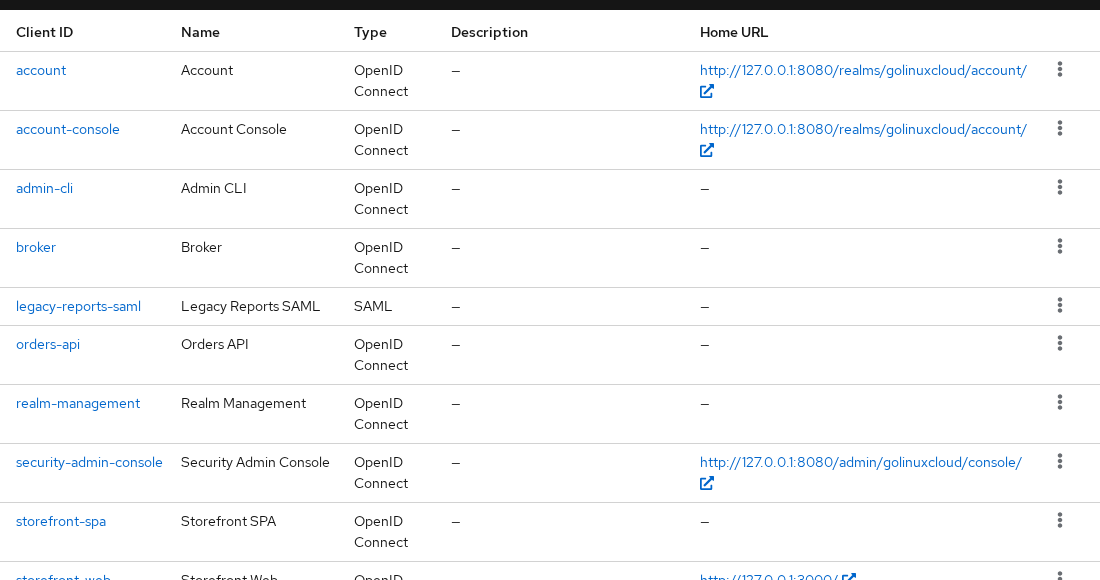
Each row is a client registration inside the realm — not a running application, pod, container, or systemd service.
Client ID and internal UUID
Keycloak has two different client identifiers that are easy to confuse:
| Field | What it is | Where you use it |
|---|---|---|
clientId |
Human-chosen protocol identifier (storefront-web) |
OAuth/OIDC client_id, SAML entity id, logs, app config |
id (UUID) |
Internal Keycloak primary key | Admin REST URLs (/clients/{uuid}/…), some automation |
They are not interchangeable:
- Your application configuration normally uses the
clientId - Admin REST operations that address
/clients/{id}use Keycloak's internal UUID
Assuming ${TOKEN} contains an admin access token, query by clientId — the API search parameter is the protocol id, not the UUID:
curl -s \
  'http://127.0.0.1:8080/admin/realms/golinuxcloud/clients?clientId=storefront-web' \
  -H "Authorization: Bearer ${TOKEN}" | python3 -c 'import sys,json; c=json.load(sys.stdin)[0]; print("clientId:", c["clientId"]); print("id:", c["id"])'
Sample output:
clientId: storefront-web
id: f9e69b6a-f143-42ff-8c2f-f13bcfc8e7ba
From the API response:
clientIdis what you configure in the applicationidis what Keycloak uses in Admin API paths — copy it when a script updates client settings by UUID
Root URL, home URL, and redirect URIs
URL fields on Clients → client → Settings control where Keycloak sends the browser after login and which redirect targets are allowed.
| Setting | Purpose |
|---|---|
| Root URL | Optional prefix for relative paths in the client config |
| Home URL | Default URL Keycloak can use when it needs to link or redirect back to the application |
| Valid redirect URIs | Allow-list of browser destinations Keycloak may redirect to after an OIDC authentication or authorization response |
| Valid post logout redirect URIs | Where logout may return the user |
Redirect URI matching is a security control:
- Keycloak rejects authorization responses to URIs that are not listed — that blocks token theft via open redirects
- Keycloak matches redirect URIs exactly, with limited wildcard support at the end of a pattern, specifically to prevent unsafe redirects
Practical rules:
- Prefer exact redirect URIs such as
http://127.0.0.1:3000/callbackwhen your application has a fixed callback path - Keycloak supports a wildcard at the end of a URI pattern when multiple callback paths are genuinely required, but avoid broad patterns in production
- List every host and path your app uses in development and production, including both
127.0.0.1andlocalhostwhen your team tests with both - A mismatch in scheme, host, port, or path causes Keycloak to reject the
redirect_uri
Open storefront-web → Settings to see the lab values:
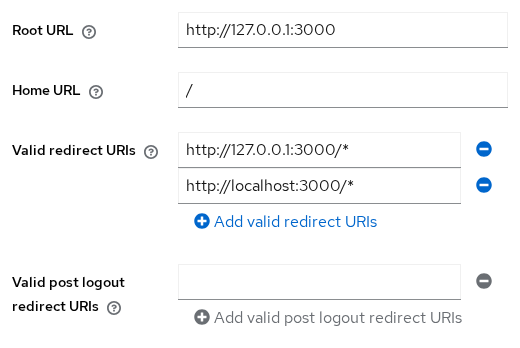
storefront-web uses:
- Root URL
http://127.0.0.1:3000 - Home URL
/ - Valid redirect URI patterns
http://127.0.0.1:3000/*andhttp://localhost:3000/*
That lets the same dev app work whether you browse via loopback or the localhost hostname.
Web origins
Web origins control which browser origins Keycloak allows for cross-origin requests (CORS). This matters when JavaScript running at one origin calls Keycloak at another origin.
| Concept | Redirect URI | Web origin |
|---|---|---|
| Protects | Where the browser may land after OAuth redirect | Which browser origins may call Keycloak XHR/fetch APIs |
| Typical symptom when wrong | invalid_redirect_uri at login |
Browser CORS error in devtools |
| Example value | http://127.0.0.1:3000/callback |
http://127.0.0.1:3000 or + (derive from redirect URIs) |
Do not copy redirect URIs into web origins verbatim — the formats differ (path included on redirects vs origin without path for CORS).
Open storefront-spa → Settings to see the lab values:
- Valid redirect URIs on port
5173 - Web origins
+ - Client authentication off
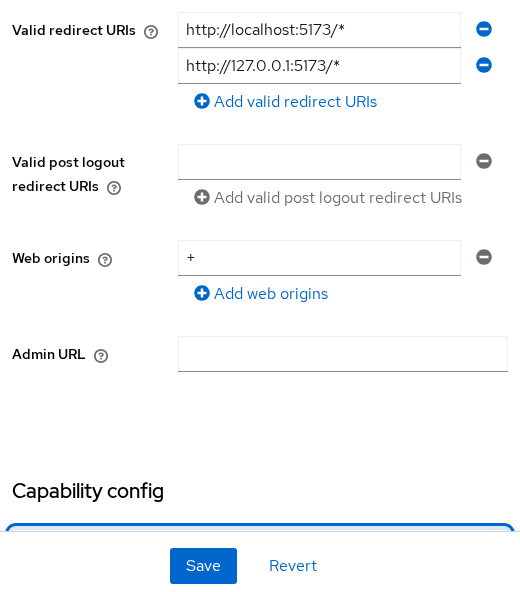
With Client authentication off, a browser SPA cannot safely store a client secret.
Client authentication
On Keycloak 26.x, Client authentication on the Settings tab replaces the older Access Type dropdown:
| Client authentication | Meaning | Typical app |
|---|---|---|
| ON | Confidential client — can authenticate itself to Keycloak using a configured client credential | Server-side web app, backend service |
| OFF | Public client — cannot safely keep a client secret | Browser SPA, mobile app; use Authorization Code Flow with PKCE and strict redirect URIs |
Confidential clients expose a Credentials tab where Keycloak stores:
- A generated client secret by default
- JWT or certificate authenticators when configured
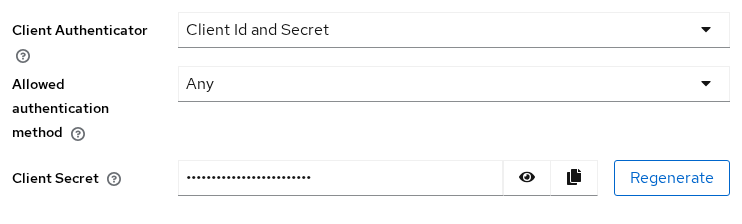
Treat the secret like a password:
- Rotate it if leaked
- Never embed it in frontend code
Public versus confidential trade-offs, PKCE, and service-account patterns are covered in a dedicated public/confidential client guide; this page only maps the Admin Console toggle.
Client capability settings
Below authentication, capability toggles enable OAuth 2.0 / OIDC grant families. You do not need every flow on every client.
| Capability | Enables | Leave off when |
|---|---|---|
| Standard flow | Authorization code flow (browser login) | Machine-only API with no user login |
| Direct access grants | Allows a client to send user credentials directly to Keycloak's token endpoint | Avoid for normal production user login; prefer Authorization Code Flow |
| Implicit flow | Legacy implicit grant | New apps — use standard flow + PKCE |
| Service accounts roles | Enables the client's service account; with Client authentication ON, the client can use Client Credentials Grant | User-facing apps only |
| OAuth 2.0 Device Authorization Grant | Device code flow for TVs and CLI | Web apps with a browser |
| OIDC CIBA grant | Client-initiated backchannel authentication | Rare; specialized use cases |
The lab storefront-web client enables Standard flow only. In the API record:
directAccessGrantsEnabledis falseserviceAccountsEnabledis false
Grant-by-grant configuration, PKCE, and token exchange belong in the OpenID Connect tutorial cluster, not on this vocabulary page.
Client credentials mechanisms
When Client authentication is ON, the client can authenticate itself to Keycloak using a configured credential. Common mechanisms include:
- Client secret — shared secret; default for many confidential clients
- Signed JWT — client proves possession of a private key
Keycloak supports additional client-authentication mechanisms as well; use those only when your application's integration requires them.
When Client authentication is enabled:
- These mechanisms are available on the Credentials tab
When Client authentication is off:
- Public clients do not have a reusable client credential because applications running in browsers or installed on user devices cannot safely keep one confidential
Pick the mechanism in the dedicated public/confidential guide when you move from lab to production.
Client scopes
Client scopes group protocol mappers and role scope mappings that influence the contents of tokens or assertions:
- Default and Optional — shared scopes linked to a client
- Dedicated — client-specific mappings for an OIDC client
The realm-level Client scopes page contains built-in scopes as well as any custom scopes you create:
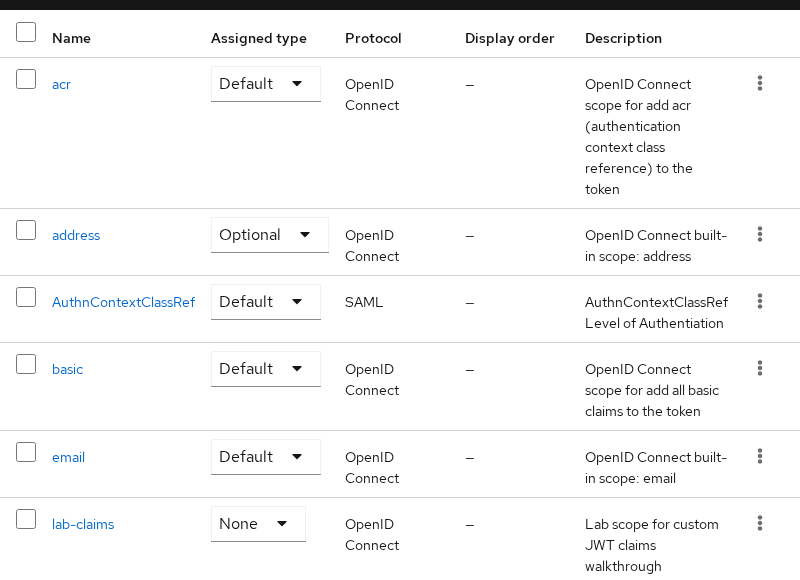
For OIDC clients:
- Default scopes are applied automatically
- Optional scopes are applied when requested through the OIDC
scopeparameter
The dedicated Keycloak client scopes guide demonstrates the difference with before-and-after tokens.
Legacy Access Type vs current Admin Console
Older Keycloak tutorials and blog posts reference Access Type:
| Older terminology | Current interpretation |
|---|---|
public |
OIDC client with Client authentication OFF |
confidential |
OIDC client with Client authentication ON |
bearer-only |
Special client-model setting represented by bearerOnly=true; it is not equivalent to a modern public client with browser flows disabled |
The current Admin Console exposes Client authentication for the normal public/confidential distinction. Keep these points in mind when reading older material:
- Existing imports and Admin REST representations can still contain fields such as
publicClientandbearerOnly - Do not translate old bearer-only examples into a modern public client mechanically
- If an older tutorial describes a client as confidential, the equivalent modern Admin Console concept is Client authentication ON
- For public, it is Client authentication OFF
- Treat old bearer-only configurations separately rather than converting them to a public client
Common client problems
| Symptom | Likely cause | Fix |
|---|---|---|
invalid_redirect_uri |
Callback URL not in Valid redirect URIs | Add exact scheme/host/port/path; include dev and prod entries |
| Login works in one realm, fails in another | Wrong realm or wrong client_id |
Confirm realm selector and clientId match the app config |
invalid_client or token endpoint 401 |
Client authentication failed | Verify Client authentication setting, client ID, secret or authenticator, and how the credential is sent; regenerate the secret only if it is lost or compromised |
unauthorized_client |
Client is not allowed to use the requested flow or grant | Check capability settings such as Standard flow, Direct access grants, or Service accounts roles |
| Browser CORS error on token call | Web origins omit the SPA dev server origin | Add origin or use + when appropriate — not the same as redirect URI |
Client not allowed for direct access grants |
Password grant disabled on client | Enable only for labs; use standard flow in production |
| Protocol mismatch (SAML vs OIDC) | App expects OIDC but client registered as SAML | Recreate client with correct protocol or fix app integration |
Summary
A Keycloak client is the configuration that represents an application or service inside a realm:
- OIDC clients may be public or confidential
- SAML clients represent SAML service providers
- Each client can have its own redirect URIs, authentication settings, allowed flows, roles, and client scopes
For OIDC clients:
- Client authentication OFF represents a public client that cannot keep a secret
- Client authentication ON represents a confidential client that authenticates itself
- Redirect URIs control where Keycloak may return the browser
- Web Origins control cross-origin browser requests to Keycloak
When troubleshooting a client, first check:
- Realm and client ID
- Redirect URIs
- Client authentication setting
- Web Origins
- Enabled capability flows
Then move to protocol-specific token, role, or mapper troubleshooting if the client configuration is correct.
References
- Keycloak Server Administration Guide — Managing clients
- Keycloak Server Administration Guide — Client scopes
- OpenID Connect Core 1.0
- OAuth 2.0 RFC 6749
Frequently Asked Questions
What is a client in Keycloak?
A Keycloak client is the registration of an application or service inside a realm. It tells Keycloak how that application participates in:
- Authentication and token or SAML flows
- Roles, scopes, and redirects
- Other client-specific behavior
What is the difference between client ID and client UUID?
clientId is the string you put in application config and OAuth client_id parameters. The UUID id is Keycloak's internal key for Admin REST API paths:
- Search the API by
clientId - Update by UUID
Are redirect URI and web origin the same?
No:
- Redirect URIs control where OAuth may return the browser after login
- Web origins control which browser origins may make cross-origin requests to Keycloak APIs
Use matching hosts but different formats.
When should client authentication be ON?
Turn it on for server-side apps that can store a client secret or private key securely.
Leave Client authentication off for browser SPAs and mobile apps that cannot safely keep a secret. When those clients use Authorization Code Flow:
- Use PKCE
- Restrict redirect URIs tightly
Why do old tutorials mention Access Type instead of Client authentication?
Newer Keycloak Admin Console versions no longer use the old Access Type dropdown for normal OIDC clients. Instead, Client authentication distinguishes public clients (OFF) from confidential clients (ON). Older tutorials may therefore use terminology that no longer matches the current UI.
