
| Tested on | Red Hat Enterprise Linux 10.2 (Coughlan) Windows Server 2025 AD DC — WIN-8S0K67EP5EO.lab.example (192.168.56.128) |
|---|---|
| Package | quay.io/keycloak/keycloak:26.7.3krb5-workstation (host kinit / curl --negotiate) |
| Applies to | Keycloak 26.x with LDAP-backed Kerberos on Microsoft Active Directory (lab-ad) |
| Privilege | Keycloak realm admin; AD administrator (or delegated account) for service-account encryption settings on the DC—not the read-only keycloak-bind LDAP bind account |
| Lab environment | Prerequisite — Keycloak Kerberos with Active Directory (HTTP SPN, keytab, krb5.conf, Allow Kerberos authentication on lab-ad)Keycloak published on http://vm1.lab.example:8080/ — Install Keycloak with Podman |
| Scope | Browser SPNEGO and integrated Windows authentication: public URL that matches the HTTP SPN, Podman hostname and DNS, AES on the Keycloak HTTP service account, client browser policy, NTP, Kerberos principal ↔ LDAP attribute matching, and curl --negotiate verification. Does not repeat keytab export or standalone Kerberos federation providers. |
| Related guides | Keycloak Kerberos with Active Directory Integrate Keycloak with Active Directory Keycloak sAMAccountName vs userPrincipalName Keycloak AD login fails after sync Keycloak tutorial |
Once the SPN and keytab are working, SPNEGO lets a domain user's browser authenticate to Keycloak without prompting for the AD password. The browser opens Keycloak on the same hostname that appears in the HTTP service principal, sends Authorization: Negotiate, and Keycloak maps the Kerberos principal to the federated user from lab-ad.
This guide assumes that prerequisite is already complete. You keep realm golinuxcloud and provider lab-ad as configured in Keycloak Kerberos with Active Directory, then focus on client URL, container DNS, AES on the service account, principal lookup, and browser policy. You verify SPNEGO with curl --negotiate on the Keycloak host and with Edge on a domain-joined Windows workstation.
Keycloak SPNEGO Windows SSO: Quick Answer
This guide assumes the SPN, keytab, krb5.conf, and Allow Kerberos authentication steps from Keycloak Kerberos with Active Directory are already done.
| Layer | Kerberos prerequisite | SPNEGO adds |
|---|---|---|
| Server | HTTP SPN, keytab, krb5.conf, Allow Kerberos authentication |
Keycloak reachable as http://vm1.lab.example:8080/ (hostname matches SPN) |
| Auth flow | Kerberos = Alternative in the browser flow | Unchanged — SPNEGO uses that execution |
| Client | Host kinit -kt does not require the SPN URL |
Browser or curl must use the SPN hostname and send Negotiate |
| Identity | LDAP user from lab-ad |
Ticket principal must resolve through Kerberos principal attribute |
You do not add a second Kerberos user federation provider. SPNEGO is the browser transport for the LDAP-backed Kerberos configuration you already enabled.
How Keycloak Windows SSO with SPNEGO works
Kerberos ticket vs password login
Password login over http://127.0.0.1:8080 only exercises LDAP binds. Kerberos browser authentication requires three names to agree:
- DNS name in the browser address bar (
vm1.lab.example) - HTTP SPN registered in AD (
HTTP/vm1.lab.example) - Keycloak front URL (
--hostname=http://vm1.lab.example:8080in this lab)
   Domain user TGT (workstation or kinit)
                 ↓
   Browser requests http://vm1.lab.example:8080/...
                 ↓
   Authorization: Negotiate (SPNEGO service ticket)
                 ↓
   Keycloak validates ticket with HTTP keytab
                 ↓
   lab-ad LDAP lookup (Kerberos principal attribute)
                 ↓
   OIDC session for federated user (for example jane)
When a domain user signs in to Windows, Windows already has a Kerberos Ticket Granting Ticket (TGT). When Keycloak responds with a Negotiate challenge, the browser asks Windows for a service ticket for HTTP/vm1.lab.example and sends that ticket to Keycloak. The browser does not send the user's AD password to Keycloak. That is what makes this flow passwordless desktop SSO.
SPNEGO is not a separate realm feature. It is the HTTP mechanism that carries the Kerberos ticket when the Kerberos authenticator is enabled in the browser flow.
Why the browser does not send the AD password
On Windows, the TGT comes from the interactive logon session. On Linux, kinit obtains the TGT before you open the site or run curl --negotiate; the client library then exchanges it for the HTTP service ticket.
Before you test Keycloak SPNEGO
Confirm the Kerberos with Active Directory checklist:
lab-adconnects, users sync, and Allow Kerberos authentication is on with keytab path and server principal set- Kerberos is Alternative in Authentication → Flows → browser (not Disabled)
- Host-side
KRB5_CONFIG=~/keycloak-ad-lab/kerberos/krb5.conf kinit -kt ... HTTP/vm1.lab.example@LAB.EXAMPLEsucceeds
Keycloak host and container
- Clients use
http://vm1.lab.example:8080/(or HTTPS with the same hostname in production), not127.0.0.1or the raw IP - The Keycloak container can resolve the domain controller (
win-8s0k67ep5eo.lab.example) for the LDAP bind that follows ticket acceptance - Keycloak host, AD DC, and clients stay within Kerberos clock skew (typically five minutes)
Windows client assumptions
For the Windows SSO test in this guide:
- The workstation is joined to the
lab.exampleActive Directory domain - The user is signed in to Windows with an AD domain account
- The workstation can reach the domain controller (KDC)
- The workstation resolves
vm1.lab.exampleto the Keycloak host - The browser opens Keycloak using
vm1.lab.example, not an IP address orlocalhost - The user's Windows session has a valid Kerberos TGT
- Edge or Chrome is allowed to use Integrated Windows Authentication for
vm1.lab.example(AuthServerAllowlist) - Restart the browser after you change the authentication policy
Linux and curl on the Keycloak host
- Test user
janeis federated throughlab-adwith Username LDAP attribute =sAMAccountName(password form login namejane) - Before
curl --negotiate, confirm the build supports SPNEGO (see Verify Keycloak SPNEGO with curl):
curl -VThe Features line must include GSS-API, Kerberos, and SPNEGO.
| Role | Lab value |
|---|---|
| Keycloak URL for SSO | http://vm1.lab.example:8080/ |
| Keycloak host IP | 192.168.56.116 |
| HTTP SPN | HTTP/vm1.lab.example@LAB.EXAMPLE |
| Realm | golinuxcloud |
| Sample user | jane |
Publish Keycloak on the Kerberos SPN hostname
For SPNEGO testing, access Keycloak through http://vm1.lab.example:8080/. The hostname must match the HTTP SPN. Use the same hostname for the Admin Console during this lab unless you configure a separate hostname-admin for administration.
Add a publish mapping on the lab IP and set the front hostname when you create or recreate the container:
podman run -d --name keycloak-podman \
  --add-host win-8s0k67ep5eo.lab.example:192.168.56.128 \
  --add-host vm1.lab.example:192.168.56.116 \
  -p 192.168.56.116:8080:8080 \
  -e JAVA_OPTS_APPEND="-Djava.security.krb5.conf=/opt/keycloak/conf/krb5.conf" \
  -v ~/keycloak-ad-lab/conf/keycloak.conf:/opt/keycloak/conf/keycloak.conf:Z \
  -v ~/keycloak-ad-lab/trust/lab-dc.pem:/mnt/trust/lab-dc.pem:ro,Z \
  -v ~/keycloak-ad-lab/kerberos/krb5.conf:/opt/keycloak/conf/krb5.conf:ro,Z \
  -v ~/keycloak-ad-lab/kerberos/http.keytab:/opt/keycloak/conf/http.keytab:ro,Z \
  quay.io/keycloak/keycloak:26.7.3 start-dev --hostname=http://vm1.lab.example:8080
Keep bootstrap admin flags and other mounts from Install Keycloak with Podman and the keytab lesson. The --add-host entries matter because the container must reach AD over LDAP immediately after it accepts a Kerberos ticket.
On Linux clients without DNS, map the hostname in /etc/hosts:
192.168.56.116 vm1.lab.exampleConfirm the realm answers on the public name:
curl --noproxy '*' -s -o /dev/null -w '%{http_code}\n' http://vm1.lab.example:8080/realms/golinuxcloud/200HTTP 200 on the realm discovery URL means Keycloak is listening on the hostname that matches the HTTP SPN.
Ensure the Keycloak service account uses AES
Modern Keycloak on current Java expects AES Kerberos keys. Configure the keycloak-http service account and keytab for AES on the domain controller with an appropriately privileged AD account—not the read-only keycloak-bind LDAP bind from Integrate Keycloak with Active Directory. Export or refresh the keytab with AES as in Keycloak Kerberos with Active Directory.
If Keycloak logs show RC4 or other encryption-type errors, correct the AD service account and regenerate a compatible AES keytab rather than weakening Java security. Restart Keycloak after you replace the keytab.
Match the Kerberos principal to the LDAP user
After Keycloak validates the Kerberos ticket, it must resolve that principal to the correct LDAP-backed user.
When Kerberos principal attribute is userPrincipalName, Keycloak uses that LDAP attribute during the lookup. The Keycloak Server Administration Guide describes resolving a principal such as john@A against userPrincipalName.
For example:
Kerberos principal:   jane@LAB.EXAMPLE
AD userPrincipalName: jane@lab.example
Keycloak must map the Kerberos principal from the ticket to the LDAP-backed AD user. With Kerberos principal attribute = userPrincipalName, verify that the user's AD UPN represents the same identity. Do not rewrite the UPN merely to match the uppercase formatting commonly used for the Kerberos realm.
Pay particular attention to genuinely different suffixes or values—for example jane@LAB.EXAMPLE in the ticket versus jane@corp.example on the user—not capitalization alone (jane@lab.example versus jane@LAB.EXAMPLE).
Confirm what AD stores (read-only bind is appropriate here):
export LDAP_BIND_PW='KeycloakBind!2026'Query jane with the read-only bind account to see userPrincipalName and sAMAccountName:
LDAPTLS_CACERT=~/keycloak-ad-lab/trust/lab-dc.pem ldapsearch -x -ZZ -H ldap://win-8s0k67ep5eo.lab.example:389 -D "keycloak-bind@lab.example" -w "$LDAP_BIND_PW" -b "DC=lab,DC=example" -s sub "(sAMAccountName=jane)" userPrincipalName sAMAccountNamedn: CN=Jane Admin,CN=Users,DC=lab,DC=example
sAMAccountName: jane
userPrincipalName: jane@lab.exampleIf your AD UPNs do not correspond cleanly to Kerberos principals, consider whether another principal-mapping strategy is more appropriate for your directory (for example a different Kerberos principal attribute or federation design). See Keycloak sAMAccountName vs userPrincipalName for how Username LDAP attribute relates to what users type on the password form.
Configure Edge for Windows integrated authentication
On a domain-joined Windows client, the user already holds a TGT from Windows logon.
Edge can automatically use Windows Integrated Authentication for intranet sites. To make lab behavior explicit and consistent, configure AuthServerAllowlist for vm1.lab.example:
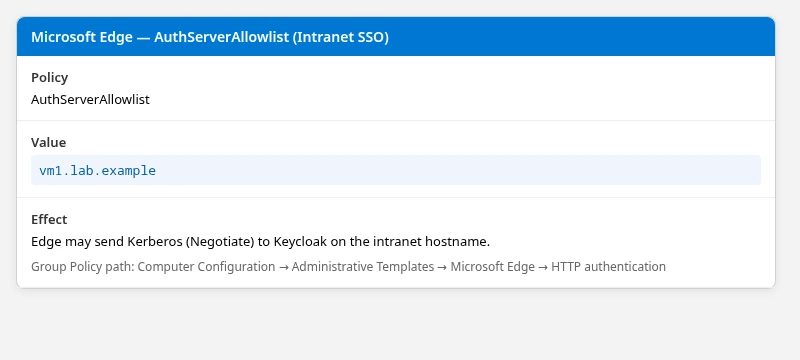
Group Policy path: Computer Configuration → Administrative Templates → Microsoft Edge → HTTP authentication → Configure the list of servers for which Integrated Windows Authentication is enabled.
Restart Edge after you change this policy. Microsoft documents that the allowlist is not dynamically refreshed in a running browser session.
Chrome on Windows uses the same policy name (AuthServerAllowlist). Add vm1.lab.example through Local Group Policy or a domain GPO the same way.
Open http://vm1.lab.example:8080/realms/golinuxcloud/account/ while logged on to Windows as a domain user (for example jane). When SPNEGO succeeds, Keycloak opens the Account Console without showing the username and password form.
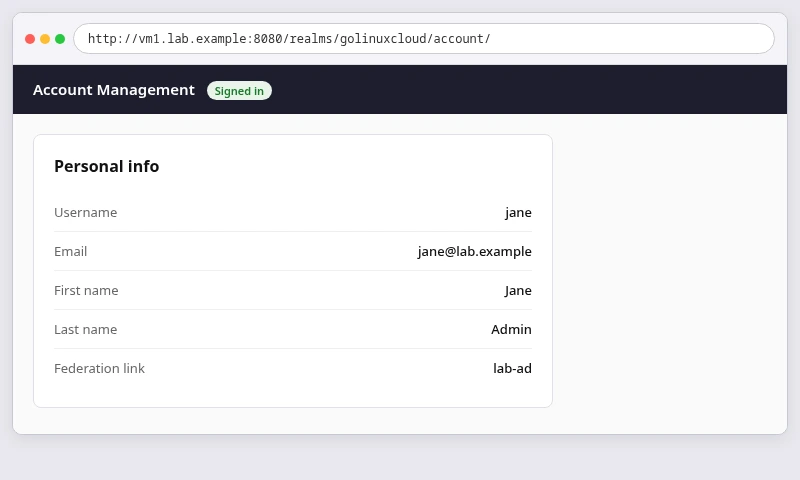
The address bar should show vm1.lab.example, the signed-in user should match your federated AD account, and no login form should appear.
Configure Firefox for Kerberos SPNEGO
Firefox does not enable Negotiate for arbitrary sites by default. On a Linux workstation that already has krb5.conf for LAB.EXAMPLE, set network.negotiate-auth.trusted-uris to .lab.example or http://vm1.lab.example:8080.
Delegation settings (network.negotiate-auth.delegation-uris) are only required when downstream services must reuse the user's Kerberos credentials; basic Keycloak SSO does not need them.
Obtain a user ticket before testing:
KRB5_CONFIG=~/keycloak-ad-lab/kerberos/krb5.conf kinit jane@LAB.EXAMPLEEnter Jane's AD password when prompted. kinit exits silently on success.
List the ticket to confirm the client principal:
klistDefault principal: jane@LAB.EXAMPLEVerify Keycloak SPNEGO with curl
curl with --negotiate is the fastest server-side proof that Keycloak accepts tickets before you troubleshoot browsers.
Confirm your curl build supports GSS-API before you use --negotiate:
curl -VFeatures: alt-svc AsynchDNS brotli GSS-API HSTS HTTP2 HTTPS-proxy IDN IPv6 Kerberos Largefile libz NTLM PSL SPNEGO SSL threadsafe TLS-SRP UnixSocketsThe Features line should include GSS-API, Kerberos, and SPNEGO. If --negotiate is unavailable, install a curl build linked against Kerberos libraries (on RHEL, the base curl package typically includes them).
Generate PKCE parameters for the public account-console client (Keycloak 26 requires code_challenge):
export VER=$(python3 -c 'import secrets,base64; print(base64.urlsafe_b64encode(secrets.token_bytes(32)).decode().rstrip("="))')Hash the verifier into the S256 code_challenge the authorize endpoint expects:
export CH=$(python3 -c 'import hashlib,base64,os; v=os.environ["VER"]; print(base64.urlsafe_b64encode(hashlib.sha256(v.encode()).digest()).decode().rstrip("="))')Build the authorization URL (redirect URI must match the client registration):
REDIR='http://vm1.lab.example:8080/realms/golinuxcloud/account/'
URL="http://vm1.lab.example:8080/realms/golinuxcloud/protocol/openid-connect/auth?client_id=account-console&redirect_uri=${REDIR}&response_type=code&scope=openid&code_challenge=${CH}&code_challenge_method=S256"
Confirm the Negotiate challenge
Without a Negotiate token, Keycloak should return 401 and offer SPNEGO:
curl --noproxy '*' -sS -D - -o /dev/null "$URL" | grep -i '^WWW-Authenticate:'WWW-Authenticate: NegotiateA 401 carrying WWW-Authenticate: Negotiate confirms that Keycloak's browser flow is offering SPNEGO, as described in the Keycloak Kerberos documentation.
Verify passwordless Kerberos login
Repeat with a user TGT and SPNEGO:
curl --noproxy '*' -s -o /dev/null -w 'Negotiate: %{http_code} final=%{url_effective}\n' --negotiate -u : -L "$URL"Negotiate: 200 final=http://vm1.lab.example:8080/realms/golinuxcloud/account/?session_state=2zy2E0VS_geAbjwdMLVTtJw1&iss=http%3A%2F%2Fvm1.lab.example%3A8080%2Frealms%2Fgolinuxcloud&code=697ce61d-4af9-405a-ec5f-ea25e9c4454c.2zy2E0VS_geAbjwdMLVTtJw1.c7c288ae-9e30-44ae-8aba-b3edcc088843A redirect to account/ with session_state and code= confirms Kerberos authentication completed without a password prompt.
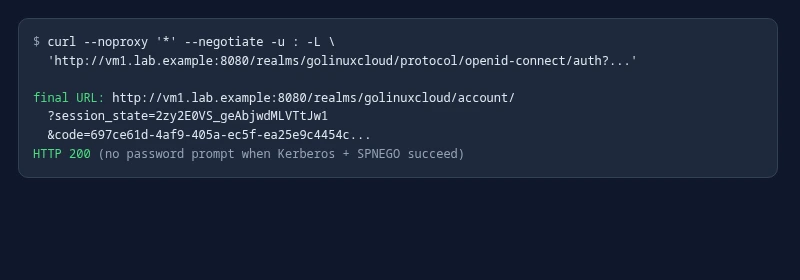
If Kerberos in the browser flow is Disabled, you may get 200 with the login form instead of 401 / WWW-Authenticate: Negotiate.
Troubleshoot Keycloak SPNEGO
| Symptom | Likely cause | Fix |
|---|---|---|
Login form always shown; no WWW-Authenticate: Negotiate |
Kerberos execution disabled | Set Kerberos to Alternative in the browser flow |
Clock skew too great in Keycloak log |
NTP drift between VM, container, and DC | Sync time on Keycloak host and DC; retest with fresh kinit |
Encryption type RC4 ... not supported |
Service account or keytab still RC4-oriented | Fix AES on keycloak-http and re-export keytab; do not weaken Java |
UnknownHostException for DC inside container |
Container DNS | Add --add-host win-8s0k67ep5eo.lab.example:192.168.56.128 |
| Ticket validates but user not found | Kerberos principal attribute / UPN mismatch | Match principal to the right AD attribute; check suffix (corp.example vs lab.example), not realm capitalization alone |
| SPNEGO works on host, not on Windows | URL or policy | Use vm1.lab.example; set AuthServerAllowlist and restart Edge |
| Unexpected Windows credential prompt | NTLM fallback or no Kerberos ticket | Keycloak does not support NTLM in this flow; ensure Negotiate/Kerberos and allowlist |
curl --negotiate fails immediately |
No user TGT or curl without GSS-API | Run kinit; confirm curl --version lists GSS-API |
For keytab, SPN, and kinit -kt issues, return to Keycloak Kerberos with Active Directory. For password bind failures after sync, use Keycloak AD login fails after sync.
Summary
Browser SPNEGO builds on the LDAP Kerberos setup from Keycloak Kerberos with Active Directory. Users and tickets still come from lab-ad; what changes is the URL clients open (http://vm1.lab.example:8080/), container DNS to the DC, AES on the HTTP service account, and correct resolution from the Kerberos principal to the LDAP user.
Windows integrated authentication relies on a domain TGT and, for predictable lab behavior, AuthServerAllowlist in Edge or Chrome. Server-side proof uses curl --negotiate: look for WWW-Authenticate: Negotiate on the authorize URL, then a redirect with code= when a user ticket is present.
Fix clock skew and AES on keycloak-http before you chase browser policy. If ticket validation succeeds but Keycloak cannot find the user, check the Kerberos principal attribute and LDAP lookup before you change the keytab.
References
- Keycloak Server Administration Guide — Kerberos
- Microsoft Learn — AuthServerAllowlist (Edge policy)
- Microsoft Learn — Kerberos and Active Directory
- Oracle Java SE 17 — Migrate security (weak Kerberos encryption types)
- Mozilla — Configuring Kerberos authentication (Firefox)
Frequently Asked Questions
Does SPNEGO require a separate Keycloak Kerberos user federation provider?
No. For Active Directory users imported through lab-ad, keep Allow Kerberos authentication on that LDAP provider. SPNEGO only delivers the ticket to the Kerberos step in the browser flow.
Can I use http://127.0.0.1:8080 for the Admin Console during this lab?
SPNEGO requires the browser to use the SPN hostname (vm1.lab.example). For a consistent lab, open the Admin Console on http://vm1.lab.example:8080/ as well unless you configure a dedicated admin hostname.
Why did curl show WWW-Authenticate: Negotiate?
With Kerberos set to Alternative, Keycloak responds to unauthenticated authorize requests with 401 and a Negotiate challenge so the client can send SPNEGO.
Is HTTPS required for SPNEGO?
Production deployments should use HTTPS on the same hostname as the HTTP SPN. This lab uses HTTP on port 8080 to keep captures simple; the Kerberos service class remains HTTP/.
