
| Tested on | Red Hat Enterprise Linux 10.2 (Coughlan) |
|---|---|
| Package | quay.io/keycloak/keycloak:26.7.3 |
| Applies to | Any identity provider or application stack that implements OAuth 2.0, OpenID Connect 1.0, or SAML 2.0 (examples use Keycloak 26.x) |
| Privilege | Read-only understanding; Keycloak admin access only if you follow the Admin Console client-type screenshot |
| Lab environment | Optional Keycloak 26.7.3 lab for the decoded ID token example. See Install Keycloak with Podman. |
| Scope | Protocol purpose, actors, message formats, common flows, selection criteria, and how Keycloak exposes OIDC and SAML clients. Does not cover deep OAuth grant setup, full SAML SP configuration, SCIM provisioning, or LDAP federation beyond a short clarification. |
| Related guides | What is Keycloak? IdP vs service provider Single sign-on (SSO) |
In this article we will compare OAuth 2.0, OpenID Connect (OIDC), and SAML 2.0 so you can pick the right protocol for login, API access, or enterprise SSO.
These three names often appear in the same conversation, which makes them sound interchangeable. They are not. The easiest way to separate them is by the problem each one solves: OAuth mainly answers “may this application call that API?”, OIDC answers “who signed in?”, and SAML handles federated login between an identity provider and an application. That split is the same idea as authentication versus authorization, applied to protocol choice.
OAuth vs OIDC vs SAML: Quick Comparison
Authentication vs authorization vs SSO vs federation
Before comparing the protocols, keep four terms straight:
- Authentication means proving who a user is.
- Authorization means deciding what that user or application is allowed to access.
- SSO (Single Sign-On) means signing in once and then accessing multiple applications without signing in again.
- Federation means one system trusting another identity system to authenticate users.
OAuth mainly solves authorization. OIDC adds standardized authentication to OAuth. SAML is another federation and authentication standard commonly used for enterprise SSO. OIDC and SAML can both provide SSO; OAuth alone does not.
| OAuth 2.0 | OpenID Connect | SAML 2.0 | |
|---|---|---|---|
| Primary job | Delegated API authorization | Authentication and identity on top of OAuth | Federated authentication |
| Can provide SSO? | Not by itself | Yes | Yes |
| Typical question | May this client access these resources? | Who is the signed-in user? | Can this enterprise app trust the corporate IdP? |
| Main artifact | Access token (often opaque or JWT) | ID token (JWT) plus access token | SAML assertion (XML) |
| Common transport | HTTPS JSON / form posts | Same OAuth endpoints + UserInfo | HTTP Redirect / POST with XML |
| Common use | API access | Modern login, SSO, and API access | Enterprise browser SSO |
| Best fit | APIs, delegated third-party access, service-to-service access | User login, identity, web/mobile SSO | Enterprise SaaS and legacy IdPs that require SAML |
OIDC is not a rival to OAuth 2.0. It reuses OAuth 2.0 flows and adds a standard ID token. SAML is a separate family of protocols; it does not sit on OAuth.
LDAP and SCIM are also different jobs. LDAP is a directory protocol for looking up users and groups. SCIM is an API for provisioning accounts. Neither replaces OAuth, OIDC, or SAML for browser login or API delegation.
OAuth 2.0: Delegated Authorization
OAuth 2.0 lets an application obtain limited access to an API or other protected resource without receiving the user's password.
Imagine a photo-printing app that wants permission to read photos from your cloud-photo account. You approve that limited access, and the app receives an access token. You do not give the printing app your cloud-account password.
The main actors are:
- Resource owner: usually the end user who grants permission
- Client: the application requesting access
- Authorization server: issues tokens after consent (Keycloak plays this role)
- Resource server: the API that accepts the access token
OAuth 2.0 does not define how the authorization server authenticates the user. Password, MFA, passkeys, and federation are left to the deployment. An access token represents the authorization granted to the client and is presented when calling the protected API. It is not, by itself, a standard statement that says “this person logged in.”
Common OAuth flows and grants you will see:
- Authorization Code + PKCE: commonly used for user-facing web and mobile applications. PKCE protects the authorization-code exchange and is especially important for applications that cannot safely store a client secret.
- Client Credentials: service-to-service calls with no end user
A client may also receive a refresh token, which it can later exchange for a new access token without asking the user to sign in again.
If your only need is “this backend may call that API,” start with OAuth 2.0. If you also need a standard proof of who authenticated, add OIDC.
OpenID Connect: Authentication on OAuth 2.0
OpenID Connect adds a standard authentication layer on top of OAuth 2.0. OAuth gives the client an access token for APIs. OIDC additionally gives the client an ID token that tells it who authenticated.
The client requests the openid scope. In the Authorization Code Flow, Keycloak first returns an authorization code. The client exchanges that code at the token endpoint, which returns an ID token along with the OAuth access token. The ID token is a signed JWT containing information about the authentication event and the user.
Because OIDC is built on OAuth, the same client and authorization-server concepts still apply. OIDC also introduces two common identity terms:
- OpenID Provider (OP): the authorization server that issues ID tokens
- Relying Party (RP): the OIDC client application
That response normally contains:
- ID token: for the client application to learn who signed in (
sub,iss,aud,exp, optional profile claims) - Access token: for calling APIs (including the optional UserInfo endpoint)
- Refresh token: optionally, when the client is allowed to renew access
Here is a shortened ID token payload from a Keycloak lab realm (golinuxcloud, client orders-api, user tokenuser). Timestamps and UUIDs will differ in your environment:
{
  "iss": "http://127.0.0.1:8080/realms/golinuxcloud",
  "sub": "a7ee9670-e7b4-4693-b7bb-eca054ede3cd",
  "aud": "orders-api",
  "exp": 1789823375,
  "iat": 1789823075,
  "azp": "orders-api",
  "preferred_username": "tokenuser",
  "email": "tokenuser@golinuxcloud.lab",
  "typ": "ID"
}
The important fields are:
iss: who issued the tokensub: unique ID of the authenticated useraud: which client the ID token is intended forexp: when the token expirespreferred_username/email: identity claims about the user
You do not need to memorize every JWT claim. Read that payload as identity evidence for the client (aud / azp), not as the API authorization story by itself. APIs should validate the access token. The ID token is primarily for the application that completed the login.
OIDC also standardizes discovery (.well-known/openid-configuration), UserInfo, and common claim names. OIDC is commonly chosen for new web, SPA, and mobile applications because it provides standardized login, tokens, discovery, and user claims. Keycloak currently recommends OIDC for securing applications in most cases.
SAML 2.0: Enterprise Federation and SSO
SAML 2.0 is commonly used to exchange authentication information between an Identity Provider and an application using XML messages. In the usual web SSO profile:
- The Identity Provider (IdP) authenticates the user and issues a SAML assertion
- The Service Provider (SP) consumes that assertion and creates a local session
Example: your company uses Keycloak as the Identity Provider (IdP), and an HR SaaS application is the Service Provider (SP). When you sign in through Keycloak, it sends the HR application a signed SAML assertion saying who you are and, optionally, attributes such as department or email.
SAML is widely used for enterprise browser SSO, especially with corporate applications, SaaS products, and partner integrations that already exchange SAML metadata. Assertions travel mainly through browser Redirect or POST bindings, not through a JSON token endpoint.
You do not normally hand-write this XML. It is shown only so you can recognize what a SAML assertion looks like:
<saml:Assertion>
  <saml:Issuer>https://idp.example.com/realms/corp</saml:Issuer>
  <saml:Subject>
    <saml:NameID>tokenuser@corp.example</saml:NameID>
  </saml:Subject>
  <saml:Conditions NotBefore="..." NotOnOrAfter="...">
    <saml:AudienceRestriction>
      <saml:Audience>https://sp.example.com/saml/metadata</saml:Audience>
    </saml:AudienceRestriction>
  </saml:Conditions>
  <saml:AttributeStatement>
    <saml:Attribute Name="department">
      <saml:AttributeValue>Platform Engineering</saml:AttributeValue>
    </saml:Attribute>
  </saml:AttributeStatement>
</saml:Assertion>
SAML is not obsolete. Many enterprise IdPs and SaaS products still require it. Choose SAML when the counterparty already speaks SAML, not because XML is more secure than JWT in the abstract.
OIDC and SAML Terminology Compared
OIDC and SAML solve similar login problems with different vocabulary:
| Concept | OIDC | SAML |
|---|---|---|
| Identity system | OpenID Provider (OP) | Identity Provider (IdP) |
| Application | Relying Party (RP) | Service Provider (SP) |
| Identity proof | ID token | SAML assertion |
| Typical format | JWT / JSON | XML |
When you read vendor docs, map the names before comparing features. An OIDC Relying Party and a SAML Service Provider are both “the app that trusts the identity system.”
How the Flows Differ
The three protocols answer different questions, so their message paths look different.
OAuth 2.0 Authorization Code (API access):
  Browser                  Client                 Authorization Server          API
     │                        │                            │                     │
     │ open app               │                            │                     │
     ├───────────────────────►│                            │                     │
     │                        │ redirect to authorize      │                     │
     │◄───────────────────────┤                            │                     │
     │ authenticate / authorize                            │                     │
     ├────────────────────────────────────────────────────►│                     │
     │ redirect_uri?code=...                               │                     │
     │◄────────────────────────────────────────────────────┤                     │
     ├───────────────────────►│                            │                     │
     │                        │ POST /token + code         │                     │
     │                        ├───────────────────────────►│                     │
     │                        │ access token               │                     │
     │                        │◄───────────────────────────┤                     │
     │                        │ API + access token                               │
     │                        ├─────────────────────────────────────────────────►│
What happens in this flow:
- You open the application, which redirects your browser to the authorization server.
- The authorization server authenticates you if necessary and asks you to authorize the requested access when required.
- The authorization server redirects the browser back to the client's registered redirect URI with a short-lived authorization code.
- The client exchanges that code at the token endpoint for an access token. Public clients such as SPAs and mobile apps also use PKCE, which binds the authorization request to the later code exchange so a stolen authorization code cannot be used by another client.
- Confidential web apps may also authenticate themselves during the token exchange.
- The client sends the access token when calling the protected API.
- OAuth 2.0 is primarily about delegated access to resources. It does not by itself define a standard identity token telling the application who signed in; OpenID Connect adds that capability.
OIDC builds on that same OAuth Authorization Code flow. Request scope=openid. After the code exchange, the token endpoint returns:
  OAuth Authorization Code Flow
              +
         scope=openid
              ↓
     Token endpoint returns

     access_token   → for APIs
     id_token       → who authenticated
     refresh_token  → optional renewal
What changes with OIDC:
- The browser redirect, login, consent, and code exchange follow the same OAuth Authorization Code path.
- The request includes the
openidscope so the authorization server knows this is an OpenID Connect login. - After the code exchange, the token endpoint returns an ID token in addition to the access token.
- The application uses the ID token to learn who signed in, and still uses the access token when it calls APIs.
- Optional refresh tokens work the same way as in OAuth: renew access later without a full interactive login.
OIDC reuses the OAuth 2.0 authorization flow and adds the information an application needs to know who signed in.
SAML 2.0 (SP-initiated browser SSO):
The Assertion Consumer Service (ACS) is the Service Provider URL that receives the SAML response.
  Browser                Service Provider           Identity Provider
       │                        │                          │
       │  open app              │                          │
       ├───────────────────────►│                          │
       │  redirect to IdP       │                          │
       │◄───────────────────────┤                          │
       │  authenticate          │                          │
       ├──────────────────────────────────────────────────►│
       │  SAMLResponse to browser                          │
       │◄──────────────────────────────────────────────────┤
       │  POST SAMLResponse to SP ACS                      │
       ├───────────────────────►│                          │
       │  SP validates assertion│                          │
       │  and creates session   │                          │
What happens in this flow:
- You open the application (the Service Provider), and it redirects your browser to the Identity Provider.
- You authenticate at the IdP.
- The IdP returns a SAML response to the browser, usually containing a signed assertion about who you are.
- The browser posts that SAML response to the Service Provider’s ACS URL.
- The Service Provider validates the assertion and creates its own application session.
- There is no OAuth-style token endpoint or access token in this common browser SSO path. The identity proof is the SAML assertion, not an ID token.
A useful way to remember the difference is to look at who consumes each result:
| Result | Who uses it |
|---|---|
| Access token | API / resource server |
| ID token | OIDC client application |
| SAML assertion | SAML Service Provider |
Tokens, Assertions, Scopes and Claims
| Concept | OAuth 2.0 | OIDC | SAML 2.0 |
|---|---|---|---|
| Access request / permissions | OAuth scopes | OAuth scopes + openid for OIDC |
No direct equivalent in common SAML SSO |
| Identity claims | Not standardized | JWT claims (sub, email, …) |
XML attributes / NameID |
| Format | Opaque token (a value whose contents the client does not interpret) or JWT | JWT ID token; access token varies | XML assertion |
| Token / message security | Access token format is defined by the authorization server; the token may be opaque or a signed JWT | ID token is a JWT, normally signed by the OpenID Provider | Assertion/response: XML signatures are commonly used; exact signing requirements depend on profile and configuration |
OAuth scopes describe the access being requested or granted. Claims and attributes carry information about a subject or authentication context. OIDC puts many identity claims in the ID token; SAML puts them in the assertion. OAuth alone does not require a standard identity claim set.
Custom claims in Keycloak OIDC tokens are configured with protocol mappers. See Keycloak protocol mappers when you need department or group paths in a JWT.
When to Use OAuth, OIDC or SAML
Use this decision path:
| Situation | Prefer |
|---|---|
| SPA, mobile app, or modern web app needs login | OIDC |
| Application needs delegated or machine-to-machine API access | OAuth 2.0 (often together with OIDC for the user-facing login) |
| Enterprise SaaS or partner IdP only offers SAML metadata | SAML 2.0 |
| You need both browser SSO and API access in one product | OIDC + OAuth for new apps; add SAML only where a customer IdP requires it |
| Directory sync or account provisioning | Not these three; look at SCIM or directory connectors separately |
Concrete examples:
- SPA talking to your API: OIDC Authorization Code with PKCE for login; access token for the API
- Machine job calling an inventory API: OAuth 2.0 Client Credentials; no ID token
- HR SaaS that only uploads a SAML metadata XML: SAML SP integration with your Keycloak IdP
For a new Keycloak application, OIDC is generally the first protocol to consider. Use SAML when an existing enterprise application or partner requires it. Use OAuth without the OIDC identity layer when the problem is API authorization rather than user login.
How Keycloak Supports OAuth, OIDC and SAML
Keycloak can act as an OpenID Provider and as a SAML Identity Provider in the same realm. When you create a client, you choose the client type:
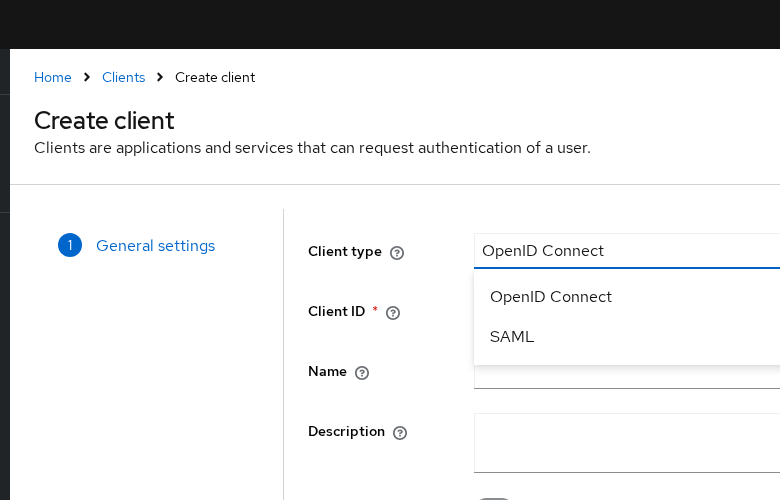
Keycloak does not show a separate OAuth 2.0 client type in the Admin Console. Its OpenID Connect client type implements OIDC and the underlying OAuth 2.0 authorization flows. SAML clients use the separate SAML protocol.
- OpenID Connect clients use authorization endpoints, token endpoints, and optional mappers that add JWT claims
- SAML clients use an Assertion Consumer Service (ACS) URL, NameID settings, certificates, and assertion attribute mappers
The same realm users can sign in to an OIDC app and a SAML app. Client settings differ (redirect URIs and PKCE for OIDC; assertion consumer URLs and certificates for SAML), but the user store stays shared. For client registration details, see Keycloak clients explained.
Keycloak also brokers external IdPs (OIDC or SAML) so users authenticate elsewhere and land in your realm. Identity brokering is a separate scenario from choosing the protocol that your own application uses to communicate with Keycloak.
Common Misconceptions
| Misconception | Reality |
|---|---|
| “OAuth is authentication” | OAuth 2.0 is authorization. Login products that “use OAuth” usually mean OIDC or a proprietary identity profile on top of OAuth. |
| “OIDC replaces OAuth” | OIDC extends OAuth 2.0. You still use access tokens for APIs. |
| “SAML is obsolete” | SAML remains common in enterprise SSO. Prefer OIDC for new applications, but use SAML when the application, partner, or identity provider requires it. |
| “Access token = proof of login for my UI” | In OIDC, the client validates the ID token for the authentication result. In SAML, the SP validates the SAML Response/assertion and then creates its application session. Access tokens are primarily for APIs. |
| “SSO is another protocol like OAuth or SAML” | SSO is a user experience and capability. OIDC and SAML can both be used to implement SSO. |
| “One protocol is always safer” | Neither protocol is automatically safer just because it uses XML or JSON. Security depends on the flow, token/assertion validation, TLS, keys, and configuration. |
Summary
OAuth 2.0 is primarily for delegated API authorization. OIDC adds standardized authentication and identity on top of OAuth. SAML provides federated browser SSO using XML assertions. For new Keycloak applications, start by considering OIDC; use SAML when the application or partner requires it, and use OAuth alone when the problem is API authorization without a user-login requirement.
Keycloak supports OIDC and SAML clients in one realm, so you can meet both new applications and enterprise SAML integrations without inventing a private login format.
References
- RFC 6749 — The OAuth 2.0 Authorization Framework
- OpenID Connect Core 1.0
- SAML 2.0 Technical Overview (OASIS)
- Keycloak Server Administration Guide — Clients
- Keycloak Server Administration Guide — SSO protocols
- Keycloak Server Administration Guide — OpenID Connect compared to SAML
- Keycloak Server Administration Guide — SAML
Frequently Asked Questions
Is OAuth authentication or authorization?
OAuth 2.0 is an authorization framework. It issues access tokens so a client can call protected APIs. It does not define a standard login identity token. Products that use OAuth for “Sign in with …” usually add OpenID Connect or a similar identity layer.
Is OIDC the same as OAuth?
No. OpenID Connect is built on OAuth 2.0 and adds authentication features such as the ID token and the openid scope. You can use OAuth without OIDC for API authorization. For standardized modern application login, OIDC is commonly used on top of OAuth.
Is SAML obsolete?
No. Many enterprises and SaaS vendors still require SAML 2.0. New consumer and mobile apps usually prefer OIDC, but SAML stays the right choice when the identity provider or application only supports SAML metadata and assertions.
When should I use OIDC instead of SAML?
Prefer OIDC for new web, SPA, and mobile applications, especially when you also need API access tokens in the same family of flows. Choose SAML when a partner or enterprise IdP mandates SAML, or when an existing SP integration is already SAML-only. Keycloak recommends OIDC for securing applications in most cases.
Does Keycloak support all three?
Keycloak implements OAuth 2.0 and OpenID Connect through its OpenID Connect client type, and SAML 2.0 through SAML clients. There is no separate “OAuth” client type in the Admin Console. The same realm can serve both OIDC and SAML applications.
